steering CHRYSLER VOYAGER 1996 Service Manual
[x] Cancel search | Manufacturer: CHRYSLER, Model Year: 1996, Model line: VOYAGER, Model: CHRYSLER VOYAGER 1996Pages: 1938, PDF Size: 55.84 MB
Page 439 of 1938
REMOVAL AND INSTALLATION
MULTI-FUNCTION SWITCH
WARNING: BEFORE SERVICING A STEERING COL-
UMN EQUIPPED WITH AN AIRBAG REFER TO
GROUP 8M, RESTRAINT SYSTEMS FOR PROPER
AND SAFE SERVICE PROCEDURES.
REMOVAL
(1) Release hood latch and open hood.
(2) Disconnect and isolate battery negative cable.
(3) Remove upper and lower steering column
shrouds, refer to Group 19, Steering for proper pro-
cedures.
(4) Disconnect wire connector from back of turn
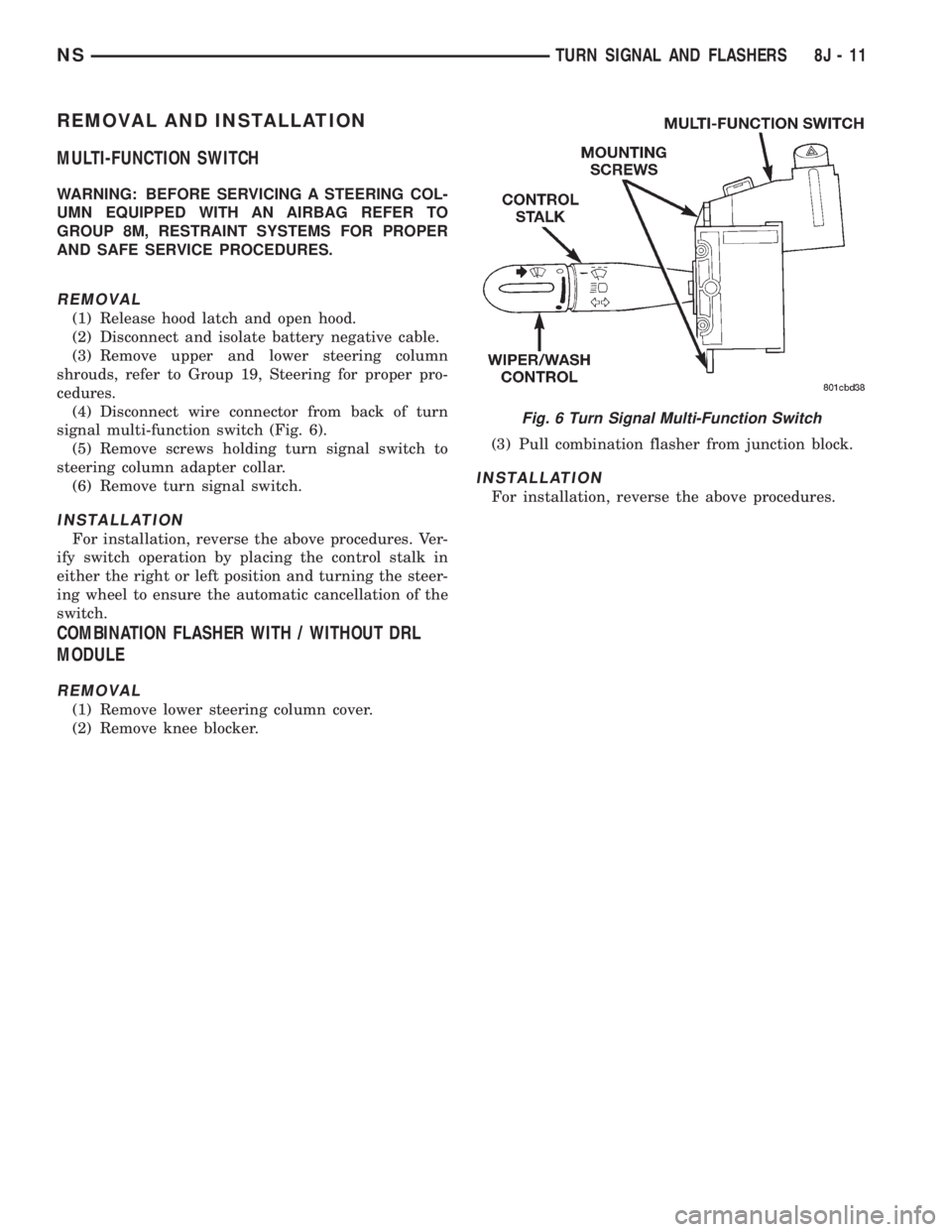
signal multi-function switch (Fig. 6).
(5) Remove screws holding turn signal switch to
steering column adapter collar.
(6) Remove turn signal switch.
INSTALLATION
For installation, reverse the above procedures. Ver-
ify switch operation by placing the control stalk in
either the right or left position and turning the steer-
ing wheel to ensure the automatic cancellation of the
switch.
COMBINATION FLASHER WITH / WITHOUT DRL
MODULE
REMOVAL
(1) Remove lower steering column cover.
(2) Remove knee blocker.(3) Pull combination flasher from junction block.
INSTALLATION
For installation, reverse the above procedures.
Fig. 6 Turn Signal Multi-Function Switch
NSTURN SIGNAL AND FLASHERS 8J - 11
Page 444 of 1938
MULTI-FUNCTION SWITCH
To test the windshield wiper and washer portion of
the multi-function switch:
(1) Remove the multi-function switch, refer to
removal procedures.
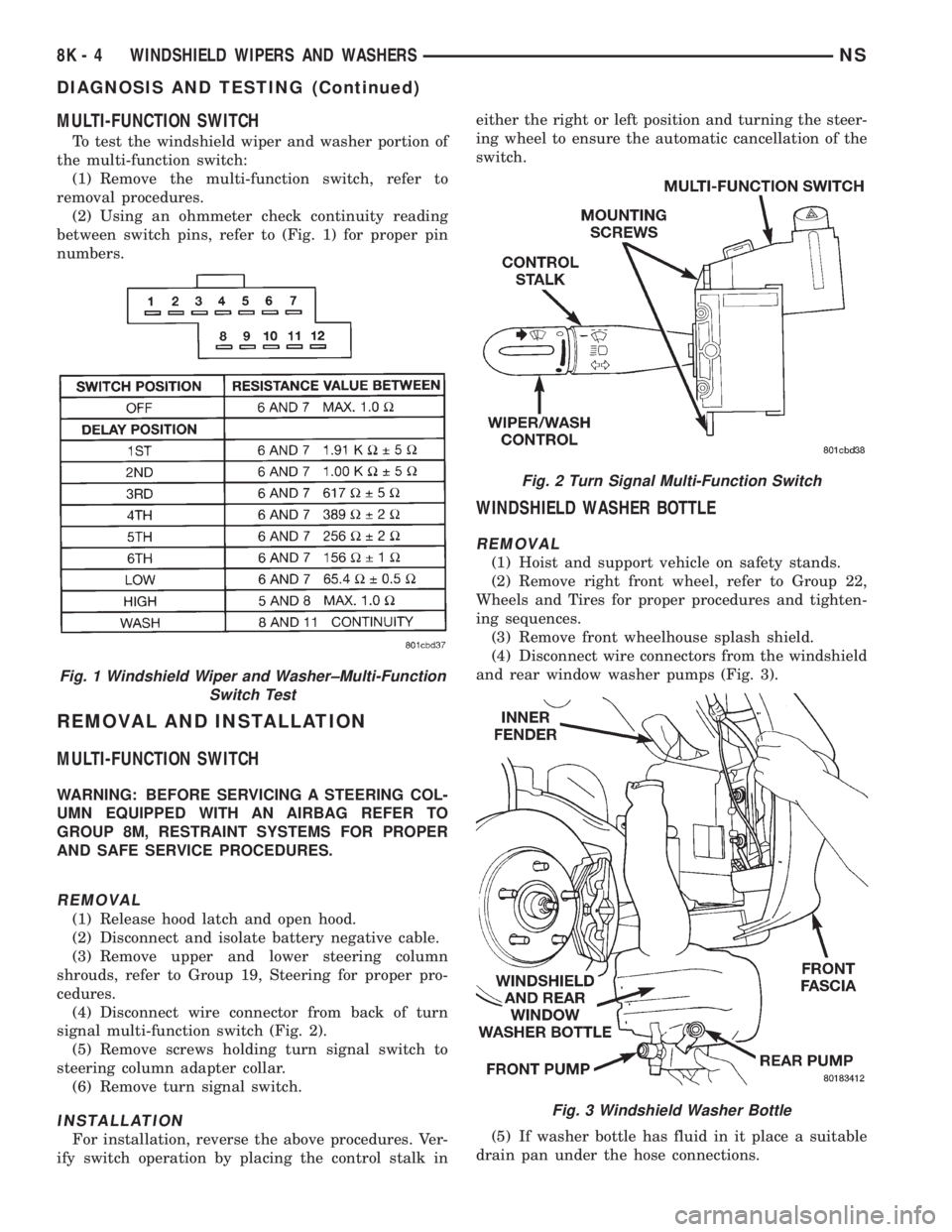
(2) Using an ohmmeter check continuity reading
between switch pins, refer to (Fig. 1) for proper pin
numbers.
REMOVAL AND INSTALLATION
MULTI-FUNCTION SWITCH
WARNING: BEFORE SERVICING A STEERING COL-
UMN EQUIPPED WITH AN AIRBAG REFER TO
GROUP 8M, RESTRAINT SYSTEMS FOR PROPER
AND SAFE SERVICE PROCEDURES.
REMOVAL
(1) Release hood latch and open hood.
(2) Disconnect and isolate battery negative cable.
(3) Remove upper and lower steering column
shrouds, refer to Group 19, Steering for proper pro-
cedures.
(4) Disconnect wire connector from back of turn
signal multi-function switch (Fig. 2).
(5) Remove screws holding turn signal switch to
steering column adapter collar.
(6) Remove turn signal switch.
INSTALLATION
For installation, reverse the above procedures. Ver-
ify switch operation by placing the control stalk ineither the right or left position and turning the steer-
ing wheel to ensure the automatic cancellation of the
switch.
WINDSHIELD WASHER BOTTLE
REMOVAL
(1) Hoist and support vehicle on safety stands.
(2) Remove right front wheel, refer to Group 22,
Wheels and Tires for proper procedures and tighten-
ing sequences.
(3) Remove front wheelhouse splash shield.
(4) Disconnect wire connectors from the windshield
and rear window washer pumps (Fig. 3).
(5) If washer bottle has fluid in it place a suitable
drain pan under the hose connections.
Fig. 1 Windshield Wiper and Washer±Multi-Function
Switch Test
Fig. 2 Turn Signal Multi-Function Switch
Fig. 3 Windshield Washer Bottle
8K - 4 WINDSHIELD WIPERS AND WASHERSNS
DIAGNOSIS AND TESTING (Continued)
Page 454 of 1938

ning light functions (for Canadian vehicles), and has
been designed with internal relays to take advantage
of low current switching requirements in the vehicle.
It is plugged into the junction block at positions
three and four (Fig. 1), where all wiring associated
with its operation is terminated. The junction block
is adjacent to and left of the steering column of the
vehicle. For diagnostic information refer to Group 8J,
Turn Signal and Flashers.
On vehicles built for use in the United States, only
position four is used. Vehicles built for use in Canada
utilize both positions three and four.
To gain access to the device, remove the lower
steering column cover and knee blocker. Refer to
Group 8E, Instrument Panel and Gauges.SYSTEM FUNCTION
The combination-flasher/DRL may be operated in
its hazard warning mode either with or without the
ignition circuit being active. However, in order to
operate in the turn signal mode or the DRL mode,
the ignition circuit must be completed to the module.
While the combination-flasher portion is idle, there
is no current drawn through the module. The device
does not become active in the turn signal or hazard
warning modes until a signal ground circuit is sup-
plied to either of the turn signal inputs or the hazard
warning input. With the ignition OFF, there is no
current drawn through the module.
While the ignition is ON, the front turn signal fil-
aments are illuminated steadily thus providing the
DRL function. The DRL function may be inhibited by
applying a signal ground input from either the park
brake circuit or the headlamp relay activation circuit.
DIAGNOSIS AND TESTING
DIAGNOSTIC PROCEDURES
When a vehicle experiences problems with the
headlamp system, verify the condition of the battery
connections, charging system, headlamp bulbs, wire
connectors, relay, high beam dimmer switch and
headlamp switch. Refer to Group 8W, Wiring Dia-
grams, for component locations and circuit informa-
tion.
Fig. 1 Junction Block Terminal PINS
8L - 2 LAMPSNS
GENERAL INFORMATION (Continued)
Page 471 of 1938
HEADER READING/COURTESY LAMP BULB
REMOVAL
(1) Insert a small, flat bladed pry tool at forward
position between reading/courtesy lamp lens and
lamp housing.
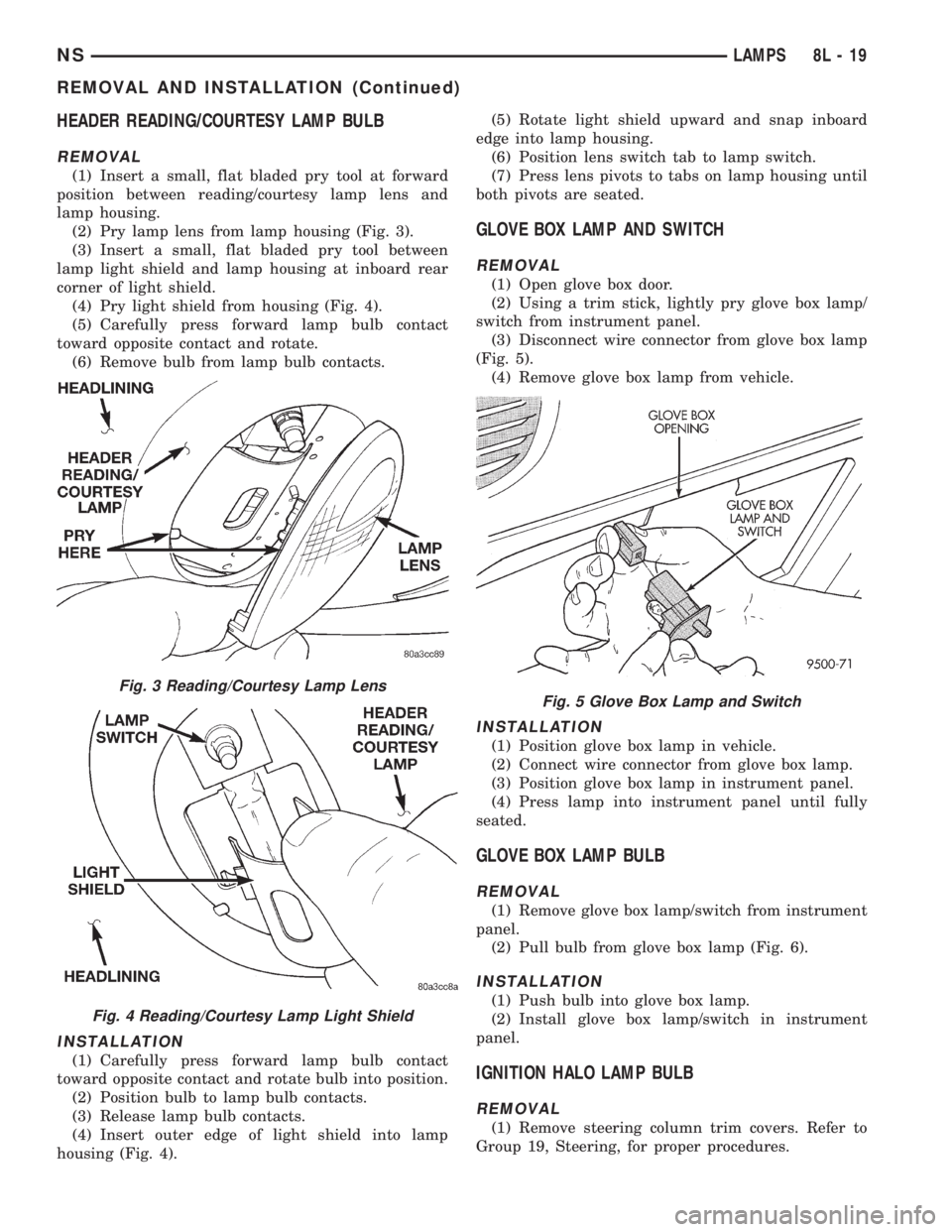
(2) Pry lamp lens from lamp housing (Fig. 3).
(3) Insert a small, flat bladed pry tool between
lamp light shield and lamp housing at inboard rear
corner of light shield.
(4) Pry light shield from housing (Fig. 4).
(5) Carefully press forward lamp bulb contact
toward opposite contact and rotate.
(6) Remove bulb from lamp bulb contacts.
INSTALLATION
(1) Carefully press forward lamp bulb contact
toward opposite contact and rotate bulb into position.
(2) Position bulb to lamp bulb contacts.
(3) Release lamp bulb contacts.
(4) Insert outer edge of light shield into lamp
housing (Fig. 4).(5) Rotate light shield upward and snap inboard
edge into lamp housing.
(6) Position lens switch tab to lamp switch.
(7) Press lens pivots to tabs on lamp housing until
both pivots are seated.
GLOVE BOX LAMP AND SWITCH
REMOVAL
(1) Open glove box door.
(2) Using a trim stick, lightly pry glove box lamp/
switch from instrument panel.
(3) Disconnect wire connector from glove box lamp
(Fig. 5).
(4) Remove glove box lamp from vehicle.
INSTALLATION
(1) Position glove box lamp in vehicle.
(2) Connect wire connector from glove box lamp.
(3) Position glove box lamp in instrument panel.
(4) Press lamp into instrument panel until fully
seated.
GLOVE BOX LAMP BULB
REMOVAL
(1) Remove glove box lamp/switch from instrument
panel.
(2) Pull bulb from glove box lamp (Fig. 6).
INSTALLATION
(1) Push bulb into glove box lamp.
(2) Install glove box lamp/switch in instrument
panel.
IGNITION HALO LAMP BULB
REMOVAL
(1) Remove steering column trim covers. Refer to
Group 19, Steering, for proper procedures.
Fig. 3 Reading/Courtesy Lamp Lens
Fig. 4 Reading/Courtesy Lamp Light Shield
Fig. 5 Glove Box Lamp and Switch
NSLAMPS 8L - 19
REMOVAL AND INSTALLATION (Continued)
Page 472 of 1938
(2) Rotate bulb socket counterclockwise one quar-
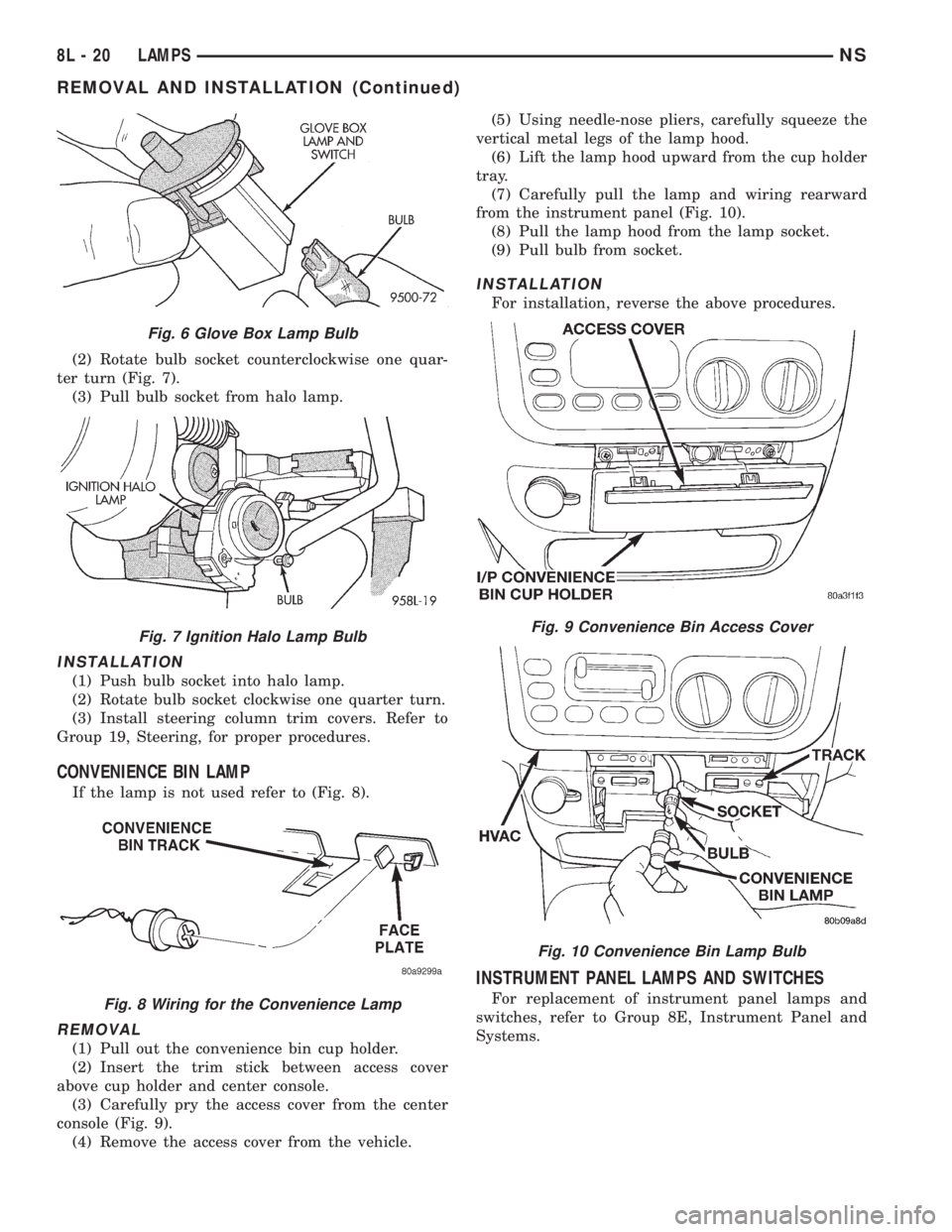
ter turn (Fig. 7).
(3) Pull bulb socket from halo lamp.
INSTALLATION
(1) Push bulb socket into halo lamp.
(2) Rotate bulb socket clockwise one quarter turn.
(3) Install steering column trim covers. Refer to
Group 19, Steering, for proper procedures.
CONVENIENCE BIN LAMP
If the lamp is not used refer to (Fig. 8).
REMOVAL
(1) Pull out the convenience bin cup holder.
(2) Insert the trim stick between access cover
above cup holder and center console.
(3) Carefully pry the access cover from the center
console (Fig. 9).
(4) Remove the access cover from the vehicle.(5) Using needle-nose pliers, carefully squeeze the
vertical metal legs of the lamp hood.
(6) Lift the lamp hood upward from the cup holder
tray.
(7) Carefully pull the lamp and wiring rearward
from the instrument panel (Fig. 10).
(8) Pull the lamp hood from the lamp socket.
(9) Pull bulb from socket.
INSTALLATION
For installation, reverse the above procedures.
INSTRUMENT PANEL LAMPS AND SWITCHES
For replacement of instrument panel lamps and
switches, refer to Group 8E, Instrument Panel and
Systems.
Fig. 6 Glove Box Lamp Bulb
Fig. 7 Ignition Halo Lamp Bulb
Fig. 8 Wiring for the Convenience Lamp
Fig. 9 Convenience Bin Access Cover
Fig. 10 Convenience Bin Lamp Bulb
8L - 20 LAMPSNS
REMOVAL AND INSTALLATION (Continued)
Page 498 of 1938

ACM monitors the system to determine the system
readiness. The ACM contains on-board diagnostics
and will light the AIRBAG warning lamp in the mes-
sage center when a problem occurs.
The driver and passenger airbag system is a safety
device designed to reduce the risk of fatality or seri-
ous injury, caused by a frontal impact of the vehicle.
The impact sensor provides verification of the
direction and severity of the impact. One impact sen-
sor is used. It is located inside the Airbag Control
Module (ACM) which is mounted on a bracket, just
forward of the center console. The impact sensor is
an accelerometer that senses deceleration. The decel-
eration pulses are sent to a microprocessor which
contains a decision algorithm. When an impact is
severe enough to require airbag protection, the ACM
micro processor sends a signal that completes the
electrical circuit to the driver and passenger airbags.
The sensor is calibrated for the specific vehicle and
reacts to the severity and direction of the impact.
CLOCKSPRING
The clockspring is snapped into a plastic mounting
platform on the steering column behind the steering
wheel. The clockspring is used to maintain a contin-
uous electrical circuit between the wiring harness
and the driver's airbag module. This assembly con-
sists of a flat ribbon like electrically conductive tape
which winds and unwinds with the steering wheel
rotation.
DRIVER AND PASSENGER AIRBAG MODULES
The Driver Airbag Module is located in the center
of the steering wheel. The Passenger Airbag Module
is located in the instrument panel above the glove
box (Fig. 1). The Driver Airbag Module cover contains
the horn switch, inflator device, and a fabric bag. The
airbag cover/horn switch is serviced separately from
the inflator and bag components. Refer to Group 8G,
Horns for proper service procedure for horn switch.
The Passenger Airbag Module is serviced as an
assembly.
WARNING: WHEN THE AIRBAG SYSTEM IS
DEPLOYED BECAUSE OF A COLLISION, THE FOL-
LOWING MUST BE REPLACED:
²COMPLETE STEERING COLUMN ASSEMBLY
²LOWER STEERING COUPLER
²STEERING WHEEL
²STEERING COLUMN CLOCKSPRING
²DRIVER AIRBAG COVER/HORN SWITCH
²DRIVER AIRBAG MODULE
²PASSENGER AIRBAG MODULE
²UPPER INSTRUMENT PANEL WITH PAD
DIAGNOSIS AND TESTING
AIRBAG SYSTEM TEST
(1) Disconnect and isolate the battery negative
cable.
WARNING: DISCONNECT AND ISOLATE THE BAT-
TERY NEGATIVE CABLE BEFORE BEGINNING AIR-
BAG SYSTEM COMPONENT SERVICE
PROCEDURES. THIS WILL DISABLE THE AIRBAG
SYSTEM. FAILURE TO DISCONNECT THE BATTERY
COULD RESULT IN ACCIDENTAL AIRBAG DEPLOY-
MENT AND POSSIBLE PERSONAL INJURY. ALLOW
SYSTEM CAPACITOR TO DISCHARGE FOR TWO
MINUTES BEFORE REMOVING AIRBAG COMPO-
NENTS.
(2) Connect scan tool (DRB) to Data Link connec-
tor, located at left side of the steering column and at
the lower edge of the lower instrument panel.
(3) Turn the ignition key to ON position. Exit vehi-
cle with scan tool. Use the latest version of the
proper cartridge.
(4) After checking that no one is inside the vehicle,
connect the battery negative terminal.
(5) Using the scan tool, read and record active
diagnostic code data.
(6) Read and record any stored diagnostic codes.
(7) Refer to the proper Body Diagnostic Procedures
Manual if any diagnostic codes are found in Step 5 or
Step 6.
(8) Erase stored diagnostic codes if there are no
active diagnostic codes. If problems remain, diagnos-
tic codes will not erase. Refer to the Passive
Restraint Diagnostic Test Manual to diagnose the
problem.If airbag warning lamp either fails to
light, or goes on and stays on, there is a system
malfunction. Refer to the proper Body Diagnos-
tic Procedures Manual to diagnose the problem.
Fig. 1 Airbag Module Locations
8M - 2 RESTRAINT SYSTEMNS
DESCRIPTION AND OPERATION (Continued)
Page 501 of 1938
CLOCKSPRING
WARNING: DISCONNECT AND ISOLATE THE BAT-
TERY NEGATIVE CABLE BEFORE BEGINNING AIR-
BAG SYSTEM COMPONENT SERVICE
PROCEDURES. THIS WILL DISABLE THE AIRBAG
SYSTEM. FAILURE TO DISCONNECT THE BATTERY
COULD RESULT IN ACCIDENTAL AIRBAG DEPLOY-
MENT AND POSSIBLE PERSONAL INJURY. ALLOW
SYSTEM CAPACITOR TO DISCHARGE FOR TWO
MINUTES BEFORE REMOVING AIRBAG COMPO-
NENTS.
REMOVAL
(1) Position steering wheel and front wheels
straight ahead.
(2) Release hood latch and open hood.
(3) Disconnect and isolate battery negative cable.
Allow at least two minutes for the reserve capacitor
in the ACM to discharge.
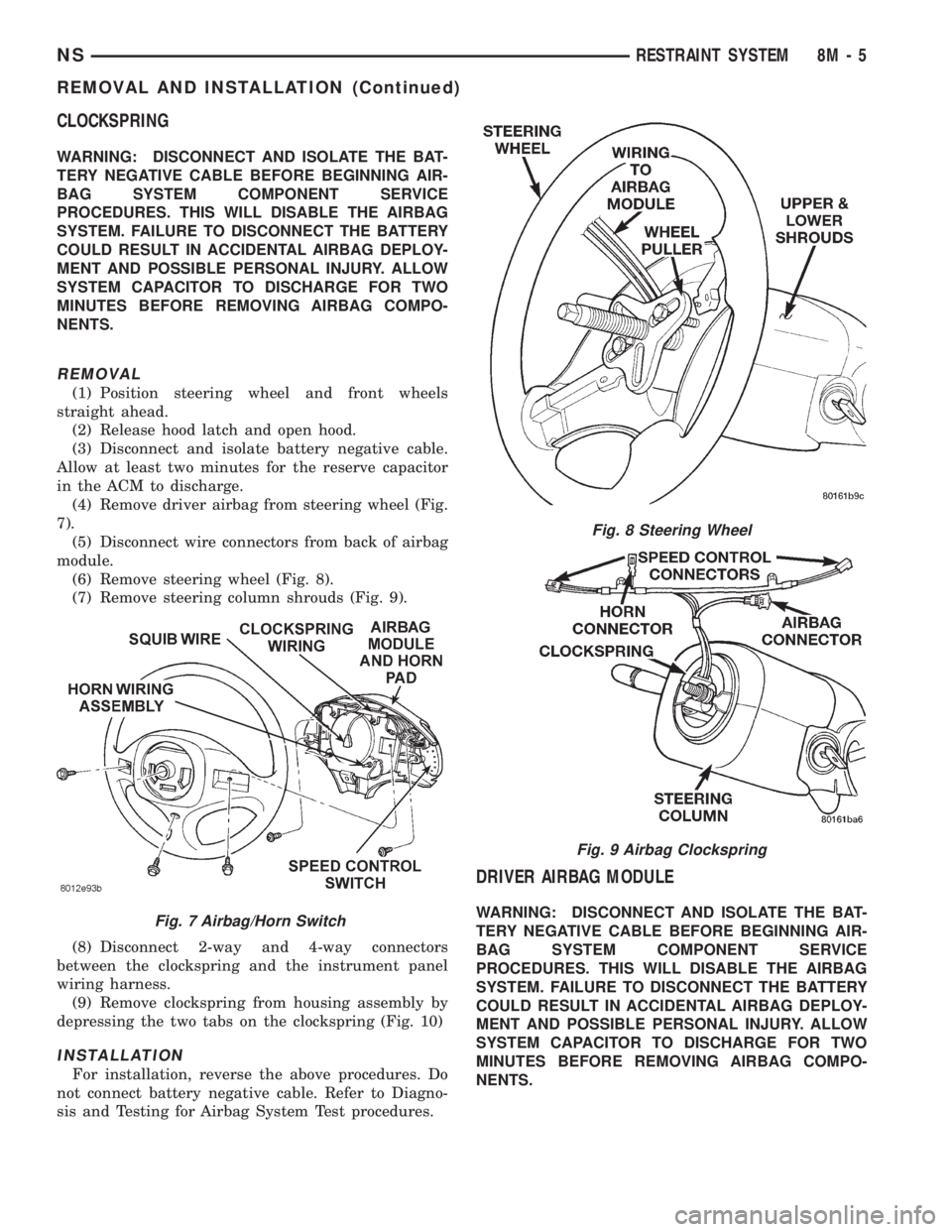
(4) Remove driver airbag from steering wheel (Fig.
7).
(5) Disconnect wire connectors from back of airbag
module.
(6) Remove steering wheel (Fig. 8).
(7) Remove steering column shrouds (Fig. 9).
(8) Disconnect 2-way and 4-way connectors
between the clockspring and the instrument panel
wiring harness.
(9) Remove clockspring from housing assembly by
depressing the two tabs on the clockspring (Fig. 10)
INSTALLATION
For installation, reverse the above procedures. Do
not connect battery negative cable. Refer to Diagno-
sis and Testing for Airbag System Test procedures.
DRIVER AIRBAG MODULE
WARNING: DISCONNECT AND ISOLATE THE BAT-
TERY NEGATIVE CABLE BEFORE BEGINNING AIR-
BAG SYSTEM COMPONENT SERVICE
PROCEDURES. THIS WILL DISABLE THE AIRBAG
SYSTEM. FAILURE TO DISCONNECT THE BATTERY
COULD RESULT IN ACCIDENTAL AIRBAG DEPLOY-
MENT AND POSSIBLE PERSONAL INJURY. ALLOW
SYSTEM CAPACITOR TO DISCHARGE FOR TWO
MINUTES BEFORE REMOVING AIRBAG COMPO-
NENTS.Fig. 7 Airbag/Horn Switch
Fig. 8 Steering Wheel
Fig. 9 Airbag Clockspring
NSRESTRAINT SYSTEM 8M - 5
REMOVAL AND INSTALLATION (Continued)
Page 502 of 1938
DEPLOYED MODULE
The Driver Airbag Module and Driver Airbag Cov-
er/Horn Pad are serviced separately from eachother.
REMOVAL
(1) Disconnect battery negative cable. Allow at
least two minutes for the reserve capacitor in the
ACM to discharge.
(2) Clean powder residue from interior of vehicle,
refer to Cleanup Procedure.
(3) Remove three screws attaching Driver Airbag
Module to steering wheel (Fig. 7).
(4) Remove airbag module from steering wheel.
(5) Disconnect wire connectors from Airbag Mod-
ule, horn switch, and speed control switches.
(6) Adjust the steering wheel so that the tires are
in a straight ahead position. Remove steering wheel
(Fig. 8), refer to Group 19, Steering for proper proce-
dure.
(7) Disconnect the 2-way and 4-way connectors
between the clockspring and the instrument panel
wiring harness.
(8) Remove upper and lower steering column
shrouds.
(9) Remove clockspring from the housing assembly
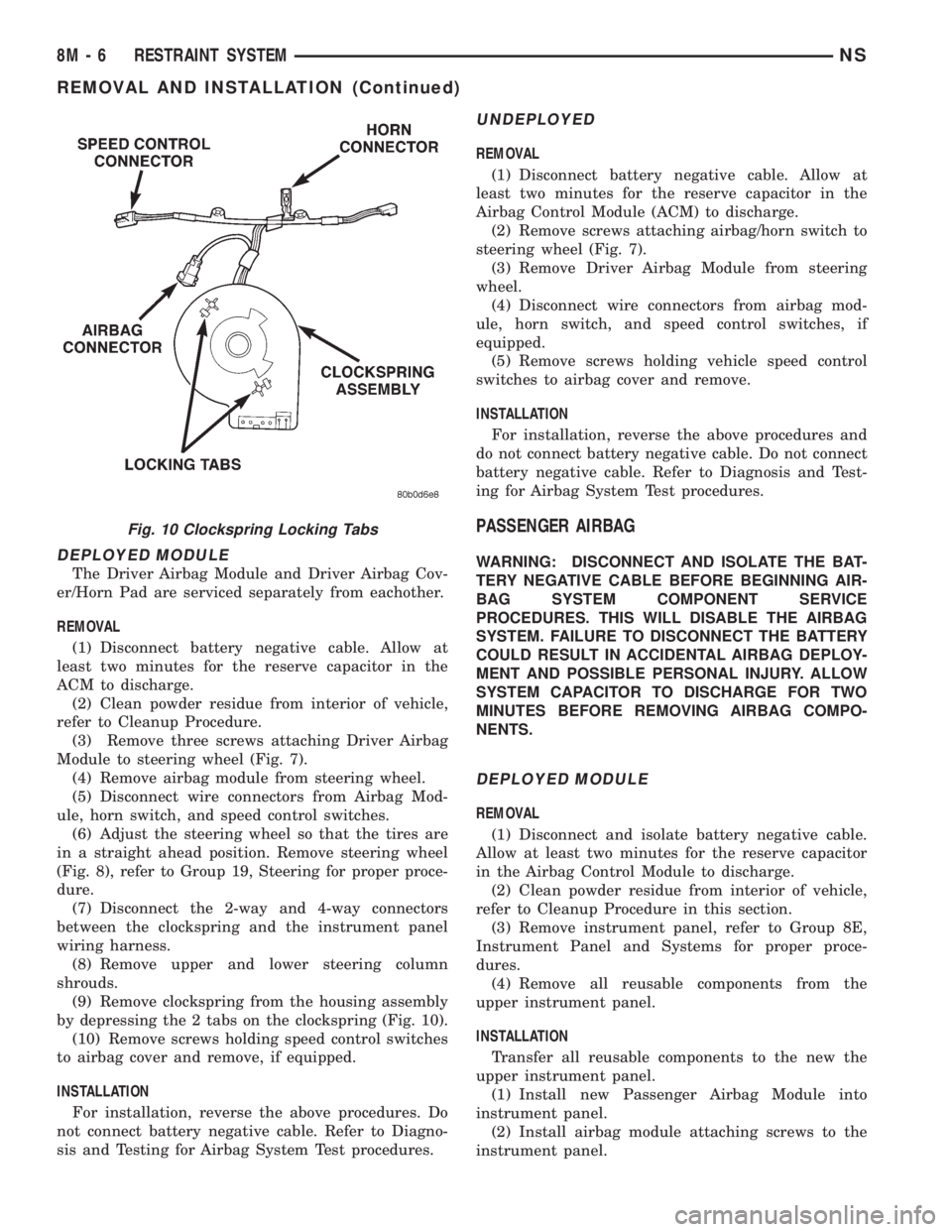
by depressing the 2 tabs on the clockspring (Fig. 10).
(10) Remove screws holding speed control switches
to airbag cover and remove, if equipped.
INSTALLATION
For installation, reverse the above procedures. Do
not connect battery negative cable. Refer to Diagno-
sis and Testing for Airbag System Test procedures.
UNDEPLOYED
REMOVAL
(1) Disconnect battery negative cable. Allow at
least two minutes for the reserve capacitor in the
Airbag Control Module (ACM) to discharge.
(2) Remove screws attaching airbag/horn switch to
steering wheel (Fig. 7).
(3) Remove Driver Airbag Module from steering
wheel.
(4) Disconnect wire connectors from airbag mod-
ule, horn switch, and speed control switches, if
equipped.
(5) Remove screws holding vehicle speed control
switches to airbag cover and remove.
INSTALLATION
For installation, reverse the above procedures and
do not connect battery negative cable. Do not connect
battery negative cable. Refer to Diagnosis and Test-
ing for Airbag System Test procedures.
PASSENGER AIRBAG
WARNING: DISCONNECT AND ISOLATE THE BAT-
TERY NEGATIVE CABLE BEFORE BEGINNING AIR-
BAG SYSTEM COMPONENT SERVICE
PROCEDURES. THIS WILL DISABLE THE AIRBAG
SYSTEM. FAILURE TO DISCONNECT THE BATTERY
COULD RESULT IN ACCIDENTAL AIRBAG DEPLOY-
MENT AND POSSIBLE PERSONAL INJURY. ALLOW
SYSTEM CAPACITOR TO DISCHARGE FOR TWO
MINUTES BEFORE REMOVING AIRBAG COMPO-
NENTS.
DEPLOYED MODULE
REMOVAL
(1) Disconnect and isolate battery negative cable.
Allow at least two minutes for the reserve capacitor
in the Airbag Control Module to discharge.
(2) Clean powder residue from interior of vehicle,
refer to Cleanup Procedure in this section.
(3) Remove instrument panel, refer to Group 8E,
Instrument Panel and Systems for proper proce-
dures.
(4) Remove all reusable components from the
upper instrument panel.
INSTALLATION
Transfer all reusable components to the new the
upper instrument panel.
(1) Install new Passenger Airbag Module into
instrument panel.
(2) Install airbag module attaching screws to the
instrument panel.
Fig. 10 Clockspring Locking Tabs
8M - 6 RESTRAINT SYSTEMNS
REMOVAL AND INSTALLATION (Continued)
Page 503 of 1938
(3) Install Instrument panel. Refer to Group 8E,
Instrument Panel and Systems for installation proce-
dures.
(4) Through access holes in instrument panel
above glove box opening, install screws holding air-
bag to back of panel.
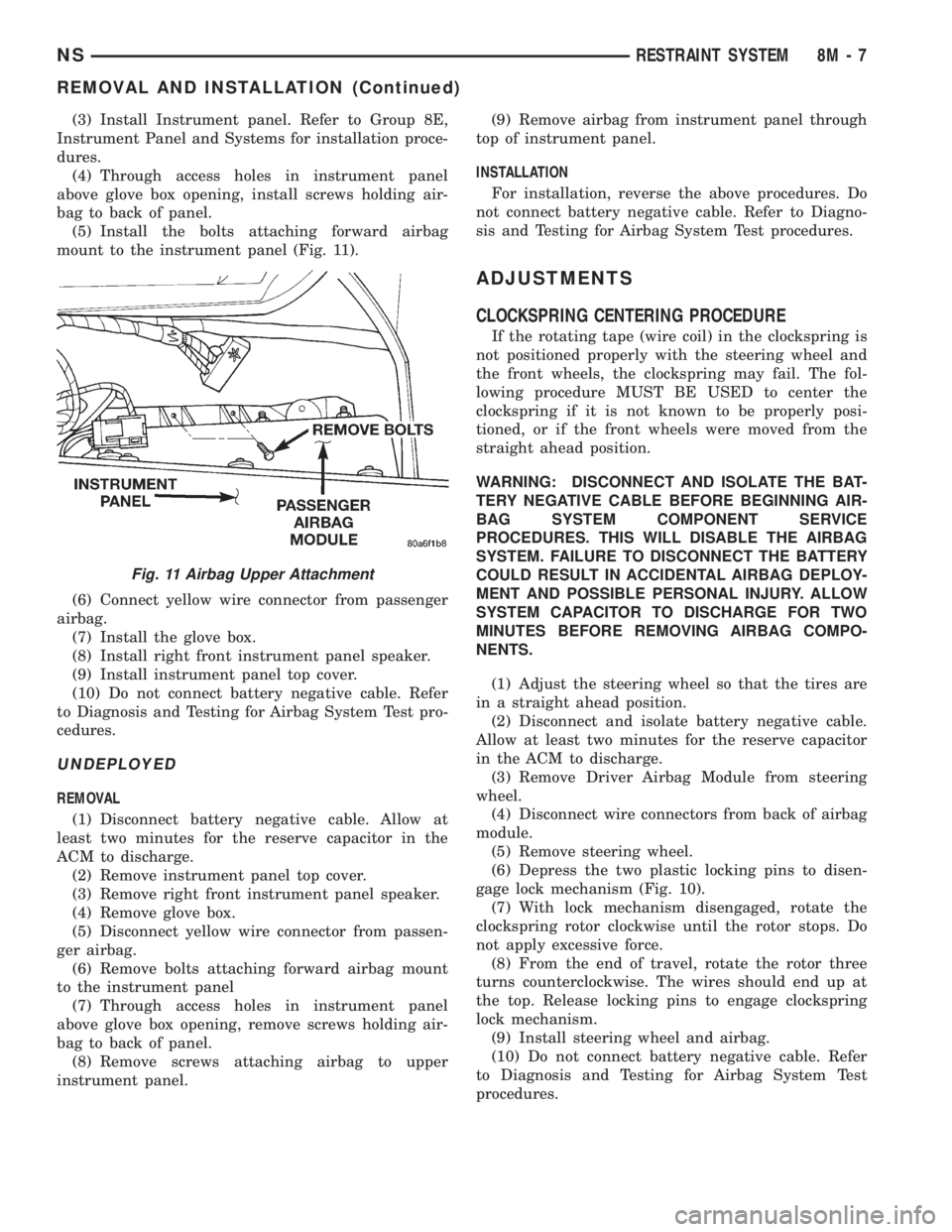
(5) Install the bolts attaching forward airbag
mount to the instrument panel (Fig. 11).
(6) Connect yellow wire connector from passenger
airbag.
(7) Install the glove box.
(8) Install right front instrument panel speaker.
(9) Install instrument panel top cover.
(10) Do not connect battery negative cable. Refer
to Diagnosis and Testing for Airbag System Test pro-
cedures.
UNDEPLOYED
REMOVAL
(1) Disconnect battery negative cable. Allow at
least two minutes for the reserve capacitor in the
ACM to discharge.
(2) Remove instrument panel top cover.
(3) Remove right front instrument panel speaker.
(4) Remove glove box.
(5) Disconnect yellow wire connector from passen-
ger airbag.
(6) Remove bolts attaching forward airbag mount
to the instrument panel
(7) Through access holes in instrument panel
above glove box opening, remove screws holding air-
bag to back of panel.
(8) Remove screws attaching airbag to upper
instrument panel.(9) Remove airbag from instrument panel through
top of instrument panel.
INSTALLATION
For installation, reverse the above procedures. Do
not connect battery negative cable. Refer to Diagno-
sis and Testing for Airbag System Test procedures.
ADJUSTMENTS
CLOCKSPRING CENTERING PROCEDURE
If the rotating tape (wire coil) in the clockspring is
not positioned properly with the steering wheel and
the front wheels, the clockspring may fail. The fol-
lowing procedure MUST BE USED to center the
clockspring if it is not known to be properly posi-
tioned, or if the front wheels were moved from the
straight ahead position.
WARNING: DISCONNECT AND ISOLATE THE BAT-
TERY NEGATIVE CABLE BEFORE BEGINNING AIR-
BAG SYSTEM COMPONENT SERVICE
PROCEDURES. THIS WILL DISABLE THE AIRBAG
SYSTEM. FAILURE TO DISCONNECT THE BATTERY
COULD RESULT IN ACCIDENTAL AIRBAG DEPLOY-
MENT AND POSSIBLE PERSONAL INJURY. ALLOW
SYSTEM CAPACITOR TO DISCHARGE FOR TWO
MINUTES BEFORE REMOVING AIRBAG COMPO-
NENTS.
(1) Adjust the steering wheel so that the tires are
in a straight ahead position.
(2) Disconnect and isolate battery negative cable.
Allow at least two minutes for the reserve capacitor
in the ACM to discharge.
(3) Remove Driver Airbag Module from steering
wheel.
(4) Disconnect wire connectors from back of airbag
module.
(5) Remove steering wheel.
(6) Depress the two plastic locking pins to disen-
gage lock mechanism (Fig. 10).
(7) With lock mechanism disengaged, rotate the
clockspring rotor clockwise until the rotor stops. Do
not apply excessive force.
(8) From the end of travel, rotate the rotor three
turns counterclockwise. The wires should end up at
the top. Release locking pins to engage clockspring
lock mechanism.
(9) Install steering wheel and airbag.
(10) Do not connect battery negative cable. Refer
to Diagnosis and Testing for Airbag System Test
procedures.
Fig. 11 Airbag Upper Attachment
NSRESTRAINT SYSTEM 8M - 7
REMOVAL AND INSTALLATION (Continued)
Page 516 of 1938
TIME-OUT PERIOD
The VTSS requires 16 consecutive seconds to time-
out and arm the alarm. If a door is key unlocked, key
fob unlocked. or the ignition is switched ON, the
VTSS will cancel out. To reset the VTSS, perform
methods A or B.
TRIGGERING THE VTSS
After the VTSS is armed, following actions will
trigger the alarm:
²Opening any door.
²Opening the hood
²Turning the ignition to the ON or unlock posi-
tion.
²The ignition switch can be turned to the acces-
sory position without triggering alarm system.
DIAGNOSIS AND TESTING
DIAGNOSTIC PROCEDURES
Refer to Group 8W, Wiring Diagrams for circuit
information and component locations. Using a scan
tool (DRB). Refer to the proper Body Diagnostic Pro-
cedures manual for test procedures.
REMOVAL AND INSTALLATION
BODY CONTROL MODULE
REMOVAL
(1) Disconnect the battery negative cable.
(2) Remove the lower steering column cover and
the knee blocker reinforcement.
(3) Disconnect the two wire connectors from the
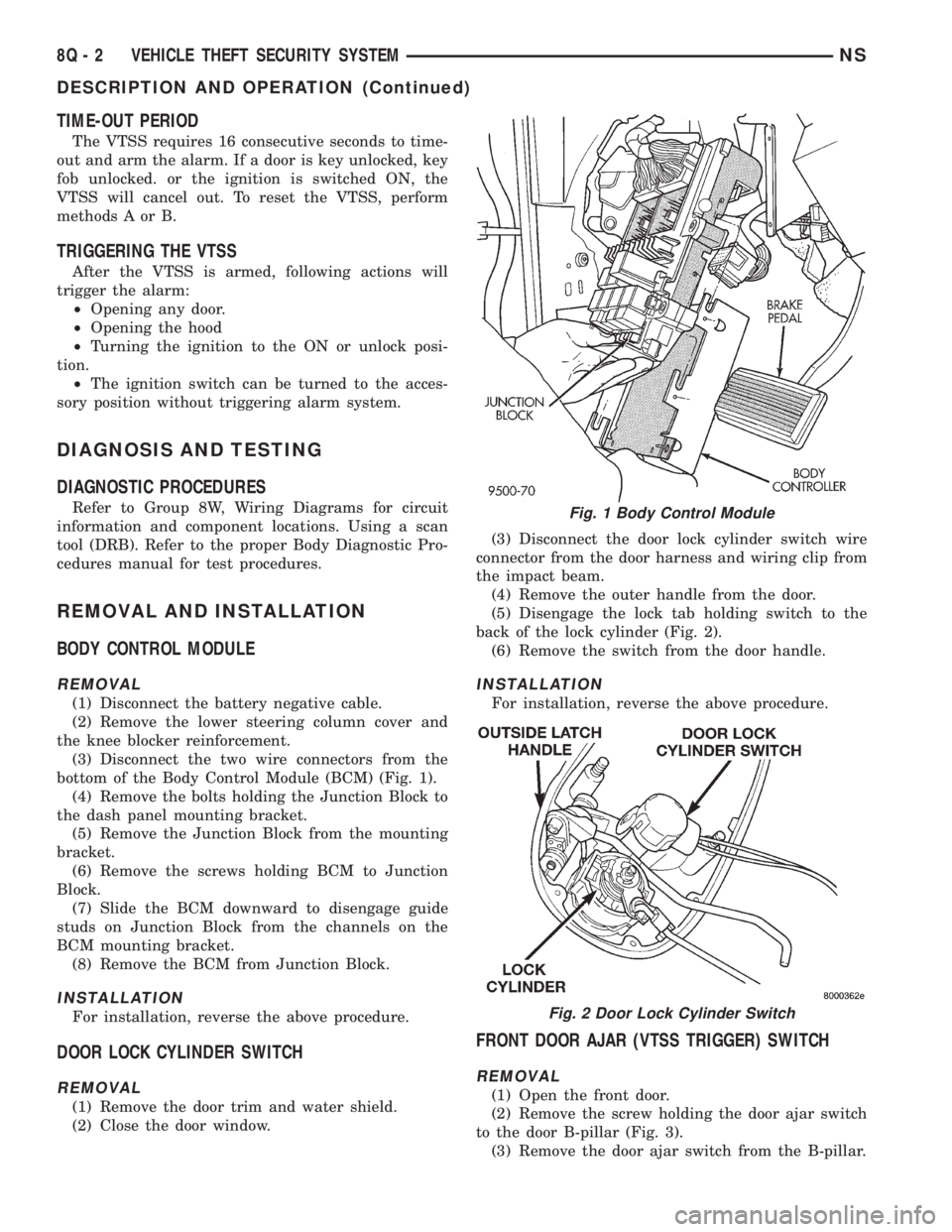
bottom of the Body Control Module (BCM) (Fig. 1).
(4) Remove the bolts holding the Junction Block to
the dash panel mounting bracket.
(5) Remove the Junction Block from the mounting
bracket.
(6) Remove the screws holding BCM to Junction
Block.
(7) Slide the BCM downward to disengage guide
studs on Junction Block from the channels on the
BCM mounting bracket.
(8) Remove the BCM from Junction Block.
INSTALLATION
For installation, reverse the above procedure.
DOOR LOCK CYLINDER SWITCH
REMOVAL
(1) Remove the door trim and water shield.
(2) Close the door window.(3) Disconnect the door lock cylinder switch wire
connector from the door harness and wiring clip from
the impact beam.
(4) Remove the outer handle from the door.
(5) Disengage the lock tab holding switch to the
back of the lock cylinder (Fig. 2).
(6) Remove the switch from the door handle.
INSTALLATION
For installation, reverse the above procedure.
FRONT DOOR AJAR (VTSS TRIGGER) SWITCH
REMOVAL
(1) Open the front door.
(2) Remove the screw holding the door ajar switch
to the door B-pillar (Fig. 3).
(3) Remove the door ajar switch from the B-pillar.
Fig. 1 Body Control Module
Fig. 2 Door Lock Cylinder Switch
8Q - 2 VEHICLE THEFT SECURITY SYSTEMNS
DESCRIPTION AND OPERATION (Continued)