lock CHRYSLER VOYAGER 1996 Service Manual
[x] Cancel search | Manufacturer: CHRYSLER, Model Year: 1996, Model line: VOYAGER, Model: CHRYSLER VOYAGER 1996Pages: 1938, PDF Size: 55.84 MB
Page 333 of 1938
IGNITION SWITCH AND LOCK CYLINDER
INDEX
page page
DESCRIPTION AND OPERATION
IGNITION INTERLOCK.................... 35
LOCK KEY CYLINDER.................... 35
REMOVAL AND INSTALLATION
IGNITION INTERLOCK.................... 38IGNITION SWITCH....................... 35
LOCK CYLINDER HOUSING............... 38
LOCK KEY CYLINDER.................... 38
DESCRIPTION AND OPERATION
IGNITION INTERLOCK
All vehicles equipped with automatic transaxles
have an interlock system. The system prevents shift-
ing the vehicle out of Park unless the ignition lock
cylinder is in the Off, Run or Start position. In addi-
tion, the operator cannot rotate the key to the lock
position unless the shifter is in the park position. On
vehicles equipped with floor shift refer to Group 21 -
Transaxle for Automatic Transmission Shifter/Igni-
tion Interlock.
LOCK KEY CYLINDER
The lock cylinder is inserted in the end of the
housing opposite the ignition switch. The ignition key
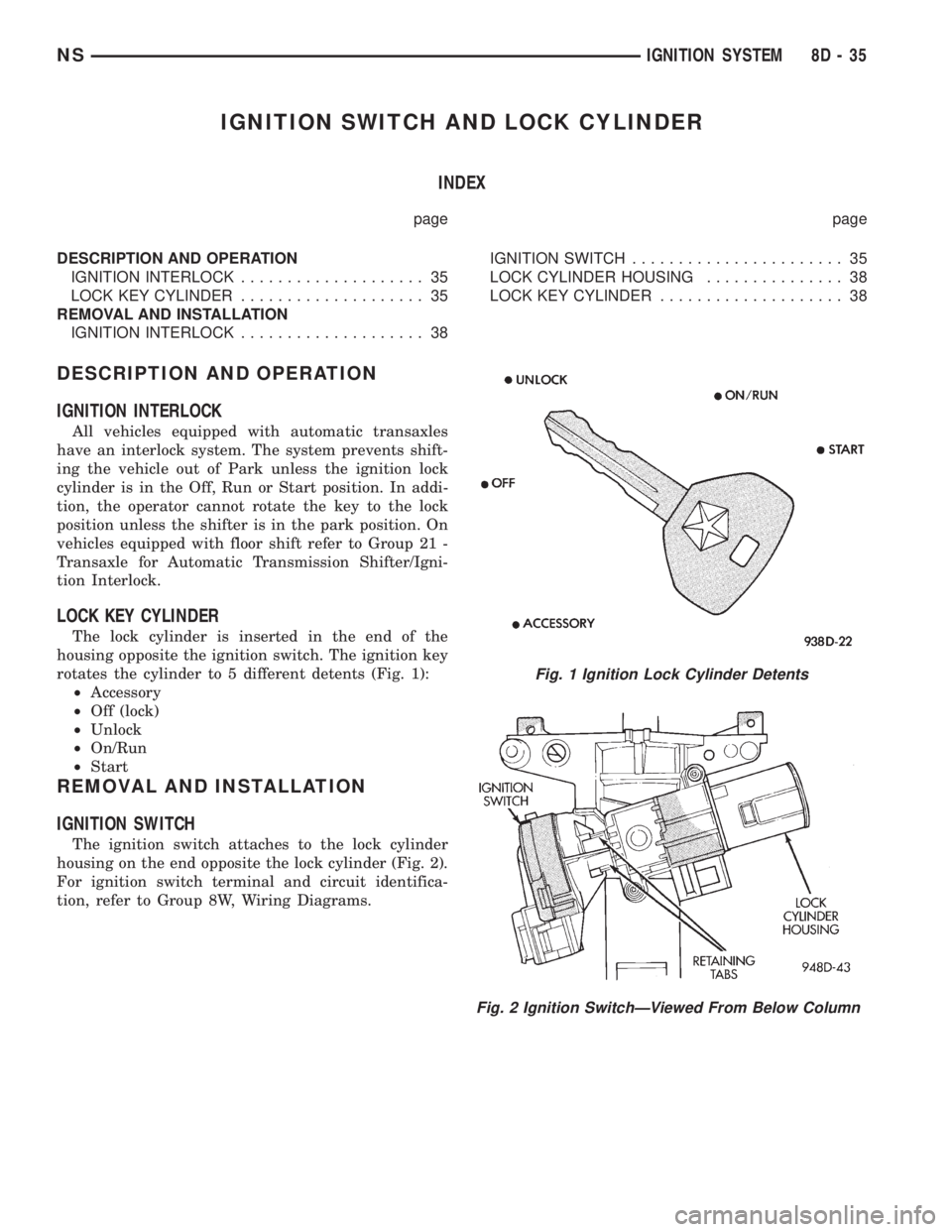
rotates the cylinder to 5 different detents (Fig. 1):
²Accessory
²Off (lock)
²Unlock
²On/Run
²Start
REMOVAL AND INSTALLATION
IGNITION SWITCH
The ignition switch attaches to the lock cylinder
housing on the end opposite the lock cylinder (Fig. 2).
For ignition switch terminal and circuit identifica-
tion, refer to Group 8W, Wiring Diagrams.
Fig. 1 Ignition Lock Cylinder Detents
Fig. 2 Ignition SwitchÐViewed From Below Column
NSIGNITION SYSTEM 8D - 35
Page 334 of 1938
REMOVAL
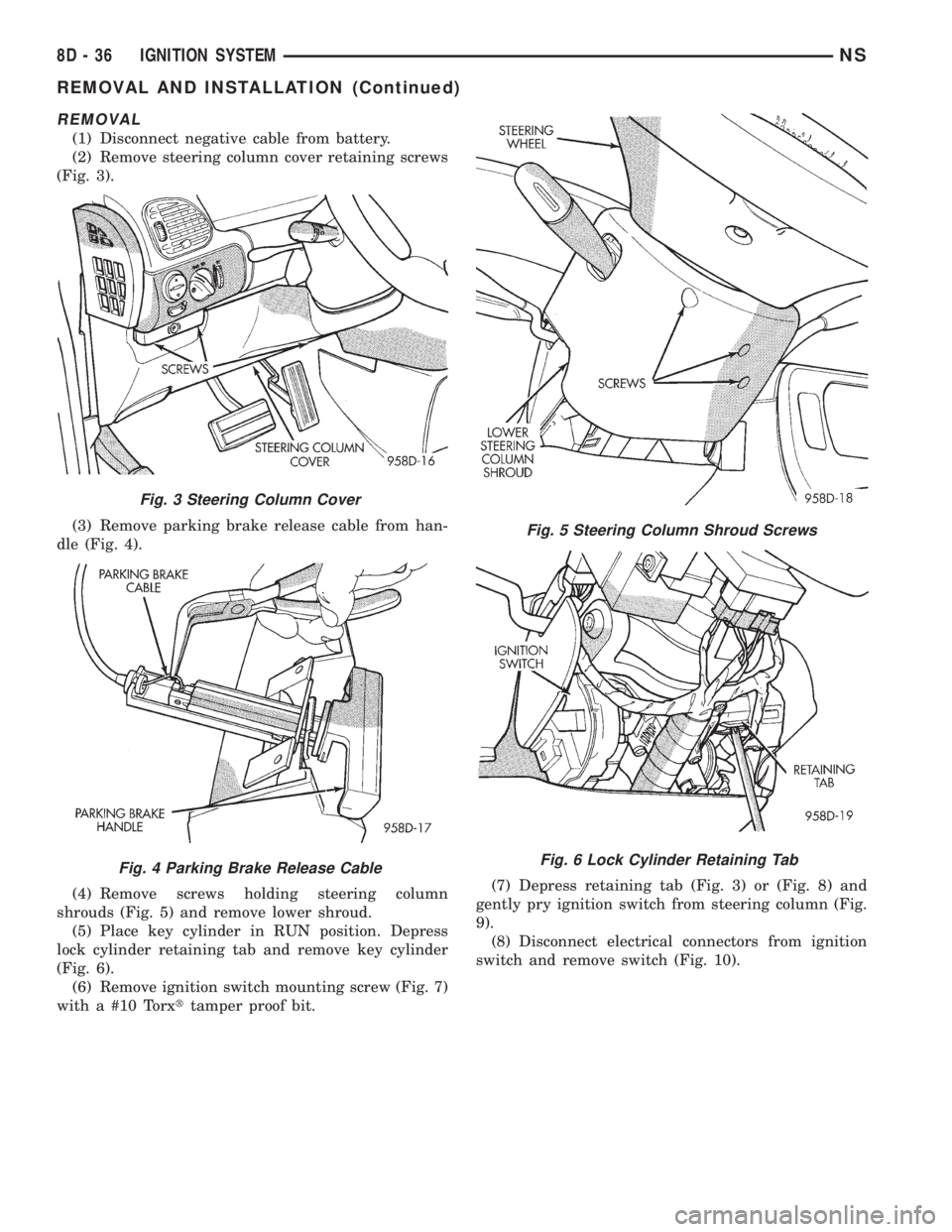
(1) Disconnect negative cable from battery.
(2) Remove steering column cover retaining screws
(Fig. 3).
(3) Remove parking brake release cable from han-
dle (Fig. 4).
(4) Remove screws holding steering column
shrouds (Fig. 5) and remove lower shroud.
(5) Place key cylinder in RUN position. Depress
lock cylinder retaining tab and remove key cylinder
(Fig. 6).
(6) Remove ignition switch mounting screw (Fig. 7)
with a #10 Torxttamper proof bit.(7) Depress retaining tab (Fig. 3) or (Fig. 8) and
gently pry ignition switch from steering column (Fig.
9).
(8) Disconnect electrical connectors from ignition
switch and remove switch (Fig. 10).
Fig. 3 Steering Column Cover
Fig. 4 Parking Brake Release Cable
Fig. 5 Steering Column Shroud Screws
Fig. 6 Lock Cylinder Retaining Tab
8D - 36 IGNITION SYSTEMNS
REMOVAL AND INSTALLATION (Continued)
Page 335 of 1938
INSTALLATION
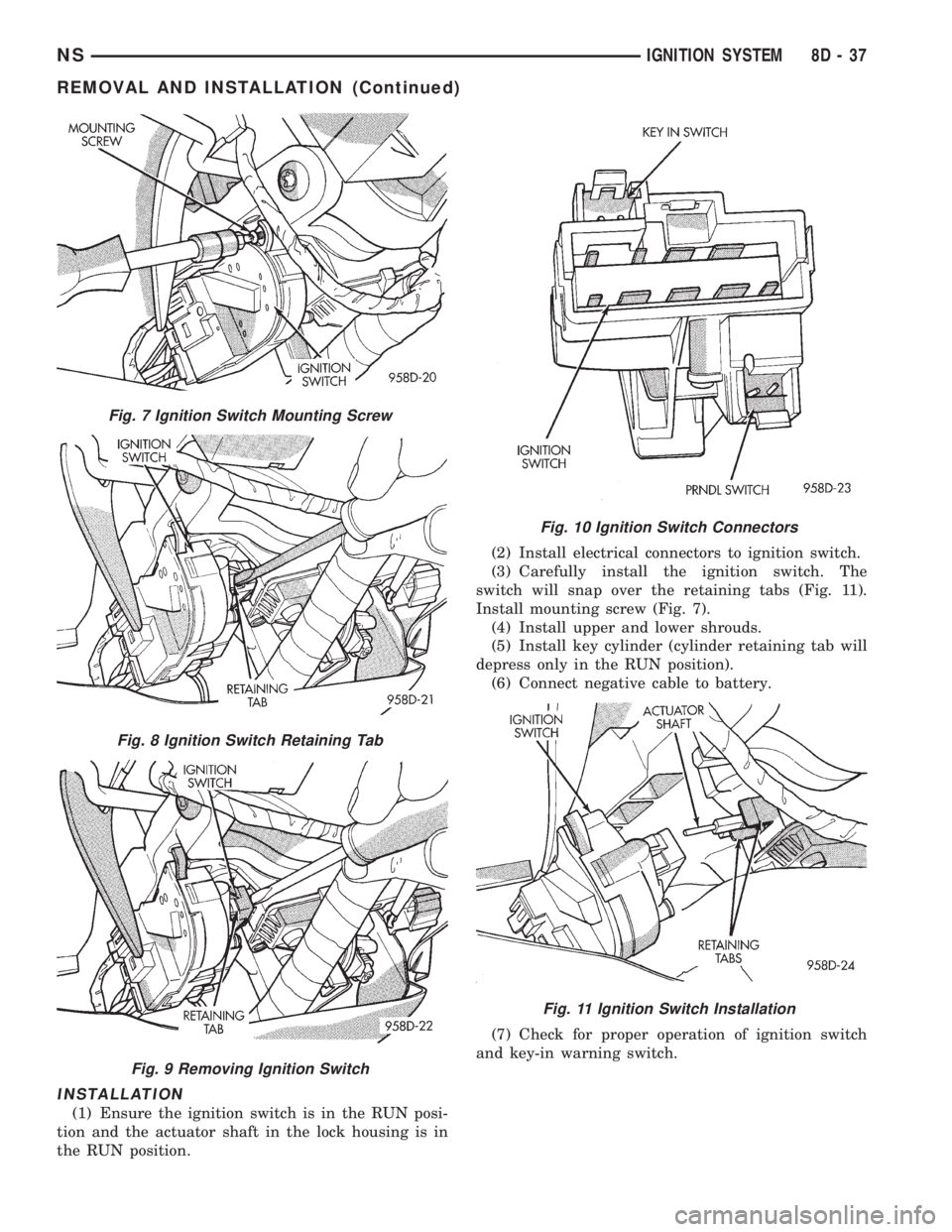
(1) Ensure the ignition switch is in the RUN posi-
tion and the actuator shaft in the lock housing is in
the RUN position.(2) Install electrical connectors to ignition switch.
(3) Carefully install the ignition switch. The
switch will snap over the retaining tabs (Fig. 11).
Install mounting screw (Fig. 7).
(4) Install upper and lower shrouds.
(5) Install key cylinder (cylinder retaining tab will
depress only in the RUN position).
(6) Connect negative cable to battery.
(7) Check for proper operation of ignition switch
and key-in warning switch.
Fig. 7 Ignition Switch Mounting Screw
Fig. 8 Ignition Switch Retaining Tab
Fig. 9 Removing Ignition Switch
Fig. 10 Ignition Switch Connectors
Fig. 11 Ignition Switch Installation
NSIGNITION SYSTEM 8D - 37
REMOVAL AND INSTALLATION (Continued)
Page 336 of 1938
LOCK KEY CYLINDER
REMOVAL
(1) Disconnect negative cable from battery.
(2) Remove steering column cover retaining screws
(Fig. 3).
(3) Remove screws holding steering column
shrouds (Fig. 5) and remove lower shroud.
(4) Place key cylinder in RUN position. Depress
lock cylinder retaining tab and remove key cylinder
(Fig. 6).
INSTALLATION
(1) Install key in lock cylinder. Turn key to run
position (retaining tab on lock cylinder can be
depressed).
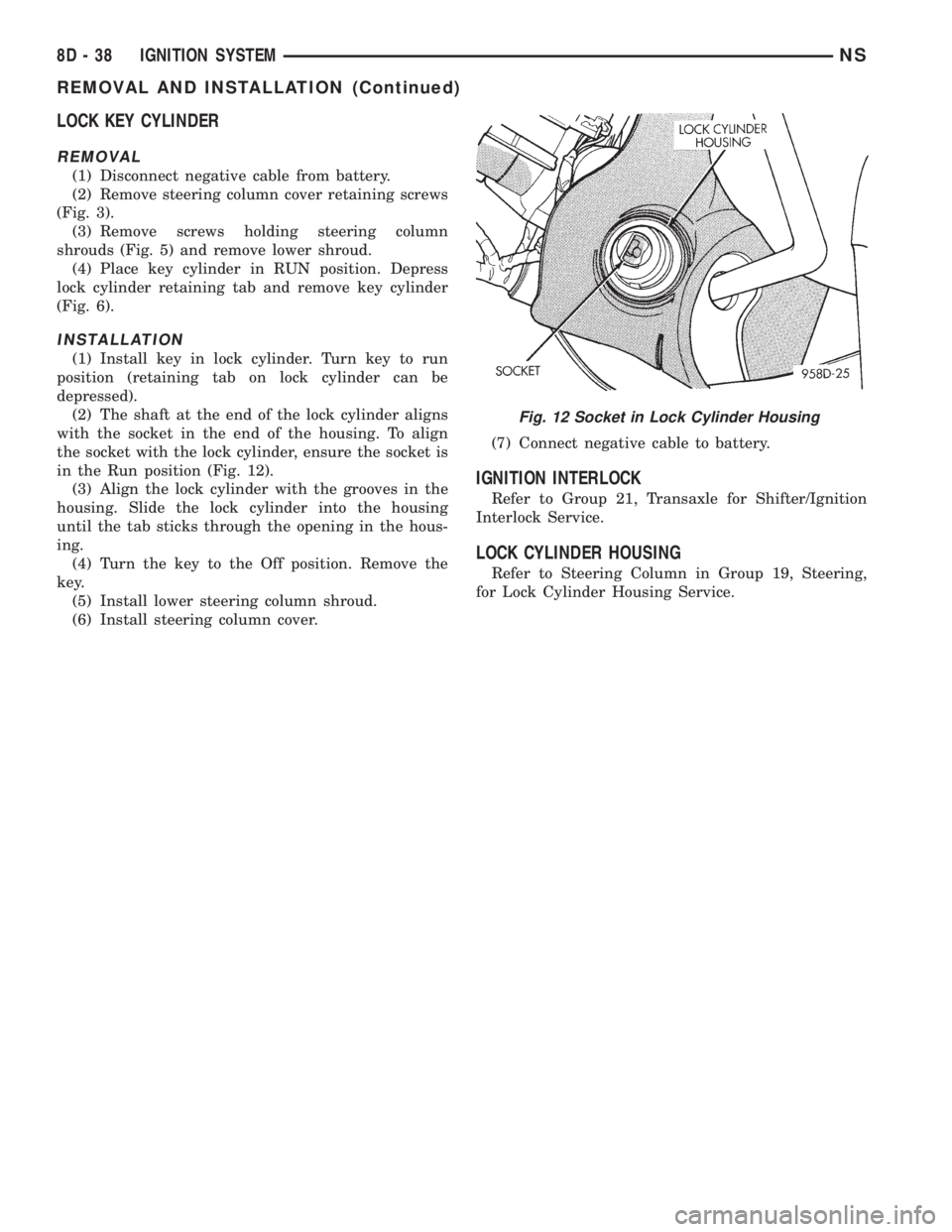
(2) The shaft at the end of the lock cylinder aligns
with the socket in the end of the housing. To align
the socket with the lock cylinder, ensure the socket is
in the Run position (Fig. 12).
(3) Align the lock cylinder with the grooves in the
housing. Slide the lock cylinder into the housing
until the tab sticks through the opening in the hous-
ing.
(4) Turn the key to the Off position. Remove the
key.
(5) Install lower steering column shroud.
(6) Install steering column cover.(7) Connect negative cable to battery.
IGNITION INTERLOCK
Refer to Group 21, Transaxle for Shifter/Ignition
Interlock Service.
LOCK CYLINDER HOUSING
Refer to Steering Column in Group 19, Steering,
for Lock Cylinder Housing Service.
Fig. 12 Socket in Lock Cylinder Housing
8D - 38 IGNITION SYSTEMNS
REMOVAL AND INSTALLATION (Continued)
Page 337 of 1938
INSTRUMENT PANEL AND SYSTEMS
CONTENTS
page page
GENERAL INFORMATION
INTRODUCTION......................... 1
DESCRIPTION AND OPERATION
INSTRUMENT CLUSTER................... 1
DIAGNOSIS AND TESTING
DIAGNOSTIC PROCEDURES................ 2
HEADLAMP SWITCH..................... 2
SELF DIAGNOSTIC TEST.................. 2
TRACTION CONTROL SWITCH............. 17
REMOVAL AND INSTALLATION
BODY CONTROL MODULE (BCM).......... 18
CONVENIENCE BIN - CUP HOLDER......... 17
CONVENIENCE BIN LAMP................ 17
CONVENIENCE BIN TRACK............... 18
GLOVE BOX LAMP AND SWITCH.......... 19
GLOVE BOX LOCK STRIKER.............. 20
GLOVE BOX........................... 19
HEADLAMP SWITCH LAMP(S)............ 21
HEADLAMP SWITCH.................... 20
HVAC CONTROL LAMP.................. 21
INSTRUMENT CLUSTER BACK PANEL...... 21
INSTRUMENT CLUSTER BEZEL............ 21
INSTRUMENT CLUSTER ELECTRONIC
ODOMETER AND TRANSMISSION RANGE
INDICATOR.......................... 19
INSTRUMENT CLUSTER LAMPS........... 22
INSTRUMENT CLUSTER LENS - MECHANICAL
TRANSMISSION RANGE INDICATOR
(PRND21)........................... 19
INSTRUMENT CLUSTER LENS............. 22INSTRUMENT CLUSTER PRINTED CIRCUIT
BOARD.............................. 23
INSTRUMENT CLUSTER SUBDIAL.......... 23
INSTRUMENT CLUSTER SUBDIALÐ
MECHANICAL TRANSMISSION RANGE
INDICATOR.......................... 23
INSTRUMENT CLUSTER WITH ELECTRONIC
TRANSMISSION RANGE INDICATOR...... 23
INSTRUMENT CLUSTER WITH MECHANICAL
TRANSMISSION RANGE INDICATOR...... 24
INSTRUMENT PANEL LEFT END COVER..... 27
INSTRUMENT PANEL LOUVERS........... 27
INSTRUMENT PANEL RIGHT END COVER.... 29
INSTRUMENT PANEL TOP COVER.......... 29
INSTRUMENT PANEL.................... 25
JUNCTION BLOCK...................... 30
KNEE BLOCKER REINFORCEMENT......... 30
LOWER CONSOLE...................... 30
LOWER INSTRUMENT PANEL............. 31
LOWER STEERING COLUMN COVER........ 31
MECHANICAL TRANSMISSION RANGE
INDICATOR.......................... 32
MESSAGE CENTER LAMP................ 32
MESSAGE CENTER...................... 32
OUTLET (12 VOLT) BASE................. 32
OVER STEERING COLUMN BEZEL.......... 32
POWER MIRROR SWITCH LAMP.......... 34
POWER MIRROR SWITCH................ 34
RADIO BEZEL AND HVAC CONTROL........ 34
REAR HEATER-A/C SWITCH LAMP......... 35
REAR HEATER-A/C SWITCH............... 35
TRACTION CONTROL SWITCH............. 35
GENERAL INFORMATION
INTRODUCTION
The instrumentation gauges on NS vehicles are
contained in a subdial assemblies within the instru-
ment cluster. The individual gauges are not serviced
separately. If one of the cluster gauges becomes
faulty the entire subdial would require replacement
and all gauges will have to be calibrated. Refer to the
proper Body Diagnostic Procedure Manual for cali-
bration procedures.
DESCRIPTION AND OPERATION
INSTRUMENT CLUSTER
The mechanical instrument cluster with a tachom-
eter is equipped with a electronic vacuum fluorescent
transmission range indicator (PRND3L), odometer,
and trip odometer display.
The mechanical instrument cluster without a
tachometer is equipped with a cable operated trans-
mission range indicator (PRND21).
NSINSTRUMENT PANEL AND SYSTEMS 8E - 1
Page 353 of 1938
TRACTION CONTROL SWITCH
(1) Remove over steering column bezel. Refer to
Over Steering Column Bezel. Removal procedures.
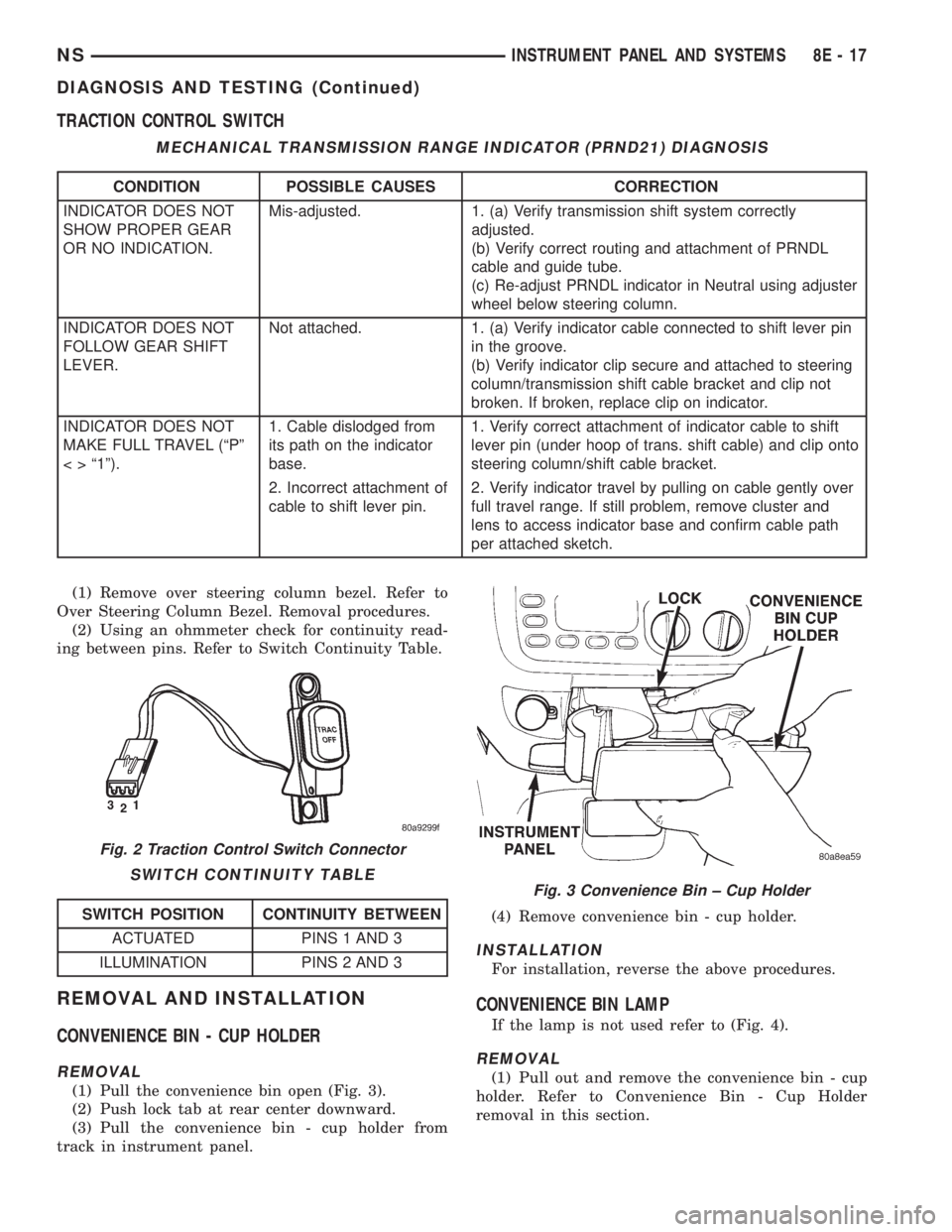
(2) Using an ohmmeter check for continuity read-
ing between pins. Refer to Switch Continuity Table.
REMOVAL AND INSTALLATION
CONVENIENCE BIN - CUP HOLDER
REMOVAL
(1) Pull the convenience bin open (Fig. 3).
(2) Push lock tab at rear center downward.
(3) Pull the convenience bin - cup holder from
track in instrument panel.(4) Remove convenience bin - cup holder.
INSTALLATION
For installation, reverse the above procedures.
CONVENIENCE BIN LAMP
If the lamp is not used refer to (Fig. 4).
REMOVAL
(1) Pull out and remove the convenience bin - cup
holder. Refer to Convenience Bin - Cup Holder
removal in this section.
MECHANICAL TRANSMISSION RANGE INDICATOR (PRND21) DIAGNOSIS
CONDITION POSSIBLE CAUSES CORRECTION
INDICATOR DOES NOT
SHOW PROPER GEAR
OR NO INDICATION.Mis-adjusted. 1. (a) Verify transmission shift system correctly
adjusted.
(b) Verify correct routing and attachment of PRNDL
cable and guide tube.
(c) Re-adjust PRNDL indicator in Neutral using adjuster
wheel below steering column.
INDICATOR DOES NOT
FOLLOW GEAR SHIFT
LEVER.Not attached. 1. (a) Verify indicator cable connected to shift lever pin
in the groove.
(b) Verify indicator clip secure and attached to steering
column/transmission shift cable bracket and clip not
broken. If broken, replace clip on indicator.
INDICATOR DOES NOT
MAKE FULL TRAVEL (ªPº
< > ª1º).1. Cable dislodged from
its path on the indicator
base.1. Verify correct attachment of indicator cable to shift
lever pin (under hoop of trans. shift cable) and clip onto
steering column/shift cable bracket.
2. Incorrect attachment of
cable to shift lever pin.2. Verify indicator travel by pulling on cable gently over
full travel range. If still problem, remove cluster and
lens to access indicator base and confirm cable path
per attached sketch.
Fig. 2 Traction Control Switch Connector
SWITCH CONTINUITY TABLE
SWITCH POSITION CONTINUITY BETWEEN
ACTUATED PINS 1 AND 3
ILLUMINATION PINS 2 AND 3
Fig. 3 Convenience Bin ± Cup Holder
NSINSTRUMENT PANEL AND SYSTEMS 8E - 17
DIAGNOSIS AND TESTING (Continued)
Page 354 of 1938
(2) Insert the trim stick (special tool #C-4755)
between access cover and radio bezel, above conve-
nience bin - cup holder.
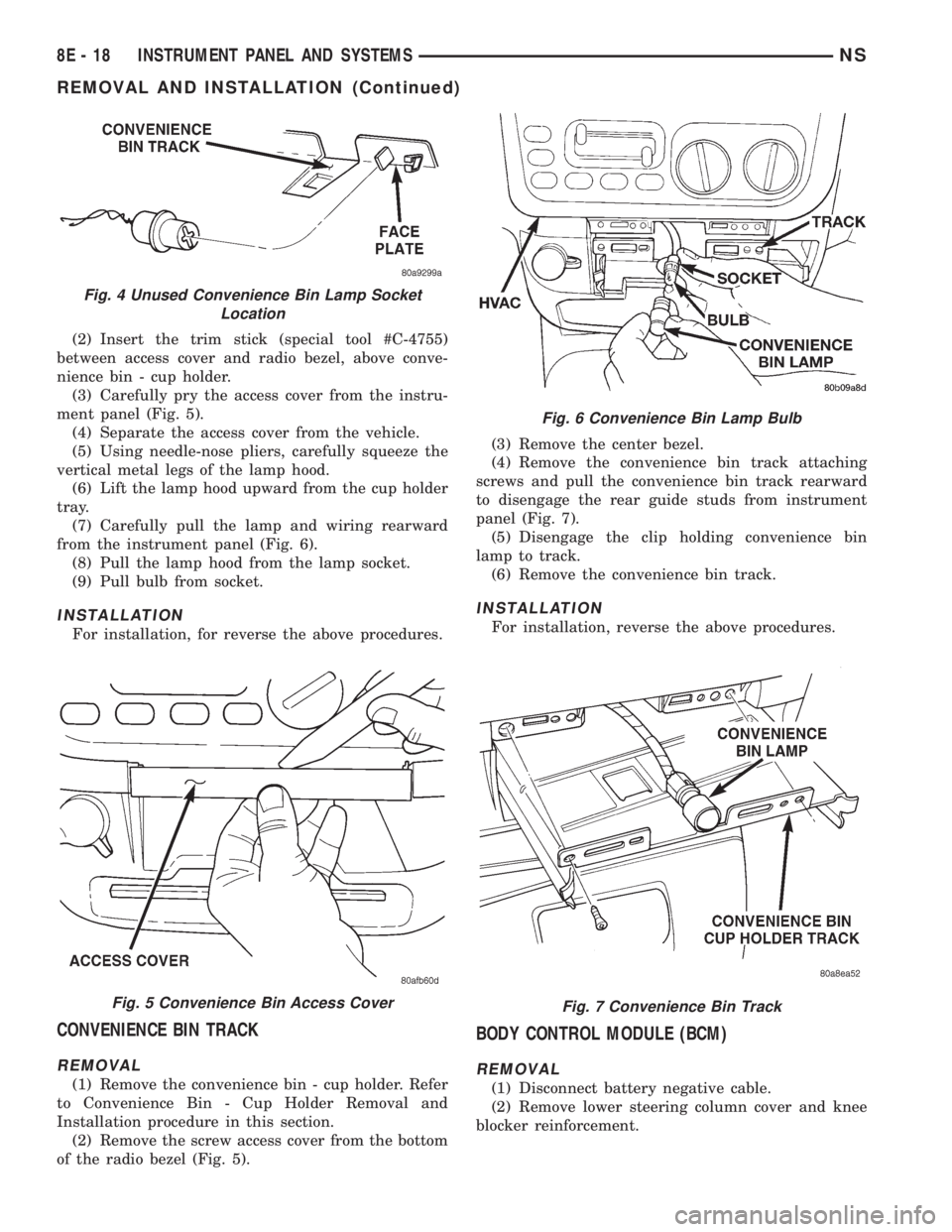
(3) Carefully pry the access cover from the instru-
ment panel (Fig. 5).
(4) Separate the access cover from the vehicle.
(5) Using needle-nose pliers, carefully squeeze the
vertical metal legs of the lamp hood.
(6) Lift the lamp hood upward from the cup holder
tray.
(7) Carefully pull the lamp and wiring rearward
from the instrument panel (Fig. 6).
(8) Pull the lamp hood from the lamp socket.
(9) Pull bulb from socket.
INSTALLATION
For installation, for reverse the above procedures.
CONVENIENCE BIN TRACK
REMOVAL
(1) Remove the convenience bin - cup holder. Refer
to Convenience Bin - Cup Holder Removal and
Installation procedure in this section.
(2) Remove the screw access cover from the bottom
of the radio bezel (Fig. 5).(3) Remove the center bezel.
(4) Remove the convenience bin track attaching
screws and pull the convenience bin track rearward
to disengage the rear guide studs from instrument
panel (Fig. 7).
(5) Disengage the clip holding convenience bin
lamp to track.
(6) Remove the convenience bin track.
INSTALLATION
For installation, reverse the above procedures.
BODY CONTROL MODULE (BCM)
REMOVAL
(1) Disconnect battery negative cable.
(2) Remove lower steering column cover and knee
blocker reinforcement.
Fig. 4 Unused Convenience Bin Lamp Socket
Location
Fig. 5 Convenience Bin Access Cover
Fig. 6 Convenience Bin Lamp Bulb
Fig. 7 Convenience Bin Track
8E - 18 INSTRUMENT PANEL AND SYSTEMSNS
REMOVAL AND INSTALLATION (Continued)
Page 355 of 1938
(3) Disconnect two wire connectors from bottom of
Body Control Module (BCM)
(4) Remove bolts holding Junction Block to dash
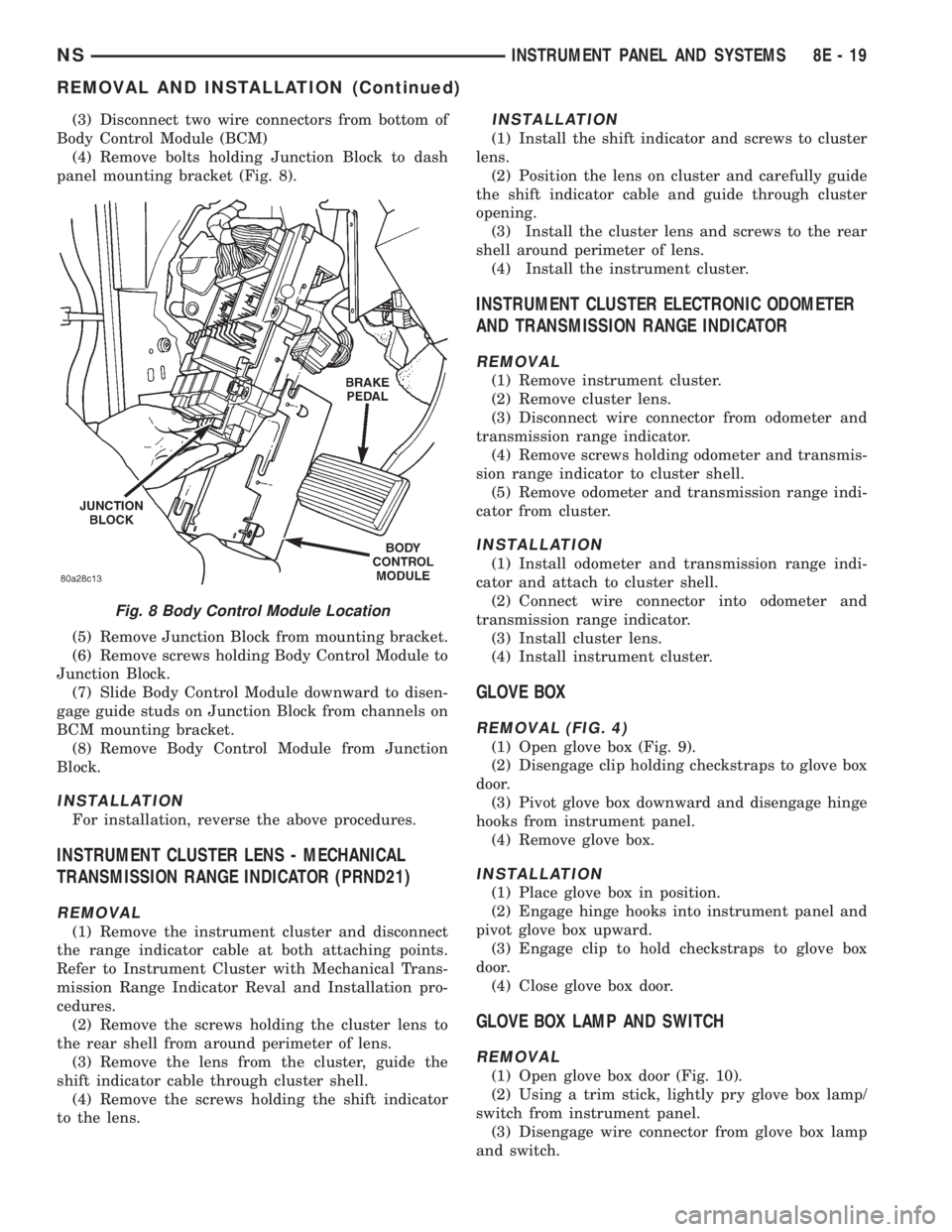
panel mounting bracket (Fig. 8).
(5) Remove Junction Block from mounting bracket.
(6) Remove screws holding Body Control Module to
Junction Block.
(7) Slide Body Control Module downward to disen-
gage guide studs on Junction Block from channels on
BCM mounting bracket.
(8) Remove Body Control Module from Junction
Block.
INSTALLATION
For installation, reverse the above procedures.
INSTRUMENT CLUSTER LENS - MECHANICAL
TRANSMISSION RANGE INDICATOR (PRND21)
REMOVAL
(1) Remove the instrument cluster and disconnect
the range indicator cable at both attaching points.
Refer to Instrument Cluster with Mechanical Trans-
mission Range Indicator Reval and Installation pro-
cedures.
(2) Remove the screws holding the cluster lens to
the rear shell from around perimeter of lens.
(3) Remove the lens from the cluster, guide the
shift indicator cable through cluster shell.
(4) Remove the screws holding the shift indicator
to the lens.
INSTALLATION
(1) Install the shift indicator and screws to cluster
lens.
(2) Position the lens on cluster and carefully guide
the shift indicator cable and guide through cluster
opening.
(3) Install the cluster lens and screws to the rear
shell around perimeter of lens.
(4) Install the instrument cluster.
INSTRUMENT CLUSTER ELECTRONIC ODOMETER
AND TRANSMISSION RANGE INDICATOR
REMOVAL
(1) Remove instrument cluster.
(2) Remove cluster lens.
(3) Disconnect wire connector from odometer and
transmission range indicator.
(4) Remove screws holding odometer and transmis-
sion range indicator to cluster shell.
(5) Remove odometer and transmission range indi-
cator from cluster.
INSTALLATION
(1) Install odometer and transmission range indi-
cator and attach to cluster shell.
(2) Connect wire connector into odometer and
transmission range indicator.
(3) Install cluster lens.
(4) Install instrument cluster.
GLOVE BOX
REMOVAL (FIG. 4)
(1) Open glove box (Fig. 9).
(2) Disengage clip holding checkstraps to glove box
door.
(3) Pivot glove box downward and disengage hinge
hooks from instrument panel.
(4) Remove glove box.
INSTALLATION
(1) Place glove box in position.
(2) Engage hinge hooks into instrument panel and
pivot glove box upward.
(3) Engage clip to hold checkstraps to glove box
door.
(4) Close glove box door.
GLOVE BOX LAMP AND SWITCH
REMOVAL
(1) Open glove box door (Fig. 10).
(2) Using a trim stick, lightly pry glove box lamp/
switch from instrument panel.
(3) Disengage wire connector from glove box lamp
and switch.
Fig. 8 Body Control Module Location
NSINSTRUMENT PANEL AND SYSTEMS 8E - 19
REMOVAL AND INSTALLATION (Continued)
Page 356 of 1938
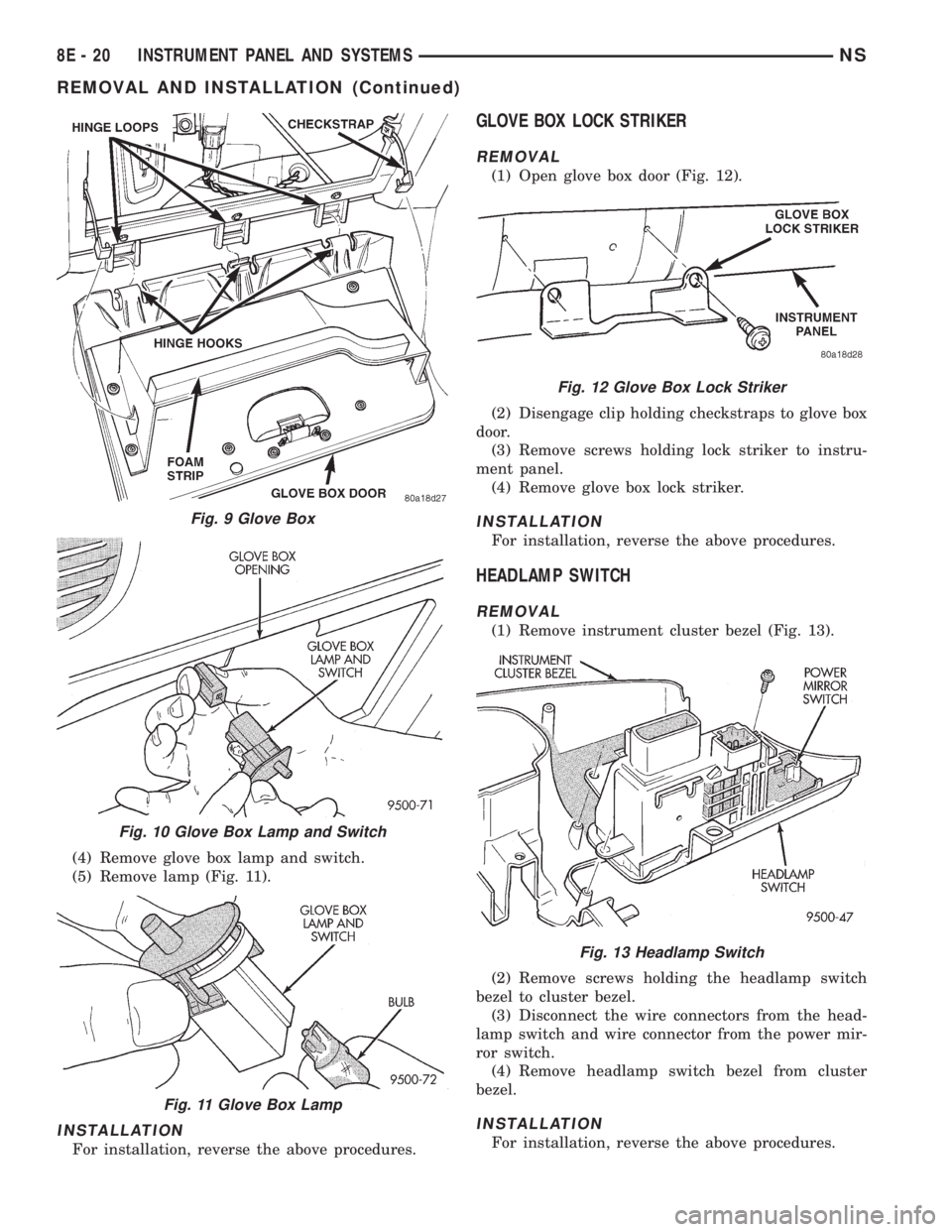
(4) Remove glove box lamp and switch.
(5) Remove lamp (Fig. 11).
INSTALLATION
For installation, reverse the above procedures.
GLOVE BOX LOCK STRIKER
REMOVAL
(1) Open glove box door (Fig. 12).
(2) Disengage clip holding checkstraps to glove box
door.
(3) Remove screws holding lock striker to instru-
ment panel.
(4) Remove glove box lock striker.
INSTALLATION
For installation, reverse the above procedures.
HEADLAMP SWITCH
REMOVAL
(1) Remove instrument cluster bezel (Fig. 13).
(2) Remove screws holding the headlamp switch
bezel to cluster bezel.
(3) Disconnect the wire connectors from the head-
lamp switch and wire connector from the power mir-
ror switch.
(4) Remove headlamp switch bezel from cluster
bezel.
INSTALLATION
For installation, reverse the above procedures.
Fig. 9 Glove Box
Fig. 10 Glove Box Lamp and Switch
Fig. 11 Glove Box Lamp
Fig. 12 Glove Box Lock Striker
Fig. 13 Headlamp Switch
8E - 20 INSTRUMENT PANEL AND SYSTEMSNS
REMOVAL AND INSTALLATION (Continued)
Page 357 of 1938
HEADLAMP SWITCH LAMP(S)
REMOVAL
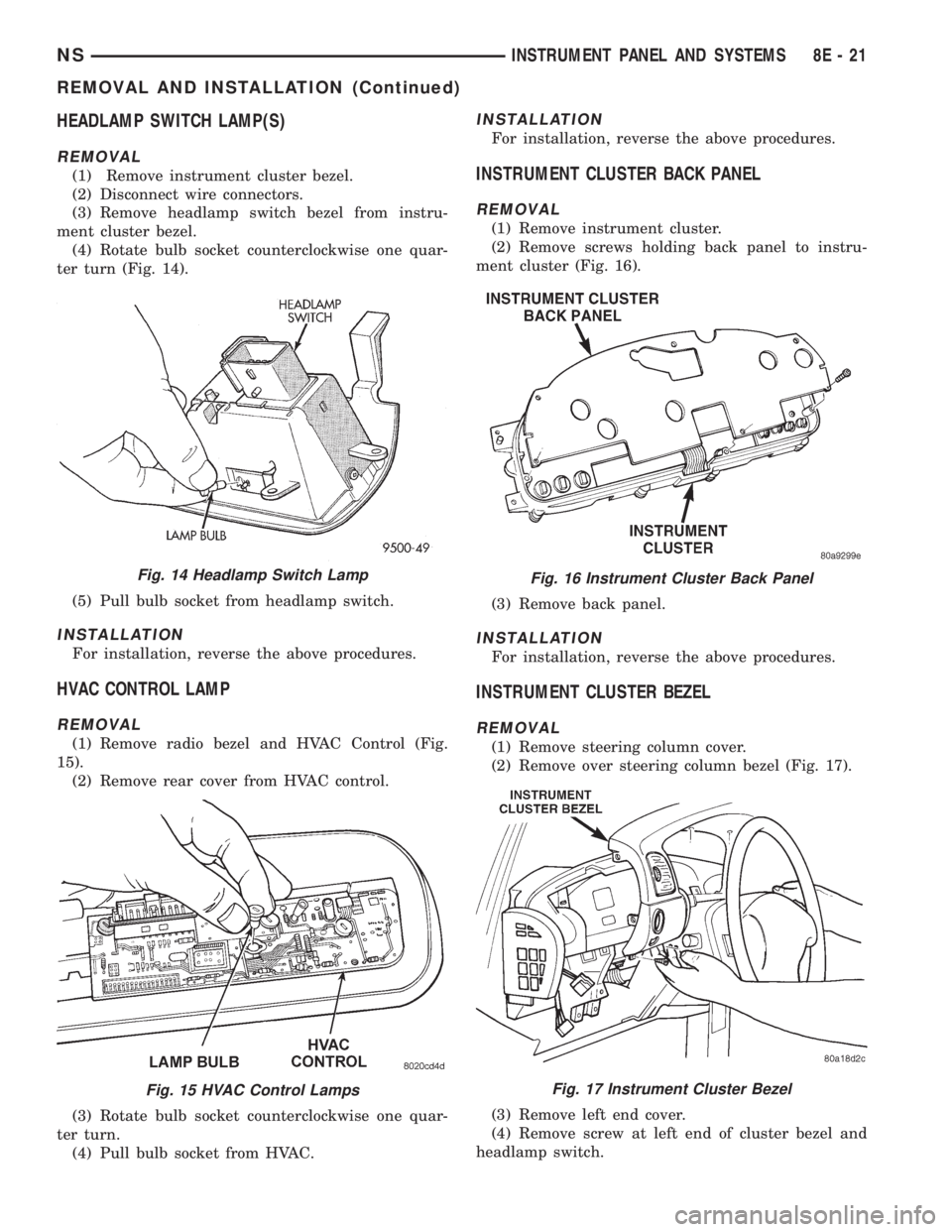
(1) Remove instrument cluster bezel.
(2) Disconnect wire connectors.
(3) Remove headlamp switch bezel from instru-
ment cluster bezel.
(4) Rotate bulb socket counterclockwise one quar-
ter turn (Fig. 14).
(5) Pull bulb socket from headlamp switch.
INSTALLATION
For installation, reverse the above procedures.
HVAC CONTROL LAMP
REMOVAL
(1) Remove radio bezel and HVAC Control (Fig.
15).
(2) Remove rear cover from HVAC control.
(3) Rotate bulb socket counterclockwise one quar-
ter turn.
(4) Pull bulb socket from HVAC.
INSTALLATION
For installation, reverse the above procedures.
INSTRUMENT CLUSTER BACK PANEL
REMOVAL
(1) Remove instrument cluster.
(2) Remove screws holding back panel to instru-
ment cluster (Fig. 16).
(3) Remove back panel.
INSTALLATION
For installation, reverse the above procedures.
INSTRUMENT CLUSTER BEZEL
REMOVAL
(1) Remove steering column cover.
(2) Remove over steering column bezel (Fig. 17).
(3) Remove left end cover.
(4) Remove screw at left end of cluster bezel and
headlamp switch.
Fig. 14 Headlamp Switch Lamp
Fig. 15 HVAC Control Lamps
Fig. 16 Instrument Cluster Back Panel
Fig. 17 Instrument Cluster Bezel
NSINSTRUMENT PANEL AND SYSTEMS 8E - 21
REMOVAL AND INSTALLATION (Continued)