lock CHRYSLER VOYAGER 1996 Service Manual
[x] Cancel search | Manufacturer: CHRYSLER, Model Year: 1996, Model line: VOYAGER, Model: CHRYSLER VOYAGER 1996Pages: 1938, PDF Size: 55.84 MB
Page 387 of 1938
REMOVAL AND INSTALLATION
CONVENIENCE BIN - CUP HOLDER
REMOVAL
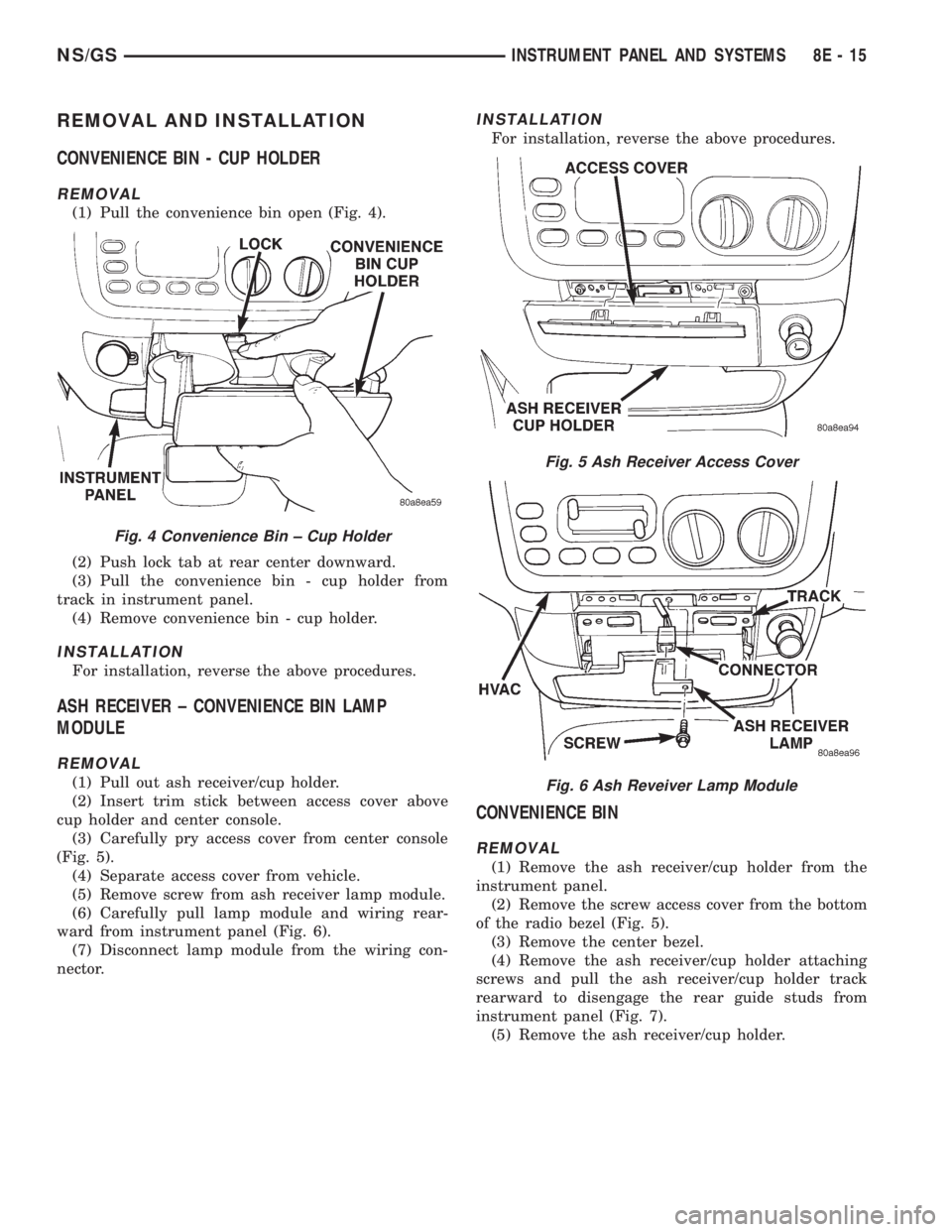
(1) Pull the convenience bin open (Fig. 4).
(2) Push lock tab at rear center downward.
(3) Pull the convenience bin - cup holder from
track in instrument panel.
(4) Remove convenience bin - cup holder.
INSTALLATION
For installation, reverse the above procedures.
ASH RECEIVER ± CONVENIENCE BIN LAMP
MODULE
REMOVAL
(1) Pull out ash receiver/cup holder.
(2) Insert trim stick between access cover above
cup holder and center console.
(3) Carefully pry access cover from center console
(Fig. 5).
(4) Separate access cover from vehicle.
(5) Remove screw from ash receiver lamp module.
(6) Carefully pull lamp module and wiring rear-
ward from instrument panel (Fig. 6).
(7) Disconnect lamp module from the wiring con-
nector.
INSTALLATION
For installation, reverse the above procedures.
CONVENIENCE BIN
REMOVAL
(1) Remove the ash receiver/cup holder from the
instrument panel.
(2) Remove the screw access cover from the bottom
of the radio bezel (Fig. 5).
(3) Remove the center bezel.
(4) Remove the ash receiver/cup holder attaching
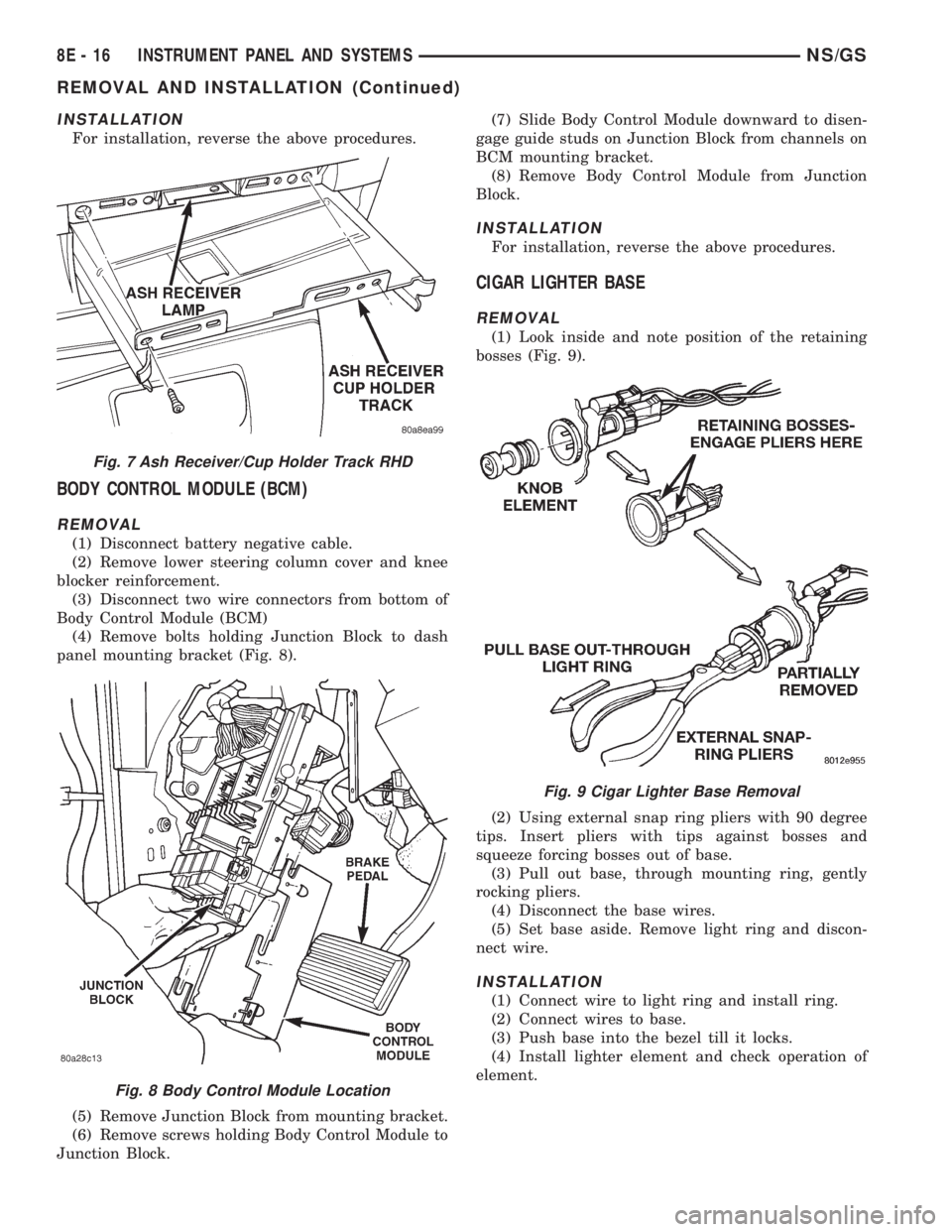
screws and pull the ash receiver/cup holder track
rearward to disengage the rear guide studs from
instrument panel (Fig. 7).
(5) Remove the ash receiver/cup holder.
Fig. 4 Convenience Bin ± Cup Holder
Fig. 5 Ash Receiver Access Cover
Fig. 6 Ash Reveiver Lamp Module
NS/GSINSTRUMENT PANEL AND SYSTEMS 8E - 15
Page 388 of 1938
INSTALLATION
For installation, reverse the above procedures.
BODY CONTROL MODULE (BCM)
REMOVAL
(1) Disconnect battery negative cable.
(2) Remove lower steering column cover and knee
blocker reinforcement.
(3) Disconnect two wire connectors from bottom of
Body Control Module (BCM)
(4) Remove bolts holding Junction Block to dash
panel mounting bracket (Fig. 8).
(5) Remove Junction Block from mounting bracket.
(6) Remove screws holding Body Control Module to
Junction Block.(7) Slide Body Control Module downward to disen-
gage guide studs on Junction Block from channels on
BCM mounting bracket.
(8) Remove Body Control Module from Junction
Block.
INSTALLATION
For installation, reverse the above procedures.
CIGAR LIGHTER BASE
REMOVAL
(1) Look inside and note position of the retaining
bosses (Fig. 9).
(2) Using external snap ring pliers with 90 degree
tips. Insert pliers with tips against bosses and
squeeze forcing bosses out of base.
(3) Pull out base, through mounting ring, gently
rocking pliers.
(4) Disconnect the base wires.
(5) Set base aside. Remove light ring and discon-
nect wire.
INSTALLATION
(1) Connect wire to light ring and install ring.
(2) Connect wires to base.
(3) Push base into the bezel till it locks.
(4) Install lighter element and check operation of
element.
Fig. 7 Ash Receiver/Cup Holder Track RHD
Fig. 8 Body Control Module Location
Fig. 9 Cigar Lighter Base Removal
8E - 16 INSTRUMENT PANEL AND SYSTEMSNS/GS
REMOVAL AND INSTALLATION (Continued)
Page 389 of 1938
GLOVE BOX
REMOVAL (FIG. 4)
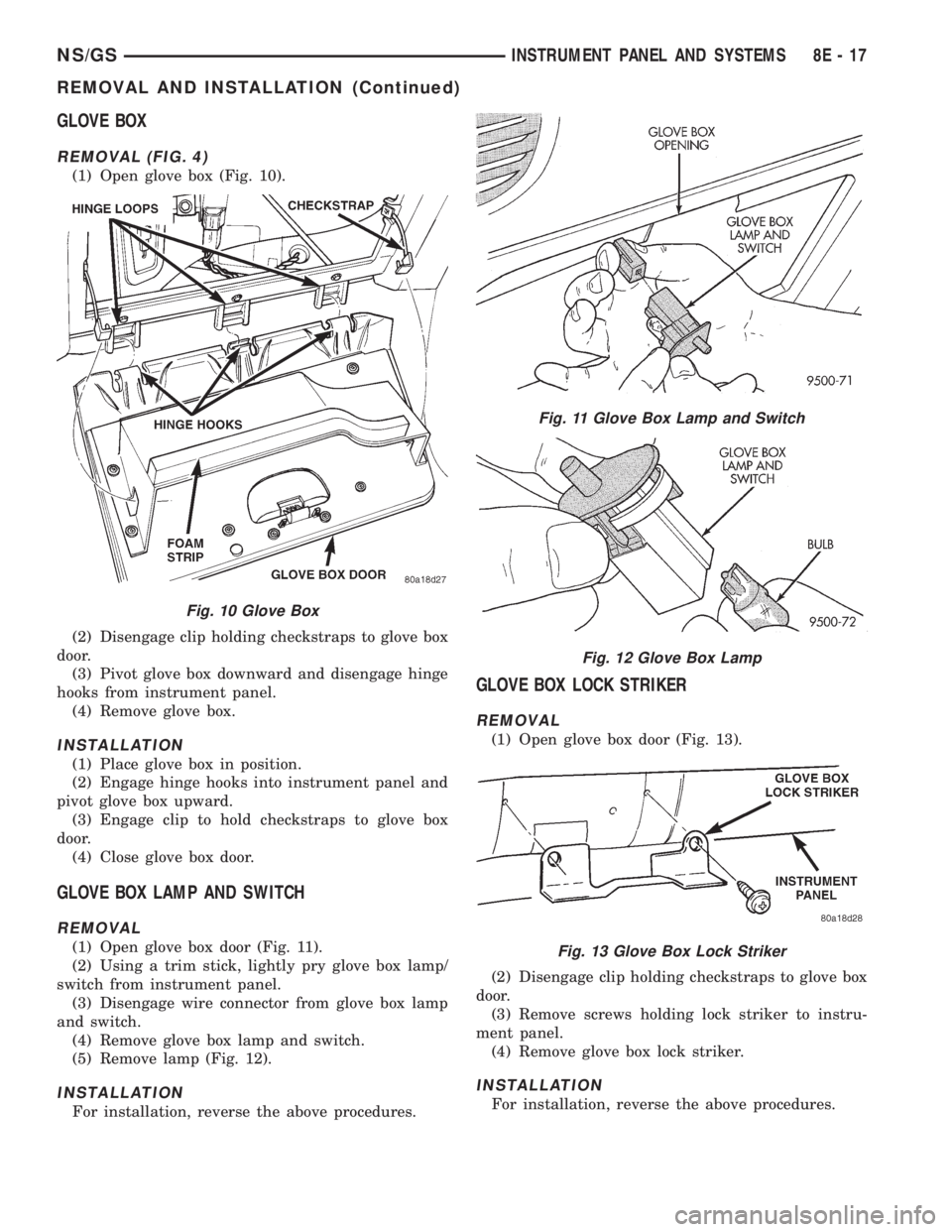
(1) Open glove box (Fig. 10).
(2) Disengage clip holding checkstraps to glove box
door.
(3) Pivot glove box downward and disengage hinge
hooks from instrument panel.
(4) Remove glove box.
INSTALLATION
(1) Place glove box in position.
(2) Engage hinge hooks into instrument panel and
pivot glove box upward.
(3) Engage clip to hold checkstraps to glove box
door.
(4) Close glove box door.
GLOVE BOX LAMP AND SWITCH
REMOVAL
(1) Open glove box door (Fig. 11).
(2) Using a trim stick, lightly pry glove box lamp/
switch from instrument panel.
(3) Disengage wire connector from glove box lamp
and switch.
(4) Remove glove box lamp and switch.
(5) Remove lamp (Fig. 12).
INSTALLATION
For installation, reverse the above procedures.
GLOVE BOX LOCK STRIKER
REMOVAL
(1) Open glove box door (Fig. 13).
(2) Disengage clip holding checkstraps to glove box
door.
(3) Remove screws holding lock striker to instru-
ment panel.
(4) Remove glove box lock striker.
INSTALLATION
For installation, reverse the above procedures.
Fig. 10 Glove Box
Fig. 11 Glove Box Lamp and Switch
Fig. 12 Glove Box Lamp
Fig. 13 Glove Box Lock Striker
NS/GSINSTRUMENT PANEL AND SYSTEMS 8E - 17
REMOVAL AND INSTALLATION (Continued)
Page 390 of 1938
HEADLAMP SWITCH
REMOVAL
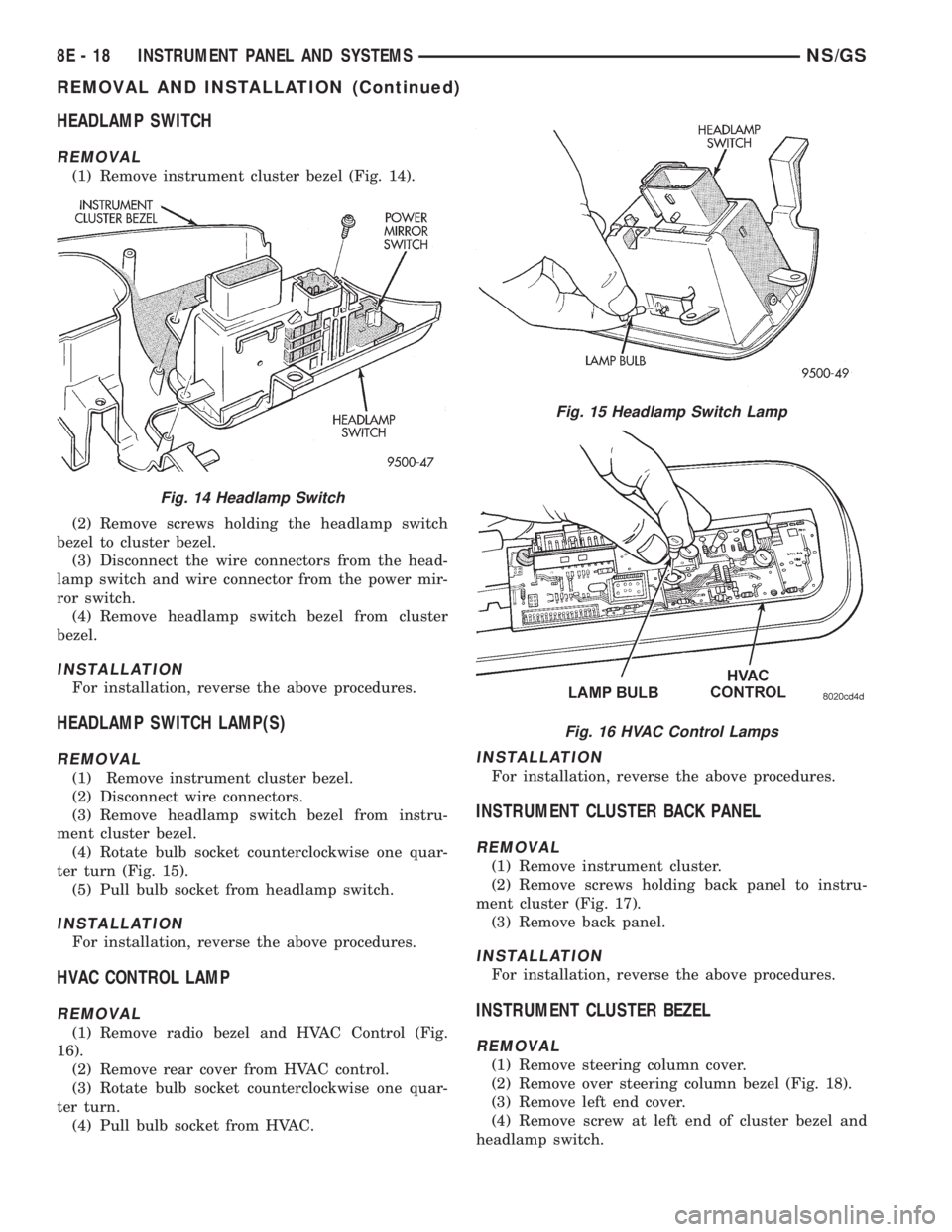
(1) Remove instrument cluster bezel (Fig. 14).
(2) Remove screws holding the headlamp switch
bezel to cluster bezel.
(3) Disconnect the wire connectors from the head-
lamp switch and wire connector from the power mir-
ror switch.
(4) Remove headlamp switch bezel from cluster
bezel.
INSTALLATION
For installation, reverse the above procedures.
HEADLAMP SWITCH LAMP(S)
REMOVAL
(1) Remove instrument cluster bezel.
(2) Disconnect wire connectors.
(3) Remove headlamp switch bezel from instru-
ment cluster bezel.
(4) Rotate bulb socket counterclockwise one quar-
ter turn (Fig. 15).
(5) Pull bulb socket from headlamp switch.
INSTALLATION
For installation, reverse the above procedures.
HVAC CONTROL LAMP
REMOVAL
(1) Remove radio bezel and HVAC Control (Fig.
16).
(2) Remove rear cover from HVAC control.
(3) Rotate bulb socket counterclockwise one quar-
ter turn.
(4) Pull bulb socket from HVAC.
INSTALLATION
For installation, reverse the above procedures.
INSTRUMENT CLUSTER BACK PANEL
REMOVAL
(1) Remove instrument cluster.
(2) Remove screws holding back panel to instru-
ment cluster (Fig. 17).
(3) Remove back panel.
INSTALLATION
For installation, reverse the above procedures.
INSTRUMENT CLUSTER BEZEL
REMOVAL
(1) Remove steering column cover.
(2) Remove over steering column bezel (Fig. 18).
(3) Remove left end cover.
(4) Remove screw at left end of cluster bezel and
headlamp switch.
Fig. 14 Headlamp Switch
Fig. 15 Headlamp Switch Lamp
Fig. 16 HVAC Control Lamps
8E - 18 INSTRUMENT PANEL AND SYSTEMSNS/GS
REMOVAL AND INSTALLATION (Continued)
Page 393 of 1938
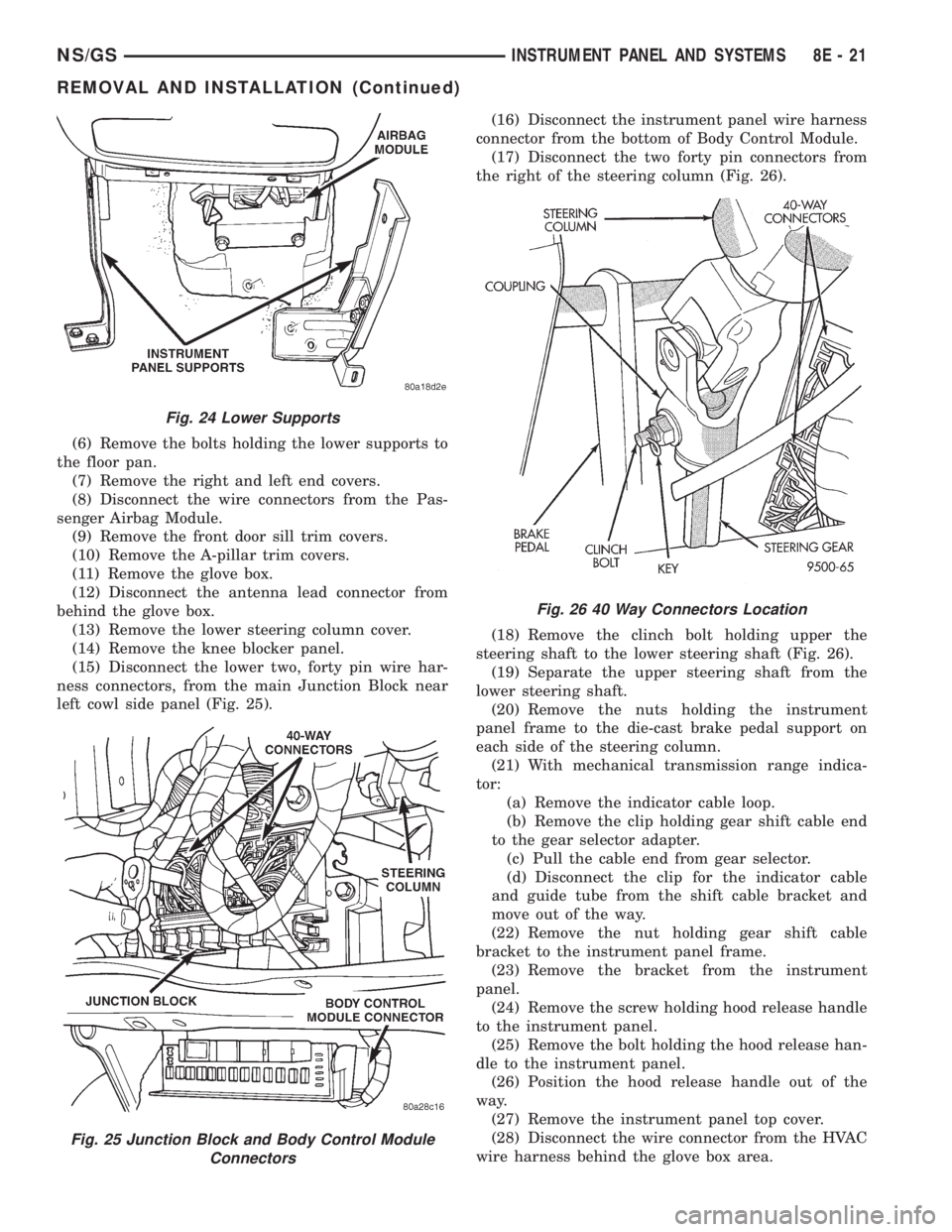
(6) Remove the bolts holding the lower supports to
the floor pan.
(7) Remove the right and left end covers.
(8) Disconnect the wire connectors from the Pas-
senger Airbag Module.
(9) Remove the front door sill trim covers.
(10) Remove the A-pillar trim covers.
(11) Remove the glove box.
(12) Disconnect the antenna lead connector from
behind the glove box.
(13) Remove the lower steering column cover.
(14) Remove the knee blocker panel.
(15) Disconnect the lower two, forty pin wire har-
ness connectors, from the main Junction Block near
left cowl side panel (Fig. 25).(16) Disconnect the instrument panel wire harness
connector from the bottom of Body Control Module.
(17) Disconnect the two forty pin connectors from
the right of the steering column (Fig. 26).
(18) Remove the clinch bolt holding upper the
steering shaft to the lower steering shaft (Fig. 26).
(19) Separate the upper steering shaft from the
lower steering shaft.
(20) Remove the nuts holding the instrument
panel frame to the die-cast brake pedal support on
each side of the steering column.
(21) With mechanical transmission range indica-
tor:
(a) Remove the indicator cable loop.
(b) Remove the clip holding gear shift cable end
to the gear selector adapter.
(c) Pull the cable end from gear selector.
(d) Disconnect the clip for the indicator cable
and guide tube from the shift cable bracket and
move out of the way.
(22) Remove the nut holding gear shift cable
bracket to the instrument panel frame.
(23) Remove the bracket from the instrument
panel.
(24) Remove the screw holding hood release handle
to the instrument panel.
(25) Remove the bolt holding the hood release han-
dle to the instrument panel.
(26) Position the hood release handle out of the
way.
(27) Remove the instrument panel top cover.
(28) Disconnect the wire connector from the HVAC
wire harness behind the glove box area.
Fig. 24 Lower Supports
Fig. 25 Junction Block and Body Control Module
Connectors
Fig. 26 40 Way Connectors Location
NS/GSINSTRUMENT PANEL AND SYSTEMS 8E - 21
REMOVAL AND INSTALLATION (Continued)
Page 394 of 1938
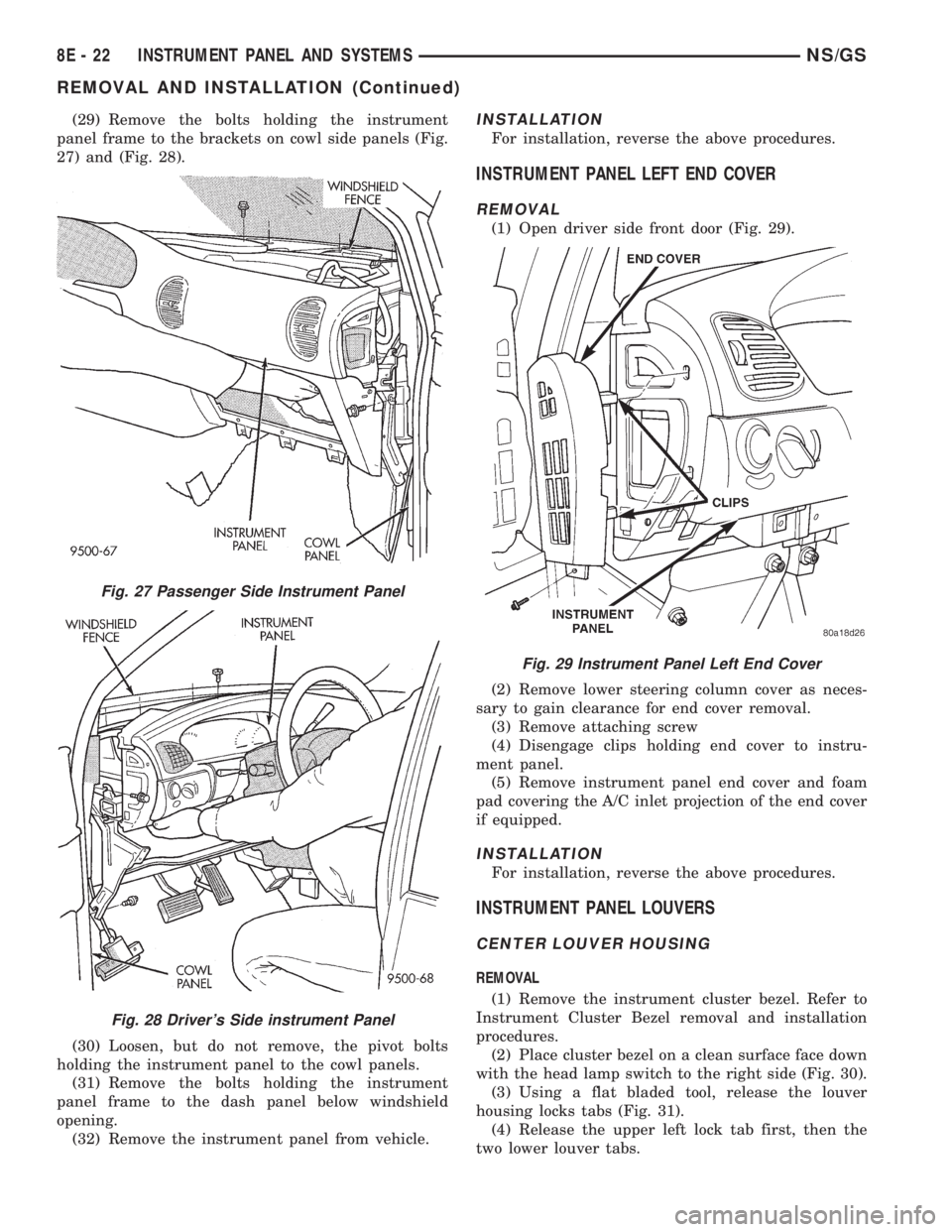
(29) Remove the bolts holding the instrument
panel frame to the brackets on cowl side panels (Fig.
27) and (Fig. 28).
(30) Loosen, but do not remove, the pivot bolts
holding the instrument panel to the cowl panels.
(31) Remove the bolts holding the instrument
panel frame to the dash panel below windshield
opening.
(32) Remove the instrument panel from vehicle.INSTALLATION
For installation, reverse the above procedures.
INSTRUMENT PANEL LEFT END COVER
REMOVAL
(1) Open driver side front door (Fig. 29).
(2) Remove lower steering column cover as neces-
sary to gain clearance for end cover removal.
(3) Remove attaching screw
(4) Disengage clips holding end cover to instru-
ment panel.
(5) Remove instrument panel end cover and foam
pad covering the A/C inlet projection of the end cover
if equipped.
INSTALLATION
For installation, reverse the above procedures.
INSTRUMENT PANEL LOUVERS
CENTER LOUVER HOUSING
REMOVAL
(1) Remove the instrument cluster bezel. Refer to
Instrument Cluster Bezel removal and installation
procedures.
(2) Place cluster bezel on a clean surface face down
with the head lamp switch to the right side (Fig. 30).
(3) Using a flat bladed tool, release the louver
housing locks tabs (Fig. 31).
(4) Release the upper left lock tab first, then the
two lower louver tabs.
Fig. 27 Passenger Side Instrument Panel
Fig. 28 Driver's Side instrument Panel
Fig. 29 Instrument Panel Left End Cover
8E - 22 INSTRUMENT PANEL AND SYSTEMSNS/GS
REMOVAL AND INSTALLATION (Continued)
Page 395 of 1938
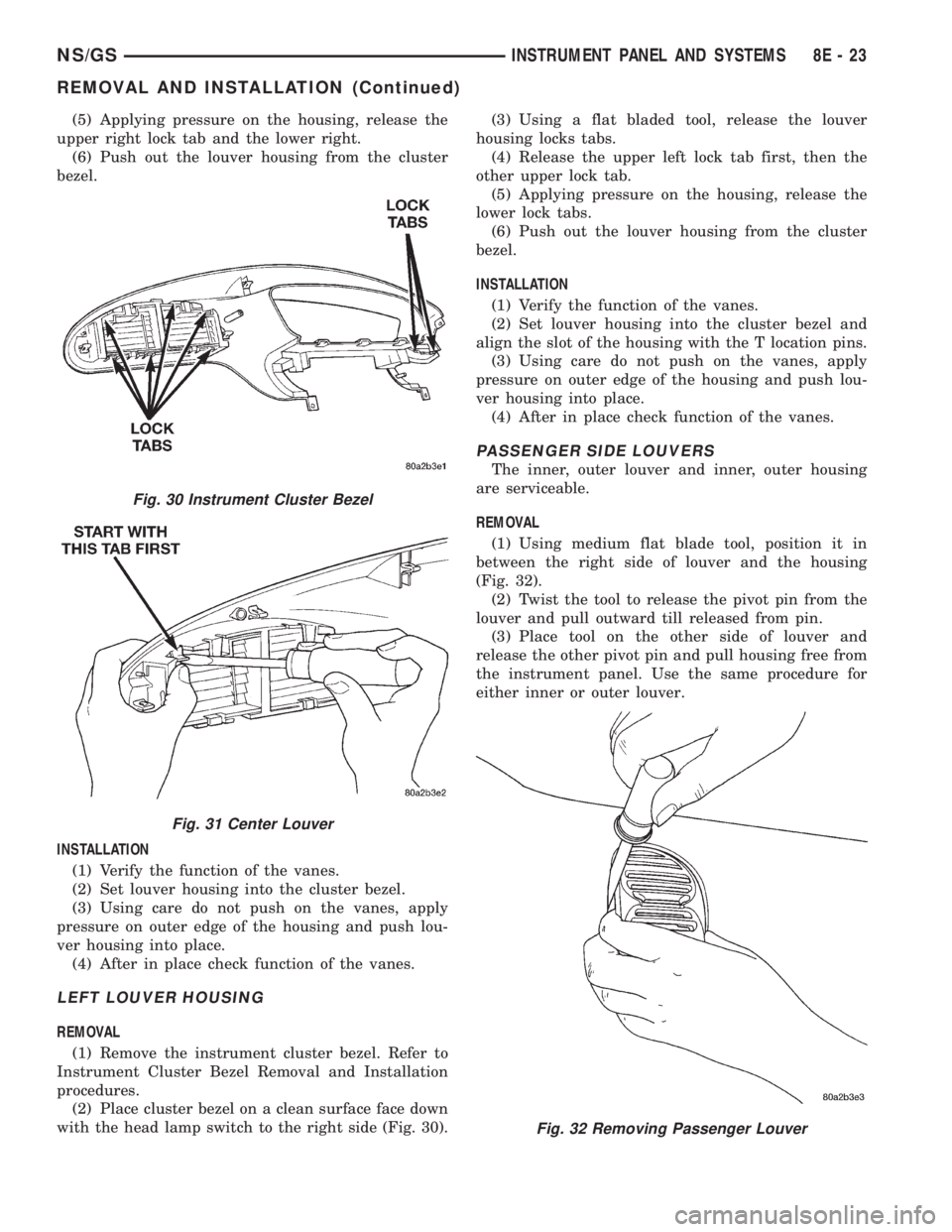
(5) Applying pressure on the housing, release the
upper right lock tab and the lower right.
(6) Push out the louver housing from the cluster
bezel.
INSTALLATION
(1) Verify the function of the vanes.
(2) Set louver housing into the cluster bezel.
(3) Using care do not push on the vanes, apply
pressure on outer edge of the housing and push lou-
ver housing into place.
(4) After in place check function of the vanes.
LEFT LOUVER HOUSING
REMOVAL
(1) Remove the instrument cluster bezel. Refer to
Instrument Cluster Bezel Removal and Installation
procedures.
(2) Place cluster bezel on a clean surface face down
with the head lamp switch to the right side (Fig. 30).(3) Using a flat bladed tool, release the louver
housing locks tabs.
(4) Release the upper left lock tab first, then the
other upper lock tab.
(5) Applying pressure on the housing, release the
lower lock tabs.
(6) Push out the louver housing from the cluster
bezel.
INSTALLATION
(1) Verify the function of the vanes.
(2) Set louver housing into the cluster bezel and
align the slot of the housing with the T location pins.
(3) Using care do not push on the vanes, apply
pressure on outer edge of the housing and push lou-
ver housing into place.
(4) After in place check function of the vanes.
PASSENGER SIDE LOUVERS
The inner, outer louver and inner, outer housing
are serviceable.
REMOVAL
(1) Using medium flat blade tool, position it in
between the right side of louver and the housing
(Fig. 32).
(2) Twist the tool to release the pivot pin from the
louver and pull outward till released from pin.
(3) Place tool on the other side of louver and
release the other pivot pin and pull housing free from
the instrument panel. Use the same procedure for
either inner or outer louver.
Fig. 30 Instrument Cluster Bezel
Fig. 31 Center Louver
Fig. 32 Removing Passenger Louver
NS/GSINSTRUMENT PANEL AND SYSTEMS 8E - 23
REMOVAL AND INSTALLATION (Continued)
Page 397 of 1938
INSTALLATION
(1) Place instrument panel top cover in position on
vehicle.
(2) Push top cover forward to engage hooks to hold
front of top cover to instrument panel.
(3) Connect wire harness to message center.
(4) Engage clips to hold rear edge of top cover to
instrument panel.
(5) Pull top cover rearward.
(6) Install A-pillar trim.
INSTRUMENT PANEL RIGHT END COVER
REMOVAL
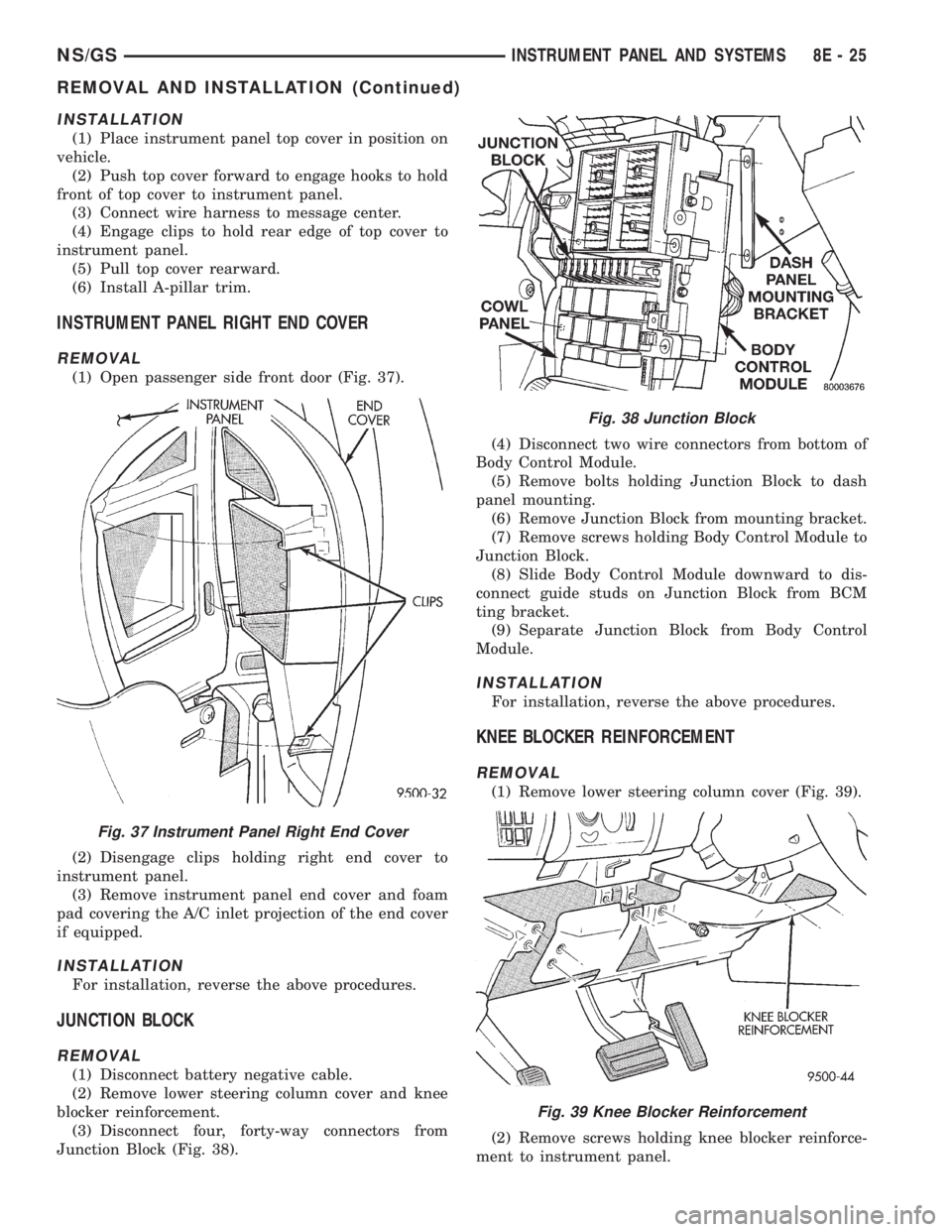
(1) Open passenger side front door (Fig. 37).
(2) Disengage clips holding right end cover to
instrument panel.
(3) Remove instrument panel end cover and foam
pad covering the A/C inlet projection of the end cover
if equipped.
INSTALLATION
For installation, reverse the above procedures.
JUNCTION BLOCK
REMOVAL
(1) Disconnect battery negative cable.
(2) Remove lower steering column cover and knee
blocker reinforcement.
(3) Disconnect four, forty-way connectors from
Junction Block (Fig. 38).(4) Disconnect two wire connectors from bottom of
Body Control Module.
(5) Remove bolts holding Junction Block to dash
panel mounting.
(6) Remove Junction Block from mounting bracket.
(7) Remove screws holding Body Control Module to
Junction Block.
(8) Slide Body Control Module downward to dis-
connect guide studs on Junction Block from BCM
ting bracket.
(9) Separate Junction Block from Body Control
Module.
INSTALLATION
For installation, reverse the above procedures.
KNEE BLOCKER REINFORCEMENT
REMOVAL
(1) Remove lower steering column cover (Fig. 39).
(2) Remove screws holding knee blocker reinforce-
ment to instrument panel.
Fig. 37 Instrument Panel Right End Cover
Fig. 38 Junction Block
Fig. 39 Knee Blocker Reinforcement
NS/GSINSTRUMENT PANEL AND SYSTEMS 8E - 25
REMOVAL AND INSTALLATION (Continued)
Page 398 of 1938
(3) Remove reinforcement.
INSTALLATION
(1) Place reinforcement in position.
(2) Install screws to hold knee blocker reinforce-
ment to instrument panel.
(3) Install lower steering column cover.
LOWER CONSOLE
REMOVAL
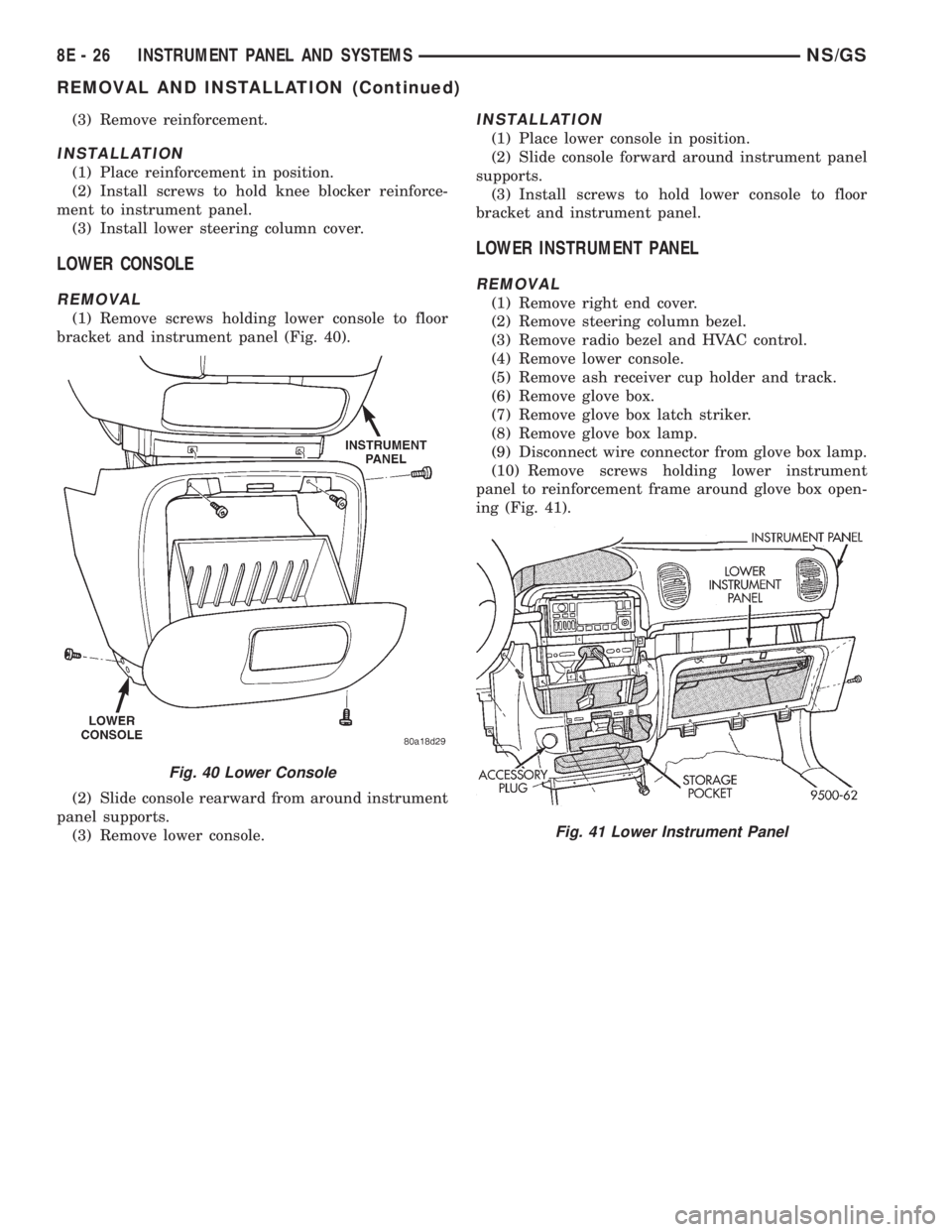
(1) Remove screws holding lower console to floor
bracket and instrument panel (Fig. 40).
(2) Slide console rearward from around instrument
panel supports.
(3) Remove lower console.
INSTALLATION
(1) Place lower console in position.
(2) Slide console forward around instrument panel
supports.
(3) Install screws to hold lower console to floor
bracket and instrument panel.
LOWER INSTRUMENT PANEL
REMOVAL
(1) Remove right end cover.
(2) Remove steering column bezel.
(3) Remove radio bezel and HVAC control.
(4) Remove lower console.
(5) Remove ash receiver cup holder and track.
(6) Remove glove box.
(7) Remove glove box latch striker.
(8) Remove glove box lamp.
(9) Disconnect wire connector from glove box lamp.
(10) Remove screws holding lower instrument
panel to reinforcement frame around glove box open-
ing (Fig. 41).
Fig. 40 Lower Console
Fig. 41 Lower Instrument Panel
8E - 26 INSTRUMENT PANEL AND SYSTEMSNS/GS
REMOVAL AND INSTALLATION (Continued)
Page 400 of 1938
INSTALLATION
(1) Place message center in position on top cover.
(2) Install screws to hold message center to instru-
ment panel top cover.
(3) Connect wire connector into back of message
center.
(4) Install instrument panel top cover.
(5) Install A-pillar trim.
OVER STEERING COLUMN BEZEL
REMOVAL
(1) Remove the lower steering column cover.
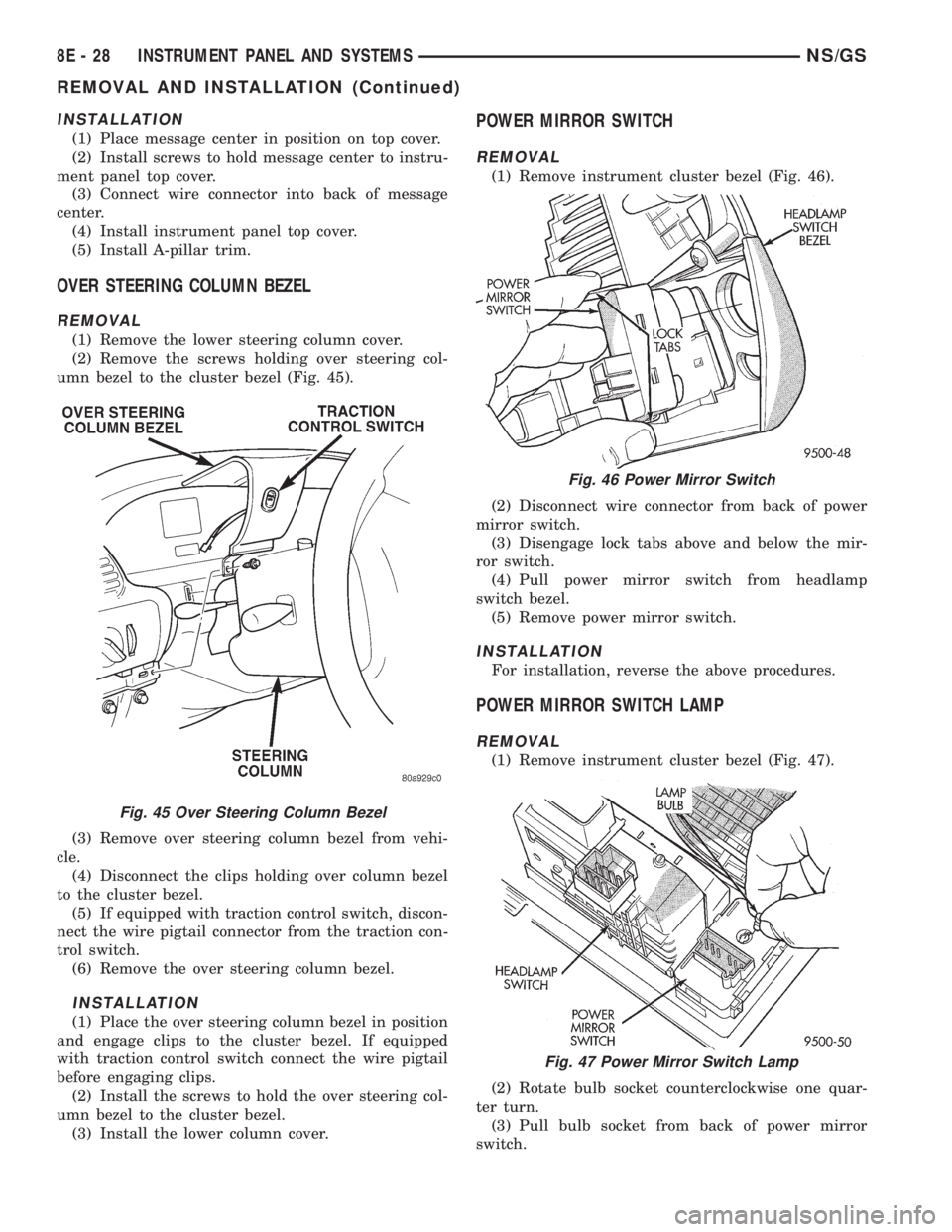
(2) Remove the screws holding over steering col-
umn bezel to the cluster bezel (Fig. 45).
(3) Remove over steering column bezel from vehi-
cle.
(4) Disconnect the clips holding over column bezel
to the cluster bezel.
(5) If equipped with traction control switch, discon-
nect the wire pigtail connector from the traction con-
trol switch.
(6) Remove the over steering column bezel.
INSTALLATION
(1) Place the over steering column bezel in position
and engage clips to the cluster bezel. If equipped
with traction control switch connect the wire pigtail
before engaging clips.
(2) Install the screws to hold the over steering col-
umn bezel to the cluster bezel.
(3) Install the lower column cover.
POWER MIRROR SWITCH
REMOVAL
(1) Remove instrument cluster bezel (Fig. 46).
(2) Disconnect wire connector from back of power
mirror switch.
(3) Disengage lock tabs above and below the mir-
ror switch.
(4) Pull power mirror switch from headlamp
switch bezel.
(5) Remove power mirror switch.
INSTALLATION
For installation, reverse the above procedures.
POWER MIRROR SWITCH LAMP
REMOVAL
(1) Remove instrument cluster bezel (Fig. 47).
(2) Rotate bulb socket counterclockwise one quar-
ter turn.
(3) Pull bulb socket from back of power mirror
switch.
Fig. 45 Over Steering Column Bezel
Fig. 46 Power Mirror Switch
Fig. 47 Power Mirror Switch Lamp
8E - 28 INSTRUMENT PANEL AND SYSTEMSNS/GS
REMOVAL AND INSTALLATION (Continued)