air condition CHRYSLER VOYAGER 1996 Workshop Manual
[x] Cancel search | Manufacturer: CHRYSLER, Model Year: 1996, Model line: VOYAGER, Model: CHRYSLER VOYAGER 1996Pages: 1938, PDF Size: 55.84 MB
Page 350 of 1938
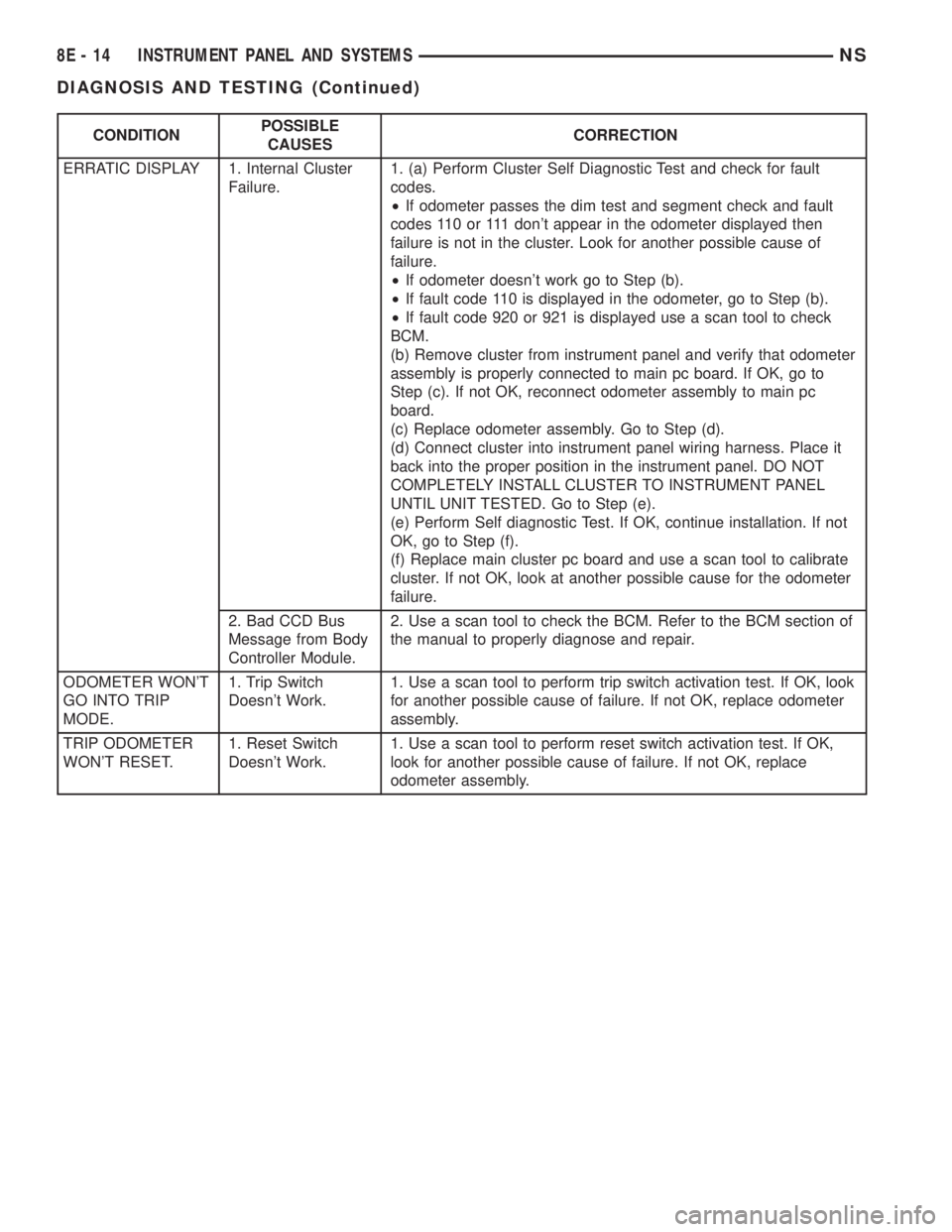
CONDITIONPOSSIBLE
CAUSESCORRECTION
ERRATIC DISPLAY 1. Internal Cluster
Failure.1. (a) Perform Cluster Self Diagnostic Test and check for fault
codes.
²If odometer passes the dim test and segment check and fault
codes 110 or 111 don't appear in the odometer displayed then
failure is not in the cluster. Look for another possible cause of
failure.
²If odometer doesn't work go to Step (b).
²If fault code 110 is displayed in the odometer, go to Step (b).
²If fault code 920 or 921 is displayed use a scan tool to check
BCM.
(b) Remove cluster from instrument panel and verify that odometer
assembly is properly connected to main pc board. If OK, go to
Step (c). If not OK, reconnect odometer assembly to main pc
board.
(c) Replace odometer assembly. Go to Step (d).
(d) Connect cluster into instrument panel wiring harness. Place it
back into the proper position in the instrument panel. DO NOT
COMPLETELY INSTALL CLUSTER TO INSTRUMENT PANEL
UNTIL UNIT TESTED. Go to Step (e).
(e) Perform Self diagnostic Test. If OK, continue installation. If not
OK, go to Step (f).
(f) Replace main cluster pc board and use a scan tool to calibrate
cluster. If not OK, look at another possible cause for the odometer
failure.
2. Bad CCD Bus
Message from Body
Controller Module.2. Use a scan tool to check the BCM. Refer to the BCM section of
the manual to properly diagnose and repair.
ODOMETER WON'T
GO INTO TRIP
MODE.1. Trip Switch
Doesn't Work.1. Use a scan tool to perform trip switch activation test. If OK, look
for another possible cause of failure. If not OK, replace odometer
assembly.
TRIP ODOMETER
WON'T RESET.1. Reset Switch
Doesn't Work.1. Use a scan tool to perform reset switch activation test. If OK,
look for another possible cause of failure. If not OK, replace
odometer assembly.
8E - 14 INSTRUMENT PANEL AND SYSTEMSNS
DIAGNOSIS AND TESTING (Continued)
Page 352 of 1938
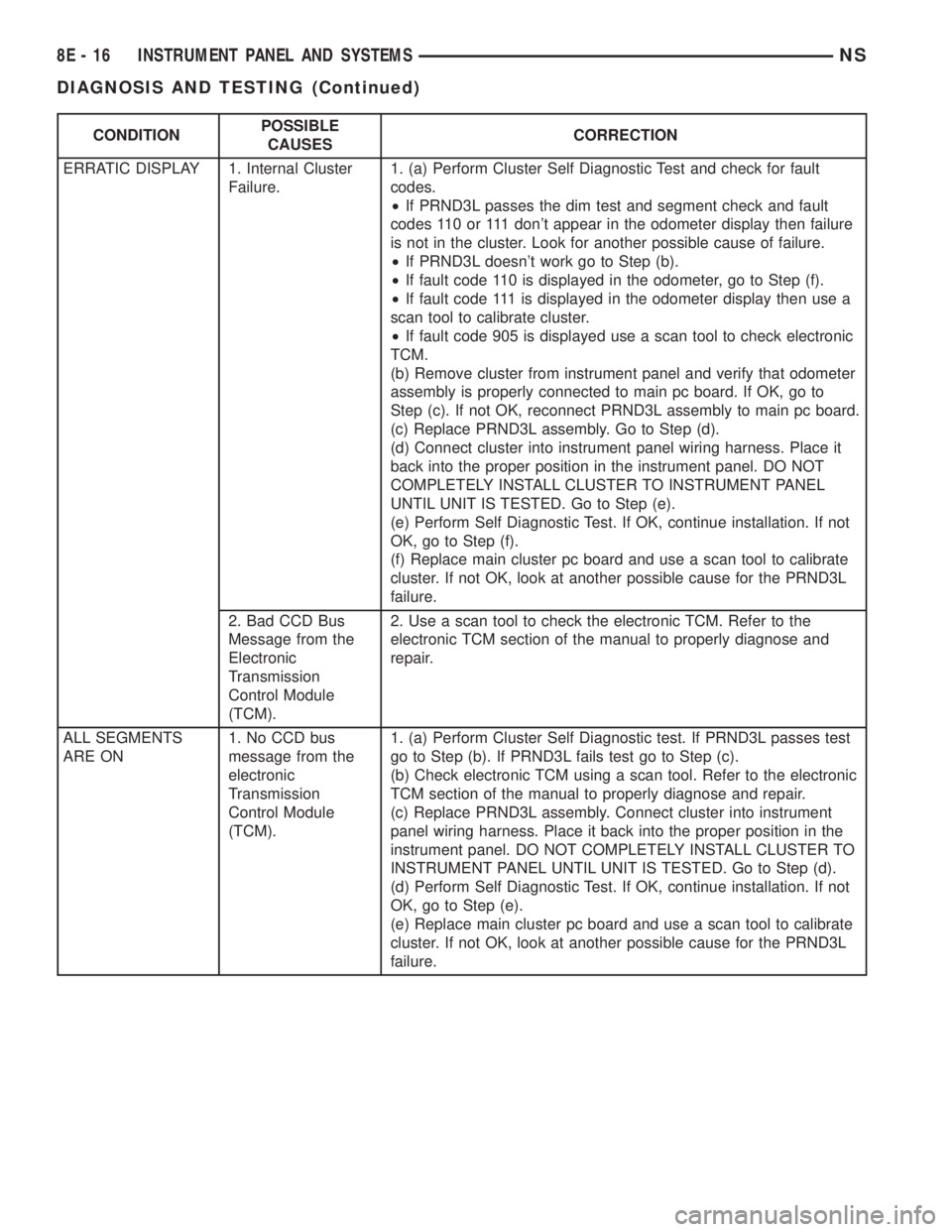
CONDITIONPOSSIBLE
CAUSESCORRECTION
ERRATIC DISPLAY 1. Internal Cluster
Failure.1. (a) Perform Cluster Self Diagnostic Test and check for fault
codes.
²If PRND3L passes the dim test and segment check and fault
codes 110 or 111 don't appear in the odometer display then failure
is not in the cluster. Look for another possible cause of failure.
²If PRND3L doesn't work go to Step (b).
²If fault code 110 is displayed in the odometer, go to Step (f).
²If fault code 111 is displayed in the odometer display then use a
scan tool to calibrate cluster.
²If fault code 905 is displayed use a scan tool to check electronic
TCM.
(b) Remove cluster from instrument panel and verify that odometer
assembly is properly connected to main pc board. If OK, go to
Step (c). If not OK, reconnect PRND3L assembly to main pc board.
(c) Replace PRND3L assembly. Go to Step (d).
(d) Connect cluster into instrument panel wiring harness. Place it
back into the proper position in the instrument panel. DO NOT
COMPLETELY INSTALL CLUSTER TO INSTRUMENT PANEL
UNTIL UNIT IS TESTED. Go to Step (e).
(e) Perform Self Diagnostic Test. If OK, continue installation. If not
OK, go to Step (f).
(f) Replace main cluster pc board and use a scan tool to calibrate
cluster. If not OK, look at another possible cause for the PRND3L
failure.
2. Bad CCD Bus
Message from the
Electronic
Transmission
Control Module
(TCM).2. Use a scan tool to check the electronic TCM. Refer to the
electronic TCM section of the manual to properly diagnose and
repair.
ALL SEGMENTS
ARE ON1. No CCD bus
message from the
electronic
Transmission
Control Module
(TCM).1. (a) Perform Cluster Self Diagnostic test. If PRND3L passes test
go to Step (b). If PRND3L fails test go to Step (c).
(b) Check electronic TCM using a scan tool. Refer to the electronic
TCM section of the manual to properly diagnose and repair.
(c) Replace PRND3L assembly. Connect cluster into instrument
panel wiring harness. Place it back into the proper position in the
instrument panel. DO NOT COMPLETELY INSTALL CLUSTER TO
INSTRUMENT PANEL UNTIL UNIT IS TESTED. Go to Step (d).
(d) Perform Self Diagnostic Test. If OK, continue installation. If not
OK, go to Step (e).
(e) Replace main cluster pc board and use a scan tool to calibrate
cluster. If not OK, look at another possible cause for the PRND3L
failure.
8E - 16 INSTRUMENT PANEL AND SYSTEMSNS
DIAGNOSIS AND TESTING (Continued)
Page 406 of 1938
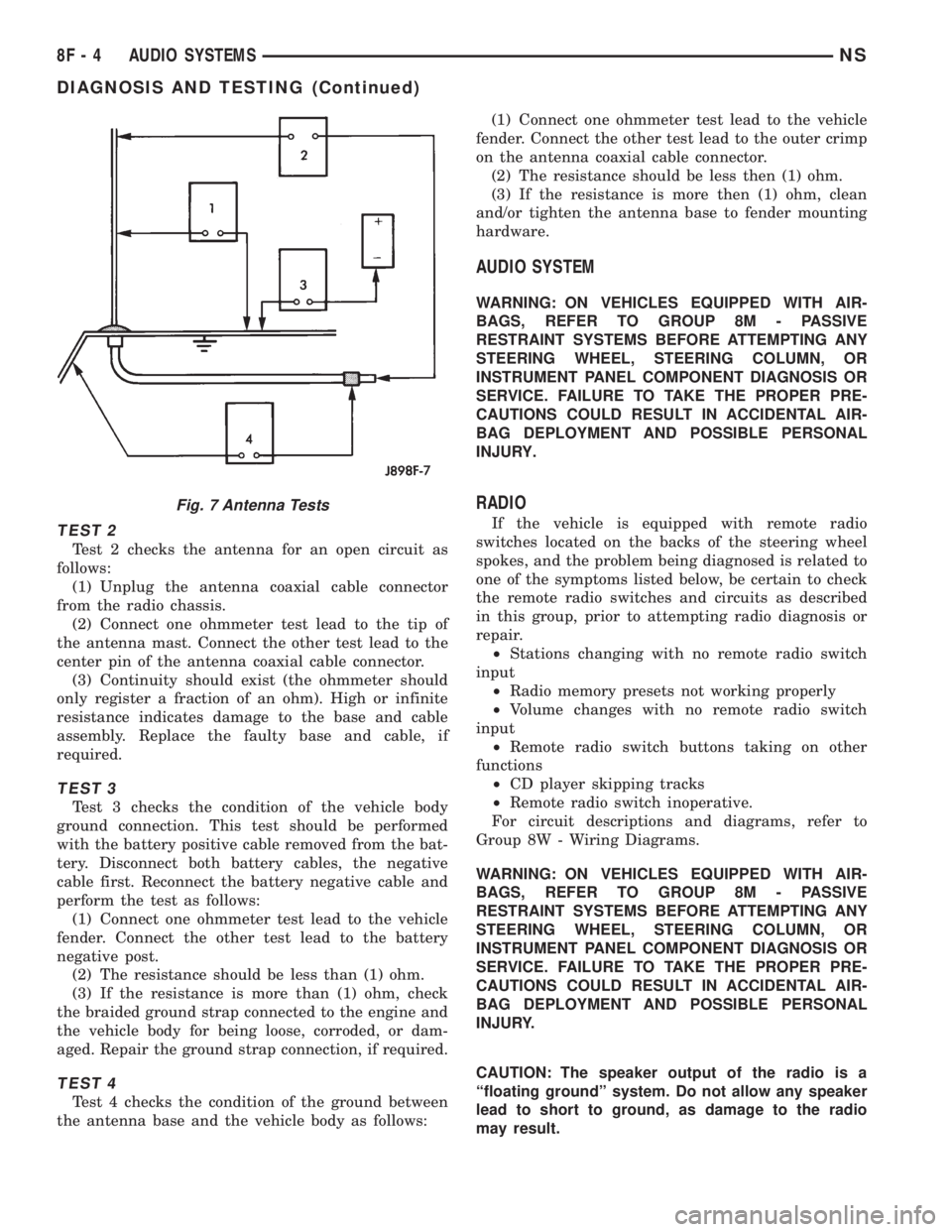
TEST 2
Test 2 checks the antenna for an open circuit as
follows:
(1) Unplug the antenna coaxial cable connector
from the radio chassis.
(2) Connect one ohmmeter test lead to the tip of
the antenna mast. Connect the other test lead to the
center pin of the antenna coaxial cable connector.
(3) Continuity should exist (the ohmmeter should
only register a fraction of an ohm). High or infinite
resistance indicates damage to the base and cable
assembly. Replace the faulty base and cable, if
required.
TEST 3
Test 3 checks the condition of the vehicle body
ground connection. This test should be performed
with the battery positive cable removed from the bat-
tery. Disconnect both battery cables, the negative
cable first. Reconnect the battery negative cable and
perform the test as follows:
(1) Connect one ohmmeter test lead to the vehicle
fender. Connect the other test lead to the battery
negative post.
(2) The resistance should be less than (1) ohm.
(3) If the resistance is more than (1) ohm, check
the braided ground strap connected to the engine and
the vehicle body for being loose, corroded, or dam-
aged. Repair the ground strap connection, if required.
TEST 4
Test 4 checks the condition of the ground between
the antenna base and the vehicle body as follows:(1) Connect one ohmmeter test lead to the vehicle
fender. Connect the other test lead to the outer crimp
on the antenna coaxial cable connector.
(2) The resistance should be less then (1) ohm.
(3) If the resistance is more then (1) ohm, clean
and/or tighten the antenna base to fender mounting
hardware.
AUDIO SYSTEM
WARNING: ON VEHICLES EQUIPPED WITH AIR-
BAGS, REFER TO GROUP 8M - PASSIVE
RESTRAINT SYSTEMS BEFORE ATTEMPTING ANY
STEERING WHEEL, STEERING COLUMN, OR
INSTRUMENT PANEL COMPONENT DIAGNOSIS OR
SERVICE. FAILURE TO TAKE THE PROPER PRE-
CAUTIONS COULD RESULT IN ACCIDENTAL AIR-
BAG DEPLOYMENT AND POSSIBLE PERSONAL
INJURY.
RADIO
If the vehicle is equipped with remote radio
switches located on the backs of the steering wheel
spokes, and the problem being diagnosed is related to
one of the symptoms listed below, be certain to check
the remote radio switches and circuits as described
in this group, prior to attempting radio diagnosis or
repair.
²Stations changing with no remote radio switch
input
²Radio memory presets not working properly
²Volume changes with no remote radio switch
input
²Remote radio switch buttons taking on other
functions
²CD player skipping tracks
²Remote radio switch inoperative.
For circuit descriptions and diagrams, refer to
Group 8W - Wiring Diagrams.
WARNING: ON VEHICLES EQUIPPED WITH AIR-
BAGS, REFER TO GROUP 8M - PASSIVE
RESTRAINT SYSTEMS BEFORE ATTEMPTING ANY
STEERING WHEEL, STEERING COLUMN, OR
INSTRUMENT PANEL COMPONENT DIAGNOSIS OR
SERVICE. FAILURE TO TAKE THE PROPER PRE-
CAUTIONS COULD RESULT IN ACCIDENTAL AIR-
BAG DEPLOYMENT AND POSSIBLE PERSONAL
INJURY.
CAUTION: The speaker output of the radio is a
ªfloating groundº system. Do not allow any speaker
lead to short to ground, as damage to the radio
may result.
Fig. 7 Antenna Tests
8F - 4 AUDIO SYSTEMSNS
DIAGNOSIS AND TESTING (Continued)
Page 407 of 1938
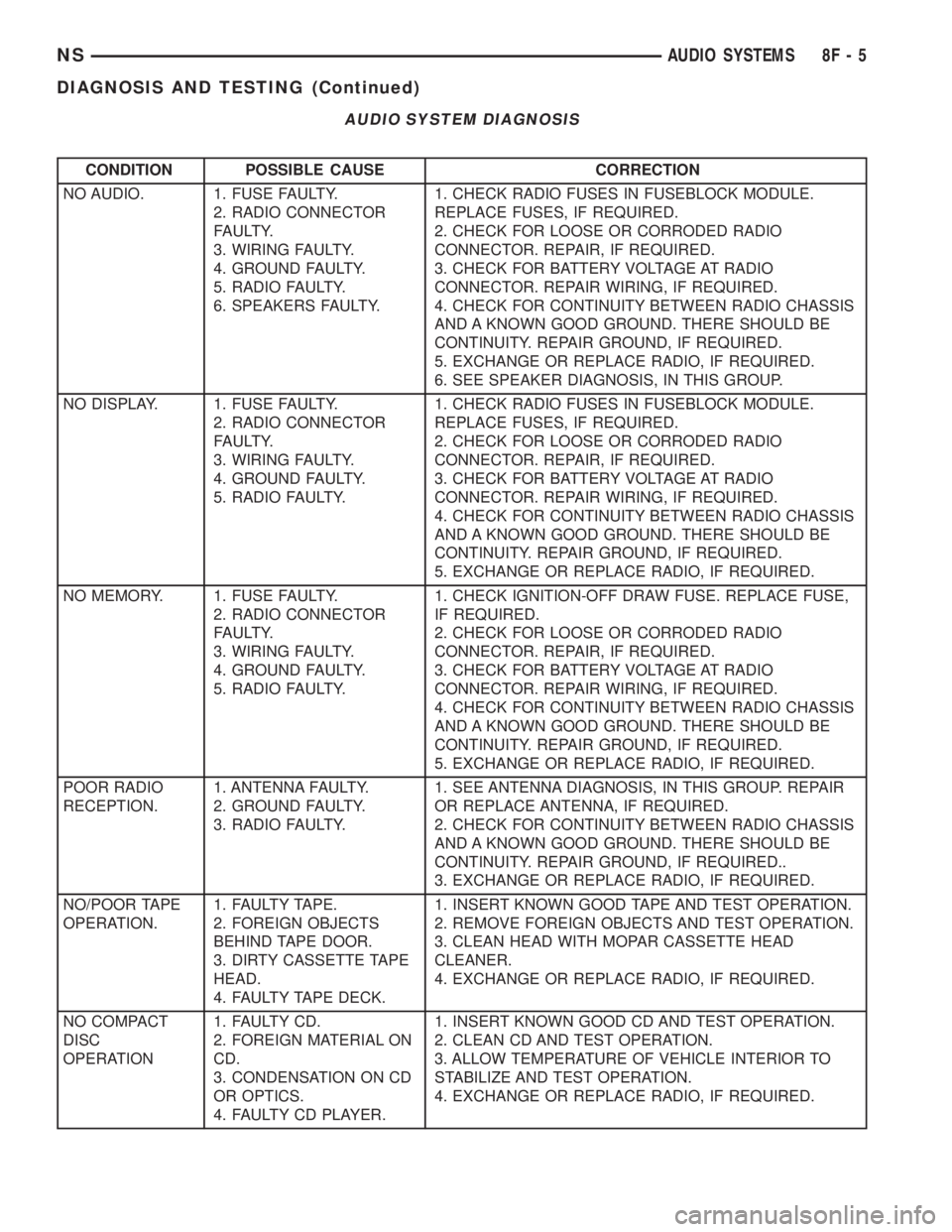
CONDITION POSSIBLE CAUSE CORRECTION
NO AUDIO. 1. FUSE FAULTY.
2. RADIO CONNECTOR
FAULTY.
3. WIRING FAULTY.
4. GROUND FAULTY.
5. RADIO FAULTY.
6. SPEAKERS FAULTY.1. CHECK RADIO FUSES IN FUSEBLOCK MODULE.
REPLACE FUSES, IF REQUIRED.
2. CHECK FOR LOOSE OR CORRODED RADIO
CONNECTOR. REPAIR, IF REQUIRED.
3. CHECK FOR BATTERY VOLTAGE AT RADIO
CONNECTOR. REPAIR WIRING, IF REQUIRED.
4. CHECK FOR CONTINUITY BETWEEN RADIO CHASSIS
AND A KNOWN GOOD GROUND. THERE SHOULD BE
CONTINUITY. REPAIR GROUND, IF REQUIRED.
5. EXCHANGE OR REPLACE RADIO, IF REQUIRED.
6. SEE SPEAKER DIAGNOSIS, IN THIS GROUP.
NO DISPLAY. 1. FUSE FAULTY.
2. RADIO CONNECTOR
FAULTY.
3. WIRING FAULTY.
4. GROUND FAULTY.
5. RADIO FAULTY.1. CHECK RADIO FUSES IN FUSEBLOCK MODULE.
REPLACE FUSES, IF REQUIRED.
2. CHECK FOR LOOSE OR CORRODED RADIO
CONNECTOR. REPAIR, IF REQUIRED.
3. CHECK FOR BATTERY VOLTAGE AT RADIO
CONNECTOR. REPAIR WIRING, IF REQUIRED.
4. CHECK FOR CONTINUITY BETWEEN RADIO CHASSIS
AND A KNOWN GOOD GROUND. THERE SHOULD BE
CONTINUITY. REPAIR GROUND, IF REQUIRED.
5. EXCHANGE OR REPLACE RADIO, IF REQUIRED.
NO MEMORY. 1. FUSE FAULTY.
2. RADIO CONNECTOR
FAULTY.
3. WIRING FAULTY.
4. GROUND FAULTY.
5. RADIO FAULTY.1. CHECK IGNITION-OFF DRAW FUSE. REPLACE FUSE,
IF REQUIRED.
2. CHECK FOR LOOSE OR CORRODED RADIO
CONNECTOR. REPAIR, IF REQUIRED.
3. CHECK FOR BATTERY VOLTAGE AT RADIO
CONNECTOR. REPAIR WIRING, IF REQUIRED.
4. CHECK FOR CONTINUITY BETWEEN RADIO CHASSIS
AND A KNOWN GOOD GROUND. THERE SHOULD BE
CONTINUITY. REPAIR GROUND, IF REQUIRED.
5. EXCHANGE OR REPLACE RADIO, IF REQUIRED.
POOR RADIO
RECEPTION.1. ANTENNA FAULTY.
2. GROUND FAULTY.
3. RADIO FAULTY.1. SEE ANTENNA DIAGNOSIS, IN THIS GROUP. REPAIR
OR REPLACE ANTENNA, IF REQUIRED.
2. CHECK FOR CONTINUITY BETWEEN RADIO CHASSIS
AND A KNOWN GOOD GROUND. THERE SHOULD BE
CONTINUITY. REPAIR GROUND, IF REQUIRED..
3. EXCHANGE OR REPLACE RADIO, IF REQUIRED.
NO/POOR TAPE
OPERATION.1. FAULTY TAPE.
2. FOREIGN OBJECTS
BEHIND TAPE DOOR.
3. DIRTY CASSETTE TAPE
HEAD.
4. FAULTY TAPE DECK.1. INSERT KNOWN GOOD TAPE AND TEST OPERATION.
2. REMOVE FOREIGN OBJECTS AND TEST OPERATION.
3. CLEAN HEAD WITH MOPAR CASSETTE HEAD
CLEANER.
4. EXCHANGE OR REPLACE RADIO, IF REQUIRED.
NO COMPACT
DISC
OPERATION1. FAULTY CD.
2. FOREIGN MATERIAL ON
CD.
3. CONDENSATION ON CD
OR OPTICS.
4. FAULTY CD PLAYER.1. INSERT KNOWN GOOD CD AND TEST OPERATION.
2. CLEAN CD AND TEST OPERATION.
3. ALLOW TEMPERATURE OF VEHICLE INTERIOR TO
STABILIZE AND TEST OPERATION.
4. EXCHANGE OR REPLACE RADIO, IF REQUIRED.
AUDIO SYSTEM DIAGNOSIS
NSAUDIO SYSTEMS 8F - 5
DIAGNOSIS AND TESTING (Continued)
Page 414 of 1938

(b) If the horn does not sound, install horn relay
and refer to Horn Test.
HORNS WILL NOT SOUND
Check horn fuse 6 in the Power Distribution Cen-
ter and fuse 7 in the Junction Block. If fuse is blown
refer to FUSE BLOWN section. If fuse is OK, refer to
FUSE OK section.
FUSE BLOWN
(1) Verify condition of battery terminals and volt-
age, refer to Group 8A, Battery. If battery connec-
tions and battery charge is OK proceed to Step 2.
(2) Using a voltmeter, test for battery voltage at
both sides of horn fuse 7. If voltage is OK, on both
sides of fuse, proceed to Fuse OK. If voltage is OK,
on one side of fuse, the fuse is blown, proceed to Step
3.
(3) Using a suitable ammeter in place of the fuse,
test amperage draw of the horn circuit. If amperage
draw is greater than 20 amps without the horn
switch depressed, a grounded circuit exists between
the fuse and the horn relay. Proceed to Step 4. If
amperage draw is greater than 20 amps with the
horn switch depressed, a grounded circuit exists
between the horn relay and the horn. Proceed to step
Step 5.
(4) Remove the horn relay from the Junction
Block. If the amperage draw drops to 0 amps, the
horn switch or circuit is shorted. Refer to group 8W,
Wiring Diagrams for circuit information. If the
amperage draw does not drop to 0 amps, repair short
at the Junction Block.
(5) Disengage a wire connector from one of the
horns. If amperage drops and the connected horn
sounds, replace the faulty horn. If amperage does not
drop with both horns disconnected and the horn
switch depressed, proceed to Step 6.
(6) Using a continuity tester, with the horns dis-
connected test continuity of the X2 cavity of the horn
relay to ground. Refer to Group 8W, Wiring Diagrams
for circuit information. If continuity is detected, the
circuit is grounded between the Junction Block and
the horns. Locate and repair pinched harness.
FUSE OK
(1) Remove the horn relay from the Junction
Block.
(2) Using a continuity tester, Depress horn switch
and test continuity from the X3 cavity of the horn
relay to ground. Refer to Group 8W, Wiring Diagrams
for circuit information.
(a) If continuity is detected, proceed to Step 3.
(b) If NO continuity, proceed to Step 4.
(3) Using a suitable jumper wire, jump across the
fuse F62 cavity and the X2 cavity of the horn relay in
the Junction Block.
(a) If the horn sounds, replace the horn relay.
(b) If the horn does not sound, proceed to Step 4.
(4) Remove airbag/horn pad from steering wheel.
Refer to Group 8M, Restraint Systems for proper pro-
cedures.
(5) Test continuity across horn switch connectors
with horn switch depressed.
(a) If continuity is detected, repair open circuit
between the relay and the horn switch.
(b) If NO continuity, replace airbag cover.
(6) Install horn relay into Junction Block.
(7) Disengage wire connectors from horns.
(8) Using a voltmeter, with the horn switch
depressed test voltage across horn connector termi-
nals of the wire harness (Fig. 3).
(a) If voltage is detected, replace horns.
(b) If NO voltage, proceed to step Step 9.
(9) With the horn switch depressed, test for volt-
age between the X2 circuit and ground.
(a) If voltage OK, repair system ground at right
cowl area. Refer to Group 8W, Wiring Diagrams.
(b) If NO voltage, repair open X2 circuit between
the relay and the horns.
Fig. 2 Horn Relay
Fig. 3 Horn and Connector
8G - 2 HORNSNS
DIAGNOSIS AND TESTING (Continued)
Page 415 of 1938

HORNS SOUND CONTINUOUSLY
CAUTION: Continuous sounding of horns may
cause relay to fail.
The horn switch (membrane) sometimes can be the
cause without the switch being depressing.
(1) Remove the horn relay from the junction block.
(2) Using a continuity tester, test continuity from
the X3 cavity of the horn relay to ground. Refer to
Group 8W, Wiring Diagrams for circuit information.
(a) If continuity is detected, proceed to step Step
3.
(b) If NO continuity, replace the horn relay.
(3) Remove the airbag/horn pad from the steering
wheel and disengage horn connector.
(4) Install horn relay into junction block.
(a) If horn does not sound, replace airbag cover/
horn pad.
(b) If horn sounds, repair grounded X3 circuit
from junction block to clockspring in steering in
steering column. Refer to Group 8W, Wiring Dia-
grams.
HORN SYSTEM
Refer to Horn System Test below. If the horn does
not sound, check horn fuse located in the Power Dis-
tribution Center. If the fuse is blown, replace with
the correct fuse. If the horn fail to sound and the
new fuse blows when depressing the horn switch, a
short circuit in the horn or the horn wiring between
the fuse terminal and the horn is responsible, or a
defective horn switch allowed the horn to burn out is
responsible.
If the fuse is OK, test horn relay refer to Horn
Relay Test.
If the relay is OK, test horn. Refer to Horn System
Test.
CAUTION: Continuous sounding of horn may
cause horn relay to fail.
Should the horn sound continuously:
²Unplug the horn relay from Power Distribution
Center.
²Refer to Horn Relay Test.
Refer to Group 8W, Wiring Diagrams for circuit
and wiring information.
HORN SYSTEM TEST
CONDITION POSSIBLE CAUSE CORRECTION
Horn sounds continuously.
NOTE: Immediately unplug horn
relay in the Power Distribution
Center (PDC)(1) Faulty horn relay.
(2) Horn control circuit to relay
shorted to ground.
(3) Pinched horn switch wire under
Driver Airbag Module.
(4) Defective horn switch(1) Refer to horn relay test.
(2) Check terminal 85 in Junction
Block for continuity to ground. If
continuity to ground indicates:
(a) Steering Wheel horn switch/lead
shorted to ground.
(b) Wiring harness shorted to
ground. Find the short and repair as
necessary.
(3) Replace Driver Airbag Module.
(4) Replace Driver Airbag Module.
Horn sound intermittently as the
steering wheel is turned.(1) Horn relay control circuit X3 is
shorted to ground inside steering
column or wheel.
(2) Pinched horn switch wire under
Driver Airbag Module
(3) Defective horn switch(1) Remove Driver Airbag Module
and/or wheel. Check for rubbing or
loose wire/connector, repair as
necessary.
(2) Replace Driver Airbag Module.
(3) Replace Driver Airbag Module.
Horn does not sound (1) Check fuse 6 in PDC
(2) No Voltage at horn relay
terminals 30 & 86, and fuse is OK.
(3) Open circuit from terminal 85 of
the horn relay to horn switch, X3
circuit.
(4) Defective or damaged horn.
(5) Defective horn switch(1) Replace fuse if blown repair as
necessary.
(2) No voltage, repair the A6 circuit
as necessary.
(3) Repair circuit as necessary.
(4) Voltage at horn when horn switch
is pressed, replace horn.
(5) Replace Driver Airbag Module.
NSHORNS 8G - 3
DIAGNOSIS AND TESTING (Continued)
Page 416 of 1938

CONDITION POSSIBLE CAUSE CORRECTION
Fuse blows when horn sounds (1) Short circuit in horn or horn
wiring(1) Remove horn relay, check for
shorted horn or horn wiring.
Disconnect horn wire harness to
isolate short and repair as
necessary.
Fuse blows without blowing horn (1) Short circuit (1) Remove relay, install new fuse, if
fuse does not blow replace horn
relay. If fuse blows with relay
removed, check for short to ground
with ohmmeter on circuit between
terminals 30 & 86 and the fuse
terminal. Repair as necessary.
NOTE: For wiring repairs refer to
Group 8W, Wire Diagrams.
REMOVAL AND INSTALLATION
HORN SWITCH
The horn switch is molded into the airbag cover.
The horn switch cannot be serviced separately. Refer
to Group 8M, Restraint System for Driver Airbag
Module Removal and Installation procedures.
HORNS
REMOVAL
(1) Hoist and support the front of the vehicle on
safety stands.
(2) From behind the front fascia and forward of
the left front wheel, disconnect the wire connectors
from horn.
(3) Remove the mount bracket attaching nut from
the bottom of radiator closure panel. Do not remove
the horn from mounting bracket (Fig. 4).
(4) Separate the horn from vehicle.
INSTALLATION
For installation reverse the above procedures.
Fig. 4 Horn Removal/Installation
8G - 4 HORNSNS
DIAGNOSIS AND TESTING (Continued)
Page 418 of 1938
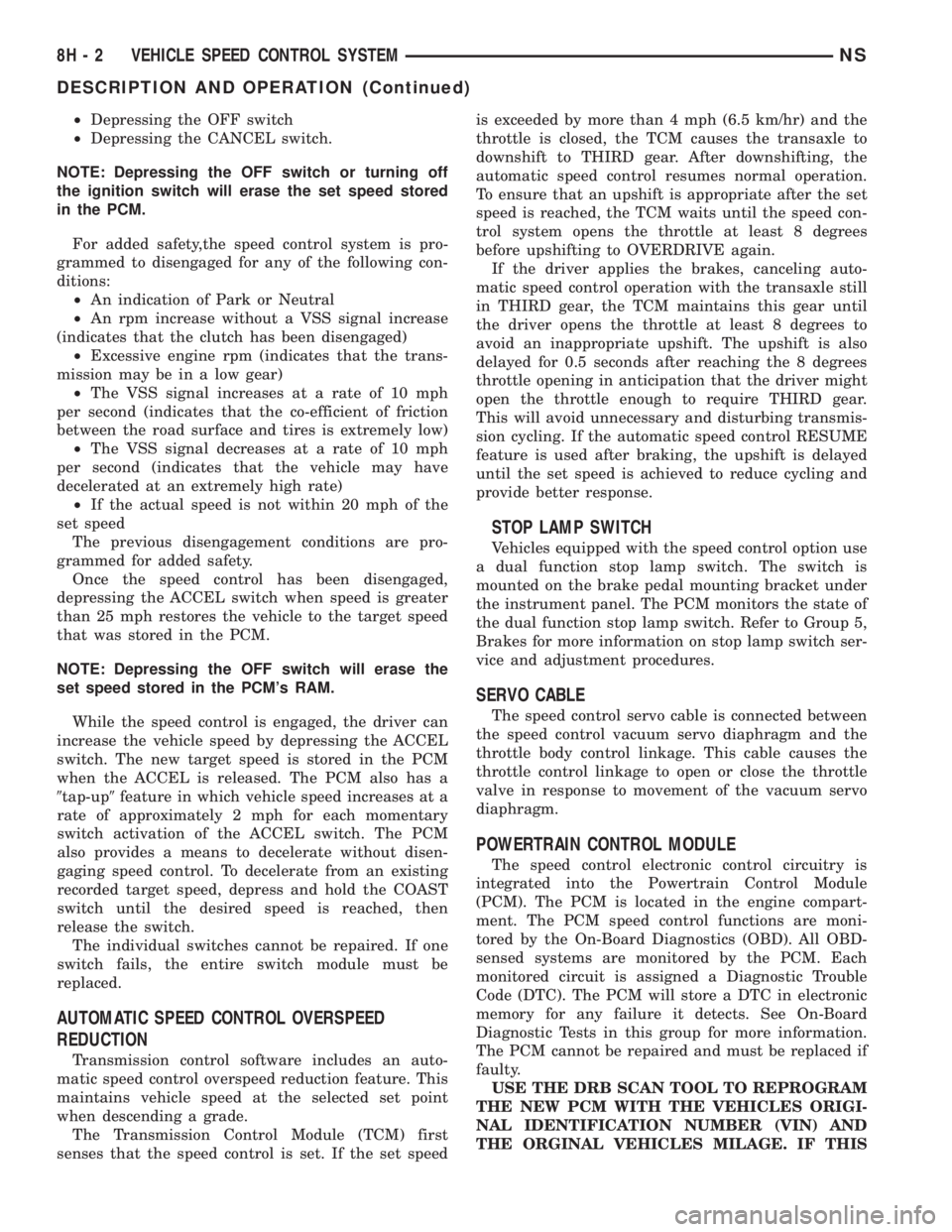
²Depressing the OFF switch
²Depressing the CANCEL switch.
NOTE: Depressing the OFF switch or turning off
the ignition switch will erase the set speed stored
in the PCM.
For added safety,the speed control system is pro-
grammed to disengaged for any of the following con-
ditions:
²An indication of Park or Neutral
²An rpm increase without a VSS signal increase
(indicates that the clutch has been disengaged)
²Excessive engine rpm (indicates that the trans-
mission may be in a low gear)
²The VSS signal increases at a rate of 10 mph
per second (indicates that the co-efficient of friction
between the road surface and tires is extremely low)
²The VSS signal decreases at a rate of 10 mph
per second (indicates that the vehicle may have
decelerated at an extremely high rate)
²If the actual speed is not within 20 mph of the
set speed
The previous disengagement conditions are pro-
grammed for added safety.
Once the speed control has been disengaged,
depressing the ACCEL switch when speed is greater
than 25 mph restores the vehicle to the target speed
that was stored in the PCM.
NOTE: Depressing the OFF switch will erase the
set speed stored in the PCM's RAM.
While the speed control is engaged, the driver can
increase the vehicle speed by depressing the ACCEL
switch. The new target speed is stored in the PCM
when the ACCEL is released. The PCM also has a
9tap-up9feature in which vehicle speed increases at a
rate of approximately 2 mph for each momentary
switch activation of the ACCEL switch. The PCM
also provides a means to decelerate without disen-
gaging speed control. To decelerate from an existing
recorded target speed, depress and hold the COAST
switch until the desired speed is reached, then
release the switch.
The individual switches cannot be repaired. If one
switch fails, the entire switch module must be
replaced.
AUTOMATIC SPEED CONTROL OVERSPEED
REDUCTION
Transmission control software includes an auto-
matic speed control overspeed reduction feature. This
maintains vehicle speed at the selected set point
when descending a grade.
The Transmission Control Module (TCM) first
senses that the speed control is set. If the set speedis exceeded by more than 4 mph (6.5 km/hr) and the
throttle is closed, the TCM causes the transaxle to
downshift to THIRD gear. After downshifting, the
automatic speed control resumes normal operation.
To ensure that an upshift is appropriate after the set
speed is reached, the TCM waits until the speed con-
trol system opens the throttle at least 8 degrees
before upshifting to OVERDRIVE again.
If the driver applies the brakes, canceling auto-
matic speed control operation with the transaxle still
in THIRD gear, the TCM maintains this gear until
the driver opens the throttle at least 8 degrees to
avoid an inappropriate upshift. The upshift is also
delayed for 0.5 seconds after reaching the 8 degrees
throttle opening in anticipation that the driver might
open the throttle enough to require THIRD gear.
This will avoid unnecessary and disturbing transmis-
sion cycling. If the automatic speed control RESUME
feature is used after braking, the upshift is delayed
until the set speed is achieved to reduce cycling and
provide better response.
STOP LAMP SWITCH
Vehicles equipped with the speed control option use
a dual function stop lamp switch. The switch is
mounted on the brake pedal mounting bracket under
the instrument panel. The PCM monitors the state of
the dual function stop lamp switch. Refer to Group 5,
Brakes for more information on stop lamp switch ser-
vice and adjustment procedures.
SERVO CABLE
The speed control servo cable is connected between
the speed control vacuum servo diaphragm and the
throttle body control linkage. This cable causes the
throttle control linkage to open or close the throttle
valve in response to movement of the vacuum servo
diaphragm.
POWERTRAIN CONTROL MODULE
The speed control electronic control circuitry is
integrated into the Powertrain Control Module
(PCM). The PCM is located in the engine compart-
ment. The PCM speed control functions are moni-
tored by the On-Board Diagnostics (OBD). All OBD-
sensed systems are monitored by the PCM. Each
monitored circuit is assigned a Diagnostic Trouble
Code (DTC). The PCM will store a DTC in electronic
memory for any failure it detects. See On-Board
Diagnostic Tests in this group for more information.
The PCM cannot be repaired and must be replaced if
faulty.
USE THE DRB SCAN TOOL TO REPROGRAM
THE NEW PCM WITH THE VEHICLES ORIGI-
NAL IDENTIFICATION NUMBER (VIN) AND
THE ORGINAL VEHICLES MILAGE. IF THIS
8H - 2 VEHICLE SPEED CONTROL SYSTEMNS
DESCRIPTION AND OPERATION (Continued)
Page 419 of 1938

STEP IS NOT DONE A DIAGONSTIC TROUBLE
CODE (DTC) MAY BE SET.
VACUUM RESERVOIR
The reservoir contains a one-way check valve to
trap engine vacuum in the reservoir. When engine
vacuum drops, as in climbing a grade while driving,
the reservoir supplies the vacuum needed to main-
tain proper speed control operation. The vacuum res-
ervoir cannot be repaired and must be replaced if
faulty.
VEHICLE SPEED AND DISTANCE
The 4 speed automatic Transmission Control Mod-
ule (TCM) supplies the speed input to the PCM. The
PCM determines acceleration rates. The speed con-
trol software in the PCM uses vehicle speed and
acceleration to control to the set speed.
Vehicles with a 3 speed automatic or manual trans-
mission have a vehicle speed sensor (VSS) mounted
to an adapter near the transmission output shaft.
The sensor is driven through the adapter by a speed-
ometer pinion gear. The VSS pulse signal is moni-
tored by the PCM to determine vehicle speed and to
maintain speed control set speed. Refer to the appro-
priate Powertrain Diagnostic Procedures manual for
diagnosis and testing of this component. Refer to
group 14, Fuel System for Removal/Installation
DIAGNOSIS AND TESTING
ROAD TEST
Perform a vehicle road test to verify reports of
speed control system malfunction. The road test
should include attention to the speedometer. Speed-
ometer operation should be smooth and without flut-
ter at all speeds.
Flutter in the speedometer indicates a problem
which might cause surging in the speed control sys-
tem. The cause of any speedometer problems should
be corrected before proceeding. Refer to Group 8E,
Instrument Panel and Gauges for speedometer diag-
nosis.
If a road test verifies a surge following a set and
the speedometer operates properly see ªOvershoot/
Undershoot on speed control setº.
If a road test verifies an inoperative system, and
the speedometer operates properly, check for:
²A Diagnostic Trouble Code (DTC). If a DTC
exists, conduct tests per the Powertrain Diagnostic
Procedures service manual.
²A misadjusted brake (stop) lamp switch. This
could also cause an intermittent problem.
²Loose or corroded electrical connections at the
servo. Corrosion should be removed from electricalterminals and a light coating of Mopar Multipurpose
Grease, or equivalent, applied.
²Leaking vacuum reservoir.
²Loose or leaking vacuum hoses or connections.
²Defective one-way vacuum check valve.
²Secure attachment at both ends of the speed
control servo cable.
²Smooth operation of throttle linkage and throttle
body air valve.
²Conduct electrical test at PCM.
²Failed speed control servo. Do the servo vacuum
test.
CAUTION: When test probing for voltage or conti-
nuity at electrical connectors, care must be taken
not to damage connector, terminals or seals. If
these components are damaged, intermittent or
complete system failure may occur.
OVERSHOOT/UNDERSHOOT FOLLOWING SPEED
CONTROL SET
If the operator repeatedly presses and releases the
set button with their foot off of the accelerator (a ªlift
foot setº to begin speed control operation), the vehicle
may accelerate and exceed the desired set speed by
up to 5 MPH (8 km/h) and then decelerate to less
than the desired set speed before finally achieving
the desired set speed.
The Speed Control has an adaptive strategy that
compensates for vehicle-to-vehicle variations in speed
control cable lengths. When the speed control is set
with the vehicle operators foot off of the accelerator
pedal, the speed control thinks there is excessive
speed control cable slack and adapts. If the lift foot
sets are continually used, the speed control over-
shoot/undershoot condition will develop.
To ªunlearnº the overshoot/undershoot condition,
the vehicle operator has to press and release the set
button while maintaining the desired set speed with
the accelerator pedal (not decelerating or accelerat-
ing), and then turn the cruise control switch to the
OFF position (or press the CANCEL button if
equipped) after waiting 10 seconds. This procedure
must be performed approximately 10±15 times to
completely unlearn the overshoot/undershoot condi-
tion.
CHECKING FOR DIAGNOSTIC CODES
When trying to verify a speed control system elec-
tronic malfunction: Connect a DRB scan tool if avail-
able to the data link connector. The connector is
located at left side of the steering column, and at
lower edge of the panel.
(1) A speed control malfunction may occur without
a diagnostic code being indicated.
NSVEHICLE SPEED CONTROL SYSTEM 8H - 3
DESCRIPTION AND OPERATION (Continued)
Page 434 of 1938
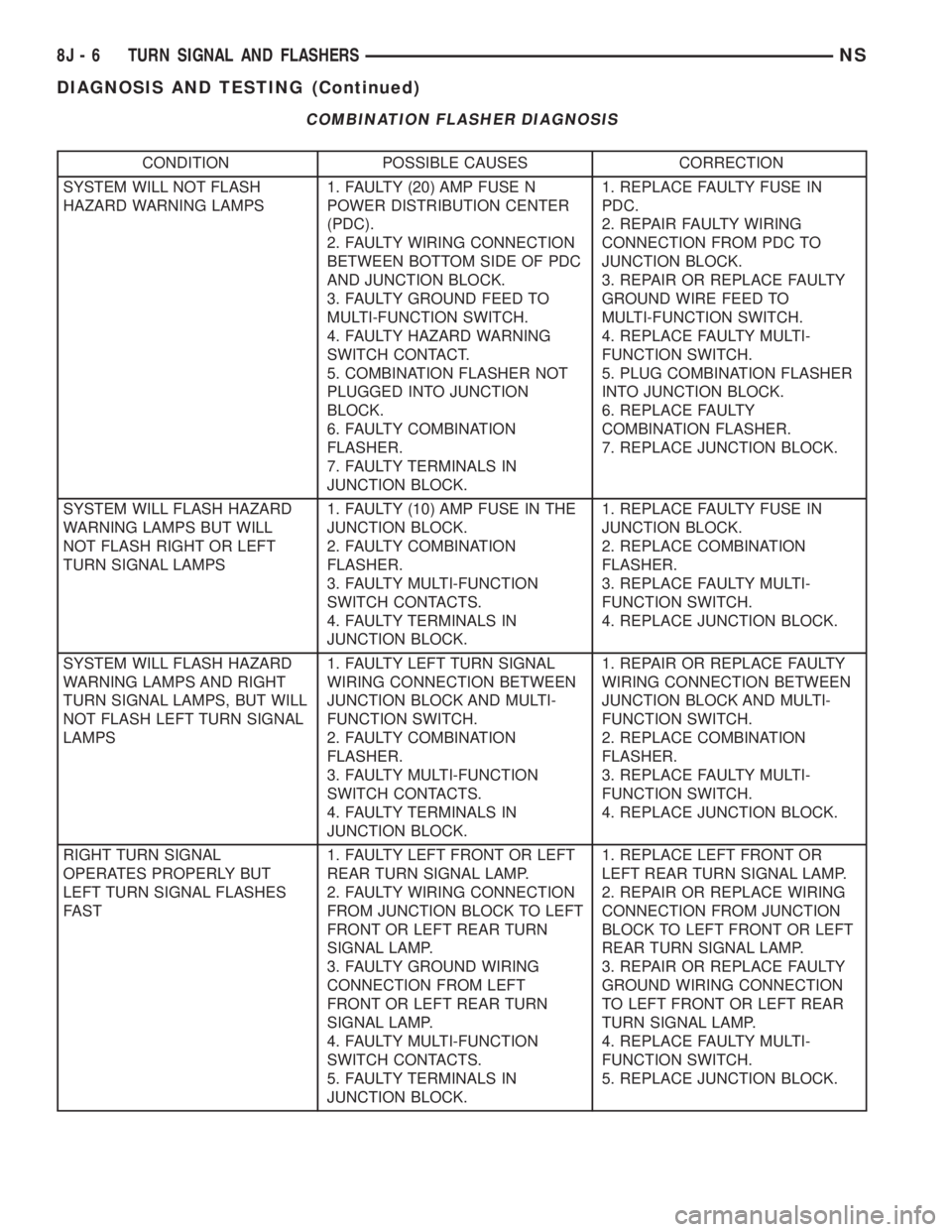
COMBINATION FLASHER DIAGNOSIS
CONDITION POSSIBLE CAUSES CORRECTION
SYSTEM WILL NOT FLASH
HAZARD WARNING LAMPS1. FAULTY (20) AMP FUSE N
POWER DISTRIBUTION CENTER
(PDC).
2. FAULTY WIRING CONNECTION
BETWEEN BOTTOM SIDE OF PDC
AND JUNCTION BLOCK.
3. FAULTY GROUND FEED TO
MULTI-FUNCTION SWITCH.
4. FAULTY HAZARD WARNING
SWITCH CONTACT.
5. COMBINATION FLASHER NOT
PLUGGED INTO JUNCTION
BLOCK.
6. FAULTY COMBINATION
FLASHER.
7. FAULTY TERMINALS IN
JUNCTION BLOCK.1. REPLACE FAULTY FUSE IN
PDC.
2. REPAIR FAULTY WIRING
CONNECTION FROM PDC TO
JUNCTION BLOCK.
3. REPAIR OR REPLACE FAULTY
GROUND WIRE FEED TO
MULTI-FUNCTION SWITCH.
4. REPLACE FAULTY MULTI-
FUNCTION SWITCH.
5. PLUG COMBINATION FLASHER
INTO JUNCTION BLOCK.
6. REPLACE FAULTY
COMBINATION FLASHER.
7. REPLACE JUNCTION BLOCK.
SYSTEM WILL FLASH HAZARD
WARNING LAMPS BUT WILL
NOT FLASH RIGHT OR LEFT
TURN SIGNAL LAMPS1. FAULTY (10) AMP FUSE IN THE
JUNCTION BLOCK.
2. FAULTY COMBINATION
FLASHER.
3. FAULTY MULTI-FUNCTION
SWITCH CONTACTS.
4. FAULTY TERMINALS IN
JUNCTION BLOCK.1. REPLACE FAULTY FUSE IN
JUNCTION BLOCK.
2. REPLACE COMBINATION
FLASHER.
3. REPLACE FAULTY MULTI-
FUNCTION SWITCH.
4. REPLACE JUNCTION BLOCK.
SYSTEM WILL FLASH HAZARD
WARNING LAMPS AND RIGHT
TURN SIGNAL LAMPS, BUT WILL
NOT FLASH LEFT TURN SIGNAL
LAMPS1. FAULTY LEFT TURN SIGNAL
WIRING CONNECTION BETWEEN
JUNCTION BLOCK AND MULTI-
FUNCTION SWITCH.
2. FAULTY COMBINATION
FLASHER.
3. FAULTY MULTI-FUNCTION
SWITCH CONTACTS.
4. FAULTY TERMINALS IN
JUNCTION BLOCK.1. REPAIR OR REPLACE FAULTY
WIRING CONNECTION BETWEEN
JUNCTION BLOCK AND MULTI-
FUNCTION SWITCH.
2. REPLACE COMBINATION
FLASHER.
3. REPLACE FAULTY MULTI-
FUNCTION SWITCH.
4. REPLACE JUNCTION BLOCK.
RIGHT TURN SIGNAL
OPERATES PROPERLY BUT
LEFT TURN SIGNAL FLASHES
FAST1. FAULTY LEFT FRONT OR LEFT
REAR TURN SIGNAL LAMP.
2. FAULTY WIRING CONNECTION
FROM JUNCTION BLOCK TO LEFT
FRONT OR LEFT REAR TURN
SIGNAL LAMP.
3. FAULTY GROUND WIRING
CONNECTION FROM LEFT
FRONT OR LEFT REAR TURN
SIGNAL LAMP.
4. FAULTY MULTI-FUNCTION
SWITCH CONTACTS.
5. FAULTY TERMINALS IN
JUNCTION BLOCK.1. REPLACE LEFT FRONT OR
LEFT REAR TURN SIGNAL LAMP.
2. REPAIR OR REPLACE WIRING
CONNECTION FROM JUNCTION
BLOCK TO LEFT FRONT OR LEFT
REAR TURN SIGNAL LAMP.
3. REPAIR OR REPLACE FAULTY
GROUND WIRING CONNECTION
TO LEFT FRONT OR LEFT REAR
TURN SIGNAL LAMP.
4. REPLACE FAULTY MULTI-
FUNCTION SWITCH.
5. REPLACE JUNCTION BLOCK.
8J - 6 TURN SIGNAL AND FLASHERSNS
DIAGNOSIS AND TESTING (Continued)