wiring CHRYSLER VOYAGER 1996 Repair Manual
[x] Cancel search | Manufacturer: CHRYSLER, Model Year: 1996, Model line: VOYAGER, Model: CHRYSLER VOYAGER 1996Pages: 1938, PDF Size: 55.84 MB
Page 354 of 1938
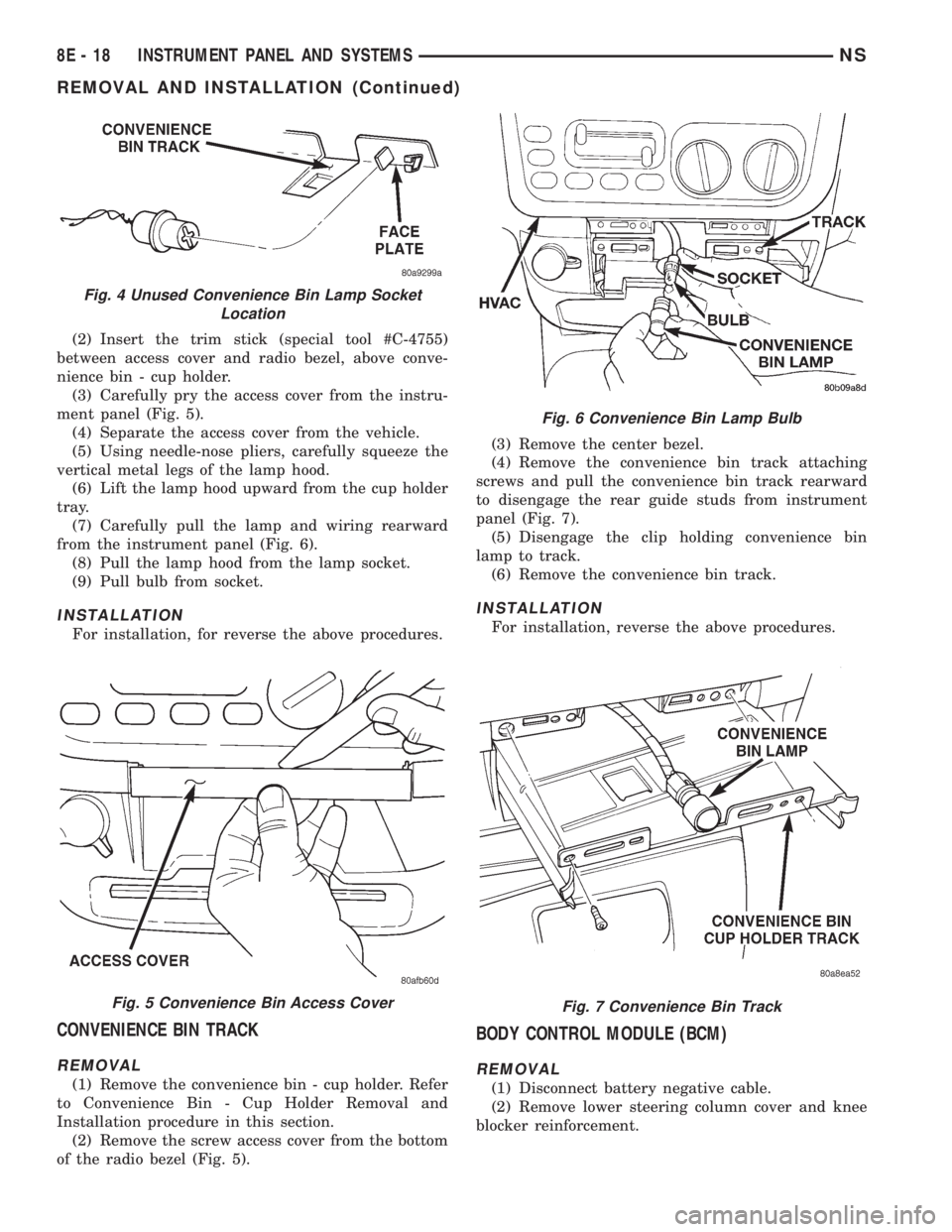
(2) Insert the trim stick (special tool #C-4755)
between access cover and radio bezel, above conve-
nience bin - cup holder.
(3) Carefully pry the access cover from the instru-
ment panel (Fig. 5).
(4) Separate the access cover from the vehicle.
(5) Using needle-nose pliers, carefully squeeze the
vertical metal legs of the lamp hood.
(6) Lift the lamp hood upward from the cup holder
tray.
(7) Carefully pull the lamp and wiring rearward
from the instrument panel (Fig. 6).
(8) Pull the lamp hood from the lamp socket.
(9) Pull bulb from socket.
INSTALLATION
For installation, for reverse the above procedures.
CONVENIENCE BIN TRACK
REMOVAL
(1) Remove the convenience bin - cup holder. Refer
to Convenience Bin - Cup Holder Removal and
Installation procedure in this section.
(2) Remove the screw access cover from the bottom
of the radio bezel (Fig. 5).(3) Remove the center bezel.
(4) Remove the convenience bin track attaching
screws and pull the convenience bin track rearward
to disengage the rear guide studs from instrument
panel (Fig. 7).
(5) Disengage the clip holding convenience bin
lamp to track.
(6) Remove the convenience bin track.
INSTALLATION
For installation, reverse the above procedures.
BODY CONTROL MODULE (BCM)
REMOVAL
(1) Disconnect battery negative cable.
(2) Remove lower steering column cover and knee
blocker reinforcement.
Fig. 4 Unused Convenience Bin Lamp Socket
Location
Fig. 5 Convenience Bin Access Cover
Fig. 6 Convenience Bin Lamp Bulb
Fig. 7 Convenience Bin Track
8E - 18 INSTRUMENT PANEL AND SYSTEMSNS
REMOVAL AND INSTALLATION (Continued)
Page 361 of 1938

(8) Using the indicator adjuster thumbwheel on
the indicator clip below the steering column. Rotate
the indicator thumbwheel to position the indicator
calibration arrow to the center of the N slot on the
instrument cluster mask.
(9) After the indicator has been properly adjusted,
move the shift lever through each gear position to
verify the appropriate gear position has been selected
and the slot is fully covered by the indicator. The left
edge of the indicator will just peek at the left edge of
the P slot in Park.
(10) If the indicator is not covering each of the
selected gear positions when selected, place the shift
lever back into neutral N and readjust the indicator.
Repeat the process until each gear is covered when
selected.
(11) Install the metal knee blocker panel.
(12) Install the lower steering column cover.
INSTRUMENT PANEL
The instrument panel is removed as a unit. The
steering column and wiring harnesses are assembled
into the panel before installation. Service procedures
for interior trim not related to the instrument panel
can be found in Group 23, Body.
REMOVAL
(1) Disconnect the battery, negative cable first.
(2) Remove the lower console.
(3) Remove the screw holding the lower heat duct
to the instrument panel support (Fig. 26).
(4) Disconnect the heat duct from the vehicle.
(5) Remove the bolts holding the lower supports to
the instrument panel frame (Fig. 27).(6) Remove the bolts holding the lower supports to
the floor pan.
(7) Remove the right and left end covers.
(8) Disconnect the wire connectors from the Pas-
senger Airbag Module.
(9) Remove the front door sill trim covers.
(10) Remove the A-pillar trim covers.
(11) Remove the glove box.
(12) Disconnect the antenna lead connector from
behind the glove box.
(13) Remove the lower steering column cover.
(14) Remove the knee blocker panel.
(15) Disconnect the lower two, forty pin wire har-
ness connectors, from the main Junction Block near
left cowl side panel (Fig. 28).
(16) Disconnect the instrument panel wire harness
connector from the bottom of Body Control Module.
(17) Disconnect the two forty pin connectors from
the right of the steering column (Fig. 29).
(18) Remove the clinch bolt holding upper the
steering shaft to the lower steering shaft (Fig. 29).
Fig. 25 Range Indicator Cable
Fig. 26 Heat Duct
Fig. 27 Lower Supports
NSINSTRUMENT PANEL AND SYSTEMS 8E - 25
REMOVAL AND INSTALLATION (Continued)
Page 387 of 1938
REMOVAL AND INSTALLATION
CONVENIENCE BIN - CUP HOLDER
REMOVAL
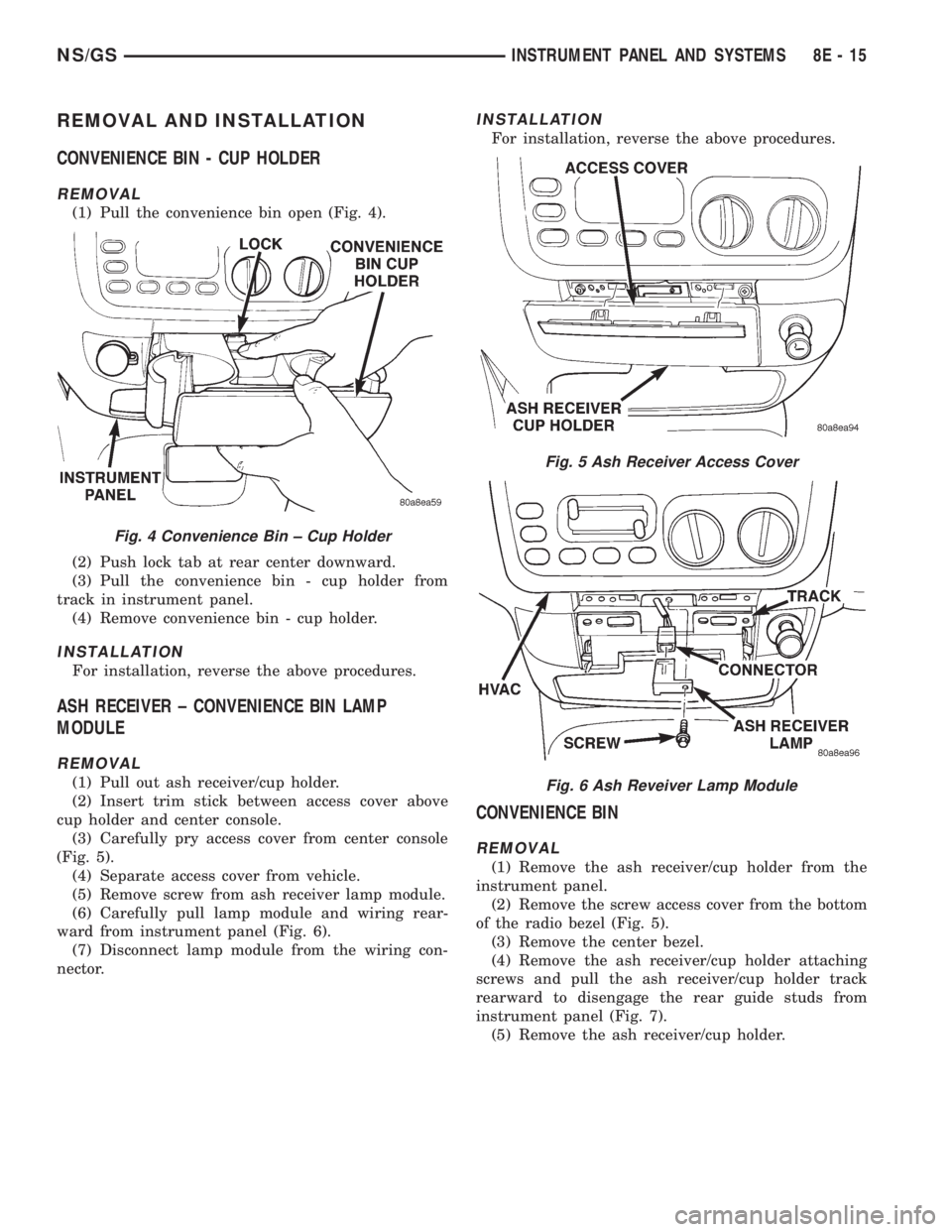
(1) Pull the convenience bin open (Fig. 4).
(2) Push lock tab at rear center downward.
(3) Pull the convenience bin - cup holder from
track in instrument panel.
(4) Remove convenience bin - cup holder.
INSTALLATION
For installation, reverse the above procedures.
ASH RECEIVER ± CONVENIENCE BIN LAMP
MODULE
REMOVAL
(1) Pull out ash receiver/cup holder.
(2) Insert trim stick between access cover above
cup holder and center console.
(3) Carefully pry access cover from center console
(Fig. 5).
(4) Separate access cover from vehicle.
(5) Remove screw from ash receiver lamp module.
(6) Carefully pull lamp module and wiring rear-
ward from instrument panel (Fig. 6).
(7) Disconnect lamp module from the wiring con-
nector.
INSTALLATION
For installation, reverse the above procedures.
CONVENIENCE BIN
REMOVAL
(1) Remove the ash receiver/cup holder from the
instrument panel.
(2) Remove the screw access cover from the bottom
of the radio bezel (Fig. 5).
(3) Remove the center bezel.
(4) Remove the ash receiver/cup holder attaching
screws and pull the ash receiver/cup holder track
rearward to disengage the rear guide studs from
instrument panel (Fig. 7).
(5) Remove the ash receiver/cup holder.
Fig. 4 Convenience Bin ± Cup Holder
Fig. 5 Ash Receiver Access Cover
Fig. 6 Ash Reveiver Lamp Module
NS/GSINSTRUMENT PANEL AND SYSTEMS 8E - 15
Page 392 of 1938
(5) Remove the screws holding printed circuit
board to the cluster shell.
(6) Remove the printed circuit board from the clus-
ter.
INSTALLATION
For installation, reverse the above procedures.
After installing the print circuit board it will have to
be calibrated using a scan tool (DRB III). Refer to the
proper Body Diagnostic Procedure Manual for cali-
bration procedures.
NOTE: Speedometer and/or Tachometer will not
operate properly until all gauges have been cali-
brated
INSTRUMENT CLUSTER SUBDIAL
REMOVAL
(1) Remove instrument cluster.
(2) Remove cluster lens.
(3) Disconnect temperature/fuel gauge and tachom-
eter terminals from connectors in cluster by pulling
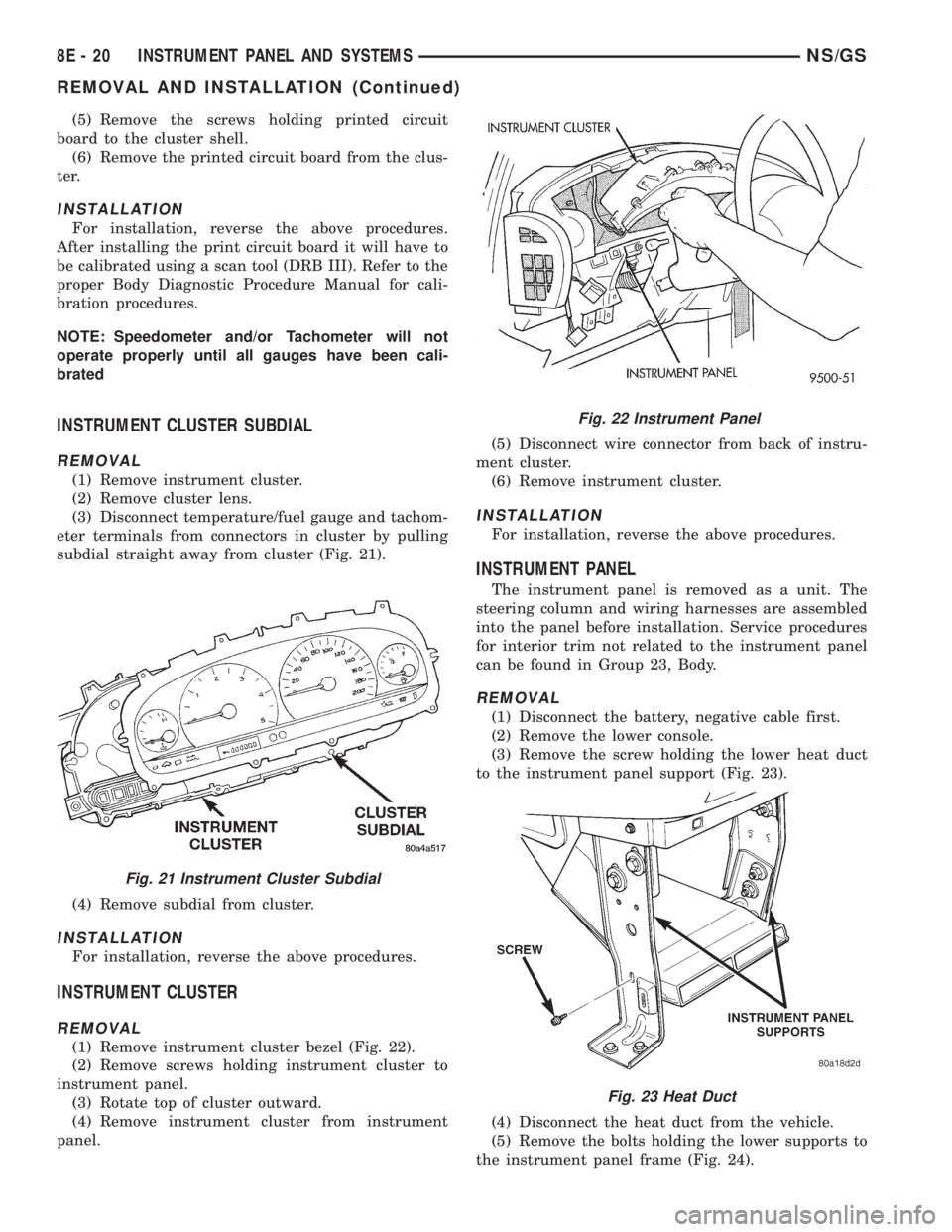
subdial straight away from cluster (Fig. 21).
(4) Remove subdial from cluster.
INSTALLATION
For installation, reverse the above procedures.
INSTRUMENT CLUSTER
REMOVAL
(1) Remove instrument cluster bezel (Fig. 22).
(2) Remove screws holding instrument cluster to
instrument panel.
(3) Rotate top of cluster outward.
(4) Remove instrument cluster from instrument
panel.(5) Disconnect wire connector from back of instru-
ment cluster.
(6) Remove instrument cluster.
INSTALLATION
For installation, reverse the above procedures.
INSTRUMENT PANEL
The instrument panel is removed as a unit. The
steering column and wiring harnesses are assembled
into the panel before installation. Service procedures
for interior trim not related to the instrument panel
can be found in Group 23, Body.
REMOVAL
(1) Disconnect the battery, negative cable first.
(2) Remove the lower console.
(3) Remove the screw holding the lower heat duct
to the instrument panel support (Fig. 23).
(4) Disconnect the heat duct from the vehicle.
(5) Remove the bolts holding the lower supports to
the instrument panel frame (Fig. 24).
Fig. 21 Instrument Cluster Subdial
Fig. 22 Instrument Panel
Fig. 23 Heat Duct
8E - 20 INSTRUMENT PANEL AND SYSTEMSNS/GS
REMOVAL AND INSTALLATION (Continued)
Page 406 of 1938
TEST 2
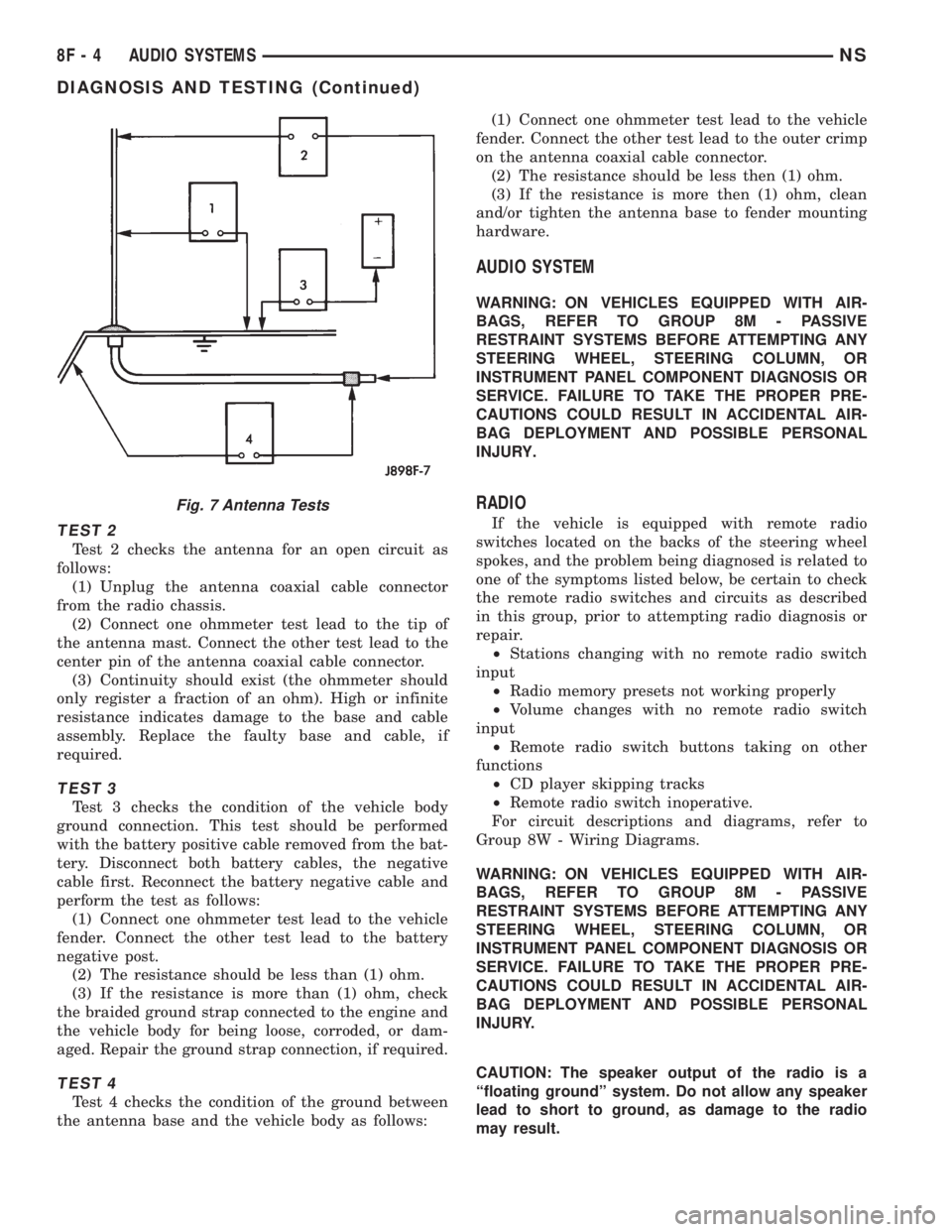
Test 2 checks the antenna for an open circuit as
follows:
(1) Unplug the antenna coaxial cable connector
from the radio chassis.
(2) Connect one ohmmeter test lead to the tip of
the antenna mast. Connect the other test lead to the
center pin of the antenna coaxial cable connector.
(3) Continuity should exist (the ohmmeter should
only register a fraction of an ohm). High or infinite
resistance indicates damage to the base and cable
assembly. Replace the faulty base and cable, if
required.
TEST 3
Test 3 checks the condition of the vehicle body
ground connection. This test should be performed
with the battery positive cable removed from the bat-
tery. Disconnect both battery cables, the negative
cable first. Reconnect the battery negative cable and
perform the test as follows:
(1) Connect one ohmmeter test lead to the vehicle
fender. Connect the other test lead to the battery
negative post.
(2) The resistance should be less than (1) ohm.
(3) If the resistance is more than (1) ohm, check
the braided ground strap connected to the engine and
the vehicle body for being loose, corroded, or dam-
aged. Repair the ground strap connection, if required.
TEST 4
Test 4 checks the condition of the ground between
the antenna base and the vehicle body as follows:(1) Connect one ohmmeter test lead to the vehicle
fender. Connect the other test lead to the outer crimp
on the antenna coaxial cable connector.
(2) The resistance should be less then (1) ohm.
(3) If the resistance is more then (1) ohm, clean
and/or tighten the antenna base to fender mounting
hardware.
AUDIO SYSTEM
WARNING: ON VEHICLES EQUIPPED WITH AIR-
BAGS, REFER TO GROUP 8M - PASSIVE
RESTRAINT SYSTEMS BEFORE ATTEMPTING ANY
STEERING WHEEL, STEERING COLUMN, OR
INSTRUMENT PANEL COMPONENT DIAGNOSIS OR
SERVICE. FAILURE TO TAKE THE PROPER PRE-
CAUTIONS COULD RESULT IN ACCIDENTAL AIR-
BAG DEPLOYMENT AND POSSIBLE PERSONAL
INJURY.
RADIO
If the vehicle is equipped with remote radio
switches located on the backs of the steering wheel
spokes, and the problem being diagnosed is related to
one of the symptoms listed below, be certain to check
the remote radio switches and circuits as described
in this group, prior to attempting radio diagnosis or
repair.
²Stations changing with no remote radio switch
input
²Radio memory presets not working properly
²Volume changes with no remote radio switch
input
²Remote radio switch buttons taking on other
functions
²CD player skipping tracks
²Remote radio switch inoperative.
For circuit descriptions and diagrams, refer to
Group 8W - Wiring Diagrams.
WARNING: ON VEHICLES EQUIPPED WITH AIR-
BAGS, REFER TO GROUP 8M - PASSIVE
RESTRAINT SYSTEMS BEFORE ATTEMPTING ANY
STEERING WHEEL, STEERING COLUMN, OR
INSTRUMENT PANEL COMPONENT DIAGNOSIS OR
SERVICE. FAILURE TO TAKE THE PROPER PRE-
CAUTIONS COULD RESULT IN ACCIDENTAL AIR-
BAG DEPLOYMENT AND POSSIBLE PERSONAL
INJURY.
CAUTION: The speaker output of the radio is a
ªfloating groundº system. Do not allow any speaker
lead to short to ground, as damage to the radio
may result.
Fig. 7 Antenna Tests
8F - 4 AUDIO SYSTEMSNS
DIAGNOSIS AND TESTING (Continued)
Page 407 of 1938
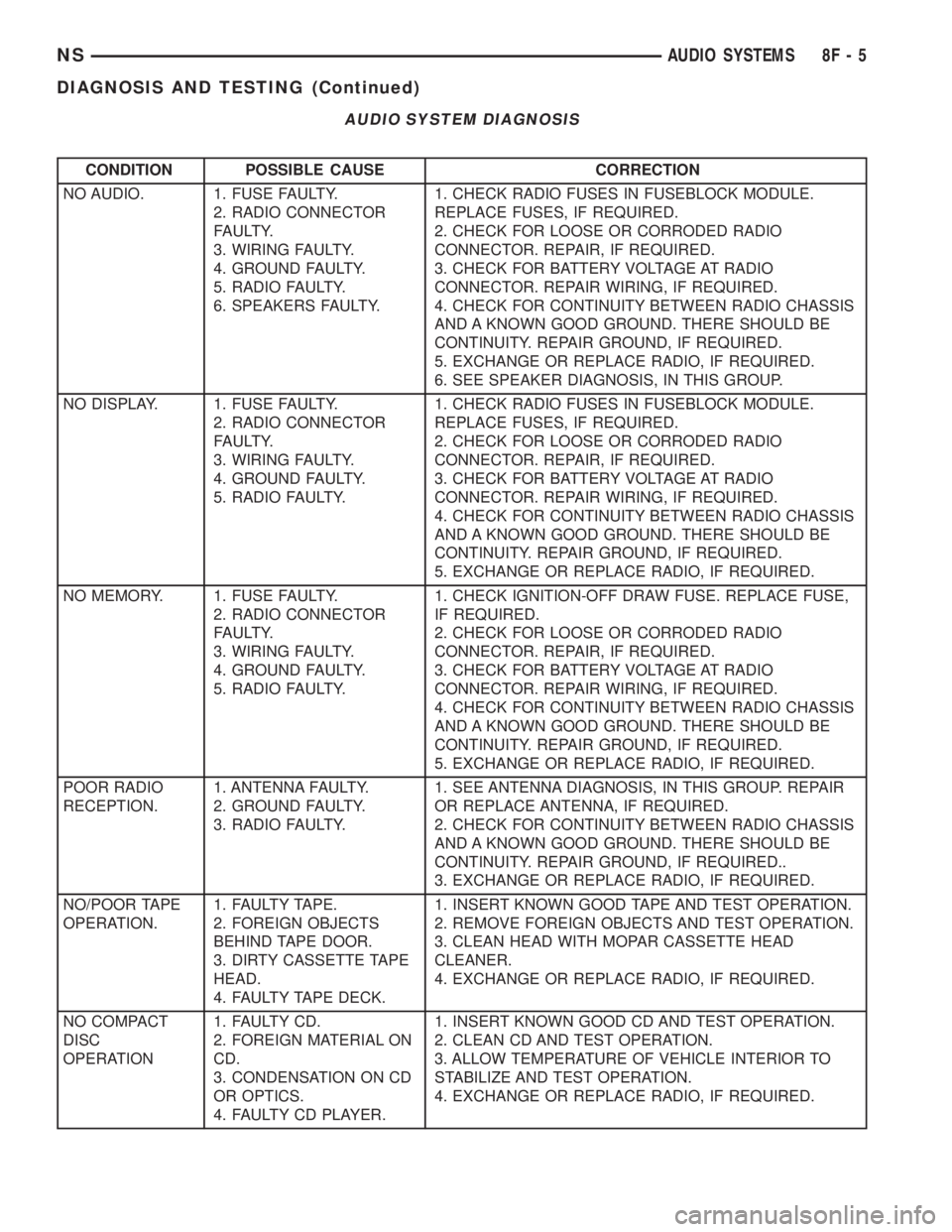
CONDITION POSSIBLE CAUSE CORRECTION
NO AUDIO. 1. FUSE FAULTY.
2. RADIO CONNECTOR
FAULTY.
3. WIRING FAULTY.
4. GROUND FAULTY.
5. RADIO FAULTY.
6. SPEAKERS FAULTY.1. CHECK RADIO FUSES IN FUSEBLOCK MODULE.
REPLACE FUSES, IF REQUIRED.
2. CHECK FOR LOOSE OR CORRODED RADIO
CONNECTOR. REPAIR, IF REQUIRED.
3. CHECK FOR BATTERY VOLTAGE AT RADIO
CONNECTOR. REPAIR WIRING, IF REQUIRED.
4. CHECK FOR CONTINUITY BETWEEN RADIO CHASSIS
AND A KNOWN GOOD GROUND. THERE SHOULD BE
CONTINUITY. REPAIR GROUND, IF REQUIRED.
5. EXCHANGE OR REPLACE RADIO, IF REQUIRED.
6. SEE SPEAKER DIAGNOSIS, IN THIS GROUP.
NO DISPLAY. 1. FUSE FAULTY.
2. RADIO CONNECTOR
FAULTY.
3. WIRING FAULTY.
4. GROUND FAULTY.
5. RADIO FAULTY.1. CHECK RADIO FUSES IN FUSEBLOCK MODULE.
REPLACE FUSES, IF REQUIRED.
2. CHECK FOR LOOSE OR CORRODED RADIO
CONNECTOR. REPAIR, IF REQUIRED.
3. CHECK FOR BATTERY VOLTAGE AT RADIO
CONNECTOR. REPAIR WIRING, IF REQUIRED.
4. CHECK FOR CONTINUITY BETWEEN RADIO CHASSIS
AND A KNOWN GOOD GROUND. THERE SHOULD BE
CONTINUITY. REPAIR GROUND, IF REQUIRED.
5. EXCHANGE OR REPLACE RADIO, IF REQUIRED.
NO MEMORY. 1. FUSE FAULTY.
2. RADIO CONNECTOR
FAULTY.
3. WIRING FAULTY.
4. GROUND FAULTY.
5. RADIO FAULTY.1. CHECK IGNITION-OFF DRAW FUSE. REPLACE FUSE,
IF REQUIRED.
2. CHECK FOR LOOSE OR CORRODED RADIO
CONNECTOR. REPAIR, IF REQUIRED.
3. CHECK FOR BATTERY VOLTAGE AT RADIO
CONNECTOR. REPAIR WIRING, IF REQUIRED.
4. CHECK FOR CONTINUITY BETWEEN RADIO CHASSIS
AND A KNOWN GOOD GROUND. THERE SHOULD BE
CONTINUITY. REPAIR GROUND, IF REQUIRED.
5. EXCHANGE OR REPLACE RADIO, IF REQUIRED.
POOR RADIO
RECEPTION.1. ANTENNA FAULTY.
2. GROUND FAULTY.
3. RADIO FAULTY.1. SEE ANTENNA DIAGNOSIS, IN THIS GROUP. REPAIR
OR REPLACE ANTENNA, IF REQUIRED.
2. CHECK FOR CONTINUITY BETWEEN RADIO CHASSIS
AND A KNOWN GOOD GROUND. THERE SHOULD BE
CONTINUITY. REPAIR GROUND, IF REQUIRED..
3. EXCHANGE OR REPLACE RADIO, IF REQUIRED.
NO/POOR TAPE
OPERATION.1. FAULTY TAPE.
2. FOREIGN OBJECTS
BEHIND TAPE DOOR.
3. DIRTY CASSETTE TAPE
HEAD.
4. FAULTY TAPE DECK.1. INSERT KNOWN GOOD TAPE AND TEST OPERATION.
2. REMOVE FOREIGN OBJECTS AND TEST OPERATION.
3. CLEAN HEAD WITH MOPAR CASSETTE HEAD
CLEANER.
4. EXCHANGE OR REPLACE RADIO, IF REQUIRED.
NO COMPACT
DISC
OPERATION1. FAULTY CD.
2. FOREIGN MATERIAL ON
CD.
3. CONDENSATION ON CD
OR OPTICS.
4. FAULTY CD PLAYER.1. INSERT KNOWN GOOD CD AND TEST OPERATION.
2. CLEAN CD AND TEST OPERATION.
3. ALLOW TEMPERATURE OF VEHICLE INTERIOR TO
STABILIZE AND TEST OPERATION.
4. EXCHANGE OR REPLACE RADIO, IF REQUIRED.
AUDIO SYSTEM DIAGNOSIS
NSAUDIO SYSTEMS 8F - 5
DIAGNOSIS AND TESTING (Continued)
Page 413 of 1938

HORNS
CONTENTS
page page
DESCRIPTION AND OPERATION
INTRODUCTION......................... 1
DIAGNOSIS AND TESTING
HORN RELAY........................... 1
HORN SYSTEM.......................... 3
HORN SYSTEM TEST..................... 3HORN................................. 1
HORNS SOUND CONTINUOUSLY............ 3
HORNS WILL NOT SOUND................ 2
REMOVAL AND INSTALLATION
HORN SWITCH.......................... 4
HORNS................................ 4
DESCRIPTION AND OPERATION
INTRODUCTION
WARNING: ON VEHICLES EQUIPPED WITH AIR-
BAG, SEE GROUP 8M, RESTRAINT SYSTEMS FOR
SAFETY PRECAUTIONS. DISCONNECT THE NEGA-
TIVE CABLE FROM THE BATTERY BEFORE SER-
VICING COMPONENTS INVOLVING THE AIRBAG
SYSTEM. ACCIDENTAL DEPLOYMENT OF AIRBAG
AND PERSONAL INJURY CAN RESULT.
The horn circuit consists of a horn switch, clock-
spring, horn relay, horns and Body Control Module
(Fig. 1). The horn switch is a membrane switch
located in the airbag cover. The horns are located for-
ward of the left front wheel behind the bumper fas-
cia. The horn relay plugs into the junction block. For
circuit information and component locations refer to
Group 8W, Wiring Diagrams.
DIAGNOSIS AND TESTING
HORN
(1) Disconnect wire connector at horn.
(2) Using a voltmeter, connect one lead to ground
terminal and the other lead to the positive wire ter-
minal (Fig. 3).
(3) Depress the horn switch, battery voltage
should be present.
(4) If no voltage, refer to Horn Will Not Sound. If
voltage is OK, go to step Step 5.
(5) Using ohmmeter, test ground wire for continu-
ity to ground.
(6) If no ground repair as necessary.
(7) If wires test OK and horn does not sound,
replace horn.
HORN RELAY
(1) Remove horn relay.
(2) Using ohmmeter, test between relay connector
terminals 85 to 86 for 70 to 75 ohms resistance (Fig.
2). If resistance not OK, replace relay.
(3) Test for continuity between ground and termi-
nal 85 of horn relay.
(a) When the horn switch is not depressed, no
continuity should be present.
(b) Continuity to ground when horn switch is
depressed.
(c) If continuity is not correct repair horn
switch or wiring as necessary, refer to Group 8W,
Wiring Diagrams Group 8M Restraint System for
Driver's Airbag Module removal procedures.
(4) Using voltmeter, test voltage at:
(a) Terminals 30 and 86 of the horn relay to
body ground.
(b) If NO voltage check fuse 7 of the BCM.
(c) If incorrect voltage repair as necessary. Refer
to Group 8W, Wiring Diagrams.
(5) Insert a jumper wire between terminal 30 and
87 of the power distribution center.
(a) If horn sounds replace relay.
Fig. 1 Horn System
NSHORNS 8G - 1
Page 414 of 1938

(b) If the horn does not sound, install horn relay
and refer to Horn Test.
HORNS WILL NOT SOUND
Check horn fuse 6 in the Power Distribution Cen-
ter and fuse 7 in the Junction Block. If fuse is blown
refer to FUSE BLOWN section. If fuse is OK, refer to
FUSE OK section.
FUSE BLOWN
(1) Verify condition of battery terminals and volt-
age, refer to Group 8A, Battery. If battery connec-
tions and battery charge is OK proceed to Step 2.
(2) Using a voltmeter, test for battery voltage at
both sides of horn fuse 7. If voltage is OK, on both
sides of fuse, proceed to Fuse OK. If voltage is OK,
on one side of fuse, the fuse is blown, proceed to Step
3.
(3) Using a suitable ammeter in place of the fuse,
test amperage draw of the horn circuit. If amperage
draw is greater than 20 amps without the horn
switch depressed, a grounded circuit exists between
the fuse and the horn relay. Proceed to Step 4. If
amperage draw is greater than 20 amps with the
horn switch depressed, a grounded circuit exists
between the horn relay and the horn. Proceed to step
Step 5.
(4) Remove the horn relay from the Junction
Block. If the amperage draw drops to 0 amps, the
horn switch or circuit is shorted. Refer to group 8W,
Wiring Diagrams for circuit information. If the
amperage draw does not drop to 0 amps, repair short
at the Junction Block.
(5) Disengage a wire connector from one of the
horns. If amperage drops and the connected horn
sounds, replace the faulty horn. If amperage does not
drop with both horns disconnected and the horn
switch depressed, proceed to Step 6.
(6) Using a continuity tester, with the horns dis-
connected test continuity of the X2 cavity of the horn
relay to ground. Refer to Group 8W, Wiring Diagrams
for circuit information. If continuity is detected, the
circuit is grounded between the Junction Block and
the horns. Locate and repair pinched harness.
FUSE OK
(1) Remove the horn relay from the Junction
Block.
(2) Using a continuity tester, Depress horn switch
and test continuity from the X3 cavity of the horn
relay to ground. Refer to Group 8W, Wiring Diagrams
for circuit information.
(a) If continuity is detected, proceed to Step 3.
(b) If NO continuity, proceed to Step 4.
(3) Using a suitable jumper wire, jump across the
fuse F62 cavity and the X2 cavity of the horn relay in
the Junction Block.
(a) If the horn sounds, replace the horn relay.
(b) If the horn does not sound, proceed to Step 4.
(4) Remove airbag/horn pad from steering wheel.
Refer to Group 8M, Restraint Systems for proper pro-
cedures.
(5) Test continuity across horn switch connectors
with horn switch depressed.
(a) If continuity is detected, repair open circuit
between the relay and the horn switch.
(b) If NO continuity, replace airbag cover.
(6) Install horn relay into Junction Block.
(7) Disengage wire connectors from horns.
(8) Using a voltmeter, with the horn switch
depressed test voltage across horn connector termi-
nals of the wire harness (Fig. 3).
(a) If voltage is detected, replace horns.
(b) If NO voltage, proceed to step Step 9.
(9) With the horn switch depressed, test for volt-
age between the X2 circuit and ground.
(a) If voltage OK, repair system ground at right
cowl area. Refer to Group 8W, Wiring Diagrams.
(b) If NO voltage, repair open X2 circuit between
the relay and the horns.
Fig. 2 Horn Relay
Fig. 3 Horn and Connector
8G - 2 HORNSNS
DIAGNOSIS AND TESTING (Continued)
Page 415 of 1938

HORNS SOUND CONTINUOUSLY
CAUTION: Continuous sounding of horns may
cause relay to fail.
The horn switch (membrane) sometimes can be the
cause without the switch being depressing.
(1) Remove the horn relay from the junction block.
(2) Using a continuity tester, test continuity from
the X3 cavity of the horn relay to ground. Refer to
Group 8W, Wiring Diagrams for circuit information.
(a) If continuity is detected, proceed to step Step
3.
(b) If NO continuity, replace the horn relay.
(3) Remove the airbag/horn pad from the steering
wheel and disengage horn connector.
(4) Install horn relay into junction block.
(a) If horn does not sound, replace airbag cover/
horn pad.
(b) If horn sounds, repair grounded X3 circuit
from junction block to clockspring in steering in
steering column. Refer to Group 8W, Wiring Dia-
grams.
HORN SYSTEM
Refer to Horn System Test below. If the horn does
not sound, check horn fuse located in the Power Dis-
tribution Center. If the fuse is blown, replace with
the correct fuse. If the horn fail to sound and the
new fuse blows when depressing the horn switch, a
short circuit in the horn or the horn wiring between
the fuse terminal and the horn is responsible, or a
defective horn switch allowed the horn to burn out is
responsible.
If the fuse is OK, test horn relay refer to Horn
Relay Test.
If the relay is OK, test horn. Refer to Horn System
Test.
CAUTION: Continuous sounding of horn may
cause horn relay to fail.
Should the horn sound continuously:
²Unplug the horn relay from Power Distribution
Center.
²Refer to Horn Relay Test.
Refer to Group 8W, Wiring Diagrams for circuit
and wiring information.
HORN SYSTEM TEST
CONDITION POSSIBLE CAUSE CORRECTION
Horn sounds continuously.
NOTE: Immediately unplug horn
relay in the Power Distribution
Center (PDC)(1) Faulty horn relay.
(2) Horn control circuit to relay
shorted to ground.
(3) Pinched horn switch wire under
Driver Airbag Module.
(4) Defective horn switch(1) Refer to horn relay test.
(2) Check terminal 85 in Junction
Block for continuity to ground. If
continuity to ground indicates:
(a) Steering Wheel horn switch/lead
shorted to ground.
(b) Wiring harness shorted to
ground. Find the short and repair as
necessary.
(3) Replace Driver Airbag Module.
(4) Replace Driver Airbag Module.
Horn sound intermittently as the
steering wheel is turned.(1) Horn relay control circuit X3 is
shorted to ground inside steering
column or wheel.
(2) Pinched horn switch wire under
Driver Airbag Module
(3) Defective horn switch(1) Remove Driver Airbag Module
and/or wheel. Check for rubbing or
loose wire/connector, repair as
necessary.
(2) Replace Driver Airbag Module.
(3) Replace Driver Airbag Module.
Horn does not sound (1) Check fuse 6 in PDC
(2) No Voltage at horn relay
terminals 30 & 86, and fuse is OK.
(3) Open circuit from terminal 85 of
the horn relay to horn switch, X3
circuit.
(4) Defective or damaged horn.
(5) Defective horn switch(1) Replace fuse if blown repair as
necessary.
(2) No voltage, repair the A6 circuit
as necessary.
(3) Repair circuit as necessary.
(4) Voltage at horn when horn switch
is pressed, replace horn.
(5) Replace Driver Airbag Module.
NSHORNS 8G - 3
DIAGNOSIS AND TESTING (Continued)
Page 416 of 1938

CONDITION POSSIBLE CAUSE CORRECTION
Fuse blows when horn sounds (1) Short circuit in horn or horn
wiring(1) Remove horn relay, check for
shorted horn or horn wiring.
Disconnect horn wire harness to
isolate short and repair as
necessary.
Fuse blows without blowing horn (1) Short circuit (1) Remove relay, install new fuse, if
fuse does not blow replace horn
relay. If fuse blows with relay
removed, check for short to ground
with ohmmeter on circuit between
terminals 30 & 86 and the fuse
terminal. Repair as necessary.
NOTE: For wiring repairs refer to
Group 8W, Wire Diagrams.
REMOVAL AND INSTALLATION
HORN SWITCH
The horn switch is molded into the airbag cover.
The horn switch cannot be serviced separately. Refer
to Group 8M, Restraint System for Driver Airbag
Module Removal and Installation procedures.
HORNS
REMOVAL
(1) Hoist and support the front of the vehicle on
safety stands.
(2) From behind the front fascia and forward of
the left front wheel, disconnect the wire connectors
from horn.
(3) Remove the mount bracket attaching nut from
the bottom of radiator closure panel. Do not remove
the horn from mounting bracket (Fig. 4).
(4) Separate the horn from vehicle.
INSTALLATION
For installation reverse the above procedures.
Fig. 4 Horn Removal/Installation
8G - 4 HORNSNS
DIAGNOSIS AND TESTING (Continued)