light CHRYSLER VOYAGER 1996 Manual Online
[x] Cancel search | Manufacturer: CHRYSLER, Model Year: 1996, Model line: VOYAGER, Model: CHRYSLER VOYAGER 1996Pages: 1938, PDF Size: 55.84 MB
Page 551 of 1938

OVERHEAD CONSOLE
CONTENTS
page page
DESCRIPTION AND OPERATION
COMPASS MINI-TRIP COMPUTER (CMTC).... 1
COMPASS/TEMPERATURE MINI TRIP
COMPUTER SELF-DIAGNOSTIC TEST....... 1
THERMOMETER AND COMPASS............ 2
UNIVERSAL TRANSMITTER................ 2
DIAGNOSIS AND TESTING
READING/DOME LAMP DIAGNOSIS......... 3
TRAVELER MESSAGES.................... 3
UNIVERSAL TRANSMITTER................ 3
SERVICE PROCEDURES
COMPASS CALIBRATION PROCEDURE (FAST
METHOD)............................. 4
COMPASS CALIBRATION PROCEDURE....... 4
DEMAGNETIZING PROCEDURE............. 4UNIVERSAL TRANSMITTER................ 5
REMOVAL AND INSTALLATION
AMBIENT TEMPERATURE SENSOR.......... 5
COMPASS MINI-TRIP COMPUTER (CMTC)
LAMP BULBS......................... 6
COMPASS MINI-TRIP COMPUTER (CMTC)
MODULE............................. 6
FRONT HEADER READING/COURTESY LAMP . . 6
OVERHEAD CONSOLE.................... 6
READING/COURTESY LAMP ASSEMBLY...... 7
READING/COURTESY LAMP............... 6
UNIVERSAL TRANSMITTER................ 7
SPECIAL TOOLS
SPECIAL TOOL.......................... 9
DESCRIPTION AND OPERATION
COMPASS/TEMPERATURE MINI TRIP COMPUTER
SELF-DIAGNOSTIC TEST
The CMTC is capable of performing a diagnostic
self check on many of its internal functions. CMTC
diagnostics may be performed using a scan tool
(DRB) and the proper Body Diagnostic Procedures
manual or by the following procedure.
(1) With the ignition switch in the OFF position,
press both the US/M and STEP button.
(2) Turn ignition switch to the ON position.
The CMTC will perform internal checks while
lighting all segments of the vacuum florescent dis-
play. Upon completion of the internal check, the
CMTC will display.
²PASS
²FAIL
²CCd
If any segment of the CMTC fails to light replace
the module.
If FAIL is displayed, replace the module.
If CCd is displayed, check the CCD and Body Con-
trol Module (BCM) for proper operation, refer to the
appropriate diagnostic test procedures manual If the
CCD and the BCM are OK, replace the CMTC mod-
ule.
For additional diagnostic information on the CMTC
and for identifying CMTC problems, refer to the
proper Body Diagnostic Procedures manual.
COMPASS MINI-TRIP COMPUTER (CMTC)
The Compass Mini-Trip Computer (CMTC) system
is located in the overhead console. CMTC consists of
a electronic control module with a vacuum fluores-
cent display (VFD) and function switches. The CMTC
consists of a electronic module that displays compass,
trip computer, and temperature features. Actuating
the STEP switch will cause the CMTC to change
mode of operation when ignition is ON. Example:
²Compass/Temperature
²Trip odometer (ODO)
²Average miles per gallon (ECO)
²Instant miles per gallon (ECO)
²Distance to empty (DTE)
²Elapsed time (ET)
²Off
The CMTC module in the overhead console has
three buttons used to select various functions. The
CMTC selector buttons will not operate until the
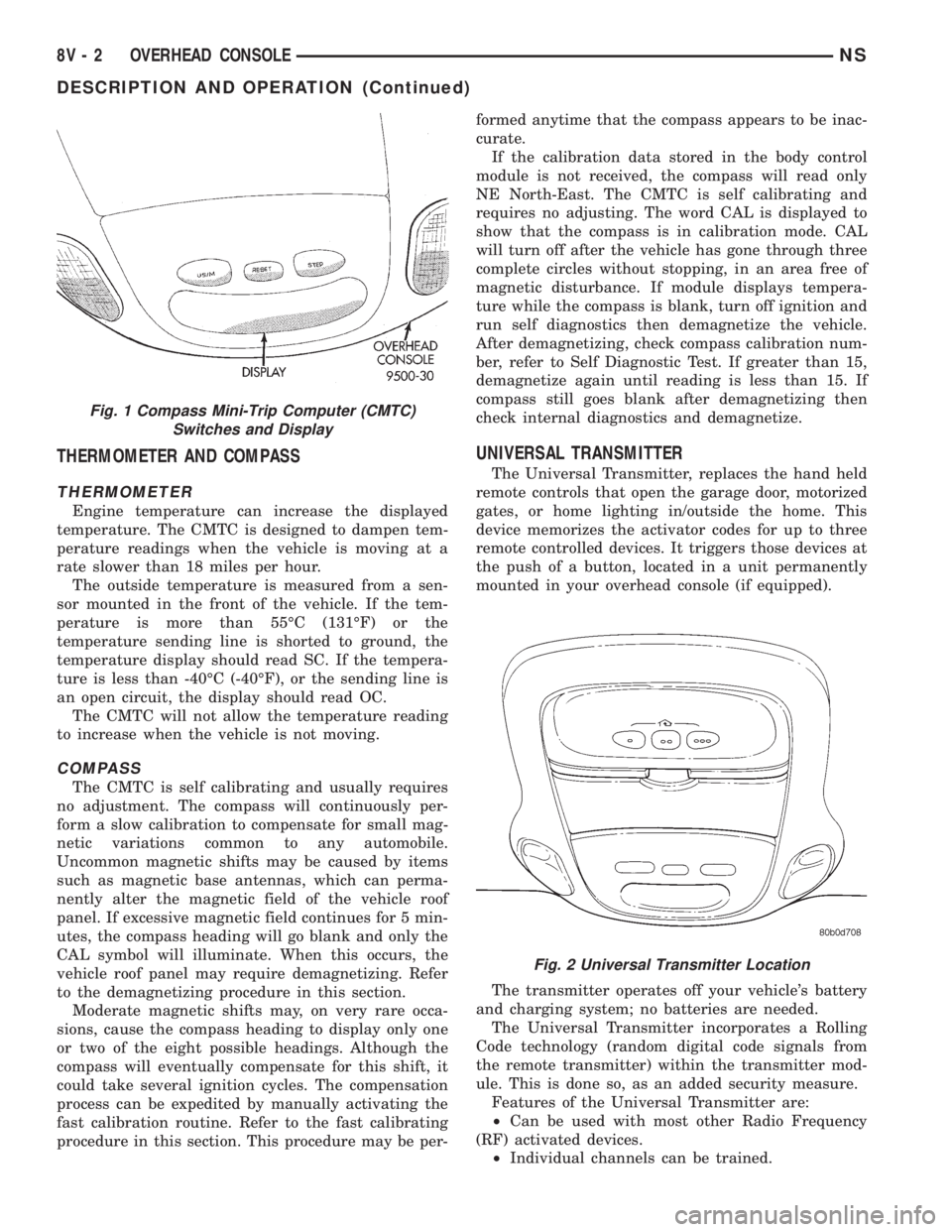
ignition is in the RUN position (Fig. 1).
When the ignition switch is first turned to the
RUN position the CMTC display;
²Blanks momentarily
²All segments of the VFD will light for one sec-
ond
²Blanks momentarily
²Returns to the last mode setting selected before
the ignition was last switched OFF.
NSOVERHEAD CONSOLE 8V - 1
Page 552 of 1938
THERMOMETER AND COMPASS
THERMOMETER
Engine temperature can increase the displayed
temperature. The CMTC is designed to dampen tem-
perature readings when the vehicle is moving at a
rate slower than 18 miles per hour.
The outside temperature is measured from a sen-
sor mounted in the front of the vehicle. If the tem-
perature is more than 55ÉC (131ÉF) or the
temperature sending line is shorted to ground, the
temperature display should read SC. If the tempera-
ture is less than -40ÉC (-40ÉF), or the sending line is
an open circuit, the display should read OC.
The CMTC will not allow the temperature reading
to increase when the vehicle is not moving.
COMPASS
The CMTC is self calibrating and usually requires
no adjustment. The compass will continuously per-
form a slow calibration to compensate for small mag-
netic variations common to any automobile.
Uncommon magnetic shifts may be caused by items
such as magnetic base antennas, which can perma-
nently alter the magnetic field of the vehicle roof
panel. If excessive magnetic field continues for 5 min-
utes, the compass heading will go blank and only the
CAL symbol will illuminate. When this occurs, the
vehicle roof panel may require demagnetizing. Refer
to the demagnetizing procedure in this section.
Moderate magnetic shifts may, on very rare occa-
sions, cause the compass heading to display only one
or two of the eight possible headings. Although the
compass will eventually compensate for this shift, it
could take several ignition cycles. The compensation
process can be expedited by manually activating the
fast calibration routine. Refer to the fast calibrating
procedure in this section. This procedure may be per-formed anytime that the compass appears to be inac-
curate.
If the calibration data stored in the body control
module is not received, the compass will read only
NE North-East. The CMTC is self calibrating and
requires no adjusting. The word CAL is displayed to
show that the compass is in calibration mode. CAL
will turn off after the vehicle has gone through three
complete circles without stopping, in an area free of
magnetic disturbance. If module displays tempera-
ture while the compass is blank, turn off ignition and
run self diagnostics then demagnetize the vehicle.
After demagnetizing, check compass calibration num-
ber, refer to Self Diagnostic Test. If greater than 15,
demagnetize again until reading is less than 15. If
compass still goes blank after demagnetizing then
check internal diagnostics and demagnetize.
UNIVERSAL TRANSMITTER
The Universal Transmitter, replaces the hand held
remote controls that open the garage door, motorized
gates, or home lighting in/outside the home. This
device memorizes the activator codes for up to three
remote controlled devices. It triggers those devices at
the push of a button, located in a unit permanently
mounted in your overhead console (if equipped).
The transmitter operates off your vehicle's battery
and charging system; no batteries are needed.
The Universal Transmitter incorporates a Rolling
Code technology (random digital code signals from
the remote transmitter) within the transmitter mod-
ule. This is done so, as an added security measure.
Features of the Universal Transmitter are:
²Can be used with most other Radio Frequency
(RF) activated devices.
²Individual channels can be trained.
Fig. 1 Compass Mini-Trip Computer (CMTC)
Switches and Display
Fig. 2 Universal Transmitter Location
8V - 2 OVERHEAD CONSOLENS
DESCRIPTION AND OPERATION (Continued)
Page 553 of 1938
²Stores transmitter data in permanent memory -
retraining is not required even if the battery dies or
is disconnected.
To operate, simply press the appropriate button on
the Universal Transmitter. The red LED will light up
while the signal is being transmitted.
NOTE: For security reasons, you are able to erase
the trained frequencies.
DIAGNOSIS AND TESTING
READING/DOME LAMP DIAGNOSIS
The dome lamps operate in conjunction with the
Remote Keyless Entry system. Refer to the Wiring
Diagrams group of this manual for component loca-
tions and circuit information. For additional diagnos-
tic information on lamp operation controlled by Body
Control Module (BCM) refer to the Body Diagnostic
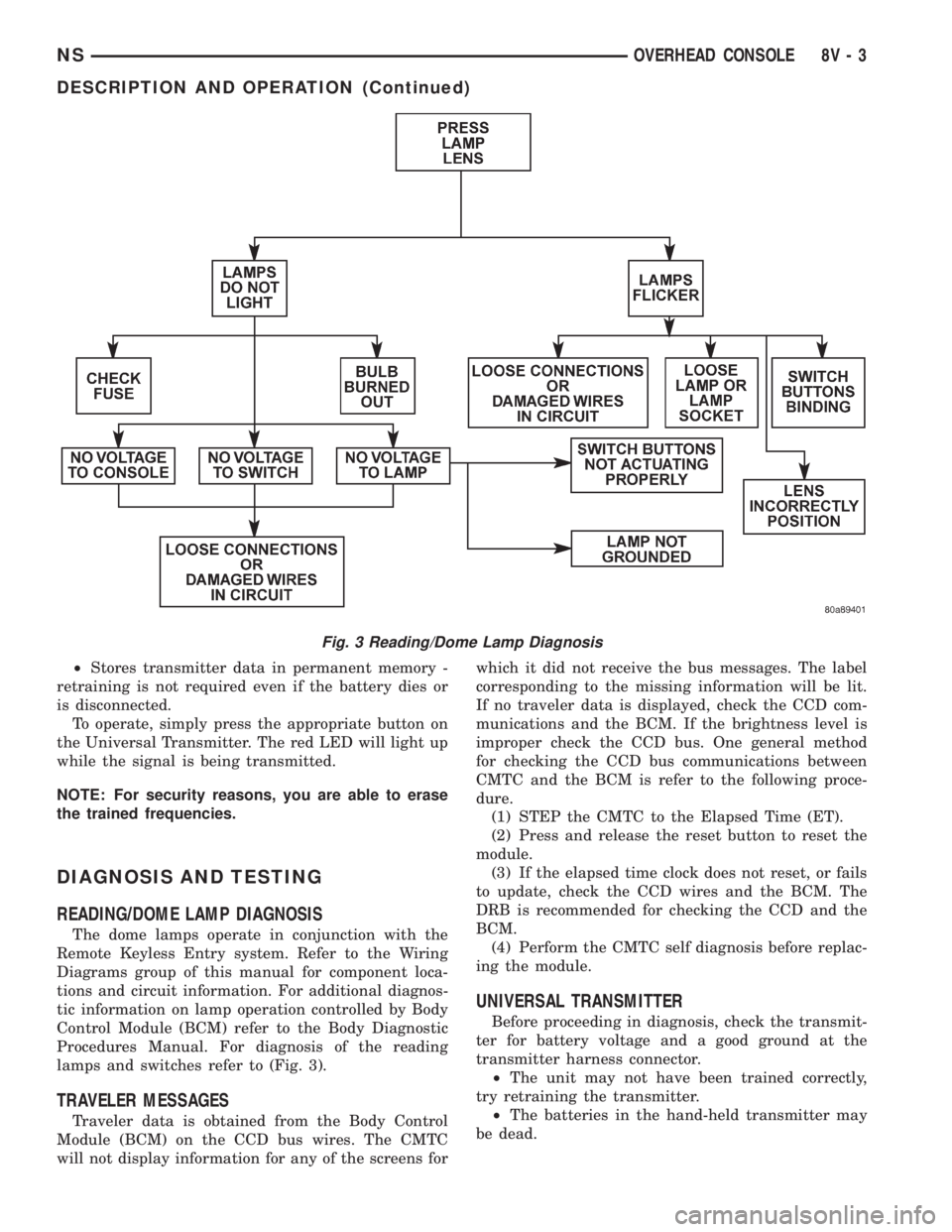
Procedures Manual. For diagnosis of the reading
lamps and switches refer to (Fig. 3).
TRAVELER MESSAGES
Traveler data is obtained from the Body Control
Module (BCM) on the CCD bus wires. The CMTC
will not display information for any of the screens forwhich it did not receive the bus messages. The label
corresponding to the missing information will be lit.
If no traveler data is displayed, check the CCD com-
munications and the BCM. If the brightness level is
improper check the CCD bus. One general method
for checking the CCD bus communications between
CMTC and the BCM is refer to the following proce-
dure.
(1) STEP the CMTC to the Elapsed Time (ET).
(2) Press and release the reset button to reset the
module.
(3) If the elapsed time clock does not reset, or fails
to update, check the CCD wires and the BCM. The
DRB is recommended for checking the CCD and the
BCM.
(4) Perform the CMTC self diagnosis before replac-
ing the module.
UNIVERSAL TRANSMITTER
Before proceeding in diagnosis, check the transmit-
ter for battery voltage and a good ground at the
transmitter harness connector.
²The unit may not have been trained correctly,
try retraining the transmitter.
²The batteries in the hand-held transmitter may
be dead.
Fig. 3 Reading/Dome Lamp Diagnosis
NSOVERHEAD CONSOLE 8V - 3
DESCRIPTION AND OPERATION (Continued)
Page 554 of 1938
²Rotate your hand-held transmitter end-over-end
and train again. For best results, place the end oppo-
site from the battery compartment against the uni-
versal transmitter while training.
²The frequency of the hand-held transmitter may
not be in the desired frequencies between 286MHz
and 399MHz set by FCC.
SERVICE PROCEDURES
COMPASS CALIBRATION PROCEDURE
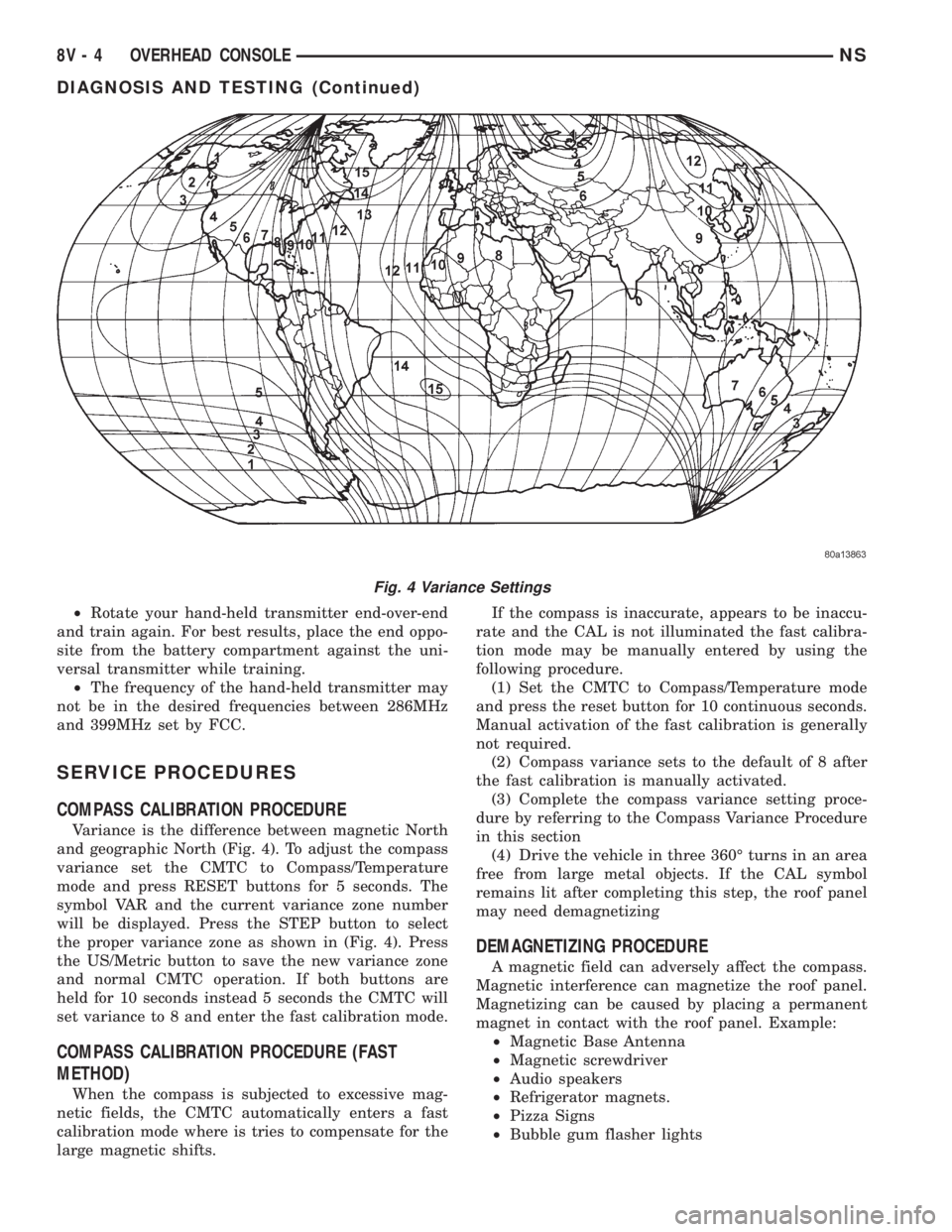
Variance is the difference between magnetic North
and geographic North (Fig. 4). To adjust the compass
variance set the CMTC to Compass/Temperature
mode and press RESET buttons for 5 seconds. The
symbol VAR and the current variance zone number
will be displayed. Press the STEP button to select
the proper variance zone as shown in (Fig. 4). Press
the US/Metric button to save the new variance zone
and normal CMTC operation. If both buttons are
held for 10 seconds instead 5 seconds the CMTC will
set variance to 8 and enter the fast calibration mode.
COMPASS CALIBRATION PROCEDURE (FAST
METHOD)
When the compass is subjected to excessive mag-
netic fields, the CMTC automatically enters a fast
calibration mode where is tries to compensate for the
large magnetic shifts.If the compass is inaccurate, appears to be inaccu-
rate and the CAL is not illuminated the fast calibra-
tion mode may be manually entered by using the
following procedure.
(1) Set the CMTC to Compass/Temperature mode
and press the reset button for 10 continuous seconds.
Manual activation of the fast calibration is generally
not required.
(2) Compass variance sets to the default of 8 after
the fast calibration is manually activated.
(3) Complete the compass variance setting proce-
dure by referring to the Compass Variance Procedure
in this section
(4) Drive the vehicle in three 360É turns in an area
free from large metal objects. If the CAL symbol
remains lit after completing this step, the roof panel
may need demagnetizing
DEMAGNETIZING PROCEDURE
A magnetic field can adversely affect the compass.
Magnetic interference can magnetize the roof panel.
Magnetizing can be caused by placing a permanent
magnet in contact with the roof panel. Example:
²Magnetic Base Antenna
²Magnetic screwdriver
²Audio speakers
²Refrigerator magnets.
²Pizza Signs
²Bubble gum flasher lights
Fig. 4 Variance Settings
8V - 4 OVERHEAD CONSOLENS
DIAGNOSIS AND TESTING (Continued)
Page 555 of 1938
Removing magnetic interfering objects will usually
restore normal compass operation. If the compass
display remains blank while the CAL label is illumi-
nated, then the roof panel requires demagnetizing. To
demagnetize use Special Tool 6029 for demagnetizing
the roof panel. The demagnetizing procedure will
demagnetize the roof and mounting screws in the
overhead console. It is important that you follow the
instructions below exactly. The mounting screws and
the mounting brackets around the compass area are
steel, and therefore aid in the demagnetizing of the
roof panel.
(1) Be sure the ignition switch is in the OFF posi-
tion before you begin the demagnetize procedure.
(2) Plug the demagnetizing tool into a standard
110/115 volt AC outlet, keeping the demagnetizing
tool at least 12 inches away from the compass area
when plugging it in.
(3) Slowly approach and contact the console
mounting screw with the plastic coated tip of the tool
for at least two seconds.
(4) With the demagnetizing tool still energized,
slowly back it away from the screw until the tip is at
least 12 inches from the screw head.
(5) Repeat the last step with all the console
mounting screws.
(6) After you have pulled at least 12 inches from
the last screw, remove the demagnetizing tool from
inside vehicle and disconnect it from the electrical
outlet.
(7) Place an 8 1/2 X 11 inch piece of paper length-
wise on the roof of vehicle directly above compass.
The purpose of the paper is to protect the roof panel
from scratches and define the area to be demagne-
tized.
(8) Plug in the demagnetizing tool, keeping it at
least two feet away from the compass unit.
(9) Slowly approach the center of the roof panel at
the windshield with the demagnetizing tool plugged
in.
(10) Contact the roof panel with the tip of the tool.
Using slow sweeping motions of 1/2 inch between
sweeps. Move the tool approximately four inches
either side of the center line and at least 11 inches
back from the windshield.
(11) With the demagnetizing tool still energized,
slowly back away from the roof panel until the tip is
at least two feet from the roof before unplugging the
tool.
(12) Recalibrate compass, refer to the compass cal-
ibration procedure in this section.
UNIVERSAL TRANSMITTER
TRAINING
(1) Turn off the engine.(2) Erase the factory test codes by pressing the
two outside buttons. Release the buttons when the
red light begins to flash (about 20 seconds).
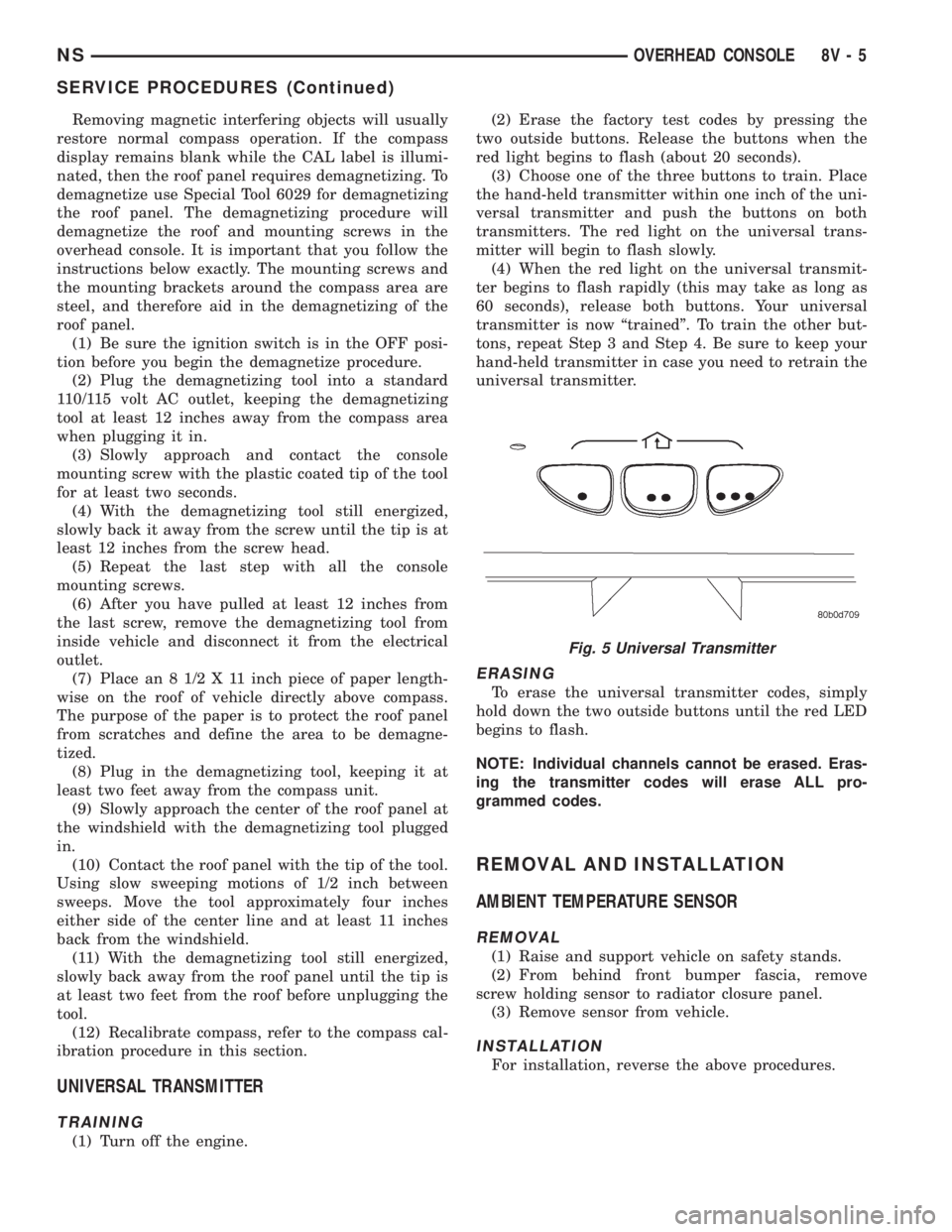
(3) Choose one of the three buttons to train. Place
the hand-held transmitter within one inch of the uni-
versal transmitter and push the buttons on both
transmitters. The red light on the universal trans-
mitter will begin to flash slowly.
(4) When the red light on the universal transmit-
ter begins to flash rapidly (this may take as long as
60 seconds), release both buttons. Your universal
transmitter is now ªtrainedº. To train the other but-
tons, repeat Step 3 and Step 4. Be sure to keep your
hand-held transmitter in case you need to retrain the
universal transmitter.
ERASING
To erase the universal transmitter codes, simply
hold down the two outside buttons until the red LED
begins to flash.
NOTE: Individual channels cannot be erased. Eras-
ing the transmitter codes will erase ALL pro-
grammed codes.
REMOVAL AND INSTALLATION
AMBIENT TEMPERATURE SENSOR
REMOVAL
(1) Raise and support vehicle on safety stands.
(2) From behind front bumper fascia, remove
screw holding sensor to radiator closure panel.
(3) Remove sensor from vehicle.
INSTALLATION
For installation, reverse the above procedures.
Fig. 5 Universal Transmitter
NSOVERHEAD CONSOLE 8V - 5
SERVICE PROCEDURES (Continued)
Page 556 of 1938
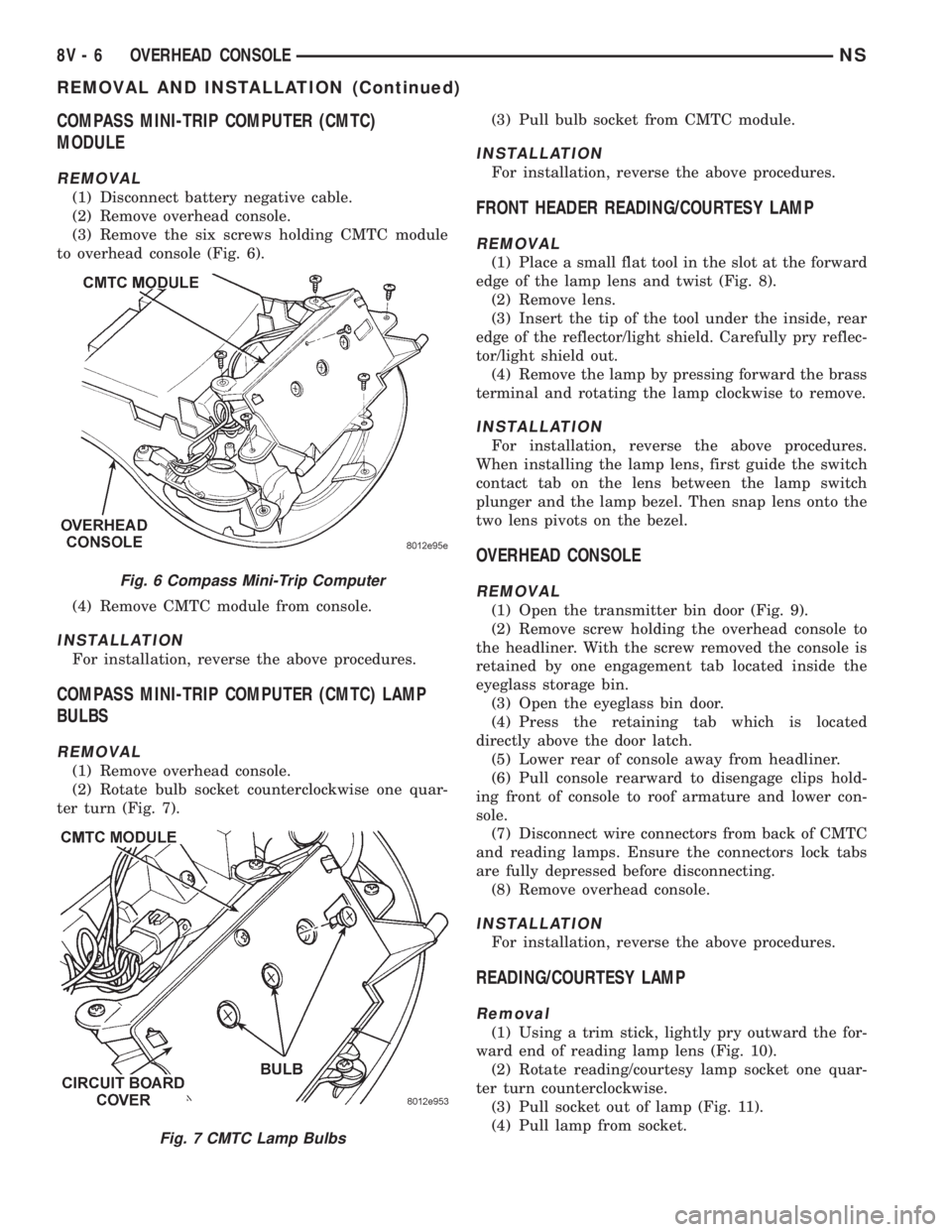
COMPASS MINI-TRIP COMPUTER (CMTC)
MODULE
REMOVAL
(1) Disconnect battery negative cable.
(2) Remove overhead console.
(3) Remove the six screws holding CMTC module
to overhead console (Fig. 6).
(4) Remove CMTC module from console.
INSTALLATION
For installation, reverse the above procedures.
COMPASS MINI-TRIP COMPUTER (CMTC) LAMP
BULBS
REMOVAL
(1) Remove overhead console.
(2) Rotate bulb socket counterclockwise one quar-
ter turn (Fig. 7).(3) Pull bulb socket from CMTC module.
INSTALLATION
For installation, reverse the above procedures.
FRONT HEADER READING/COURTESY LAMP
REMOVAL
(1) Place a small flat tool in the slot at the forward
edge of the lamp lens and twist (Fig. 8).
(2) Remove lens.
(3) Insert the tip of the tool under the inside, rear
edge of the reflector/light shield. Carefully pry reflec-
tor/light shield out.
(4) Remove the lamp by pressing forward the brass
terminal and rotating the lamp clockwise to remove.
INSTALLATION
For installation, reverse the above procedures.
When installing the lamp lens, first guide the switch
contact tab on the lens between the lamp switch
plunger and the lamp bezel. Then snap lens onto the
two lens pivots on the bezel.
OVERHEAD CONSOLE
REMOVAL
(1) Open the transmitter bin door (Fig. 9).
(2) Remove screw holding the overhead console to
the headliner. With the screw removed the console is
retained by one engagement tab located inside the
eyeglass storage bin.
(3) Open the eyeglass bin door.
(4) Press the retaining tab which is located
directly above the door latch.
(5) Lower rear of console away from headliner.
(6) Pull console rearward to disengage clips hold-
ing front of console to roof armature and lower con-
sole.
(7) Disconnect wire connectors from back of CMTC
and reading lamps. Ensure the connectors lock tabs
are fully depressed before disconnecting.
(8) Remove overhead console.
INSTALLATION
For installation, reverse the above procedures.
READING/COURTESY LAMP
Removal
(1) Using a trim stick, lightly pry outward the for-
ward end of reading lamp lens (Fig. 10).
(2) Rotate reading/courtesy lamp socket one quar-
ter turn counterclockwise.
(3) Pull socket out of lamp (Fig. 11).
(4) Pull lamp from socket.
Fig. 6 Compass Mini-Trip Computer
Fig. 7 CMTC Lamp Bulbs
8V - 6 OVERHEAD CONSOLENS
REMOVAL AND INSTALLATION (Continued)
Page 561 of 1938
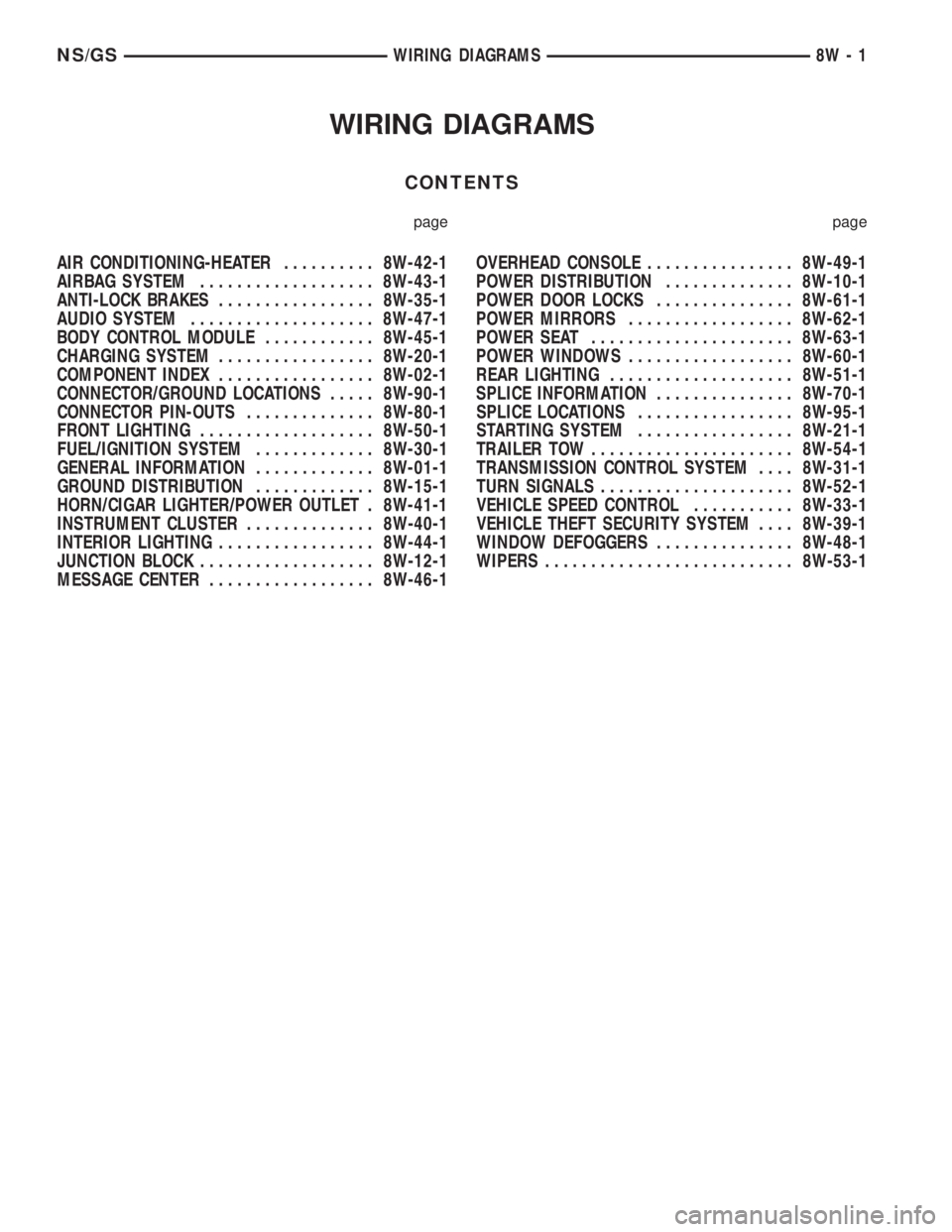
WIRING DIAGRAMS
CONTENTS
page page
AIR CONDITIONING-HEATER.......... 8W-42-1
AIRBAG SYSTEM................... 8W-43-1
ANTI-LOCK BRAKES................. 8W-35-1
AUDIO SYSTEM.................... 8W-47-1
BODY CONTROL MODULE............ 8W-45-1
CHARGING SYSTEM................. 8W-20-1
COMPONENT INDEX................. 8W-02-1
CONNECTOR/GROUND LOCATIONS..... 8W-90-1
CONNECTOR PIN-OUTS.............. 8W-80-1
FRONT LIGHTING................... 8W-50-1
FUEL/IGNITION SYSTEM............. 8W-30-1
GENERAL INFORMATION............. 8W-01-1
GROUND DISTRIBUTION............. 8W-15-1
HORN/CIGAR LIGHTER/POWER OUTLET . 8W-41-1
INSTRUMENT CLUSTER.............. 8W-40-1
INTERIOR LIGHTING................. 8W-44-1
JUNCTION BLOCK................... 8W-12-1
MESSAGE CENTER.................. 8W-46-1OVERHEAD CONSOLE................ 8W-49-1
POWER DISTRIBUTION.............. 8W-10-1
POWER DOOR LOCKS............... 8W-61-1
POWER MIRRORS.................. 8W-62-1
POWER SEAT...................... 8W-63-1
POWER WINDOWS.................. 8W-60-1
REAR LIGHTING.................... 8W-51-1
SPLICE INFORMATION............... 8W-70-1
SPLICE LOCATIONS................. 8W-95-1
STARTING SYSTEM................. 8W-21-1
TRAILER TOW...................... 8W-54-1
TRANSMISSION CONTROL SYSTEM.... 8W-31-1
TURN SIGNALS..................... 8W-52-1
VEHICLE SPEED CONTROL........... 8W-33-1
VEHICLE THEFT SECURITY SYSTEM.... 8W-39-1
WINDOW DEFOGGERS............... 8W-48-1
WIPERS........................... 8W-53-1
NS/GSWIRING DIAGRAMS 8W - 1
Page 566 of 1938
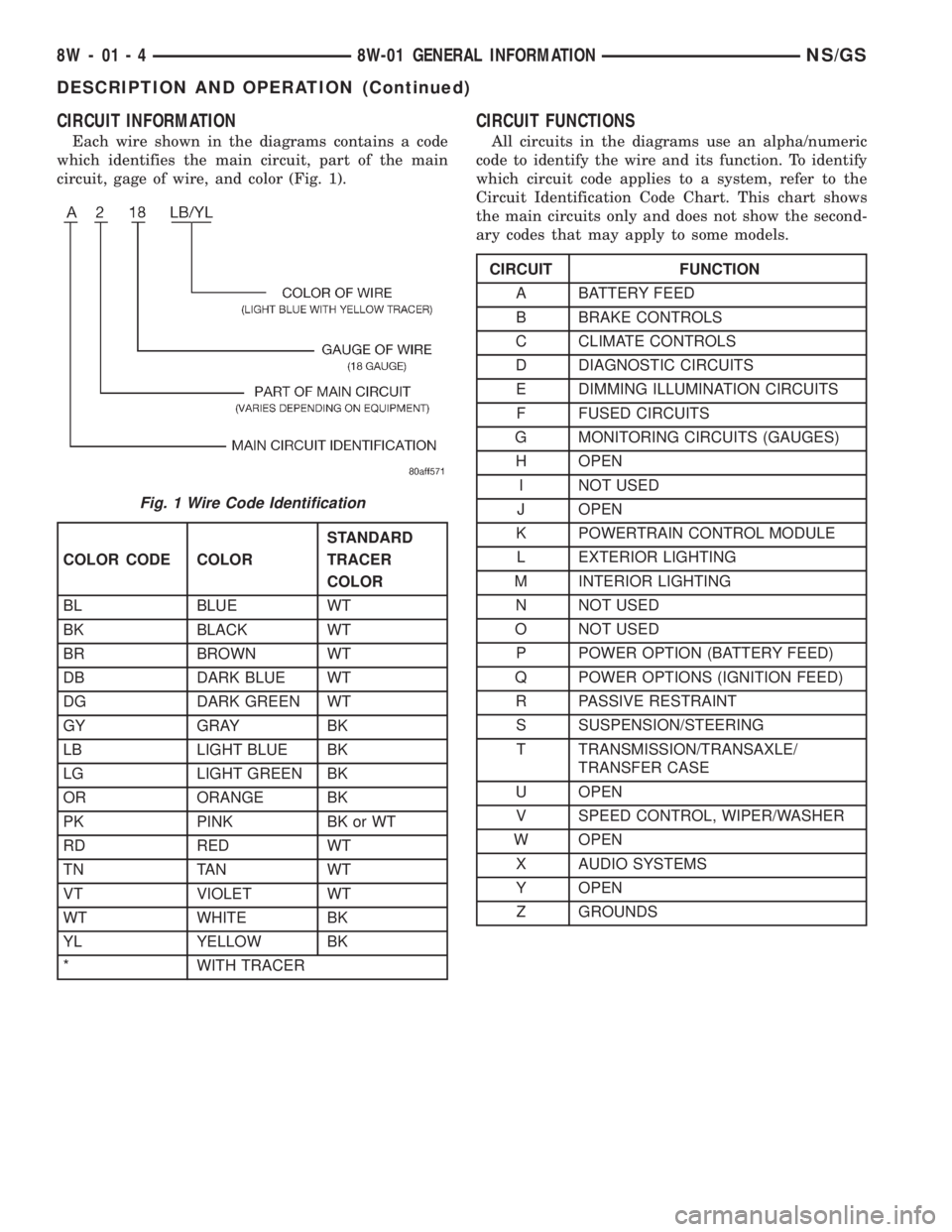
CIRCUIT INFORMATION
Each wire shown in the diagrams contains a code
which identifies the main circuit, part of the main
circuit, gage of wire, and color (Fig. 1).
CIRCUIT FUNCTIONS
All circuits in the diagrams use an alpha/numeric
code to identify the wire and its function. To identify
which circuit code applies to a system, refer to the
Circuit Identification Code Chart. This chart shows
the main circuits only and does not show the second-
ary codes that may apply to some models.
Fig. 1 Wire Code Identification
COLOR CODE COLORSTANDARD
TRACER
COLOR
BL BLUE WT
BK BLACK WT
BR BROWN WT
DB DARK BLUE WT
DG DARK GREEN WT
GY GRAY BK
LB LIGHT BLUE BK
LG LIGHT GREEN BK
OR ORANGE BK
PK PINK BK or WT
RD RED WT
TN TAN WT
VT VIOLET WT
WT WHITE BK
YL YELLOW BK
* WITH TRACER
CIRCUIT FUNCTION
A BATTERY FEED
B BRAKE CONTROLS
C CLIMATE CONTROLS
D DIAGNOSTIC CIRCUITS
E DIMMING ILLUMINATION CIRCUITS
F FUSED CIRCUITS
G MONITORING CIRCUITS (GAUGES)
H OPEN
I NOT USED
J OPEN
K POWERTRAIN CONTROL MODULE
L EXTERIOR LIGHTING
M INTERIOR LIGHTING
N NOT USED
O NOT USED
P POWER OPTION (BATTERY FEED)
Q POWER OPTIONS (IGNITION FEED)
R PASSIVE RESTRAINT
S SUSPENSION/STEERING
T TRANSMISSION/TRANSAXLE/
TRANSFER CASE
U OPEN
V SPEED CONTROL, WIPER/WASHER
W OPEN
X AUDIO SYSTEMS
Y OPEN
Z GROUNDS
8W - 01 - 4 8W-01 GENERAL INFORMATIONNS/GS
DESCRIPTION AND OPERATION (Continued)
Page 567 of 1938
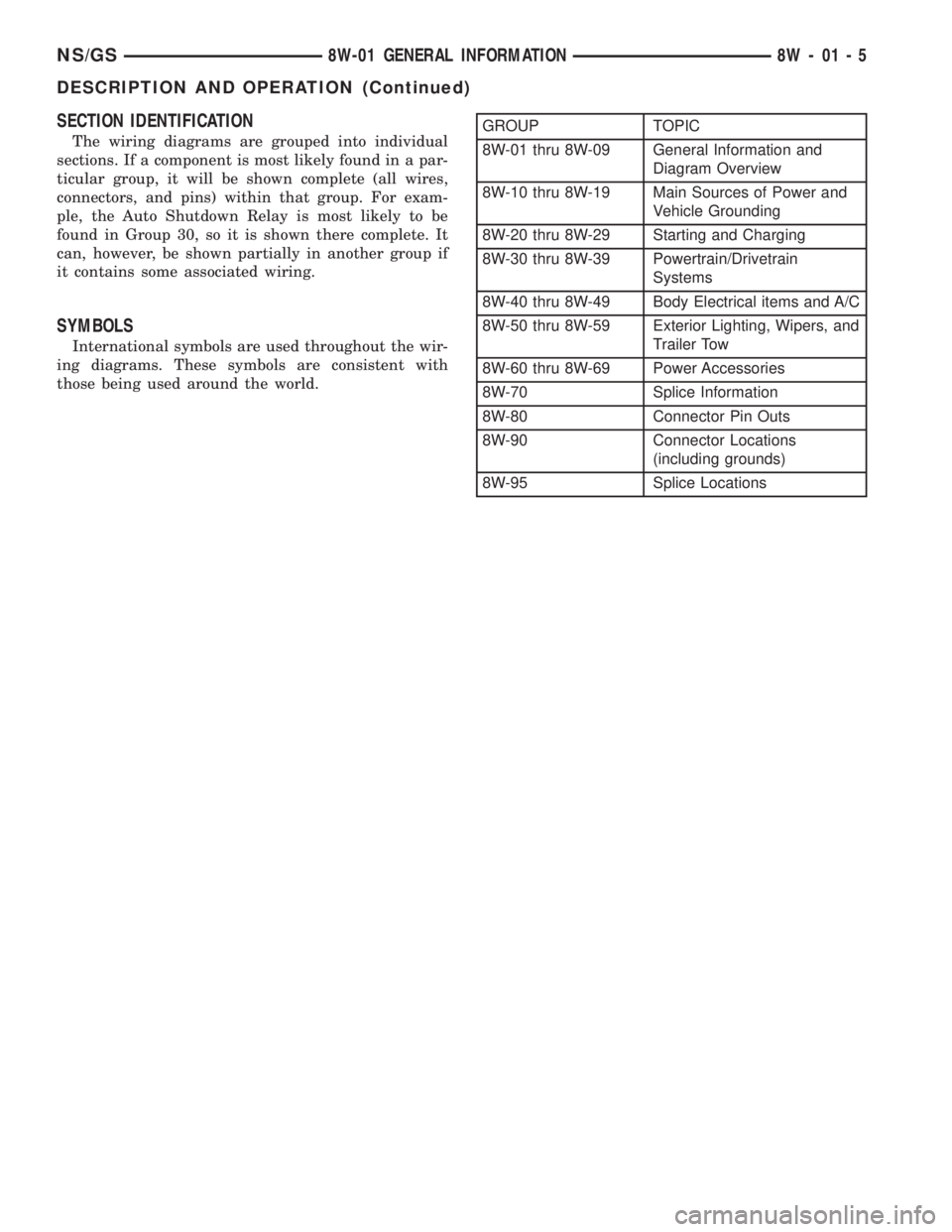
SECTION IDENTIFICATION
The wiring diagrams are grouped into individual
sections. If a component is most likely found in a par-
ticular group, it will be shown complete (all wires,
connectors, and pins) within that group. For exam-
ple, the Auto Shutdown Relay is most likely to be
found in Group 30, so it is shown there complete. It
can, however, be shown partially in another group if
it contains some associated wiring.
SYMBOLS
International symbols are used throughout the wir-
ing diagrams. These symbols are consistent with
those being used around the world.
GROUP TOPIC
8W-01 thru 8W-09 General Information and
Diagram Overview
8W-10 thru 8W-19 Main Sources of Power and
Vehicle Grounding
8W-20 thru 8W-29 Starting and Charging
8W-30 thru 8W-39 Powertrain/Drivetrain
Systems
8W-40 thru 8W-49 Body Electrical items and A/C
8W-50 thru 8W-59 Exterior Lighting, Wipers, and
Trailer Tow
8W-60 thru 8W-69 Power Accessories
8W-70 Splice Information
8W-80 Connector Pin Outs
8W-90 Connector Locations
(including grounds)
8W-95 Splice Locations
NS/GS8W-01 GENERAL INFORMATION 8W - 01 - 5
DESCRIPTION AND OPERATION (Continued)
Page 571 of 1938

²Voltmeter - Used to check for voltage on a cir-
cuit. Always connect the black lead to a known good
ground and the red lead to the positive side of the
circuit.
CAUTION: Most of the electrical components used
in today's vehicle are solid state. When checking
voltages in these circuits use a meter with a 10-me-
gohm or greater impedance rating.
²Ohmmeter - Used to check the resistance
between two points of a circuit. Low or no resistance
in a circuit means good continuity.
CAUTION: - Most of the electrical components used
in today's vehicle are Solid State. When checking
resistance in these circuits use a meter with a 10-
megohm or greater impedance rating. In addition,
make sure the power is disconnected from the cir-
cuit. Circuits that are powered up by the vehicle
electrical system can cause damage to the equip-
ment and provide false readings.
²Probing Tools - These tools are used for probing
terminals in connectors (Fig. 6). Select the proper
size tool from Special Tool Package 6807, and insert
it into the terminal being tested. Use the other end
of the tool to insert the meter probe.
INTERMITTENT AND POOR CONNECTIONS
Most intermittent electrical problems are caused
by faulty electrical connections or wiring. It is also
possible for a sticking component or relay to cause a
problem. Before condemning a component or wiring
assembly check the following items.
²Connectors are fully seated
²Spread terminals, or terminal push out
²Terminals in the wiring assembly are fully
seated into the connector/component and locked in
position
²Dirt or corrosion on the terminals. Any amount
of corrosion or dirt could cause an intermittent prob-
lem
²Damaged connector/component casing exposing
the item to dirt and moisture²Wire insulation that has rubbed through causing
a short to ground
²Some or all of the wiring strands broken inside
of the insulation covering.
²Wiring broken inside of the insulation
TROUBLESHOOTING TESTS
Before beginning any tests on a vehicles electrical
system use the Wiring Diagrams and study the cir-
cuit. Also refer to the Troubleshooting Wiring Prob-
lems in this section.
TESTING FOR VOLTAGE POTENTIAL
(1) Connect the ground lead of a voltmeter to a
known good ground (Fig. 7).
(2) Connect the other lead of the voltmeter to the
selected test point. The vehicle ignition may need to
be turned ON to check voltage. Refer to the appropri-
ate test procedure.
TESTING FOR CONTINUITY
(1) Remove the fuse for the circuit being checked
or, disconnect the battery.
(2) Connect one lead of the ohmmeter to one side
of the circuit being tested (Fig. 8).
(3) Connect the other lead to the other end of the
circuit being tested. Low or no resistance means good
continuity.
TESTING FOR A SHORT TO GROUND
(1) Remove the fuse and disconnect all items
involved with the fuse.
(2) Connect a test light or a voltmeter across the
terminals of the fuse.
Fig. 6 Probing Tool
Fig. 7 Testing for Voltage Potential
NS/GS8W-01 GENERAL INFORMATION 8W - 01 - 9
DIAGNOSIS AND TESTING (Continued)