wiring CHRYSLER VOYAGER 2001 Service Manual
[x] Cancel search | Manufacturer: CHRYSLER, Model Year: 2001, Model line: VOYAGER, Model: CHRYSLER VOYAGER 2001Pages: 4284, PDF Size: 83.53 MB
Page 1011 of 4284

Symptom:
REAR WIPER OUTPUT SHORT TO GROUND
When Monitored and Set Condition:
REAR WIPER OUTPUT SHORT TO GROUND
When Monitored: Ignition ON
Set Condition:
POSSIBLE CAUSES
REAR WIPER MOTOR FUNCTION
INTERMITTENT WIRING AND CONNECTORS
REAR WIPER MOTOR CONTROL CIRCUIT SHORT TO GROUND
BODY CONTROL MODULE
TEST ACTION APPLICABILITY
1 Ignition on, engine not running.
Turn on the Rear Wiper.
Does the Rear Wiper Function?All
Ye s®Go To 2
No®Go To 3
2 Turn the ignition on.
With the DRBIIIt, erase all BCM and FCM DTCs.
Turn the ignition off.
The conditions necessary to set this DTC are not present at this time.
Using the schematics as a guide, inspect the wiring and connectors specific to this
circuit.
Wiggle the wiring while checking for shorts and open circuits.
Were there any problems found?All
Ye s®Repair as necessary.
Perform BODY VERIFICATION TEST - VER 1.
No®Test Complete.
3 Turn the ignition off to the lock position.
Disconnect the Body Control Module harness connector.
Disconnect the Rear Wiper Motor harness connector.
Note: Check connectors - Clean/repair as necessary.
Measure the resistance between ground and the Rear Wiper Motor Control circuit.
Is the resistance less than 5.0 ohms?All
Ye s®Repair the Rear Wiper Motor Control Circuit for a short to
ground.
Perform BODY VERIFICATION TEST - VER 1.
No®Go To 4
982
WINDSHIELD WIPER & WASHER
Page 1013 of 4284
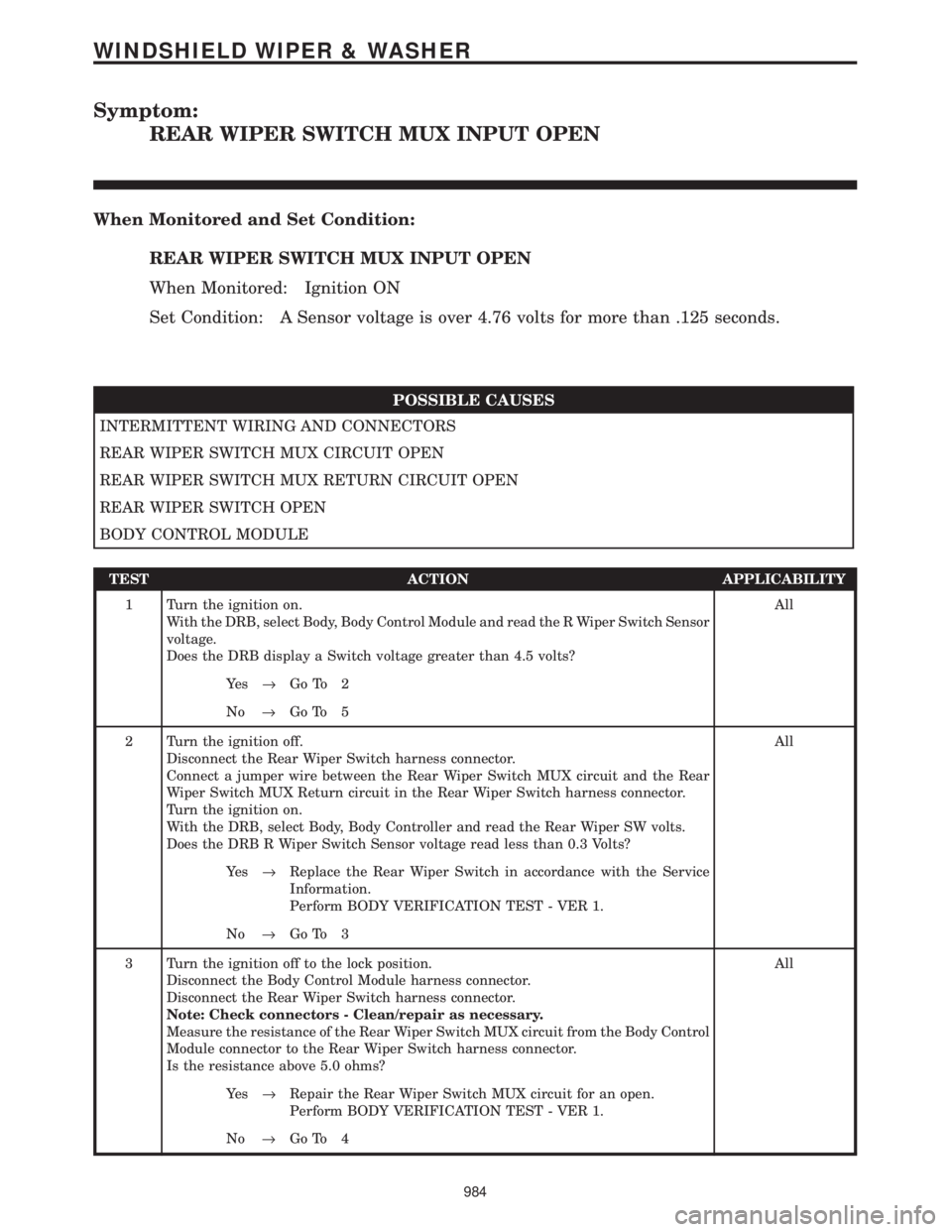
Symptom:
REAR WIPER SWITCH MUX INPUT OPEN
When Monitored and Set Condition:
REAR WIPER SWITCH MUX INPUT OPEN
When Monitored: Ignition ON
Set Condition: A Sensor voltage is over 4.76 volts for more than .125 seconds.
POSSIBLE CAUSES
INTERMITTENT WIRING AND CONNECTORS
REAR WIPER SWITCH MUX CIRCUIT OPEN
REAR WIPER SWITCH MUX RETURN CIRCUIT OPEN
REAR WIPER SWITCH OPEN
BODY CONTROL MODULE
TEST ACTION APPLICABILITY
1 Turn the ignition on.
With the DRB, select Body, Body Control Module and read the R Wiper Switch Sensor
voltage.
Does the DRB display a Switch voltage greater than 4.5 volts?All
Ye s®Go To 2
No®Go To 5
2 Turn the ignition off.
Disconnect the Rear Wiper Switch harness connector.
Connect a jumper wire between the Rear Wiper Switch MUX circuit and the Rear
Wiper Switch MUX Return circuit in the Rear Wiper Switch harness connector.
Turn the ignition on.
With the DRB, select Body, Body Controller and read the Rear Wiper SW volts.
Does the DRB R Wiper Switch Sensor voltage read less than 0.3 Volts?All
Ye s®Replace the Rear Wiper Switch in accordance with the Service
Information.
Perform BODY VERIFICATION TEST - VER 1.
No®Go To 3
3 Turn the ignition off to the lock position.
Disconnect the Body Control Module harness connector.
Disconnect the Rear Wiper Switch harness connector.
Note: Check connectors - Clean/repair as necessary.
Measure the resistance of the Rear Wiper Switch MUX circuit from the Body Control
Module connector to the Rear Wiper Switch harness connector.
Is the resistance above 5.0 ohms?All
Ye s®Repair the Rear Wiper Switch MUX circuit for an open.
Perform BODY VERIFICATION TEST - VER 1.
No®Go To 4
984
WINDSHIELD WIPER & WASHER
Page 1014 of 4284
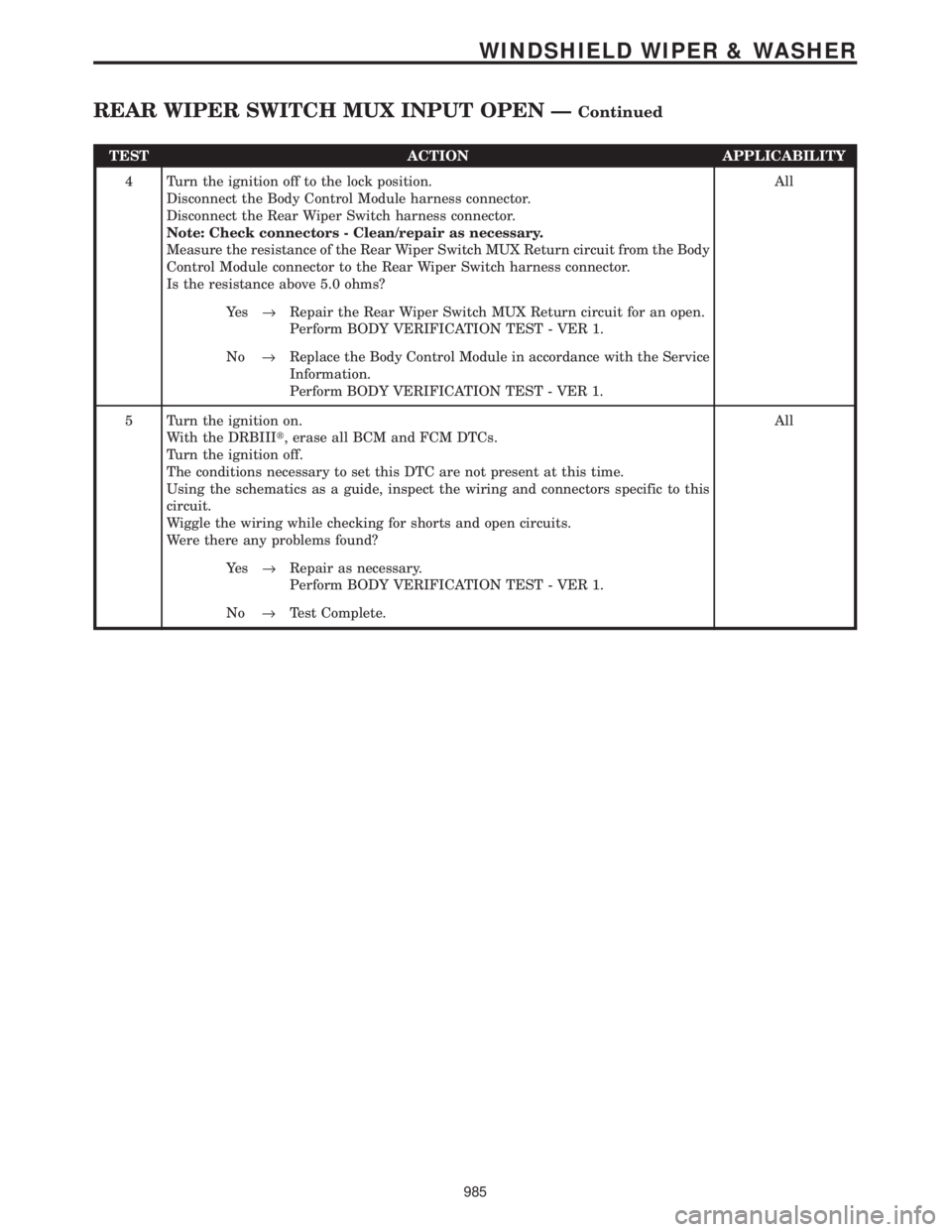
TEST ACTION APPLICABILITY
4 Turn the ignition off to the lock position.
Disconnect the Body Control Module harness connector.
Disconnect the Rear Wiper Switch harness connector.
Note: Check connectors - Clean/repair as necessary.
Measure the resistance of the Rear Wiper Switch MUX Return circuit from the Body
Control Module connector to the Rear Wiper Switch harness connector.
Is the resistance above 5.0 ohms?All
Ye s®Repair the Rear Wiper Switch MUX Return circuit for an open.
Perform BODY VERIFICATION TEST - VER 1.
No®Replace the Body Control Module in accordance with the Service
Information.
Perform BODY VERIFICATION TEST - VER 1.
5 Turn the ignition on.
With the DRBIIIt, erase all BCM and FCM DTCs.
Turn the ignition off.
The conditions necessary to set this DTC are not present at this time.
Using the schematics as a guide, inspect the wiring and connectors specific to this
circuit.
Wiggle the wiring while checking for shorts and open circuits.
Were there any problems found?All
Ye s®Repair as necessary.
Perform BODY VERIFICATION TEST - VER 1.
No®Test Complete.
985
WINDSHIELD WIPER & WASHER
REAR WIPER SWITCH MUX INPUT OPEN ÐContinued
Page 1015 of 4284
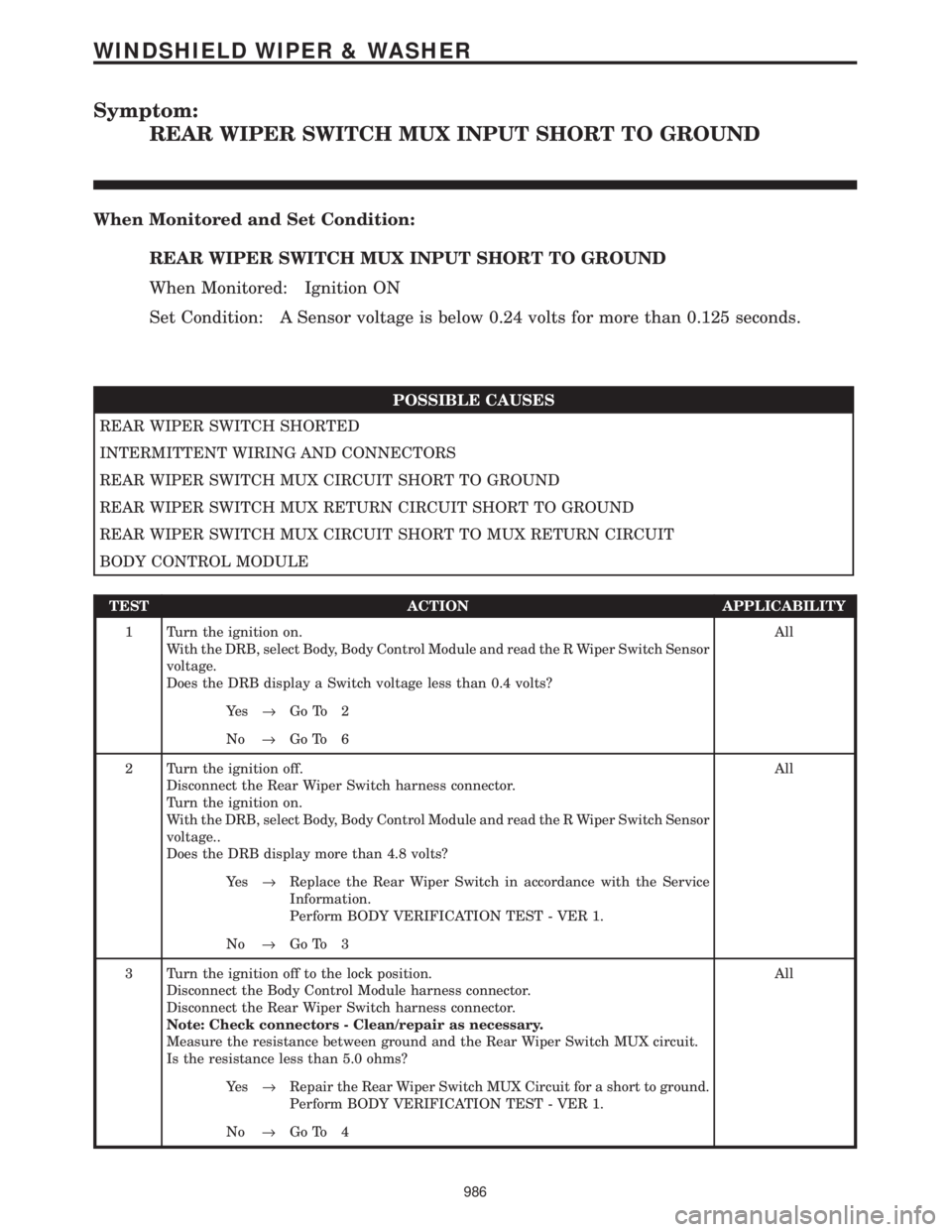
Symptom:
REAR WIPER SWITCH MUX INPUT SHORT TO GROUND
When Monitored and Set Condition:
REAR WIPER SWITCH MUX INPUT SHORT TO GROUND
When Monitored: Ignition ON
Set Condition: A Sensor voltage is below 0.24 volts for more than 0.125 seconds.
POSSIBLE CAUSES
REAR WIPER SWITCH SHORTED
INTERMITTENT WIRING AND CONNECTORS
REAR WIPER SWITCH MUX CIRCUIT SHORT TO GROUND
REAR WIPER SWITCH MUX RETURN CIRCUIT SHORT TO GROUND
REAR WIPER SWITCH MUX CIRCUIT SHORT TO MUX RETURN CIRCUIT
BODY CONTROL MODULE
TEST ACTION APPLICABILITY
1 Turn the ignition on.
With the DRB, select Body, Body Control Module and read the R Wiper Switch Sensor
voltage.
Does the DRB display a Switch voltage less than 0.4 volts?All
Ye s®Go To 2
No®Go To 6
2 Turn the ignition off.
Disconnect the Rear Wiper Switch harness connector.
Turn the ignition on.
With the DRB, select Body, Body Control Module and read the R Wiper Switch Sensor
voltage..
Does the DRB display more than 4.8 volts?All
Ye s®Replace the Rear Wiper Switch in accordance with the Service
Information.
Perform BODY VERIFICATION TEST - VER 1.
No®Go To 3
3 Turn the ignition off to the lock position.
Disconnect the Body Control Module harness connector.
Disconnect the Rear Wiper Switch harness connector.
Note: Check connectors - Clean/repair as necessary.
Measure the resistance between ground and the Rear Wiper Switch MUX circuit.
Is the resistance less than 5.0 ohms?All
Ye s®Repair the Rear Wiper Switch MUX Circuit for a short to ground.
Perform BODY VERIFICATION TEST - VER 1.
No®Go To 4
986
WINDSHIELD WIPER & WASHER
Page 1016 of 4284
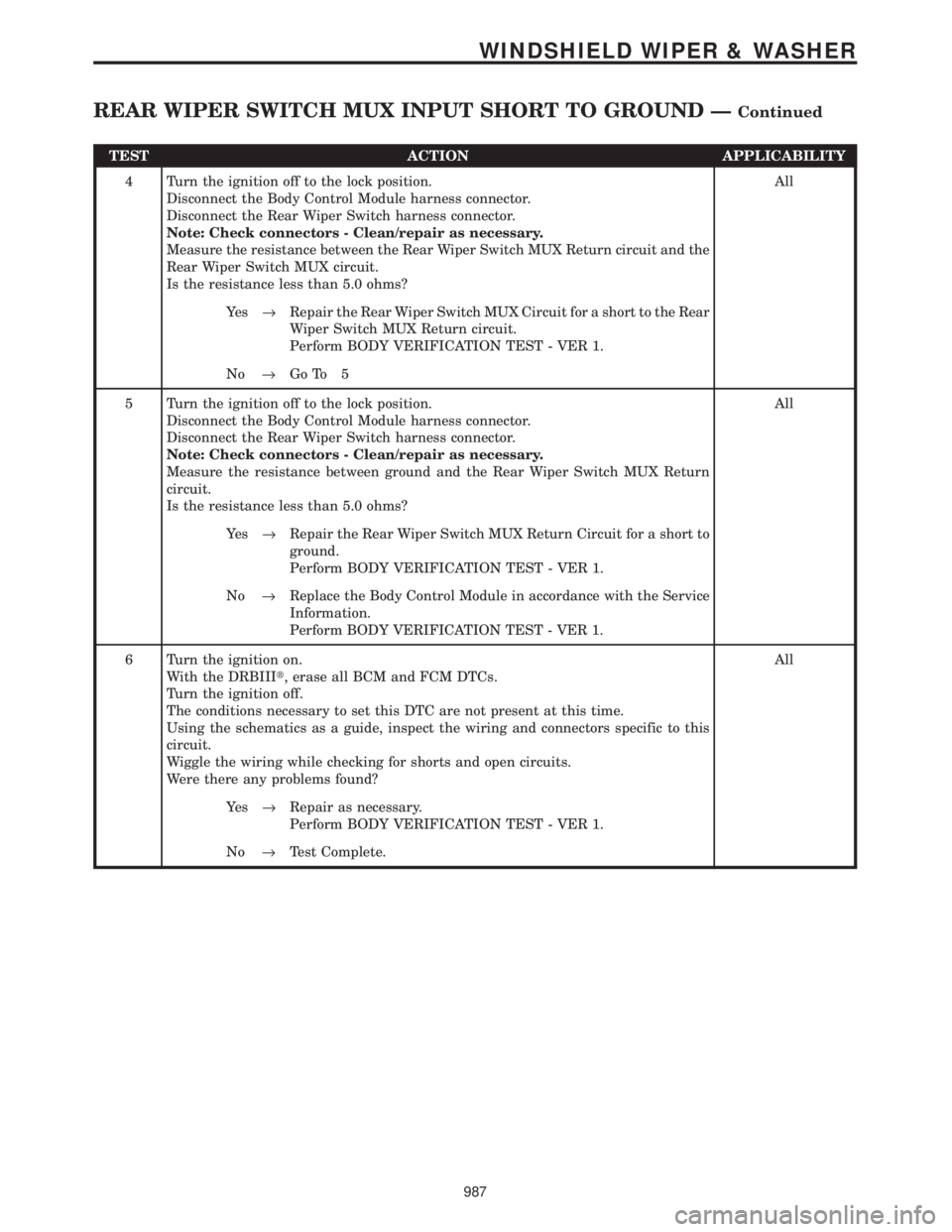
TEST ACTION APPLICABILITY
4 Turn the ignition off to the lock position.
Disconnect the Body Control Module harness connector.
Disconnect the Rear Wiper Switch harness connector.
Note: Check connectors - Clean/repair as necessary.
Measure the resistance between the Rear Wiper Switch MUX Return circuit and the
Rear Wiper Switch MUX circuit.
Is the resistance less than 5.0 ohms?All
Ye s®Repair the Rear Wiper Switch MUX Circuit for a short to the Rear
Wiper Switch MUX Return circuit.
Perform BODY VERIFICATION TEST - VER 1.
No®Go To 5
5 Turn the ignition off to the lock position.
Disconnect the Body Control Module harness connector.
Disconnect the Rear Wiper Switch harness connector.
Note: Check connectors - Clean/repair as necessary.
Measure the resistance between ground and the Rear Wiper Switch MUX Return
circuit.
Is the resistance less than 5.0 ohms?All
Ye s®Repair the Rear Wiper Switch MUX Return Circuit for a short to
ground.
Perform BODY VERIFICATION TEST - VER 1.
No®Replace the Body Control Module in accordance with the Service
Information.
Perform BODY VERIFICATION TEST - VER 1.
6 Turn the ignition on.
With the DRBIIIt, erase all BCM and FCM DTCs.
Turn the ignition off.
The conditions necessary to set this DTC are not present at this time.
Using the schematics as a guide, inspect the wiring and connectors specific to this
circuit.
Wiggle the wiring while checking for shorts and open circuits.
Were there any problems found?All
Ye s®Repair as necessary.
Perform BODY VERIFICATION TEST - VER 1.
No®Test Complete.
987
WINDSHIELD WIPER & WASHER
REAR WIPER SWITCH MUX INPUT SHORT TO GROUND ÐContinued
Page 1159 of 4284
The cycling of the build and decay valves is
similar to the ABS except that they work to control
wheel spin by applying brakes. ABS function is to
control wheel skid by releasing brakes.
Two pressure relief valves allow excess fluid vol-
ume to return to the reservoir when not used by the
build/decay cycles. These are required because the
pump supplies more volume than the traction con-
trol system requires.
If at any time the brake pedal is applied during a
traction control cycle, the brake lamp switch will
trigger the CAB to switch off the traction control.
The traction control system will be enabled at
each ignition cycle. It may be turned off by depress-
ing the Traction Control Switch. The traction con-
trol system function lamp will illuminate ªTRAC
OFFº immediately upon depressing the traction
control switch button. Only the ªTRACº portion of
the ªTRAC OFFº indicator will illuminate during a
traction control event. If the CAB calculates that
the brake temperatures are high, the traction con-
trol system will become inoperative until a time-out
period has elapsed. When in this thermal protection
mode, the traction control ªTRAC OFFº lamp will
illuminate; however, a fault will not be registered.
3.3 SYSTEM COMPONENTS
²controller antilock brake (CAB)
²vacuum booster
²master cylinder
²ABS integrated electronic control module/
hydraulic control unit (HCU), valve block assem-
bly: 8 valve solenoids (4 inlet valves, 4 outlet
valves, 2 accumulators) 1 motor, 2 pump
²ABS integrated electronic control module with
traction control same as above but has 10 valve
solenoids.
²4 wheel speed sensor/tone wheel assemblies
²ABS warning indicator
²fuses and wiring harness
²fluid reservoir
²TRAC/TRAC OFF indicator
3.3.1 ABS AND BRAKE WARNING
INDICATORS
The amber ABS warning indicator is located in
the instrument cluster. It is used to inform the
driver that the antilock function has been turned
off. The ABS warning indicator is controlled by the
CAB. The CAB controls the lamp with a command
over the PCI bus.
The ABS Warning Indicator will remain lit during
every key cycle until a circuit or component fault is
repaired and the CAB no longer detects the fault.After repair of a sensor signal fault or a pump motor
fault, the CAB must sense all four wheels at 25
km/h (15 mph) before it will extinguish the ABS and
TRAC OFF Indicators.
The Instrument Cluster will illuminate the ABS
Warning Indicator if it loses communication with
the CAB.
The red BRAKE warning indicator is also located
in the instrument cluster. It can be activated in
several ways. Application of the parking brake or a
low fluid signal from the fluid level switch located in
the master cylinder reservoir will cause the indica-
tor to come on.
3.3.2 CONTROLLER ANTILOCK BRAKE
(CAB)
The Controller Antilock Brake (CAB) is a
microprocessor-based device that monitors wheel
speeds and controls the antilock functions. The
CAB contains two microprocessors that receive
identical sensor signals and then independently
process the information. The results are then com-
pared to make sure that they agree. Otherwise, the
CAB will turn off the antilock and turn on the ABS
amber warning indicator.
The primary functions of the CAB are to:
²detect wheel locking tendencies
²control fluid pressure modulation to the brakes
during antilock stop
²monitor the system for proper operation
²manage traction control functions
²provide communication to the DRBIIItwhile in
diagnostic mode
²store diagnostic information in non-volatile memory
The CAB continuously monitors the speed of each
wheel. When a wheel locking tendency is detected,
the CAB will command the appropriate valve to
modulate brake fluid pressure in its hydraulic unit.
Brake pedal position is maintained during an an-
tilock stop by being a closed system with the use of
2 accumulators. The CAB continues to control pres-
sure in individual hydraulic circuits until a wheel
locking tendency is no longer present. The CAB
turns on the pump motor during an antilock stop.
The antilock brake system is constantly moni-
tored by the CAB for proper operation. If the CAB
detects a system malfunction, it can disable the
antilock system and turn on the ABS warning
indicator. If the antilock function is disabled, the
system will revert to standard base brake system
operation.
The CAB inputs include the following:
²diagnostic communication
²four wheel speed sensors
2
GENERAL INFORMATION
Page 1161 of 4284
the brake pedal is applied the test will be run at 40
km/h (24 mph) regardless of brake switch state. If,
during the dynamic test, the brake pedal is applied,
the driver may feel the test through brake pedal
pulsations. This is a normal condition.
If any component exhibits a trouble condition
during system initialization or dynamic check, the
CAB will illuminate the ABS warning indicator and
TRAC OFF lamp if equipped.
3.3.6 DIAGNOSTIC MODE
To enter diagnostic mode, a vehicle speed must be
below 10 km/h (6 mph) and no ABS condition
present. If vehicle speed is not below 10 km/h
(6 mph), a ªNo Responseº message could be dis-
played by the DRBIIIt. The following are charac-
teristics of diagnostic mode:
± The amber ABS warning indicator will blink
rapidly (about 1/2 second ON and 1/2 second
OFF). If a hard trouble code, such as Valve
Power Feed Failure code is present, the indi-
cator will be illuminated without blinking un-
til the trouble condition is cleared.
± Antilock operation is disabled.
± The HCU valves cannot be actuated when the
vehicle speed is above 8 km/h (5 mph). If valve
actuation is attempted above 8 km/h (5 mph), a
ªNo Responseº message will be displayed on
the DRBIIIt.
3.4 DIAGNOSTIC TROUBLE CODES
The controller antilock brake may report any of
the following diagnostic trouble codes:
CLUSTER LAMP FAILURE
VALVE POWER FEED FAILURE
BUS SYSTEM COMMUNICATION FAILURE
CAB INTERNAL FAILURE
LEFT FRONT SENSOR CIRCUIT FAILURE
LEFT FRONT WHEEL SPEED SIGNAL
FAILURE
LEFT REAR SENSOR CIRCUIT FAILURE
LEFT REAR WHEEL SPEED SIGNAL
FAILURE
PUMP CIRCUIT FAILURE
RIGHT FRONT SENSOR CIRCUIT FAILURE
RIGHT FRONT WHEEL SPEED SIGNAL
FAILURE
RIGHT REAR SENSOR CIRCUIT FAILURE
RIGHT REAR WHEEL SPEED SIGNAL
FAILURE
SYSTEM OVERVOLTAGE
SYSTEM UNDERVOLTAGE
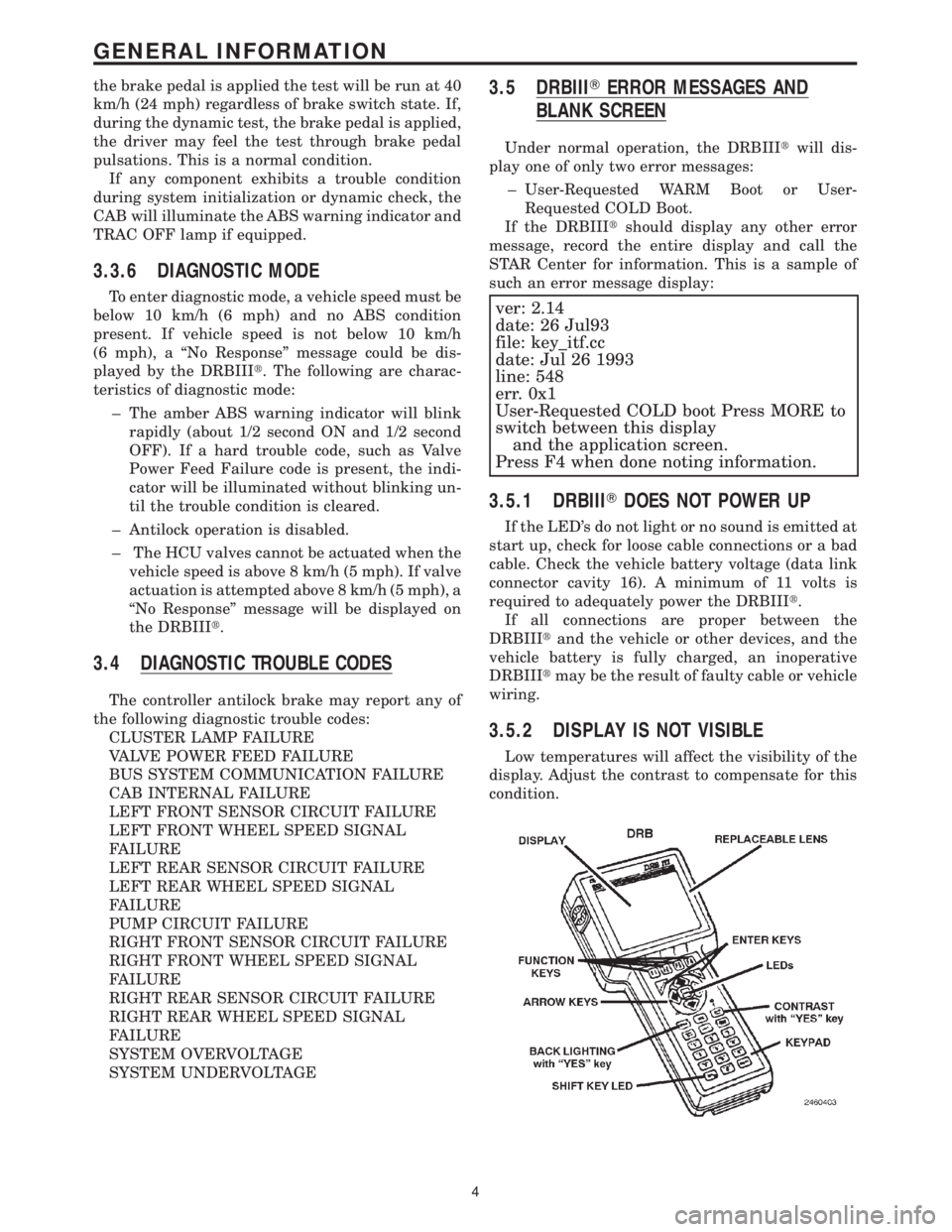
3.5 DRBIIITERROR MESSAGES AND
BLANK SCREEN
Under normal operation, the DRBIIItwill dis-
play one of only two error messages:
± User-Requested WARM Boot or User-
Requested COLD Boot.
If the DRBIIItshould display any other error
message, record the entire display and call the
STAR Center for information. This is a sample of
such an error message display:
ver: 2.14
date: 26 Jul93
file: key_itf.cc
date: Jul 26 1993
line: 548
err. 0x1
User-Requested COLD boot Press MORE to
switch between this display
and the application screen.
Press F4 when done noting information.
3.5.1 DRBIIITDOES NOT POWER UP
If the LED's do not light or no sound is emitted at
start up, check for loose cable connections or a bad
cable. Check the vehicle battery voltage (data link
connector cavity 16). A minimum of 11 volts is
required to adequately power the DRBIIIt.
If all connections are proper between the
DRBIIItand the vehicle or other devices, and the
vehicle battery is fully charged, an inoperative
DRBIIItmay be the result of faulty cable or vehicle
wiring.
3.5.2 DISPLAY IS NOT VISIBLE
Low temperatures will affect the visibility of the
display. Adjust the contrast to compensate for this
condition.
4
GENERAL INFORMATION
Page 1164 of 4284

6.0 GLOSSARY OF TERMS
ABSantilock brake system
CABcontroller antilock brake
CCDChrysler Collision Detection
DLCdata link connector
DRBdiagnostic read-out box
EDWelectrical distribution wiring
EMIelectro magnetic interference
HCUhydraulic control unit
ICUintegrated control unit
IFLinlet front leftIFRinlet front right
IRLinlet rear left
IRRinlet rear right
JBLKjunction block
OFLoutlet front left
OFRoutlet front right
ORLoutlet rear left
ORRoutlet rear right
PDCpower distribution center
P/Mpump motor
RFIradio frequency interference
WSSwheel speed sensor
7
GENERAL INFORMATION
Page 1173 of 4284

TEST ACTION APPLICABILITY
5 Turn the ignition off.
Visually inspect the related wiring harness. Look for any chafed, pierced, pinched, or
partially broken wires.
Visually inspect the related wire harness connectors. Look for broken, bent, pushed
out, or corroded terminals.
Refer to any Hotline letters or Technical Service Bulletins that may apply.
Were any problems found?All
Ye s®Repair as necessary.
Perform ABS VERIFICATION TEST - VER 1.
No®Test Complete.
16
BRAKES (CAB)
LEFT FRONT SENSOR CIRCUIT FAILURE ÐContinued
Page 1175 of 4284

TEST ACTION APPLICABILITY
3 With the DRBIIIt, read DTCs.
Did the DTC reoccur?All
Ye s®Replace the Wheel Speed Sensor in accordance with the Service
Information.
Perform ABS VERIFICATION TEST - VER 1.
No®Go To 4
4 Turn the ignition off.
Visually inspect wheel speed sensor.
Visually inspect tone wheel.
Visually inspect wiring harness.
Visually inspect brakes for locking up due to lining contamination or overheating.
Inspect all Components for defects which may cause a Signal DTC to set.
Is any Component Damaged?All
Ye s®Repair as necessary. The vehicle must be driven at 25 km/h (15
mph) to extinguish the ABS indicator.
Perform ABS VERIFICATION TEST - VER 1.
No®Test Complete.
18
BRAKES (CAB)
LEFT FRONT WHEEL SPEED SIGNAL FAILURE ÐContinued