wiring CHRYSLER VOYAGER 2001 Service Manual
[x] Cancel search | Manufacturer: CHRYSLER, Model Year: 2001, Model line: VOYAGER, Model: CHRYSLER VOYAGER 2001Pages: 4284, PDF Size: 83.53 MB
Page 3748 of 4284
NOTE:Do not activate the Dosing Pump Prime more
than one time. This will put excess fuel in the DCHA
Heater Module an cause smoke to emit from the
DCHA exhaust pipe when heater activation occurs.
NOTE: A clicking noise heard coming from the Dos-
ing Pump indicates that the pump is operational.
(7)
With the DRBIIItin Cabin Heater, select Sys-
tem Tests and Dosing Pump Prime. Allow the Dosing
Pump to run for the full 45 second cycle time. When
the 45 second cycle is complete, press Page Back on
the DRBIIItkey pad to exit the Dosing Pump Prime.
The Dosing Pump priming procedure is now complete.
HEATER UNIT
REMOVAL
WARNING: ALLOW THE DCHA TO COOL BEFORE
PERFORMING A COMPONENT INSPECTION/REPAIR
OR REPLACEMENT. FAILURE TO FOLLOW THESE
INSTRUCTIONS MAY RESULT IN PERSONAL
INJURY.
WARNING: ALLOW THE EXHAUST SYSTEM TO
COOL BEFORE PERFORMING A COMPONENT
INSPECTION/REPAIR OR REPLACEMENT. FAILURE
TO FOLLOW THESE INSTRUCTION MAY RESULT IN
PERSONAL INJURY.
(1) Elevate the vehicle on a hoist/lift taking note of
heater exhaust tube flexible section.
(2) Drain cooling system(Refer to 7 - COOLING -
STANDARD PROCEDURE).
(3) Carefully open one hose to the underbody tube
assembly and drain the remaining coolant. A salvage
hose is a good idea to control the residual coolant, as
flow will occur from both the heater and the hose and
tube assemblies.
(4) Remove the second hose from the underbody
hose and tube assembly.
(5) Loosen the hose and tube assembly from the
toe-board cross member at two locations.
(6) Disconnect the electrical connector from the
body harness near the toe board cross member and
rail.
(7) Remove the wiring harness from the toe board
cross member(Refer to 24 - HEATING & AIR CON-
DITIONING/CABIN HEATER/HEATER UNIT -
REMOVAL).
(8) Open the fuel fill cap. Disconnect the rubber
fuel hose between the body tube assembly and the
fuel pump nipple at the body tube joint. A minimal
amount of fuel may flow from the open port.NOTE: Utilize an approved fuel storage container to
catch any residual fuel.
(9) Loosen the two M8 fasteners at the rail. Take
care to notice that the exhaust tube bracket tab is on
top of the heater bracket.
(10) Remove the heater exhaust tube flex section
from the exhaust tube by loosening the M6 bolt of
the clamp assembly. Remove the hose from the
exhaust tube. Removal of the rail tube assembly may
aid in this service operation.(Refer to 24 - HEATING
& AIR CONDITIONING/CABIN HEATER/EXHAUST
TUBE - REMOVAL).
(11) Remove seat hex nut at the heater mounting
flange to cross member.
(12) Loosen the remaining M6 and M8 fasteners
which mount the exhaust tube assembly to the vehi-
cle.
(a) Install a suitable cabin heater support device
under the cabin heater and secure the cabin heater
to the device.
(13) Loosen the remaining three M6 fasteners to
the cross members.
(14) Remove the loosened fasteners that support
the heater while supporting the weight of the heater.
(15) Swing the unit mounting bracket from
between the exhaust bracket and rail mounting loca-
tion. Drain any residual coolant from the heater unit.
(16) Lower the cabin heater and remove from the
supporting device and place on a suitable work area.
INSTALLATION
(1) Install the unit mounting bracket between the
exhaust bracket and the rail mounting location.
(2) Install the fasteners that support the heater
while supporting the weight of the heater.
(3) Install the three M6 fasteners to the cross
members. Tighten the M6 fasteners to 7 Nm (5 ft.
lbs.).
(4) Tighten the remaining M6 fasteners to 7 Nm (5
ft. lbs.) and the M8 fasteners to 23 Nm (17 ft. lbs.)
which mount the exhaust tube assembly to the vehi-
cle.
(5) Install the seat hex nut at the heater mounting
flange to the cross members. Tighten to 60 Nm (44 ft.
lbs.)
(6) Install the heater exhaust tube flex section to
the exhaust tube by tightening the M6 bolt of the
clamp assembly. Install the hose to the exhaust tube.
(7) Tighten the two M8 fasteners at the rail to 23
Nm (17 ft. lbs.). Taking care so that the exhaust tube
bracket tab is on the top of the heater bracket.
(8) Install the wiring harness(Refer to 24 - HEAT-
ING & AIR CONDITIONING/CABIN HEATER/
HEATER UNIT - INSTALLATION).
24a - 10 HEATING & AIR CONDITIONINGRG
FUEL LINE (Continued)
Page 3749 of 4284
(9) Tighten the hose and tube assembly to the toe-
board cross member at two locations.
(10) Install the second hose to the underbody hose
and tube assembly.
(11) Connect the rubber fuel hose between the
body tube assembly and the fuel pump nipple at the
body tube joint. Close the fuel fill cap.
(12) Remove the heater unit support device from
under the vehicle.
(13) Lower vehicle from lift.
(14) Refill cooling system(Refer to 7 - COOLING -
STANDARD PROCEDURE).
(15) Verify function of the cabin heater.
SUPPLEMENTAL DIESEL
HEATER WIRING
REMOVAL
(1) Elevate vehicle on a lift taking note of the
exhaust tube flexible section.
(2) Unplug connector from vehicle wiring harness
to cabin heater harness.
(3) Unplug connector from cabin heater harness to
dosing pump connector.
(4) Unplug two connectors from cabin heater har-
ness to cabin heater controller connectors.
(5) Remove two wiring harness connectors from
underbody.
(6) Remove two wiring harness connectors from
cabin heater shield.
(7) Carefully route the cabin heater harness to the
left side between the cabin heater unit and the cabin
heater shield.
INSTALLATION
(1) Carefully route the cabin heater harness from
the left side of the cabin heater between the cabin
heater unit and the cabin heater shield.
(2) Install the two wiring harness retaining con-
nectors to the cabin heater shield.
(3) Route the wiring harness along the underside
of the vehicle and install the two wiring harness
retaining connectors.
(4) Plug the two connectors from the cabin heater
harness to the cabin heater controller.
(5) Plug the connector to the cabin heater harness
to the dosing pump connector.
(6) Plug the connector from the vehicle wiring har-
ness to the cabin heater harness.
(7) Lower the vehicle.
(8) Verify function of the cabin heater.
AIR INTAKE PIPE
REMOVAL
NOTE: Heater air intake tube is part of an assembly
that includes the heater cooling intake and return
pipes. If heater air intake tube requires removal or
replacement the entire assembly will require remov-
al/replacement.
(1) Drain cooling system(Refer to 7 - COOLING -
STANDARD PROCEDURE).
(2) Remove clamps from the heater tubes at the
lower heater port and the lower EGR connector
which are located under the hood.
(3) Remove the retaining clamp at the heater air
intake muffler connection(Refer to 24 - HEATING &
AIR CONDITIONING/CABIN HEATER/INLET
MUFFLER - REMOVAL).
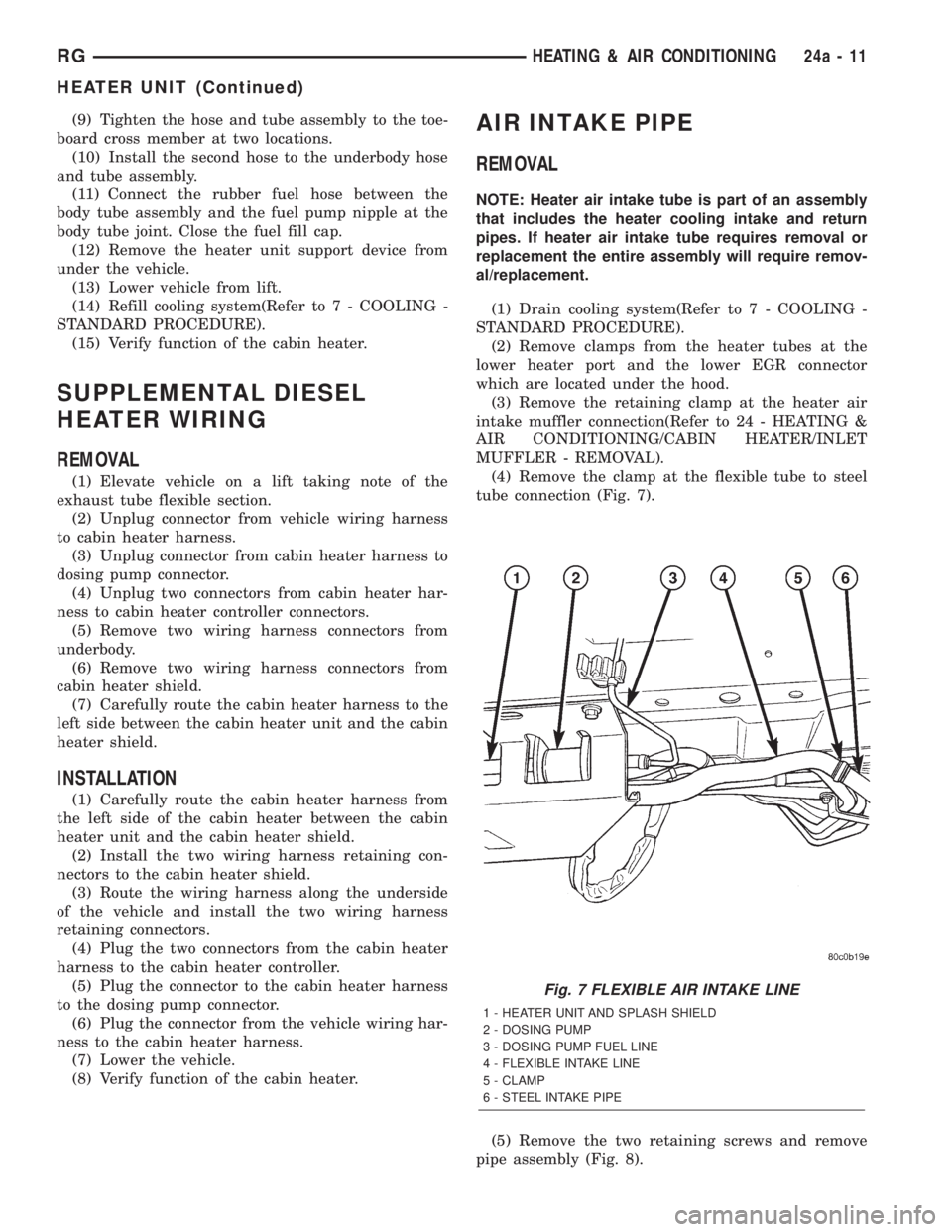
(4) Remove the clamp at the flexible tube to steel
tube connection (Fig. 7).
(5) Remove the two retaining screws and remove
pipe assembly (Fig. 8).
Fig. 7 FLEXIBLE AIR INTAKE LINE
1 - HEATER UNIT AND SPLASH SHIELD
2 - DOSING PUMP
3 - DOSING PUMP FUEL LINE
4 - FLEXIBLE INTAKE LINE
5 - CLAMP
6 - STEEL INTAKE PIPE
RGHEATING & AIR CONDITIONING24a-11
HEATER UNIT (Continued)
Page 3802 of 4284
powertrain control module checks that circuit or
function. Procedures in this manual verify if the
DTC is a hard code at the beginning of each test.
When it is not a hard code, an intermittent test
must be performed.
DTC's that are for Euro Stage III OBD monitors
will not set with just the ignition key on. Comparing
these to non-emission DTC's, they will seem like an
intermittent. These DTC's require a set of parame-
ters to be performed (The DRBIIItpre-test screens
will help with this for MONITOR DTC's), this is
called a TRIP. All Euro Stage III OBD DTCs will be
set after one or in some cases two trip failures, and
the MIL will be turned on. These DTC's require
three successful, no failures, TRIPS to extinguish
the MIL, followed by 40 warm-up cycles to erase the
DTC.
3.3.2 INTERMITTENT CODE
A diagnostic trouble code that is not there every
time the PCM checks the circuit is an intermittent
DTC. Most intermittent DTC's are caused by wiring
or connector problems. Defects that come and go
like this are the most difficult to diagnose; they
must be looked for under specific conditions that
cause them. The following checks may assist you in
identifying a possible intermittent problem:
²Visually inspect related wire harness connectors.
Look for broken, bent, pushed out, or corroded
terminals.
²Visually inspect the related harnesses. Look for
chafed, pierced, or partially broken wire.
²Refer to any technical service bulletins that may
apply.
²Use the DRBIIItdata recorder or co-pilot.
3.3.3 DISTANCE SINCE MI SET
The Euro Stage III OBD directive requires that
the distance traveled by the vehicle while theMIis
activated must be available at any instant through
the serial port on the standard data link connector.
This feature works as follows:1. If the MI is illuminated due to a fault, the
distance count is updated (i.e. it is counting).
2. If there is a9stale9MI fault (i.e. the fault is still
frozen in memory but the MI has heen extin-
guished due to 3 good trips), the distance count is
held (i.e. frozen).
3. If the distance count is being held due to (Item
2.) and the fault is cleared, the distance is
cleared (set to zero).
4. If the distance count is being held due to (Item
2.) and another MI occurs, the distance count is
reset (to 0) and begins updating anew.
5. If a fault occurs while the MI is already illumi-
nated due to a previous fault (the distance count
is updating), then the distance count continues
to update w/out interruption.
6. If the MI is flashing due to activate misfire and
there is and9active9fault (i.e. matured fault for
which 3 good trips have not occurred), the dis-
tance count behaves as the MI in ON.
7. If the MI is flashing due to active misfire and
there is no9active9fault (i.e. the MI is flashing
for a 1 malf.), the distance count behaves as if
the MI is off (because it is not yet a matured
fault).
8. The distance count is cleared whenever the fault
is cleared. (Via 40 warm up cycles, or via scan
tool).
3.3.4 HANDLING NO DTC PROBLEMS
Symptom checks cannot be used properly unless
the driveability problem characteristic actually
happens while the vehicle is being tested.
Select the symptom that most accurately de-
scribes the vehicle's driveability problem and then
perform the test routine that pertains to this symp-
tom. Perform each routine test in sequence until the
problem is found. For definitions, see Section 6.0
Glossary Of Terms.
SYMPTOM DIAGNOSTIC TEST
HARD START CHECKING THE FUEL PRESSURE
CHECKING THE ECT SENSOR
CHECKING THROTTLE POSITION SENSOR
CHECKING MAP SENSOR
CHECKING IDLE AIR CONTROL MOTOR OPERATION
CHECKING EGR SYSTEM
CHECKING IAT SENSOR
8
GENERAL INFORMATION
Page 3804 of 4284
SYMPTOM DIAGNOSTIC TEST
POOR FUEL ECONOMY CHECKING PCM POWER AND GND CKT
CHECKING THE FUEL PRESSURE
CHECKING ECT SENSOR
CHECKING THROTTLE POSITION SENSOR
CHECKING MAP SENSOR
CHECKING IDLE AIR CONTROL MOTOR OPERATION
CHECKING IAT SENSOR
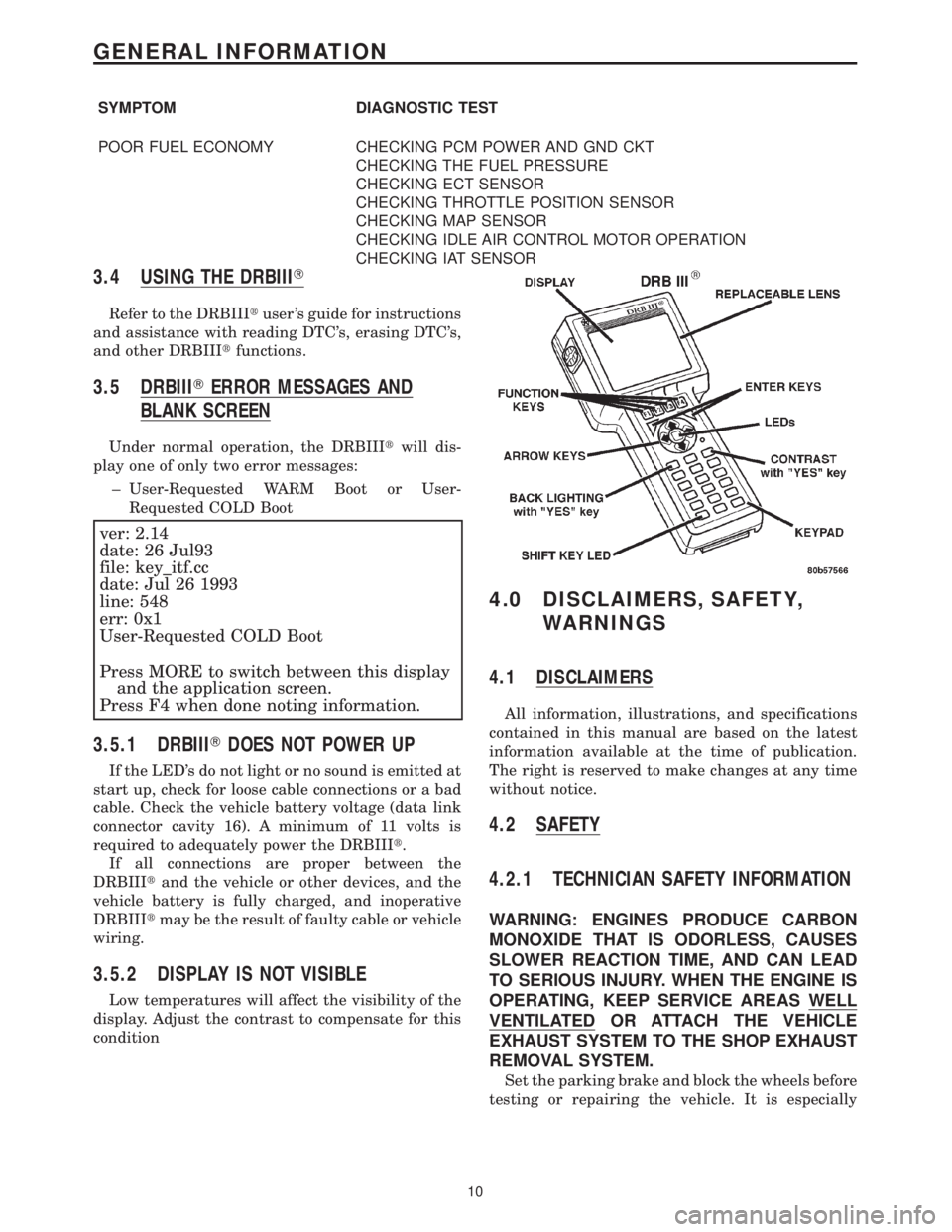
3.4 USING THE DRBIIIT
Refer to the DRBIIItuser 's guide for instructions
and assistance with reading DTC's, erasing DTC's,
and other DRBIIItfunctions.
3.5 DRBIIITERROR MESSAGES AND
BLANK SCREEN
Under normal operation, the DRBIIItwill dis-
play one of only two error messages:
± User-Requested WARM Boot or User-
Requested COLD Boot
ver: 2.14
date: 26 Jul93
file: key_itf.cc
date: Jul 26 1993
line: 548
err: 0x1
User-Requested COLD Boot
Press MORE to switch between this display
and the application screen.
Press F4 when done noting information.
3.5.1 DRBIIITDOES NOT POWER UP
If the LED's do not light or no sound is emitted at
start up, check for loose cable connections or a bad
cable. Check the vehicle battery voltage (data link
connector cavity 16). A minimum of 11 volts is
required to adequately power the DRBIIIt.
If all connections are proper between the
DRBIIItand the vehicle or other devices, and the
vehicle battery is fully charged, and inoperative
DRBIIItmay be the result of faulty cable or vehicle
wiring.
3.5.2 DISPLAY IS NOT VISIBLE
Low temperatures will affect the visibility of the
display. Adjust the contrast to compensate for this
condition
4.0 DISCLAIMERS, SAFETY,
WARNINGS
4.1 DISCLAIMERS
All information, illustrations, and specifications
contained in this manual are based on the latest
information available at the time of publication.
The right is reserved to make changes at any time
without notice.
4.2 SAFETY
4.2.1 TECHNICIAN SAFETY INFORMATION
WARNING: ENGINES PRODUCE CARBON
MONOXIDE THAT IS ODORLESS, CAUSES
SLOWER REACTION TIME, AND CAN LEAD
TO SERIOUS INJURY. WHEN THE ENGINE IS
OPERATING, KEEP SERVICE AREAS WELL
VENTILATED OR ATTACH THE VEHICLE
EXHAUST SYSTEM TO THE SHOP EXHAUST
REMOVAL SYSTEM.
Set the parking brake and block the wheels before
testing or repairing the vehicle. It is especially
10
GENERAL INFORMATION
Page 3810 of 4284

Symptom:
P0622-GENERATOR FIELD NOT SWITCHING PROPERLY
When Monitored and Set Condition:
P0622-GENERATOR FIELD NOT SWITCHING PROPERLY
When Monitored: With the ignition on. Engine running.
Set Condition: When the PCM tries to regulate the generator field with no result during
monitoring.
POSSIBLE CAUSES
WIRING HARNESS INTERMITTENT
INSPECT WIRING HARNESS
ASD RELAY OUTPUT CIRCUIT OPEN
GENERATOR FIELD DRIVER CIRCUIT SHORTED TO GROUND
GENERATOR FIELD DRIVER CIRCUIT OPEN
GENERATOR
POWERTRAIN CONTROL MODULE
TEST ACTION APPLICABILITY
1 Turn the ignition on.
With the DRBIIIt, actuate the Generator Field Driver circuit.
Using a 12-volt test light connected to ground, backprobe the Generator Field Driver
circuit in the back of the Generator.
Does the test light illuminate brightly and flash?All
Ye s®Go To 2
No®Go To 4
2 Turn the ignition on.
With the DRBIIItactuate the Generator Field Driver circuit.
Wiggle the wiring harness from the Generator to PCM.
With the DRBIIIt, read DTC's.
Did the DTC reset?All
Ye s®Repair as necessary .
Perform POWERTRAIN VERIFICATION TEST VER - 3.
No®Go To 3
3 Turn the ignition off.
Using the schematic as a guide, inspect the Wiring and Connectors.
Were any problems found?All
Ye s®Repair as necessary.
Perform POWERTRAIN VERIFICATION TEST VER - 3.
No®Test Complete.
16
CHARGING
Page 3813 of 4284

TEST ACTION APPLICABILITY
4WARNING: WHEN THE ENGINE IS OPERATING, DO NOT STAND IN A
DIRECT LINE WITH THE FAN. DO NOT PUT YOUR HANDS NEAR THE
PULLEYS, BELTS OR FAN. DO NOT WEAR LOOSE CLOTHING.
NOTE: The conditions that set the DTC are not present at this time. The
following list may help in identifying the intermittent condition.
With the engine running at normal operating temperature, monitor the DRB
parameters related to the DTC while wiggling the wiring harness. Look for param-
eter values to change and/or a DTC to set.
Review the DRB Freeze Frame information. If possible, try to duplicate the
conditions under which the DTC was set.
Refer to any Technical Service Bulletins (TSB) that may apply.
Visually inspect the related wiring harness. Look for any chafed, pierced, pinched, or
partially broken wires.
Visually inspect the related wiring harness connectors. Look for broken, bent, pushed
out, or corroded terminals.
Were any of the above conditions present?All
Ye s®Repair as necessary
Perform POWERTRAIN VERIFICATION TEST VER - 3.
No®Test Complete.
5 Turn the ignition off.
Disconnect the PCM harness connector.
Disconnect the Generator Field harness connector.
Measure the resistance of the Generator Field Driver circuit from the PCM harness
connector to ground.
Is the resistance below 5.0 ohms?All
Ye s®Repair the Generator Field Driver circuit shorted to ground.
Perform POWERTRAIN VERIFICATION TEST VER - 3.
No®Go To 6
6 Turn the ignition off.
Disconnect the Generator Field harness connector.
Measure resistance of the Generator Field Driver terminal to ground.
Is the resistance below 5.0 ohms?All
Ye s®Repair or replace the shorted Generator as necessary.
Perform POWERTRAIN VERIFICATION TEST VER - 3.
No®Go To 7
7 If there are no possible causes remaining, view repair. All
Repair
Replace and program the Powertrain Control Module in accor-
dance with the Service Information.
Perform POWERTRAIN VERIFICATION TEST VER - 3.
19
CHARGING
P1594-CHARGING SYSTEM VOLTAGE TOO HIGH ÐContinued
Page 3816 of 4284

TEST ACTION APPLICABILITY
6 Disconnect the Generator Field harness connector.
Turn the ignition on.
With the DRBIIItactuate the Generator Field Driver.
Using a 12-volt test light connected to ground, probe the ASD Relay Output circuit.
Does the test light illuminate brightly?All
Ye s®Go To 7
No®Repair the ASD Relay Output circuit.
Perform POWERTRAIN VERIFICATION TEST VER - 3.
7 If there is no possible causes remaining, view repair. All
Ye s®Repair or replace the Generator as necessary..
Perform POWERTRAIN VERIFICATION TEST VER - 3.
8WARNING: WHEN THE ENGINE IS OPERATING, DO NOT STAND IN A
DIRECT LINE WITH THE FAN. DO NOT PUT YOUR HANDS NEAR THE
PULLEYS, BELTS OR FAN. DO NOT WEAR LOOSE CLOTHING.
NOTE: The conditions that set the DTC are not present at this time. The
following list may help in identifying the intermittent condition.
With the engine running at normal operating temperature, monitor the DRB
parameters related to the DTC while wiggling the wiring harness. Look for param-
eter values to change and/or a DTC to set.
Review the DRB Freeze Frame information. If possible, try to duplicate the
conditions under which the DTC was set.
Refer to any Technical Service Bulletins (TSB) that may apply.
Visually inspect the related wiring harness. Look for any chafed, pierced, pinched, or
partially broken wires.
Visually inspect the related wiring harness connectors. Look for broken, bent, pushed
out, or corroded terminals.
Were any of the above conditions present?All
Ye s®Repair as necessary
Perform POWERTRAIN VERIFICATION TEST VER - 3.
No®Test Complete.
22
CHARGING
P1682-CHARGING SYSTEM VOLTAGE TOO LOW ÐContinued
Page 3821 of 4284

TEST ACTION APPLICABILITY
4 Turn the ignition off.
Replace the Sentry Key Immobilizer Module in accordance with the Service Infor-
mation.
Turn the ignition on.
Display and erase all PCM and SKIM DTCs.
Perform 5 ignition key cycles leaving the ignition key on for 90 seconds per cycle.
With the DRB, display PCM DTCs.
Does the DRB display the same DTC?All
Ye s®Replace and program the PCM in accordance with the Service
Information.
Perform SKIS VERIFICATION TEST.
No®Test Complete.
5WARNING: KEEP CLEAR OF THE ENGINE'S MOVING PARTS.
NOTE: The conditions that set the DTC are not present at this time. The
following list may help in identifying the intermittent condition.
With the engine running and at normal operating temperature, monitor the DRB
parameters related to the DTC while wiggling the wiring harness. Look for param-
eter values to change and/or a DTC to set.
Review the DTC When Monitored and Set Conditions. If possible, try to duplicate the
conditions under which the DTC was set.
Refer to any Technical Service Bulletins (TSB) that may apply.
Visually inspect the related wiring harness. Look for any chafed, pierced, pinched, or
partially broken wires.
Visually inspect the related wiring harness connectors. Look for broken, bent, pushed
out, or corroded terminals.
Were any of the above conditions present?All
Ye s®Repair as necessary
Perform SKIS VERIFICATION TEST.
No®Test Complete.
27
COMMUNICATION
P1686-NO SKIM BUS MESSAGE RECEIVED ÐContinued
Page 3823 of 4284

TEST ACTION APPLICABILITY
3WARNING: WHEN THE ENGINE IS OPERATING, DO NOT STAND IN A
DIRECT LINE WITH THE FAN. DO NOT PUT YOUR HANDS NEAR THE
PULLEYS, BELTS OR FAN. DO NOT WEAR LOOSE CLOTHING.
NOTE: The conditions that set the DTC are not present at this time. The
following list may help in identifying the intermittent condition.
With the engine running at normal operating temperature, monitor the DRB
parameters related to the DTC while wiggling the wiring harness. Look for param-
eter values to change and/or a DTC to set.
Review the DRB Freeze Frame information. If possible, try to duplicate the
conditions under which the DTC was set.
Refer to any Technical Service Bulletins (TSB) that may apply.
Visually inspect the related wiring harness. Look for any chafed, pierced, pinched, or
partially broken wires.
Visually inspect the related wiring harness connectors. Look for broken, bent, pushed
out, or corroded terminals.
Were any of the above conditions present?All
Ye s®Repair as necessary
Perform POWERTRAIN VERIFICATION TEST VER-1.
No®Test Complete.
29
COMMUNICATION
P1695-NO CCD/J1850 MESSAGE FROM BODY CONTROL MODULE Ð
Continued
Page 3827 of 4284

TEST ACTION APPLICABILITY
3WARNING: WHEN THE ENGINE IS OPERATING, DO NOT STAND IN A
DIRECT LINE WITH THE FAN. DO NOT PUT YOUR HANDS NEAR THE
PULLEYS, BELTS OR FAN. DO NOT WEAR LOOSE CLOTHING.
NOTE: The conditions that set the DTC are not present at this time. The
following list may help in identifying the intermittent condition.
With the engine running at normal operating temperature, monitor the DRB
parameters related to the DTC while wiggling the wiring harness. Look for param-
eter values to change and/or a DTC to set.
Review the DRB Freeze Frame information. If possible, try to duplicate the
conditions under which the DTC was set.
Refer to any Technical Service Bulletins (TSB) that may apply.
Visually inspect the related wiring harness. Look for any chafed, pierced, pinched, or
partially broken wires.
Visually inspect the related wiring harness connectors. Look for broken, bent, pushed
out, or corroded terminals.
Were any of the above conditions present?All
Ye s®Repair as necessary
Perform POWERTRAIN VERIFICATION TEST VER-1.
No®Test Complete.
33
COMMUNICATION
P1698-NO BUS MESSAGE FROM TRANS CONTROL MODULE ÐContinued