wiring CHRYSLER VOYAGER 2001 Manual Online
[x] Cancel search | Manufacturer: CHRYSLER, Model Year: 2001, Model line: VOYAGER, Model: CHRYSLER VOYAGER 2001Pages: 4284, PDF Size: 83.53 MB
Page 528 of 4284

TEST ACTION APPLICABILITY
4 Turn the ignition off.
Inspect the wiring and connectors associated with the Right Low Beam Driver
circuit.
Were any problems found?All
Ye s®Repair as necessary.
Perform BODY VERIFICATION TEST - VER 1.
No®Replace the Front Control Module.
Perform BODY VERIFICATION TEST - VER 1.
5 Turn the ignition off.
NOTE: Visually inspect the related wiring harness and circuits. Look for
any chafed, pierced, pinched, or partially broken wires.
NOTE: Visually inspect the related wiring harness connectors. Look for
broken, bent, pushed out, or corroded terminals.
Note: Refer to any Technical Service Bulletins (TSB) that may apply.
Were any problems found?All
Ye s®Repair as necessary.
Perform BODY VERIFICATION TEST - VER 1.
No®Test Complete.
499
EXTERIOR LIGHTING
RIGHT LOW BEAM HEADLAMP CIRCUIT SHORTED TO GROUND Ð
Continued
Page 529 of 4284

Symptom:
RIGHT LOW BEAM HEADLAMP CIRCUIT SHORTED TO VOLTAGE
POSSIBLE CAUSES
FRONT CONTROL MODULE
GROUND CIRCUIT OPEN
HIGH BEAM AND LOW BEAM DRIVERS CIRCUITS SHORTED TOGETHER
RIGHT HEADLAMP
RIGHT LOW BEAM DRIVER CIRCUIT SHORTED TO VOLTAGE
WIRING PROBLEM
WIRING HARNESS INSPECTION
TEST ACTION APPLICABILITY
1 Turn the ignition on.
With the DRB, erase the Front Control Module DTC's.
Turn the headlamps on.
Switch the headlamps between high beam and low beam several times, pausing for
5 seconds in each position.
With the DRB, read Front Control Module DTC's.
Is this DTC present?All
Ye s®Go To 2
No®Go To 7
2 Turn the ignition off.
Disconnect the Right Headlamp harness connector.
Using a 12-volt test light connected to 12-volts, check the Ground circuit.
Does the test light illuminate brightly?All
Ye s®Go To 3
No®Repair the Ground circuit for an open.
Perform BODY VERIFICATION TEST - VER 1.
3 Turn the ignition off.
Disconnect the Right Headlamp harness connector.
Disconnect the Front Control Module.
Measure the resistance between the Right High Beam Driver circuit and the Right
Low Beam Driver circuit at the Right Headlamp harness connector.
Is the resistance below 100.0 ohms?All
Ye s®Repair the Right High Beam Driver circuit for a short to the Right
Low Beam Driver circuit.
Perform BODY VERIFICATION TEST - VER 1.
No®Go To 4
500
EXTERIOR LIGHTING
Page 530 of 4284

TEST ACTION APPLICABILITY
4 Turn the ignition off.
Disconnect the Right Headlamp harness connector.
Disconnect the Front Control Module.
Turn the ignition on.
Measure the voltage of the Right Low Beam Driver circuit.
Is the voltage below 1.0 volt?All
Ye s®Go To 5
No®Repair the Right Low Beam Driver circuit for a short to voltage.
Perform BODY VERIFICATION TEST - VER 1.
5 Turn the ignition off.
Turn the Headlamps off.
Install a substitute Headlamp Bulb in place of the Right Headlamp Bulb.
Turn the ignition on.
With the DRB, erase the Front Control Module DTC's.
Turn the headlamps on.
Switch the headlamps between high beam and low beam several times, pausing for
5 seconds in each position.
With the DRB, read Front Control Module DTC's.
Does the DRB display this DTC?All
Ye s®Go To 6
No®Replace the original Right Headlamp Bulb.
Perform BODY VERIFICATION TEST - VER 1.
6 Turn the ignition off.
Inspect the wiring and connectors associated with the Right Low Beam Driver
circuit.
Were any problems found?All
Ye s®Repair as necessary.
Perform BODY VERIFICATION TEST - VER 1.
No®Replace the Front Control Module.
Perform BODY VERIFICATION TEST - VER 1.
7 Turn the ignition off.
NOTE: Visually inspect the related wiring harness and circuits. Look for
any chafed, pierced, pinched, or partially broken wires.
NOTE: Visually inspect the related wiring harness connectors. Look for
broken, bent, pushed out, or corroded terminals.
Note: Refer to any Technical Service Bulletins (TSB) that may apply.
Were any problems found?All
Ye s®Repair as necessary.
Perform BODY VERIFICATION TEST - VER 1.
No®Test Complete.
501
EXTERIOR LIGHTING
RIGHT LOW BEAM HEADLAMP CIRCUIT SHORTED TO VOLTAGE Ð
Continued
Page 531 of 4284
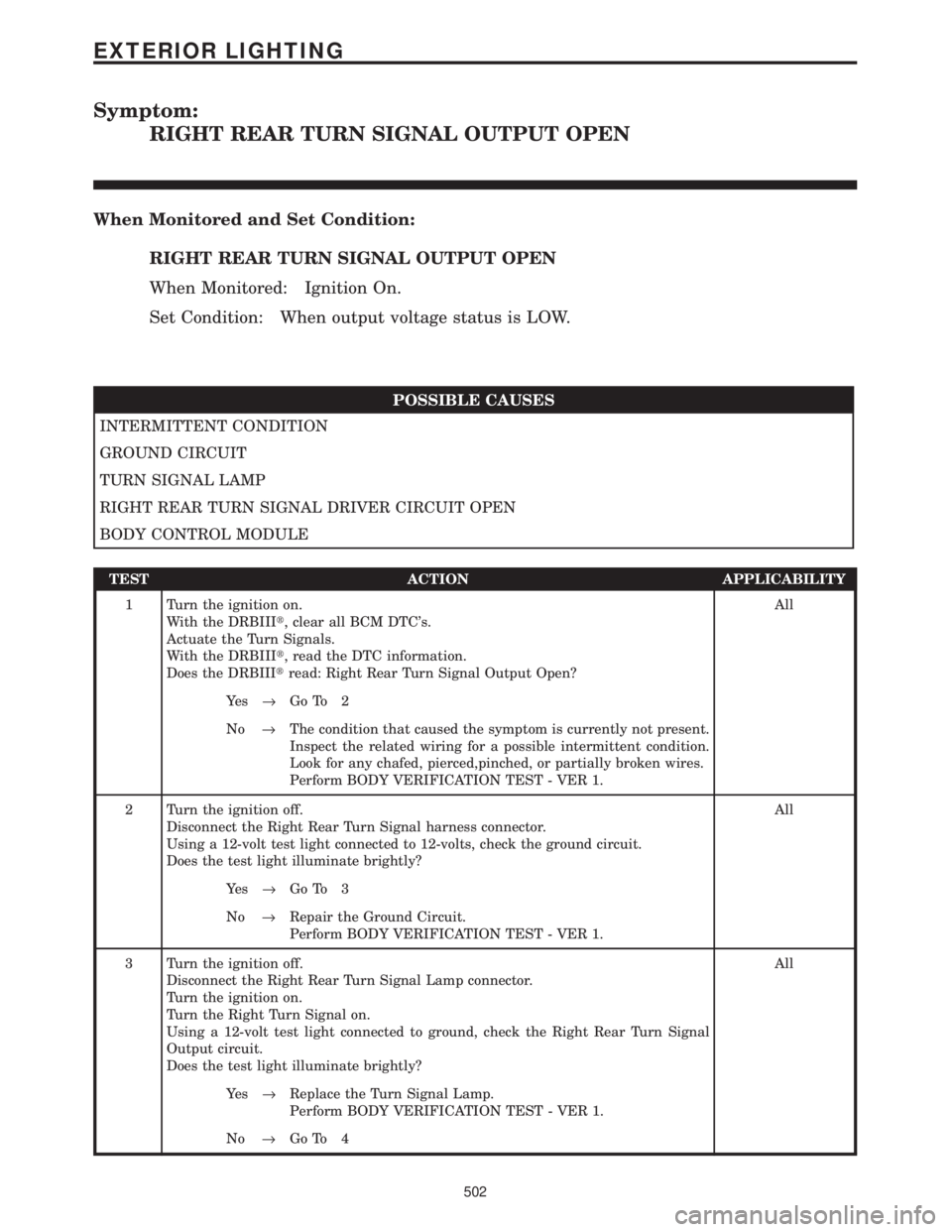
Symptom:
RIGHT REAR TURN SIGNAL OUTPUT OPEN
When Monitored and Set Condition:
RIGHT REAR TURN SIGNAL OUTPUT OPEN
When Monitored: Ignition On.
Set Condition: When output voltage status is LOW.
POSSIBLE CAUSES
INTERMITTENT CONDITION
GROUND CIRCUIT
TURN SIGNAL LAMP
RIGHT REAR TURN SIGNAL DRIVER CIRCUIT OPEN
BODY CONTROL MODULE
TEST ACTION APPLICABILITY
1 Turn the ignition on.
With the DRBIIIt, clear all BCM DTC's.
Actuate the Turn Signals.
With the DRBIIIt, read the DTC information.
Does the DRBIIItread: Right Rear Turn Signal Output Open?All
Ye s®Go To 2
No®The condition that caused the symptom is currently not present.
Inspect the related wiring for a possible intermittent condition.
Look for any chafed, pierced,pinched, or partially broken wires.
Perform BODY VERIFICATION TEST - VER 1.
2 Turn the ignition off.
Disconnect the Right Rear Turn Signal harness connector.
Using a 12-volt test light connected to 12-volts, check the ground circuit.
Does the test light illuminate brightly?All
Ye s®Go To 3
No®Repair the Ground Circuit.
Perform BODY VERIFICATION TEST - VER 1.
3 Turn the ignition off.
Disconnect the Right Rear Turn Signal Lamp connector.
Turn the ignition on.
Turn the Right Turn Signal on.
Using a 12-volt test light connected to ground, check the Right Rear Turn Signal
Output circuit.
Does the test light illuminate brightly?All
Ye s®Replace the Turn Signal Lamp.
Perform BODY VERIFICATION TEST - VER 1.
No®Go To 4
502
EXTERIOR LIGHTING
Page 533 of 4284
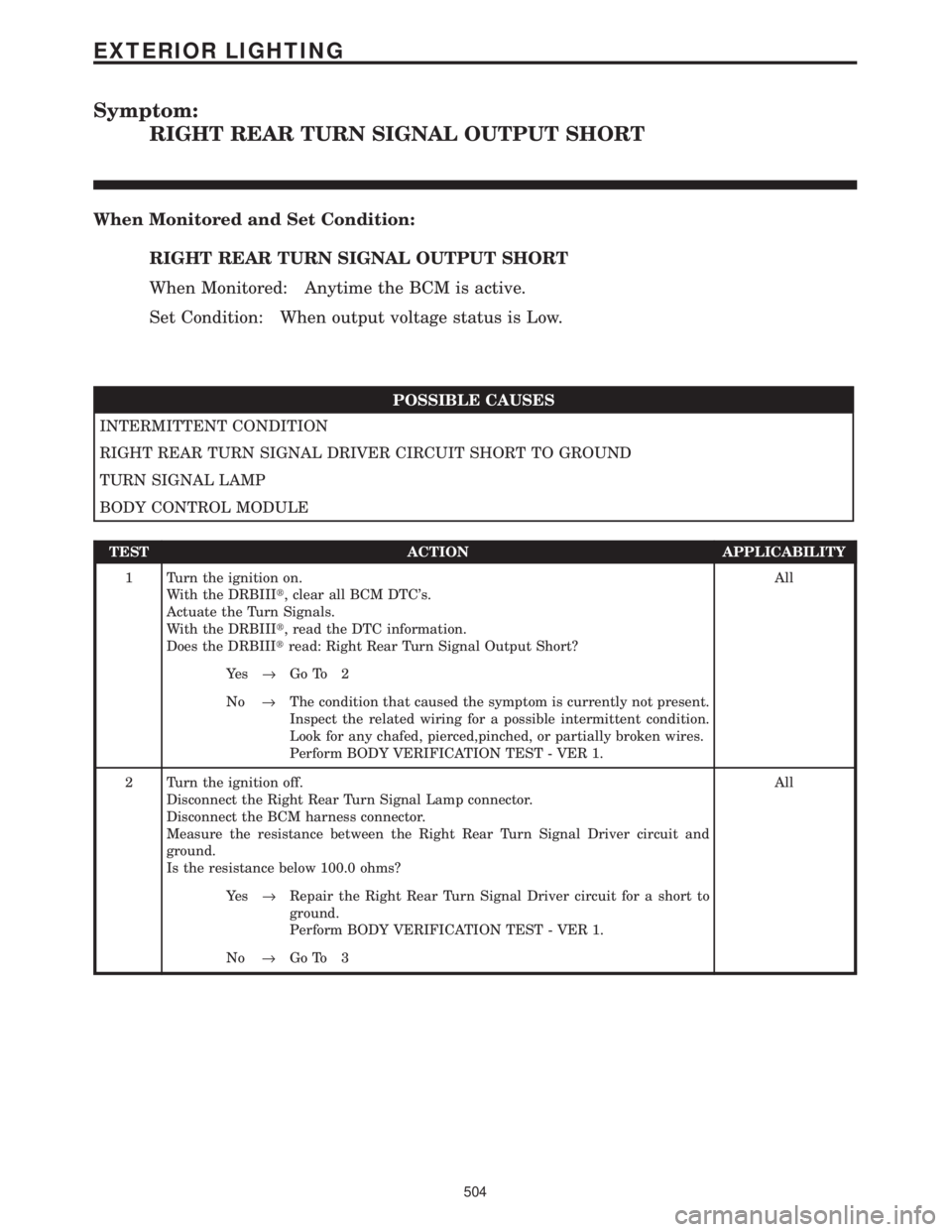
Symptom:
RIGHT REAR TURN SIGNAL OUTPUT SHORT
When Monitored and Set Condition:
RIGHT REAR TURN SIGNAL OUTPUT SHORT
When Monitored: Anytime the BCM is active.
Set Condition: When output voltage status is Low.
POSSIBLE CAUSES
INTERMITTENT CONDITION
RIGHT REAR TURN SIGNAL DRIVER CIRCUIT SHORT TO GROUND
TURN SIGNAL LAMP
BODY CONTROL MODULE
TEST ACTION APPLICABILITY
1 Turn the ignition on.
With the DRBIIIt, clear all BCM DTC's.
Actuate the Turn Signals.
With the DRBIIIt, read the DTC information.
Does the DRBIIItread: Right Rear Turn Signal Output Short?All
Ye s®Go To 2
No®The condition that caused the symptom is currently not present.
Inspect the related wiring for a possible intermittent condition.
Look for any chafed, pierced,pinched, or partially broken wires.
Perform BODY VERIFICATION TEST - VER 1.
2 Turn the ignition off.
Disconnect the Right Rear Turn Signal Lamp connector.
Disconnect the BCM harness connector.
Measure the resistance between the Right Rear Turn Signal Driver circuit and
ground.
Is the resistance below 100.0 ohms?All
Ye s®Repair the Right Rear Turn Signal Driver circuit for a short to
ground.
Perform BODY VERIFICATION TEST - VER 1.
No®Go To 3
504
EXTERIOR LIGHTING
Page 535 of 4284
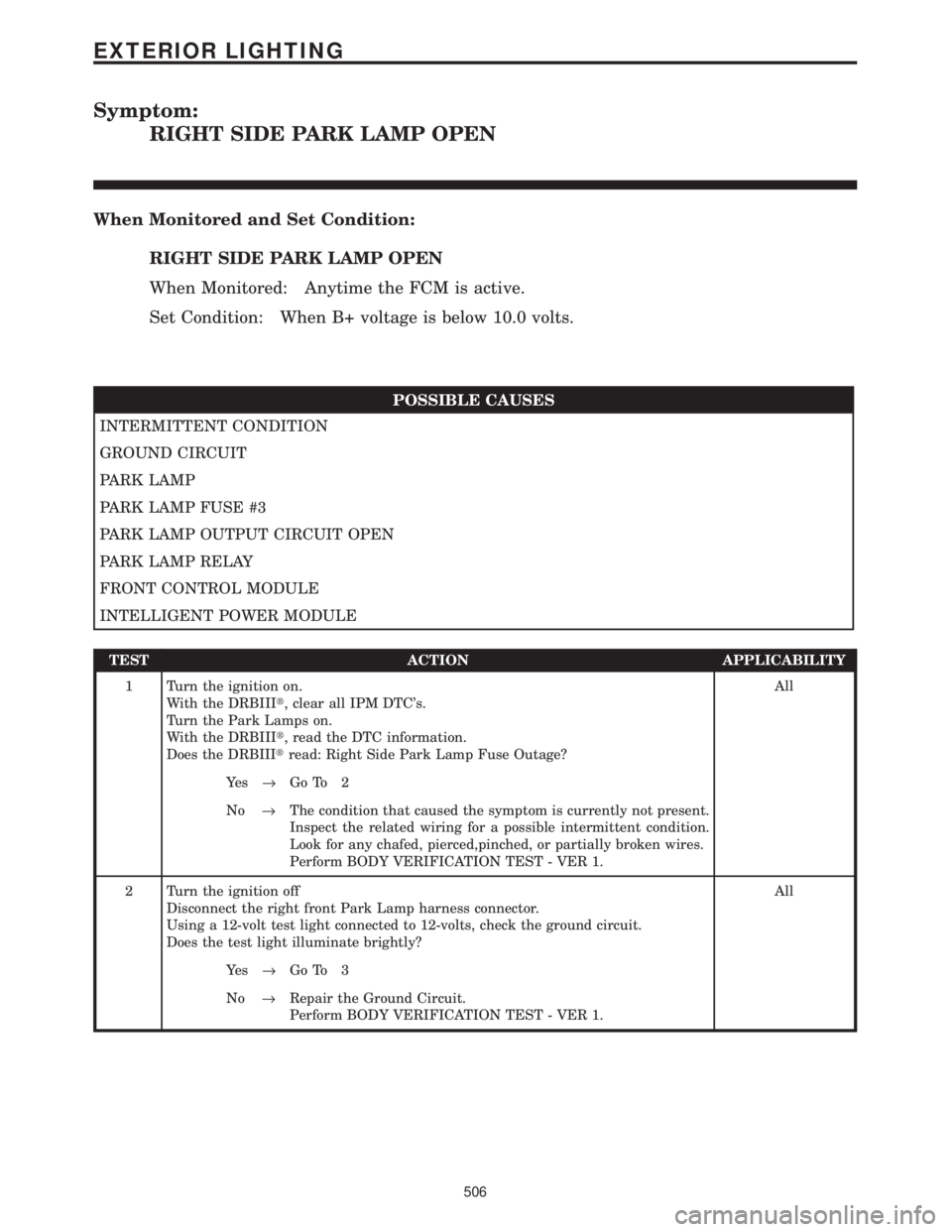
Symptom:
RIGHT SIDE PARK LAMP OPEN
When Monitored and Set Condition:
RIGHT SIDE PARK LAMP OPEN
When Monitored: Anytime the FCM is active.
Set Condition: When B+ voltage is below 10.0 volts.
POSSIBLE CAUSES
INTERMITTENT CONDITION
GROUND CIRCUIT
PARK LAMP
PARK LAMP FUSE #3
PARK LAMP OUTPUT CIRCUIT OPEN
PARK LAMP RELAY
FRONT CONTROL MODULE
INTELLIGENT POWER MODULE
TEST ACTION APPLICABILITY
1 Turn the ignition on.
With the DRBIIIt, clear all IPM DTC's.
Turn the Park Lamps on.
With the DRBIIIt, read the DTC information.
Does the DRBIIItread: Right Side Park Lamp Fuse Outage?All
Ye s®Go To 2
No®The condition that caused the symptom is currently not present.
Inspect the related wiring for a possible intermittent condition.
Look for any chafed, pierced,pinched, or partially broken wires.
Perform BODY VERIFICATION TEST - VER 1.
2 Turn the ignition off
Disconnect the right front Park Lamp harness connector.
Using a 12-volt test light connected to 12-volts, check the ground circuit.
Does the test light illuminate brightly?All
Ye s®Go To 3
No®Repair the Ground Circuit.
Perform BODY VERIFICATION TEST - VER 1.
506
EXTERIOR LIGHTING
Page 537 of 4284
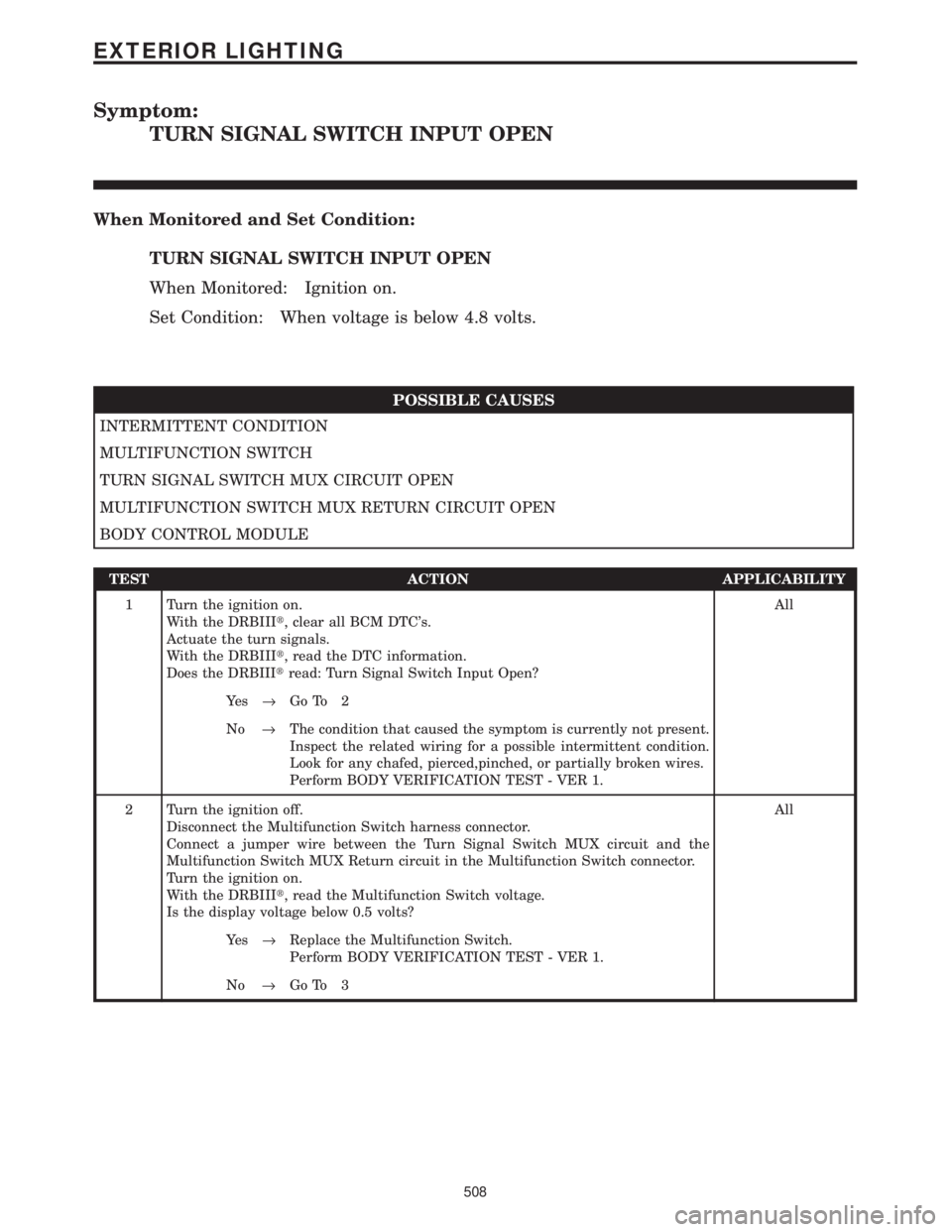
Symptom:
TURN SIGNAL SWITCH INPUT OPEN
When Monitored and Set Condition:
TURN SIGNAL SWITCH INPUT OPEN
When Monitored: Ignition on.
Set Condition: When voltage is below 4.8 volts.
POSSIBLE CAUSES
INTERMITTENT CONDITION
MULTIFUNCTION SWITCH
TURN SIGNAL SWITCH MUX CIRCUIT OPEN
MULTIFUNCTION SWITCH MUX RETURN CIRCUIT OPEN
BODY CONTROL MODULE
TEST ACTION APPLICABILITY
1 Turn the ignition on.
With the DRBIIIt, clear all BCM DTC's.
Actuate the turn signals.
With the DRBIIIt, read the DTC information.
Does the DRBIIItread: Turn Signal Switch Input Open?All
Ye s®Go To 2
No®The condition that caused the symptom is currently not present.
Inspect the related wiring for a possible intermittent condition.
Look for any chafed, pierced,pinched, or partially broken wires.
Perform BODY VERIFICATION TEST - VER 1.
2 Turn the ignition off.
Disconnect the Multifunction Switch harness connector.
Connect a jumper wire between the Turn Signal Switch MUX circuit and the
Multifunction Switch MUX Return circuit in the Multifunction Switch connector.
Turn the ignition on.
With the DRBIIIt, read the Multifunction Switch voltage.
Is the display voltage below 0.5 volts?All
Ye s®Replace the Multifunction Switch.
Perform BODY VERIFICATION TEST - VER 1.
No®Go To 3
508
EXTERIOR LIGHTING
Page 539 of 4284
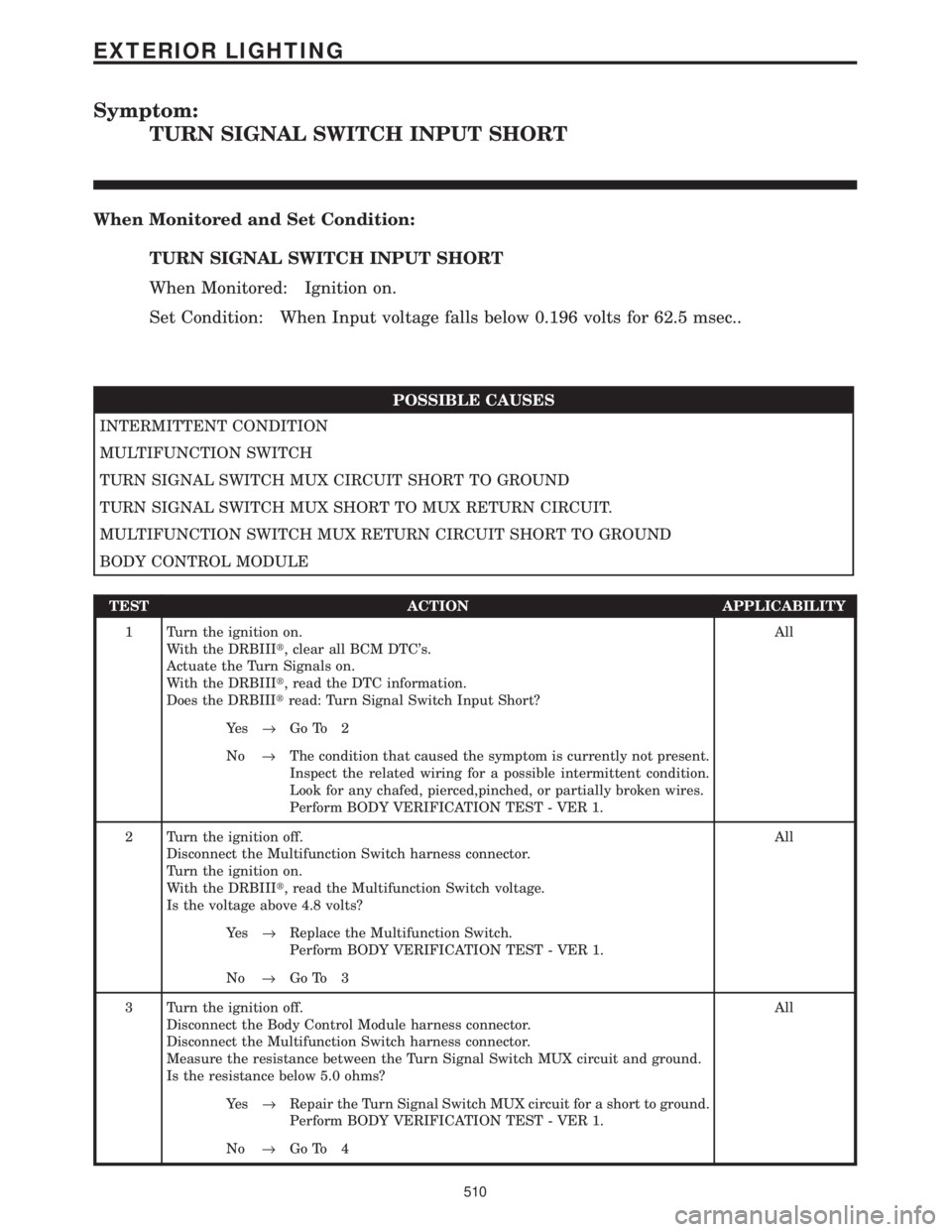
Symptom:
TURN SIGNAL SWITCH INPUT SHORT
When Monitored and Set Condition:
TURN SIGNAL SWITCH INPUT SHORT
When Monitored: Ignition on.
Set Condition: When Input voltage falls below 0.196 volts for 62.5 msec..
POSSIBLE CAUSES
INTERMITTENT CONDITION
MULTIFUNCTION SWITCH
TURN SIGNAL SWITCH MUX CIRCUIT SHORT TO GROUND
TURN SIGNAL SWITCH MUX SHORT TO MUX RETURN CIRCUIT.
MULTIFUNCTION SWITCH MUX RETURN CIRCUIT SHORT TO GROUND
BODY CONTROL MODULE
TEST ACTION APPLICABILITY
1 Turn the ignition on.
With the DRBIIIt, clear all BCM DTC's.
Actuate the Turn Signals on.
With the DRBIIIt, read the DTC information.
Does the DRBIIItread: Turn Signal Switch Input Short?All
Ye s®Go To 2
No®The condition that caused the symptom is currently not present.
Inspect the related wiring for a possible intermittent condition.
Look for any chafed, pierced,pinched, or partially broken wires.
Perform BODY VERIFICATION TEST - VER 1.
2 Turn the ignition off.
Disconnect the Multifunction Switch harness connector.
Turn the ignition on.
With the DRBIIIt, read the Multifunction Switch voltage.
Is the voltage above 4.8 volts?All
Ye s®Replace the Multifunction Switch.
Perform BODY VERIFICATION TEST - VER 1.
No®Go To 3
3 Turn the ignition off.
Disconnect the Body Control Module harness connector.
Disconnect the Multifunction Switch harness connector.
Measure the resistance between the Turn Signal Switch MUX circuit and ground.
Is the resistance below 5.0 ohms?All
Ye s®Repair the Turn Signal Switch MUX circuit for a short to ground.
Perform BODY VERIFICATION TEST - VER 1.
No®Go To 4
510
EXTERIOR LIGHTING
Page 556 of 4284
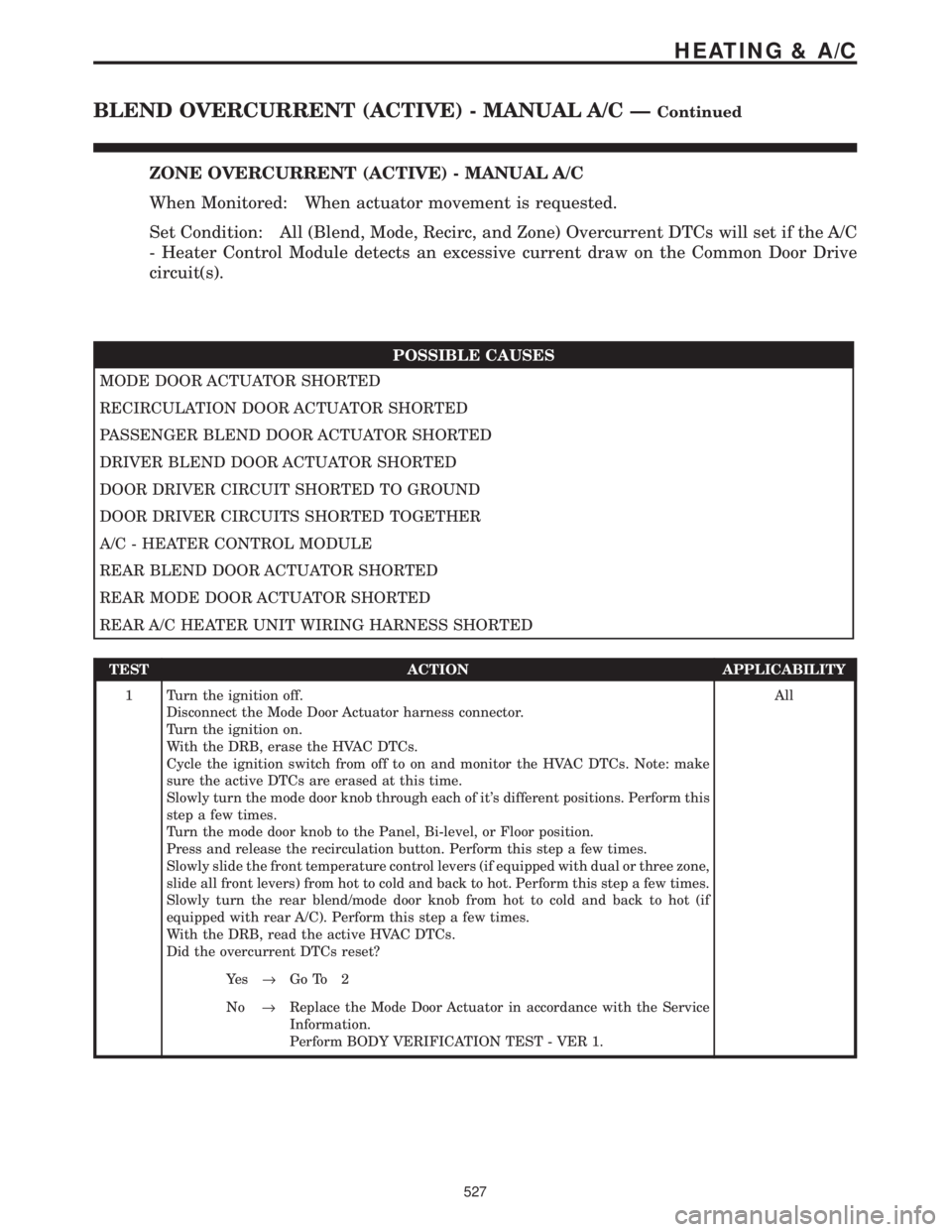
ZONE OVERCURRENT (ACTIVE) - MANUAL A/C
When Monitored: When actuator movement is requested.
Set Condition: All (Blend, Mode, Recirc, and Zone) Overcurrent DTCs will set if the A/C
- Heater Control Module detects an excessive current draw on the Common Door Drive
circuit(s).
POSSIBLE CAUSES
MODE DOOR ACTUATOR SHORTED
RECIRCULATION DOOR ACTUATOR SHORTED
PASSENGER BLEND DOOR ACTUATOR SHORTED
DRIVER BLEND DOOR ACTUATOR SHORTED
DOOR DRIVER CIRCUIT SHORTED TO GROUND
DOOR DRIVER CIRCUITS SHORTED TOGETHER
A/C - HEATER CONTROL MODULE
REAR BLEND DOOR ACTUATOR SHORTED
REAR MODE DOOR ACTUATOR SHORTED
REAR A/C HEATER UNIT WIRING HARNESS SHORTED
TEST ACTION APPLICABILITY
1 Turn the ignition off.
Disconnect the Mode Door Actuator harness connector.
Turn the ignition on.
With the DRB, erase the HVAC DTCs.
Cycle the ignition switch from off to on and monitor the HVAC DTCs. Note: make
sure the active DTCs are erased at this time.
Slowly turn the mode door knob through each of it's different positions. Perform this
step a few times.
Turn the mode door knob to the Panel, Bi-level, or Floor position.
Press and release the recirculation button. Perform this step a few times.
Slowly slide the front temperature control levers (if equipped with dual or three zone,
slide all front levers) from hot to cold and back to hot. Perform this step a few times.
Slowly turn the rear blend/mode door knob from hot to cold and back to hot (if
equipped with rear A/C). Perform this step a few times.
With the DRB, read the active HVAC DTCs.
Did the overcurrent DTCs reset?All
Ye s®Go To 2
No®Replace the Mode Door Actuator in accordance with the Service
Information.
Perform BODY VERIFICATION TEST - VER 1.
527
HEATING & A/C
BLEND OVERCURRENT (ACTIVE) - MANUAL A/C ÐContinued
Page 560 of 4284
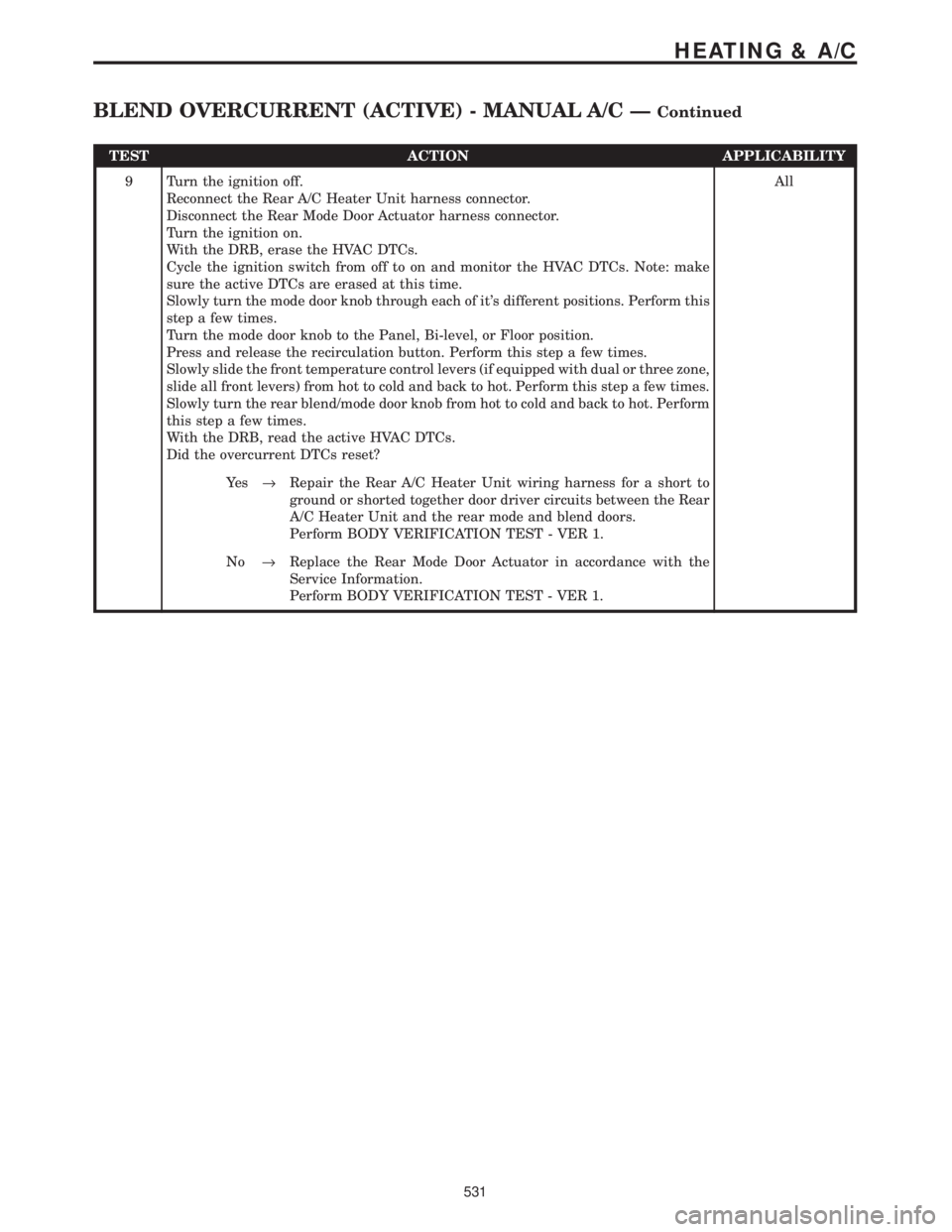
TEST ACTION APPLICABILITY
9 Turn the ignition off.
Reconnect the Rear A/C Heater Unit harness connector.
Disconnect the Rear Mode Door Actuator harness connector.
Turn the ignition on.
With the DRB, erase the HVAC DTCs.
Cycle the ignition switch from off to on and monitor the HVAC DTCs. Note: make
sure the active DTCs are erased at this time.
Slowly turn the mode door knob through each of it's different positions. Perform this
step a few times.
Turn the mode door knob to the Panel, Bi-level, or Floor position.
Press and release the recirculation button. Perform this step a few times.
Slowly slide the front temperature control levers (if equipped with dual or three zone,
slide all front levers) from hot to cold and back to hot. Perform this step a few times.
Slowly turn the rear blend/mode door knob from hot to cold and back to hot. Perform
this step a few times.
With the DRB, read the active HVAC DTCs.
Did the overcurrent DTCs reset?All
Ye s®Repair the Rear A/C Heater Unit wiring harness for a short to
ground or shorted together door driver circuits between the Rear
A/C Heater Unit and the rear mode and blend doors.
Perform BODY VERIFICATION TEST - VER 1.
No®Replace the Rear Mode Door Actuator in accordance with the
Service Information.
Perform BODY VERIFICATION TEST - VER 1.
531
HEATING & A/C
BLEND OVERCURRENT (ACTIVE) - MANUAL A/C ÐContinued