NO INSTRUMENT CLUSTER LIGHTS CHRYSLER VOYAGER 2021 Owners Manual
[x] Cancel search | Manufacturer: CHRYSLER, Model Year: 2021, Model line: VOYAGER, Model: CHRYSLER VOYAGER 2021Pages: 348, PDF Size: 18.73 MB
Page 5 of 348
3
EXTERIOR LIGHTS ................................................. 53 Multifunction Lever .........................................53
Headlight Switch...............................................53
Daytime Running Lights (DRLs) —
If Equipped........................................................54
High/Low Beam Switch....................................54
Flash-To-Pass ...................................................54
Automatic Headlights — If Equipped ..............54
Headlight Time Delay — If Equipped ...............54
Lights-On Reminder..........................................54
Front Fog Lights — If Equipped .......................54
Turn Signals ......................................................55
Lane Change Assist — If Equipped ..................55
Battery Protection ...........................................55
INTERIOR LIGHTS ................................................. 55
Interior Courtesy Lights ...................................55
WINDSHIELD WIPER AND WASHERS ............... 56
Windshield Wiper Operation .........................57
Rear Wiper And Washer ...................................58
CLIMATE CONTROLS ........................................... 58
Automatic Climate Control Descriptions
And Functions ...................................................58
Manual Climate Control Descriptions
And Functions ...................................................64
Automatic Temperature Control (ATC) —
If Equipped .......................................................69
Climate Voice Commands................................70
Operating Tips .................................................70 INTERIOR STORAGE AND EQUIPMENT ............... 71
Storage..............................................................71
Sun Screens — If Equipped..............................74
USB/AUX Control ...........................................75
Power Outlets ..................................................76
Cigar Lighter — If Equipped .............................78
Smoker's Package Kit — If Equipped .............78
WINDOWS ...............................................................78
Power Windows ................................................78
Automatic Window Features ...........................79
Reset Auto Up...................................................79
Wind Buffeting ..................................................80
HOOD .....................................................................80
Opening.............................................................80
Closing ..............................................................80
LIFTGATE ................................................................. 81
To Unlock/Open The Liftgate...........................81
To Lock/Close The Liftgate ..............................81
Power Liftgate — If Equipped ...........................81
Cargo Area Features .......................................82
STOW ‘N PLACE ROOF RACK —
IF EQUIPPED .......................................................... 83
Deploying The Crossbars .................................83
Stowing The Crossbars ....................................84
GETTING TO KNOW YOUR
INSTRUMENT PANEL
INSTRUMENT CLUSTER......................................... 87Instrument Cluster Descriptions ..................... 88
INSTRUMENT CLUSTER DISPLAY ....................... 88
Instrument Cluster Display Location And
Controls............................................................. 89
Oil Life Reset ................................................... 90
KeySense Cluster Messages —
If Equipped .......................................................90
Instrument Cluster Display Menu Items ........ 91
Battery Saver On/Battery Saver Mode
Message — Electrical Load Reduction
Actions — If Equipped ...................................... 95
TRIP COMPUTER ................................................... 96
WARNING LIGHTS AND MESSAGES ................... 97
Red Warning Lights ..........................................97
Yellow Warning Lights ................................... 100
Yellow Indicator Lights .................................. 103 Green Indicator Lights .................................. 103White Indicator Lights ................................... 103
Blue Indicator Lights ..................................... 103
ONBOARD DIAGNOSTIC SYSTEM — OBD II ..... 104
Onboard Diagnostic System
(OBD II) Cybersecurity ................................... 104
EMISSIONS INSPECTION AND MAINTENANCE
PROGRAMS ......................................................... 105
21_RUV_OM_EN_USC_t.book Page 3
Page 57 of 348
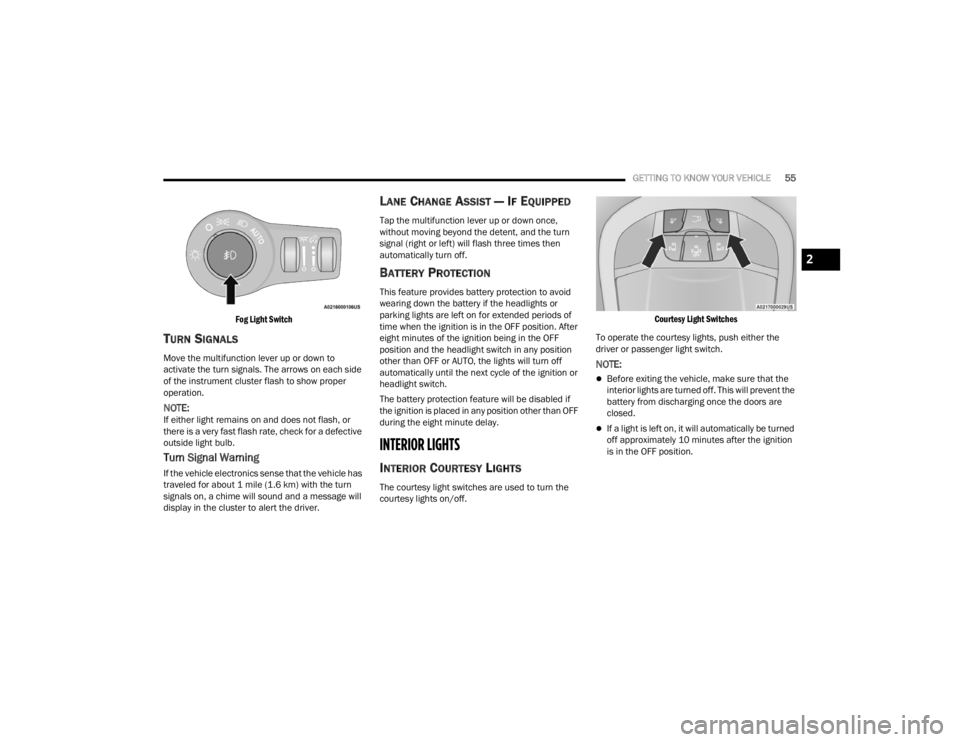
GETTING TO KNOW YOUR VEHICLE55
Fog Light Switch
TURN SIGNALS
Move the multifunction lever up or down to
activate the turn signals. The arrows on each side
of the instrument cluster flash to show proper
operation.
NOTE:If either light remains on and does not flash, or
there is a very fast flash rate, check for a defective
outside light bulb.
Turn Signal Warning
If the vehicle electronics sense that the vehicle has
traveled for about 1 mile (1.6 km) with the turn signals on, a chime will sound and a message will
display in the cluster to alert the driver.
LANE CHANGE ASSIST — IF EQUIPPED
Tap the multifunction lever up or down once,
without moving beyond the detent, and the turn
signal (right or left) will flash three times then
automatically turn off.
BATTERY PROTECTION
This feature provides battery protection to avoid
wearing down the battery if the headlights or
parking lights are left on for extended periods of
time when the ignition is in the OFF position. After
eight minutes of the ignition being in the OFF
position and the headlight switch in any position
other than OFF or AUTO, the lights will turn off
automatically until the next cycle of the ignition or
headlight switch.
The battery protection feature will be disabled if
the ignition is placed in any position other than OFF
during the eight minute delay.
INTERIOR LIGHTS
INTERIOR COURTESY LIGHTS
The courtesy light switches are used to turn the
courtesy lights on/off.
Courtesy Light Switches
To operate the courtesy lights, push either the
driver or passenger light switch.
NOTE:
Before exiting the vehicle, make sure that the
interior lights are turned off. This will prevent the
battery from discharging once the doors are
closed.
If a light is left on, it will automatically be turned
off approximately 10 minutes after the ignition
is in the OFF position.
2
21_RUV_OM_EN_USC_t.book Page 55
Page 58 of 348
56GETTING TO KNOW YOUR VEHICLE
Rear Courtesy/Reading Lights —
If Equipped
Located above the rear passengers are
courtesy/reading lights. The lights turn on when a
front door, a sliding door or the liftgate is opened.
If your vehicle is equipped with Remote Keyless
Entry (RKE) the lights will also turn on when the
unlock button on the key fob is pushed.
The courtesy lights also function as reading lights.
Push the lens to turn these lights on while inside
the vehicle. Push the lens a second time to turn
each light off.
Ambient Light Control — If Equipped
Rotate the ambient dimmer control upward or
downward to increase or decrease the brightness
of the ambient light located in the door handle
lights, under instrument panel lights, door map
pocket lights, and cubby bin lights.
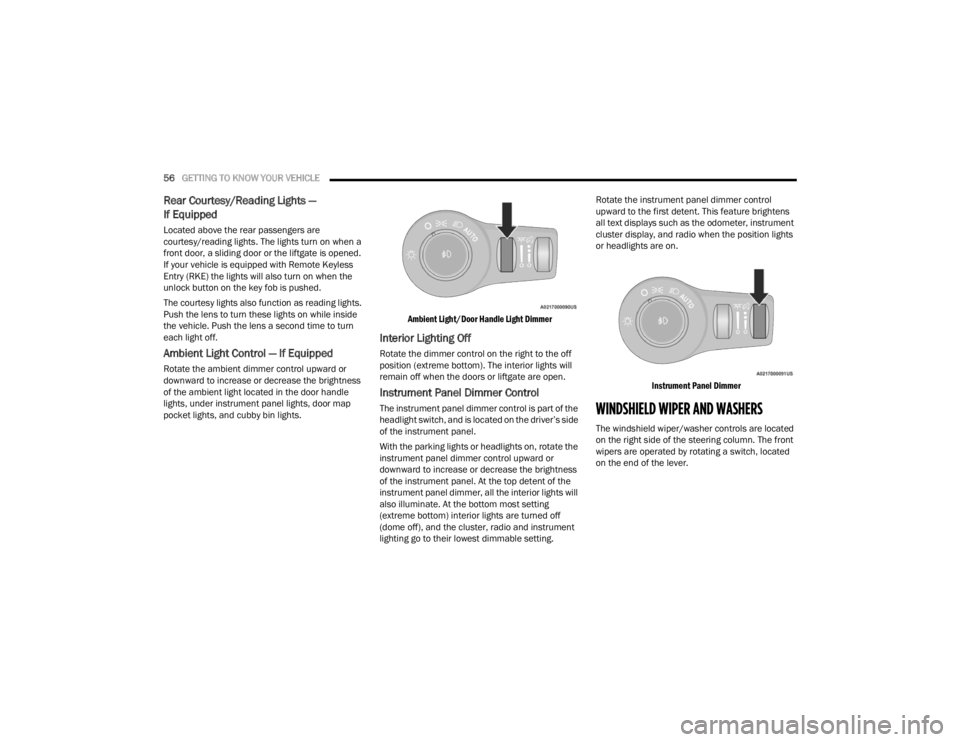
Ambient Light/Door Handle Light Dimmer
Interior Lighting Off
Rotate the dimmer control on the right to the off
position (extreme bottom). The interior lights will
remain off when the doors or liftgate are open.
Instrument Panel Dimmer Control
The instrument panel dimmer control is part of the
headlight switch, and is located on the driver’s side
of the instrument panel.
With the parking lights or headlights on, rotate the
instrument panel dimmer control upward or
downward to increase or decrease the brightness
of the instrument panel. At the top detent of the
instrument panel dimmer, all the interior lights will
also illuminate. At the bottom most setting
(extreme bottom) interior lights are turned off
(dome off), and the cluster, radio and instrument
lighting go to their lowest dimmable setting.Rotate the instrument panel dimmer control
upward to the first detent. This feature brightens
all text displays such as the odometer, instrument
cluster display, and radio when the position lights
or headlights are on.
Instrument Panel Dimmer
WINDSHIELD WIPER AND WASHERS
The windshield wiper/washer controls are located
on the right side of the steering column. The front
wipers are operated by rotating a switch, located
on the end of the lever.
21_RUV_OM_EN_USC_t.book Page 56
Page 98 of 348
96GETTING TO KNOW YOUR INSTRUMENT PANEL
Loss of the battery charge may indicate one or
more of the following conditions:
The charging system cannot deliver enough
electrical power to the vehicle system because
the electrical loads are larger than the capability
of charging system. The charging system is still
functioning properly.
Turning on all possible vehicle electrical loads
(e.g. HVAC to max settings, exterior and interior
lights, overloaded power outlets +12 Volts,
150W, USB ports) during certain driving condi -
tions (city driving, towing, frequent stopping).
Installing options like additional lights, upfitter
electrical accessories, audio systems, alarms
and similar devices.
Unusual driving cycles (short trips separated by
long parking periods).
The vehicle was parked for an extended period
of time (weeks, months).
The battery was recently replaced and was not
charged completely.
The battery was discharged by an electrical load
left on when the vehicle was parked.
The battery was used for an extended period
with the engine not running to supply radio,
lights, chargers, +12 Volt portable appliances
like vacuum cleaners, game consoles and
similar devices. What to do when an electrical load reduction
action message is present (“Battery Saver On” or
“Battery Saver Mode”)
During a trip:
Reduce power to unnecessary loads if possible:
Turn off redundant lights
(interior or exterior)
Check what may be plugged in to power
outlets +12 Volts, 150W, USB ports
Check HVAC settings (blower, temperature)
Check the audio settings (volume)
After a trip:
Check if any aftermarket equipment was
installed (additional lights, upfitter electrical
accessories, audio systems, alarms) and review
specifications if any (load and Ignition Off Draw
currents).
Evaluate the latest driving cycles (distance,
driving time and parking time).
The vehicle should have service performed if
the message is still present during consecutive
trips and the evaluation of the vehicle and
driving pattern did not help to identify the cause.
TRIP COMPUTER
The Trip Computer is located in the instrument
cluster display. Push and release the up or
down arrow button until “Trip Info” is
highlighted in the instrument cluster display.
Navigate between Trip A or Trip B by using the
right and left arrow buttons.
For each trip the following information will be
displayed:
Trip A
Shows the total distance traveled for Trip A
since the last reset.
Shows the Average MPG for Trip A since the last
reset.
Shows the elapsed time traveled for Trip A since
the last reset. Elapsed time will increment when
the ignition switch is in the ON or START posi -
tion.
Trip B
Shows the total distance traveled for Trip B
since the last reset.
Shows the Average MPG for Trip B since the last
reset.
Shows the elapsed time traveled for Trip B
since the last reset. Elapsed time will increment
when the ignition switch is in the ON or START
position.
21_RUV_OM_EN_USC_t.book Page 96
Page 102 of 348
100GETTING TO KNOW YOUR INSTRUMENT PANEL
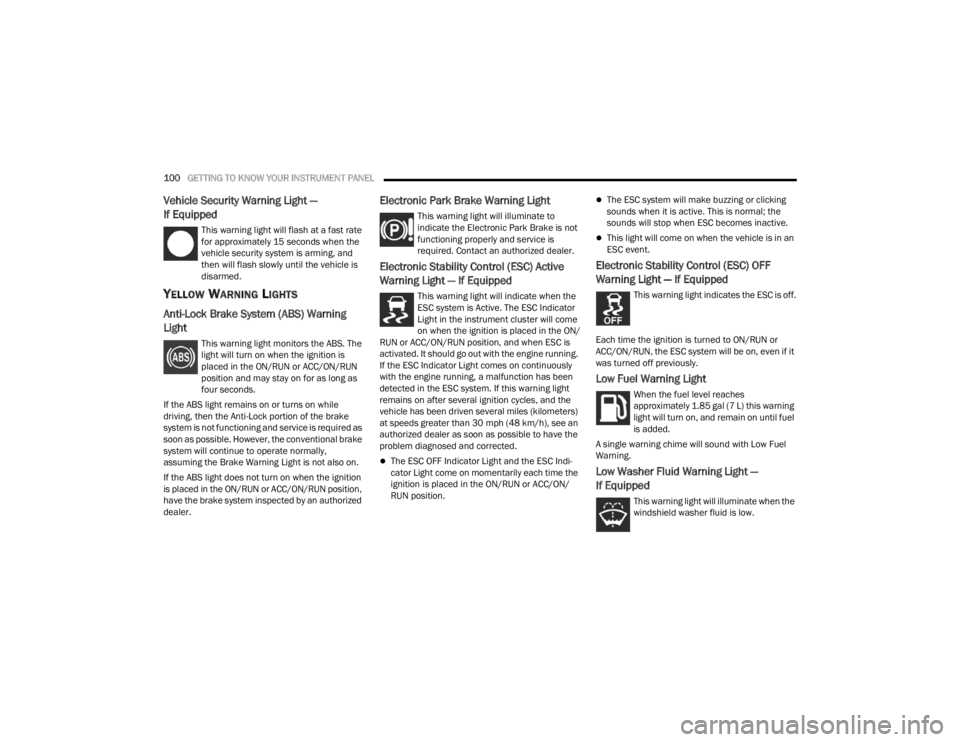
Vehicle Security Warning Light —
If Equipped
This warning light will flash at a fast rate
for approximately 15 seconds when the
vehicle security system is arming, and
then will flash slowly until the vehicle is
disarmed.
YELLOW WARNING LIGHTS
Anti-Lock Brake System (ABS) Warning
Light
This warning light monitors the ABS. The
light will turn on when the ignition is
placed in the ON/RUN or ACC/ON/RUN
position and may stay on for as long as
four seconds.
If the ABS light remains on or turns on while
driving, then the Anti-Lock portion of the brake
system is not functioning and service is required as
soon as possible. However, the conventional brake
system will continue to operate normally,
assuming the Brake Warning Light is not also on.
If the ABS light does not turn on when the ignition
is placed in the ON/RUN or ACC/ON/RUN position,
have the brake system inspected by an authorized
dealer.
Electronic Park Brake Warning Light
This warning light will illuminate to
indicate the Electronic Park Brake is not
functioning properly and service is
required. Contact an authorized dealer.
Electronic Stability Control (ESC) Active
Warning Light — If Equipped
This warning light will indicate when the
ESC system is Active. The ESC Indicator
Light in the instrument cluster will come
on when the ignition is placed in the ON/
RUN or ACC/ON/RUN position, and when ESC is
activated. It should go out with the engine running.
If the ESC Indicator Light comes on continuously
with the engine running, a malfunction has been
detected in the ESC system. If this warning light
remains on after several ignition cycles, and the
vehicle has been driven several miles (kilometers)
at speeds greater than 30 mph (48 km/h), see an
authorized dealer as soon as possible to have the
problem diagnosed and corrected.
The ESC OFF Indicator Light and the ESC Indi -
cator Light come on momentarily each time the
ignition is placed in the ON/RUN or ACC/ON/
RUN position.
The ESC system will make buzzing or clicking
sounds when it is active. This is normal; the
sounds will stop when ESC becomes inactive.
This light will come on when the vehicle is in an
ESC event.
Electronic Stability Control (ESC) OFF
Warning Light — If Equipped
This warning light indicates the ESC is off.
Each time the ignition is turned to ON/RUN or
ACC/ON/RUN, the ESC system will be on, even if it
was turned off previously.
Low Fuel Warning Light
When the fuel level reaches
approximately 1.85 gal (7 L) this warning
light will turn on, and remain on until fuel
is added.
A single warning chime will sound with Low Fuel
Warning.
Low Washer Fluid Warning Light —
If Equipped
This warning light will illuminate when the
windshield washer fluid is low.
21_RUV_OM_EN_USC_t.book Page 100
Page 147 of 348
MULTIMEDIA145
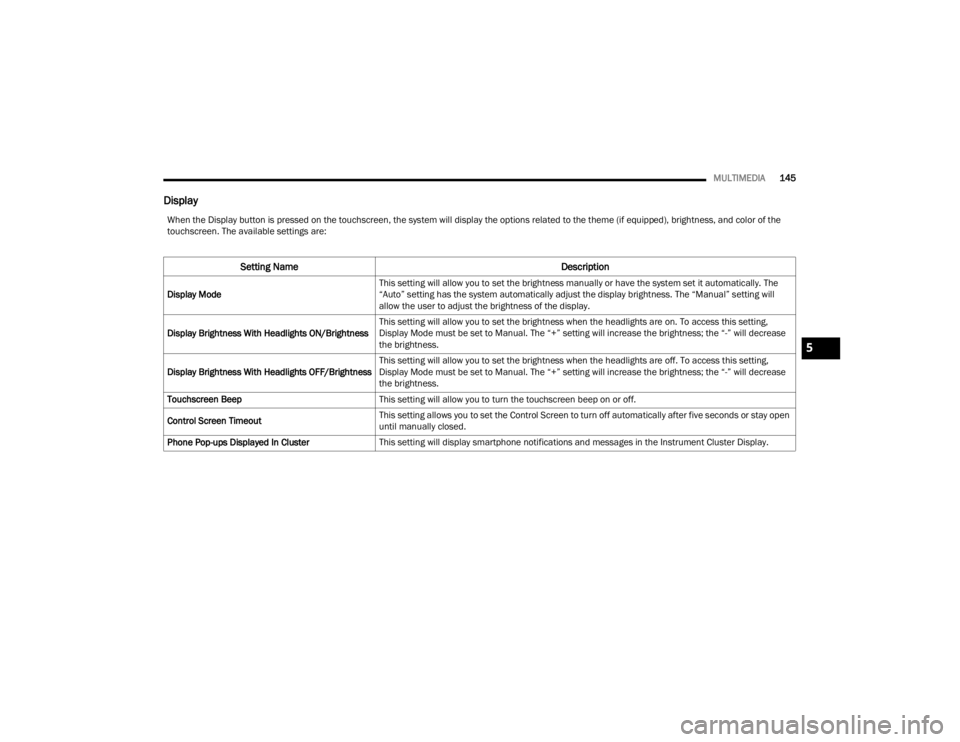
Display
When the Display button is pressed on the touchscreen, the system will display the options related to the theme (if equipped), brightness, and color of the
touchscreen. The available settings are:
Setting Name Description
Display ModeThis setting will allow you to set the brightness manually or have the system set it automatically. The
“Auto” setting has the system automatically adjust the display brightness. The “Manual” setting will
allow the user to adjust the brightness of the display.
Display Brightness With Headlights ON/Brightness This setting will allow you to set the brightness when the headlights are on. To access this setting,
Display Mode must be set to Manual. The “+” setting will increase the brightness; the “-” will decrease
the brightness.
Display Brightness With Headlights OFF/Brightness This setting will allow you to set the brightness when the headlights are off. To access this setting,
Display Mode must be set to Manual. The “+” setting will increase the brightness; the “-” will decrease
the brightness.
Touchscreen Beep This setting will allow you to turn the touchscreen beep on or off.
Control Screen Timeout This setting allows you to set the Control Screen to turn off automatically after five seconds or stay open
until manually closed.
Phone Pop-ups Displayed In Cluster This setting will display smartphone notifications and messages in the Instrument Cluster Display.
5
21_RUV_OM_EN_USC_t.book Page 145
Page 337 of 348

335
Fluid Level Checks Brake
........................................................ 289Engine Oil.................................................. 276Fluid, Brake................................................... 327Fog Lights................................................. 53, 54Fold In Floor (Stow ‘n Go) Seating.................... 37Fold-Flat Seats................................................. 28Forward Collision Warning............................. 196Freeing A Stuck Vehicle................................. 267Front Position Light........................................ 301Fuel............................................................... 323Additives................................................... 325Clean Air.................................................... 324Ethanol...................................................... 324Filler Cap (Gas Cap)................................... 129Gasoline.................................................... 323Materials Added........................................ 325Methanol................................................... 324Octane Rating................................. 323, 326Requirements........................................... 323Specifications............................................ 326Tank Capacity............................................ 326Fuses............................................................. 290
G
Garage Door Opener (HomeLink).................... 50Gas Cap (Fuel Filler Cap)............................... 129Gasoline, (Fuel)............................................. 323Gasoline, Clean Air........................................ 324Gasoline, Reformulated................................. 324
Gear Ranges................................................. 115Glass Cleaning.............................................. 321Gross Axle Weight Rating.............................. 131Gross Vehicle Weight Rating......................... 131GVWR............................................................ 129
H
HazardDriving Through Flowing, Rising,Or Shallow Standing Water
.................. 140Hazard Warning Flashers.............................. 245Head Restraints............................................... 43Headlights....................................................... 53Cleaning................................................... 319High Beam/Low Beam Select Switch.......... 53Lights On Reminder.............................. 53, 54Passing................................................. 53, 54Switch.......................................................... 53Time Delay................................................... 53Heated Mirrors................................................. 48Heated Seats................................................... 43Heater, Engine Block.................................... 110Hill Start Assist.............................................. 190HitchesTrailer Towing........................................... 132HomeLink (Garage Door Opener)..................... 50Hood Prop........................................................ 80Hood Release.................................................. 80Hook, Coat....................................................... 74
I
Ignition.............................................................15Switch..........................................................15Inside Rearview Mirror........................... 48, 245Instrument Cluster...........................................88Descriptions.............................................. 103Display.........................................................88Display Controls...........................................89KeySense Message.....................................90Menu Items.................................................91Instrument Panel Lens Cleaning................... 321Interior And Instrument Lights.........................55Interior Appearance Care.............................. 320Interior Lights...................................................55Intermittent Wipers (Delay Wipers)..................57Introduction....................................................... 7
J
Jack Location................................................ 250Jack Operation.............................................. 249Jump Starting................................................ 262
K
Key Fob............................................................12Arm The System...........................................19Disarm The Alarm........................................19Programming Additional Key Fobs...............14Key Fob Battery Service
(Remote Keyless Entry)....................................13
11
21_RUV_OM_EN_USC_t.book Page 335
Page 338 of 348

336
Key Fob Programming
(Remote Keyless Entry)
................................... 14Keyless Enter-N-Go.......................................... 22Passive Entry............................................... 22Keys................................................................. 12
L
Lane Change And Turn Signals........................ 53Lane Change Assist.................................. 53, 55Lap/Shoulder Belts....................................... 204Latches.......................................................... 243Hood........................................................... 80Lead Free Gasoline........................................ 323Leaks, Fluid................................................... 243Life Of Tires................................................... 312Liftgate............................................................ 81Power.......................................................... 81Light Bulbs........................................... 243, 301Lighter Cigar............................................................ 78Lights............................................................. 243Air Bag.......................................97, 213, 242Battery Saver............................................... 55Brake Assist Warning................................ 190Brake Warning............................................ 97Bulb Replacement........................... 299, 301Cruise........................................................ 103Daytime Running......................................... 53
Dimmer Switch, Headlight........................... 53Engine Temperature Warning...................... 98Exterior............................................ 243, 301Fog.............................................................. 54Headlights............................................ 53, 54High Beam/Low Beam Select...................... 53Instrument Cluster....................................... 53Intensity Control.......................................... 56Interior......................................................... 55Lights On Reminder.............................. 53, 54Malfunction Indicator (Check Engine)....... 101Park.......................................................... 103Passing................................................. 53, 54Reading....................................................... 55Seat Belt Reminder..................................... 99Security Alarm.......................................... 100Service..................................................... 299Side Marker.............................................. 301Traction Control........................................ 190Turn Signals.................... 53, 103, 243, 301Warning Instrument Cluster Descriptions...................................98, 103Load Floor, Cargo............................................. 82Load Shed Battery Saver Mode....................... 95Load Shed Battery Saver On............................ 95Load Shed Electrical Load Reduction.............. 95Load Shed Intelligent Battery Sensor............... 95
Loading Vehicle...................................... 82, 129Tires.......................................................... 306Low Tire Pressure System............................. 199Lubrication, Body.......................................... 282Lug Nuts........................................................ 322Luggage Carrier................................................83
M
Maintenance Free Battery............................ 276Maintenance Schedule................................. 271Malfunction Indicator Light
(Check Engine)..................................... 101, 105ManualPark Release............................................ 266Service...................................................... 331Map/Reading Lights........................................55Marker Lights, Side....................................... 301Media Hub.......................................................75Media Mode.................................................. 168Memory Seat....................................................49Methanol....................................................... 324Mini-Trip Computer..........................................96Mirrors.............................................................48Automatic Dimming.....................................48Electric Remote...........................................49Exterior Folding............................................49Heated.........................................................48Outside........................................................48Rearview............................................ 48, 245Vanity...........................................................48
21_RUV_OM_EN_USC_t.book Page 336
Page 343 of 348

341
W
Warning Lights Blue
........................................................... 103Green........................................................ 103Red.............................................................. 97White......................................................... 103Yellow........................................................ 100Warning Lights
(Instrument Cluster Descriptions).................. 100Warning Lights And Messages......................... 97Warranty Information..................................... 330Washers, Windshield..................................... 276Washing Vehicle............................................ 319
WaterDriving Through........................................ 140Wheel And Wheel Tire Care.......................... 315Wheel And Wheel Tire Trim........................... 315Wind Buffeting................................................. 80Window Fogging............................................... 70Windows.......................................................... 78Power.......................................................... 78Windshield Defroster.................................... 242
Windshield Washers....................... 56, 57, 276Fluid.......................................................... 276Windshield Wiper Blades.............................. 282Wipers Blade Replacement........................... 282Wipers, Intermittent..................................56, 57Wrecker Towing............................................. 268
11
21_RUV_OM_EN_USC_t.book Page 341