tow CHRYSLER VOYAGER 2023 Workshop Manual
[x] Cancel search | Manufacturer: CHRYSLER, Model Year: 2023, Model line: VOYAGER, Model: CHRYSLER VOYAGER 2023Pages: 256, PDF Size: 13.97 MB
Page 160 of 256
158SAFETY
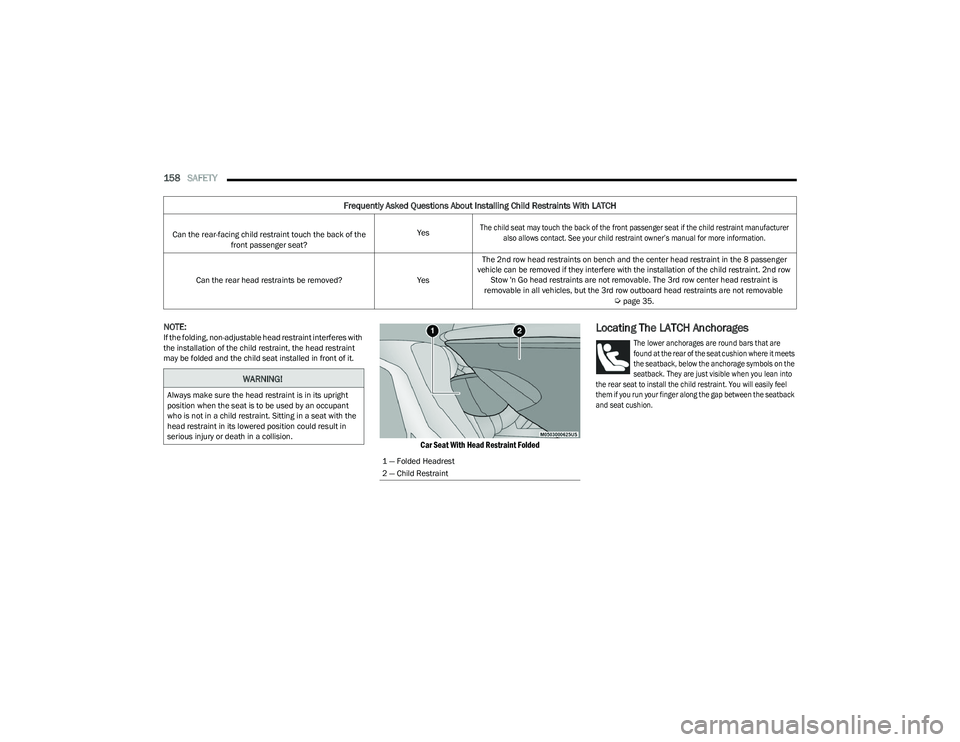
NOTE:If the folding, non-adjustable head restraint interferes with
the installation of the child restraint, the head restraint
may be folded and the child seat installed in front of it.
Car Seat With Head Restraint Folded
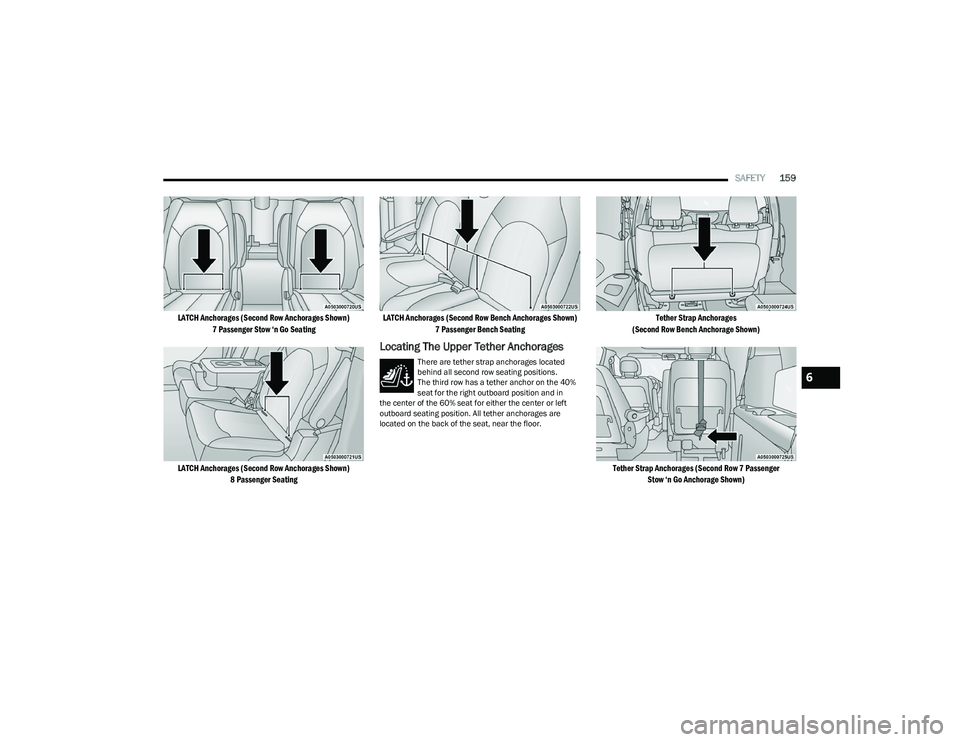
Locating The LATCH Anchorages
The lower anchorages are round bars that are
found at the rear of the seat cushion where it meets
the seatback, below the anchorage symbols on the
seatback. They are just visible when you lean into
the rear seat to install the child restraint. You will easily feel
them if you run your finger along the gap between the seatback
and seat cushion.
Can the rear-facing child restraint touch the back of the front passenger seat? Yes
The child seat may touch the back of the front passenger seat if the child restraint manufacturer
also allows contact. See your child restraint owner’s manual for more information.
Can the rear head restraints be removed? YesThe 2nd row head restraints on bench and the center head restraint in the 8 passenger
vehicle can be removed if they interfere with the installation of the child restraint. 2nd row Stow 'n Go head restraints are not removable. The 3rd row center head restraint is
removable in all vehicles, but the 3rd row outboard head restraints are not removable
Úpage 35.
Frequently Asked Questions About Installing Child Restraints With LATCH
WARNING!
Always make sure the head restraint is in its upright
position when the seat is to be used by an occupant
who is not in a child restraint. Sitting in a seat with the
head restraint in its lowered position could result in
serious injury or death in a collision.
1 — Folded Headrest
2 — Child Restraint
23_RUV_OM_EN_US_t.book Page 158
Page 161 of 256
SAFETY159
LATCH Anchorages (Second Row Anchorages Shown)
7 Passenger Stow ‘n Go Seating
LATCH Anchorages (Second Row Anchorages Shown) 8 Passenger Seating LATCH Anchorages (Second Row Bench Anchorages Shown)
7 Passenger Bench Seating
Locating The Upper Tether Anchorages
There are tether strap anchorages located
behind all second row seating positions.
The third row has a tether anchor on the 40%
seat for the right outboard position and in
the center of the 60% seat for either the center or left
outboard seating position. All tether anchorages are
located on the back of the seat, near the floor.
Tether Strap Anchorages
(Second Row Bench Anchorage Shown)
Tether Strap Anchorages (Second Row 7 Passenger Stow ‘n Go Anchorage Shown)
6
23_RUV_OM_EN_US_t.book Page 159
Page 163 of 256
SAFETY161
To Install A LATCH-Compatible Child Restraint
If the selected seating position has a Switchable
Automatic Locking Retractor (ALR) seat belt, stow the seat
belt, following the instructions below. See
Úpage 161 to
check what type of seat belt each seating position has.
1. Loosen the adjusters on the lower straps and on the tether strap of the child seat so that you can more
easily attach the hooks or connectors to the vehicle
anchorages.
2. Place the child seat between the lower anchorages for that seating position. If the second row seat can
be reclined, you may recline the seat and/or raise the
head restraint (if adjustable) to get a better fit. If the
rear seat can be moved forward and rearward in the
vehicle, you may wish to move it to its rear-most
position to make room for the child seat. You may
also move the front seat forward to allow more room
for the child seat.
3. Attach the lower hooks or connectors of the child restraint to the lower anchorages in the selected
seating position.
4. If the child restraint has a tether strap, connect it to the top tether anchorage. See
Úpage 165 for
directions to attach a tether anchor.
5. Tighten all of the straps as you push the child restraint rearward and downward into the seat.
Remove slack in the straps according to the child
restraint manufacturer’s instructions.
6. Test that the child restraint is installed tightly by pulling back and forth on the child seat at the belt
path. It should not move more than 1 inch (25.4 mm) in any direction.
How To Stow An Unused Switchable-ALR
(ALR) Seat Belt:
When using the LATCH attaching system to install a
child restraint, stow all ALR seat belts that are not being
used by other occupants or being used to secure child
restraints. An unused belt could injure a child if they play
with it and accidentally lock the seat belt retractor. Before
installing a child restraint using the LATCH system, buckle
the seat belt behind the child restraint and out of the
child’s reach. If the buckled seat belt interferes with the
child restraint installation, instead of buckling it behind
the child restraint, route the seat belt through the child
restraint belt path and then buckle it. Do not lock the seat
belt. Remind all children in the vehicle that the seat belts
are not toys and that they should not play with them.
Installing Child Restraints Using The
Vehicle Seat Belt
Child restraint systems are designed to be secured in
vehicle seats by lap belts or the lap belt portion of a
lap/shoulder belt.
The seat belts in the passenger seating positions are
equipped with a Switchable Automatic Locking Retractor
(ALR) that is designed to keep the lap portion of the
seat belt tight around the child restraint so that it is not
necessary to use a locking clip. The ALR retractor can be
“switched” into a locked mode by pulling all of the webbing
out of the retractor and then letting the webbing retract
back into the retractor. If it is locked, the ALR will make a
clicking noise while the webbing is pulled back into the
retractor.
See the “Automatic Locking Mode” description
Úpage 141 for additional information on ALR.
Please see the table below and the following sections for
more information.
WARNING!
Improper installation of a child restraint to the LATCH
anchorages can lead to failure of the restraint. The
child could be badly injured or killed. Follow the child
restraint manufacturer’s directions exactly when
installing an infant or child restraint.
Child restraint anchorages are designed to withstand
only those loads imposed by correctly-fitted child
restraints. Under no circumstances are they to be
used for adult seat belts, harnesses, or for attaching
other items or equipment to the vehicle.
WARNING!
Improper installation or failure to properly secure
a child restraint can lead to failure of the restraint.
The child could be badly injured or killed.
Follow the child restraint manufacturer’s directions
exactly when installing an infant or child restraint.
6
23_RUV_OM_EN_US_t.book Page 161
Page 164 of 256
162SAFETY
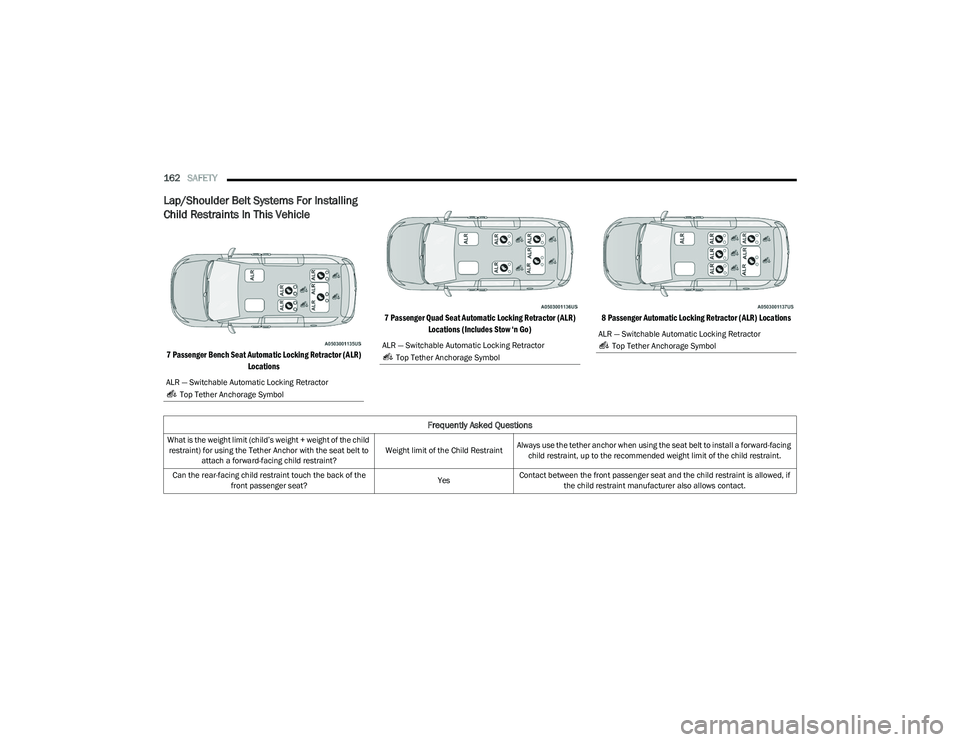
Lap/Shoulder Belt Systems For Installing
Child Restraints In This Vehicle
7 Passenger Bench Seat Automatic Locking Retractor (ALR)
Locations 7 Passenger Quad Seat Automatic Locking Retractor (ALR)
Locations (Includes Stow ‘n Go) 8 Passenger Automatic Locking Retractor (ALR) Locations
ALR — Switchable Automatic Locking Retractor
Top Tether Anchorage Symbol
ALR — Switchable Automatic Locking Retractor Top Tether Anchorage SymbolALR — Switchable Automatic Locking Retractor Top Tether Anchorage Symbol
Frequently Asked Questions
What is the weight limit (child’s weight + weight of the child restraint) for using the Tether Anchor with the seat belt to attach a forward-facing child restraint? Weight limit of the Child Restraint
Always use the tether anchor when using the seat belt to install a forward-facing
child restraint, up to the recommended weight limit of the child restraint.
Can the rear-facing child restraint touch the back of the front passenger seat? YesContact between the front passenger seat and the child restraint is allowed, if
the child restraint manufacturer also allows contact.
23_RUV_OM_EN_US_t.book Page 162
Page 165 of 256
SAFETY163
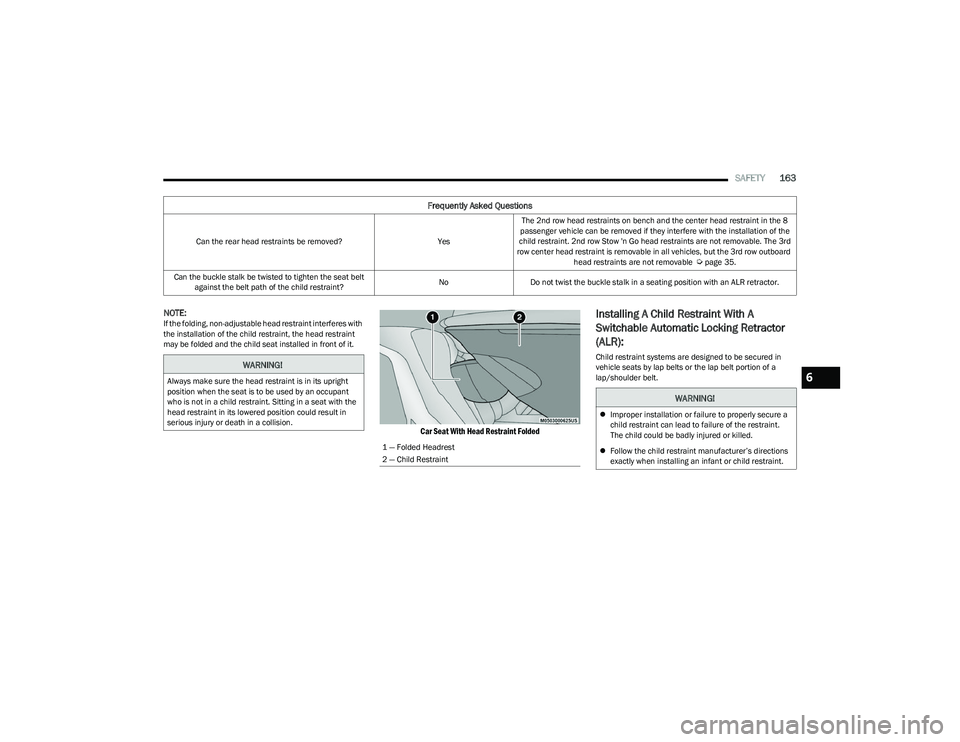
NOTE:If the folding, non-adjustable head restraint interferes with
the installation of the child restraint, the head restraint
may be folded and the child seat installed in front of it.
Car Seat With Head Restraint Folded
Installing A Child Restraint With A
Switchable Automatic Locking Retractor
(ALR):
Child restraint systems are designed to be secured in
vehicle seats by lap belts or the lap belt portion of a
lap/shoulder belt.
Can the rear head restraints be removed?
YesThe 2nd row head restraints on bench and the center head restraint in the 8
passenger vehicle can be removed if they interfere with the installation of the
child restraint. 2nd row Stow 'n Go head restraints are not removable. The 3rd
row center head restraint is removable in all vehicles, but the 3rd row outboard
head restraints are not removable
Úpage 35.
Can the buckle stalk be twisted to tighten the seat belt against the belt path of the child restraint? No
Do not twist the buckle stalk in a seating position with an ALR retractor.
Frequently Asked Questions
WARNING!
Always make sure the head restraint is in its upright
position when the seat is to be used by an occupant
who is not in a child restraint. Sitting in a seat with the
head restraint in its lowered position could result in
serious injury or death in a collision.
1 — Folded Headrest
2 — Child Restraint
WARNING!
Improper installation or failure to properly secure a
child restraint can lead to failure of the restraint.
The child could be badly injured or killed.
Follow the child restraint manufacturer’s directions
exactly when installing an infant or child restraint.
6
23_RUV_OM_EN_US_t.book Page 163
Page 168 of 256
166SAFETY
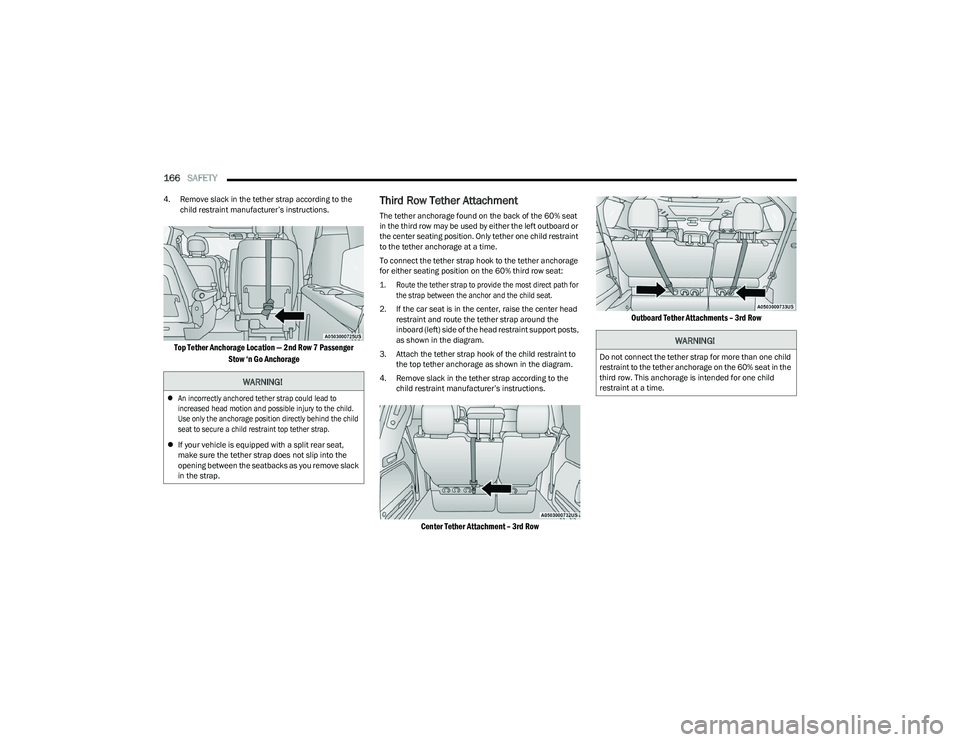
4. Remove slack in the tether strap according to the
child restraint manufacturer’s instructions.
Top Tether Anchorage Location — 2nd Row 7 Passenger
Stow ‘n Go Anchorage
Third Row Tether Attachment
The tether anchorage found on the back of the 60% seat
in the third row may be used by either the left outboard or
the center seating position. Only tether one child restraint
to the tether anchorage at a time.
To connect the tether strap hook to the tether anchorage
for either seating position on the 60% third row seat:
1. Route the tether strap to provide the most direct path for the strap between the anchor and the child seat.
2. If the car seat is in the center, raise the center head restraint and route the tether strap around the
inboard (left) side of the head restraint support posts,
as shown in the diagram.
3. Attach the tether strap hook of the child restraint to the top tether anchorage as shown in the diagram.
4. Remove slack in the tether strap according to the child restraint manufacturer’s instructions.
Center Tether Attachment – 3rd Row
Outboard Tether Attachments – 3rd Row
WARNING!
An incorrectly anchored tether strap could lead to
increased head motion and possible injury to the child.
Use only the anchorage position directly behind the child
seat to secure a child restraint top tether strap.
If your vehicle is equipped with a split rear seat,
make sure the tether strap does not slip into the
opening between the seatbacks as you remove slack
in the strap.
WARNING!
Do not connect the tether strap for more than one child
restraint to the tether anchorage on the 60% seat in the
third row. This anchorage is intended for one child
restraint at a time.
23_RUV_OM_EN_US_t.book Page 166
Page 170 of 256
168SAFETY
(Continued)
PERIODIC SAFETY CHECKS YOU SHOULD
M
AKE OUTSIDE THE VEHICLE
Tires
Examine tires for excessive tread wear and uneven wear
patterns. Check for stones, nails, glass, or other objects
lodged in the tread or sidewall. Inspect the tread for cuts
and cracks. Inspect sidewalls for cuts, cracks, and bulges.
Check the lug nut/bolt torque for tightness. Check the
tires (including spare) for proper cold inflation pressure.
Lights
Have someone observe the operation of brake lights and
exterior lights while you work the controls. Check turn
signal and high beam indicator lights on the instrument
panel.
Door Latches
Check for proper closing, latching, and locking.
Fluid Leaks
Check area under the vehicle after overnight parking for
fuel, coolant, oil, or other fluid leaks. Also, if gasoline
fumes are detected or if fuel or brake fluid leaks are
suspected, the cause should be located and corrected
immediately.
WARNING!
An improperly attached, damaged, folded, or stacked
floor mat, or damaged floor mat fasteners may cause
your floor mat to interfere with the accelerator, brake, or
clutch pedals and cause a loss of vehicle control. To
prevent SERIOUS INJURY or DEATH:
ALWAYS securely attach your floor mat
using the floor mat fasteners. DO NOT
install your floor mat upside down or turn
your floor mat over. Lightly pull to confirm
mat is secured using the floor mat fasteners on a
regular basis.
ALWAYS REMOVE THE EXISTING FLOOR
MAT FROM THE VEHICLE before installing
any other floor mat. NEVER install or stack
an additional floor mat on top of an
existing floor mat.
ONLY install floor mats designed to fit your vehicle.
NEVER install a floor mat that cannot be properly
attached and secured to your vehicle. If a floor mat needs
to be replaced, only use a FCA approved floor mat for the
specific make, model, and year of your vehicle.
ONLY use the driver’s side floor mat on the driver’s side
floor area. To check for interference, with the vehicle
properly parked with the engine off, fully depress the
accelerator, the brake, and the clutch pedal (if present) to
check for interference. If your floor mat interferes with the
operation of any pedal, or is not secure to the floor,
remove the floor mat from the vehicle and place the floor
mat in your trunk.
ONLY use the passenger’s side floor mat on the
passenger’s side floor area.
ALWAYS make sure objects cannot fall or slide into
the driver’s side floor area when the vehicle is
moving. Objects can become trapped under acceler -
ator, brake, or clutch pedals and could cause a loss
of vehicle control.
NEVER place any objects under the floor mat (e.g.,
towels, keys, etc.). These objects could change the
position of the floor mat and may cause interference
with the accelerator, brake, or clutch pedals.
If the vehicle carpet has been removed and
re-installed, always properly attach carpet to the floor
and check the floor mat fasteners are secure to the
vehicle carpet. Fully depress each pedal to check for
interference with the accelerator, brake, or clutch
pedals then re-install the floor mats.
It is recommended to only use mild soap and water
to clean your floor mats. After cleaning, always check
your floor mat has been properly installed and is
secured to your vehicle using the floor mat fasteners
by lightly pulling mat.
WARNING!
23_RUV_OM_EN_US_t.book Page 168
Page 174 of 256
172IN CASE OF EMERGENCY
SOS Call System Limitations
Vehicles sold in Mexico DO NOT have SOS Call system
capabilities.
SOS or other emergency line operators in Mexico may not
answer or respond to SOS system calls.
If the SOS Call system detects a malfunction, any of
the following may occur at the time the malfunction is
detected, and at the beginning of each ignition cycle:
The Rearview Mirror light located between the SOS and
Assist buttons will continuously illuminate red.
The Device Screen will display the following message
“Vehicle device requires service. Please contact an
authorized dealer.”
An In-Vehicle Audio message will state “Vehicle device
requires service. Please contact an authorized dealer.” Even if the SOS Call system is fully functional, factors
beyond FCA US LLC’s control may prevent or stop the SOS
Call system operation. These include, but are not limited
to, the following factors:
The ignition is in the OFF position
The vehicle’s electrical systems are not intact
The SOS Call system software and/or hardware are
damaged during a crash
The vehicle battery loses power or becomes discon -
nected during a vehicle crash
LTE (voice/data) or 4G (data) network and/or Global
Positioning Satellite signals are unavailable or
obstructed
Equipment malfunction at the SOS operator facility
Operator error by the SOS operator
LTE (voice/data) or 4G (data) network congestion
Weather
Buildings, structures, geographic terrain, or tunnelsNOTE:
Your vehicle may be transmitting data as authorized by
the subscriber.
Never place anything on or near the vehicle’s LTE
(voice/data) or 4G (data) and GPS antennas. You could
prevent LTE (voice/data) or 4G (data) and GPS signal
reception, which can prevent your vehicle from placing
an emergency call. An operable LTE (voice/data) or 4G
(data) network connection and a GPS signal is required
for the SOS Call system to function properly.
NOTE:Changes or modifications not expressly approved by the
party responsible for compliance could void the user's
authority to operate the equipment.
Automatic SOS — If Equipped
Automatic SOS is a hands-free safety service that can
immediately connect you with help in the event that your
vehicle’s airbags deploy. Please refer to your provided
radio supplement for complete information.
ASSIST Call
The ASSIST Button is used to automatically connect you to
any one of the following support centers:
Roadside Assistance – If you get a flat tire, or need a tow,
just push the ASSIST button and you will be connected to a
representative for assistance. Roadside Assistance will
know what vehicle is being driven and its location. Addi -
tional fees may apply for roadside assistance.
SiriusXM Guardian™ Customer Care – In-vehicle
support for SiriusXM Guardian™.
WARNING!
Ignoring the Rearview Mirror light could mean you
will not have SOS Call services. If the Rearview Mirror
light is illuminated, have an authorized dealer
service the SOS Call system immediately.
The Occupant Restraint Control module turns on the
air bag Warning Light on the instrument panel if a
malfunction in any part of the system is detected.
If the Air Bag Warning Light is illuminated, have an
authorized dealer service the Occupant Restraint
Control system immediately.
WARNING!
ALWAYS obey traffic laws and pay attention to the road.
ALWAYS drive safely with your hands on the steering
wheel. You have full responsibility and assume all risks
related to the use of the features and applications in
this vehicle. Only use the features and applications
when it is safe to do so. Failure to do so may result in an
accident involving serious injury or death.
23_RUV_OM_EN_US_t.book Page 172
Page 176 of 256
174IN CASE OF EMERGENCY
JACK AND SPARE TIRE LOCATION
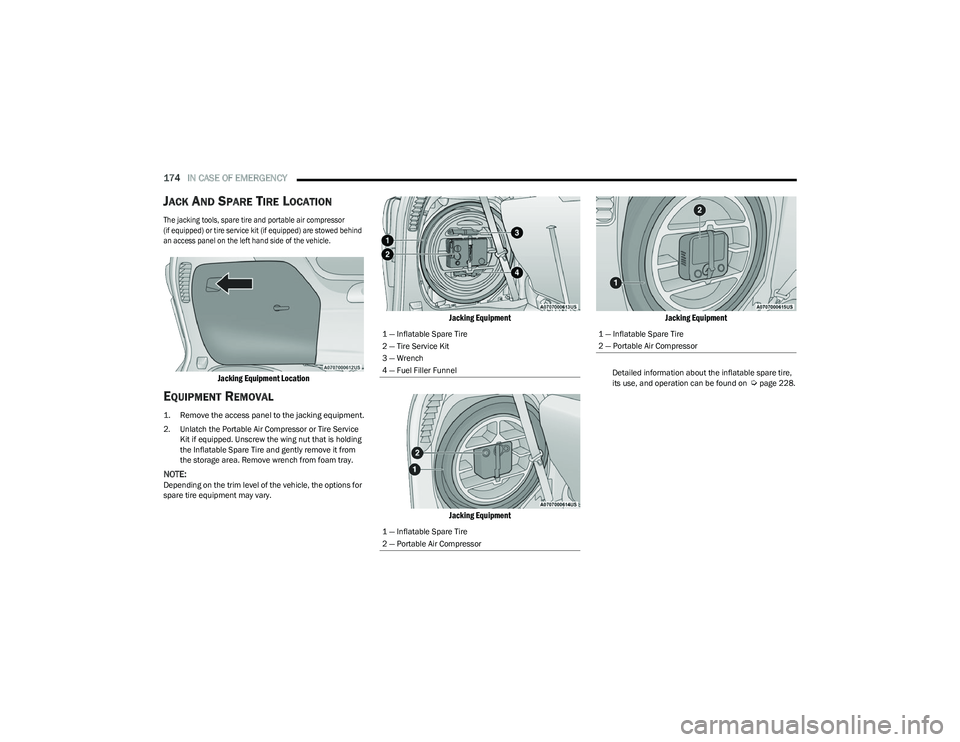
The jacking tools, spare tire and portable air compressor
(if equipped) or tire service kit (if equipped) are stowed behind
an access panel on the left hand side of the vehicle.
Jacking Equipment Location
EQUIPMENT REMOVAL
1. Remove the access panel to the jacking equipment.
2. Unlatch the Portable Air Compressor or Tire Service
Kit if equipped. Unscrew the wing nut that is holding
the Inflatable Spare Tire and gently remove it from
the storage area. Remove wrench from foam tray.
NOTE:Depending on the trim level of the vehicle, the options for
spare tire equipment may vary.
Jacking Equipment
Jacking Equipment Jacking Equipment
Detailed information about the inflatable spare tire,
its use, and operation can be found on Úpage 228.
1 — Inflatable Spare Tire
2 — Tire Service Kit
3 — Wrench
4 — Fuel Filler Funnel
1 — Inflatable Spare Tire
2 — Portable Air Compressor1 — Inflatable Spare Tire
2 — Portable Air Compressor
23_RUV_OM_EN_US_t.book Page 174
Page 179 of 256
IN CASE OF EMERGENCY177
3. Place the wrench on the jack screw and turn
clockwise until the jack head is properly engaged in
the described location. Do not raise the vehicle until
you are sure the jack is securely engaged.
4. Raise the vehicle by turning the jack screw clockwise, using the swivel wrench. Raise the vehicle only until
the tire just clears the surface and enough clearance
is obtained to install the compact spare tire.
Minimum tire lift provides maximum stability.
5. Remove the wheel lug nuts, for vehicles with wheel covers, remove the cover from the wheel by hand.
Do not pry the wheel cover off. Then pull the wheel off
the hub.
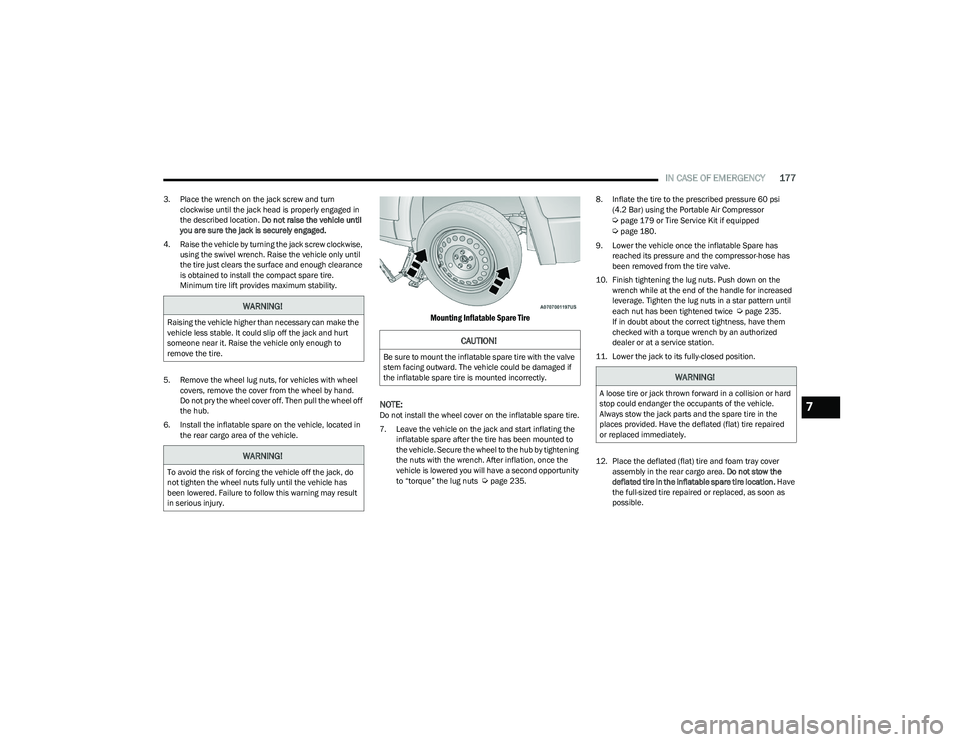
6. Install the inflatable spare on the vehicle, located in the rear cargo area of the vehicle.
Mounting Inflatable Spare Tire
NOTE:
Do not install the wheel cover on the inflatable spare tire.
7. Leave the vehicle on the jack and start inflating the inflatable spare after the tire has been mounted to
the vehicle. Secure the wheel to the hub by tightening
the nuts with the wrench. After inflation, once the
vehicle is lowered you will have a second opportunity
to “torque” the lug nuts
Úpage 235. 8. Inflate the tire to the prescribed pressure 60 psi
(4.2 Bar) using the Portable Air Compressor
Úpage 179 or Tire Service Kit if equipped Úpage 180.
9. Lower the vehicle once the inflatable Spare has reached its pressure and the compressor-hose has
been removed from the tire valve.
10. Finish tightening the lug nuts. Push down on the wrench while at the end of the handle for increased
leverage. Tighten the lug nuts in a star pattern until
each nut has been tightened twice
Úpage 235.
If in doubt about the correct tightness, have them
checked with a torque wrench by an authorized
dealer or at a service station.
11. Lower the jack to its fully-closed position.
12. Place the deflated (flat) tire and foam tray cover assembly in the rear cargo area. Do not stow the
deflated tire in the inflatable spare tire location. Have
the full-sized tire repaired or replaced, as soon as
possible.WARNING!
Raising the vehicle higher than necessary can make the
vehicle less stable. It could slip off the jack and hurt
someone near it. Raise the vehicle only enough to
remove the tire.
WARNING!
To avoid the risk of forcing the vehicle off the jack, do
not tighten the wheel nuts fully until the vehicle has
been lowered. Failure to follow this warning may result
in serious injury.
CAUTION!
Be sure to mount the inflatable spare tire with the valve
stem facing outward. The vehicle could be damaged if
the inflatable spare tire is mounted incorrectly.
WARNING!
A loose tire or jack thrown forward in a collision or hard
stop could endanger the occupants of the vehicle.
Always stow the jack parts and the spare tire in the
places provided. Have the deflated (flat) tire repaired
or replaced immediately.
7
23_RUV_OM_EN_US_t.book Page 177