Sign Citroen BERLINGO 2014 2.G Owner's Guide
[x] Cancel search | Manufacturer: CITROEN, Model Year: 2014, Model line: BERLINGO, Model: Citroen BERLINGO 2014 2.GPages: 268, PDF Size: 13.39 MB
Page 119 of 268
11 7
Child safety
11 7
SAFETY
4
GENERAL POINTS RELATING
TO CHILD SEATS
Although one of CITROËN's main
criteria when designing your vehicle,
the safety of your children also
depends on you.
For maximum safety, please follow
these precautions:
- all children under the age of 12 or less than one metre fi fty tall must
travel in approved child seats suited
to their weight, on seats fi tted with
a seat belt or ISOFIX mountings,
- statistically, the safest seats in your vehicle for the transportation of
children are the rear seats,
- a child weighing less than 9 kg must travel in the "rearward facing"
position both in the front and in
the rear,
- the passenger must not travel with a child on their lap.
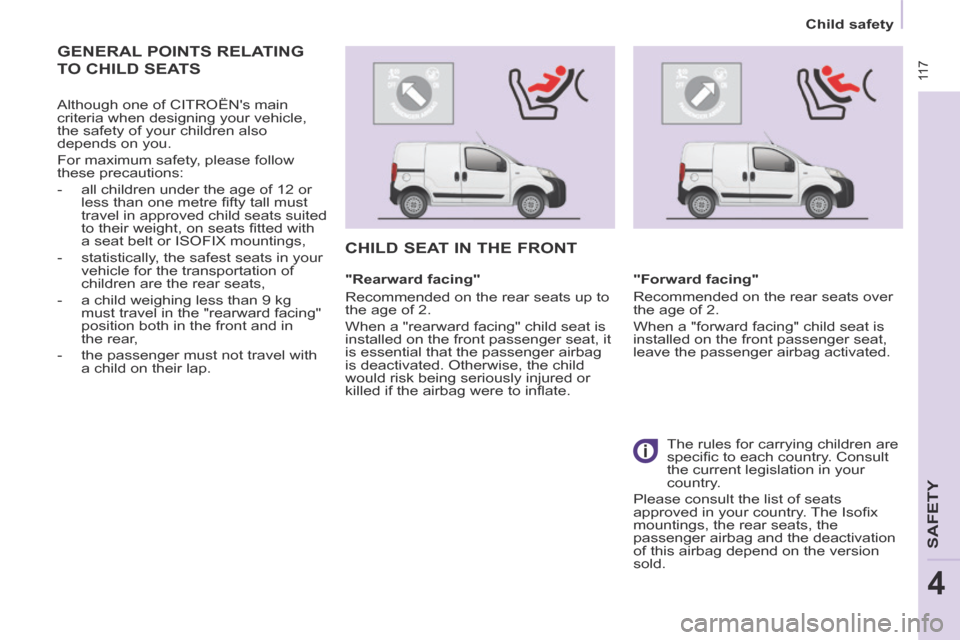
CHILD SEAT IN THE FRONT
"Rearward facing"
Recommended on the rear seats up to
the age of 2.
When a "rearward facing" child seat is
installed on the front passenger seat, it
is essential that the passenger airbag
is deactivated. Otherwise, the child
would risk being seriously injured or
killed if the airbag were to infl ate. "Forward facing"
Recommended on the rear seats over
the age of 2.
When a "forward facing" child seat is
installed on the front passenger seat,
leave the passenger airbag activated.
The rules for carrying children are
specifi c to each country. Consult
the current legislation in your
country.
Please consult the list of seats
approved in your country. The Isofi x
mountings, the rear seats, the
passenger airbag and the deactivation
of this airbag depend on the version
sold.
Page 131 of 268
129
Towing a trailer
ACCESSORIES
5
Good Practice
In certain cases of particularly arduous
use (towing the maximum load up a
steep slope in high temperatures), the
engine automatically limits its power.
In this case, the air conditioning is
automatically cut off to save engine
power. Tyres
Check the tyre pressures of the
towing vehicle (see the "Identifi cation
markings" section of chapter 8) and of
the trailer, observing the recommended
pressures.
See the "Levels" section of chapter 6.
If the coolant temperature
warning lamp comes on, stop
the vehicle and switch off the
engine as soon as possible. Brakes
Towing increases the braking distance.
Drive at a moderate speed, change
down early and brake gradually.
Towbar
We recommend the use of genuine
CITROËN towbars and their
harnesses, which have been tested
and approved from the design stage of
your vehicle, and that you entrust the
fi tting of this equipment to a CITROËN
dealer.
If this equipment is not fi tted by a
CITROËN dealer, it is imperative
that it is fi tted using the electrical
pre-equipment installed at the rear of
the vehicle and in accordance with the
manufacturer's instructions.
In accordance with the general
instructions a reminder of which has
been given above, we draw your
attention to the risk associated with
fi tting a towbar or electrical accessory
not recommended by CITROËN.
Fitting such equipment could result in
the failure of your vehicle's electronic
system. Please obtain information from
the Manufacturer before fi tting this type
of equipment.
Side wind
Sensitivity to side wind is increased.
Drive smoothly and at a moderate
speed.
ABS/DSC
The ABS or DSC systems only control
the vehicle, not the trailer or caravan.
Rear parking sensors
The parking sensors system does not
function while the vehicle is towing.
Page 139 of 268
Levels
137
CHECKS
6
Cooling system
Only use the fl uid recommended by the
manufacturer.
Otherwise, you risk seriously damaging
your engine.
When the engine is warm, the
temperature of the coolant is controlled
by the engine fan. As this fan can
operate with the ignition key removed
and because the cooling system is
pressurised, wait for at least one hour
after the engine has stopped before
carrying out any work.
Slacken the cap by 1/4 of a turn to
release the pressure to prevent any
risk of scalding. When the pressure
has dropped, remove the cap and top
up the level with coolant.
If fl uid has to be added frequently,
this indicates a fault which must be
checked by a CITROËN dealer as
soon as possible.
Power steering fluid level
The vehicle must be parked on level
ground with the engine cold. Unscrew
the cap integrated with the gauge and
check the level which must be between
the MIN and MAX marks. In order to regenerate the fi lter, you
are advised to drive at a speed higher
than 40 mph (60 km/h) for at least fi ve
minutes as soon as possible, when
traffi c conditions permit (until the
message disappears and the service
warning lamp goes off).
During regeneration of the particle
emission fi lter, the noise of a relay
operating may be heard under the
dashboard.
If the message is still displayed and
if the service warning lamp remains
on, consult a CITROËN dealer or a
qualifi ed workshop.
Topping up
The level must be between the MIN
and MAX marks on the expansion
bottle. If more than 1 litre of fl uid is
required to top up the level, have the
system checked by a CITROËN dealer
or a qualifi ed workshop.
Screenwash and headlamp
wash level
For best quality cleaning and for your
safety, we would advise that you use
products of the CITROËN range.
For optimum cleaning and to avoid
freezing, this fl uid must not be topped
up or replaced with plain water.
Capacity of the screenwash reservoir:
approximately 3 litres.
If your vehicle is fi tted with headlamp
washers, the capacity of the reservoir
is 6 litres.
Diesel additive level
(Diesel with particle
emission filter)
Topping up
This additive must be topped up by
a CITROËN dealer or a qualifi ed
workshop without delay.
Waste products
Avoid prolonged contact of used oil
with the skin.
Brake fl uid is harmful to health and
very corrosive.
Do not dispose of used oil, brake fl uid
or coolant into drains or into the ground
but into the containers dedicated to this
use at CITROËN dealer (France) or an
authorised waste disposal site.
The minimum level of this additive
is indicated by lighting of the service
warning lamp, accompanied by an
audible signal and a message in the
screen.
When this occurs with the engine
running it is due to the start of
saturation of the particle emission fi lter
(exceptionally prolonged urban type
driving conditions: low speed, long
traffi c jams, ...).
Page 151 of 268
Snow screen
149
QUICK HELP
7
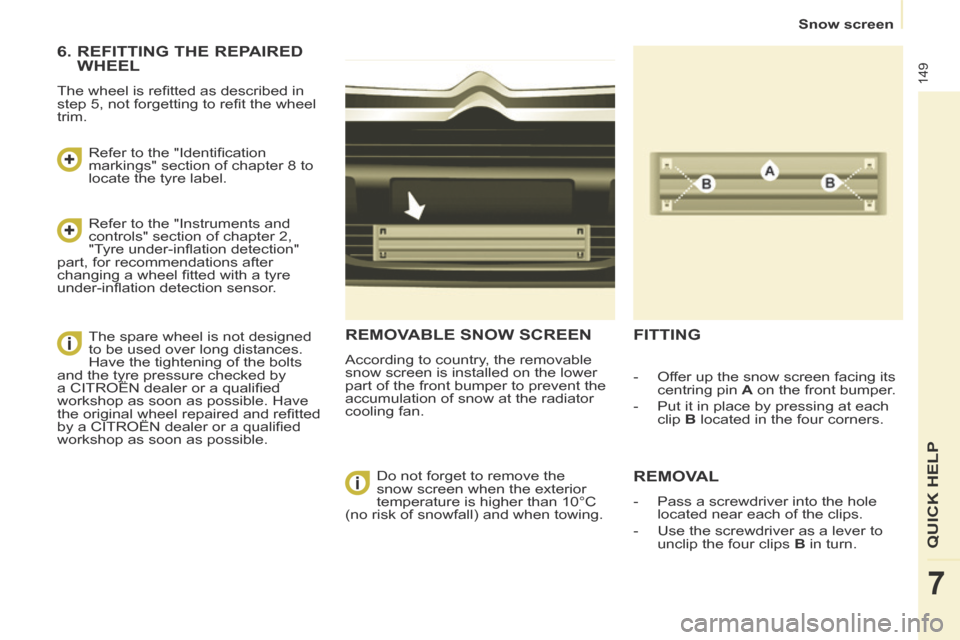
REMOVABLE SNOW SCREEN
According to country, the removable
snow screen is installed on the lower
part of the front bumper to prevent the
accumulation of snow at the radiator
cooling fan.
FITTING
REMOVAL
- Pass a screwdriver into the hole located near each of the clips.
- Use the screwdriver as a lever to unclip the four clips B in turn.
- Offer up the snow screen facing its
centring pin A on the front bumper.
- Put it in place by pressing at each clip B located in the four corners.
Do not forget to remove the
snow screen when the exterior
temperature is higher than 10°C
(no risk of snowfall) and when towing.
6. REFITTING THE REPAIRED WHEEL
The wheel is refi tted as described in
step 5, not forgetting to refi t the wheel
trim.
Refer to the "Identifi cation
markings" section of chapter 8 to
locate the tyre label.
Refer to the "Instruments and
controls" section of chapter 2,
"Tyre under-infl ation detection"
part, for recommendations after
changing a wheel fi tted with a tyre
under-infl ation detection sensor.
The spare wheel is not designed
to be used over long distances.
Have the tightening of the bolts
and the tyre pressure checked by
a CITROËN dealer or a qualifi ed
workshop as soon as possible. Have
the original wheel repaired and refi tted
by a CITROËN dealer or a qualifi ed
workshop as soon as possible.
Page 152 of 268
Snow chains
150
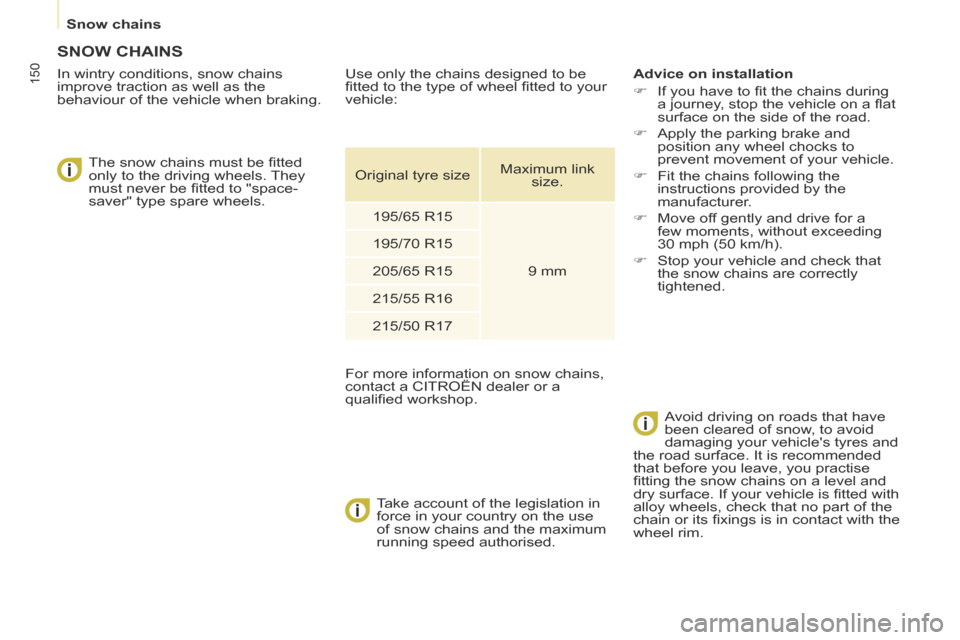
SNOW CHAINS
In wintry conditions, snow chains
improve traction as well as the
behaviour of the vehicle when braking. The snow chains must be fi tted
only to the driving wheels. They
must never be fi tted to "space-
saver" type spare wheels.
Take account of the legislation in
force in your country on the use
of snow chains and the maximum
running speed authorised. Advice on installation
If you have to fi t the chains during
a journey, stop the vehicle on a fl at
surface on the side of the road.
Apply the parking brake and position any wheel chocks to
prevent movement of your vehicle.
Fit the chains following the instructions provided by the
manufacturer.
Move off gently and drive for a few moments, without exceeding
30 mph (50 km/h).
Stop your vehicle and check that the snow chains are correctly
tightened.
Avoid driving on roads that have
been cleared of snow, to avoid
damaging your vehicle's tyres and
the road surface. It is recommended
that before you leave, you practise
fi tting the snow chains on a level and
dry surface. If your vehicle is fi tted with
alloy wheels, check that no part of the
chain or its fi xings is in contact with the
wheel rim.
Use only the chains designed to be
fi tted to the type of wheel fi tted to your
vehicle:
For more information on snow chains,
contact a CITROËN dealer or a
qualifi ed workshop.
Original tyre size
Maximum link
size.
195/65 R15
9 mm
195/70 R15
205/65 R15
215/55 R16
215/50 R17
Page 195 of 268
9.25
06 TRAFFIC INFORMATION
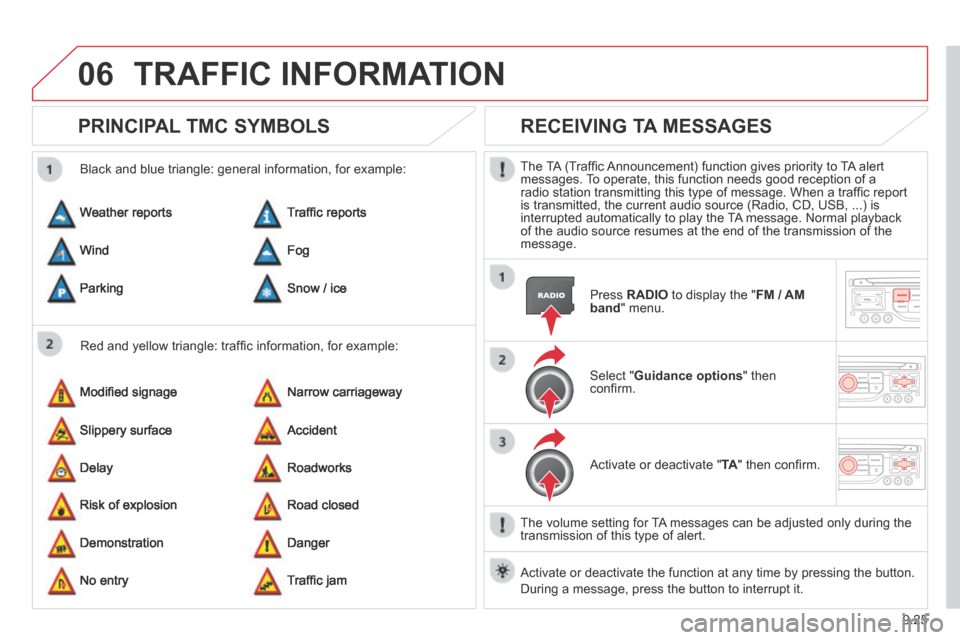
PRINCIPAL TMC SYMBOLS
Red and yellow triangle: traffi c information, for example:
Black and blue triangle: general information, for example:
Weather reports
Modifi ed signage
Risk of explosion
Traffi c reports
Narrow carriageway
Road closed
Wind
Slippery surface
Demonstration
Fog
Accident
Danger
Parking
Delay
No entry
Snow / ice
Roadworks
Traffi c jam
RECEIVING TA MESSAGES
The TA (Traffi c Announcement) function gives priority to TA alert messages. To operate, this function needs good reception of a radio station transmitting this type of message. When a traffi c report is transmitted, the current audio source (Radio, CD, USB, ...) is interrupted automatically to play the TA message. Normal playback of the audio source resumes at the end of the transmission of the message.
Press RADIO to display the " FM / AM band " menu.
Select " Guidance options " then confi rm.
Activate or deactivate " TA " then confi rm.
The volume setting for TA messages can be adjusted only during the transmission of this type of alert.
Activate or deactivate the function at any time by pressing the button. \
During a message, press the button to interrupt it.
Page 210 of 268
9.40
08
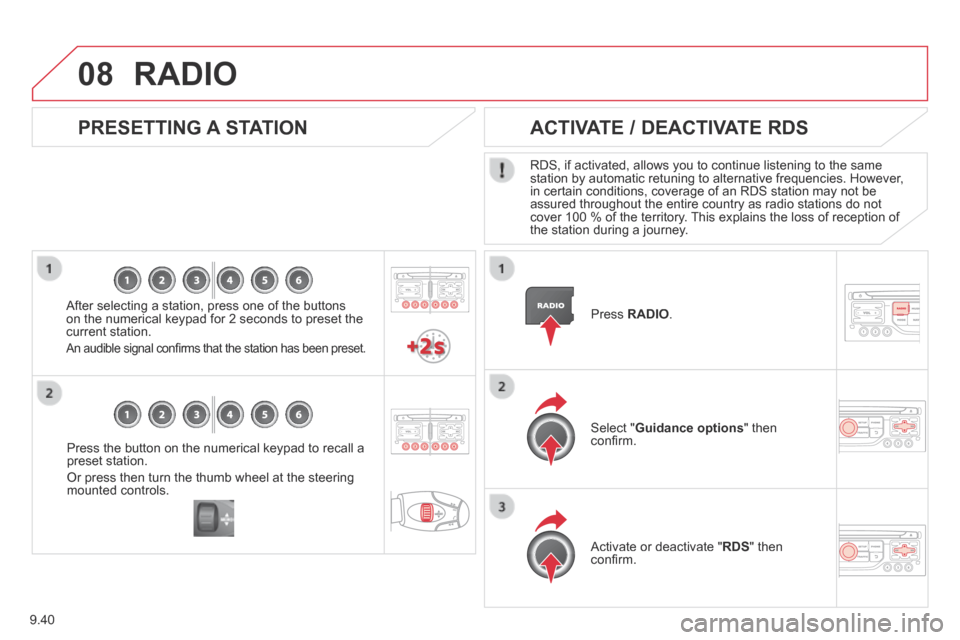
Press the button on the numerical keypad to recall a preset station.
Or press then turn the thumb wheel at the steering mounted controls.
PRESETTING A STATION
After selecting a station, press one of the buttons on the numerical keypad for 2 seconds to preset the current station.
An audible signal confi rms that the station has been preset.
Press RADIO .
ACTIVATE / DEACTIVATE RDS
RDS, if activated, allows you to continue listening to the same station by automatic retuning to alternative frequencies. However, in certain conditions, coverage of an RDS station may not be assured throughout the entire country as radio stations do not cover 100 % of the territory. This explains the loss of reception of the station during a journey.
Select " Guidance options " then confi rm.
Activate or deactivate " RDS " then confi rm.
RADIO
Page 221 of 268
9.51
11 TRIP COMPUTER
TRIP COMPUTER
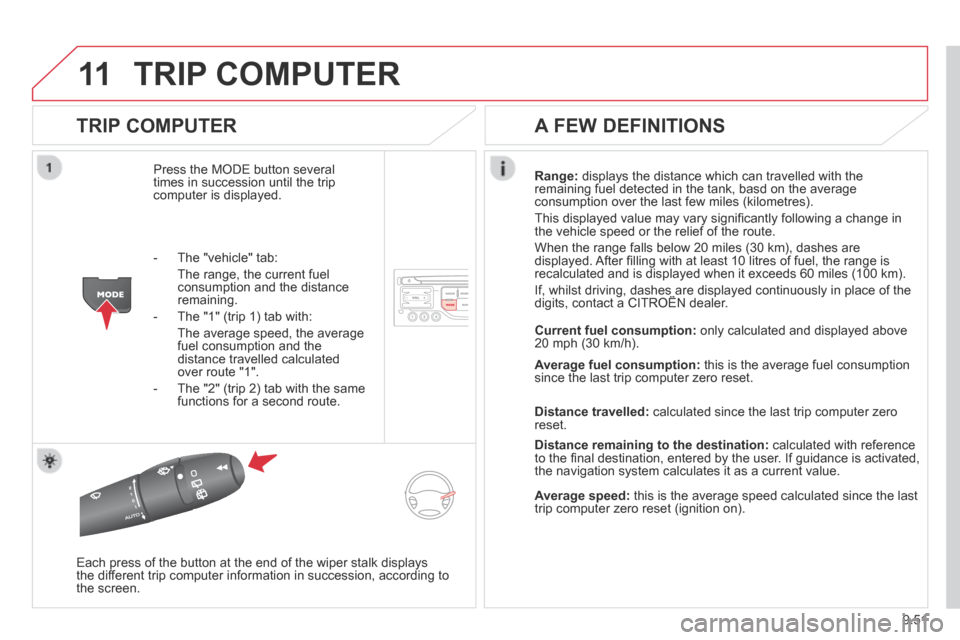
Press the MODE button several times in succession until the trip computer is displayed.
Range: displays the distance which can travelled with the remaining fuel detected in the tank, basd on the average consumption over the last few miles (kilometres).
This displayed value may vary signifi cantly following a change in the vehicle speed or the relief of the route.
When the range falls below 20 miles (30 km), dashes are displayed. After fi lling with at least 10 litres of fuel, the range is recalculated and is displayed when it exceeds 60 miles (100 km).
If, whilst driving, dashes are displayed continuously in place of the digits, contact a CITROËN dealer. If, whilst driving, dashes are displayed continuously in place of the digits, contact a CITROËN dealer. If, whilst driving, dashes are displayed continuously in place of the
Each press of the button at the end of the wiper stalk displays the different trip computer information in succession, according to the screen.
A FEW DEFINITIONS
- The "vehicle" tab:
The range, the current fuel consumption and the distance remaining.
- The "1" (trip 1) tab with:
The average speed, the average fuel consumption and the distance travelled calculated over route "1".
- The "2" (trip 2) tab with the same functions for a second route.
Current fuel consumption: only calculated and displayed above 20 mph (30 km/h).
Average fuel consumption: this is the average fuel consumption since the last trip computer zero reset.
Distance travelled: calculated since the last trip computer zero reset.
Distance remaining to the destination: calculated with reference to the fi nal destination, entered by the user. If guidance is activated, the navigation system calculates it as a current value.
Average speed: this is the average speed calculated since the last trip computer zero reset (ignition on).
Page 227 of 268
9.57
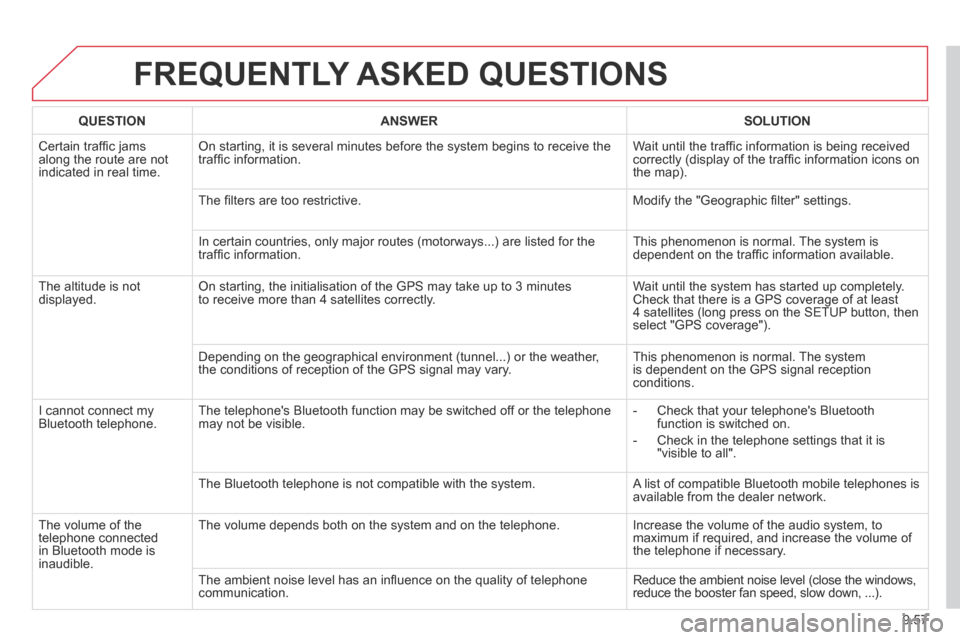
FREQUENTLY ASKED QUESTIONS
QUESTIONANSWERSOLUTION
Certain traffi c jams along the route are not indicated in real time.
On starting, it is several minutes before the system begins to receive t\
he traffi c information. Wait until the traffi c information is being received correctly (display of the traffi c information icons on the map).
The fi lters are too restrictive. Modify the "Geographic fi lter" settings.
In certain countries, only major routes (motorways...) are listed for \
the traffi c information. This phenomenon is normal. The system is dependent on the traffi c information available.
The altitude is not displayed. On starting, the initialisation of the GPS may take up to 3 minutes to receive more than 4 satellites correctly. Wait until the system has started up completely. Check that there is a GPS coverage of at least 4 satellites (long press on the SETUP button, then select "GPS coverage").
Depending on the geographical environment (tunnel...) or the weather, the conditions of reception of the GPS signal may vary. This phenomenon is normal. The system is dependent on the GPS signal reception conditions.
I cannot connect my Bluetooth telephone. The telephone's Bluetooth function may be switched off or the telephone may not be visible. - Check that your telephone's Bluetooth function is switched on.
- Check in the telephone settings that it is "visible to all".
The Bluetooth telephone is not compatible with the system. A list of compatible Bluetooth mobile telephones is available from the dealer network.
The volume of the telephone connected in Bluetooth mode is inaudible.
The volume depends both on the system and on the telephone. Increase the volume of the audio system, to maximum if required, and increase the volume of the telephone if necessary.
The ambient noise level has an infl uence on the quality of telephone communication. Reduce the ambient noise level (close the windows, reduce the booster fan speed, slow down, ...).
Page 247 of 268
9.77
08
13
TRIP COMPUTER
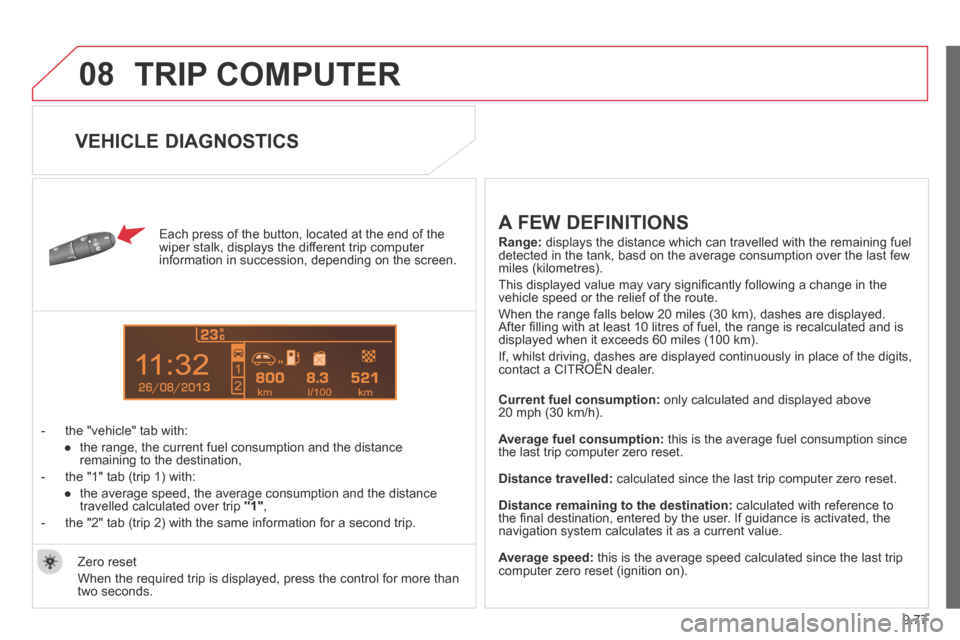
Each press of the button, located at the end of the wiper stalk, displays the different trip computer information in succession, depending on the screen.
- the "vehicle" tab with:
● the range, the current fuel consumption and the distance remaining to the destination,
- the "1" tab (trip 1) with:
● the average speed, the average consumption and the distance travelled calculated over trip "1" ,
- the "2" tab (trip 2) with the same information for a second trip.
A FEW DEFINITIONS
Range: displays the distance which can travelled with the remaining fuel detected in the tank, basd on the average consumption over the last few \
miles (kilometres).
This displayed value may vary signifi cantly following a change in the vehicle speed or the relief of the route.
When the range falls below 20 miles (30 km), dashes are displayed. After fi lling with at least 10 litres of fuel, the range is recalculated and is displayed when it exceeds 60 miles (100 km).
If, whilst driving, dashes are displayed continuously in place of the di\
gits, contact a CITROËN dealer. If, whilst driving, dashes are displayed continuously in place of the di\
gits, contact a CITROËN dealer. If, whilst driving, dashes are displayed continuously in place of the di\
gits,
Current fuel consumption: only calculated and displayed above 20 mph (30 km/h).
Average fuel consumption: this is the average fuel consumption since the last trip computer zero reset.
Distance travelled: calculated since the last trip computer zero reset.
Distance remaining to the destination: calculated with reference to the fi nal destination, entered by the user. If guidance is activated, the navigation system calculates it as a current value.
Average speed: this is the average speed calculated since the last trip computer zero reset (ignition on). Zero reset
When the required trip is displayed, press the control for more than two seconds.
VEHICLE DIAGNOSTICS