adjust Citroen C1 2016 1.G Owner's Manual
[x] Cancel search | Manufacturer: CITROEN, Model Year: 2016, Model line: C1, Model: Citroen C1 2016 1.GPages: 269, PDF Size: 7.63 MB
Page 4 of 269
.
.
C1_en_Chap00a_sommaire_ed01-2016
Instrument panels 11
Display screens
1
3
Indicator
and warning lamps
1
5
Indicators
2
6
Trip
computer
2
7
Setting
the time
2
9
InstrumentsOver view
Keys 31
K eyless Entry and Starting system
3
4
Doors
3
8
Boot
3
9
Front
electric windows
4
1
Rear
quarter windows
4
1
Electric
fa
bric
ro
of
4
2
Access
Front seats 46
Rear seats
4
8
Mirrors
5
0
Steering
wheel adjustment
5
1
Ventilation
5
2
Heating
5
4
Manual
a
ir
c
onditioning
5
5
Automatic
air conditioning
5
7
Front
demist - defrost
6
0
Rear
screen demist - defrost
6
1
Courtesy
lamp
6
2
Boot
lamp
6
2
Interior
fittings
6
3
Rear
parcel shelf
6
7
Boot
fittings
6
8
Ease of use a nd c omfort
Driving recommendations 7 0
Starting - switching off the engine
with
the key
7
1
Starting
- switching off the engine with
t
he Keyless Entry and Starting system
7
2
Manual
par
king
b
rake
7
6
5 -speed
manual gearbox
7
6
ETG
electronic gearbox
7
7
Gear
shift indicator
8
1
Hill
start assist
8
2
Stop
& Start
8
3
Speed
limiter
8
6
Reversing
camera
9
2
Lane
departure warning system
9
3
Under-inflation
d
etection
9
5
Driving
Eco-driving
Contents
Page 5 of 269
.
C1_en_Chap00a_sommaire_ed01-2016
Exterior lighting control stalk 98
Automatic illumination of headlamps
1
01
Direction
indicators
1
03
Headlamp
beam height adjustment
1
03
Wiper
control stalk
1
04
Lighting and v isibility
Horn 10 6
Hazard warning lamps
1
06
ESC
system
1
07
Active
City Brake
1
10
Seat
belts
1
15
Airbags
1
18
Child
seats
1
23
Deactivating the passenger's front airbag 126
ISOFIX
child
seats
1
32
Child
lock
1
37
Safety
In
t
he
e
vent
o
f
a
b
reakdown
Fuel tank 138
Snow chains
1
40
Electrical
energy economy mode
1
41
Accessories
1
42
Changing
a wiper blade
1
44
Fitting
roof bars
1
44
Bonnet
14
6
Petrol
engines
1
47
Checking
levels
1
48
C h e c ks
1
51
Practical information Technical da ta
7-inch touch screen tablet 185
Audio system
2
35
Audio and telematics
Alphabetical
in
dex
Temporary puncture repair kit 1 53
Spare wheel
1
58
Changing
a bulb
1
63
Changing
a fuse
1
68
12
V battery
1
77
Towing
the vehicle
1
80Engines
1
81
Weights
1
82
Dimensions
1
83
Identification
ma
rkings
1
84
Contents
Page 6 of 269
4
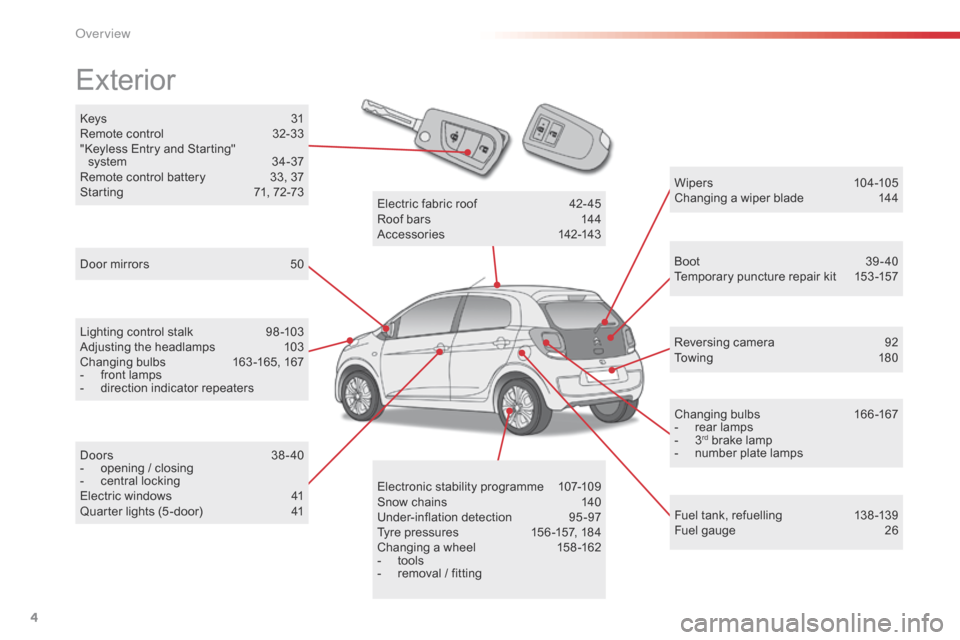
C1_en_Chap00b_vue-ensemble_ed01-2016
Keys 31
R emote control 3 2-33
"Keyless
Entry and Starting"
s
ystem
3
4-37
Remote
control battery
3
3, 37
Starting
7
1, 72-73
Exterior
Door mirrors 5 0
Lighting control stalk
9
8 -103
Adjusting
the headlamps
1
03
Changing
bu
lbs
1
63-165,
1
67
-
f
ront lamps
-
d
irection indicator repeaters
Doors
3
8-40
-
o
pening / closing
-
c
entral locking
Electric
windows
4
1
Quarter
lights (5 -door)
4
1 Wipers
10
4 -105
Changing a wiper blade
1
44
Boot 3 9-40
Temporary puncture repair kit 1 53 -157
Reversing
camera
9
2
To w i n g
1
8 0
Changing
bu
lbs
1
66-167
-
r
ear lamps
-
3rd brake lamp
-
n
umber plate lamps
Fuel
tank, refuelling
1
38 -139
Fuel
gauge
2
6
Electronic
s
tability
pro
gramme
1
07-109
Snow
chains
1
40
Under-inflation
d
etection
9
5-97
Tyre
pressures
1
56 -157,
184
Changing
a
wheel
1
58 -162
-
t
ools
-
r
emoval
/
fitting
Electric
fa
bric
ro
of
4
2-45
Roof
bars
1
44
Accessories
1
42-143
O
Page 9 of 269
7
C1_en_Chap00b_vue-ensemble_ed01-2016
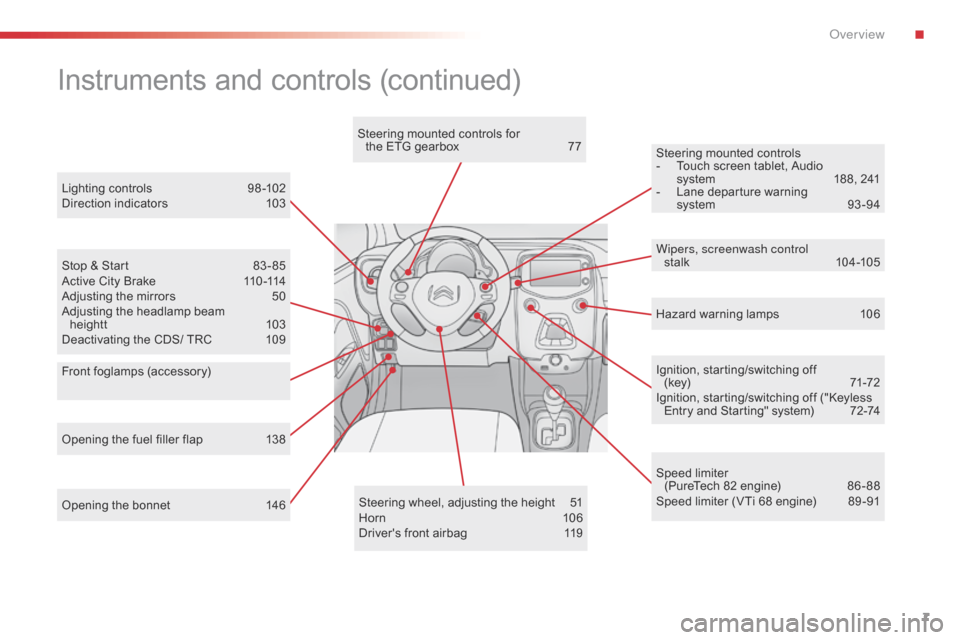
Opening the bonnet 146Steering wheel, adjusting the height 5 1
Horn 10 6
Driver's
front airbag
1
19Ignition,
starting/switching off
(key)
7
1-72
Ignition, starting/switching off ("Keyless
E
ntry and Starting" system)
7
2-74
Steering mounted controls
-
T
ouch screen tablet, Audio
s
ystem
1
88, 241
-
L
ane departure warning
s
ystem
9
3 -94
Instruments and controls (continued)
Lighting controls 9
8 -102
Direction indicators 1 03
Stop
& Start
8
3 - 85
Active
City Brake
1
10 -114
Adjusting
the mirrors
5
0
Adjusting
the headlamp beam
heightt
1
03
Deactivating
the CDS/ TRC
1
09 Wipers, screenwash control
stalk
10
4 -105
Speed
limiter
(PureTech
82 engine)
8
6 - 88
Speed
limiter (VTi 68 engine)
8
9 -91
Opening
the fuel filler flap
1
38 Hazard
warning lamps
1
06
Steering
mounted controls for
the ETG gearbox
7
7
Front foglamps (accessory)
.
Over view
Page 21 of 269
19
C1_en_Chap01_instrument- de-bord_ed01-2016
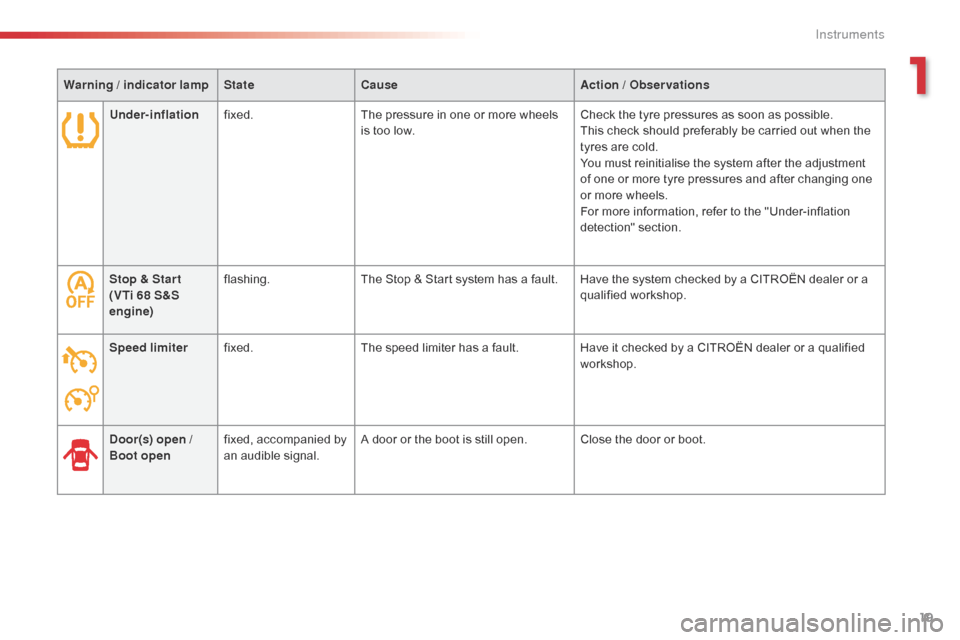
Stop & Star t
(VTi 68 S&S
engine)flashing.
The Stop & Start system has a fault. Have the system checked by a CITROËN dealer or a q
ualified w orkshop.
Speed limiter fixed. The
speed limiter has a fault.Have
it checked by a CITROËN dealer or a qualified
w
orkshop.
Door(s) open
/
Boot open fixed,
accompanied by
a
n audible signal.A
door or the boot is still open. Close the door or boot.
Warning
/ indicator lamp
State Cause Action
/ Observations
Under-inflation fixed. The pressure in one or more wheels
i
s too low.
Check the tyre pressures as soon as possible.
This check should preferably be carried out when the
t
yres are cold.
You must reinitialise the system after the adjustment
o
f one or more tyre pressures and after changing one
o
r more wheels.
For more information, refer to the "Under-inflation
d
etection"
s
ection.
1
Instruments
Page 29 of 269
27
C1_en_Chap01_instrument- de-bord_ed01-2016
Trip computer
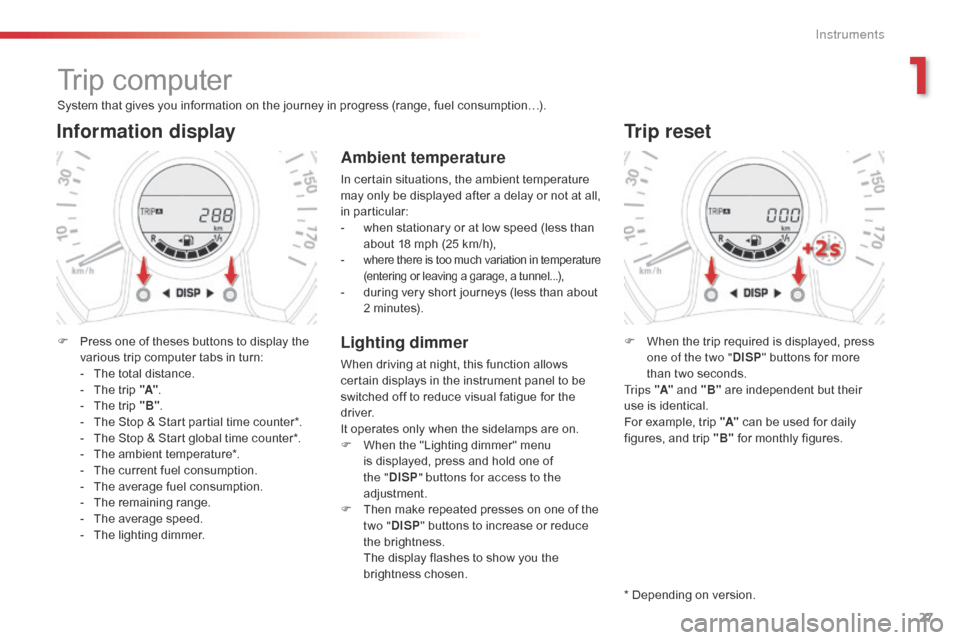
System that gives you information on the journey in progress (range, fuel consumption…).
Information display
F Press one of theses buttons to display the v
arious trip computer tabs in turn:
-
T
he total distance.
-
T
he trip "A".
-
T
he trip "B".
-
T
he Stop & Start partial time counter*.
-
T
he Stop & Start global time counter*.
-
T
he ambient temperature*.
-
T
he current fuel consumption.
-
T
he average fuel consumption.
-
T
he remaining range.
-
T
he average speed.
-
T
he lighting dimmer.
Trip reset
F When the trip required is displayed, press o
ne of the two " DISP"
buttons for more
t
han two seconds.
Tr i p s "A"
and "B"
are independent but their
u
se is identical.
For
example, trip "A"
can be used for daily
f
igures, and trip "B"
for monthly figures.
* Depending
on version.
Ambient temperature
In certain situations, the ambient temperature may only be displayed after a delay or not at all,
in par
ticular:
-
w
hen stationary or at low speed (less than
a
bout 18 mph (25 km/h),
-
where there is too much variation in temperature (
entering or leaving a garage, a tunnel...),
- during very short journeys (less than about 2
minutes).
Lighting dimmer
When driving at night, this function allows certain displays in the instrument panel to be
s
witched off to reduce visual fatigue for the
d
river.
It
operates only when the sidelamps are on.
F
W
hen the "Lighting dimmer" menu
i
s displayed, press and hold one of
t
he "DISP " buttons for access to the
adjustment.
F
T
hen make repeated presses on one of the
t
wo "DISP "
buttons to increase or reduce
t
he brightness.
T
he display flashes to show you the
b
rightness chosen.
1
Instruments
Page 31 of 269
29
C1_en_Chap01_instrument- de-bord_ed01-2016
Audio system
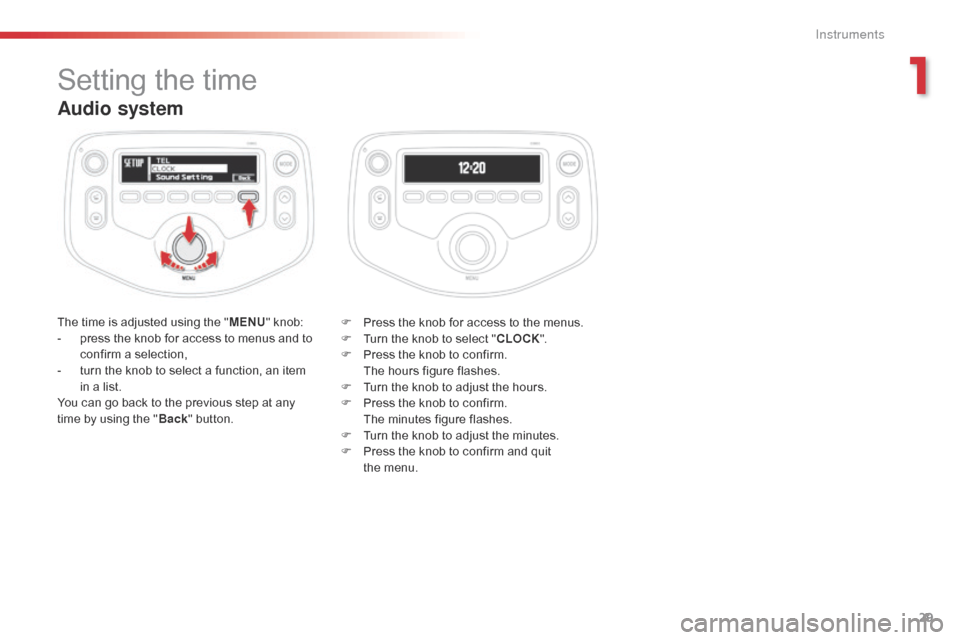
The time is adjusted using the "M ENU" knob:
- p ress the knob for access to menus and to
c
onfirm a selection,
-
t
urn the knob to select a function, an item
i
n a list.
You
can go back to the previous step at any
t
ime by using the "Back "
button. F
P ress the knob for access to the menus.
F
T
urn the knob to select "CLOCK ".
F
P
ress the knob to confirm.
T
he hours figure flashes.
F
T
urn the knob to adjust the hours.
F
P
ress the knob to confirm.
T
he minutes figure flashes.
F
T
urn the knob to adjust the minutes.
F
P
ress the knob to confirm and quit
t
he menu.
Setting the time
1
Instruments
Page 32 of 269
30
Touch screen tablet
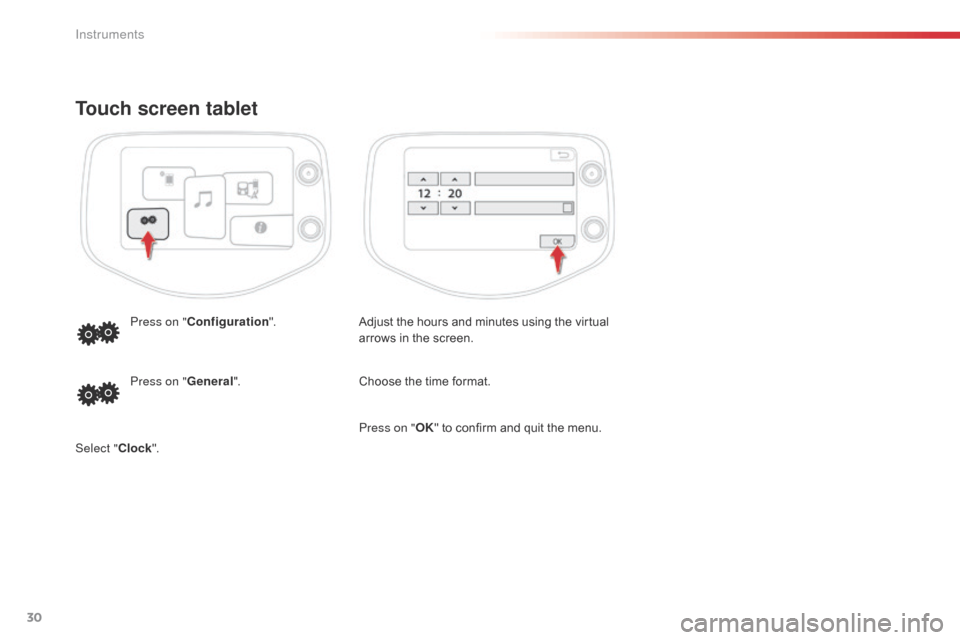
Adjust the hours and minutes using the virtual arrows in the screen.
Press on "
Configuration ".
Choose the time format.
Press on " General".
Select " Clock". Press on "
OK"
to confirm and quit the menu.
Instruments
Page 48 of 269
46
C1_en_Chap03_ergonomie-confort_ed01-2016
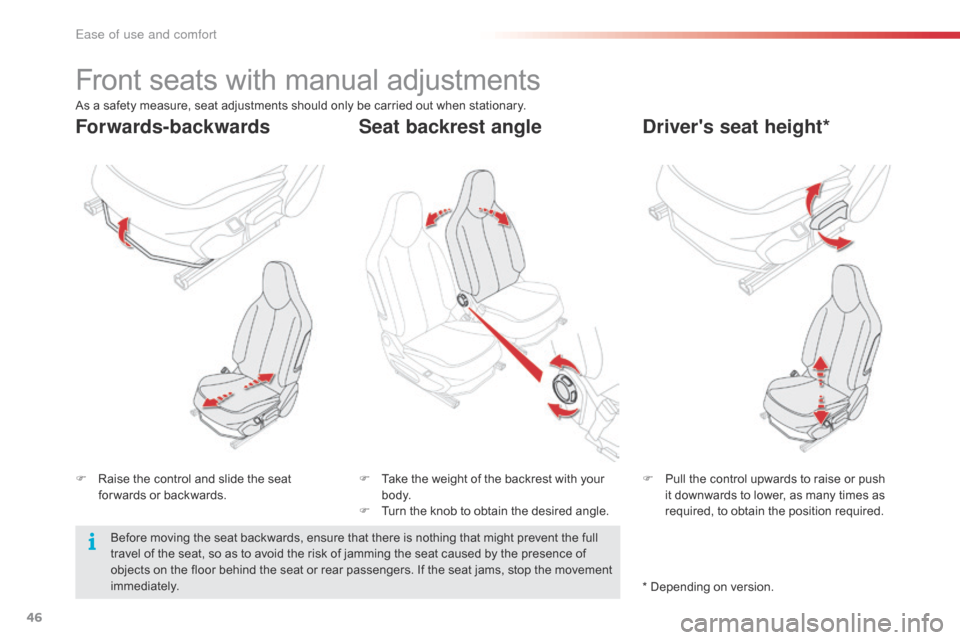
Front seats with manual adjustments
F Raise the control and slide the seat f
or wards or backwards. F
P ull the control upwards to raise or push i
t downwards to lower, as many times as
r
equired, to obtain the position required.
F
T ake the weight of the backrest with your b
o dy.
F
T
urn the knob to obtain the desired angle.
Forwards-backwardsDriver's seat height*
Seat backrest angle
As a safety measure, seat adjustments should only be carried out when stationary.
B efore moving the seat backwards, ensure that there is nothing that might prevent the full
t
ravel of the seat, so as to avoid the risk of jamming the seat caused by the presence of
o
bjects on the floor behind the seat or rear passengers. If the seat jams, stop the movement
i
mmediately. *
Depending on version.
Ease of use and comfort
Page 52 of 269

50
C1_en_Chap03_ergonomie-confort_ed01-2016
Mirrors
Manual door mirrors
F Operate the lever in four directions to a
djust the mirror.
Electric door mirrors
Adjustment
F Move control A to the right or to the left to s
elect the corresponding mirror.
F
M
ove control B in all four directions to
adj
ust.
F
R
eturn control A to the central position.
The
objects observed are, in reality,
c
loser than they appear.
Take
this into account in order to
c
orrectly judge the distance of vehicles
a
pproaching from behind.
Demisting - Defrosting
Use the heated rear window switch.
R
efer
to
the "Rear screen demist - defrost"
s
ection.
Folding / Unfolding
When parking, the mirrors can be folded m anually.
The
initial adjustments are retained
w
hen
u
nfolding.
Ease of use and comfort