adjust Citroen C1 2016 1.G Owner's Guide
[x] Cancel search | Manufacturer: CITROEN, Model Year: 2016, Model line: C1, Model: Citroen C1 2016 1.GPages: 269, PDF Size: 7.63 MB
Page 136 of 269
134
C1_en_Chap06_securite_ed01-2016
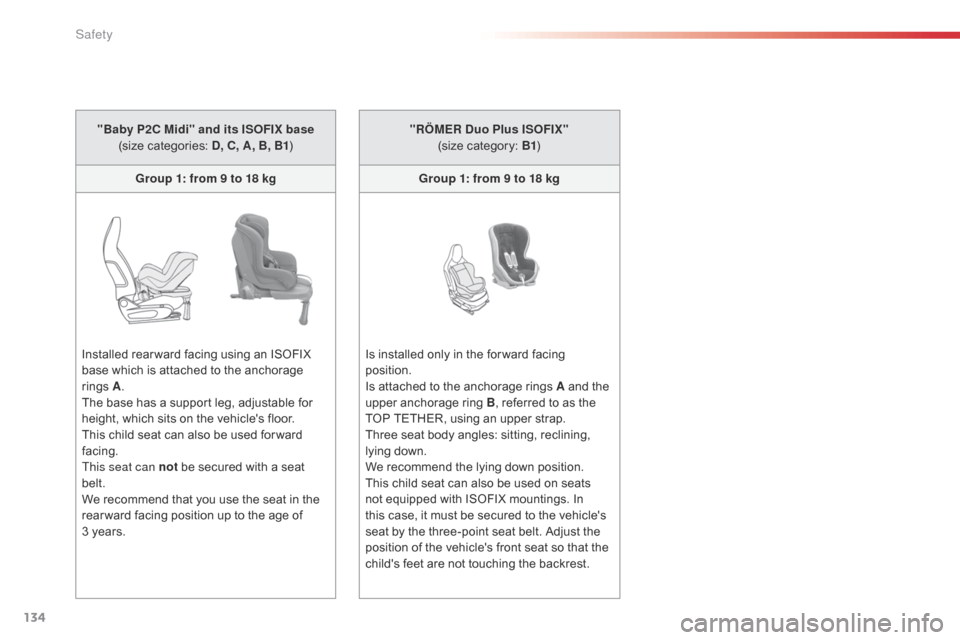
"Baby P2C Midi" and its ISOFIX base (size categories: D , C, A, B, B1)
Group 1: from 9 to 18 kg
Installed
rear ward facing using an ISOFIX
b
ase which is attached to the anchorage
r
ings
A .
T
he base has a support leg, adjustable for
h
eight, which sits on the vehicle's floor.
This
child seat can also be used for ward
f
acing.
This seat can not
be secured with a seat
bel
t.
We
recommend that you use the seat in the
r
ear ward facing position up to the age of
3 ye
ars. "RÖMER Duo Plus ISOFIX"
(size category: B1)
Group 1: from 9 to 18 kg
Is
installed only in the for ward facing
p
osition.
Is
attached to the anchorage rings A and the
u
pper anchorage ring B,
referred to as the
T
OP TETHER, using an upper strap.
Three
seat body angles: sitting, reclining,
l
ying down.
We
recommend the lying down position.
This
child seat can also be used on seats
n
ot equipped with ISOFIX mountings. In
t
his case, it must be secured to the vehicle's
s
eat by the three-point seat belt. Adjust the
p
osition of the vehicle's front seat so that the
c
hild's feet are not touching the backrest.
Safety
Page 137 of 269
135
C1_en_Chap06_securite_ed01-2016
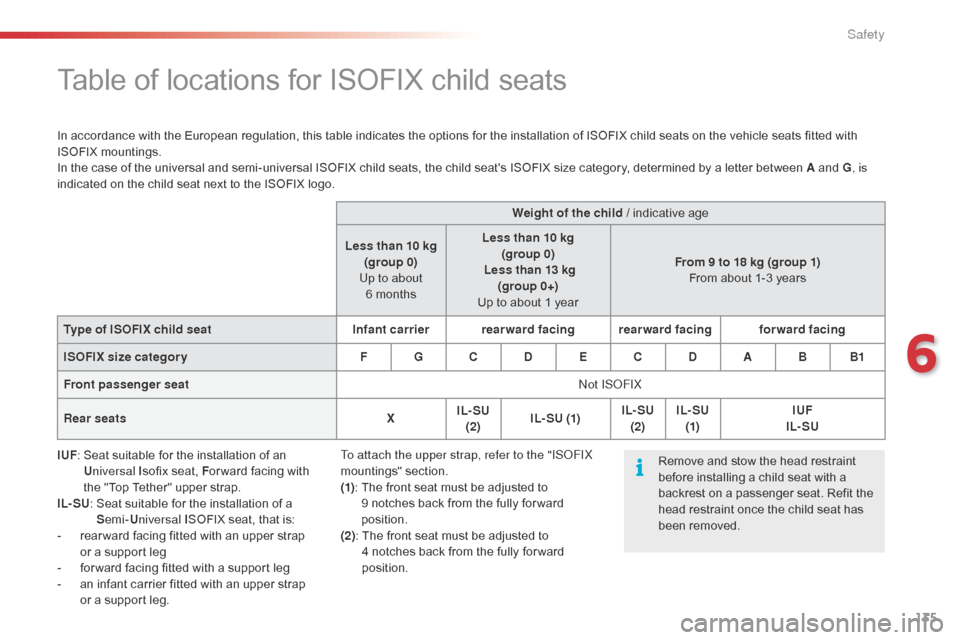
Table of locations for ISOFIX child seats
In accordance with the European regulation, this table indicates the options for the installation of ISOFIX child seats on the vehicle seats fitted with ISOFIX m ountings.
In
the case of the universal and semi-universal ISOFIX child seats, the child seat's ISOFIX size category, determined by a letter between A and G, is
indicated
on the child seat next to the ISOFIX logo.
IUF :
S
eat suitable for the installation of an
Un
iversal I sofix
seat, For ward
facing with
t
he "Top Tether" upper strap.
IL- SU :
S
eat suitable for the installation of a
Se
mi-Universal I SOFIX
seat, that is:
-
r
ear ward facing fitted with an upper strap
o
r a support leg
-
f
or ward facing fitted with a support leg
-
a
n infant carrier fitted with an upper strap
o
r a support leg. Weight of the child
/ indicative age
Less than 10 kg (group 0)
Up to about 6 months Less than 10 kg
(group 0)
Less than 13 kg (group 0+)
Up
to about 1 yearFrom 9 to 18 kg (group 1)
From
about 1-3 years
Type of ISOFIX child seat Infant carrierrearward facing rearward facing forward facing
ISOFIX size categor y F G C D E C D A B B1
Front passenger seat Not ISOFIX
Rear seats XIL- SU
(2) I L- SU (1) IL- SU
(2) IL- SU
(1) IUF
IL- SU
Remove
and stow the head restraint
b
efore installing a child seat with a
b
ackrest on a passenger seat. Refit the
h
ead restraint once the child seat has
b
een removed.
To attach the upper strap, refer to the "ISOFIX
mountings"
se
ction.
(1) :
T
he front seat must be adjusted to
9
notches back from the fully for ward
p
osition.
(2):
T
he front seat must be adjusted to
4 n
otches back from the fully for ward
p
osition.
6
Safety
Page 153 of 269
151
C1_en_Chap07_info-pratiques_ed01-2016
Checks
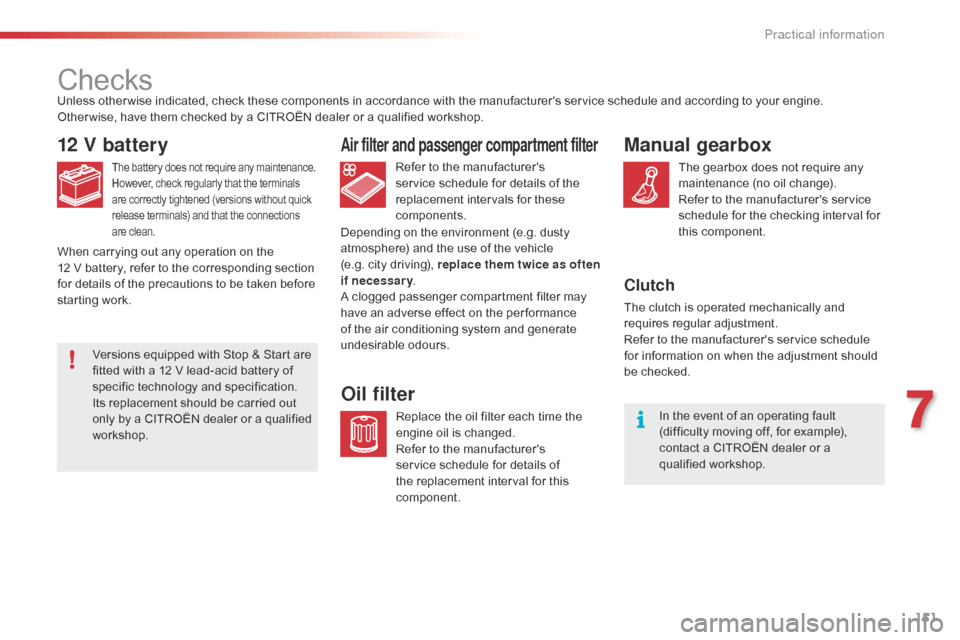
12 V battery
The battery does not require any maintenance.
H owever, check regularly that the terminals a
re correctly tightened (versions without quick
r
elease terminals) and that the connections
a
re clean.Refer to the manufacturer's service schedule for details of the
r
eplacement intervals for these
c
omponents.
Air filter and passenger compartment filter
Replace the oil filter each time the e ngine oil is changed.
Refer
to the manufacturer's
s
ervice schedule for details of
t
he replacement interval for this
c
omponent.
Oil filter
Unless other wise indicated, check these components in accordance with the manufacturer's service schedule and according to your engine.
O ther wise, have them checked by a CITROËN dealer or a qualified workshop.
Depending
on the environment (e.g. dusty
a
tmosphere) and the use of the vehicle
(e.g.
city driving), replace them twice as often
if necessary .
A
clogged passenger compartment filter may
h
ave an adverse effect on the per formance
o
f the air conditioning system and generate
u
ndesirable
o
dours.
When
carrying out any operation on the
12
V battery, refer to the corresponding section
f
or details of the precautions to be taken before
s
tarting work.
Manual gearbox
The gearbox does not require any maintenance (no oil change).
Refer
to the manufacturer's service
s
chedule for the checking interval for
t
his
c
omponent.
Clutch
The clutch is operated mechanically and requires r egular a djustment.
Refer
to the manufacturer's service schedule
f
or information on when the adjustment should
be c
hecked.In
the event of an operating fault
(
difficulty moving off, for example),
c
ontact a CITROËN dealer or a
q
ualified
w
orkshop.
Versions
equipped
with
Stop
&
Start
are
f
itted
with
a
12
V
lead-acid
battery
of
s
pecific
t
echnology
a
nd
s
pecification.
Its
replacement
should
be
carried
out
o
nly
by
a
CITROËN
dealer
or
a
qualified
w
orkshop.
7
Practical information
Page 158 of 269
156
C1_en_Chap08_en-cas-pannes_ed01-2016
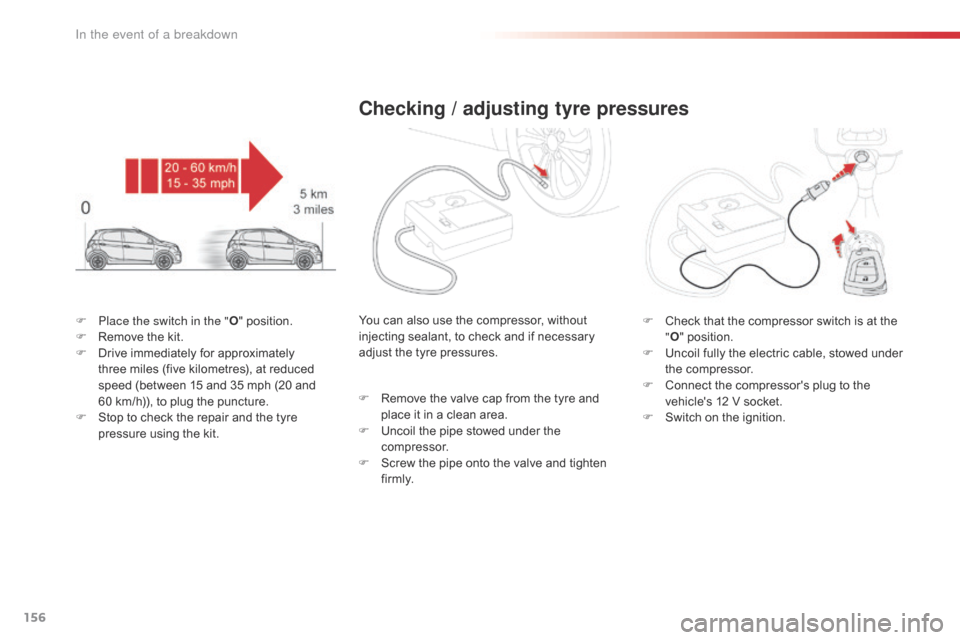
F Place the switch in the "O" position.
F R emove the kit.
F
D
rive immediately for approximately
t
hree miles (five kilometres), at reduced
s
peed (between 15 and 35 mph (20 and
6
0 km/h)), to plug the puncture.
F
S
top to check the repair and the tyre
p
ressure using the kit.
Checking / adjusting tyre pressures
F Check that the compressor switch is at the "O "
position.
F
U
ncoil fully the electric cable, stowed under
t
he compressor.
F
C
onnect the compressor's plug to the
v
ehicle's 12 V socket.
F
S
witch on the ignition.
You
can
also
use
the
compressor,
without
i
njecting
sealant,
to
check
and
if
necessary
a
djust
the
tyre
pressures.
F
R
emove
the
valve
cap
from
the
tyre
and
p
lace
it
in
a
clean
area.
F
U
ncoil
the
pipe
stowed
under
the
c
ompressor.
F
S
crew
the
pipe
onto
the
valve
and
tighten
f
i r m l y.
In the event of a breakdown
Page 159 of 269
157
C1_en_Chap08_en-cas-pannes_ed01-2016
Should the pressure of one or more tyres be adjusted, it is necessary to
r
einitialise the under-inflation detection
s
ystem.
For
more information on under-inflation
d
etection, refer to the corresponding
s
ection.
Tyre under-inflation
detection
After repair of the tyre, the warning lamp will remain on until the system is
r
einitialised.
For
more information on under-inflation
d
etection, refer to the corresponding
s
ection.
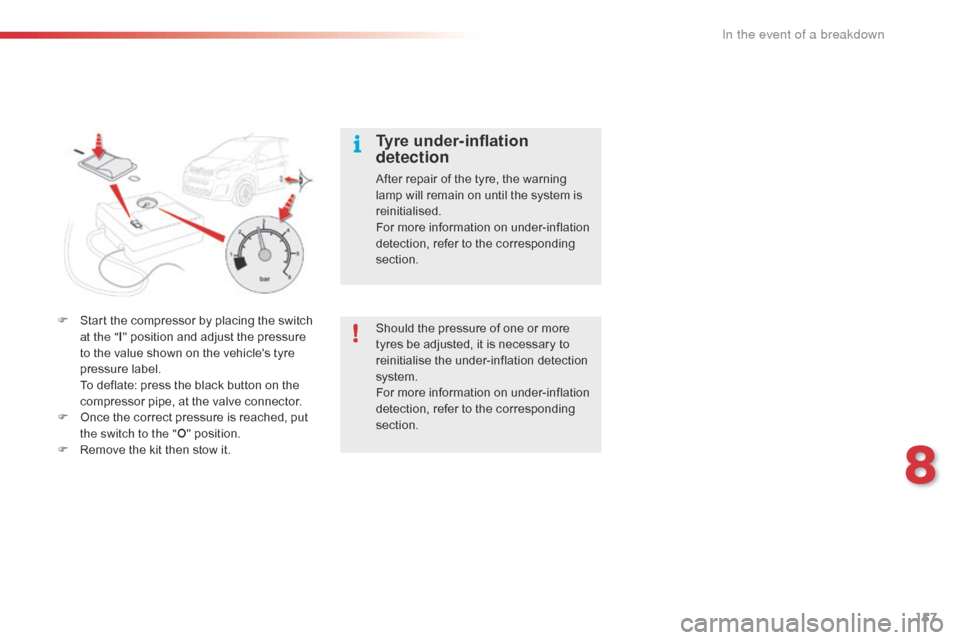
F
S
tart
the
compressor
by
placing
the
switch
a
t the " I"
position
and
adjust
the
pressure
t
o
the
value
shown
on
the
vehicle's
tyre
p
ressure
label.
T
o
deflate:
press
the
black
button
on
the
c
ompressor
pipe,
at
the
valve
connector.
F
O
nce
the
correct
pressure
is
reached,
put
t
he switch to the " O"
position.
F
R
emove
the
kit
then
stow
it.
8
In the event of a breakdown
Page 175 of 269
173
C1_en_Chap08_en-cas-pannes_ed01-2016
Fuse
N° Rating
(A) Functions
1 10Right
hand dipped beam
2 10Left
hand dipped beam - Headlamp adjustment
3 7. 5Right
hand main beam
4 7. 5Left
hand main beam
5 * 15Fuel
injection system
6 * 7. 5Fuel
injection system
7 * 15Fuel
injection system
8 * 7. 5Cooling
fan
9 7. 5Air
c
onditioning
10 ** 7. 5Fuel
injection system - Brake lamps - Third brake lamp
11 5Courtesy
lamp - Boot lamp
12 10
Direction indicators - Hazard warning lamps - Instrument panel - Display screen
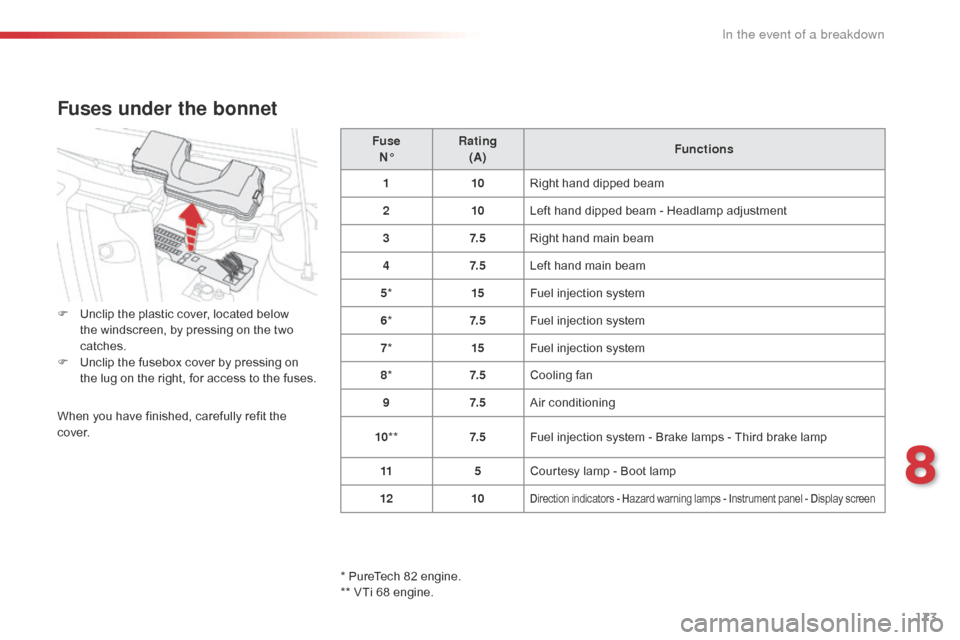
Fuses under the bonnet
F Unclip the plastic cover, located below t
he windscreen, by pressing on the two
c
atches.
F
U
nclip the fusebox cover by pressing on
t
he lug on the right, for access to the fuses.
When
you have finished, carefully refit the
c
ove r.
*
PureTech 82 engine.
**
VTi 68 engine.
8
In the event of a breakdown
Page 191 of 269
189
C1_en_Chap10a_ Autoradio-Toyota-tactile-1_ed01-2016
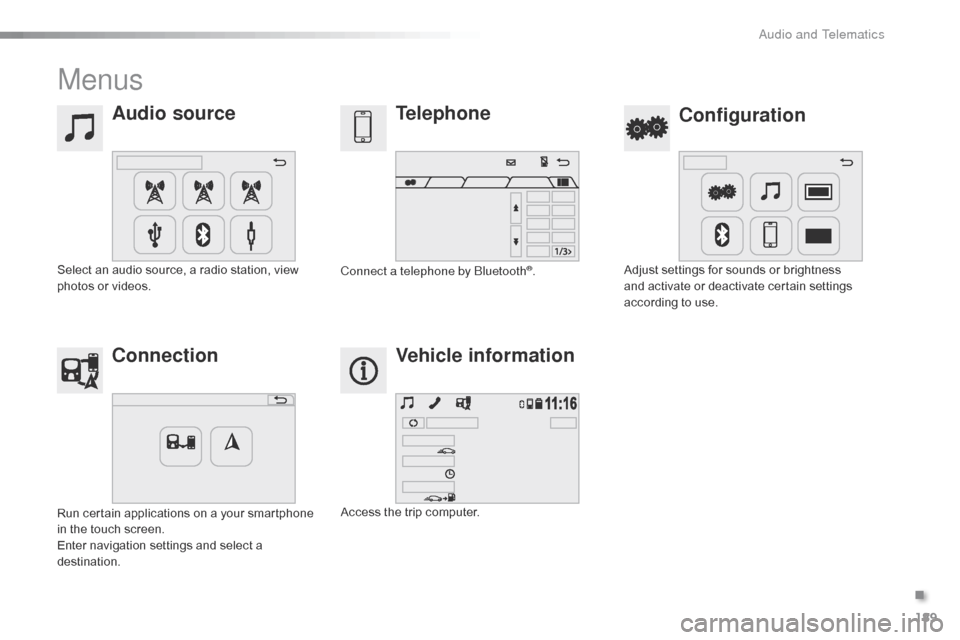
Menus
Audio sourceConfiguration
Telephone
Connection Vehicle information
Select an audio source, a radio station, view p
hotos or videos. Adjust
settings for sounds or brightness a
nd activate or deactivate certain settings
a
ccording to use.
Connect a telephone by Bluetooth®.
Run
certain
applications
on
a
your
smartphone
i
n
the
touch
screen.
Enter
navigation
settings
and
select
a
d
estination. Access
the
trip
computer.
.
Audio and Telematics
Page 211 of 269
209
C1_en_Chap10a_ Autoradio-Toyota-tactile-1_ed01-2016
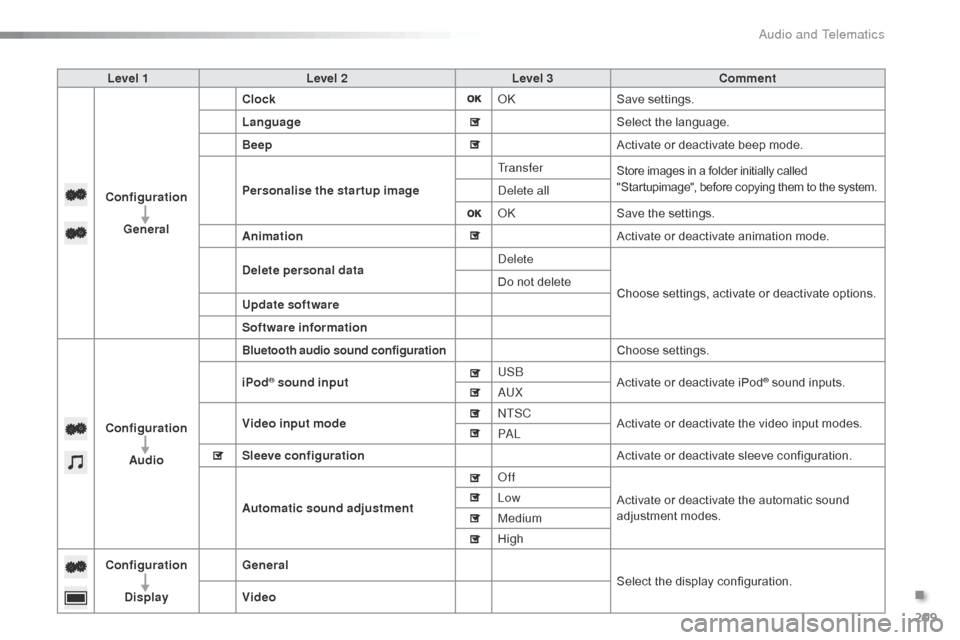
Level 1Level 2 Level 3 Comment
Configuration General Clock
OKSave
se
ttings.
Language Select
the language.
Beep Activate
or deactivate beep mode.
Personalise the star tup image Tr a n s f e r
Store images in a folder initially called "
Startupimage", before copying them to the system.
Delete all
OKSave
the settings.
Animation Activate
or deactivate animation mode.
Delete personal data Delete
Choose
settings, activate or deactivate options.
Do
not delete
Update software
Software information
Configuration Audio
Bluetooth audio sound configurationChoose settings.
iPod
® sound input USB
Activate or deactivate iPod® sound inputs.
AU
X
Video input mode NTSC
Activate
or
deactivate
the
video input modes.
PA L
Sleeve configuration Activate
or
deactivate
sleeve configuration.
Automatic sound adjustment Off
Activate
or
deactivate
the
automatic sound
a
djustment
modes.
Low
Medium
High
Configuration
Display General
Select
the
display
configuration.
Video
.
Audio and Telematics
Page 236 of 269

234
C1_en_Chap10a_ Autoradio-Toyota-tactile-1_ed01-2016
Settings, configuration
QUESTIONANSWER SOLUTION
There
is a difference in
s
ound
quality between the
d
ifferent audio sources
(
radio,
U
SB...). For
optimum sound quality, the audio settings (Volume, Treble,
M
edium, Bass) can be adapted to the different sound sources,
w
hich may result in audible differences when changing source
(
radio,
U
SB...). Check
that the audio settings are adapted to
t
he sources listened to. It is advisable to select
a
utomatic sound adjustment (Low, Medium,
Hig
h).
Check
the quality and format of your recording.
With
the engine off, the
s
ystem
switches off after a
f
ew
minutes of use. When
the engine is switched off, the system's operating time
d
epends on the battery charge.
The
switch-off is normal: the system changes to economy mode
a
nd switches off to preserve the state of charge of the vehicle's
b
attery. Start
the vehicle's engine to increase the battery
c
harge.
Audio and Telematics
Page 238 of 269
236
C1_en_Chap10b_ Autoradio-Toyota-2_ed01-2016
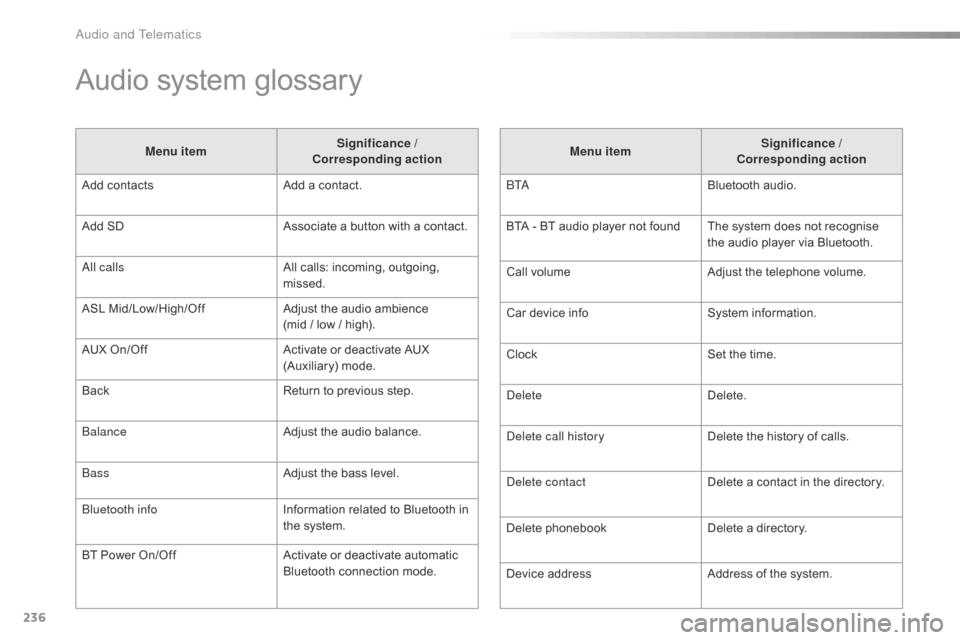
Audio system glossary
Menu itemSignificance /
Corresponding action
Add
contacts Add
a contact.
Add
SD Associate
a button with a contact.
All calls All
calls: incoming, outgoing,
m
issed.
ASL
M
id/Low/High/Off Adjust
the audio ambience
(mid
/ low / high).
AUX
On/Off Activate
or deactivate AUX
(
Auxiliary)
m
ode.
Back Return
to previous step.
Balance Adjust
the audio balance.
Bass Adjust
the bass level.
Bluetooth info Information
related to Bluetooth in
t
he system.
BT
Power
On/Off Activate
or deactivate automatic
B
luetooth connection mode.Menu item
Significance /
Corresponding action
B TA Bluetooth
audio.
BTA
- BT audio player not found The system does not recognise
t
he audio player via Bluetooth.
Call
volumeAdjust
the telephone volume.
Car
device infoSystem
i
nformation.
Clock Set
the time.
Delete Delete.
Delete call history Delete
the history of calls.
Delete contact Delete
a contact in the directory.
Delete
pho
nebookDelete
a directory.
Device
addressAddress
of the system.
Audio and Telematics