adjust Citroen C1 2016 1.G User Guide
[x] Cancel search | Manufacturer: CITROEN, Model Year: 2016, Model line: C1, Model: Citroen C1 2016 1.GPages: 269, PDF Size: 7.63 MB
Page 53 of 269
51
C1_en_Chap03_ergonomie-confort_ed01-2016
Steering wheel adjustment
(with power steering)
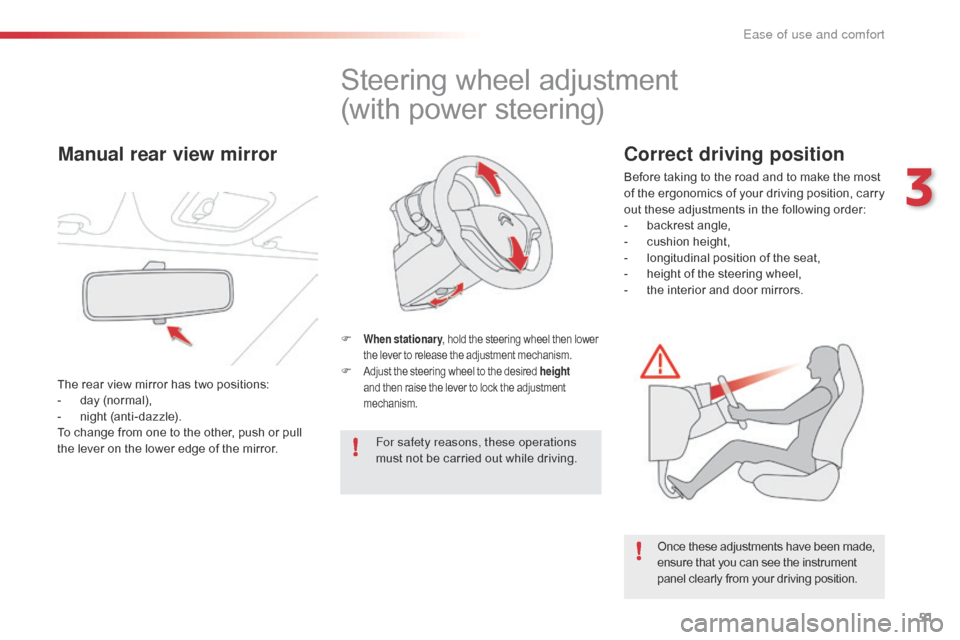
F When stationary , hold the steering wheel then lower t
he lever to release the adjustment mechanism.
F Adjust the steering wheel to the desired height
and then raise the lever to lock the adjustment m
echanism.
For safety reasons, these operations
must not be carried out while driving.
Once
these adjustments have been made,
e
nsure that you can see the instrument
p
anel clearly from your driving position.
Manual rear view mirror
The rear view mirror has two positions:
- d ay (normal),
-
n
ight (anti-dazzle).
To
change from one to the other, push or pull
t
he lever on the lower edge of the mirror.
Correct driving position
Before taking to the road and to make the most of t he e rgonomics o f y our d riving p osition, c arry
o
ut these adjustments in the following order:
-
b
ackrest angle,
-
c
ushion height,
-
l
ongitudinal position of the seat,
-
h
eight of the steering wheel,
-
t
he interior and door mirrors.
3
Ease of use and comfort
Page 56 of 269
54
C1_en_Chap03_ergonomie-confort_ed01-2016
Heating
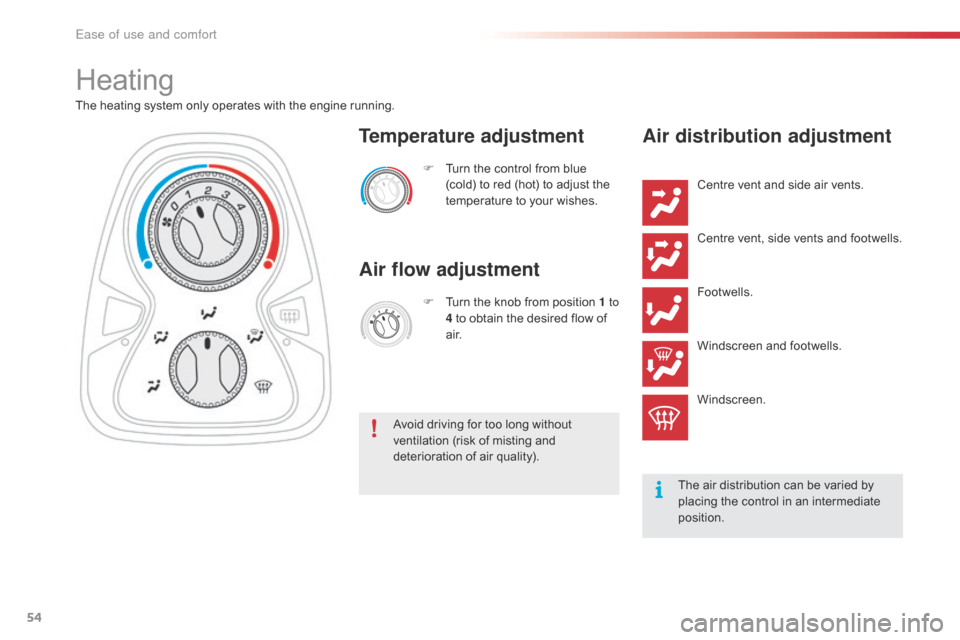
The heating system only operates with the engine running.F
T
urn the control from blue
(
cold) to red (hot) to adjust the
t
emperature to your wishes.
Temperature adjustment
Air flow adjustment
F Turn the knob from position 1 to
4 to obtain the desired flow of
a
i r.
Avoid
driving for too long without
v
entilation (risk of misting and
d
eterioration of air quality).
Air distribution adjustment
Centre vent and side air vents.
C entre vent, side vents and footwells.
Footwells.
Windscreen
and footwells.
Windscreen.
The
air distribution can be varied by
p
lacing the control in an intermediate
p
osition.
Ease of use and comfort
Page 57 of 269
55
C1_en_Chap03_ergonomie-confort_ed01-2016
Manual air conditioning
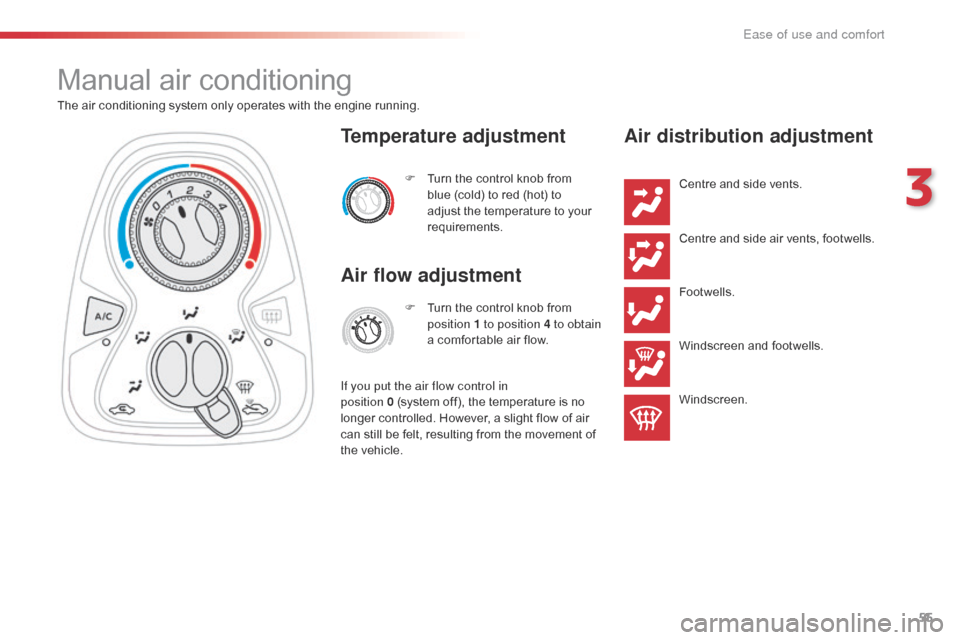
The air conditioning system only operates with the engine running.
F
T
urn the control knob from
b
lue (cold) to red (hot) to
a
djust the temperature to your
r
equirements.
Temperature adjustment
Air flow adjustment
F Turn the control knob from p
osition 1 to position 4 to obtain
a
comfortable air flow.
If you put the air flow control in
position
0 (system off), the temperature is no
l
onger
controlled. However, a slight flow of air
c
an
still
be
felt, resulting from the movement of
t
he
vehicle.
Air distribution adjustment
Centre and side vents.
C entre and side air vents, footwells.
Footwells.
Windscreen
and footwells.
Windscreen.
3
Ease of use and comfort
Page 58 of 269
56
C1_en_Chap03_ergonomie-confort_ed01-2016
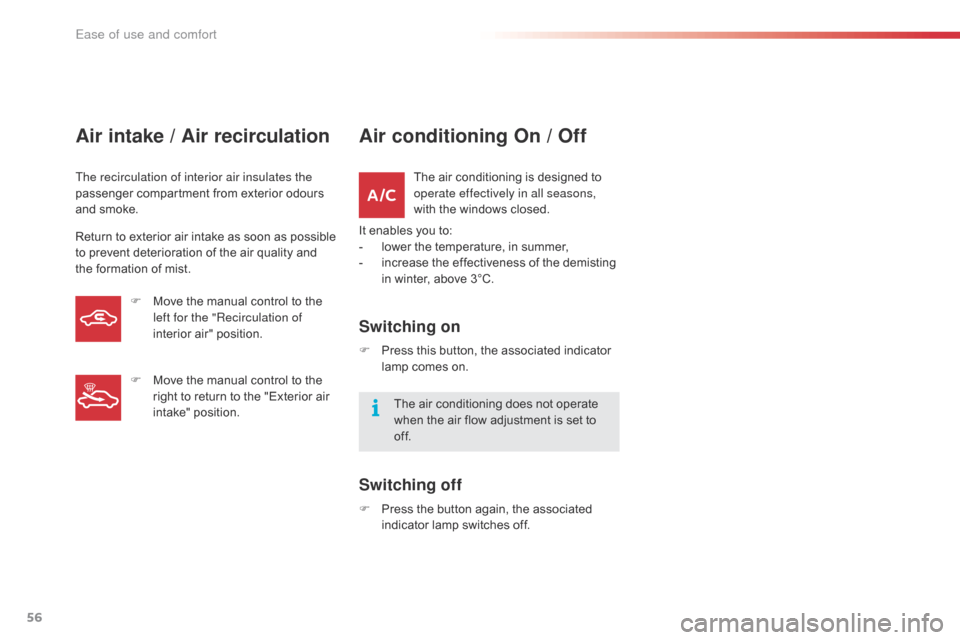
Air intake / Air recirculation
The recirculation of interior air insulates the
passenger compartment from exterior odours
a
nd smoke.
Return
to exterior air intake as soon as possible
t
o prevent deterioration of the air quality and
t
he formation of mist.
Air conditioning On / Off
The air conditioning is designed to operate effectively in all seasons,
with
the windows closed.
It
enables
you to:
-
l
ower
the temperature, in summer,
-
i
ncrease the effectiveness of the demisting
i
n
winter, above 3°C.
Switching on
F Press this button, the associated indicator l
amp comes on.
The
air conditioning does not operate
w
hen the air flow adjustment is set to
o
f f.
Switching off
F Press the button again, the associated i
ndicator lamp switches off.
F
M
ove
the
manual
control
to
the
l
eft for the "Recirculation of
interior
air"
position.
F
M
ove
the
manual
control
to
the
r
ight
to
return
to
the
"Exterior
air
i
ntake"
position.
Ease of use and comfort
Page 59 of 269
57
C1_en_Chap03_ergonomie-confort_ed01-2016
Manual override
It is possible to adjust one or more functions manually while leaving the other functions in
a
utomatic mode.
The "AUTO"
symbol switches off.
To
return to automatic mode, press the "AUTO"
button.
Switching
to manual mode may not be suitable
(
temperature, humidity, odour, condensation)
a
nd does not provide optimum comfort.
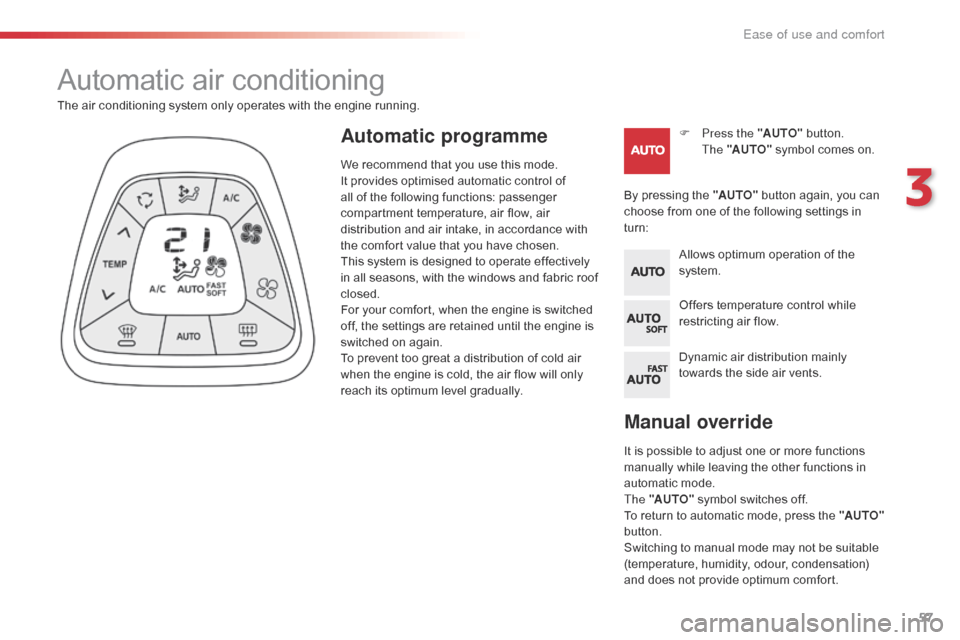
Automatic air conditioning
F Press the "AUTO" button.
The "AUTO"
symbol comes on.
The
air
conditioning
system
only
operates
with
the
engine
running.
By
pressing the "AUTO"
button again, you can
c
hoose
from one of the following settings in
t
urn:Automatic programme
Allows optimum operation of the s ystem.
Offers
temperature control while
r
estricting air flow.
Dynamic
air distribution mainly
t
owards the side air vents.
We
recommend
that
you
use
this
mode.
I
t
provides
optimised
automatic
control
of
a
ll
of
the
following
functions:
passenger
c
ompartment
temperature,
air
flow,
air
d
istribution
and
air
intake,
in
accordance
with
t
he
comfort
value
that
you
have
chosen.
This
system
is
designed
to
operate
effectively
i
n
all
seasons,
with
the
windows
and
fabric
roof
c
losed.
For
your
comfort,
when
the
engine
is
switched
o
ff,
the
settings
are
retained
until
the
engine
is
s
witched
on
again.
To
prevent
too
great
a
distribution
of
cold
air
w
hen
the
engine
is
cold,
the
air
flow
will
only
r
each
its
optimum
level
gradually.
3
Ease of use and comfort
Page 60 of 269
58
C1_en_Chap03_ergonomie-confort_ed01-2016
For maximum cooling or heating of the cabin, it is possible to go beyond the
m
inimum 14 or maximum 28 value.
F
P
ress the temperature adjustment
b
utton down or up until "LO" or
"HI"
is displayed.
A
setting around 21
gives optimum comfort.
H
owever, depending on your requirements,
a s
etting between 18 and 24 is normal.
On
entering the vehicle, if the interior is very
c
old
or hot, there is no need to change the
v
alue
displayed in order to reach the required
l
evel
of comfort. The system corrects the
t
emperature difference automatically and as
q
uickly as possible.
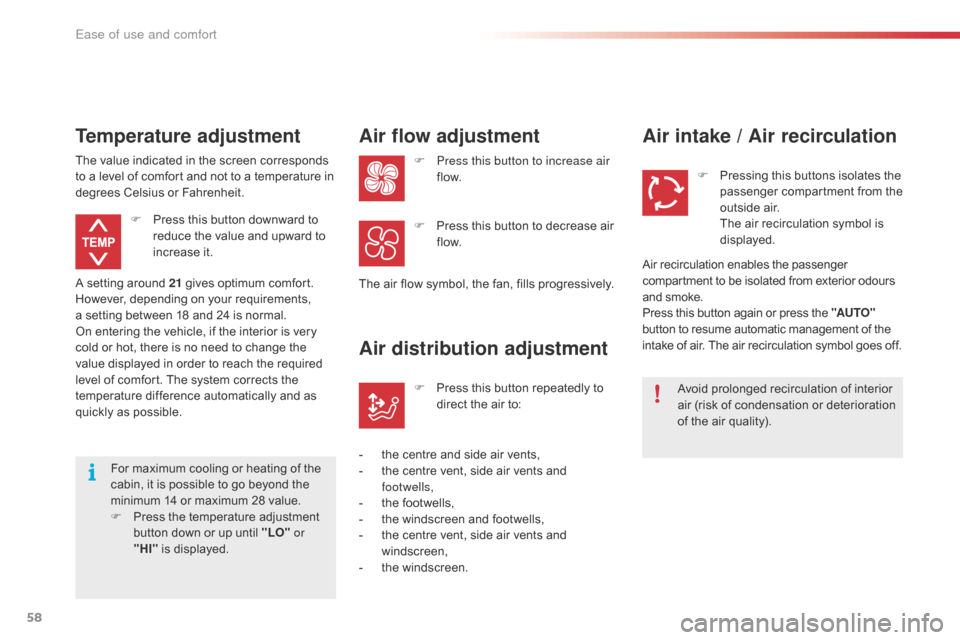
Temperature adjustment
F Press
this button downward to r
educe the value and upward to
inc
rease
it
.
The
value
indicated in the screen corresponds
t
o
a
level
of comfort and not to a temperature in
d
egrees
Celsius or Fahrenheit.
Air flow adjustment
F Press this button to increase air
f low.
The
air
flow symbol, the fan, fills progressively.
F
P
ress this button to decrease air
f
low.
Air distribution adjustment
- the centre and side air vents,
- t he centre vent, side air vents and
f
ootwells,
-
t
he footwells,
-
t
he windscreen and footwells,
-
t
he centre vent, side air vents and
w
indscreen,
-
t
he windscreen.F
P
ress this button repeatedly to
d
irect the air to:
Air intake / Air recirculation
Avoid prolonged recirculation of interior a
ir (risk of condensation or deterioration
o
f the air quality).
F
P
ressing this buttons isolates the
p
assenger compartment from the
o
utside air.
T
he air recirculation symbol is
d
isplayed.
Air
recirculation enables the passenger
c
ompartment to be isolated from exterior odours
a
nd
smoke.
Press
this button again or press the "AUTO"
button
to resume automatic management of the
i
ntake
of air. The air recirculation symbol goes off.
Ease of use and comfort
Page 61 of 269
59
C1_en_Chap03_ergonomie-confort_ed01-2016
Avoid driving for long periods with the air conditioning switched off (risk of misting a
nd reduction of the air quality in the cabin).
This action switches off all of the functions of
the air conditioning system.
Thermal
comfort is no longer controlled.
A s
light flow of air resulting from the movement
o
f the vehicle, remains perceptible however.
Pressing
the "AUTO"
button again reactivates
t
he system with the values set before it was
s
witched off.
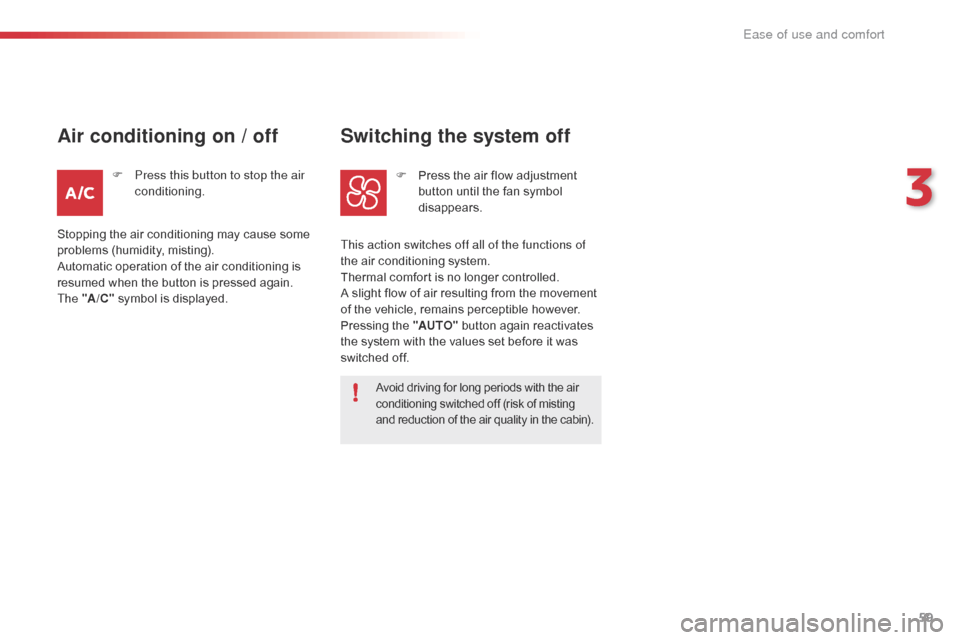
Switching the system off
F Press the air flow adjustment b
utton until the fan symbol
d
isappears.
F
P
ress this button to stop the air
conditioning.
Air conditioning on / off
Stopping the air conditioning may cause some p roblems (humidity, misting).
Automatic
operation of the air conditioning is
r
esumed when the button is pressed again.
The "A /C "
symbol is displayed.
3
Ease of use and comfort
Page 86 of 269
84
C1_en_Chap04_conduite_ed01-2016
Going into engine START
mode
This indicator lamp goes off and the engine s tarts a utomatically:
-
w
hen
you fully
depress the clutch pedal.
START
mode is invoked automatically when:
-
y
ou
open the driver's door,
-
y
ou
open the bonnet,
-
y
ou
unfasten the driver's seat belt,
-
s
ome
special conditions (battery charge,
e
ngine temperature, braking assistance,
d
escending a steep gradient, adjustment of
t
he
air conditioning...) where the engine is
n
eeded for control of a system.
Special cases: START invoked
automatically
In the event o f a f ault w ith t he s ystem, t
his warning lamp flashes in the
in
strument
pan
el.
Operating fault
Have it checked by a CITROËN dealer or a qualified w orkshop.
Special cases: STOP mode not
available
STOP mode is not invoked principally when:
- t he driver's door is open,
-
t
he driver's seat belt is not fastened,
-
t
he engine is needed to maintain a
c
omfortable temperature in the passenger
c
ompartment,
-
d
emisting is active,
-
s
ome special conditions (battery charge,
e
ngine temperature, braking assistance,
v
ehicle stopped on a steep gradient, high
a
ltitude...) where the engine is needed to
a
ssure control of a system.
Driving
Page 89 of 269

87
C1_en_Chap04_conduite_ed01-2016
Switching on
F Press the end of the control stalk: the s
peed limiter mode is selected but is not
s
witched on.
F
S
witch the speed limiter on by pulling the
c
ontrol stalk towards you, if the speed
d
isplayed is suitable (by default, the last
s
peed
pro
grammed). Once
the function is selected, you can modify
t
he speed setting by:
-
b
y pushing the control stalk up to increase
t
he
se
tting,
-
b
y pushing the control stalk down to
d
ecrease
t
he
se
tting.
A brief push on the control stalk modifies the
s
peed setting by + or - 1 mph (km/h).
A maintained push on the control stalk modifies t
he speed setting by + or - 5 mph (km/h).
Adjusting the speed limit
setting
You do not have to switch the speed l
imiter on in order to set the speed.
Pause
F You can temporarily stop the the speed l
imiter by pulling the control stalk towards
y
ou again: the display confirms that it has
b
een stopped (Pause).
F
P
ull the control stalk towards you again to
r
estore the speed limiter.
4
Driving
Page 92 of 269

90
C1_en_Chap04_conduite_ed01-2016
F Press the end of the control stalk: the s
peed limiter is switched on.
F
A
ccelerate or decelerate to attain the
de
sired
s
peed.
F
P
ush the control stalk down and release, to
p
rogramme the speed.
T
he speed at which the vehicle is running
a
t the moment when you release the
c
ontrol stalk becomes the programmed
s
peed.
Adjusting the speed limit
setting
Once a speed is programmed, you can modify it by pushing and releasing the control stalk:
-
u
p to increase the speed setting,
-
d
own to reduce the speed setting.
A
brief push on the control stalk modifies the
s
peed setting by + or - 1 mph (km/h).
A
maintained push on the control stalk modifies
t
he speed setting by + or - 5 mph (km/h).
Switching on
This indicator lamp comes on in the instrument pan el.
Pause
F You can temporarily stop the the speed l
imiter by pulling the control stalk towards
yo
u.
F
P
ush the control stalk up to restore
o
peration of the speed limiter with the
s
ame speed setting.
Driving