eco CITROEN C1 2017 Repair Manual
[x] Cancel search | Manufacturer: CITROEN, Model Year: 2017, Model line: C1, Model: CITROEN C1 2017Pages: 269, PDF Size: 7.63 MB
Page 171 of 269
169
C1_en_Chap08_en-cas-pannes_ed01-2016
Before changing a fuse, it is necessary to:
F i mmobilise the vehicle and switch off the
ig
nition,
F
s
witch off all electrical consumers,
F
i
dentify the failed fuse using the fuse
a
llocation tables and diagrams in the
fo
llowing
pag
es,
F
i
dentify and correct the cause of the
pro
blem.
Replacing a fuse
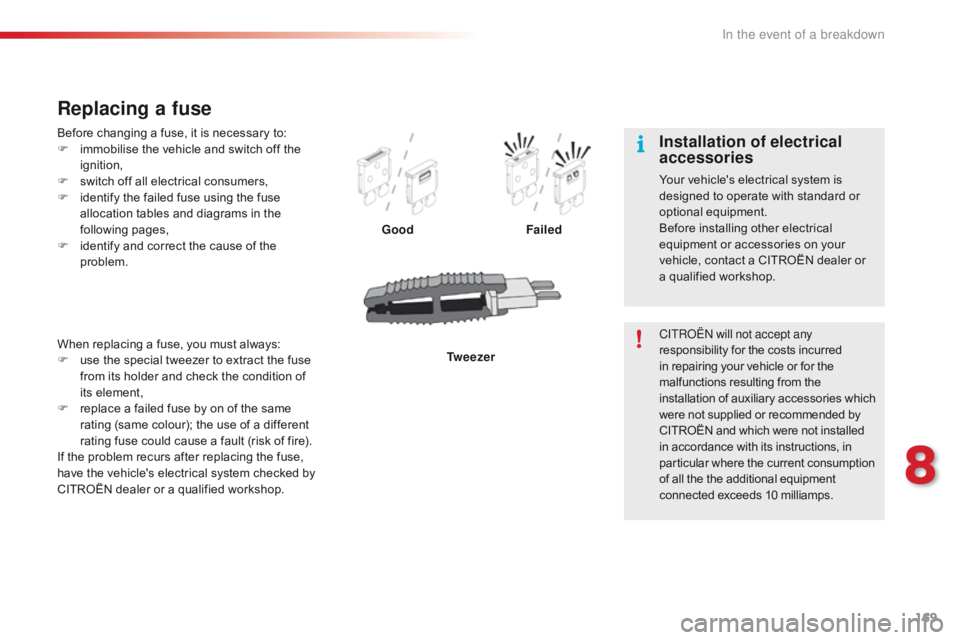
Good Failed
Tw e e z e r
When
replacing
a
fuse,
you
must
always:
F
u
se
the
special
tweezer
to
extract
the
fuse
f
rom
its
holder
and
check
the
condition
of
i
ts
element,
F
r
eplace
a
failed
fuse
by
on
of
the
same
r
ating
(same
colour);
the
use
of
a
different
r
ating
fuse
could
cause
a
fault
(risk
of
fire).
If
the
problem
recurs
after
replacing
the
fuse,
h
ave
the
vehicle's
electrical
system
checked
by
C
ITROËN
dealer
or
a
qualified
workshop. CITROËN will not accept any
responsibility
for the costs incurred
i
n repairing your vehicle or for the
m
alfunctions resulting from the
i
nstallation of auxiliary accessories which
w
ere not supplied or recommended by
C
ITROËN and which were not installed
i
n accordance with its instructions, in
p
articular where the current consumption
o
f all the the additional equipment
c
onnected exceeds 10 milliamps.
Installation of electrical
accessories
Your vehicle's electrical system is designed to operate with standard or
o
ptional
e
quipment.
Before
installing other electrical
e
quipment or accessories on your
v
ehicle, contact a CITROËN dealer or
a q
ualified workshop.
8
In the event of a breakdown
Page 181 of 269
179
C1_en_Chap08_en-cas-pannes_ed01-2016
Never try to charge a frozen battery.
I f the battery has been frozen, have
it
checked by a CITROËN dealer or a
q
ualified workshop, who will check that
t
he internal components have not been
d
amaged and the casing is not cracked,
w
hich could cause a leak of toxic and
c
orrosive acid.
Charging the battery using
a battery charger
F Disconnect the battery from the vehicle.
F F ollow the instructions for use provided by
t
he manufacturer of the charger.
F
C
onnect the battery starting with the
p
ositive terminal (+).
F
C
heck that the terminals and connectors
a
re clean. If they are covered with sulphate
(
whitish or greenish deposit), remove them
a
nd clean them.
Some
functions, including Stop & Start,
a
re not available if the battery is not
sufficiently
c
harged.Before disconnecting the battery
Wait 2 minutes after switching off the ignition before disconnecting the battery.
Close
the windows, the fabric roof and the
d
oors before disconnecting the battery.
Following reconnection of the
battery
Following reconnection of the battery, switch on the ignition and wait 1 minute before starting to
p
ermit initialisation of the electronic systems.
H
owever, if problems remain following this
o
peration, contact a CITROËN dealer or a
q
ualified
w
orkshop.
8
In the event of a breakdown
Page 182 of 269
180
C1_en_Chap08_en-cas-pannes_ed01-2016
Towing the vehicle
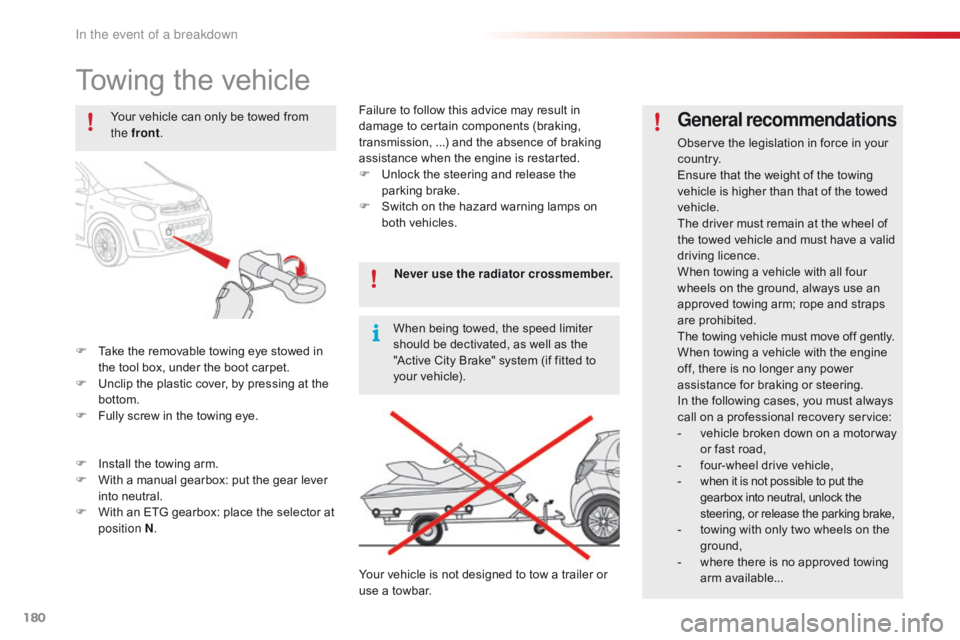
F Take the removable towing eye stowed in t
he tool box, under the boot carpet.
F
U
nclip the plastic cover, by pressing at the
b
ottom.
F
F
ully screw in the towing eye.
General recommendations
Observe the legislation in force in your co unt r y.
Ensure
that the weight of the towing
v
ehicle is higher than that of the towed
v
ehicle.
The
driver must remain at the wheel of
t
he towed vehicle and must have a valid
d
riving
l
icence.
When
towing a vehicle with all four
w
heels on the ground, always use an
a
pproved towing arm; rope and straps
ar
e
p
rohibited.
The
towing vehicle must move off gently.
When
towing a vehicle with the engine
o
ff, there is no longer any power
a
ssistance for braking or steering.
In
the following cases, you must always
c
all on a professional recovery service:
-
v
ehicle broken down on a motor way
o
r fast road,
-
f
our-wheel drive vehicle,
-
w
hen it is not possible to put the
g
earbox into neutral, unlock the
s
teering, or release the parking brake,
-
t
owing with only two wheels on the
g
round,
-
w
here there is no approved towing
ar
m
a
vailable...
Your
vehicle
can
only
be
towed
from
t
he front
.
F
I
nstall
the
towing
arm.
F
W
ith
a
manual
gearbox:
put
the
gear
lever
i
nto
neutral.
F
W
ith
an
ETG
gearbox:
place
the
selector
at
p
osition N . Never use the radiator crossmember.
When
being
towed,
the
speed
limiter
s
hould
be
dectivated,
as
well
as
the
"
Active
City
Brake"
system
(if
fitted
to
y
our
vehicle).
Your
vehicle
is
not
designed
to
tow
a
trailer
or
u
se
a
towbar.
Failure
to
follow
this
advice
may
result
in
d
amage
to
certain
components
(braking,
t
ransmission,
...)
and
the
absence
of
braking
a
ssistance
when
the
engine
is
restarted.
F
U
nlock
the
steering
and
release
the
par
king
b
rake.
F
S
witch
on
the
hazard
warning
lamps
on
b
oth
vehicles.
In the event of a breakdown
Page 187 of 269

185
C1_en_Chap10a_ Autoradio-Toyota-tactile-1_ed01-2016
7-inch touch screen tablet
Multimedia system - Bluetooth® telephone - Mirror Screen® - GPS navigation
First steps 186
Steering mounted controls
1
88
Menus
18
9
Audio
source
1
90
Radio
19
4
DAB
(Digital Audio Broadcasting) radio
1
96
Media
19
8
Telephone
2
02
Configuration
20
8
Mirror Screen
® - iPhone® connections 2 12
Mirror Screen® - MirrorLinkTM connections 2 16
Navigation
2
20
Frequently
asked
questions
2
31
As
a
safety
measure,
the
driver
must
carry
out
operations which
r
equire
prolonged
attention
while
the
vehicle
is
stationary.
To
prevent
discharging
of
the
battery,
the
system cuts off
f
ollowing
activation
of
energy
economy
mode,
20 minutes after
s
witching
off
the
engine
on
vehicles
fitted
with
the Keyless Entry
a
nd
Starting
system. Contents
The
temperature
of
a
telephone
may
increase
when
connected
b
y
MirrorLink
TM. In this case, the telephone battery discharges as a
safety
measure.
.
Audio and Telematics
Page 188 of 269

186
C1_en_Chap10a_ Autoradio-Toyota-tactile-1_ed01-2016
In the event of prolonged exposure to sunlight and very hot conditions, the
s
ystem may go into stand-by (screen
a
nd sound completely off) for at least
5 m
inutes.
Return
to normal operation takes
p
lace when the temperature in the
p
assenger
c
ompartment
d
rops.
First steps
In ACC mode or when starting the vehicle, the system comes on.
Use
the button at bottom right of the screen for
a
ccess to the main menus.
A
second press returns the system to the last
s
ource activated, then press the virtual buttons
i
n the screen.
Audio and Telematics
Page 189 of 269

187
C1_en_Chap10a_ Autoradio-Toyota-tactile-1_ed01-2016
Press to mute the sound.
A long press reinitialises the system.
Volume
(each source is independent).
Select
audio
source
(depending
on
version):
-
"
FM"
/
"AM"
/
"DAB"*
radio.
-
"
USB"
player.
-
T
elephone
connected
by
Bluetooth
and
w
ith
Bluetooth
streaming.
-
M
edia
player
connected
to
the
auxiliary
s
ocket
( jack,
cable
not
supplied).
Short-cuts:
using
virtual
buttons
in
the
top
bar
o
f
the
screen,
it
is
possible
to
go
directly
to
the
c
hoice
of
audio
source,
telephone
functions
or
"
Mirror Screen
®" mode.
*
Depending
on
equipment. To
clean the screen, use a soft non-
abrasive
cloth (spectacles cloth) without
a
ny additional product or a damp cloth.
Do
not use pointed objects on the
sc
reen.
Do
not touch the screen with wet hands.
Pressing with more than one finger is not recognised.
The
s
creen
c
an
b
e
u
sed
w
hen
w
earing
g
loves.
.
Audio and Telematics
Page 190 of 269
188
C1_en_Chap10a_ Autoradio-Toyota-tactile-1_ed01-2016
Steering mounted controls
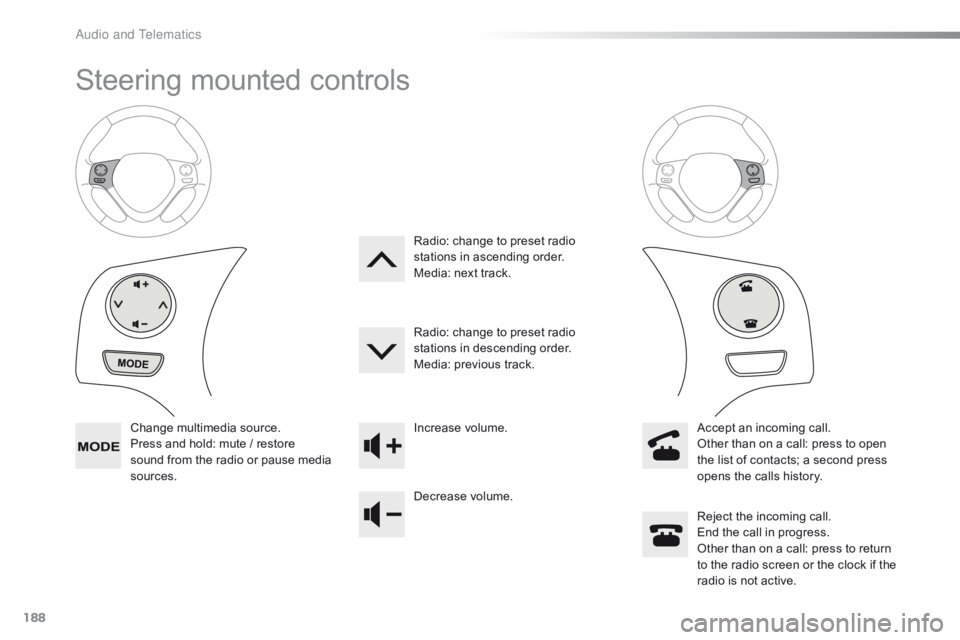
Change multimedia source.
P ress and hold: mute / restore
s
ound from the radio or pause media
s
ources. Increase
volume.
Decrease volume.Reject
the incoming call.
End
the call in progress.
Other
than on a call: press to return
t
o the radio screen or the clock if the
r
adio is not active.
Radio:
change to preset radio
s
tations in ascending order.
Media: next track.
Radio: change to preset radio
s
tations in descending order.
Media: previous track.
Accept an incoming call.
Other than on a call: press to open
t
he list of contacts; a second press
o
pens the calls history.
A
Page 191 of 269

189
C1_en_Chap10a_ Autoradio-Toyota-tactile-1_ed01-2016
Menus
Audio sourceConfiguration
Telephone
Connection Vehicle information
Select an audio source, a radio station, view p
hotos or videos. Adjust
settings for sounds or brightness a
nd activate or deactivate certain settings
a
ccording to use.
Connect a telephone by Bluetooth®.
Run
certain
applications
on
a
your
smartphone
i
n
the
touch
screen.
Enter
navigation
settings
and
select
a
d
estination. Access
the
trip
computer.
.
Audio and Telematics
Page 199 of 269
197
C1_en_Chap10a_ Autoradio-Toyota-tactile-1_ed01-2016
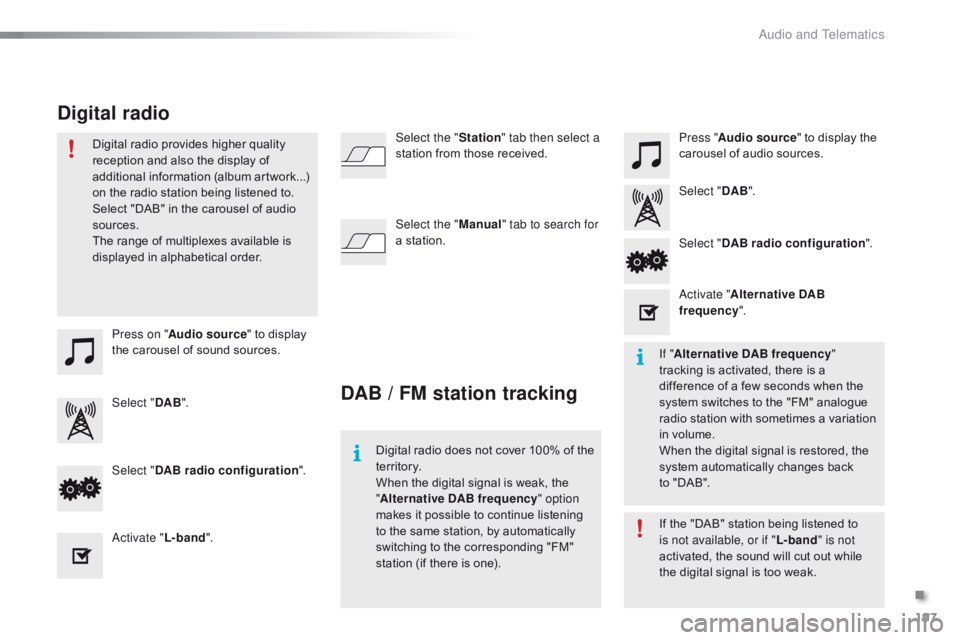
Press on "Audio source " to display t
he carousel of sound sources. Press "
Audio source " to display the
c
arousel of audio sources.
Select " DAB". Select "
DAB".
Select " DAB radio configuration ".
Activate " L-band". Select "
DAB radio configuration ".
Activate " Alternative DAB
frequency ".
Select the "
Station" tab then select a
station from those received.
Select the " Manual" tab to search for
a station.
Digital radio provides higher quality
r
eception and also the display of
a
dditional
in
formation
(
album
ar
twork...)
o
n
the radio station being listened to.
S
elect "DAB" in the carousel of audio
s
ources.
The range of multiplexes available is
d
isplayed in alphabetical order.
Digital radio does not cover 100% of the
t
e r r i to r y.
When
the digital signal is weak, the
"A
lternative DAB frequency" option
makes
it possible to continue listening
t
o the same station, by automatically
s
witching to the corresponding "FM"
s
tation (if there is one).If
the "DAB" station being listened to
i
s not available, or if "L-band" is not
activated,
the sound will cut out while
t
he digital signal is too weak.
If "
Alternative DAB frequency "
tracking
is activated, there is a
d
ifference of a few seconds when the
s
ystem switches to the "FM" analogue
r
adio station with sometimes a variation
i
n volume.
When
the digital signal is restored, the
s
ystem automatically changes back
t
o "DAB".
DAB / FM station tracking
Digital radio
.
Audio and Telematics
Page 200 of 269
198
C1_en_Chap10a_ Autoradio-Toyota-tactile-1_ed01-2016
Media
USB player
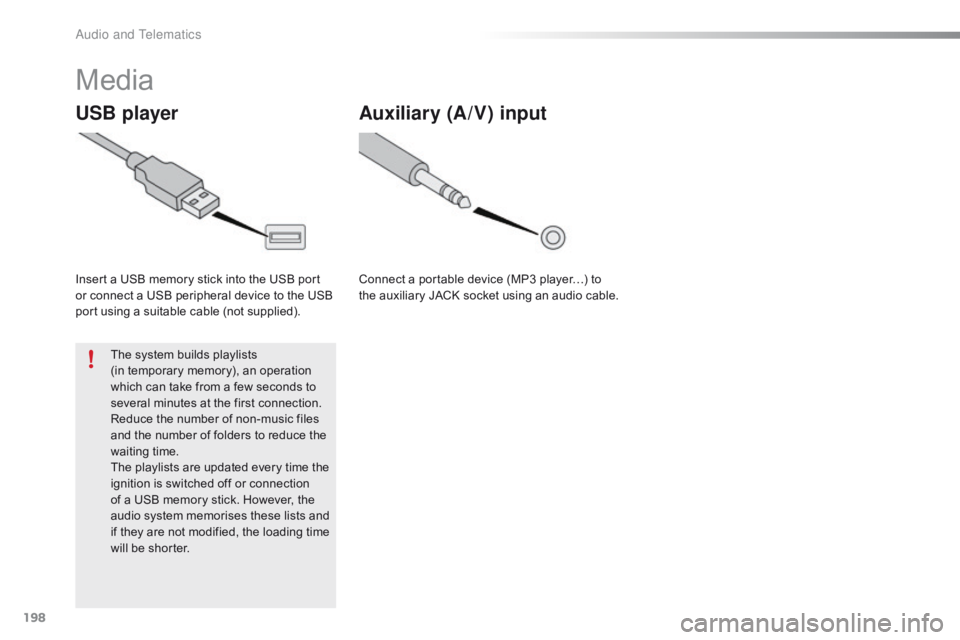
Insert a USB memory stick into the USB port or connect a USB peripheral device to the USB
p
ort using a suitable cable (not supplied).
The
system builds playlists
(in
temporary memory), an operation
w
hich can take from a few seconds to
s
everal minutes at the first connection.
Reduce
the number of non-music files
a
nd the number of folders to reduce the
w
aiting
t
ime.
The
playlists are updated every time the
i
gnition is switched off or connection
o
f a USB memory stick. However, the
a
udio system memorises these lists and
i
f they are not modified, the loading time
w
ill be shorter.
Auxiliary (A/V) input
Connect a portable device (MP3 player…) to the auxiliary JACK socket using an audio cable.
Audio and Telematics