change CITROEN C1 2021 Service Manual
[x] Cancel search | Manufacturer: CITROEN, Model Year: 2021, Model line: C1, Model: CITROEN C1 2021Pages: 269, PDF Size: 7.63 MB
Page 242 of 269

MODE
240
C1_en_Chap10b_ Autoradio-Toyota-2_ed01-2016
On/Off.
Volume (each source is
i
ndependent).
Select:
-
t
he next radio frequency up/down
au
tomatically.
-
t
he previous/next
l
ine in a list
o
r a
m
enu. AM
radio buttons 1 to 6: select a p
reset radio station.
FM
radio buttons 1 to 5: select a
p
reset radio station.
FM list:
display the radio stations
r
eceived.
Press
and hold: preset a radio
s
tation.
Back:
abandon the current operation,
g
o up one level in a menu.Display
menu and set options.
Rotate: scroll through a list or change
r
adio
s
tation.
Press: confirm the option displayed in
t
he screen.
Select AM and FM wavebands.
Select the BTA (Bluetooth Audio) and
A
UX (Auxiliary) source.
Select
previous/next media folder.
Audio system
Audio and Telematics
Page 243 of 269

241
C1_en_Chap10b_ Autoradio-Toyota-2_ed01-2016
Steering mounted controls
Select AM and FM wavebands and BTA (Bluetooth Audio) and / or
A
UX (Auxiliary) sources.
Press
and hold: Mute / restore
s
ound from the radio or pause media
s
ources. Increase
volume.
Decrease volume.Reject
the incoming call.
End
the call in progress.
Radio:
change to preset radio
s
tations in ascending order.
Media: next track.
Radio: change to preset radio
s
tations in descending order.
Media: previous track.
Accept an incoming call.
.
A
Page 246 of 269

244
C1_en_Chap10b_ Autoradio-Toyota-2_ed01-2016
Press on MENU to display the list.
Turn the knob to select "Radio " then
press
to confirm.
Turn
the knob to select "DAB AF ",
press
to activate or deactivate the
f
requency.
DAB / FM station tracking
Digital radio does not cover 100% of the country.
When
the digital signal is weak, the
a
lternative DAB frequency option,
"D
AB AF ",
makes it possible to
c
ontinue listening to the same station,
b
y automatically switching to the
c
orresponding "FM" station (if there
is
one). If "
DAB AF "
tracking is activated,
t
here is a difference of a few seconds
w
hen the system switches to the "FM"
a
nalogue radio station with sometimes
a
variation in volume.
When
the digital signal is restored, the
s
ystem automatically changes back
t
o "DAB".
If
the "DAB" station being listened to
i
s not available, or if "DAB AF" is not
activated,
the sound will cut out while
t
he digital signal is too weak.
Audio and Telematics
Page 251 of 269

249
C1_en_Chap10b_ Autoradio-Toyota-2_ed01-2016
List of Bluetooth® menus
Press on MENU, turn the knob to select "Bluetooth ", then press to display the list and m
ove through the menus using this knob.
Level 1 Level 2 Level 3Corresponding action
Bluetooth Pairing
- Connect
a portable device by
Bl
uetooth.
List Phone - Display
the list of registered
t
elephones.
List
Audio - Display
the list of audio devices
re
gistered.
Passkey Enter
new passkeyChange
or enter a password.
BT Power - Activate
or deactivate automatic
B
luetooth connection mode.
Bluetooth info Device
n
ame
Device
addressInformation
related to Bluetooth in
t
he system.
Display
S
etting- Activate
or deactivate automatic
d
isplay of connection.
Reset Reset all
Sound
S
etting
Car
device infoReset
se
ttings.
Bluetooth®
.
Audio and Telematics
Page 255 of 269

253
C1_en_Chap10b_ Autoradio-Toyota-2_ed01-2016
Radio
QUESTIONANSWER SOLUTION
The
quality of reception of
t
he
radio station listened
t
o
gradually deteriorates
o
r
the
stored stations do
n
ot
function (no sound,
87
.5 Mhz is displayed...). The
vehicle is too far from the transmitter used by the station
l
istened to or there is no transmitter in the geographical area
t
hrough which the vehicle is travelling.Activate
the "RDS" function to enable the system
t
o check whether there is a more power ful
t
ransmitter in the geographical area.
The
environment (hills, buildings, tunnels, basement car parks...)
b
lock reception, including in RDS mode.This
phenomenon is normal and does not
i
ndicate a fault with the audio system.
The
aerial is absent or has been damaged (for example when going
t
hrough a car wash or into an underground car park).Have
the aerial checked by a CITROËN dealer.
I
cannot find some radio
s
tations in the list of
stations
r
eceived. The
station is not received or its name has changed in the list.
The
name of the radio
s
tation
c
hanges. Some
radio stations send other information in place of their name
(
the title of the song for example).
The
system interprets this information as the name of the station.
.
Audio and Telematics
Page 256 of 269
254
C1_en_Chap10b_ Autoradio-Toyota-2_ed01-2016
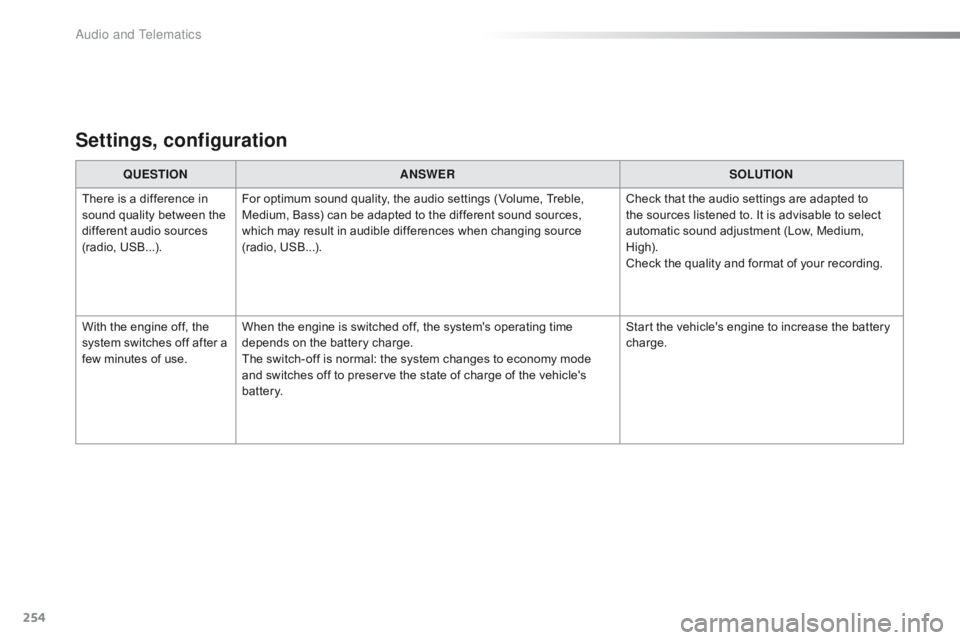
Settings, configuration
QUESTIONANSWER SOLUTION
There
is a difference in
s
ound
quality between the
d
ifferent audio sources
(
radio,
U
SB...). For
optimum sound quality, the audio settings (Volume, Treble,
M
edium, Bass) can be adapted to the different sound sources,
w
hich may result in audible differences when changing source
(
radio,
U
SB...). Check
that the audio settings are adapted to
t
he sources listened to. It is advisable to select
a
utomatic sound adjustment (Low, Medium,
Hig
h).
Check
the quality and format of your recording.
With
the engine off, the
s
ystem
switches off after a
f
ew
minutes of use. When
the engine is switched off, the system's operating time
d
epends on the battery charge.
The
switch-off is normal: the system changes to economy mode
a
nd switches off to preserve the state of charge of the vehicle's
b
attery. Start
the vehicle's engine to increase the battery
c
harge.
Audio and Telematics