display Citroen C3 2015 2.G Owners Manual
[x] Cancel search | Manufacturer: CITROEN, Model Year: 2015, Model line: C3, Model: Citroen C3 2015 2.GPages: 401, PDF Size: 13.04 MB
Page 294 of 401
292
C3_en_Chap13c_RD45_ed01-2015
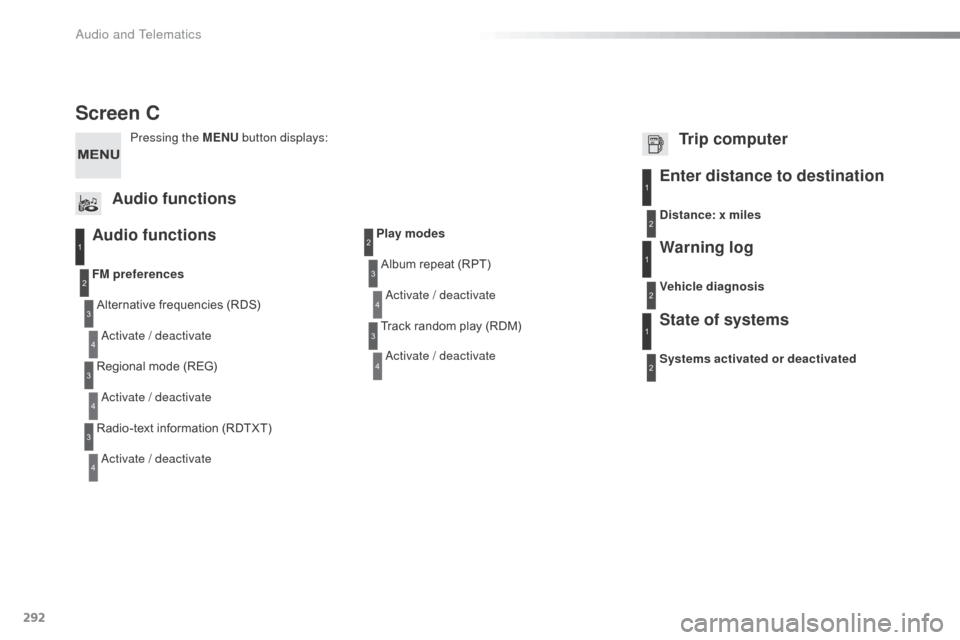
Screen C
Audio functions
Alternative frequencies (RDS)
ac
tivate / deactivate
FM
preferences
Regional mode (REG)
ac
tivate / deactivate
Radio-text information (RDTXT)
ac
tivate / deactivate
1
2
3
4
3
4
3
4
Play modesAlbum repeat (RPT)
ac
tivate / deactivate
Track random play (RDM)
ac
tivate / deactivate2
3
4
3
4
Enter distance to destination1
1
1
2
2
2
Pressing the MENU button displays:
Audio functions Trip computerDistance: x miles
Vehicle diagnosis
Warning log
Systems activated or deactivated
State of systems
Audio and Telematics
Page 295 of 401
293
C3_en_Chap13c_RD45_ed01-2015
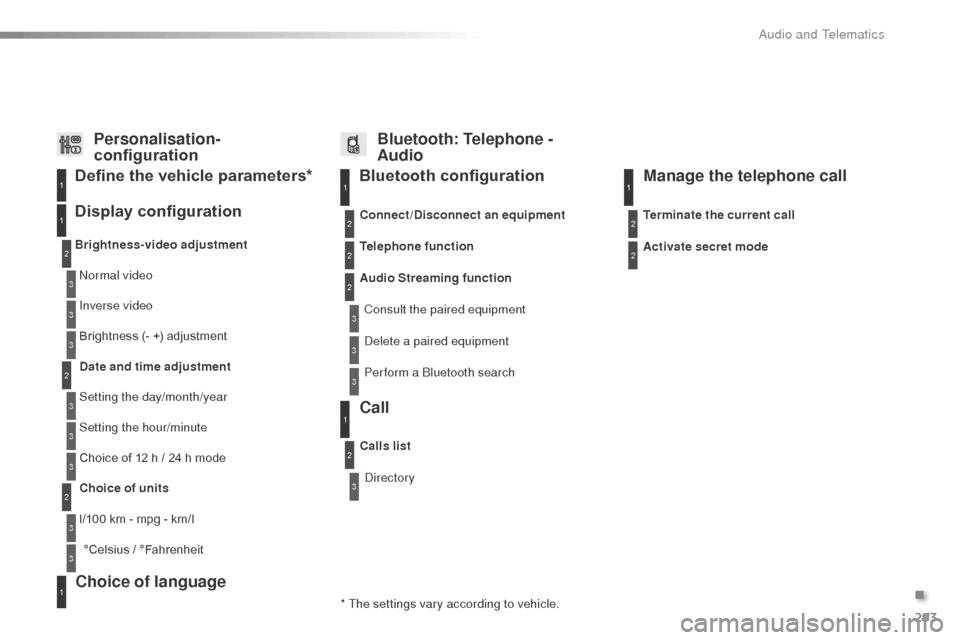
Bluetooth configuration11
1
22
22
2
3
3
3
2
3
normal video
Brightness-video adjustment
Display configuration Define the vehicle parameters*
Inverse video
Brightness (- +) adjustment
Date and time adjustment
Setting the day/month/year
Setting the hour/minute
Choice of 12 h / 24 h mode
Choice of units
l/100 km - mpg - km/l °Celsius / °Fahrenheit
1
1
3
3
2
3
2
3
3
2
3
3
3
Personalisation-
configuration Bluetooth: Telephone -
Audio
Telephone function
de
lete a paired equipment
Connect/Disconnect an equipment
Audio Streaming function
Consult the paired equipment
Per form a
b
l
uetooth search
Calls list
Call
directory Terminate the current call
Manage the telephone call
Activate secret mode
* The settings vary according to vehicle.
Choice of language1
.
audio and Telematics
Page 296 of 401

294
C3_en_Chap13c_RD45_ed01-2015
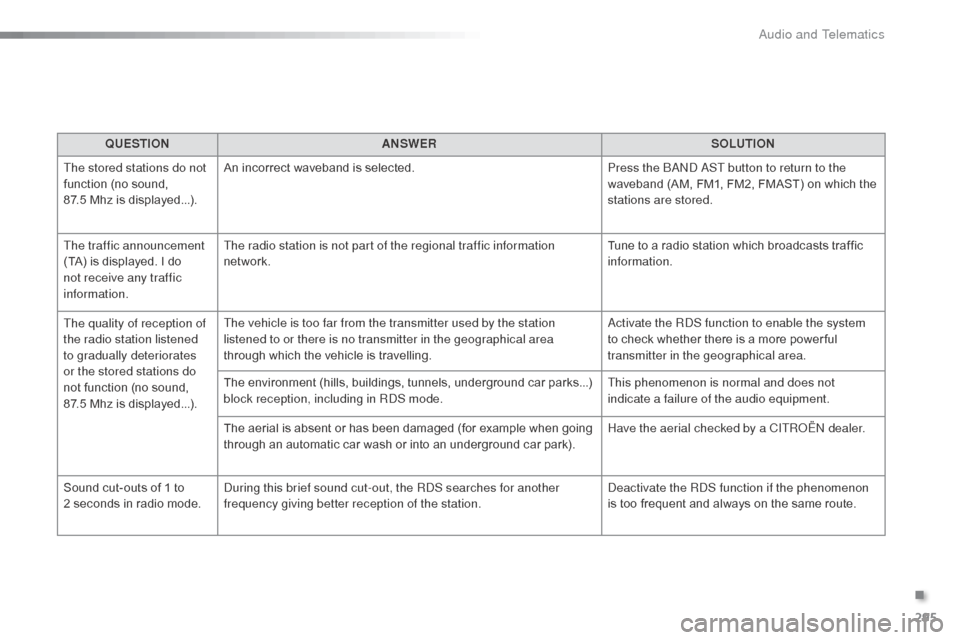
The table below gives answers to the most frequently asked questions on your audio system.QUESTION ANSWER SOLUTION
With the engine off, the
audio system switches off
after a few minutes of use. When the engine is switched off, the audio system operating time
depends on the state of charge of the battery.
The switch-off is normal: the audio equipment switches to economy
mode and switches off to prevent discharging of the vehicle's
battery. Start the vehicle's engine to increase the battery
charge.
The message "the audio
system is overheated"
appears on the display. In order to protect the installation if the surrounding temperature
is too high, the audio system switches to an automatic thermal
protection mode leading to a reduction in volume or C
d
play
stopping. Switch the audio system off for a few minutes to
allow the system to cool.
Frequently asked questions
QUESTION
ANSWER SOLUTION
There is a difference in
sound quality between the
different audio sources
(radio, CD...). For optimum sound quality, the audio settings (Volume, Bass,
Treble, Ambience, Loudness) can be adapted to the different sound
sources, which may result in audible differences when changing
source (radio, CD...). Check that the audio settings (Volume, Bass,
Treble, Ambience, Loudness) are adapted to
the sources listened to. It is advisable to set
the audio functions (Bass, Treble, Front-Rear
Balance, Left-Right Balance) to the middle
position, select the musical ambience "
no
ne"
and set the loudness correction to the "
ac
tive"
position in C
d
mode or to the "Inactive" position
in radio mode.
Radio
Audio and Telematics
Page 297 of 401
295
C3_en_Chap13c_RD45_ed01-2015
QUESTIONANSWER SOLUTION
The stored stations do not
function (no sound,
87.5 Mhz is displayed...). An incorrect waveband is selected.
Press the
band a
S
T button to return to the
waveband (AM, FM1, FM2, FMAST) on which the
stations are stored.
The traffic announcement
(TA) is displayed. I do
not receive any traffic
information. The radio station is not part of the regional traffic information
network.
Tune to a radio station which broadcasts traffic
information.
The quality of reception of
the radio station listened
to gradually deteriorates
or the stored stations do
not function (no sound,
87.5
Mhz is displayed...). The vehicle is too far from the transmitter used by the station
listened to or there is no transmitter in the geographical area
through which the vehicle is travelling.
ac
tivate the R
dS f
unction to enable the system
to check whether there is a more power ful
transmitter in the geographical area.
The environment (hills, buildings, tunnels, underground car parks...)
block reception, including in R
dS m
ode.This phenomenon is normal and does not
indicate a failure of the audio equipment.
The aerial is absent or has been damaged (for example when going
through an automatic car wash or into an underground car park). Have the aerial checked by a CITR
oËn
dealer.
Sound cut-outs of 1 to
2
seconds in radio mode.
du
ring this brief sound cut-out, the R
d
S searches for another
frequency giving better reception of the station.
de
activate the R
dS f
unction if the phenomenon
is too frequent and always on the same route.
.
Audio and Telematics
Page 298 of 401
296
C3_en_Chap13c_RD45_ed01-2015
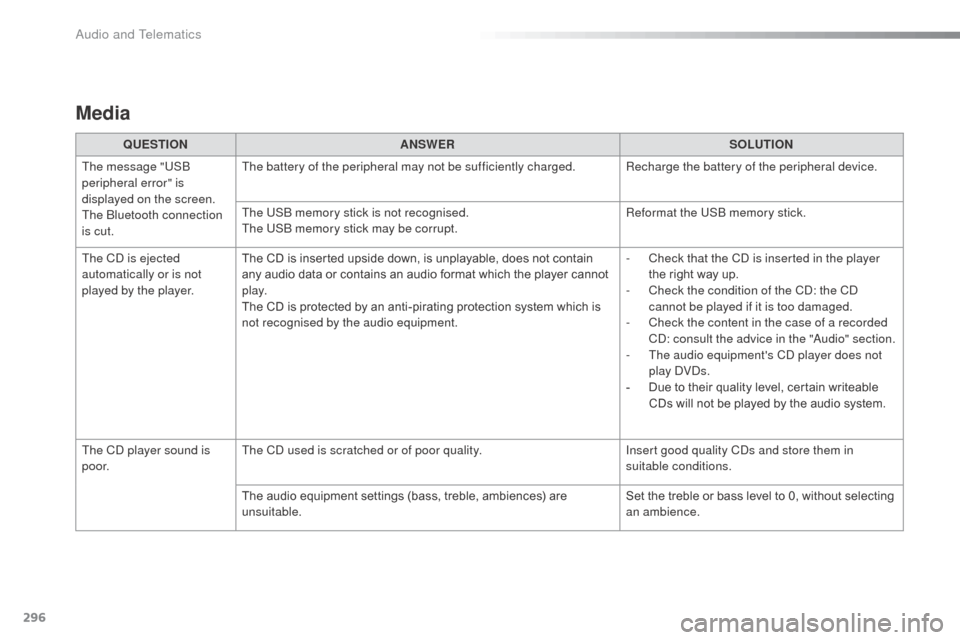
Media
QUESTIONANSWER SOLUTION
The message "US
b
peripheral error" is
displayed on the screen.
The
b
l
uetooth connection
is cut. The battery of the peripheral may not be sufficiently charged. Recharge the battery of the peripheral device.
The US
b
memory stick is not recognised.
The US
b
memory stick may be corrupt. Reformat the US
b
memory stick.
The C
d
is ejected
automatically or is not
played by the player. The CD is inserted upside down, is unplayable, does not contain
any audio data or contains an audio format which the player cannot
p l ay.
The CD is protected by an anti-pirating protection system which is
not recognised by the audio equipment. -
C
heck that the C
d
is inserted in the player
the right way up.
-
C
heck the condition of the C
d: t
he C
d
cannot be played if it is too damaged.
-
C
heck the content in the case of a recorded
C
d: c
onsult the advice in the "
au
dio" section.
-
T
he audio equipment's C
d
player does not
play
d V
ds
.
-
D
ue to their quality level, certain writeable
CDs will not be played by the audio system.
The C
d
player sound is
p o o r. The C
d
used is scratched or of poor quality. Insert good quality C
ds a
nd store them in
suitable conditions.
The audio equipment settings (bass, treble, ambiences) are
unsuitable. Set the treble or bass level to 0, without selecting
an ambience.
Audio and Telematics
Page 304 of 401
302
C3_en_Chap14_Recherche-visuel-Index-Alpha_ed01-2015
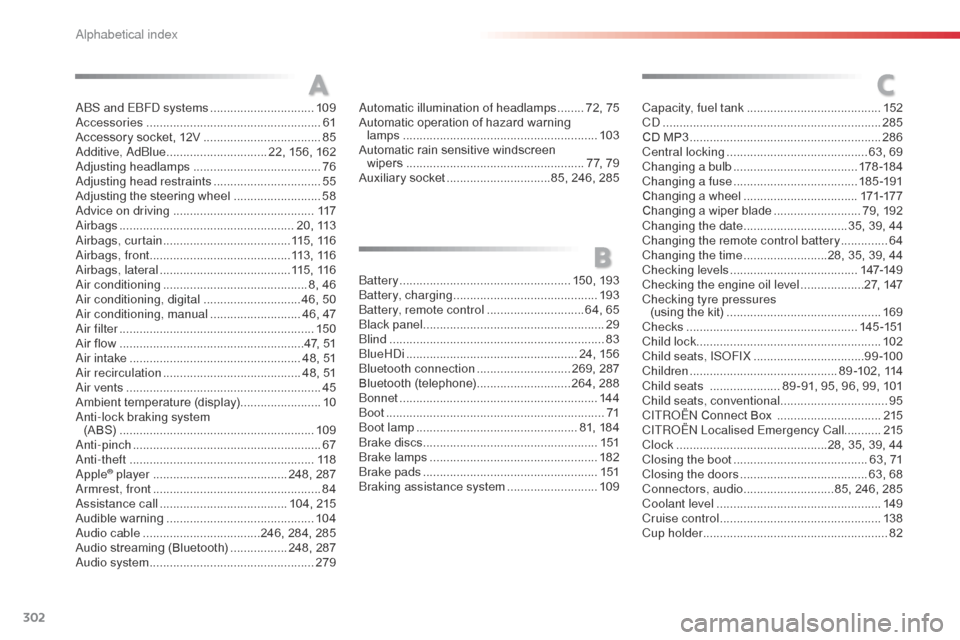
abS and EbFd systems ...............................109ac
cessories .................................................... 61
Accessory socket, 12V
...................................85
a
dditive, a d
blu
e
.............................. 22, 156, 162
ad
justing headlamps
...................................... 76
a
djusting head restraints
................................55
Adjusting the steering wheel
..........................58
ad
vice on driving
.......................................... 117
air
bags
.................................................... 20, 113
ai
rbags, curtain
...................................... 11
5 , 11 6
air
bags, front .......................................... 113 , 11 6
air
bags, lateral
....................................... 115 , 11 6
air
conditioning
........................................... 8, 46
air
conditioning, digital
.............................46, 50
air
conditioning, manual
...........................46, 47
ai
r filter .......................................................... 150
Air flow
..............................
.........................47, 51
air
intake
................................................... 48, 51
air
recirculation
......................................... 48, 51
ai
r vents
.......................................................... 45
Ambient temperature (display) ........................10
an
ti-lock braking system
(A BS)
.......................................................... 109
an
ti-pinch
........................................................ 67
ant
i-theft
....................................................... 118
apple® player ........................................2 48, 287ar
mrest, front .................................................. 84
as
sistance call
...................................... 104, 215
Audible warning
............................................ 104
au
dio cable
................................... 246, 284, 285
Audio streaming (Bluetooth)
.................2
48, 287
au
dio system ................................................. 279
A
B
C
battery ................................................... 150, 193ba
ttery, charging ........................................... 193
bat
tery, remote control
............................. 6
4, 65
bla
ck panel ...................................................... 29
bli
nd
................................................................ 83
b
lueH
di
................................................... 24, 156
bl
uetooth connection
............................269, 287
Bluetooth (telephone)
............................264, 288
bo
nnet
........................................................... 14 4
b
oot
................................................................. 71
bo
ot lamp
................................................ 81, 184
br
ake discs
.................................................... 1
51
br
ake lamps
.................................................. 182
br
ake pads
.................................................... 151
br
aking assistance system
...........................10
9
au
tomatic illumination of headlamps
........
72, 75
Automatic operation of hazard warning lamps
..............................
............................
103
Automatic rain sensitive windscreen wipers
...............
......................................
77, 79
Auxiliary socket ...............................
85, 246, 285Capacity, fuel tank
..............................
..........
152
C d
.................................................................
285
CD MP3 .........................................................
286
Central locking
..........................................
63, 69
Changing a bulb
.....................................
178 -18 4
Changing a fuse
.....................................
18 5 -191
Changing a wheel ..................................
171-17 7
Changing a wiper blade ..........................
79, 192
Changing the date
...............................
35, 39, 44
Changing the remote control battery
..............
64
Changing the time
.........................
28, 35, 39, 44
Checking levels ...................................... 14 7-149
Checking the engine oil level ...................27, 147
Checking tyre pressures (using the kit)
..............................
................169
Checks
...............
....................................14 5 -151
Child lock
...............................
........................102
Child seats, IS
oF
IX
.................................9
9 -10 0
Children
...............................
.............89 -102, 114
Child seats
.....................8
9 -91, 95, 96, 99, 101
Child seats, conventional
................................95
C
ITR
oËn C
onnect Box ...............................215
C
ITR
oËn L
ocalised Emergency Call...........215
Clock
.............................................28, 35, 39, 44
Closing the boot
........................................63, 71
Closing the doors
......................................63, 68
Connectors, audio
........................... 8
5, 246, 285
Coolant level
.................................................149
Cruise control
................................................ 13
8
Cup holder
...............................
........................82
alphabetical index
Page 318 of 401
.
Audio and Telematics 3
Additif-2_en_web_AC-AP_SMEGplus_Services_connectes_ed01-2015
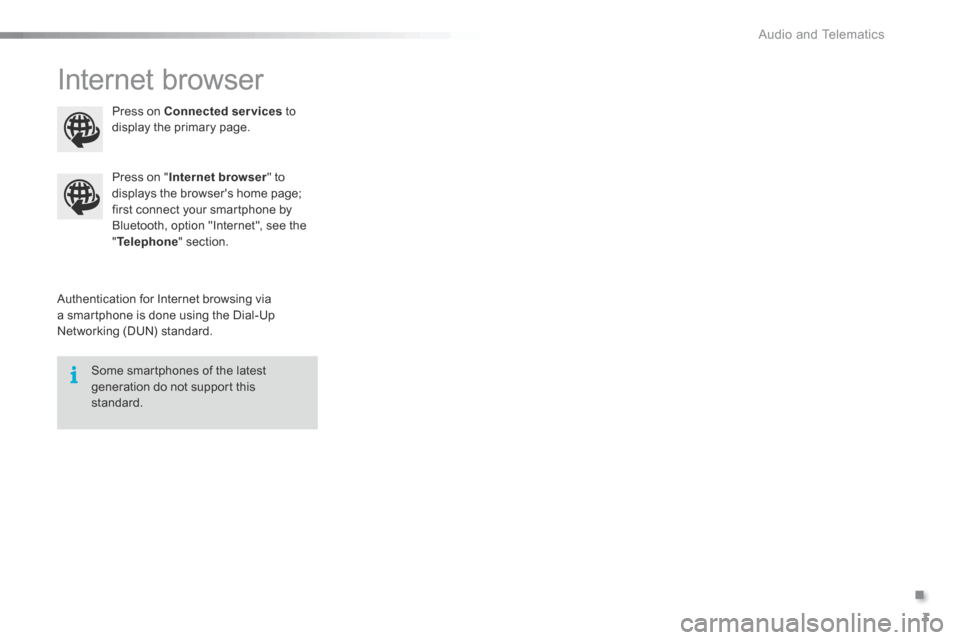
Internet browser
Authentication for Internet browsing via a smartphone is done using the Dial-Up Networking (DUN) standard.
Press on " Internet browser " to displays the browser's home page; first connect your smartphone by Bluetooth, option "Internet", see the " Telephone " section.
Some smartphones of the latest generation do not support this standard.
Press on Connected services to display the primary page.
Page 320 of 401
.
Audio and Telematics 5
Additif-2_en_web_AC-AP_SMEGplus_Services_connectes_ed01-2015
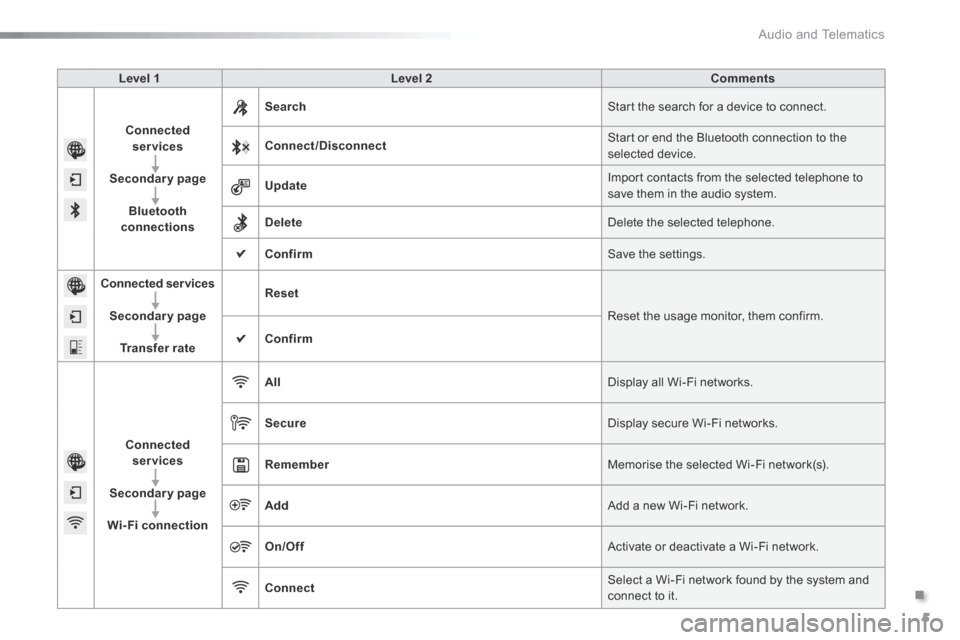
Level 1 Level 2 Comments
Connected services
Secondary page
Bluetooth connections
Search Start the search for a device to connect.
Connect/Disconnect Start or end the Bluetooth connection to the selected device.
Update Import contacts from the selected telephone to save them in the audio system.
Delete Delete the selected telephone.
Confirm Save the settings.
Connected services
Secondary page
Transfer rate
Reset
Reset the usage monitor, them confirm.
Confirm
Connected services
Secondary page
Wi-Fi connection
All Display all Wi-Fi networks.
Secure Display secure Wi-Fi networks.
Remember Memorise the selected Wi-Fi network(s).
Add Add a new Wi-Fi network.
On/Off Activate or deactivate a Wi-Fi network.
Connect Select a Wi-Fi network found by the system and connect to it.
Page 322 of 401
.
Audio and Telematics 7
Additif-2_en_web_AC-AP_SMEGplus_Services_connectes_ed01-2015
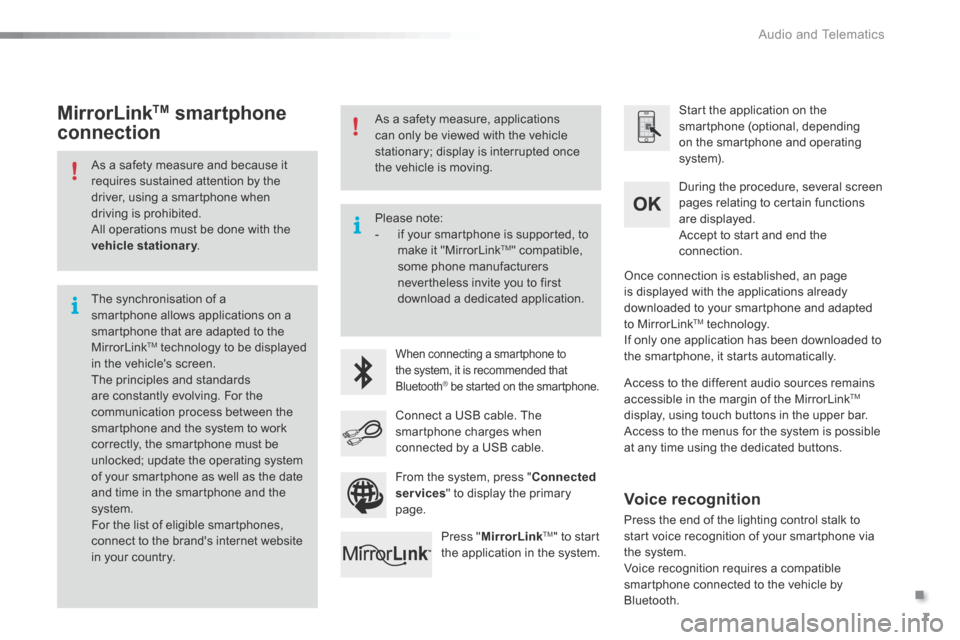
As a safety measure and because it requires sustained attention by the driver, using a smartphone when driving is prohibited. All operations must be done with the vehicle stationary . vehicle stationary . vehicle stationary
The synchronisation of a smartphone allows applications on a smartphone that are adapted to the MirrorLink TM technology to be displayed in the vehicle's screen. The principles and standards are constantly evolving. For the communication process between the smartphone and the system to work correctly, the smartphone must be unlocked; update the operating system of your smartphone as well as the date and time in the smartphone and the system. For the list of eligible smartphones,
connect to the brand's internet website in your country.
Please note: - if your smartphone is supported, to make it "MirrorLink TM " compatible, some phone manufacturers nevertheless invite you to first download a dedicated application.
When connecting a smartphone to the system, it is recommended that Bluetooth ® be started on the smartphone .® be started on the smartphone .®
Start the application on the smartphone (optional, depending on the smartphone and operating system).
During the procedure, several screen pages relating to certain functions are displayed.
Accept to start and end the connection.
Connect a USB cable. The smartphone charges when connected by a USB cable.
Press " MirrorLinkTM " to start the application in the system.
Once connection is established, an page is displayed with the applications already downloaded to your smartphone and adapted to MirrorLink TM technology. If only one application has been downloaded to the smartphone, it starts automatically.
MirrorLink TM smartphone
connection
Access to the different audio sources remains accessible in the margin of the MirrorLink TM
display, using touch buttons in the upper bar. Access to the menus for the system is possible at any time using the dedicated buttons .
From the system, press " Connected services " to display the primary page.
As a safety measure, applications can only be viewed with the vehicle stationary; display is interrupted once the vehicle is moving.
Voice recognition
Press the end of the lighting control stalk to start voice recognition of your smartphone via the system. Voice recognition requires a compatible smartphone connected to the vehicle by Bluetooth.
Page 326 of 401
.
Audio and Telematics 11
Additif-2_en_web_AC-AP_SMEGplus_Services_connectes_ed01-2015
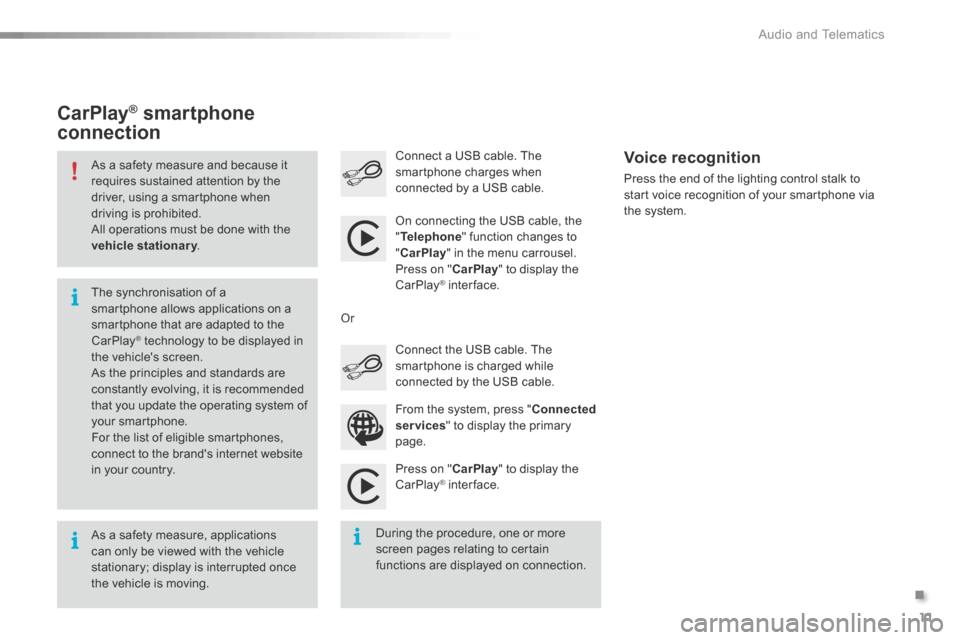
As a safety measure and because it requires sustained attention by the driver, using a smartphone when driving is prohibited. All operations must be done with the vehicle stationary . vehicle stationary . vehicle stationary
As a safety measure, applications can only be viewed with the vehicle stationary; display is interrupted once the vehicle is moving.
The synchronisation of a smartphone allows applications on a smartphone that are adapted to the CarPlay ® technology to be displayed in ® technology to be displayed in ®
the vehicle's screen. As the principles and standards are constantly evolving, it is recommended that you update the operating system of your smartphone.
For the list of eligible smartphones, connect to the brand's internet website in your country.
On connecting the USB cable, the " Telephone " function changes to " CarPlay " in the menu carrousel. Press on " CarPlay " to display the CarPlay ® inter face. ® inter face. ®
Press on " CarPlay " to display the CarPlay ® inter face. ® inter face. ®
Connect a USB cable. The smartphone charges when connected by a USB cable. Press the end of the lighting control stalk to start voice recognition of your smartphone via the system.
CarPlay ®CarPlay ®CarPlay smartphone ® smartphone ®
connection
During the procedure, one or more screen pages relating to certain functions are displayed on connection.
From the system, press " Connected services " to display the primary
page.
Connect the USB cable. The smartphone is charged while connected by the USB cable.
Or
Voice recognition