display Citroen C3 2015 2.G Repair Manual
[x] Cancel search | Manufacturer: CITROEN, Model Year: 2015, Model line: C3, Model: Citroen C3 2015 2.GPages: 401, PDF Size: 13.04 MB
Page 247 of 401
245
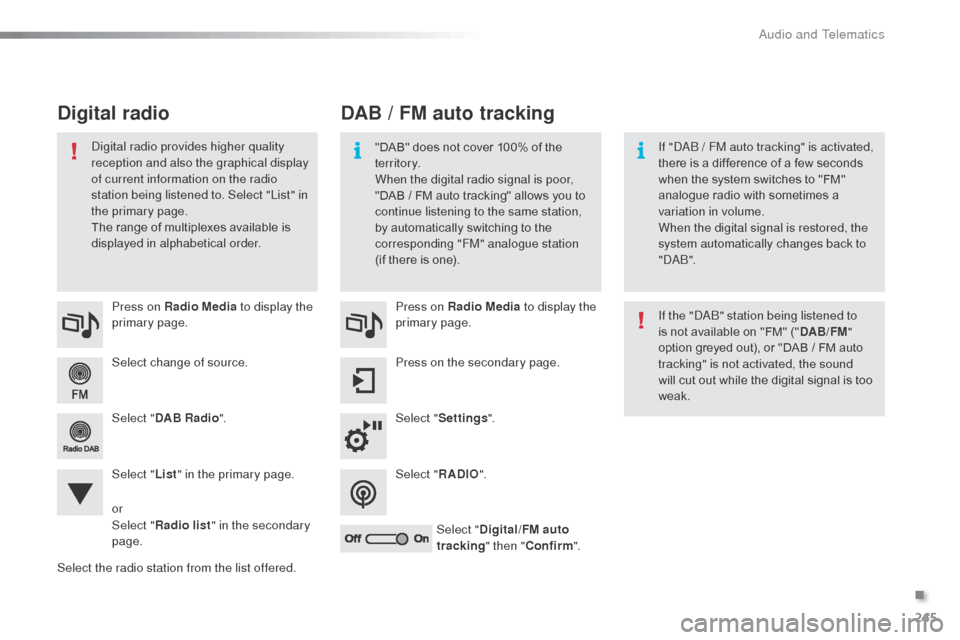
Select change of source. Press on Radio Media to display the
primary page.
Select " DAB Radio ".
Select " List" in the primary page.
Select the radio station from the list offered. Press on Radio Media
to display the
primary page.
Press on the secondary page.
Select " Settings ".
Select " RADIO".
Select " Digital/FM auto
tracking " then "Confirm ".
DAB / FM auto tracking
Digital radio
"DAB" does not cover 100% of the
te r r i to r y.
When the digital radio signal is poor,
"DAB
/ FM auto tracking" allows you to
continue listening to the same station,
by automatically switching to the
corresponding "FM" analogue station
(if there is one). If "d
ab / FM auto tracking" is activated,
there is a difference of a few seconds
when the system switches to "FM"
analogue radio with sometimes a
variation in volume.
When the digital signal is restored, the
system automatically changes back to
"
d
a b
".
di
gital radio provides higher quality
reception and also the graphical display
of current information on the radio
station being listened to. Select "List" in
the primary page.
The range of multiplexes available is
displayed in alphabetical order.
If the "
d
ab
" s
tation being listened to
is not available on "FM" (" DAB/FM"
option greyed out), or "DAB / FM auto
tracking" is not activated, the sound
will cut out while the digital signal is too
weak.
or
Select " Radio list " in the secondary
page.
.
audio and Telematics
Page 248 of 401
246
Media
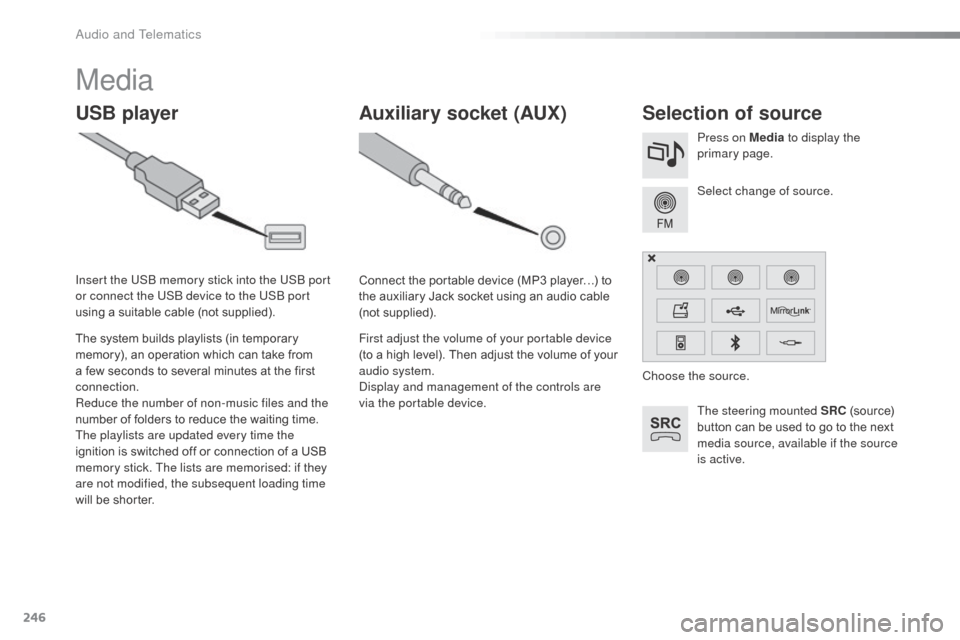
USB playerSelection of source
The steering mounted SRC (source)
button can be used to go to the next
media source, available if the source
is active. Select change of source. Press on Media to display the
primary page.
The system builds playlists (in temporary
memory), an operation which can take from
a few seconds to several minutes at the first
connection.
Reduce the number of non-music files and the
number of folders to reduce the waiting time.
The playlists are updated every time the
ignition is switched off or connection of a USB
memory stick. The lists are memorised: if they
are not modified, the subsequent loading time
will be shorter. Insert the US
b
memory stick into the US
b
port
or connect the US
b
device to the US
b
port
using a suitable cable (not supplied).
Auxiliary socket (AUX)
Connect the portable device (MP3 player…) to
the auxiliary Jack socket using an audio cable
(not supplied).
First adjust the volume of your portable device
(to a high level). Then adjust the volume of your
audio system.
di
splay and management of the controls are
via the portable device. Choose the source.
audio and Telematics
Page 249 of 401
247
The audio equipment will only play audio
files with ".wma, .aac, .flac, .ogg and. mp3"
file extensions and with a bit rate of between
32 Kbps and 320 Kbps.
It also supports VBR (Variable Bit Rate) mode.
No other type of file (.mp4,
...) can be played.
".wma" files must be of the standard
wma
9 type.
The sampling rates supported are 11, 22, 44
and 48 KHz.
It is advisable to restrict file names to
20
characters, without using of special
characters (e.g.: " " ? ; ù) to avoid any playing
and displaying problems.
Information and advice
Use only USB memory sticks formatted FAT32
(file allocation table).
The system supports USb
mass
storage portable players,
b
l
ack
be
rry
®
devices or
apple® players via USb
ports. The adaptor cable not supplied.
Control of the peripheral device is with
the audio system controls.
ot
her peripherals, not recognised on
connection, must be connected to the
auxiliary socket using a Jack cable (not
supplied).
It is recommended that the US
b
cable
for the portable device is used. The system does not support the
simultaneous connection of two
identical devices (two memory sticks
or two Apple
® players) but it is possible
t
o connect one memory stick and one
apple® player at the same time.
.
audio and Telematics
Page 253 of 401
251
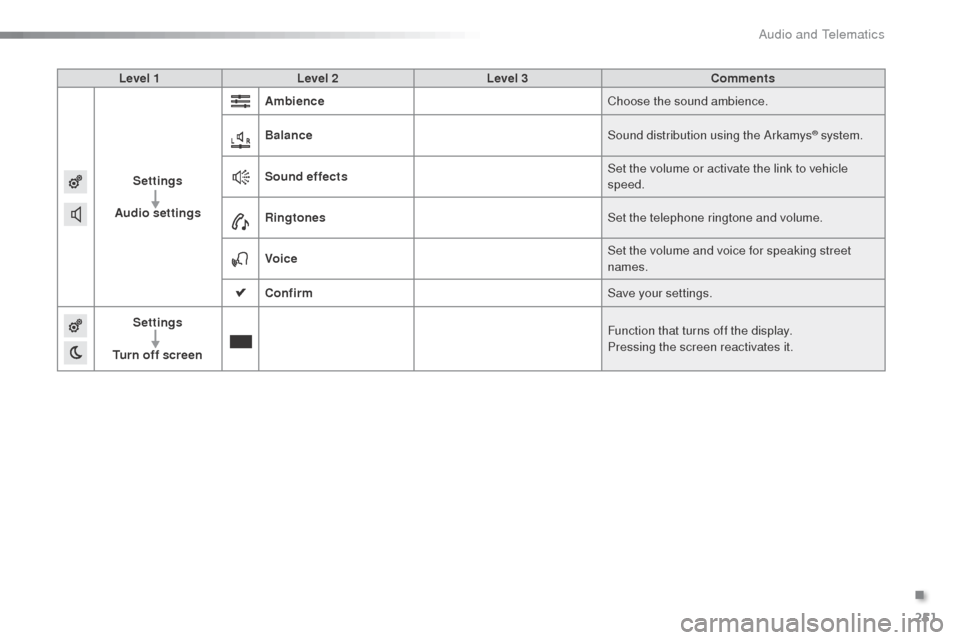
Level 1Level 2 Level 3 Comments
Settings
Audio settings Ambience
Choose the sound ambience.
Balance Sound distribution using the
a
r
kamys
® system.
Sound effects Set the volume or activate the link to vehicle
speed.
Ringtones Set the telephone ringtone and volume.
Voice Set the volume and voice for speaking street
names.
Confirm Save your settings.
Settings
Turn off screen Function that turns off the display.
Pressing the screen reactivates it.
.
Audio and Telematics
Page 254 of 401
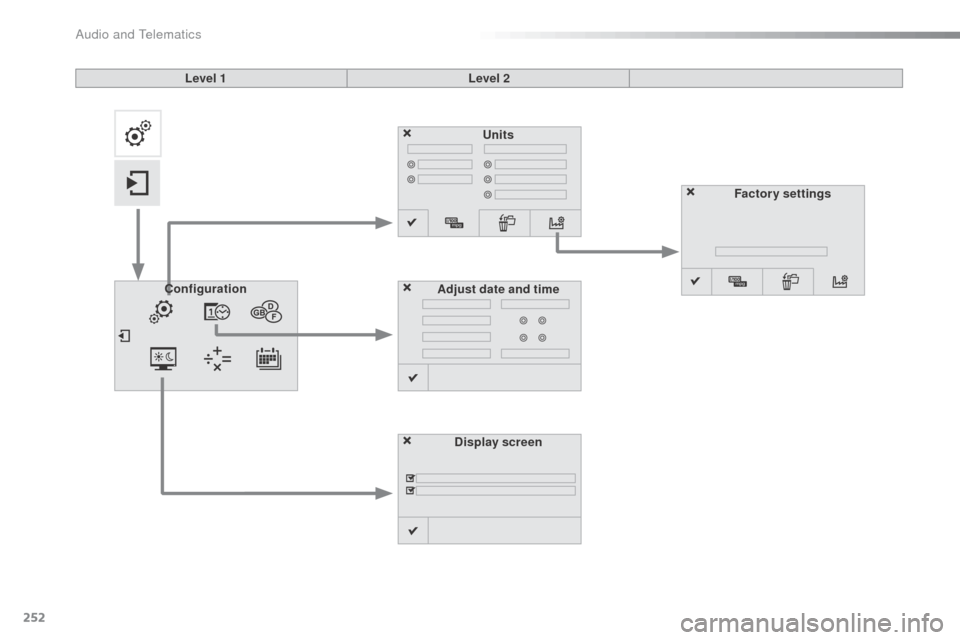
252
Units
Display screen
Configuration
Adjust date and time Factory settings
Level 1
Level 2
Audio and Telematics
Page 255 of 401
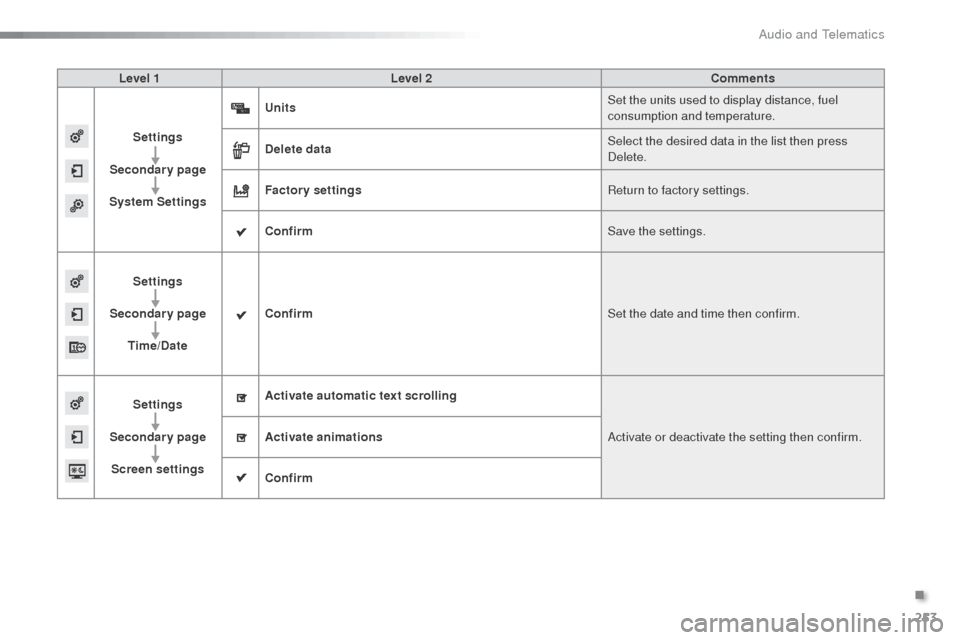
253
Level 1Level 2 Comments
Settings
Secondary page
System Settings Units
Set the units used to display distance, fuel
consumption and temperature.
Delete data Select the desired data in the list then press
de
lete.
Factory settings Return to factory settings.
Confirm Save the settings.
Settings
Secondary page Time/Date Confirm
Set the date and time then confirm.
Settings
Secondary page Screen settings Activate automatic text scrolling
ac
tivate or deactivate the setting then confirm.
Activate animations
Confirm
.
Audio and Telematics
Page 258 of 401
256
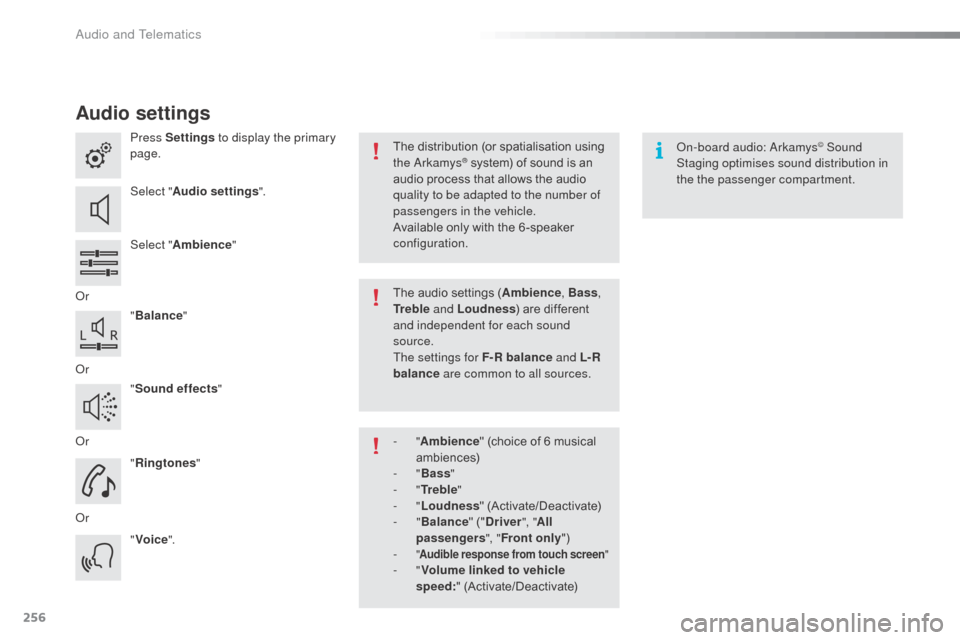
Audio settings
Press Settings to display the primary
page.
Select " Audio settings ".
Select " Ambience "
o
r "Balance "
o
r "Sound effects "
o
r "Ringtones "
o
r "Voice ".on
-board audio: ar kamys© Sound
Staging optimises sound distribution in
the the passenger compartment.
The distribution (or spatialisation using
the
ar
kamys® system) of sound is an
audio process that allows the audio
quality to be adapted to the number of
passengers in the vehicle.
Available only with the 6 -speaker
configuration.
The audio settings (Ambience , Bass,
Tr e b l e and Loudness ) are different
and independent for each sound
source.
The settings for F-R balance and L- R
balance are common to all sources.
-
" Ambience " (choice of 6 musical
ambiences)
-
" Bass "
-
" Tr e b l e "
-
" Loudness " (Activate/Deactivate)
-
" Balance " ("Driver ", "All
passengers ", "Front only ")
-
" Audible response from touch screen "- "Volume linked to vehicle
speed: " (Activate/Deactivate)
Audio and Telematics
Page 259 of 401
257
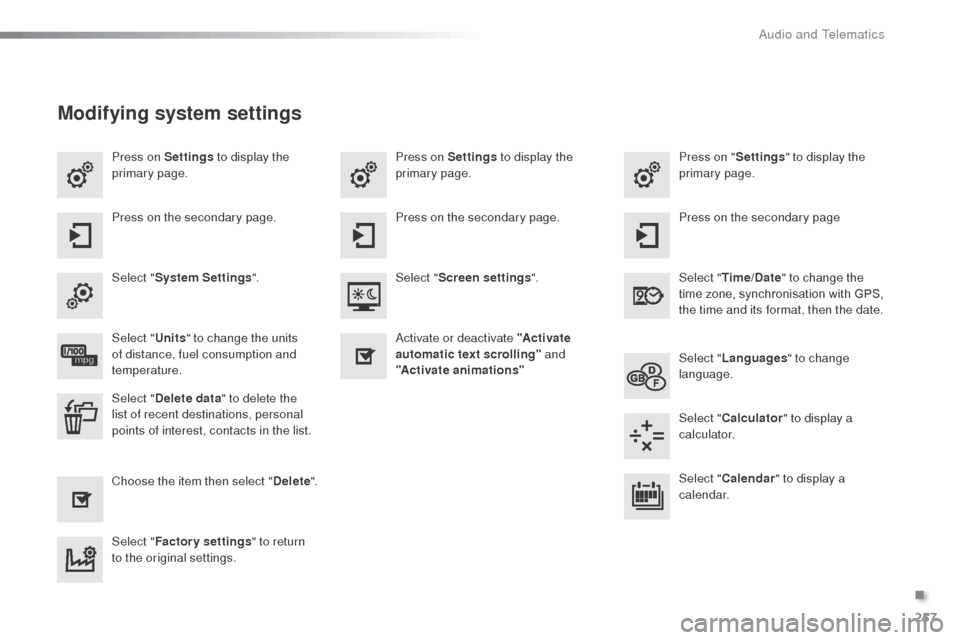
Press on Settings to display the
primary page. Press on "
Settings" to display the
primary page.
Press on Settings
to display the
primary page.
Press on the secondary page. Press on the secondary page
Press on the secondary page.
Select " System Settings ". Select "Time/Date " to change the
time zone, synchronisation with GPS,
the time and its format, then the date.
Select "
Screen settings ".
Select " Units" to change the units
of distance, fuel consumption and
temperature. Select "
Languages " to change
language.
ac
tivate or deactivate "Activate
automatic text scrolling" and
"Activate animations"
Select " Delete data " to delete the
list of recent destinations, personal
points of interest, contacts in the list. Select "
Calculator " to display a
calculator.
Choose the item then select " Delete". Select "
Calendar " to display a
calendar.
Select " Factory settings " to return
to the original settings.
Modifying system settings
.
audio and Telematics
Page 261 of 401
259
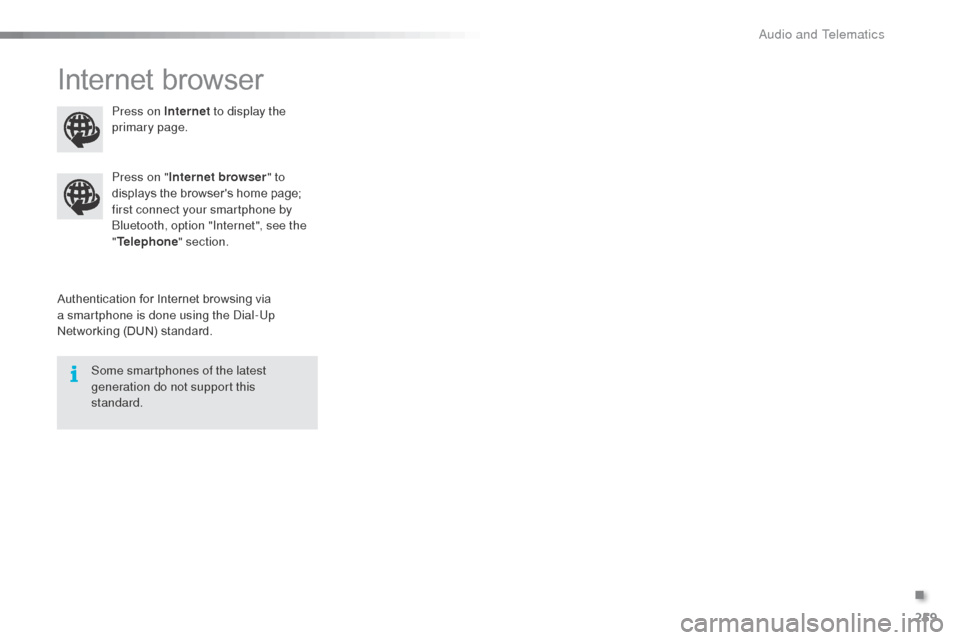
Internet browser
Authentication for Internet browsing via
a smartphone is done using the di al-Up
Networking (DUN) standard. Press on "
Internet browser " to
displays the browser's home page;
first connect your smartphone by
bl
uetooth, option "Internet", see the
" Telephone " section.
Some smartphones of the latest
generation do not support this
standard. Press on Internet
to display the
primary page.
.
audio and Telematics
Page 263 of 401
261
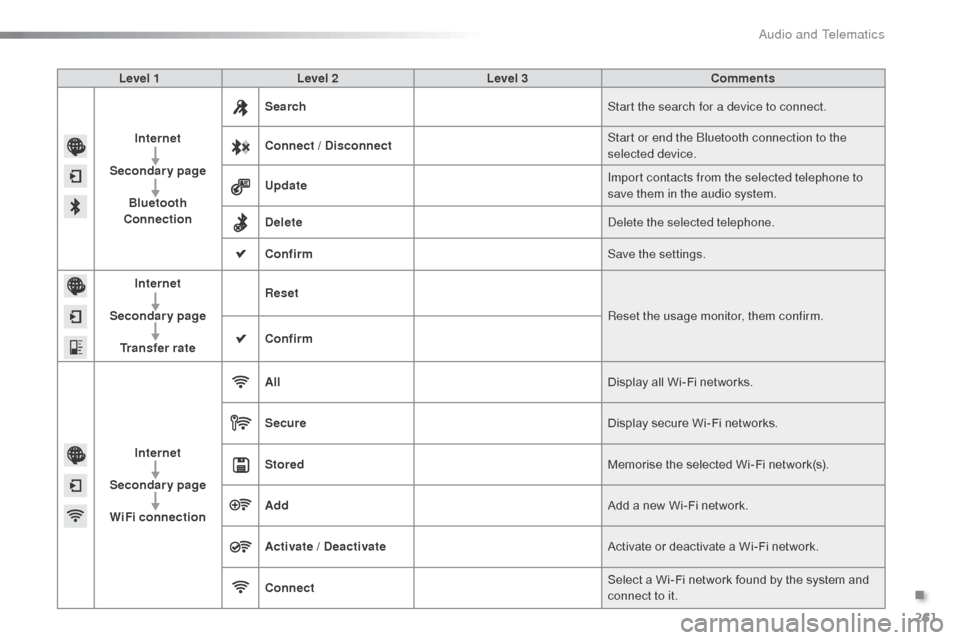
Level 1Level 2 Level 3 Comments
Internet
Secondary page Bluetooth
Connection Search
Start the search for a device to connect.
Connect / Disconnect Start or end the
b
l
uetooth connection to the
selected device.
Update Import contacts from the selected telephone to
save them in the audio system.
Delete
del
ete the selected telephone.
Confirm Save the settings.
Internet
Secondary page Transfer rate Reset
Reset the usage monitor, them confirm.
Confirm
Internet
Secondary page WiFi connection All
Display all Wi-Fi networks.
Secure Display secure Wi-Fi networks.
Stored Memorise the selected Wi-Fi network(s).
Add Add a new Wi-Fi network.
Activate / Deactivate Activate or deactivate a Wi-Fi network.
Connect Select a Wi-Fi network found by the system and
connect to it.
.
Audio and Telematics