mirror Citroen C3 2015 2.G User Guide
[x] Cancel search | Manufacturer: CITROEN, Model Year: 2015, Model line: C3, Model: Citroen C3 2015 2.GPages: 401, PDF Size: 13.04 MB
Page 83 of 401
81
Interior mood lighting
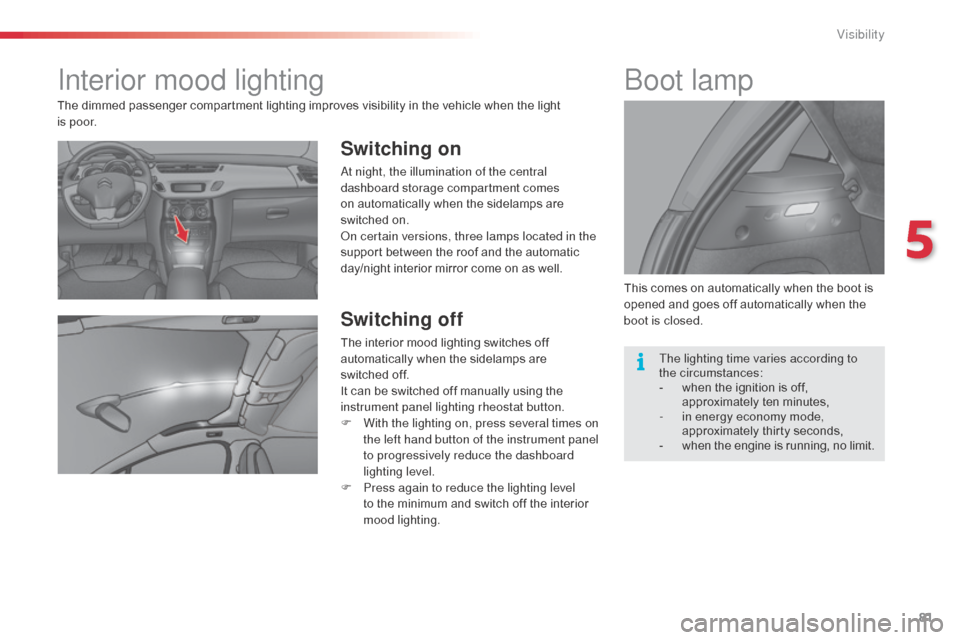
Switching on
at night, the illumination of the central
dashboard storage compartment comes
on automatically when the sidelamps are
switched on.
on c
ertain versions, three lamps located in the
support between the roof and the automatic
day/night interior mirror come on as well.
Switching off
The interior mood lighting switches off
automatically when the sidelamps are
switched
off.
It can be switched off manually using the
instrument panel lighting rheostat button.
F
W
ith the lighting on, press several times on
the left hand button of the instrument panel
to progressively reduce the dashboard
lighting level.
F
P
ress again to reduce the lighting level
to the minimum and switch off the interior
mood lighting. This comes on automatically when the boot is
opened and goes off automatically when the
boot is closed.
boot lamp
The dimmed passenger compartment lighting improves visibility in the vehicle when the light
i s
p o o r.
The lighting time varies according to
the
circumstances:
-
w
hen the ignition is off,
approximately ten minutes,
-
i
n energy economy mode,
approximately thirty seconds,
-
w
hen the engine is running, no limit.
5
Visibility
Page 86 of 401
84
Sun visorIlluminated glove box
This can be used to hold a water bottle.
Centre armrest
These can be used for portable devices (mobile
phone, MP3 player...) which can be connected
to the USB port / auxiliary socket or charged
from the 12 V socket in the centre console.
Version with Zenith windscreen
Refer to the corresponding section.
Version without Zenith windscreen
The sun visors are fitted with a vanity mirror,
with concealing flap for the driver and a ticket /
card holder.
Storage
F For access to the closed storage box, lift
the lever to open the lid.
F
F
or access to the open storage box below
the armrest, lift the complete armrest
towards the rear.
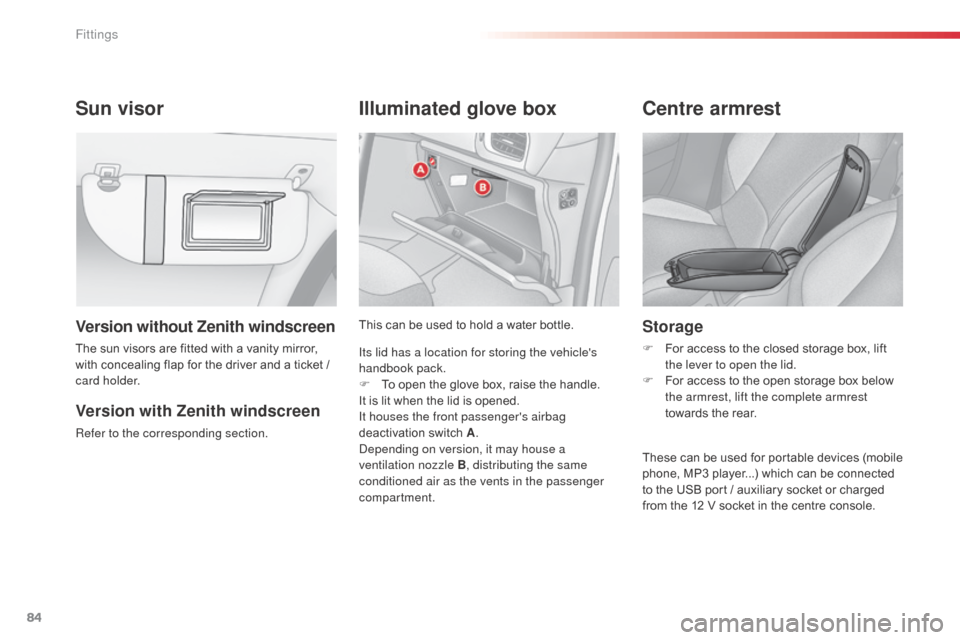
Its lid has a location for storing the vehicle's
handbook pack.
F
T
o open the glove box, raise the handle.
It is lit when the lid is opened.
It houses the front passenger's airbag
deactivation switch A.
dep
ending on version, it may house a
ventilation nozzle B , distributing the same
conditioned air as the vents in the passenger
compartment.
Fittings
Page 144 of 401
142
Reversing camera
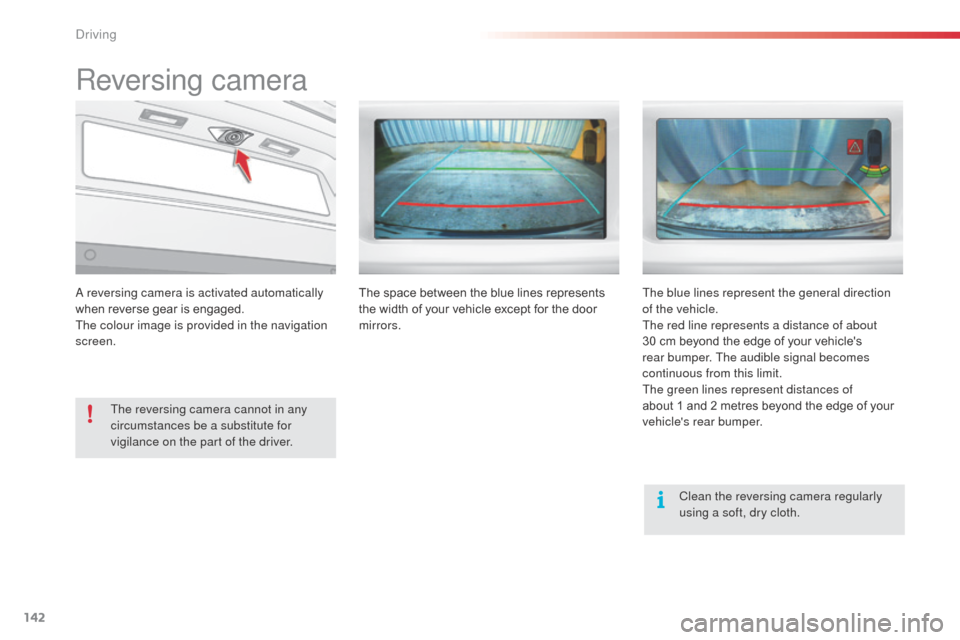
a reversing camera is activated automatically
w hen reverse gear is engaged.
The colour image is provided in the navigation
screen.
The reversing camera cannot in any
circumstances be a substitute for
vigilance on the part of the driver. Clean the reversing camera regularly
using a soft, dry cloth.
The space between the blue lines represents
the width of your vehicle except for the door
mirrors.
The blue lines represent the general direction
of the vehicle.
The red line represents a distance of about
30 cm beyond the edge of your vehicle's
rear bumper. The audible signal becomes
continuous from this limit.
The green lines represent distances of
about 1 and 2 metres beyond the edge of your
vehicle's rear bumper.
driving
Page 183 of 401
181
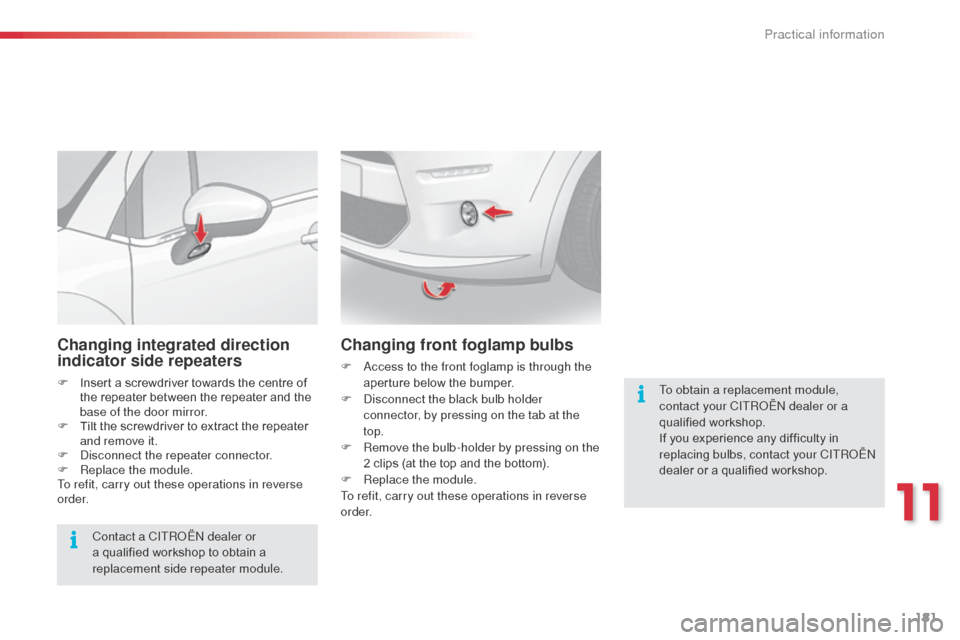
Changing integrated direction
indicator side repeaters
F Insert a screwdriver towards the centre of the repeater between the repeater and the
base of the door mirror.
F
T
ilt the screwdriver to extract the repeater
and remove it.
F
d
i
sconnect the repeater connector.
F
R
eplace the module.
To refit, carry out these operations in reverse
o r d e r.
Contact a CITR
oËn
dealer or
a qualified workshop to obtain a
replacement side repeater module.
Changing front foglamp bulbs
F access to the front foglamp is through the aperture below the bumper.
F
d
i
sconnect the black bulb holder
connector, by pressing on the tab at the
top.
F
R
emove the bulb-holder by pressing on the
2 clips (at the top and the bottom).
F
R
eplace the module.
To refit, carry out these operations in reverse
o r d e r. To obtain a replacement module,
contact your CITR
oËn
dealer or a
qualified workshop.
If you experience any difficulty in
replacing bulbs, contact your CITR
oËn
dealer or a qualified workshop.
11
Practical information
Page 188 of 401
186
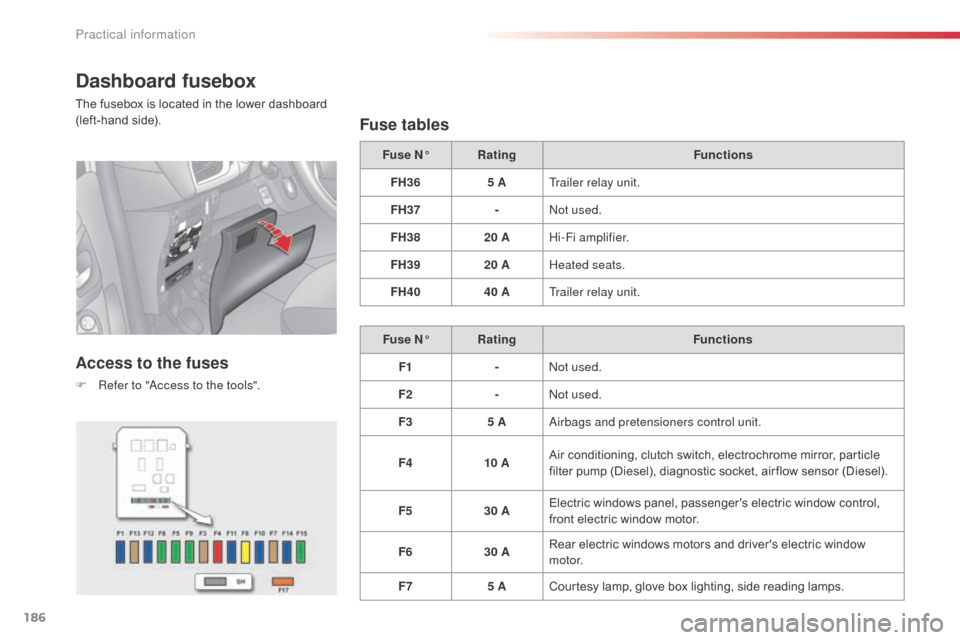
Dashboard fusebox
The fusebox is located in the lower dashboard
(left-hand side).
Access to the fuses
F Refer to "access to the tools".
Fuse tables
Fuse N° Rating Functions
FH36 5 ATrailer relay unit.
FH37 -
no
t used.
FH38 20 AHi-Fi amplifier.
FH39 20 AHeated seats.
FH40 40 ATrailer relay unit.
Fuse N° Rating Functions
F1 -
no
t used.
F2 -
no
t used.
F3 5 A
ai
rbags and pretensioners control unit.
F4 10 AAir conditioning, clutch switch, electrochrome mirror, particle
filter pump (Diesel), diagnostic socket, air flow sensor (Diesel).
F5 30 AElectric windows panel, passenger's electric window control,
front electric window motor.
F6 30 ARear electric windows motors and driver's electric window
motor.
F7 5 ACourtesy lamp, glove box lighting, side reading lamps.
Practical information
Page 189 of 401
187
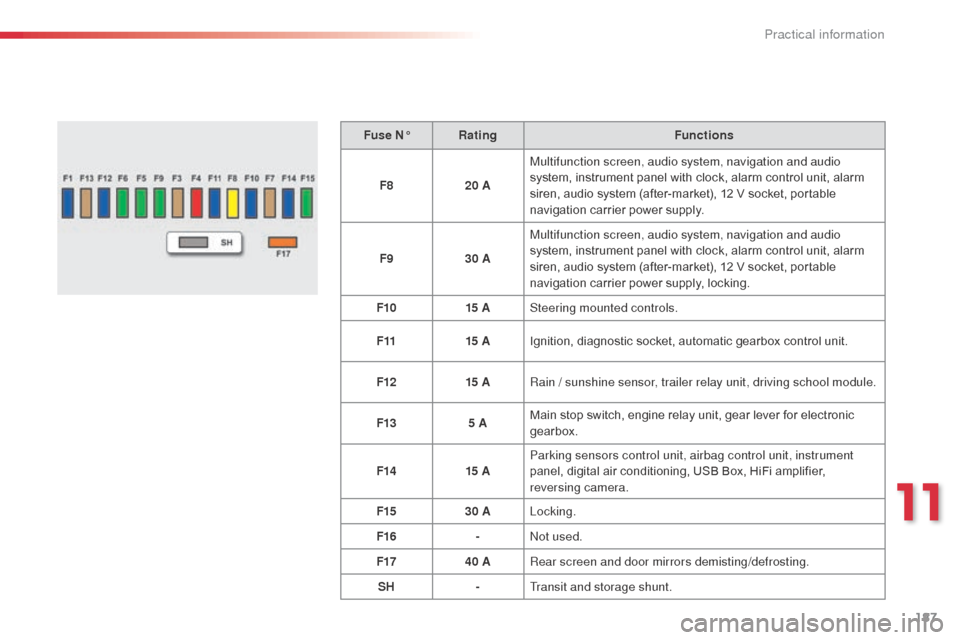
Fuse N°Rating Functions
F8 20 AMultifunction screen, audio system, navigation and audio
system, instrument panel with clock, alarm control unit, alarm
siren, audio system (after-market), 12 V socket, portable
navigation carrier power supply.
F9 30 AMultifunction screen, audio system, navigation and audio
system, instrument panel with clock, alarm control unit, alarm
siren, audio system (after-market), 12 V socket, portable
navigation carrier power supply, locking.
F10 15 ASteering mounted controls.
F11 15 AIgnition, diagnostic socket, automatic gearbox control unit.
F12 15 ARain / sunshine sensor, trailer relay unit, driving school module.
F13 5 AMain stop switch, engine relay unit, gear lever for electronic
gearbox.
F14 15 AParking sensors control unit, airbag control unit, instrument
panel, digital air conditioning, USB Box, HiFi amplifier,
reversing camera.
F15 30 ALocking.
F16 -
no
t used.
F17 40 ARear screen and door mirrors demisting/defrosting.
SH -Transit and storage shunt.
11
Practical information
Page 219 of 401
217
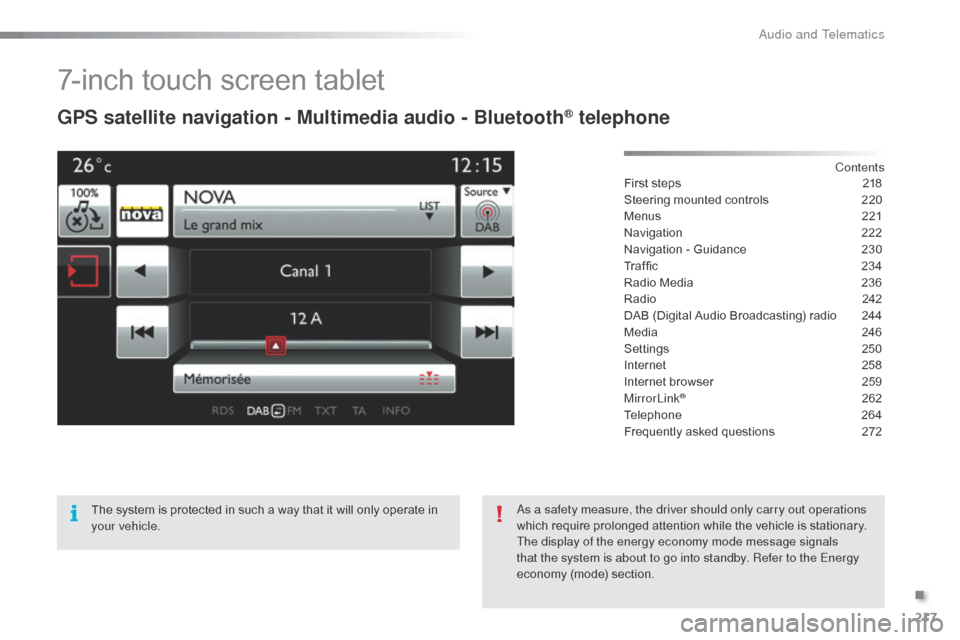
7-inch touch screen tablet
GPS satellite navigation - Multimedia audio - Bluetooth® telephone
Contents
First steps
2 18
Steering mounted controls
2
20
Menus
2
21
Navigation
2
22
Navigation - Guidance
2
30
Traffic
23
4
Radio Media
2
36
Radio
2
42
DAB (Digital Audio Broadcasting) radio
2
44
Media
2
46
Settings
2
50
Internet
2
58
Internet browser
2
59
MirrorLink
® 262
Telephone
2
64
Frequently asked questions
2
72
The system is protected in such a way that it will only operate in
your vehicle.
as a s
afety measure, the driver should only carry out operations
which require prolonged attention while the vehicle is stationary.
The display of the energy economy mode message signals
that the system is about to go into standby. Refer to the Energy
economy (mode) section.
.
Audio and Telematics
Page 223 of 401
221
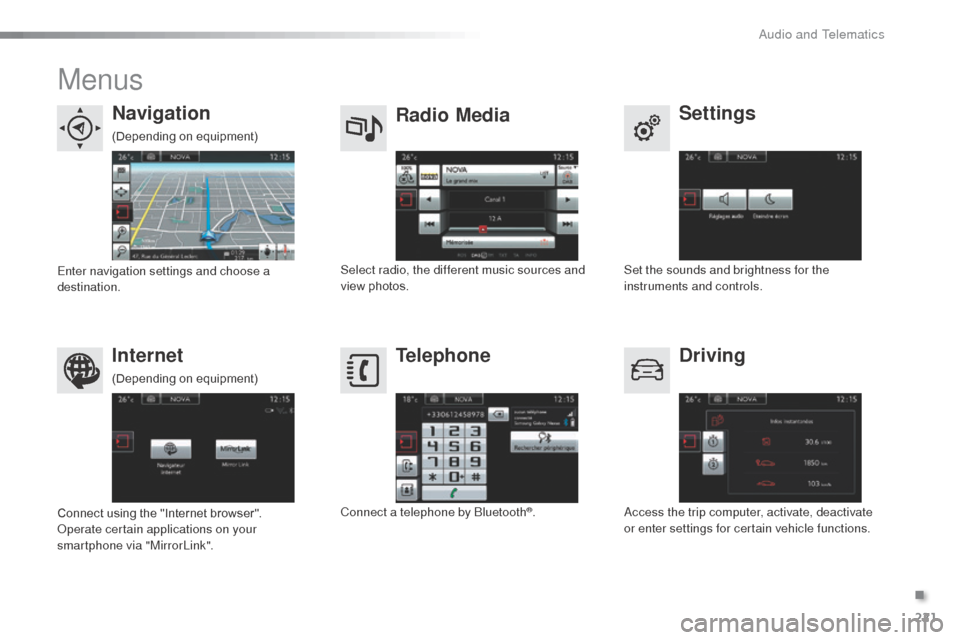
Menus
Settings
Radio Media
Navigation
Driving
Internet Telephone
Set the sounds and brightness for the
instruments and controls.
Select radio, the different music sources and
view photos.
Enter navigation settings and choose a
destination.
ac
cess the trip computer, activate, deactivate
or enter settings for certain vehicle functions.
Connect using the "Internet browser".
op
erate certain applications on your
smartphone via "MirrorLink". Connect a telephone by
b
l
uetooth
®.
(Depending on equipment)
(Depending on equipment)
.
audio and Telematics
Page 239 of 401
237
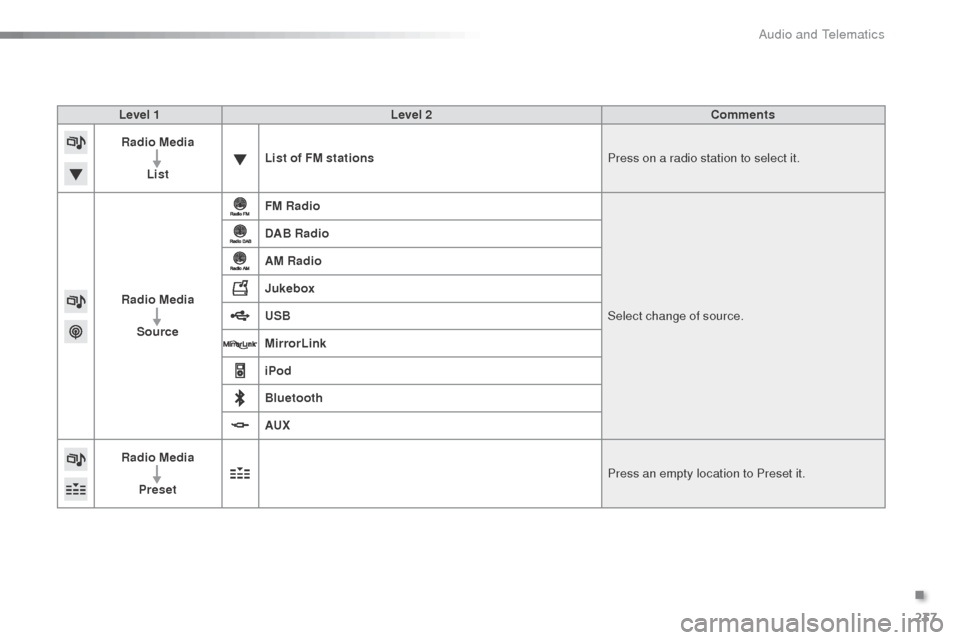
Level 1Level 2 Comments
Radio Media
List List of FM stations
Press on a radio station to select it.
Radio Media Source FM Radio
Select change of source.
DAB Radio
AM Radio
Jukebox
USB
MirrorLink
iPod
Bluetooth
AUX
Radio Media
Preset Press an empty location to Preset it.
.
Audio and Telematics
Page 264 of 401
262
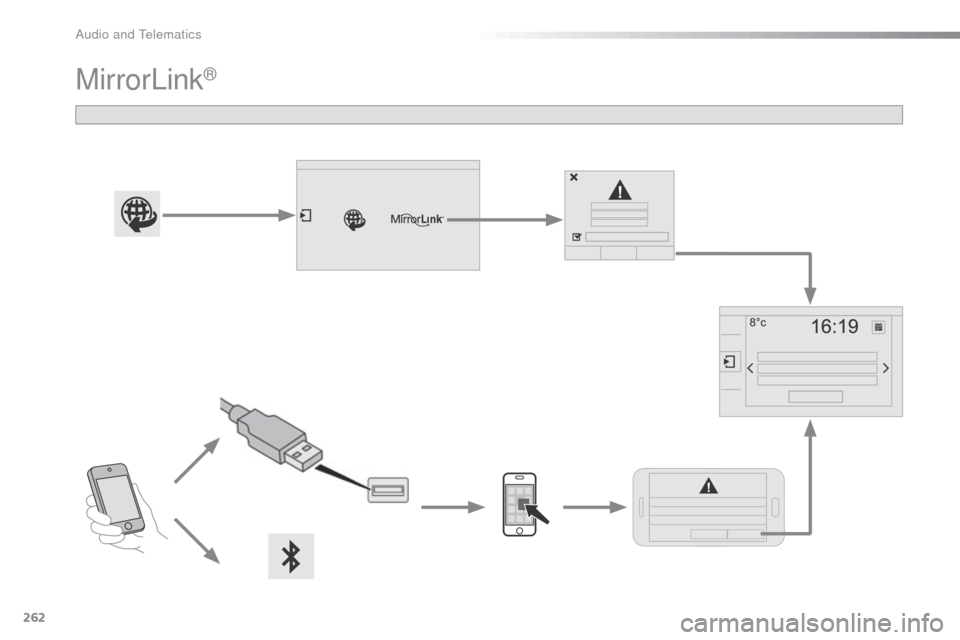
MirrorLink®
audio and Telematics