light Citroen C3 PICASSO 2008.5 1.G User Guide
[x] Cancel search | Manufacturer: CITROEN, Model Year: 2008.5, Model line: C3 PICASSO, Model: Citroen C3 PICASSO 2008.5 1.GPages: 204, PDF Size: 11 MB
Page 22 of 204
i
25
INSTRUMENTS and CONTROLS
The level read will only be correct if
the vehicle is on level ground and
the engine has been off for more
than 15 minutes.
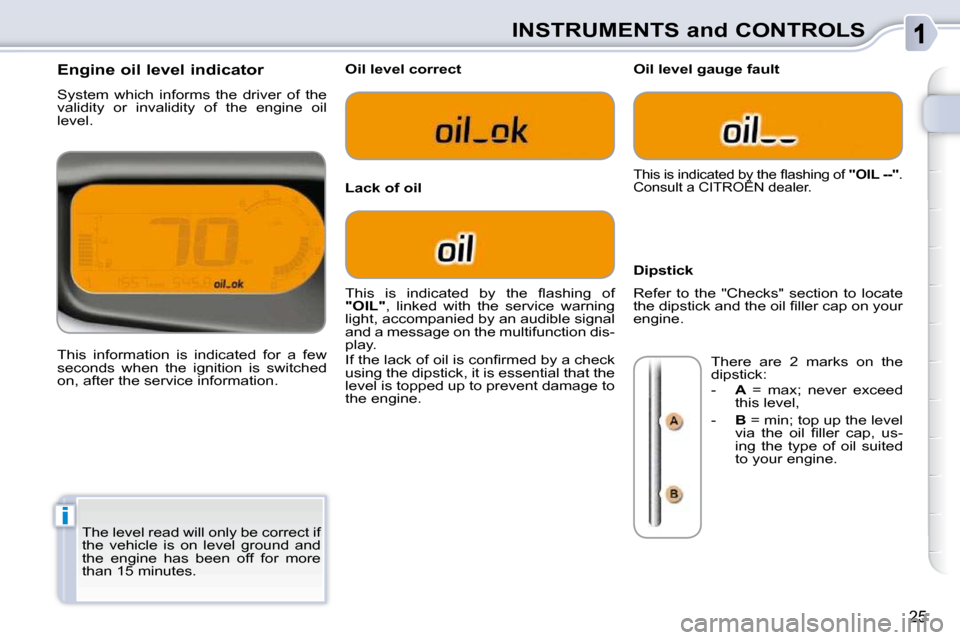
Engine oil level indicator
System which informs the driver of the
validity or invalidity of the engine oil
level.
This information is indicated for a few
seconds when the ignition is switched
on, after the service information.
Oil level correct
Lack of oil
Oil level gauge fault
Dipstick
This is indicated by the fl ashing of
"OIL" , linked with the service warning
light, accompanied by an audible signal
and a message on the multifunction dis-
play.
If the lack of oil is confi rmed by a check
using the dipstick, it is essential that the
level is topped up to prevent damage to
the engine.
This is indicated by the fl ashing of "OIL --" .
Consult a CITROËN dealer.
Refer to the "Checks" section to locate
the dipstick and the oil fi ller cap on your
engine.
There are 2 marks on the
dipstick:
- A = max; never exceed
this level,
- B = min; top up the level
via the oil fi ller cap, us-
ing the type of oil suited
to your engine.
Page 23 of 204
26
INSTRUMENTS and CONTROLS
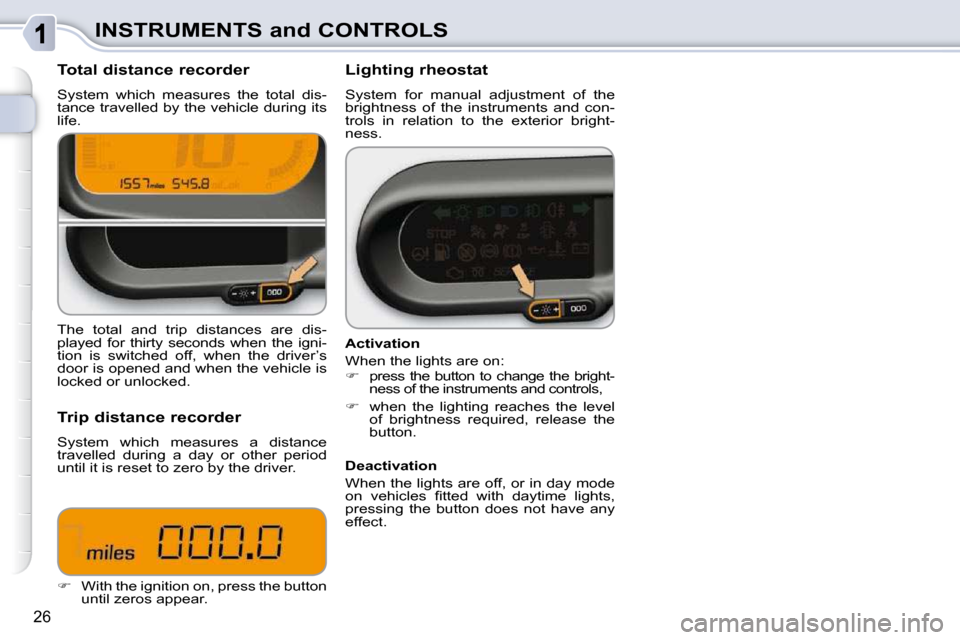
Total distance recorder
System which measures the total dis-
tance travelled by the vehicle during its
life. Lighting rheostat
System for manual adjustment of the
brightness of the instruments and con-
trols in relation to the exterior bright-
ness.
The total and trip distances are dis-
played for thirty seconds when the igni-
tion is switched off, when the driver’s
door is opened and when the vehicle is
locked or unlocked.
Trip distance recorder
System which measures a distance
travelled during a day or other period
until it is reset to zero by the driver.
With the ignition on, press the button
until zeros appear. Activation
When the lights are on:
press the button to change the bright-
ness of the instruments and controls,
when the lighting reaches the level
of brightness required, release the
button.
Deactivation
When the lights are off, or in day mode
on vehicles fi tted with daytime lights,
pressing the button does not have any
effect.
Page 25 of 204

!
i
28
MULTIFUNCTION DISPLAYS Once the fuel consumption unit has
been changed to l/100km or km/l,
the information relating to speed
and distance also changes to kilo-
metres.
Display settings
Once the "Display settings" menu has
been selected, you can gain access to
the following settings:
- year,
- month,
- day,
- hour,
- minutes,
- 12 or 24 hour mode.
Languages
Once the "Languages" menu has been
selected, you can change the language
used by the display (Français, Italiano,
Nederlands, Portugues, Portugues-
Brasil, Deutsch, English, Espanol).
Units
Once the "Units" menu has been se-
lected, you can change the units of the
following parameters:
- temperature (°C or °F),
- fuel consumption (l/100 km, mpg or
km/l).
Once you have selected a setting,
press the " " or " " buttons to
change its value.
Press the " " or " " buttons to
switch respectively to the previous
or next setting.
Press the "OK" button to record the
change and return to the normal dis-
play or press the "ESC" button to
cancel.
Vehicle confi guration
Options
Once the "Options" menu has been se-
lected, you can start diagnostics of the
status of the equipment (active, not ac-
tive, faulty).
Once the "Vehicle Confi guration" menu
has been selected, you can activate or
deactivate the following equipment:
- wiper linked with reverse gear (refer
to the "Visibility" section),
- "guide-me-home" lighting (refer to the "Visibility" section).
For safety reasons, it is impera-
tive that confi guration of the mul-
tifunction displays by the driver
takes place when stationary.
Page 26 of 204

MULTIFUNCTION DISPLAYS
MONOCHROME SCREEN
A LINKED TO THE MYWAY
SYSTEM COLOUR SCREEN
General menu
Displays on screen A
This displays the following information:
- the outside temperature (this fl ash- es if there is a risk of ice),
- the trip computer (refer to the end of the section).
Warning messages or information mes-
sages may appear temporarily. These
can be cleared by pressing the "ESC"
button. Controls
There are three display control buttons:
- "ESC" to abandon the operation in
progress,
- "MENU" to scroll through the men-
us or sub-menus,
- "OK" to select the menu or sub-
menu required.
Press the "MENU" button to scroll
through the various menus of the
general menu :
- vehicle confi guration,
- options,
- languages,
- units.
Press the "OK" button to select the
menu required.
Vehicle confi guration
Once the "Vehicle confi guration" menu
has been selected, you can activate or
deactivate the following equipment:
- wiper linked with reverse gear (refer to the "Visibility" section),
- "guide-me-home" lighting (refer to the "Visibility" section),
Page 29 of 204

32
MULTIFUNCTION DISPLAYS
"Trip computer" menu
Alert log
This summarises the active warning
messages, displaying them in succes-
sion on the multifunction display.
Once this menu has been selected, you
can consult information concerning the
status of the vehicle (alert log, status of
functions, etc.)
Defi ne the vehicle parameters
Once this menu has been selected, you
can activate or deactivate the following
equipment:
- wiper linked with reverse gear (refer
to the "Visibility" section),
- "guide-me-home" lighting "Personalisation-
Configuration" menu
Once this menu has been selected, you
can gain access to the following func-
tions:
- defi ne the vehicle parameters,
- display confi guration,
- selection of the language.
Status of functions
This summarises the status (active or
inactive) of the vehicle's functions.
Enter distance to destination
This allows you to enter an approximate
distance until your fi nal destination.
Press the "MENU" button to gain
access to the general menu.
Press the arrows, then the "OK"
button to select the " Trip computer "
menu.
In the " Trip computer " menu, select
one of the following applications:
Page 35 of 204
i
39
COMFORT
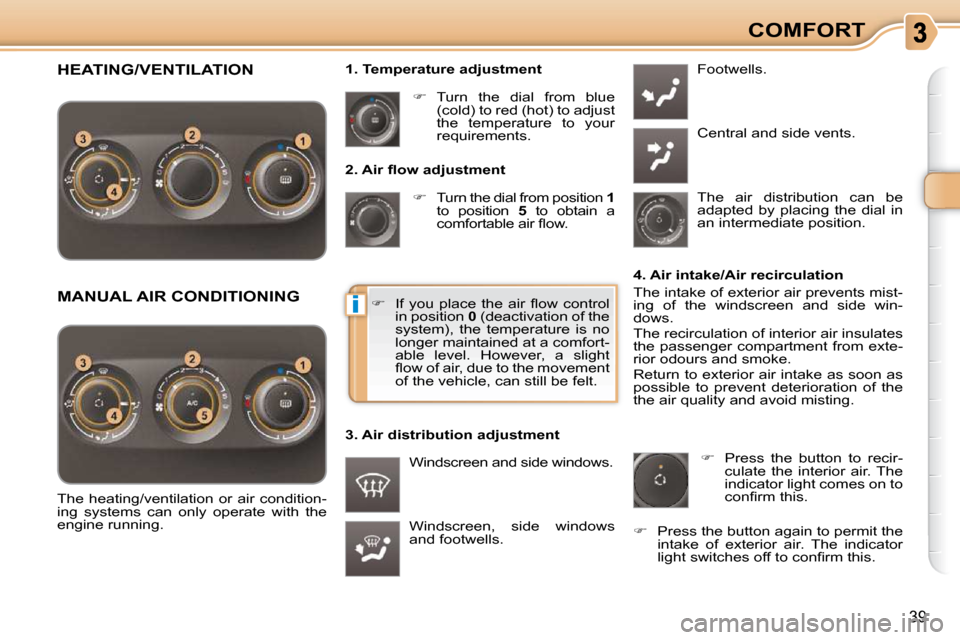
2. Air fl ow adjustment
Turn the dial from position 1
to position 5 to obtain a
comfortable air fl ow.
Windscreen, side windows
and footwells. Footwells.
Central and side vents.
Turn the dial from blue
(cold) to red (hot) to adjust
the temperature to your
requirements.
Windscreen and side windows.
1. Temperature adjustment
The air distribution can be
adapted by placing the dial in
an intermediate position.
The heating/ventilation or air condition-
ing systems can only operate with the
engine running. 4. Air intake/Air recirculation
The intake of exterior air prevents mist-
ing of the windscreen and side win-
dows.
The recirculation of interior air insulates
the passenger compartment from exte-
rior odours and smoke.
Return to exterior air intake as soon as
possible to prevent deterioration of the
the air quality and avoid misting.
If you place the air fl ow control
in position 0 (deactivation of the
system), the temperature is no
longer maintained at a comfort-
able level. However, a slight
fl ow of air, due to the movement
of the vehicle, can still be felt.
3. Air distribution adjustment
Press the button to recir-
culate the interior air. The
indicator light comes on to
confi rm this.
Press the button again to permit the
intake of exterior air. The indicator
light switches off to confi rm this.
HEATING/VENTILATION
MANUAL AIR CONDITIONING
Page 36 of 204
40
COMFORT
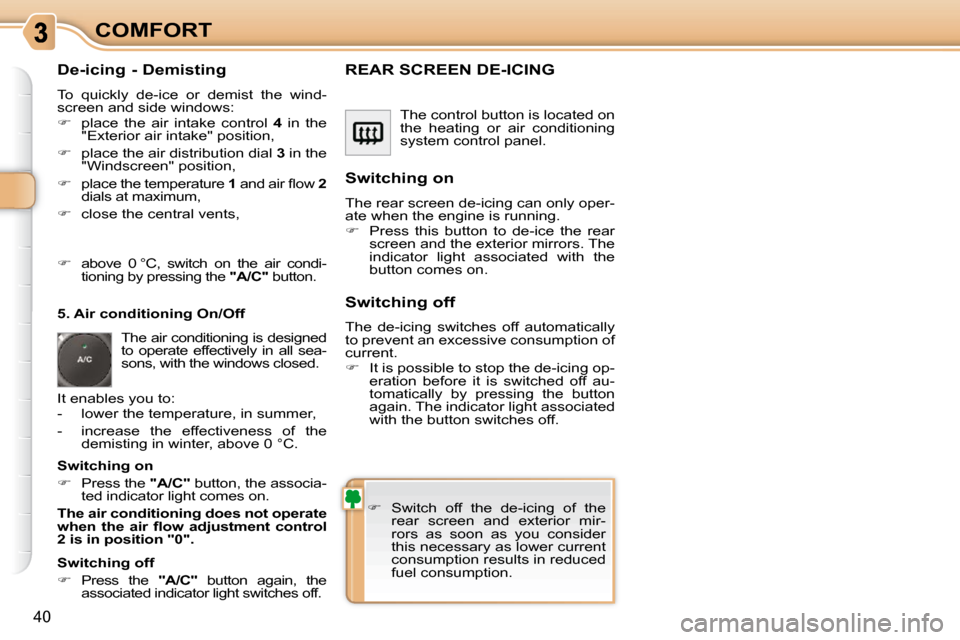
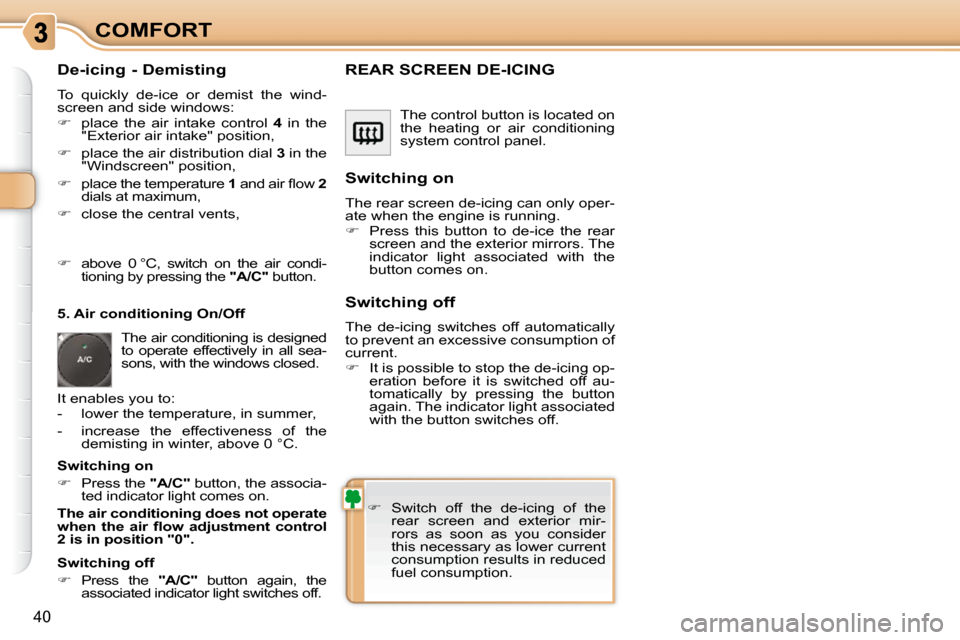
De-icing - Demisting
To quickly de-ice or demist the wind-
screen and side windows:
place the air intake control 4 in the
"Exterior air intake" position,
place the air distribution dial 3 in the
"Windscreen" position,
place the temperature 1 and air fl ow 2
dials at maximum,
close the central vents, The control button is located on
the heating or air conditioning
system control panel.
REAR SCREEN DE-ICING
Switch off the de-icing of the
rear screen and exterior mir-
rors as soon as you consider
this necessary as lower current
consumption results in reduced
fuel consumption.
Switching on
The rear screen de-icing can only oper-
ate when the engine is running.
Press this button to de-ice the rear
screen and the exterior mirrors. The
indicator light associated with the
button comes on.
Switching off
The de-icing switches off automatically
to prevent an excessive consumption of
current.
It is possible to stop the de-icing op-
eration before it is switched off au-
tomatically by pressing the button
again. The indicator light associated
with the button switches off.
5. Air conditioning On/Off
It enables you to:
- lower the temperature, in summer,
- increase the effectiveness of the
demisting in winter, above 0 °C.
Switching on
Press the "A/C" button, the associa-
ted indicator light comes on.
The air conditioning does not operate
when the air fl ow adjustment control
2 is in position "0".
Switching off
Press the "A/C" button again, the
associated indicator light switches off.
above 0 °C, switch on the air condi-
tioning by pressing the "A/C" button .
The air conditioning is designed
to operate effectively in all sea-
sons, with the windows closed.
Page 37 of 204
40
COMFORT
De-icing - Demisting
To quickly de-ice or demist the wind-
screen and side windows:
place the air intake control 4 in the
"Exterior air intake" position,
place the air distribution dial 3 in the
"Windscreen" position,
place the temperature 1 and air fl ow 2
dials at maximum,
close the central vents, The control button is located on
the heating or air conditioning
system control panel.
REAR SCREEN DE-ICING
Switch off the de-icing of the
rear screen and exterior mir-
rors as soon as you consider
this necessary as lower current
consumption results in reduced
fuel consumption.
Switching on
The rear screen de-icing can only oper-
ate when the engine is running.
Press this button to de-ice the rear
screen and the exterior mirrors. The
indicator light associated with the
button comes on.
Switching off
The de-icing switches off automatically
to prevent an excessive consumption of
current.
It is possible to stop the de-icing op-
eration before it is switched off au-
tomatically by pressing the button
again. The indicator light associated
with the button switches off.
5. Air conditioning On/Off
It enables you to:
- lower the temperature, in summer,
- increase the effectiveness of the
demisting in winter, above 0 °C.
Switching on
Press the "A/C" button, the associa-
ted indicator light comes on.
The air conditioning does not operate
when the air fl ow adjustment control
2 is in position "0".
Switching off
Press the "A/C" button again, the
associated indicator light switches off.
above 0 °C, switch on the air condi-
tioning by pressing the "A/C" button .
The air conditioning is designed
to operate effectively in all sea-
sons, with the windows closed.
Page 38 of 204
ii
41
COMFORT
When the engine is cold, to prevent
too great a distribution of cold air,
the air fl ow will reach its optimum
level gradually.
In cold weather, it favours the distri-
bution of warm air to the windscreen,
side windows and footwells only.
On entering the vehicle, if the
interior temperature is much colder
or warmer than the comfort value,
there is no need to change the value
displayed in order to obtain the com-
fort required. The system corrects
the difference in temperature auto-
matically and as quickly as possible.
The air conditioning only operates when
the engine is running. The driver and his front pas-
senger can each adjust the
temperature to their require-
ments.
Turn control 2 or 3 to the left or to
the right respectively to decrease or
increase this value.
A setting around the value 21 provides
optimum comfort. However, depending
on your requirements, a setting between
18 and 24 is normal.
You are advised to avoid a left/right
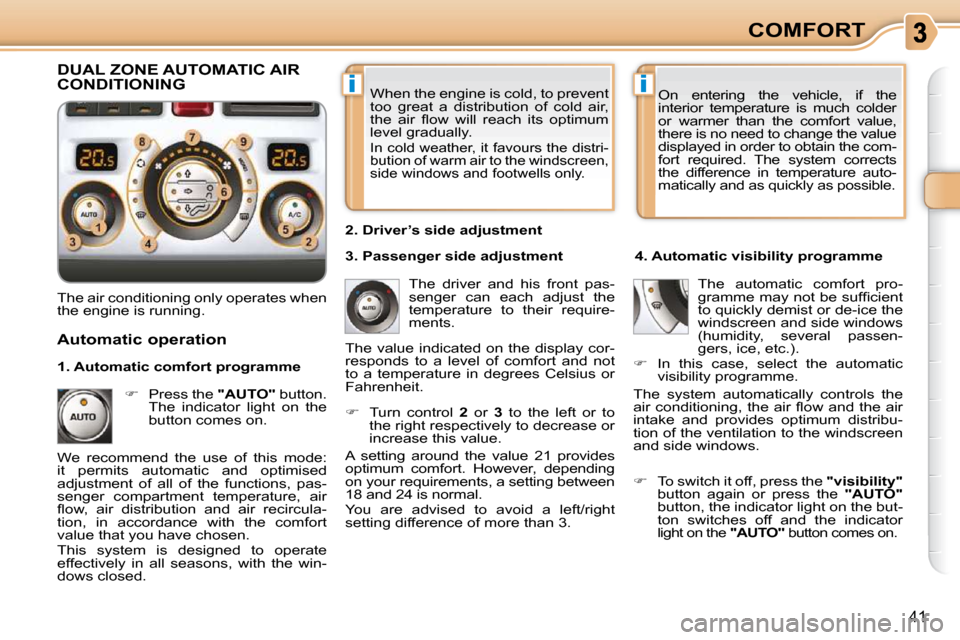
setting difference of more than 3. 4. Automatic visibility programme
The automatic comfort pro-
gramme may not be suffi cient
to quickly demist or de-ice the
windscreen and side windows
(humidity, several passen-
gers, ice, etc.).
In this case, select the automatic
visibility programme.
The system automatically controls the
air conditioning, the air fl ow and the air
intake and provides optimum distribu-
tion of the ventilation to the windscreen
and side windows.
Automatic operation
Press the "AUTO" button.
The indicator light on the
button comes on. 2. Driver’s side adjustment
DUAL ZONE AUTOMATIC AIR CONDITIONING
We recommend the use of this mode:
it permits automatic and optimised
adjustment of all of the functions, pas-
senger compartment temperature, air
fl ow, air distribution and air recircula-
tion, in accordance with the comfort
value that you have chosen.
This system is designed to operate
effectively in all seasons, with the win-
dows closed. The value indicated on the display cor-
responds to a level of comfort and not
to a temperature in degrees Celsius or
Fahrenheit.
To switch it off, press the "visibility"
button again or press the "AUTO"
button, the indicator light on the but-
ton switches off and the indicator
light on the "AUTO" button comes on.
1. Automatic comfort programme
3. Passenger side adjustment
Page 39 of 204

i
!
!
42
COMFORT
Manual operation
If you wish, you can make a different
choice from that offered by the system
by changing a setting. The other func-
tions will still be controlled automati-
cally.
Pressing the "AUTO" button returns
the system to completely automatic
operation.
Press this button to switch
off the air conditioning. 6. Air distribution adjustment
Press one or more but-
tons to direct the air fl ow
towards:
7. Air fl ow adjustment
Turn this control to the left
to decrease the air fl ow or
to the right to increase the
air fl ow.
8. Air intake/Air recirculation Switching the system off
Turn the air fl ow control to the left until
all of the indicator lights switch off.
This action switches off all of the func-
tions of the system.
Temperature related comfort is no longer
guaranteed but a slight fl ow of air, due
to the movement of the vehicle, can still
be felt.
Turn the air fl ow dial to the right or
press the "AUTO" button to reacti-
vate the system with the values set
before it was switched off.
Press this button for recir-
culation of the interior air.
The indicator light on the
button comes on.
5. Air conditioning On/Off
Avoid driving for prolonged periods
with the system off.
Avoid prolonged recirculation of
interior air (risk of condensation and
deterioration of the air quality).
- the windscreen and side windows
(de-icing or demisting),
- the windscreen, the side windows and the vents,
- the windscreen, the side windows, the vents and the footwells,
- the vents and the footwells,
- the vents,
- the footwells,
- the windscreen, the side windows and the footwells.
The air fl ow indicator lights, between
the two fans, come on progressively in
relation to the value requested.
As soon as possible, press this but-
ton again to permit the intake of out-
side air and prevent condensation.
The indicator light on the button
switches off.
For maximum cooling or heating
of the passenger compartment, it
is possible to exceed the minimum
value 14 or the maximum value 28.
Turn control 2 or 3 to the left
until "LO" is displayed or to the
right until "HI" is displayed. 9. Mono zone/Dual zone
Press this button to equa-
lise the comfort value on
the passenger side with that
on the driver’s side (mono
zone). The indicator light on
the button comes on.
Air recirculation enables the passenger
compartment to be isolated from exte-
rior odours and smoke.
Switching the system off could result in
discomfort (humidity, condensation).
Press this button again to return to
automatic operation of the air con-
ditioning. The indicator light on the
"A/C" button comes on.