ignition Citroen C4 2014.5 2.G Owners Manual
[x] Cancel search | Manufacturer: CITROEN, Model Year: 2014.5, Model line: C4, Model: Citroen C4 2014.5 2.GPages: 494, PDF Size: 21.47 MB
Page 373 of 494
05
371
USING THE TELEPHONE
Pairing a telephone
First connection
The services offered depend on the network, the SIM card and the compatibility of the Bluetooth telephone used.
Consult your telephone's manual and your operator to find out which services are available to you.
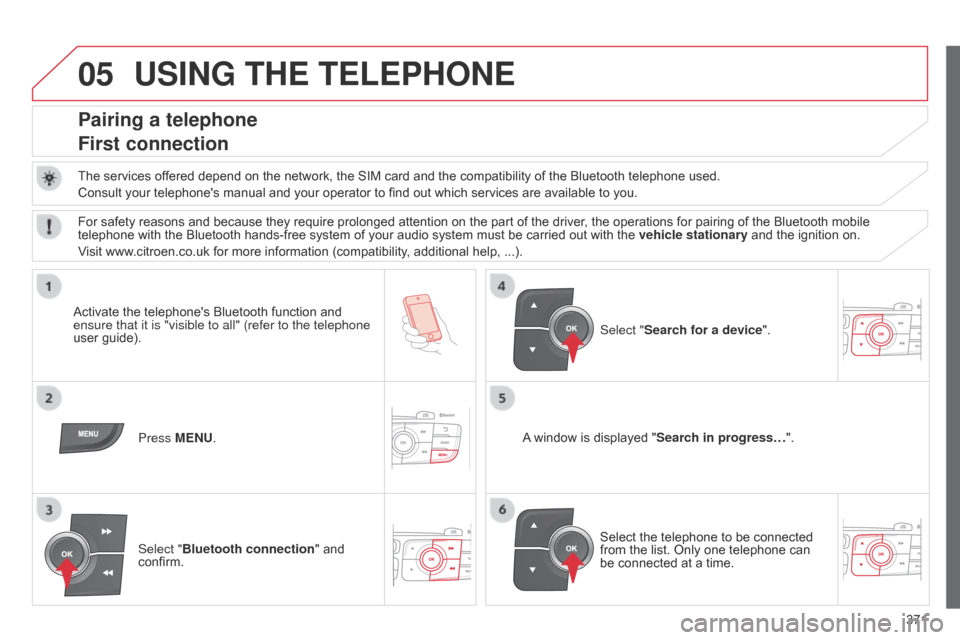
Activate
the telephone's Bluetooth function and
ensure that
it is "visible to all" (refer to the telephone
user
guide). Press MENU. A
window is displayed "Search in progress…".
Select
the telephone to be connected
from
the list. Only one telephone can
be
connected at a time.
Select "Search for a device".
For
safety reasons and because they require prolonged attention on the part of the driver, the operations for pairing of the Bluetooth mobile
telephone
with the Bluetooth hands-free system of your audio system must be carried out with the
vehicle stationary
and the ignition on.
Visit
www.citroen.co.uk for more information (compatibility, additional help, ...).
Select "Bluetooth connection "
and
confirm.
Page 393 of 494
391
Halogen headlamps .....................................23 9
Hands-free kit .............................. 3 42, 343, 371
Hazard
w
arning
lam
ps
.................................. 14
7
Headlamp
adj
ustment
.................................. 12
2
Headlamps,
d
irectional
................ 1
22, 123, 238
Headlamp
w
ash
........................................... 12
7
Head
restraints, front
..................................... 93
H
ead restraints, rear
...................................... 95
H
eated
s
eats
...............................
...................93
Heating
................
............................... 81, 82, 84
Height
and reach adjustment,
steering
w
heel
..............................
...............99
Hill start assist
.............................................. 18
5
Hooks
...............................
.............................112Intelligent T
raction
C
ontrol .......................................................14
9
Interior
f
ittings
......................................10
0,
10
1
Interior
mood
lighting
..............................
..........................131
IS
oFI
X
...............
..........................................143
ISOFIX
m
ountings......................................... 141
Jack
........
......................................................230
Jack
cable
............................................ 3
06, 368
JACK
socket
.........................1
02, 302, 306, 369
Jukebox
(playing)
.........................................3
07Labels, i
dentification ....................................2
81
Lamps,
warning and
indicator
...............................
...................16 -28
Level,
AdBlue
® additive .......................... 23, 222
Level,
brake
fluid ........................................... 2
12
Level,
power
steering
fluid
...............
.............................................. 212
Levels
and
checks
..............................
..20 9 -214
Lighting
bulbs
(replacement)
...................................... 2
38-246
Lighting
control
stalk
..................................................... 11
5 ,
11
9
Lighting
dimmer
..............................
.... 12-14, 35
Lighting,
guide-me home
...................... 1
19, 121
Lighting,
i
nterior
.................................... 13
0,
13
1
Loading
..............................
.................... 10, 258
Load
reduction mode
................................... 25
6
Locating
your
vehicle
............................... 5
6, 61
Locking
from
the inside
.................................. 65
L
ocking
the
boot............................................. 72
Long
objects,
transporting
............................ 11
0
Low fuel level
..............................
.................204
Luggage
retaining
strap
............................................................ 111
J
L
Ignition on.....................................................16 5
Indicator lamps,
status
...............
....................................... 16 -28
Indicators,
d
irection
......................1
47, 238, 240
Inflating
a
ccessories
(
using the kit)
..............................
...............229
Inflating
tyres
..............................
........... 10, 282
Inputs
for audio
system
................
................102, 302, 306, 369
Installing
s
peakers
...............................
........268
Instrument
panel
lighting
..............................
...........................35
Instrument
p
anels
...............................
.......12-14
Instrument
panel screen
................... 1
2-14, 186
I
Main beam ....................................115, 238, 241
Maintenance .............................. ....................10
Map
reading lamps
...................................... 13
0
Markings,
id
entification
................................ 2
81
M
H
Keeping children safe ........... 132-146, 154, 156key .......
.....................................................53-64
ke
y, electronic
........................................... 59
-63
Key
in ignition
warning
...............................
.......................162
Keyless
Entry and Starting
.......................53
-64
Key
not recognised
...................................... 16
4
Key
with remote
control
..................................................... 53
-58
K
.
alphabetical index
Page 407 of 494
3
Access3
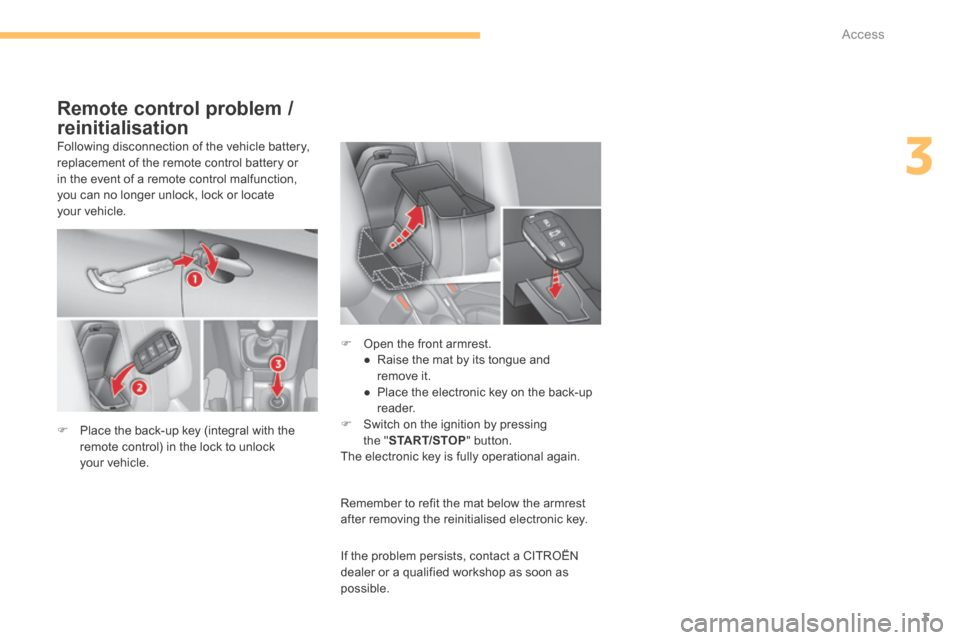
Following disconnection of the vehicle battery, replacement of the remote control battery or in the event of a remote control malfunction, you can no longer unlock, lock or locate your vehicle.
Remember to refit the mat below the armrest after removing the reinitialised electronic key.
Remote control problem /
reinitialisation
Place the back-up key (integral with the remote control) in the lock to unlock your vehicle.
Open the front armrest. ● Raise the mat by its tongue and remove it. ● Place the electronic key on the back-up reader. Switch on the ignition by pressing
the " START/STOP " button. The electronic key is fully operational again.
If the problem persists, contact a CITROËN dealer or a qualified workshop as soon as possible.
Page 410 of 494
Driving
6
Stop & Start
Operation
Going into engine STOP mode
The "ECO" warning lamp comes on in the instrument panel and the engine goes into standby automatically:
- with a manual gearbox , at speeds below 12 mph (20 km/h), or vehicle stationary with PureTech 130 petrol and BlueHDi 115 and 120 Diesel versions, when you put the gear lever into neutral and release the clutch pedal, - with an electronic gearbox , at a speed below 5 mph (8 km/h), when you press the brake pedal or place the gear lever in position N , - with an automatic gearbox, vehicle stationary, when you press the brake pedal or place the gear lever in position N .
If your vehicle is fitted with the system, a time counter calculates the sum of the periods in STOP
Special cases: STOP mode unavailable
STOP mode is not invoked when: - the vehicle is on a steep slope (up or down), - the driver's door is open, - the driver's seat belt is not fastened, - the vehicle has not exceeded 6 mph (10 km/h) since the last engine start (using the key or the "START/STOP" button), - the electric parking brake is applied or being applied, - the engine is needed to maintain a comfortable temperature in the passenger compartment, - demisting is active, - some special conditions (battery charge, engine temperature, braking assistance, ambient temperature...) where the engine is needed to assure control of a system.
In this case, the "ECO" warning lamp flashes for a few seconds, then goes of f. This operation is perfectly normal.
The Stop & Start system puts the engine temporarily into standby - STOP mode - during stops in the traffic (red lights, traffic jams, or other...). The engine restarts automatically - START mode - as soon as you want to move off. The restart takes place instantly, quickly and silently. Per fect for urban use, the Stop & Start system reduces fuel consumption and exhaust emissions as well as the noise level when stationary.
STOP mode does not affect the functionality of the vehicle, such as braking, power steering, for example. Never refuel with the engine in STOP mode; you must switch off the ignition
with the key or the "START/STOP" button.
With an electronic gearbox, for your comfort during parking manoeuvres, STOP mode is not available for a few seconds after coming out of reverse g e a r.
mode during a journey. It resets itself to zero every time the ignition is switched on with the key or the "START/STOP" button.
Page 412 of 494
Driving
8
Maintenance
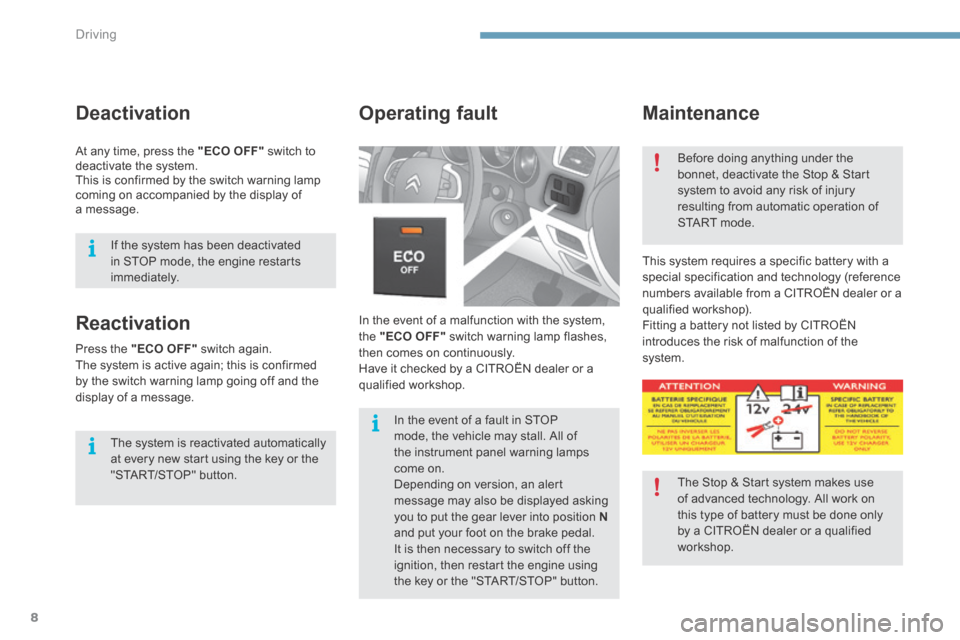
In the event of a malfunction with the system, the "ECO OFF" switch warning lamp flashes, then comes on continuously. Have it checked by a CITROËN dealer or a qualified workshop.
Operating fault
This system requires a specific battery with a special specification and technology (reference numbers available from a CITROËN dealer or a qualified workshop). Fitting a battery not listed by CITROËN introduces the risk of malfunction of the system.
Before doing anything under the bonnet, deactivate the Stop & Start system to avoid any risk of injury resulting from automatic operation of START mode.
The Stop & Start system makes use of advanced technology. All work on this type of battery must be done only by a CITROËN dealer or a qualified
workshop.
In the event of a fault in STOP mode, the vehicle may stall. All of the instrument panel warning lamps come on. Depending on version, an alert message may also be displayed asking you to put the gear lever into position Nand put your foot on the brake pedal.
It is then necessary to switch off the ignition, then restart the engine using the key or the "START/STOP" button.
Reactivation
The system is reactivated automatically at every new start using the key or the "START/STOP" button.
Press the "ECO OFF" switch again. The system is active again; this is confirmed by the switch warning lamp going off and the display of a message.
Deactivation
At any time, press the "ECO OFF" switch to deactivate the system. This is confirmed by the switch warning lamp coming on accompanied by the display of a message.
If the system has been deactivated in STOP mode, the engine restarts immediately.
Page 415 of 494
9
Driving11
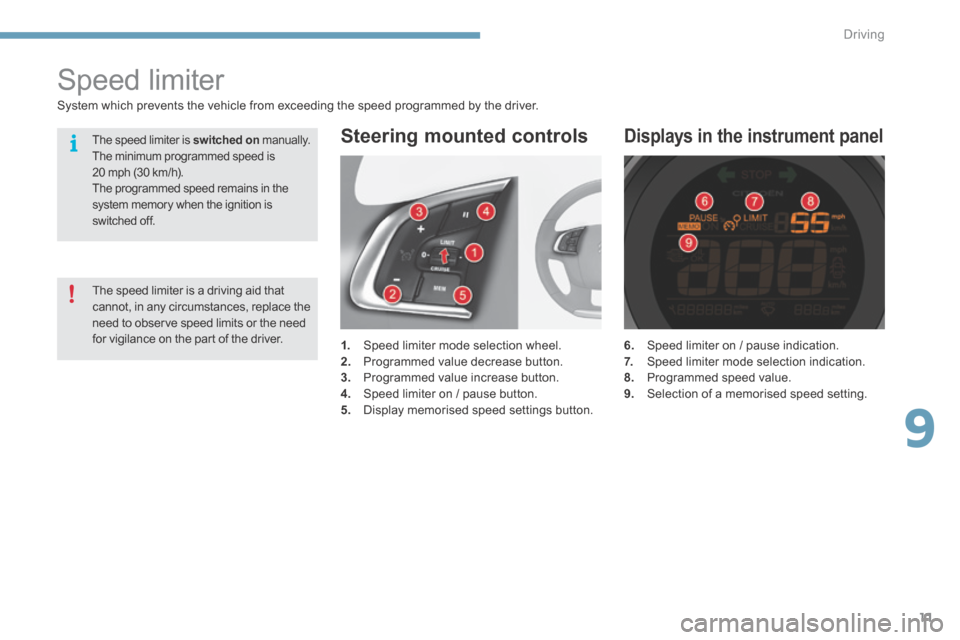
6. Speed limiter on / pause indication. 7. Speed limiter mode selection indication. 8. Programmed speed value. 9. Selection of a memorised speed setting.
Displays in the instrument panel
Speed limiter
1. Speed limiter mode selection wheel. 2. Programmed value decrease button. 3. Programmed value increase button. 4. Speed limiter on / pause button. 5. Display memorised speed settings button.
Steering mounted controls
System which prevents the vehicle from exceeding the speed programmed by the driver.
The speed limiter is a driving aid that cannot, in any circumstances, replace the need to observe speed limits or the need for vigilance on the part of the driver.
The speed limiter is switched on manually. The minimum programmed speed is 20 mph (30 km/h). The programmed speed remains in the system memory when the ignition is switched off.
Page 418 of 494
Driving
14
Cruise control
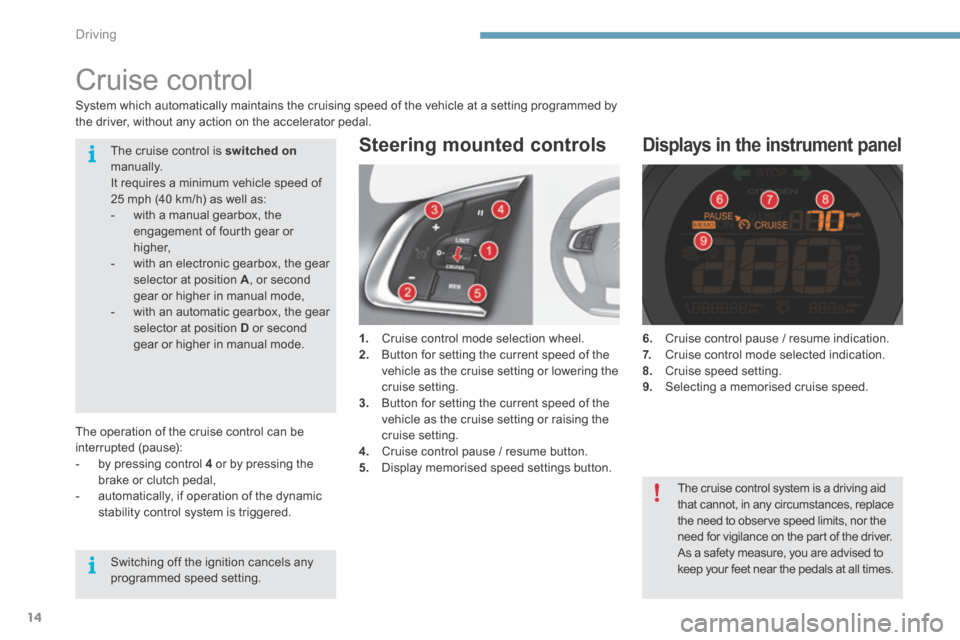
1. Cruise control mode selection wheel. 2. Button for setting the current speed of the vehicle as the cruise setting or lowering the cruise setting. 3. Button for setting the current speed of the vehicle as the cruise setting or raising the cruise setting. 4. Cruise control pause / resume button. 5. Display memorised speed settings button.
Steering mounted controls
6. Cruise control pause / resume indication. 7. Cruise control mode selected indication. 8. Cruise speed setting. 9. Selecting a memorised cruise speed.
Displays in the instrument panel
System which automatically maintains the cruising speed of the vehicle at a setting programmed by the driver, without any action on the accelerator pedal.
The operation of the cruise control can be interrupted (pause): - by pressing control 4 or by pressing the brake or clutch pedal, - automatically, if operation of the dynamic stability control system is triggered.
The cruise control is switched onmanually. It requires a minimum vehicle speed of 25 mph (40 km/h) as well as: - with a manual gearbox, the engagement of fourth gear or higher, - with an electronic gearbox, the gear selector at position A , or second gear or higher in manual mode, - with an automatic gearbox, the gear selector at position D or second gear or higher in manual mode.
Switching off the ignition cancels any programmed speed setting.
The cruise control system is a driving aid that cannot, in any circumstances, replace the need to observe speed limits, nor the
need for vigilance on the part of the driver. As a safety measure, you are advised to keep your feet near the pedals at all times.
Page 421 of 494
10
Checks17
Running out of fuel (Diesel)
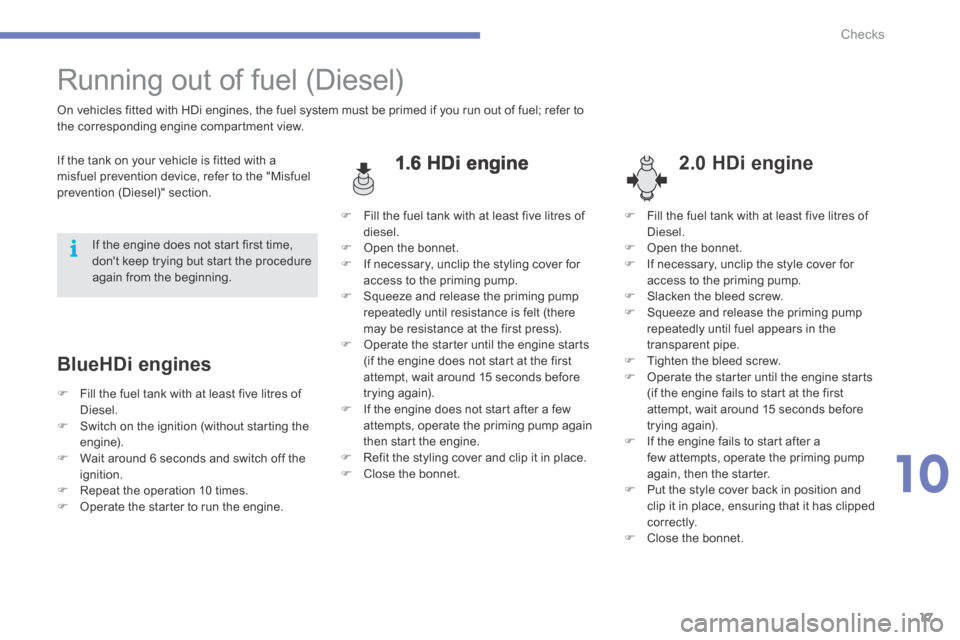
1.6 HDi engine 2.0 HDi engine
On vehicles fitted with HDi engines, the fuel system must be primed if you run out of fuel; refer to the corresponding engine compartment view.
If the tank on your vehicle is fitted with a misfuel prevention device, refer to the "Misfuel prevention (Diesel)" section.
BlueHDi engines
If the engine does not start first time, don't keep trying but start the procedure again from the beginning.
Fill the fuel tank with at least five litres of diesel. Open the bonnet. If necessary, unclip the styling cover for access to the priming pump. Squeeze and release the priming pump repeatedly until resistance is felt (there may be resistance at the first press). Operate the starter until the engine starts (if the engine does not start at the first attempt, wait around 15 seconds before trying again). If the engine does not start after a few attempts, operate the priming pump again
then start the engine. Refit the styling cover and clip it in place. Close the bonnet.
Fill the fuel tank with at least five litres of Diesel. Open the bonnet. If necessary, unclip the style cover for access to the priming pump. Slacken the bleed screw. Squeeze and release the priming pump repeatedly until fuel appears in the transparent pipe. Tighten the bleed screw. Operate the starter until the engine starts (if the engine fails to start at the first attempt, wait around 15 seconds before trying again).
If the engine fails to start after a few attempts, operate the priming pump again, then the starter. Put the style cover back in position and clip it in place, ensuring that it has clipped c o r r e c t l y. Close the bonnet.
Fill the fuel tank with at least five litres of Diesel. Switch on the ignition (without starting the engine). Wait around 6 seconds and switch off the ignition. Repeat the operation 10 times. Operate the starter to run the engine.
Page 423 of 494
.
Audio and Telematics 19
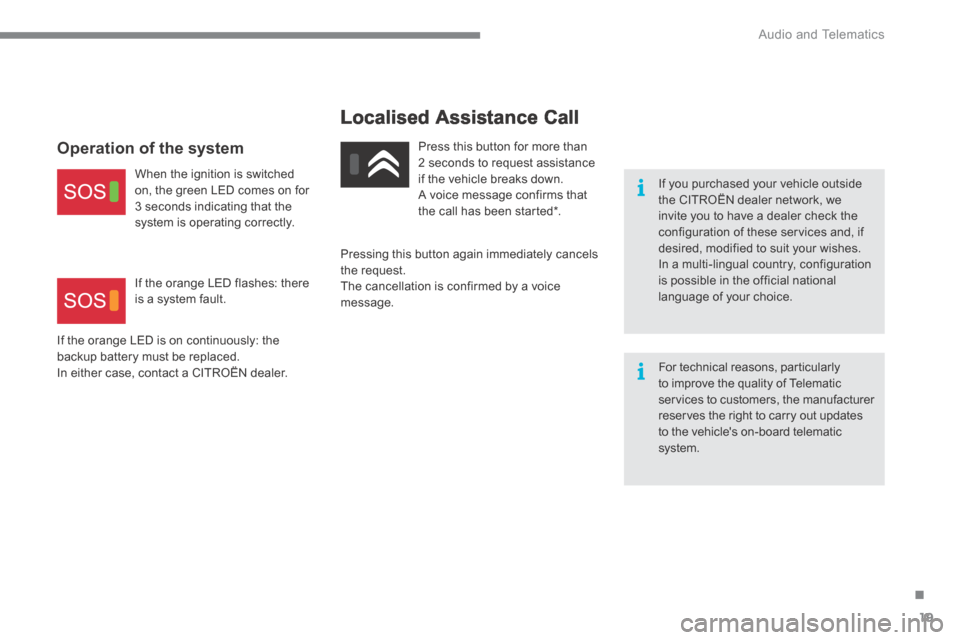
Localised Assistance Call
If you purchased your vehicle outside the CITROËN dealer network, we invite you to have a dealer check the configuration of these services and, if desired, modified to suit your wishes. In a multi-lingual country, configuration is possible in the official national language of your choice.
For technical reasons, particularly to improve the quality of Telematic services to customers, the manufacturer reserves the right to carry out updates
to the vehicle's on-board telematic system.
Press this button for more than 2 seconds to request assistance if the vehicle breaks down. A voice message confirms that the call has been started * .
Pressing this button again immediately cancels the request. The cancellation is confirmed by a voice message.
Operation of the system
When the ignition is switched on, the green LED comes on for 3 seconds indicating that the system is operating correctly.
If the orange LED is on continuously: the backup battery must be replaced. In either case, contact a CITROËN dealer.
If the orange LED flashes: there is a system fault.
Page 426 of 494
.
Audio and Telematics 23
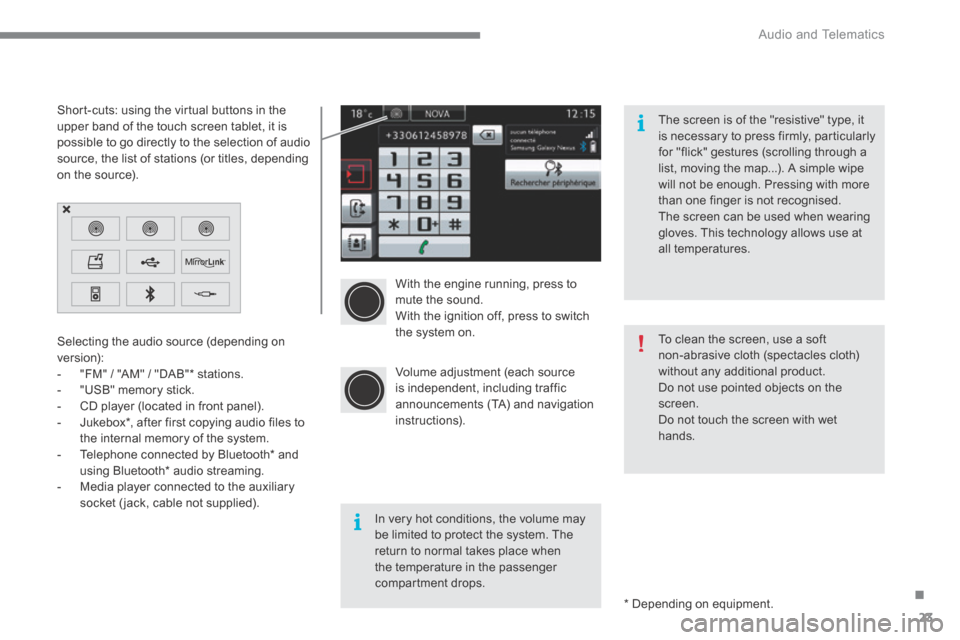
With the engine running, press to mute the sound. With the ignition off, press to switch the system on.
Volume adjustment (each source is independent, including traffic announcements (TA) and navigation instructions).
Selecting the audio source (depending on version): - "FM" / "AM" / "DAB" * stations. - "USB" memory stick. - CD player (located in front panel). - Jukebox * , after first copying audio files to
the internal memory of the system. - Telephone connected by Bluetooth * and using Bluetooth * audio streaming. - Media player connected to the auxiliary socket (jack, cable not supplied).
* Depending on equipment.
Short-cuts: using the virtual buttons in the upper band of the touch screen tablet, it is possible to go directly to the selection of audio source, the list of stations (or titles, depending on the source).
The screen is of the "resistive" type, it is necessary to press firmly, particularly for "flick" gestures (scrolling through a list, moving the map...). A simple wipe will not be enough. Pressing with more than one finger is not recognised. The screen can be used when wearing gloves. This technology allows use at all temperatures.
In very hot conditions, the volume may be limited to protect the system. The return to normal takes place when the temperature in the passenger compartment drops.
To clean the screen, use a soft non-abrasive cloth (spectacles cloth) without any additional product. Do not use pointed objects on the screen. Do not touch the screen with wet
hands.