battery Citroen C4 2015 2.G Owner's Manual
[x] Cancel search | Manufacturer: CITROEN, Model Year: 2015, Model line: C4, Model: Citroen C4 2015 2.GPages: 494, PDF Size: 20.49 MB
Page 5 of 494
C4-2_en_Chap00a_sommaire_ed01-2015
C4-2_en_Chap00a_sommaire_ed01-2015
Technical data
Checks
Practical
i
nformation
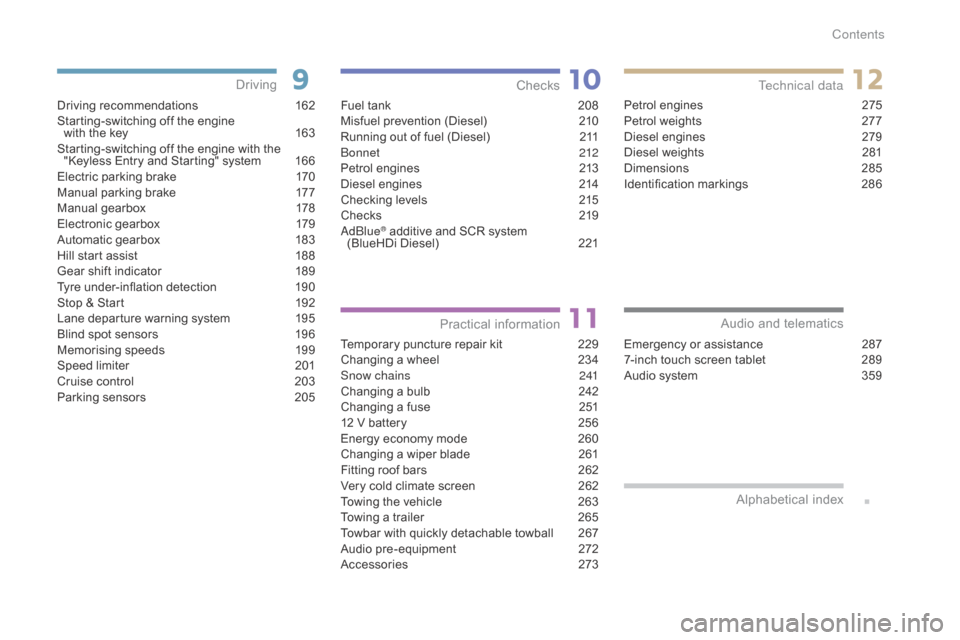
Driving recommendations 1 62
Starting-switching off the engine
with
the key
1
63
Starting-switching
off the engine with the
"
Keyless Entry and Starting" system
1
66
Electric
parking brake
1
70
Manual
par
king
b
rake
1
77
Manual
g
earbox
1
78
Electronic
gearbox
1
79
Automatic
gearbox
1
83
Hill
start assist
1
88
Gear
shift indicator
1
89
Tyre
under-inflation detection
1
90
Stop
& Start
1
92
Lane
departure warning system
1
95
Blind
spot sensors
1
96
Memorising
speeds
1
99
Speed
l
imiter
20
1
Cruise
control
2
03
Parking
sensors
2
05
Driving
Emergency or assistance 2 87
7-inch touch screen tablet 2 89
Audio
system
3
59
Audio and telematics
Alphabetical
in
dex
Fuel tank 2 08
Misfuel prevention (Diesel) 2 10
Running
out of fuel (Diesel)
2
11
bo
nnet
212
Petrol
engines
2
13
Diesel
engines
2
14
Checking
levels
2
15
Checks
2
19
a
d
blu
e
® additive and SCR system
(
BlueHDi Diesel) 2 21
Temporary
puncture repair kit
2
29
Changing
a wheel
2
34
Snow chains
2
41
Changing
a bulb
2
42
Changing
a fuse
2
51
12
V
battery
2
56
Energy
economy mode
2
60
Changing
a wiper blade
2
61
Fitting
roof bars
2
62
Very
cold climate screen
2
62
Towing
the vehicle
2
63
Towing
a trailer
2
65
Towbar
with quickly detachable towball
2
67
Audio
pre-equipment
2
72
Accessories
2
73Petrol
engines
2
75
Petrol weights
2
77
Diesel engines
2
79
Diesel weights
2
81
Dimensions
2
85
Identification
ma
rkings
2
86
Contents
Page 6 of 494
4
C4-2_en_Chap00b_vue-ensemble_ed01-2015
C4-2_en_Chap00b_vue-ensemble_ed01-2015
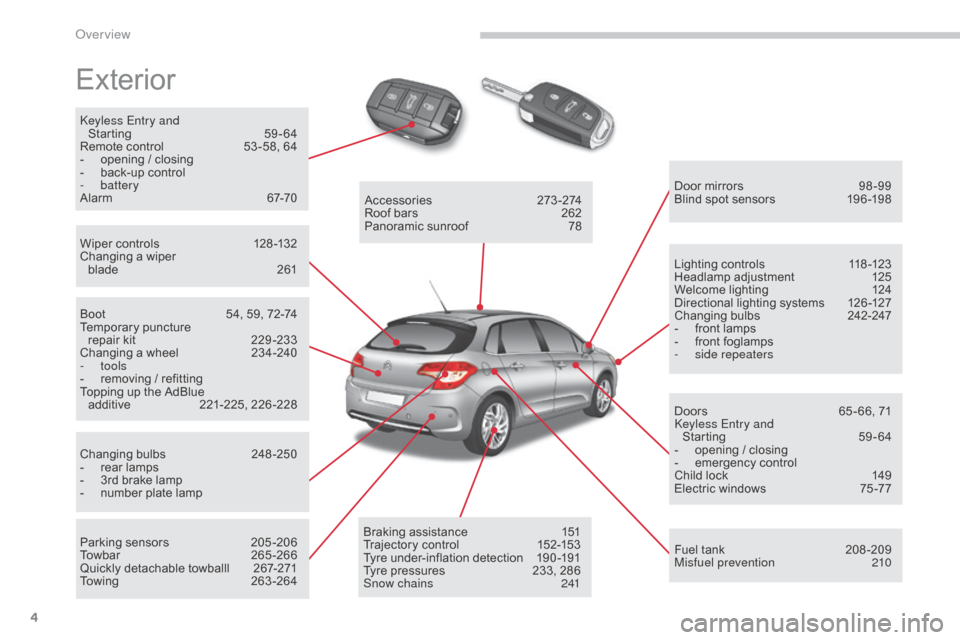
Exterior
keyless Entry and Starting 5 9-64
Remote
control
5
3 -58, 64
-
o
pening / closing
-
b
ack-up control
-
battery
Alarm
6
7-70
Wiper
controls
1
28 -132
Changing
a wiper
blade
2
61 Door
mirrors
9
8 -99
Blind
spot sensors
1
96 -198
Boot
5
4, 59, 72-74
Temporary
pu
ncture
r
epair kit
2
29 -233
Changing
a wheel
2
34-240
-
tools
-
r
emoving / refitting
Topping
up the AdBlue
a
dditive
2
21-225,
2
26-228
Changing
bu
lbs
2
48-250
-
r
ear lamps
-
3
rd brake lamp
-
n
umber plate lamp
Parking
sensors
2
05 -206
Towbar
26
5-266
Quickly
detachable towballl
2
67-271
Towing
26
3-264Accessories
2
73-274
Roof
bars
2
62
Panoramic
sunroof
7
8
Braking
assistance
1
51
Trajectory
control
1
52-153
Tyre
under-inflation detection
1
90 -191
Tyre
pressures
2
33, 286
Snow chains
2
41Lighting
controls
1
18 -123
Headlamp
adj
ustment
1
25
Welcome
lighting
1
24
Directional
lighting systems
1
26 -127
Changing
bu
lbs
2
42-247
-
f
ront lamps
-
f
ront foglamps
-
si
de repeaters
Doors
6
5 - 66, 71
ke
yless Entry and
Starting
5
9-64
-
o
pening / closing
-
em
ergency
c
ontrol
Child
lock
1
49
Electric
windows
7
5 -77
Fuel
tank
2
08 -209
Misfuel prevention
2
10
over view
Page 11 of 494
9
C4-2_en_Chap00b_vue-ensemble_ed01-2015
C4-2_en_Chap00b_vue-ensemble_ed01-2015
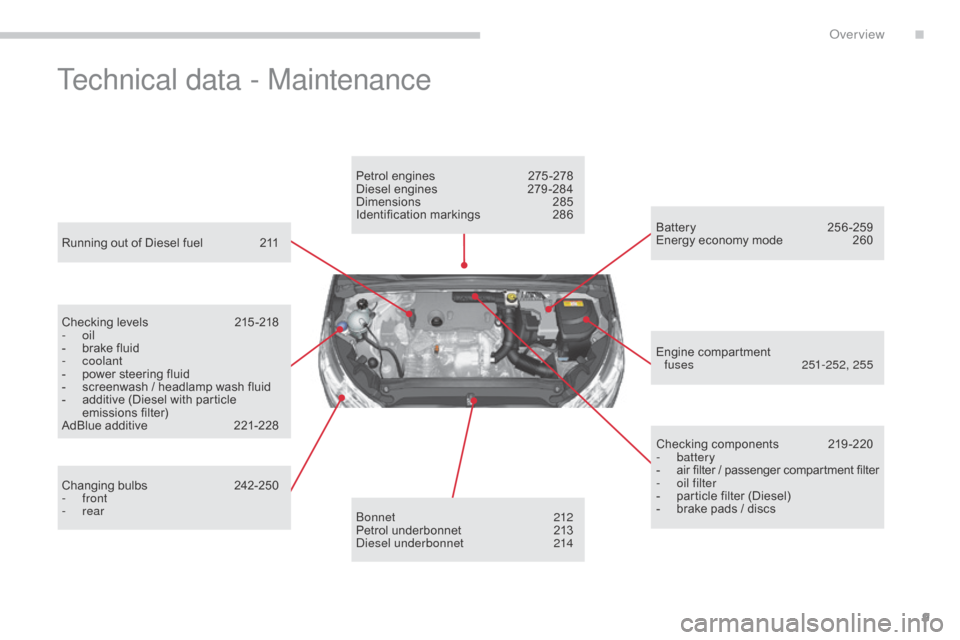
Technical data - Maintenance
Running out of Diesel fuel 211
Checking levels
2
15 -218
-
oil
-
b
rake fluid
-
coolant
-
p
ower steering fluid
-
s
creenwash / headlamp wash fluid
-
a
dditive (Diesel with particle
e
missions
f
ilter)
AdBlue
additive
2
21-228
Changing
bu
lbs
2
42-250
-
front
-
rear Petrol
engines
2
75 -278
Diesel engines
2
79 -284
Dimensions
2
85
Identification
ma
rkings
2
86
bo
nnet
212
Petrol
underbonnet
2
13
di
esel underbonnet
2
14Checking
c
omponents
2
19-220
-
battery
-
a
ir filter / passenger compartment filter
-
o
il filter
-
p
article filter (Diesel)
-
b
rake pads / discs
Battery 2
56-259
Energy economy mode 2 60
Engine
c
ompartment
f
uses
25
1-252, 255
.
over view
Page 19 of 494
17
C4-2_en_Chap01_controle-de-marche_ed01-2015
C4-2_en_Chap01_controle-de-marche_ed01-2015
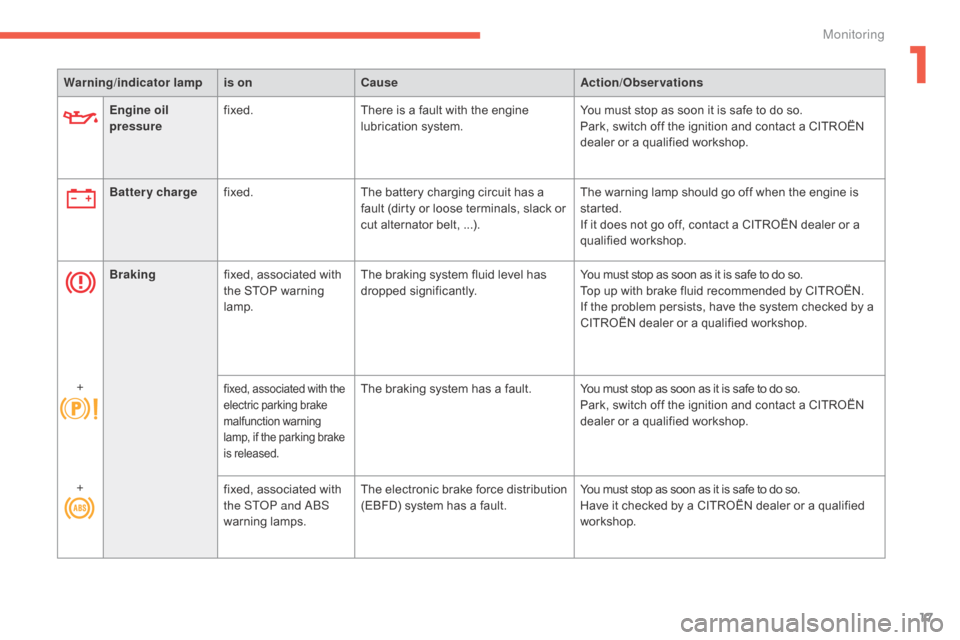
Engine oil
pressurefixed.
There is a fault with the engine l
ubrication system.You
must stop as soon it is safe to do so.
Park, switch off the ignition and contact a CITROËN
d
ealer or a qualified workshop.
Warning
/indicator lampis on Cause Action/Observations
Battery charge fixed. The
battery charging circuit has a
f
ault (dirty or loose terminals, slack or
c
ut alternator belt, ...).The
warning lamp should go off when the engine is
s
tarted.
If
it does not go off, contact a CITROËN dealer or a
q
ualified
w
orkshop.
Braking fixed,
associated with
t
he STOP warning
lam
p.The
braking system fluid level has
d
ropped
s
ignificantly.You
must stop as soon as it is safe to do so.
Top
up with brake fluid recommended by CITROËN.
If
the problem persists, have the system checked by a
C
ITROËN dealer or a qualified workshop.
+
fixed, associated with the e lectric parking brake m
alfunction
w
arning
l
amp, if the parking brake
i
s
r
eleased.The braking system has a fault. Y ou must stop as soon as it is safe to do so.
Park, switch off the ignition and contact a CITROËN
d
ealer or a qualified workshop.
+ fixed,
associated
with
t
he ST
oP a
nd
ab
S
w
arning
lam
ps. The
e
lectronic
b
rake
f
orce
d
istribution
(
EBFD) system has a fault.You
must stop as soon as it is safe to do so.
Have
it checked by a CITROËN dealer or a qualified
w
orkshop.
1
Monitoring
Page 21 of 494
19
C4-2_en_Chap01_controle-de-marche_ed01-2015
C4-2_en_Chap01_controle-de-marche_ed01-2015
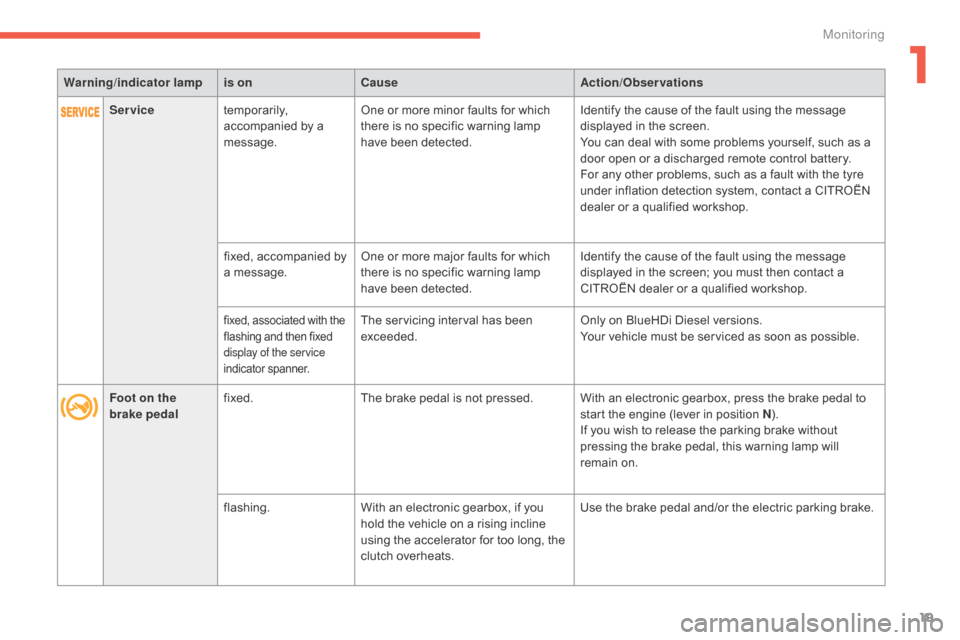
Warning/indicator lampis on Cause Action/Observations
Foot on the
brake pedal fixed.
The
brake pedal is not pressed. With an electronic gearbox, press the brake pedal to
s
tart the engine (lever in position N).
If
you wish to release the parking brake without
p
ressing the brake pedal, this warning lamp will
r
emain on.
flashing. With
an electronic gearbox, if you
h
old the vehicle on a rising incline
u
sing the accelerator for too long, the
c
lutch overheats.Use
the brake pedal and/or the electric parking brake.
Service
temporarily,
a
ccompanied by a
m
essage.One
or more minor faults for which
t
here is no specific warning lamp
h
ave been detected.Identify
the cause of the fault using the message
d
isplayed in the screen.
You
can deal with some problems yourself, such as a
d
oor open or a discharged remote control battery.
For
any other problems, such as a fault with the tyre
u
nder inflation detection system, contact a CITROËN
d
ealer or a qualified workshop.
fixed,
accompanied by
a
message.One
or more major faults for which
t
here is no specific warning lamp
h
ave been detected.Identify
the cause of the fault using the message
d
isplayed in the screen; you must then contact a
C
ITROËN dealer or a qualified workshop.
fixed, associated with the flashing and then fixed d
isplay of the service
indicator
span
ner.The servicing interval has been exceeded. Only
on BlueHDi Diesel versions.
Your vehicle must be serviced as soon as possible.
1
Monitoring
Page 34 of 494
32
C4-2_en_Chap01_controle-de-marche_ed01-2015
C4-2_en_Chap01_controle-de-marche_ed01-2015
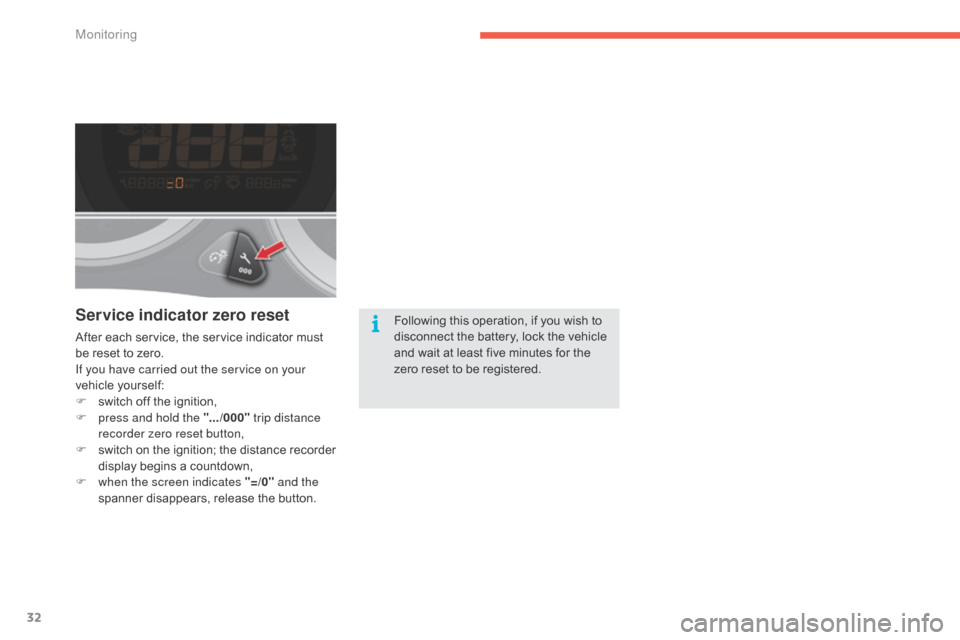
Service indicator zero reset
After each service, the service indicator must be reset to zero.
If you have carried out the service on your
vehicle
y
ourself:
F
s
witch off the ignition,
F
p
ress and hold the ".../000" trip distance
recorder zero reset button,
F
s
witch
o
n
t
he
i
gnition;
t
he
d
istance
r
ecorder
d
isplay begins a countdown,
F
w
hen the screen indicates "=/0" and the
spanner
disappears, release the button.Following
this operation, if you wish to d
isconnect the battery, lock the vehicle a
nd wait at least five minutes for the
z
ero reset to be registered.
Monitoring
Page 59 of 494
57
C4-2_en_Chap03_ouvertures_ed01-2015
C4-2_en_Chap03_ouvertures_ed01-2015
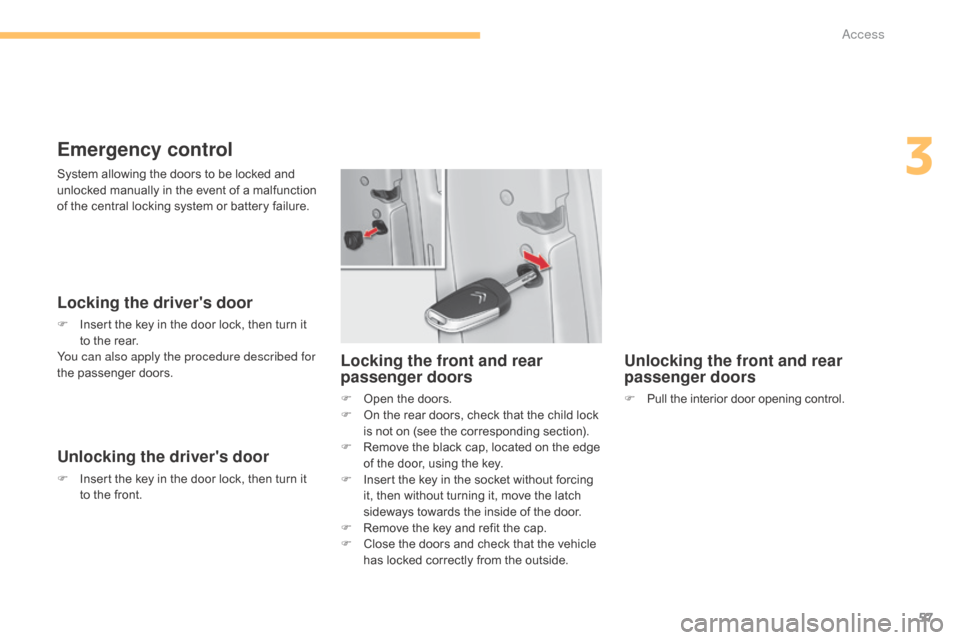
Emergency control
Locking the driver's door
F Insert the key in the door lock, then turn it t
o the rear.
You can also apply the procedure described for
the
p
assenger
do
ors.
Unlocking the driver's door
F Insert the key in the door lock, then turn it t
o the front.
Unlocking the front and rear
passenger doors
F Pull the interior door opening control.
Locking the front and rear
passenger doors
F Open the doors.
F O n the rear doors, check that the child lock
i
s not on (see the corresponding section).
F
R
emove the black cap, located on the edge
o
f the door, using the key.
F
I
nsert the key in the socket without forcing
i
t, then without turning it, move the latch
s
ideways towards the inside of the door.
F
R
emove the key and refit the cap.
F
C
lose the doors and check that the vehicle
h
as locked correctly from the outside.
System
allowing
the
doors
to
be
locked
and
u
nlocked
manually
in
the
event
of
a
malfunction
o
f
the
central
locking
system
or
battery
failure.
3
Access
Page 60 of 494
58
C4-2_en_Chap03_ouvertures_ed01-2015
C4-2_en_Chap03_ouvertures_ed01-2015
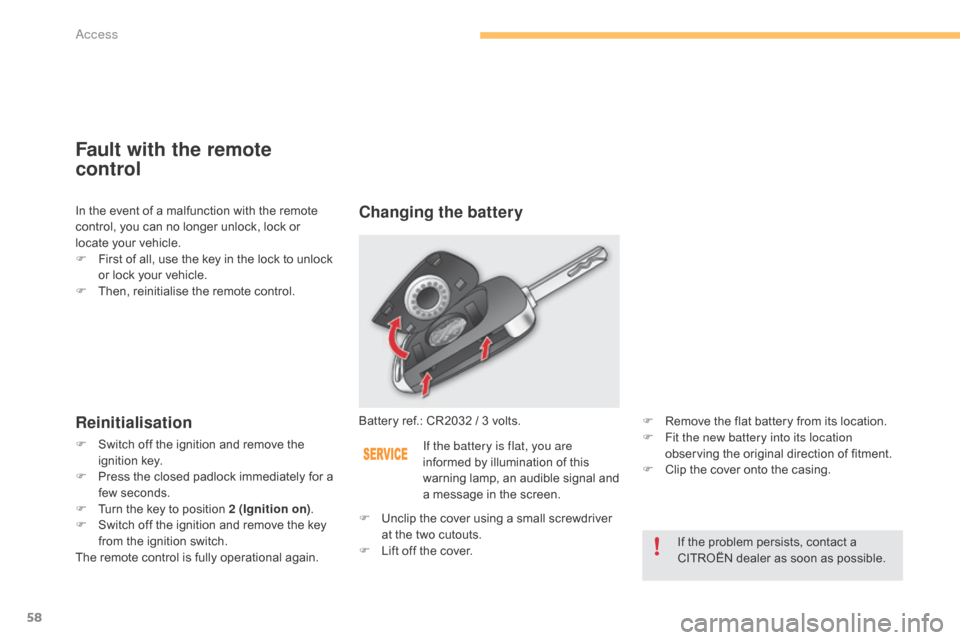
Fault with the remote
control
Reinitialisation
F Switch off the ignition and remove the ig
nition k ey.
F
P
ress the closed padlock immediately for a
f
ew seconds.
F
T
urn the key to position 2 (Ignition on).
F
S
witch off the ignition and remove the key
f
rom the ignition switch.
The
remote control is fully operational again.Battery
ref.: CR2032 / 3 volts.
Changing the battery
If the battery is flat, you are
informed
by illumination of this
w
arning lamp, an audible signal and
a
message in the screen. F
R
emove the flat battery from its location.
F F it the new battery into its location
observing the original direction of fitment.
F
C
lip the cover onto the casing.
If
the problem persists, contact a
C
ITROËN dealer as soon as possible.
F
U
nclip
the cover using a small screwdriver
a
t
the
two cutouts.
F
L
ift
off
the cover.
In
the
event
of
a
malfunction
with
the
remote
c
ontrol,
you
can
no
longer
unlock,
lock
or
l
ocate
your
vehicle.
F
F
irst
of
all,
use
the
key
in
the
lock
to
unlock
o
r
lock
your
vehicle.
F
T
hen,
reinitialise
the
remote
control.
Access
Page 62 of 494
60
C4-2_en_Chap03_ouvertures_ed01-2015
C4-2_en_Chap03_ouvertures_ed01-2015
Locking the vehicle
Normal locking
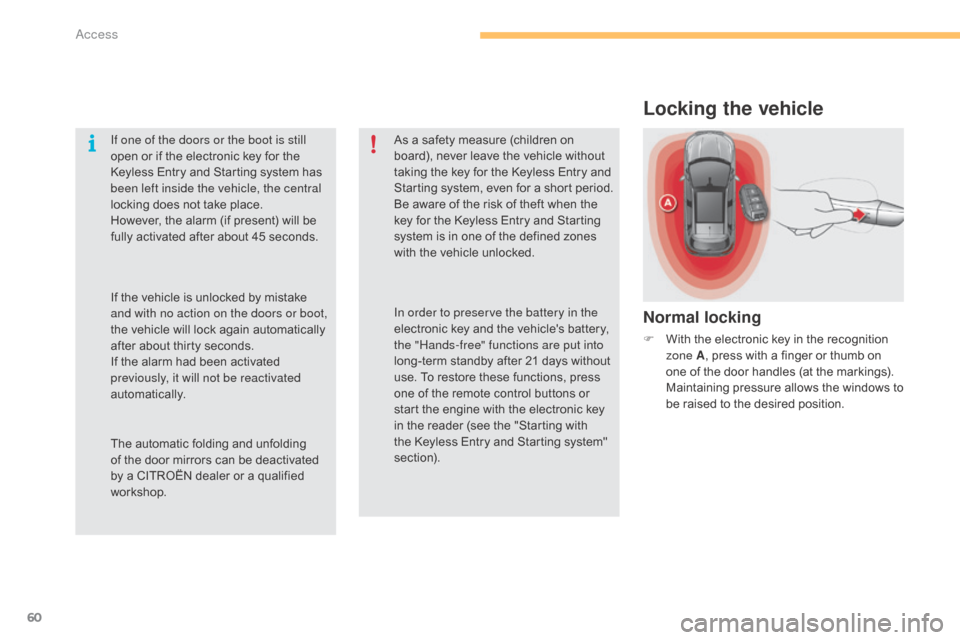
F With the electronic key in the recognition z
one A ,
press with a finger or thumb on
o
ne of the door handles (at the markings).
M
aintaining pressure allows the windows to
b
e raised to the desired position.
If one of the doors or the boot is still
open
or
if
the
electronic
key
for
the
K
eyless
Entry
and
Starting
system
has
b
een left inside the vehicle, the central
locking
does
not
take
place.
However,
the
alarm
(if
present)
will
be
f
ully
activated
after
about
45
seconds.
As
a
safety
measure
(children
on
b
oard),
never
leave
the
vehicle
without
t
aking
the
key
for
the
Keyless
Entry
and
S
tarting
system,
even
for
a
short
period.
Be
aware
of
the
risk
of
theft
when
the
k
ey
for
the
Keyless
Entry
and
Starting
s
ystem
is
in
one
of
the
defined
zones
w
ith
the
vehicle
unlocked.
The
automatic
folding
and
unfolding
o
f
the
door
mirrors
can
be
deactivated
b
y
a
CITROËN
dealer
or
a
qualified
w
orkshop. In order to preserve the battery in the
electronic
key
and
the
vehicle's
battery,
t
he "Hands-free" functions are put into
long-term
standby
after
21
days
without
u
se.
To
restore
these
functions,
press
o
ne
of
the
remote
control
buttons
or
s
tart
the
engine
with
the
electronic
key
i
n
the
reader
(see
the
"Starting
with
t
he
Keyless
Entry
and
Starting
system"
s
ection).
If
the
vehicle
is
unlocked
by
mistake
a
nd with no action on the doors or boot,
the
vehicle
will
lock
again
automatically
a
fter
about
thirty
seconds.
If
the
alarm
had
been
activated
p
reviously, it will not be reactivated
automatically.
Access
Page 64 of 494
62
C4-2_en_Chap03_ouvertures_ed01-2015
C4-2_en_Chap03_ouvertures_ed01-2015
Back-up key
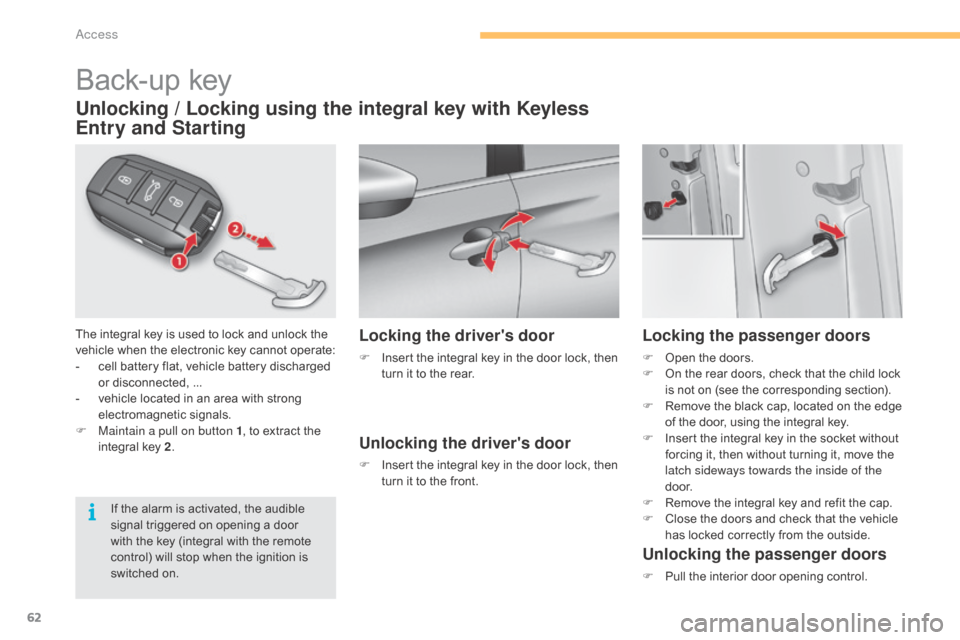
The integral key is used to lock and unlock the vehicle when the electronic key cannot operate:
-
c
ell battery flat, vehicle battery discharged
o
r disconnected, ...
-
v
ehicle located in an area with strong
e
lectromagnetic
si
gnals.
F
M
aintain a pull on button 1 ,
to extract the
i
ntegral key 2.
Unlocking / Locking using the integral key with Keyless
Entry and Starting
If the alarm is activated, the audible s
ignal triggered on opening a door
w
ith the key (integral with the remote
c
ontrol) will stop when the ignition is
s
witched on.
Locking the driver's door
F Insert the integral key in the door lock, then t
urn it to the rear.
Unlocking the driver's door
F Insert the integral key in the door lock, then t
urn it to the front.
Locking the passenger doors
F Open the doors.
F O n the rear doors, check that the child lock
i
s not on (see the corresponding section).
F
R
emove the black cap, located on the edge
o
f the door, using the integral key.
F
I
nsert the integral key in the socket without
f
orcing it, then without turning it, move the
l
atch sideways towards the inside of the
d o o r.
F
R
emove the integral key and refit the cap.
F
C
lose the doors and check that the vehicle
h
as locked correctly from the outside.
Unlocking the passenger doors
F Pull the interior door opening control.
access