ignition CITROEN C4 CACTUS 2017 User Guide
[x] Cancel search | Manufacturer: CITROEN, Model Year: 2017, Model line: C4 CACTUS, Model: CITROEN C4 CACTUS 2017Pages: 256, PDF Size: 7.62 MB
Page 24 of 256

22
Remaining range between 1,500 and 375 miles
(2,400 and 600 km) (1.6 BlueHDi Euro 6.1)
Remaining range between 500 and 60 miles
(800 and 100 km) (1.5 BlueHDi Euro 6.2)
In the event of the risk of non-
starting related to a lack of
AdBlue
®
The engine starting prevention system
required by regulations is activated
automatically once the AdBlue
® tank is
e m pt y.
Range greater than 1,500 miles (2,400 km)
When switching on the ignition, there is no
automatic display of range in the instrument
panel.
Range less than 1,500 miles (2,400 km)
You can check the remaining range for your
vehicle at any time on the touch screen. Remaining range between 1,500 and 500 miles
(2,400 and 800
km) (1.5 BlueHDi Euro 6.2)
These messages are accompanied by the
recommendation not to top up with more than
10 litres of AdBlue.
F
Y
ou can access this information
via the Driving/Vehicle touch
screen menu, by selecting the
" Driving functions " tab, then
" Diagnostics ". When switching on the ignition, this warning
lamp comes on for about thirty seconds,
accompanied by the display of a message ("NO
START IN and a distance" or "Top up AdBlue:
Starting impossible in x miles/km") indicating
the remaining range expressed in miles or
kilometres.
The reser ve level has been reached; it is
recommended that you top up as soon as
possible.
When switching on the ignition, this warning
lamp comes on, accompanied by an audible
signal and the display of a message ("NO
START IN and a distance" or "Top up AdBlue:
Starting impossible in x miles/km") indicating
the remaining range expressed in miles or
kilometres. When driving, the message comes up every
185 miles (300 km) until the tank is topped up.
The reser ve level has been reached; it is
recommended that you top up as soon as
possible.
When switching on the ignition, this warning
lamp comes on, accompanied by an audible
signal (1 beep) and the display of a message
("NO START IN and a distance" or "Top up
AdBlue: Starting impossible in x miles/km")
indicating the remaining range expressed in
miles or kilometres.
When driving, the audible signal and the
message display are triggered every 60 miles
(100 km) until the level is topped up.
It is essential to top up as soon as possible and
before the tank is completely empty, other wise
it will not be possible to restart the engine.
Instruments
Page 25 of 256

23
Remaining range less than 375 miles
(600 km) (1.6 BlueHDi Euro 6.1)
Remaining range less than 60 miles
(100
km) (1.5 BlueHDi Euro 6.2)
When switching on the ignition, this warning
lamp flashes, accompanied by the permanent
lighting of the Ser vice warning lamp, an audible
signal and the display of a message ("NO
START IN and a distance" or "Top up AdBlue:
Starting impossible in x miles/km") indicating
the remaining range expressed in miles or
kilometres.
When driving, this message is displayed every
thirty seconds until the AdBlue level has been
topped up.
It is essential to top up as soon as possible and
before the tank is completely empty, other wise
it will not be possible to restart the engine.
When switching on the ignition, this warning
lamp flashes, accompanied by an audible
signal (1 beep) and the display of a message
("NO START IN and a distance" or "Top up
AdBlue: Starting impossible in x miles/km")
indicating the remaining range expressed in
miles or kilometres. When driving, the audible signal and the
message display are triggered every 6 miles
(10 km) until the AdBlue tank is topped up.
It is essential to top up as soon as possible and
before the tank is completely empty, other wise
it will not be possible to restart the engine.
Breakdown due to a lack of AdBlue
®
When switching on the ignition, this warning
lamp flashes and the Service warning lamp
comes on, accompanied by an audible signal
and the temporary display of "NO START IN
0 km or miles" or "Top up AdBlue: Starting
impossible".
The AdBlue
® tank is empty: the starting
prevention system required by legislation
prevents starting of the engine.
To be able to restart the engine, it is
essential to add at least 5 litres of AdBlue
®
to its tank.
For more information on AdBlue
®
(BlueHDi engines) , and, in particular,
on topping up, refer to the corresponding
section.
In the event of a fault with the
SCR emissions control system
A system that prevents engine starting is
activated automatically from 685 miles
(1,100 km) after confirmation of a fault with
the SCR emissions control system.
Have the system checked by a CITROËN
dealer or a qualified workshop as soon as
possible.
In the event of the detection of a fault
If it is a temporary fault, the alert
disappears during the next journey,
after self-diagnostic checks of the SCR
emissions control system.
These warning lamps come on, accompanied
by an audible signal and the display of the
"Emissions fault" message.
The alert is triggered while driving as soon
as the fault is detected for the first time, then
when switching on the ignition for subsequent
journeys, while the fault persists.
1
Instruments
Page 26 of 256
24
While driving, the message is displayed every
thirty seconds while the fault with the SCR
emissions control system persists.
The alert is repeated when switching on the
ignition.
You should go to a CITROËN dealer or a
qualified workshop as soon as possible.
Other wise you will not be able to restart the
vehicle.
Starting preventedYou have exceeded the authorised driving
limit: the starting prevention system
inhibits engine starting.
To be able to restart the engine, you must call a
CITROËN dealer or a qualified workshop.
During the permitted driving phase
(between 685 and 0 miles (1,100 and 0 km))
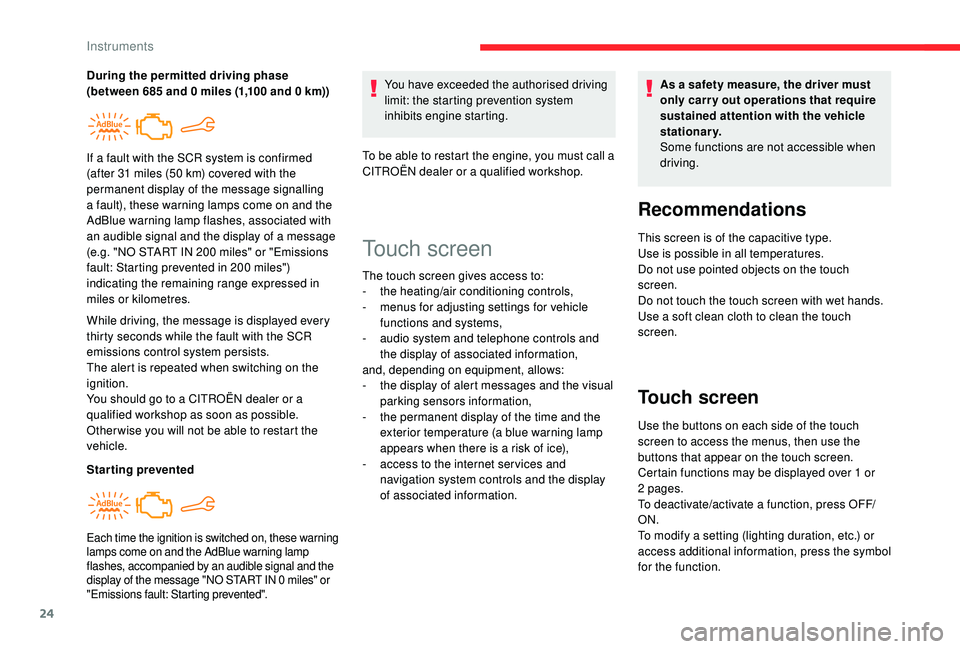
If a fault with the SCR system is confirmed
(after 31 miles (50 km) covered with the
permanent display of the message signalling
a fault), these warning lamps come on and the
AdBlue warning lamp flashes, associated with
an audible signal and the display of a message
(e.g. "NO START IN 200 miles" or "Emissions
fault: Starting prevented in 200 miles")
indicating the remaining range expressed in
miles or kilometres.
Each time the ignition is switched on, these warning
lamps come on and the AdBlue warning lamp
flashes, accompanied by an audible signal and the
display of the message "NO START IN 0 miles" or
"Emissions fault: Starting prevented".
Touch screen
The touch screen gives access to:
- t
he heating/air conditioning controls,
-
m
enus for adjusting settings for vehicle
functions and systems,
-
a
udio system and telephone controls and
the display of associated information,
and, depending on equipment, allows:
-
t
he display of alert messages and the visual
parking sensors information,
-
t
he permanent display of the time and the
exterior temperature (a blue warning lamp
appears when there is a risk of ice),
-
a
ccess to the internet ser vices and
navigation system controls and the display
of associated information. As a safety measure, the driver must
only carry out operations that require
sustained attention with the vehicle
stationary.
Some functions are not accessible when
driving.
Recommendations
This screen is of the capacitive type.
Use is possible in all temperatures.
Do not use pointed objects on the touch
screen.
Do not touch the touch screen with wet hands.
Use a soft clean cloth to clean the touch
screen.
Touch screen
Use the buttons on each side of the touch
screen to access the menus, then use the
buttons that appear on the touch screen.
Certain functions may be displayed over 1 or
2 pages.
To deactivate/activate a function, press OFF/
ON.
To modify a setting (lighting duration, etc.) or
access additional information, press the symbol
for the function.
Instruments
Page 30 of 256

28
- The trip "1" tab with:
• t he average speed,
•
t
he average fuel consumption,
•
t
he distance travelled, for the first trip.
-
T
he trip " 2" tab with:
•
t
he average speed,
•
t
he average fuel consumption,
•
t
he distance travelled, for the second trip.
Resetting the trip recorder
F When the desired trip is displayed, press the "Reset" button or the end of the wiper
control stalk until zeros appear.
Tr i p s " 1" and " 2" are independent.
For example, trip " 1" can be used for daily
figures, and trip " 2" for monthly figures.
A few definitions…
Range
(miles or km)
The distance which can still be
travelled with the fuel remaining in
the tank (related to the average fuel
consumption over the last few miles
(kilometres) travelled). This value may fluctuate if a change
of driving style or terrain results in a
significant change in the current fuel
consumption.
Dashes are displayed when the range falls
below 19 miles (30 km).
After filling with at least 5 litres of fuel, the
range is recalculated and is displayed if it
exceeds 60 miles (100 km).
If dashes instead of figures continue to
be displayed when driving, contact a
CITROËN dealer or a qualified workshop.
Current fuel consumption
(mpg or l/100 km or km/l) Calculated during the last few
seconds.
This function is only displayed at speeds
above 19 mph (30 km/h).
Average fuel consumption
(mpg or l/100 km or km/l) Calculated since the last trip
computer reset.
Average speed
(mph or km/h)
Calculated since the last trip
computer reset.
Distance travelled
(miles or km)Calculated since the last trip
computer reset.
Stop & Star t time counter
(minutes/seconds or hours/minutes)
A cumulative time counter for periods in STOP
mode during a journey.
It resets to zero every time the ignition is
switched on.
Distance recorders
The total and trip distances are displayed for
thirty seconds when the ignition is switched off,
when the driver's door is opened and when the
vehicle is locked or unlocked.
Instruments
Page 33 of 256

31
Remote control and key
The remote control can be used for the
following remote functions, depending on
version:
-
u
nlocking/locking/deadlocking the vehicle,
-
u
nlocking and partial opening of the boot,
-
o
pening the fuel tank cap (without
K
eyless
Entry and Starting),
-
l
ocking/unlocking the fuel filler flap (with
K
eyless Entry and Starting),
-
l
ocating the vehicle,
-
v
ehicle immobiliser.
The remote control includes a conventional key
that allows the central locking or unlocking of
the vehicle using the door lock, and starting
and switching off the engine.
Under normal operating conditions, it is
preferable to use the remote control.
Integral key
Ejecting the key
Version without K eyless Entr y and Star ting
F T o eject the key from the housing, press the
button.
F
P
ress the button before folding the key back
to avoid damaging the mechanism.
Version with
K
eyless Entr y and Star ting
F
T
o eject the key from the housing, pull and
hold the button.
F
P
ull and hold the button before returning the
key.
Emergency procedures allow the vehicle to
be locked or unlocked in the event of a failure
of the remote control, the central locking,
the battery, etc. For more information on
the Emergency procedures
, refer to the
corresponding section.
Remote control function
The key built into the remote control can be
used for the following functions, depending on
version:
-
u
nlocking/locking/deadlocking the vehicle,
-
t
urning the manual child lock on or off,
-
a
ctivating/deactivating the front passenger
airbag,
-
em
ergency door locking,
-
s
witching on the ignition and starting/
switching off the engine.
2
Access
Page 38 of 256

36
Remote control
The high frequency remote control is a
sensitive system; do not handle it in your
pocket as it may unlock the vehicle without
you being aware of it.
Do not repeatedly press the buttons of your
remote control out of range and out of sight
of your vehicle. The remote control may stop
working and need to be reinitialised.
The remote control does not operate when
the key is in the ignition, even when the
ignition is switched off.Electrical interference
The
K eyless Entry and Starting electronic
key may not operate if close to certain
electronic devices: telephone, laptop
computer, strong magnetic fields, etc.
Locking the vehicle
Driving with the doors locked may make
access to the passenger compartment by
the emergency ser vices more difficult in an
emergency.
As a safety precaution (with children on
board), remove the key from the ignition or
take the electronic key when you leave the
vehicle, even for a short time. Anti-theft protection
Do not make any modifications to the
electronic vehicle immobiliser system as this
could cause malfunctions.
For vehicles with an ignition switch, do
not forget to remove the key and turn the
steering to engage the steering lock.Emergency procedures
Lost keys, remote control,
electronic key
Visit a CITROËN dealer with the vehicle's
registration certificate, your personal
identification documents and if possible, the
label bearing the key code.
The CITROËN dealer will be able to retrieve the
key code and the transponder code required to
order a new key.
Complete unlocking/locking
of the vehicle with the key
Use these procedures in the following cases:
-
r emote control cell battery flat,
-
r
emote control fault,
-
v
ehicle in an area subject to strong
electromagnetic interference.
In the first case, you can also replace the
remote control cell battery.
In the second case, you can also reinitialise the
remote control.
Refer to the corresponding sections.
Access
Page 39 of 256
37
Central locking not
functioning
Use these procedures in the following cases:
- c entral locking fault,
-
b
attery disconnected or discharged. In the event of a malfunction with the
central locking system, the battery must
be disconnected to lock the boot and thus
ensure that the vehicle is locked fully.
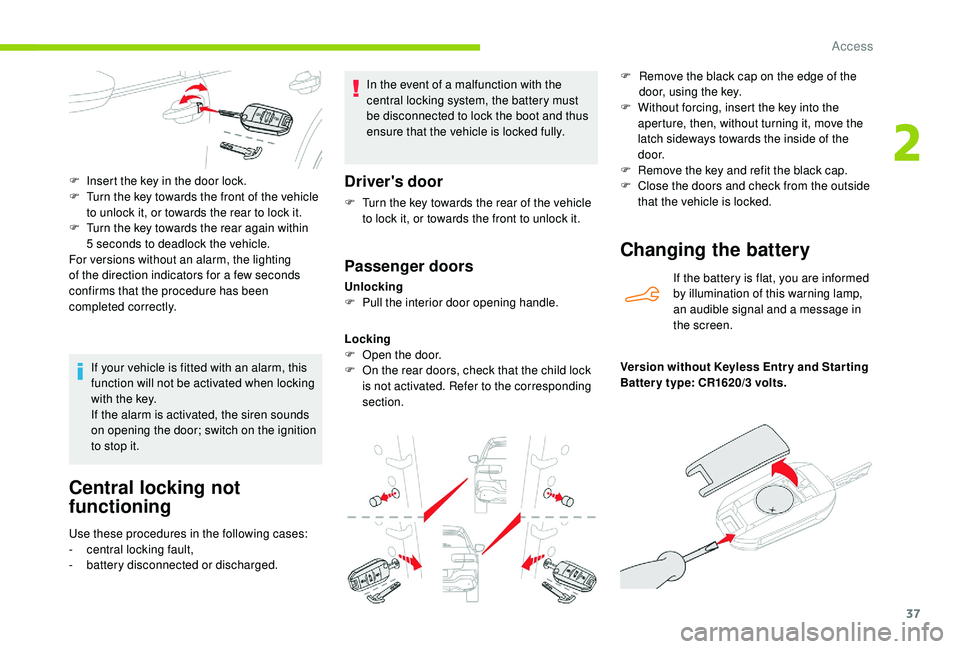
Driver's door
F Turn the key towards the rear of the vehicle
to lock it, or towards the front to unlock it.
Passenger doors
Unlocking
F P ull the interior door opening handle.
Locking
F
O
pen the door.
F
O
n the rear doors, check that the child lock
is not activated. Refer to the corresponding
section.
F
I
nsert the key in the door lock.
F
T
urn the key towards the front of the vehicle
to unlock it, or towards the rear to lock it.
F
T
urn the key towards the rear again within
5 seconds to deadlock the vehicle.
For versions without an alarm, the lighting
of the direction indicators for a few seconds
confirms that the procedure has been
completed correctly.
If your vehicle is fitted with an alarm, this
function will not be activated when locking
with the key.
If the alarm is activated, the siren sounds
on opening the door; switch on the ignition
to stop it.
Changing the battery
If the battery is flat, you are informed
by illumination of this warning lamp,
an audible signal and a message in
the screen.
Version without
K
eyless Entr y and Star ting
Batter y type: CR1620/3 volts. F
R
emove the black cap on the edge of the
door, using the key.
F
W
ithout forcing, insert the key into the
aperture, then, without turning it, move the
latch sideways towards the inside of the
d o o r.
F
R
emove the key and refit the black cap.
F
C
lose the doors and check from the outside
that the vehicle is locked.
2
Access
Page 40 of 256
38
Version with Keyless Entr y and Star ting
Batter y type: CR2032/3 volts.
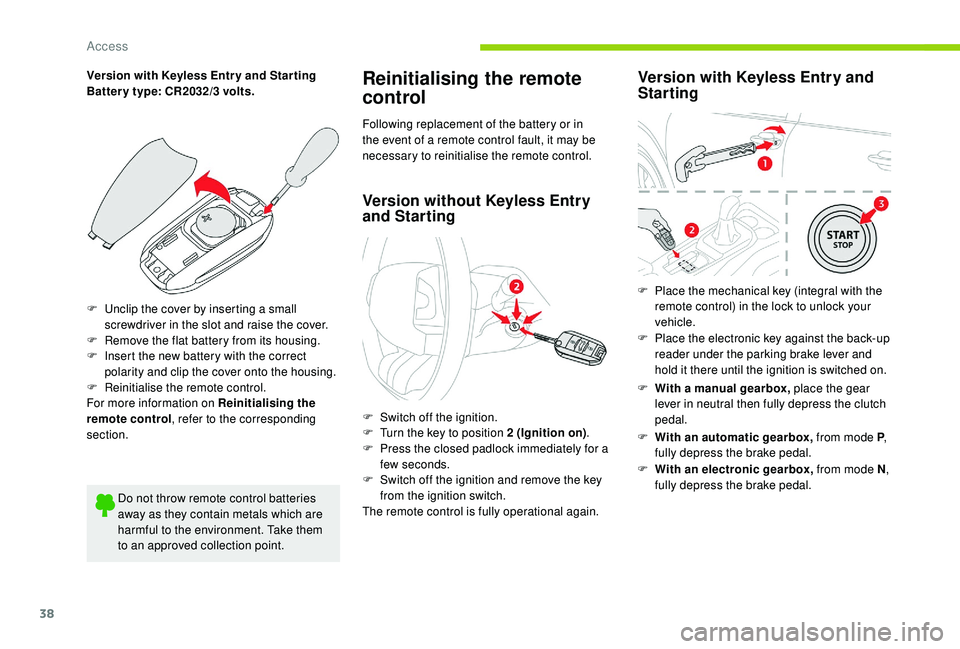
F
U
nclip the cover by inserting a small
screwdriver in the slot and raise the cover.
F
R
emove the flat battery from its housing.
F
I
nsert the new battery with the correct
polarity and clip the cover onto the housing.
F
R
einitialise the remote control.
For more information on Reinitialising the
remote control , refer to the corresponding
section.
Do not throw remote control batteries
away as they contain metals which are
harmful to the environment. Take them
to an approved collection point.Reinitialising the remote
control
Following replacement of the battery or in
the event of a remote control fault, it may be
necessary to reinitialise the remote control.
Version without K eyless Entry
and Starting
F Switch off the ignition.
F
T urn the key to position 2 (Ignition on) .
F
P
ress the closed padlock immediately for a
few seconds.
F
S
witch off the ignition and remove the key
from the ignition switch.
The remote control is fully operational again.
Version with K eyless Entry and
Starting
F With a manual gearbox, place the gear
lever in neutral then fully depress the clutch
pedal.
F
Wi
th an automatic gearbox, from mode P,
fully depress the brake pedal.
F
W
ith an electronic gearbox, from mode N ,
fully depress the brake pedal.
F
P
lace the mechanical key (integral with the
remote control) in the lock to unlock your
vehicle.
F
P
lace the electronic key against the back-up
reader under the parking brake lever and
hold it there until the ignition is switched on.
Access
Page 41 of 256
39
Doors
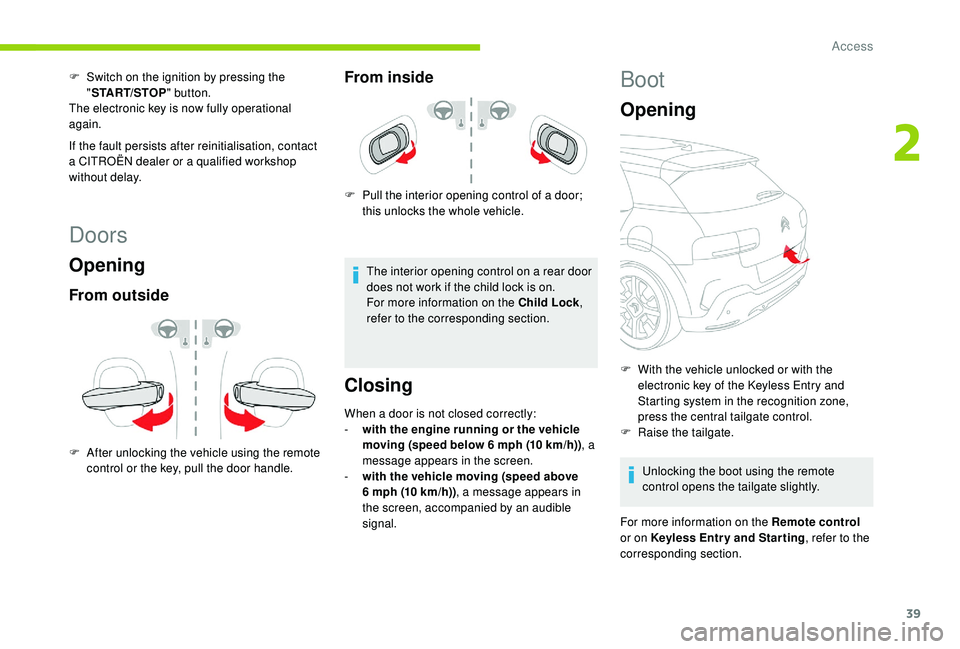
Opening
From outside
F After unlocking the vehicle using the remote control or the key, pull the door handle.
From inside
F Pull the interior opening control of a door; this unlocks the whole vehicle.
The interior opening control on a rear door
does not work if the child lock is on.
For more information on the Child Lock ,
refer to the corresponding section.
Closing
When a door is not closed correctly:
- w ith the engine running or the vehicle
moving (speed below 6 mph (10 km/h)) , a
message appears in the screen.
-
w
ith the vehicle moving (speed above
6
mph (10 km/h)) , a message appears in
the screen, accompanied by an audible
signal.
F
S
witch on the ignition by pressing the
" START/STOP " button.
The electronic key is now fully operational
again.
If the fault persists after reinitialisation, contact
a CITROËN dealer or a qualified workshop
without delay.
Boot
Opening
F With the vehicle unlocked or with the electronic key of the K eyless Entry and
Starting system in the recognition zone,
press the central tailgate control.
F
Ra
ise the tailgate.
Unlocking the boot using the remote
control opens the tailgate slightly.
For more information on the Remote control
or on
K
eyless Entr y and Star ting , refer to the
corresponding section.
2
Access
Page 42 of 256
40
In case of malfunction or difficulties
moving the tailgate when opening or
closing it, have it checked as soon as
possible by a CITROËN dealer or a
qualified workshop to ensure that this
inconvenience does not get worse, making
the tailgate fall and causing serious
injuries.
Closing
If the tailgate is not fully closed:
- w ith the engine running or the vehicle
moving (speed below 6 mph (10 km/h)) , a
message appears in the screen.
-
w
ith the vehicle moving (speed above
6
mph (10 km/h)) , a message appears in the
screen, accompanied by an audible signal.
Emergency control
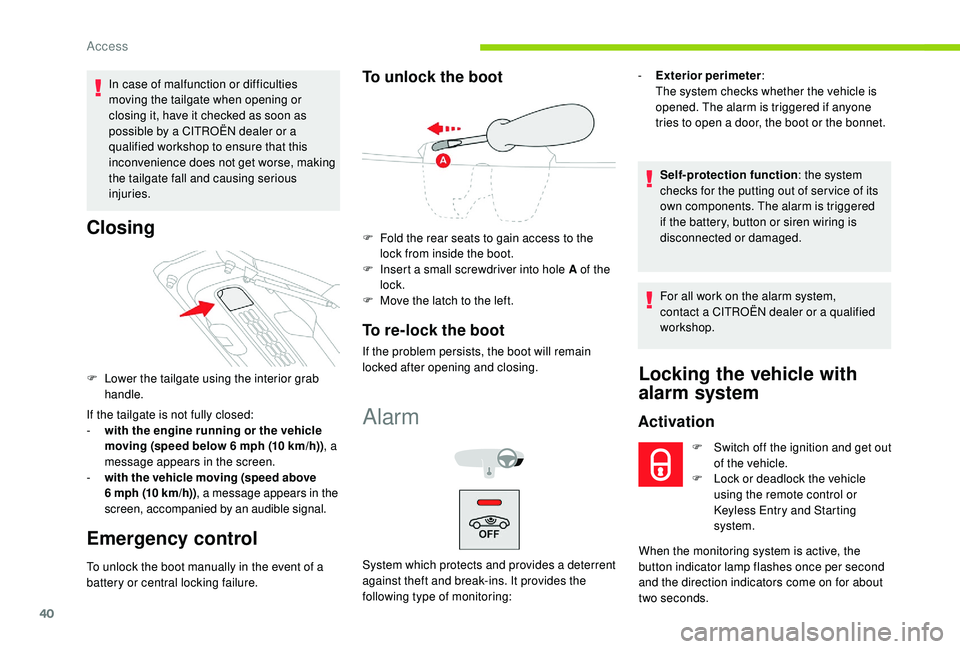
F Lower the tailgate using the interior grab handle.
To unlock the boot manually in the event of a
battery or central locking failure.
To unlock the boot
F Fold the rear seats to gain access to the lock from inside the boot.
F
I
nsert a small screwdriver into hole A of the
lock.
F
M
ove the latch to the left.
To re-lock the boot
If the problem persists, the boot will remain
locked after opening and closing.
Alarm
System which protects and provides a deterrent
against theft and break-ins. It provides the
following type of monitoring: -
E
xterior perimeter
:
The system checks whether the vehicle is
opened. The alarm is triggered if anyone
tries to open a door, the boot or the bonnet.
Self-protection function : the system
checks for the putting out of ser vice of its
own components. The alarm is triggered
if the battery, button or siren wiring is
disconnected or damaged.
For all work on the alarm system,
contact a CITROËN dealer or a qualified
workshop.
Locking the vehicle with
alarm system
Activation
F Switch off the ignition and get out of the vehicle.
F
L
ock or deadlock the vehicle
using the remote control or
Keyless Entry and Starting
system.
When the monitoring system is active, the
button indicator lamp flashes once per second
and the direction indicators come on for about
two seconds.
Access