ignition CITROEN C4 CACTUS 2017 Workshop Manual
[x] Cancel search | Manufacturer: CITROEN, Model Year: 2017, Model line: C4 CACTUS, Model: CITROEN C4 CACTUS 2017Pages: 256, PDF Size: 7.62 MB
Page 115 of 256
113
F Press the "MEM" button 2 again to confirm
and save the new speed setting.
Speed limiter
The system prevents the vehicle
from exceeding the speed setting
programmed by the driver.
The speed limiter is switched on
manually.
The minimum programmed speed is
19
mph (30 km/h).
The programmed speed remains in the
system memory when the ignition is
switched off.
The speed limiter is a driving aid only.
It does not exempt the driver from the
need to obser ve speed limits or to remain
vigilant at all times.
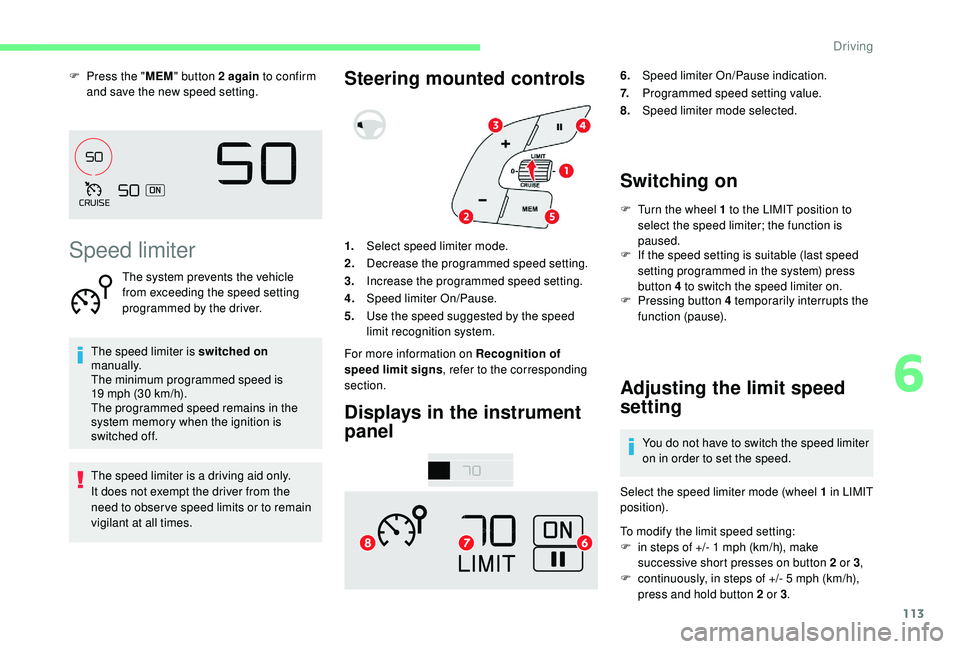
Steering mounted controls
Displays in the instrument
panel6. Speed limiter On/Pause indication.
7. Programmed speed setting value.
8. Speed limiter mode selected.
Switching on
F Turn the wheel 1 to the LIMIT position to
select the speed limiter; the function is
paused.
1. Select speed limiter mode.
2. Decrease the programmed speed setting.
3. Increase the programmed speed setting.
4. Speed limiter On/Pause.
5. Use the speed suggested by the speed
limit recognition system.
For more information on Recognition of
speed limit signs , refer to the corresponding
section. F
I
f the speed setting is suitable (last speed
setting programmed in the system) press
button 4 to switch the speed limiter on.
F
P
ressing button 4 temporarily interrupts the
function (pause).
Adjusting the limit speed
setting
You do not have to switch the speed limiter
on in order to set the speed.
Select the speed limiter mode (wheel 1 in LIMIT
position).
To modify the limit speed setting:
F
i
n steps of +/- 1 mph (km/h), make
successive short presses on button 2 or 3 ,
F
c
ontinuously, in steps of +/- 5 mph (km/h),
press and hold button 2 or 3 .
6
Driving
Page 116 of 256
114
To modify the speed limiter setting using
the speed suggested by the speed limit sign
recognition system:
F
t
he speed suggested is displayed in the
instrument panel,
F
m
ake a first press on button 5 ; a message
is displayed to confirm the memorisation
request,
F
p
ress button 5 again to save the suggested
speed.
The speed displays immediately in the
instrument panel as the new speed setting.
Temporarily exceeding the
speed setting
F Press firmly on the accelerator pedal,
going beyond the point of resistance, to
exceed the programmed speed limit.
The speed limiter is deactivated temporarily
and the displayed programmed speed flashes.
On a steep descent or in the event of
sharp acceleration, the speed limiter will
not be able to prevent the vehicle from
exceeding the programmed speed.
When the limit speed is exceeded but this is not
due to action by the driver, there is an audible
signal to supplement the visual alert (setting
flashes). Once the vehicle slows down to the
programmed setting, the speed limiter is active
again: the speed setting display is fixed once
more.
Switching off
F Turn the wheel 1 to the position 0: the
display of information about the speed
limiter disappears.
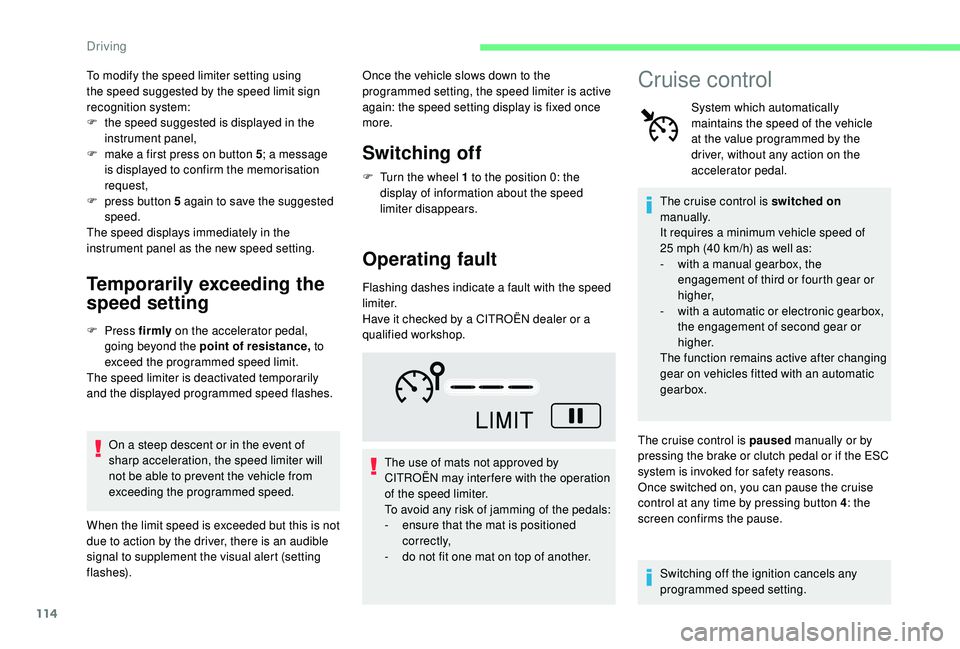
Operating fault
Flashing dashes indicate a fault with the speed
limiter.
Have it checked by a CITROËN dealer or a
qualified workshop.
The use of mats not approved by
CITROËN may inter fere with the operation
of the speed limiter.
To avoid any risk of jamming of the pedals:
-
e
nsure that the mat is positioned
c o r r e c t l y,
-
d
o not fit one mat on top of another.
Cruise control
System which automatically
maintains the speed of the vehicle
at the value programmed by the
driver, without any action on the
accelerator pedal.
The cruise control is switched on
manually.
It requires a minimum vehicle speed of
25 mph (40 km/h) as well as:
-
w
ith a manual gearbox, the
engagement of third or fourth gear or
higher,
-
w
ith a automatic or electronic gearbox,
the engagement of second gear or
higher.
The function remains active after changing
gear on vehicles fitted with an automatic
gearbox.
The cruise control is paused manually or by
pressing the brake or clutch pedal or if the ESC
system is invoked for safety reasons.
Once switched on, you can pause the cruise
control at any time by pressing button 4 : the
screen confirms the pause.
Switching off the ignition cancels any
programmed speed setting.
Driving
Page 120 of 256
118
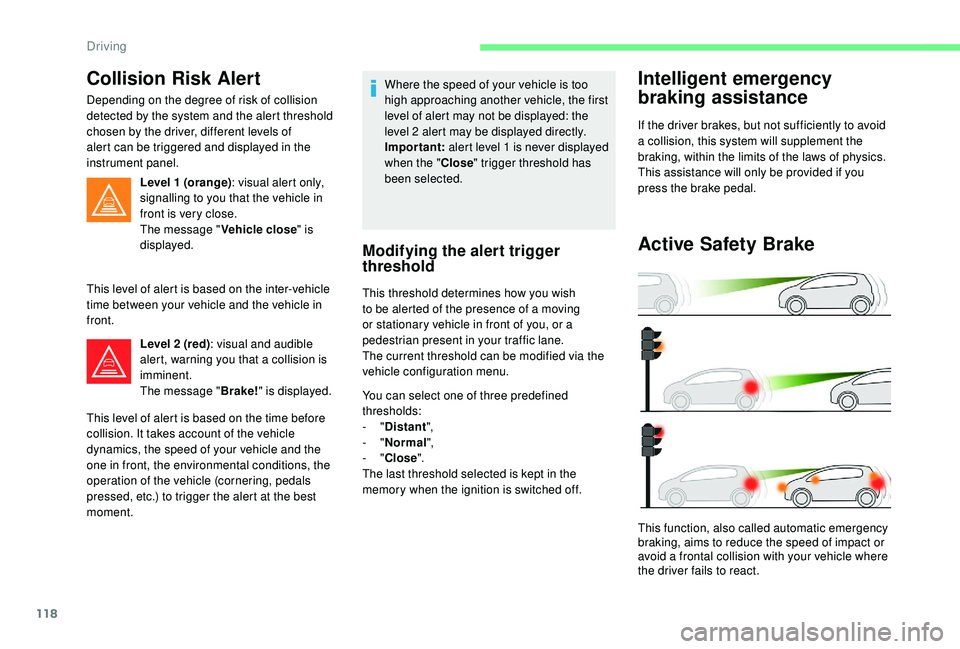
Collision Risk Alert
Depending on the degree of risk of collision
detected by the system and the alert threshold
chosen by the driver, different levels of
alert can be triggered and displayed in the
instrument panel.Level 1 (orange) : visual alert only,
signalling to you that the vehicle in
front is very close.
The message " Vehicle close" is
displayed.
This level of alert is based on the inter-vehicle
time between your vehicle and the vehicle in
front. Level 2 (red) : visual and audible
alert, warning you that a collision is
imminent.
The message " Brake!" is displayed.
This level of alert is based on the time before
collision. It takes account of the vehicle
dynamics, the speed of your vehicle and the
one in front, the environmental conditions, the
operation of the vehicle (cornering, pedals
pressed, etc.) to trigger the alert at the best
moment. Where the speed of your vehicle is too
high approaching another vehicle, the first
level of alert may not be displayed: the
level 2 alert may be displayed directly.
Important:
alert level 1 is never displayed
when the " Close" trigger threshold has
been selected.
Modifying the alert trigger
threshold
This threshold determines how you wish
to be alerted of the presence of a moving
or stationary vehicle in front of you, or a
pedestrian present in your traffic lane.
The current threshold can be modified via the
vehicle configuration menu.
You can select one of three predefined
thresholds:
-
"Distant ",
-
"Normal ",
-
"Close ".
The last threshold selected is kept in the
memory when the ignition is switched off.
Intelligent emergency
braking assistance
If the driver brakes, but not sufficiently to avoid
a collision, this system will supplement the
braking, within the limits of the laws of physics.
This assistance will only be provided if you
press the brake pedal.
Active Safety Brake
This function, also called automatic emergency
braking, aims to reduce the speed of impact or
avoid a frontal collision with your vehicle where
the driver fails to react.
Driving
Page 122 of 256
120
Malfunction
Clean the windscreen regularly,
particularly the area in front of the camera.
The internal sur face of the windscreen can
also become misted around the camera.
In humid and cold weather, demist the
windscreen regularly.
Do not allow snow to accumulate on the
bonnet or roof of the vehicle as this could
conceal the detection camera.
The system is automatically deactivated
after the use of the "space-saver" type
spare wheel is detected, or if a fault with
the side brake lamps is detected.Fatigue detection system
Take a break as soon as you feel tired or at
least every two hours.
The function has the "Driving time warning"
combined with the "Driver inattention alert".The system cannot in any circumstances
replace the need for vigilance on the part
of the driver.
Do not take the wheel if you are tired.
Activation/Deactivation
The system is activated or deactivated via the
vehicle configuration menu. F
I
n the Driving/Vehicle menu
of the touch screen, select the
" Vehicle settings " tab then
" Safety " and activate/deactivate
" Fatigue detection ".
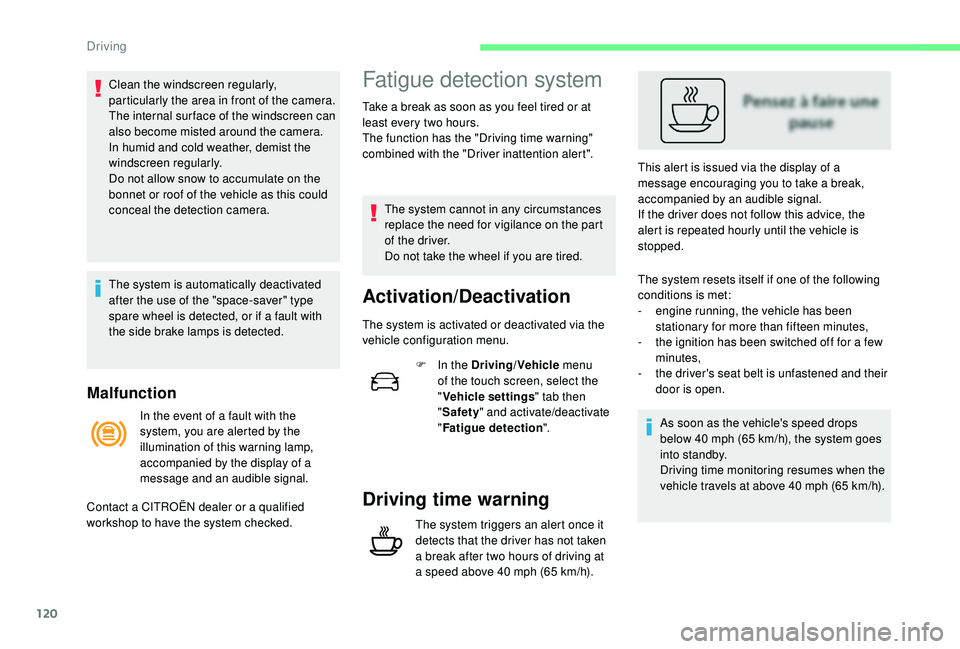
Driving time warning
The system triggers an alert once it
detects that the driver has not taken
a break after two hours of driving at
a speed above 40 mph (65 km/h). This alert is issued via the display of a
message encouraging you to take a break,
accompanied by an audible signal.
If the driver does not follow this advice, the
alert is repeated hourly until the vehicle is
stopped.
In the event of a fault with the
system, you are alerted by the
illumination of this warning lamp,
accompanied by the display of a
message and an audible signal.
Contact a CITROËN dealer or a qualified
workshop to have the system checked. The system resets itself if one of the following
conditions is met:
-
e
ngine running, the vehicle has been
stationary for more than fifteen minutes,
-
t
he ignition has been switched off for a few
minutes,
-
t
he driver's seat belt is unfastened and their
door is open.
As soon as the vehicle's speed drops
below 40 mph (65 km/h), the system goes
into standby.
Driving time monitoring resumes when the
vehicle travels at above 40 mph (65 km/h).
Driving
Page 125 of 256
123
Blind spot monitoring
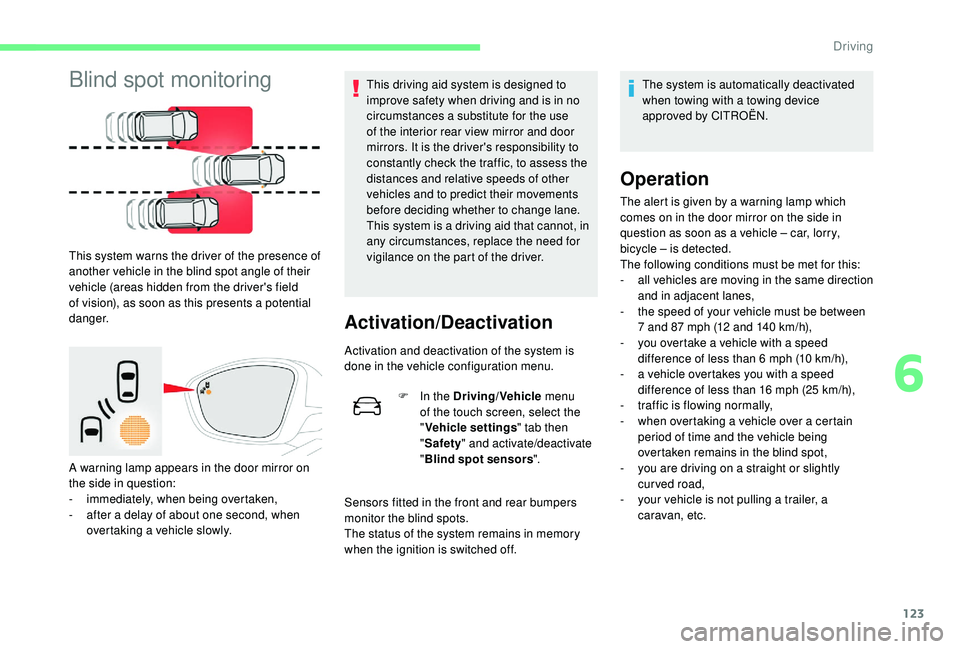
This system warns the driver of the presence of
another vehicle in the blind spot angle of their
vehicle (areas hidden from the driver's field
of vision), as soon as this presents a potential
danger.
A warning lamp appears in the door mirror on
the side in question:
-
i
mmediately, when being overtaken,
-
a
fter a delay of about one second, when
overtaking a vehicle slowly. This driving aid system is designed to
improve safety when driving and is in no
circumstances a substitute for the use
of the interior rear view mirror and door
mirrors. It is the driver's responsibility to
constantly check the traffic, to assess the
distances and relative speeds of other
vehicles and to predict their movements
before deciding whether to change lane.
This system is a driving aid that cannot, in
any circumstances, replace the need for
vigilance on the part of the driver.
Activation/Deactivation
Activation and deactivation of the system is
done in the vehicle configuration menu.
F
I
n the Driving/Vehicle menu
of the touch screen, select the
" Vehicle settings " tab then
" Safety " and activate/deactivate
" Blind spot sensors ".
Sensors fitted in the front and rear bumpers
monitor the blind spots.
The status of the system remains in memory
when the ignition is switched off. The system is automatically deactivated
when towing with a towing device
approved by CITROËN.
Operation
The alert is given by a warning lamp which
comes on in the door mirror on the side in
question as soon as a vehicle – car, lorry,
bicycle – is detected.
The following conditions must be met for this:
-
a
ll vehicles are moving in the same direction
and in adjacent lanes,
-
t
he speed of your vehicle must be between
7 and 87 mph (12 and 140 km/h),
-
y
ou overtake a vehicle with a speed
difference of less than 6 mph (10 km/h),
-
a v
ehicle overtakes you with a speed
difference of less than 16 mph (25 km/h),
-
t
raffic is flowing normally,
-
w
hen overtaking a vehicle over a certain
period of time and the vehicle being
overtaken remains in the blind spot,
-
y
ou are driving on a straight or slightly
curved road,
-
y
our vehicle is not pulling a trailer, a
caravan, etc.
6
Driving
Page 130 of 256
128
This system is a manoeuvring aid that
cannot under any circumstances replace
the vigilance of the driver.
The driver must remain in control of
their vehicle. They must always check
the surroundings of the vehicle before
undertaking a manoeuvre and ensure that
the space remains clear during the entire
manoeuvre.
The system per forms the measurements of
available parking spaces and calculations of
distances to obstacles using ultrasonic sensors
built in the front and rear bumpers of the
vehicle.
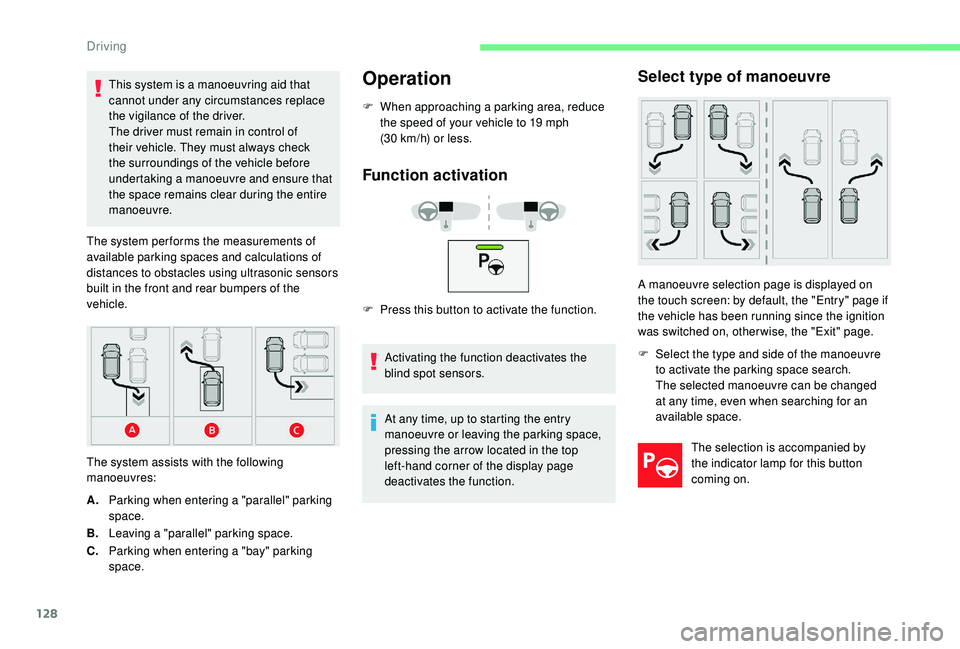
The system assists with the following
manoeuvres:Operation
F When approaching a parking area, reduce the speed of your vehicle to 19 mph
(30 km/h) or less.
Function activation
F Press this button to activate the function.
Activating the function deactivates the
blind spot sensors.
A. Parking when entering a "parallel" parking
space.
B. Leaving a "parallel" parking space.
C. Parking when entering a "bay" parking
space. At any time, up to starting the entry
manoeuvre or leaving the parking space,
pressing the arrow located in the top
left-hand corner of the display page
deactivates the function.
Select type of manoeuvre
A manoeuvre selection page is displayed on
the touch screen: by default, the "Entry" page if
the vehicle has been running since the ignition
was switched on, other wise, the "Exit" page.
F
S
elect the type and side of the manoeuvre
to activate the parking space search.
The selected manoeuvre can be changed
at any time, even when searching for an
available space.
The selection is accompanied by
the indicator lamp for this button
coming on.
Driving
Page 132 of 256

130
7
5
During the manoeuvre
The system takes over the vehicle's steering. It
gives instructions on the manoeuvring direction
when starting the entry and exit parallel parking
manoeuvres and for all entry manoeuvres for
bay parking."Reverse "
" Advance "
There instructions are displayed as a symbol
accompanied by a message:
The manoeuvring status is indicated by these
symbols:
5 mph or 7 km/h, for parking space
e nt r y. Manoeuvre in progress (green).
Manoeuvre cancelled or finished
(red) (the arrows indicate that the
driver must take back control of their
vehicle).
The maximum speed limit indications during
the manoeuvres are signalled by these
symbols: During a manoeuvre the steering wheel
rotates rapidly: do not hold the steering
wheel nor place your hand between the
spokes of the steering wheel. Watch out
for anything likely to block the manoeuvre
(loose and bulky clothing, scar ves, ties,
etc.) – Risks of injury!
It is the driver's responsibility to monitor
the state of the traffic continuously,
especially vehicles coming towards you.
The driver should check that no object
or person can hinder the advance of the
vehicle.
The images from the camera(s) displayed
on the touch screen may be distorted by
the relief.
In the presence of areas in shade, or in
conditions of bright sunlight or inadequate
lighting, the image may be darkened and
be of lower contrast.
The manoeuvre can be interrupted definitively
at any time, either by the action of the driver or
automatically by the system. By the action of the driver:
-
t aking over control of the steering,
- a ctivating the direction indicator lamps on
the opposite side to that of the manoeuvre,
-
u
nfastening the driver's seat belt,
-
s
witching off the ignition.
Interruption by the system:
-
e
xceeding the speed limit: 5 mph (7 km/h)
during the parking space entry manoeuvres
and 3 mph (5 km/h) during the parking
space exit manoeuvres,
-
t
riggering the anti-slip regulation on a
slippery road,
-
o
pening a door or the boot,
-
s
talling the engine,
-
s
ystem malfunction,
-
a
fter ten manoeuvres to enter or exit a
parallel parking space and after seven
manoeuvres to enter a parking bay.
3 mph or 5 km/h, for parking space
exit.
Interrupting the manoeuvre automatically
deactivates the function.
Driving
Page 135 of 256

133
Tyre pressures should be checked when
the tyres are "cold" (vehicle stopped for
1 hour or after a journey of less than
6 miles (10 km) at moderate speeds).
Other wise (when hot), add 0.3 bar to the
pressures shown on the label.
Under-inflation alert
This warning is indicated by
continuous illumination of this lamp,
an audible signal and a message
displayed on the screen.
F
R
educe speed immediately, avoid excessive
steering movements and sudden braking.
F
S
top as soon as it is safe to do so.
The loss of pressure detected does not
always cause visible bulging of the tyre.
Do not rely on a simple visual check. F
I
f you have a compressor (such as the
one in the temporary puncture repair kit),
check the pressures of the four tyres when
cold. If it is not possible to make this check
immediately, drive carefully at reduced
speed.
or
F
I
n the event of a puncture, use the
temporary puncture repair kit or the spare
wheel (depending on equipment).
The warning remains active until the
system is reinitialised.
Reinitialisation
The system must be reinitialised after any
adjustment to the pressures of one or more
tyres, and after changing one or more wheels. Before reinitialising the system, ensure
that the pressures of the four tyres
are correct for the conditions of use
of the vehicle and conform to the
recommendations on the tyre pressure
label.
The under-inflation alert can only be relied
on if the reinitialisation of the system has
been done with the pressures in the four
tyres correctly adjusted.
The under-inflation detection system
does not give a warning if a pressure is
incorrect at the time of reinitialisation.
Reinitialisation of the system is done via the
touch screen, with the ignition on and the
vehicle stationary .
F I n the Driving/Vehicle menu,
select the " Driving functions "
tab, then " Reset under-
inflation detection ".
F
Sel
ect "Ye s" to confirm.
The reinitialisation is confirmed by the display
of a message and an audible signal.
Snow chains
The system does not have to be
reinitialised after fitting or removing snow
chains.
6
Driving
Page 139 of 256
137
Fuel tank
Tank capacity:
- Pe trol: approximately 50 litres.
-
D
iesel: approximately 45 or 50 litres
(depending on version).
If you have put in the wrong fuel for
your vehicle, you must have the tank
drained and refilled with the correct
fuel before you star t the engine.
Low fuel level
When the low fuel level is reached,
this warning lamp in the instrument
panel comes on, accompanied by
an audible warning, a message and
the last bar of the fuel gauge flashes
in red.
When it first comes on, about 5 litres of fuel
remain in the tank.
Until sufficient fuel has been added, this
warning lamp appears every time the ignition
is switched on, accompanied by an audible
signal and a message. This audible warning
and message are repeated with increasing
frequency as the fuel level drops towards " 0".
You must refuel as soon as possible to avoid
running out. For more information on Running out of
fuel (Diesel)
, refer to the corresponding
section.
Refilling
A label on the inside of the fuel filler flap
reminds you of the type of fuel to use,
depending on your engine type.
Additions of fuel must be of at least 5 litres, in
order to be registered by the fuel gauge.
Opening the filler cap may create a noise
caused by an inrush of air. This is entirely
normal and results from the sealing of the fuel
system.
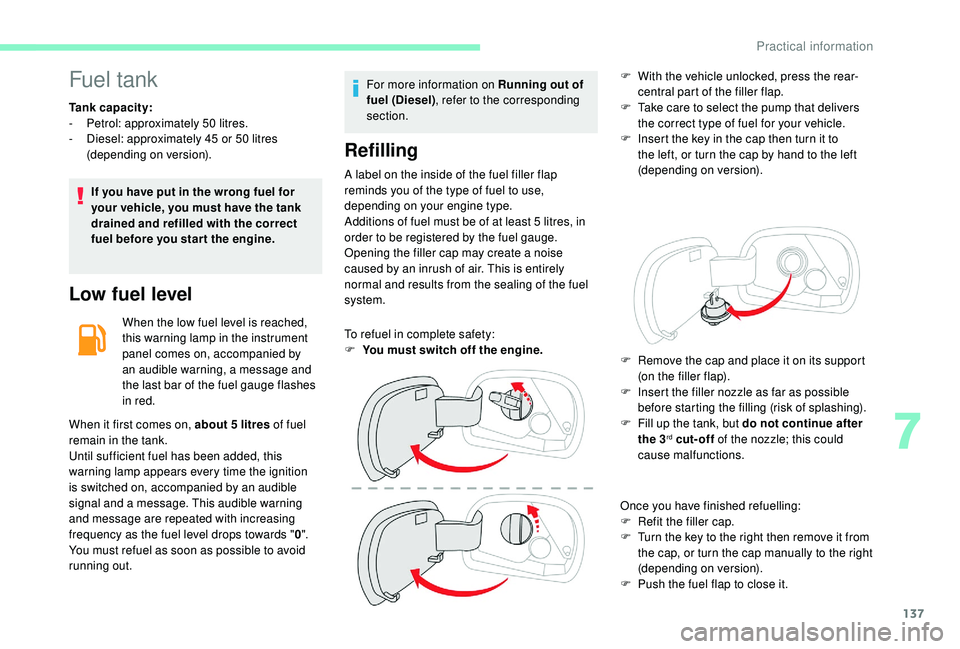
To refuel in complete safety:
F
Y
ou must switch off the engine. F
W
ith the vehicle unlocked, press the rear-
central part of the filler flap.
F
T
ake care to select the pump that delivers
the correct type of fuel for your vehicle.
F
I
nsert the key in the cap then turn it to
the left, or turn the cap by hand to the left
(depending on version).
Once you have finished refuelling:
F
R
efit the filler cap.
F
T
urn the key to the right then remove it from
the cap, or turn the cap manually to the right
(depending on version).
F
P
ush the fuel flap to close it.
F
R
emove the cap and place it on its support
(on the filler flap).
F
I
nsert the filler nozzle as far as possible
before starting the filling (risk of splashing).
F
F
ill up the tank, but do not continue after
the 3
rd cut-off of the nozzle; this could
cause malfunctions.
7
Practical information
Page 140 of 256

138
If your vehicle is fitted with Stop & Start,
never refuel with the engine in STOP
mode; you must switch off the ignition
using the key, or the START/STOP button
if your vehicle has
K
eyless Entry and
Starting.
Fuel cut- of f
Your vehicle is equipped with a safety device
which cuts off the fuel supply in the event of a
collision.
Misfuel prevention
(Diesel)
(Depending on the country of sale.)
Mechanical device which prevents filling the
tank of a Diesel vehicle with petrol. It helps
avoid the risk of engine damage that can result
from filling with the wrong fuel.
Operation
It remains possible to use a fuel can to fill
the tank.
In order to ensure a good flow of fuel,
do not place the nozzle of the fuel can in
direct contact with the flap of the misfuel
prevention device and pour slowly. Travelling abroad
As Diesel fuel pump nozzles may be
different in other countries, the presence
of the misfuel prevention device may make
refuelling impossible.
Not all Diesel vehicles are fitted with
misfuel protection, so before travelling
abroad, we recommend that you check
with the CITROËN dealer network whether
your vehicle is suitable for the fuel pumps
in the country in which you intend to travel.
When a petrol filler nozzle is introduced into the
Diesel tank, it comes into contact with the flap.
The system remains closed and prevents filling.
Do not persist but introduce a Diesel type
filler nozzle.
Snow chains
In wintry conditions, snow chains
improve traction as well as the
behaviour of the vehicle when
braking.
Snow chains must be fitted only to the
front wheels. They must never be fitted to
"space-saver" type spare wheels.
Take account of the legislation in force in
your country on the use of snow chains
and the maximum authorised speed.
Practical information