ignition CITROEN C4 CACTUS 2017 Owner's Manual
[x] Cancel search | Manufacturer: CITROEN, Model Year: 2017, Model line: C4 CACTUS, Model: CITROEN C4 CACTUS 2017Pages: 256, PDF Size: 7.62 MB
Page 43 of 256

41
When the vehicle automatically locks itself
again (as happens if a door or boot is not
opened within 30 seconds of unlocking),
the monitoring system is automatically
reactivated.
Triggering of the alarm
This is indicated by sounding of the siren
and flashing of the direction indicators for
30 seconds.
The monitoring functions remain active until
the alarm has been triggered eleven times
consecutively.
When the vehicle is unlocked using the remote
control or the
K
eyless Entry and Starting
system, rapid flashing of the locking button
indicator lamp informs you that the alarm
was triggered during your absence. When
the ignition is switched on, this flashing stops
immediately.
Locking the vehicle without
activating the alarm
F Lock or deadlock the vehicle using the key (integral to the remote control) in the driver's
door lock.
Failure of the remote
control
To deactivate the monitoring functions:
F u nlock the vehicle using the key (integral to
the remote control) in the driver's door lock,
F
O
pen the door; this sets off the alarm.
F
U
pon switching on the ignition, the alarm
stops. The button indicator lamp goes off.
The monitoring system is
deactivated: the indicator lamp in
the button goes off and the direction
indicators flash for about 2 seconds.
If a door, boot, etc. is not properly closed,
the vehicle is not locked but the exterior
perimeter monitoring will be activated after
45 seconds.
Deactivation
F Press the unlocking button on
the remote control.
or
F
U
nlock the vehicle with the
K
eyless Entry
and Starting system.
The exterior perimeter monitoring is activated
after five seconds.
Malfunction
When the ignition is switched on, and for
10 seconds after wards, the flashing of the
locking button indicator lamp indicates a
system fault.
Have the system checked by a CITROËN
dealer or a qualified workshop.
Front electric window
controls
1.
Front left.
2. Front right.
Manual operation
To open or close the window, press or pull the
switch gently, without exceeding the resistance
point. The window stops as soon as the switch
is released.
2
Access
Page 44 of 256
42
Automatic operation
To open or close the window, press or pull the
switch fully, beyond the resistance point: the
window opens or closes completely when the
switch is released. Pressing the switch again
stops the movement of the window.The electric window switches remain
operational for approximately 45 seconds
after switching off the ignition.
Once this time has elapsed, the electric
windows will not operate. To reactivate
them, switch the ignition on again.
Anti-pinch
When the window rises and meets an obstacle,
it stops and immediately partially lowers again.
To reinitialise normal operation , press the
switch until the window opens completely, then
pull the switch immediately until the window
closes fully. Continue to hold the switch for
approximately one more second.
The anti-pinch safety function is not active
whilst the function is being activated.
Reinitialisation of the
electric windows
Following reconnection of the battery, the anti-
pinch function must be reinitialised.
The anti-pinch function is not active during
these operations.
For each window:
-
b
ring the window down completely,
then bring it back up. It will go up by a
few centimetres each time. Per form the
operation again until the window is fully
closed,
-
c
ontinue to pull the switch for at least one
second after reaching the window closed
position.
In the event of contact (pinching) during
operation of the windows, you must
reverse the movement of the window. To
do this, press the switch concerned.
When the driver operates the passenger
electric window switch, it is important
to ensure that nothing can prevent the
window from closing properly.
Be particularly aware of children when
operating the windows.
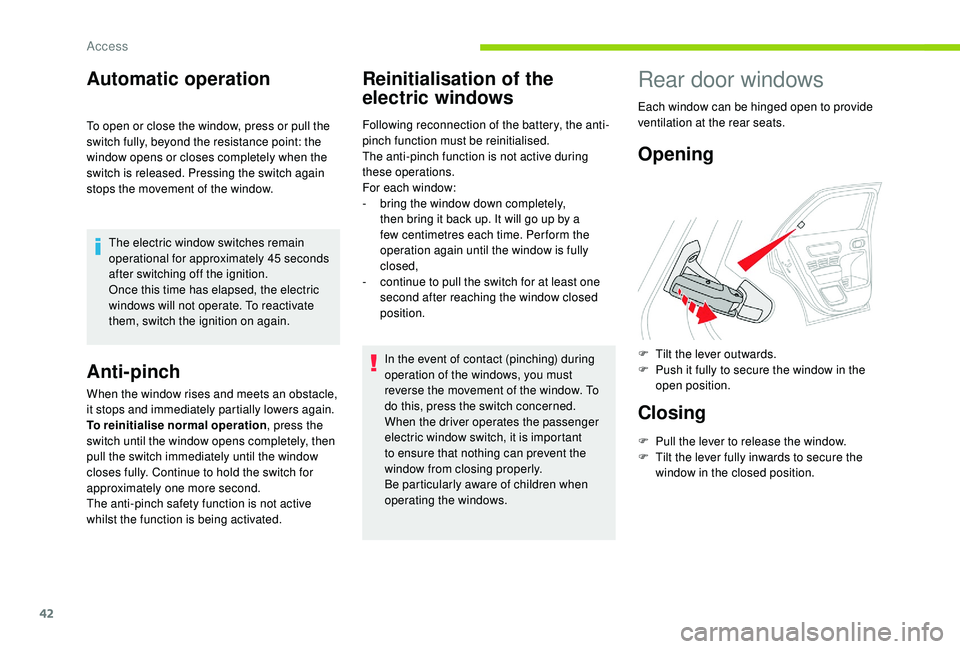
Rear door windows
Each window can be hinged open to provide
ventilation at the rear seats.
Opening
F Tilt the lever outwards.
F P ush it fully to secure the window in the
open position.
Closing
F Pull the lever to release the window.
F T ilt the lever fully inwards to secure the
window in the closed position.
Access
Page 49 of 256

47
Electric adjustment
As a safety measure, the mirrors should
be adjusted to reduce the "blind spots".
Manual folding
You can manually fold the mirrors (parking
obstruction, narrow garage, etc.).
F
T
urn the mirror towards the vehicle.
Electric folding
From outside: lock the vehicle using the remote
control or the Keyless Entry and Starting
system.
The folding and unfolding of the door
mirrors when locking or unlocking the
vehicle can be deactivated via the vehicle
configuration menu.
Demisting – Defrosting
F Turn control A to the right or left to select the corresponding mirror.
F
M
ove the control in all four directions to
adjust.
F
R
eturn the control to the central position.
Demisting-defrosting of the door
mirrors operates with the engine
running, by switching on the heated
rear screen.
For more information on Rear screen
demisting – defrosting, refer to the
corresponding section.
Rear view mirror
Equipped with an anti-dazzle system, which
darkens the mirror glass and reduces the
nuisance to the driver caused by the sun,
headlamps of other vehicles, etc.
Manual model
Adjustment
F A djust the mirror so that the glass is
directed correctly in the "day" position.
Day/night position
F
P
ull the lever to change to the "night" anti-
dazzle position.
F
P
ush the lever to change to the normal
"day" position.
If your vehicle is fitted with this function, the
mirrors can be folded electrically from the inside,
with the vehicle parked and the ignition on:
F
T
urn control A to opposite the mark.
Automatic "electrochrome"
model
3
Ease of use and comfort
Page 53 of 256
51
F Press button 5 to activate/deactivate the air conditioning system.
When the indicator lamp is on, the air
conditioning function is activated.
The air conditioning does not operate
when the air flow adjustment is inhibited.
Switching the system off
F Press this button; the indicator lamp in the button comes on.
This action switches off all of the functions of
the system.
The temperature is no longer controlled.
However, a slight flow of air, due to the
movement of the vehicle, can still be felt.
Pressing any button reactivates the system with
the settings that were previously in use. Avoid driving for long periods with
the system off – Risk of misting and
deterioration of air quality!
Automatic air conditioning
The air conditioning operates with the engine
running, but the ventilation and its controls are
available with the ignition on.
Operation of the air conditioning and regulation
of temperature, air flow and air distribution in
the passenger compartment are automatic.
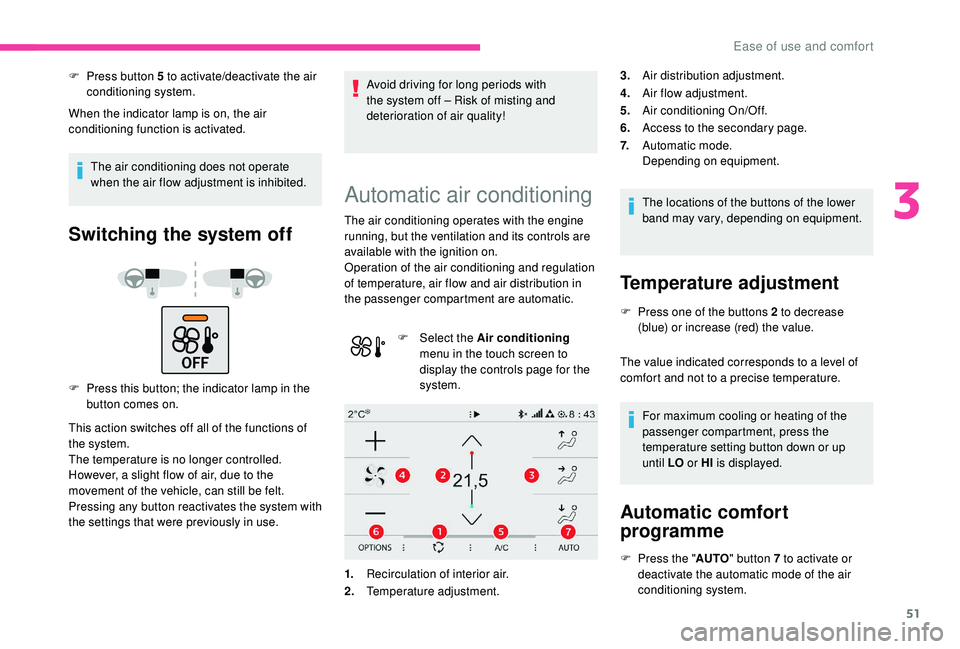
F
Sel
ect the Air conditioning
menu in the touch screen to
display the controls page for the
system.
1. Recirculation of interior air.
2. Temperature adjustment. The locations of the buttons of the lower
band may vary, depending on equipment.
Temperature adjustment
F Press one of the buttons 2 to decrease
(blue) or increase (red) the value.
The value indicated corresponds to a level of
comfort and not to a precise temperature.
For maximum cooling or heating of the
passenger compartment, press the
temperature setting button down or up
until LO or HI is displayed.
Automatic comfort
programme
F Press the " AUTO" button 7 to activate or
deactivate the automatic mode of the air
conditioning system.
3.
Air distribution adjustment.
4. Air flow adjustment.
5. Air conditioning On/Off.
6. Access to the secondary page.
7. Automatic mode.
Depending on equipment.
3
Ease of use and comfort
Page 55 of 256
53
Air conditioning On/Off
The air conditioning is designed to operate
effectively in all seasons, with the windows
closed.
It allows you:
-
i
n summer, to lower the temperature,
-
t
o increase the effectiveness of the
demisting in winter, above 3°C.
F
P
ress button 5 to activate/deactivate the air
conditioning system.
When the indicator lamp is on, the air
conditioning function is activated.
The air conditioning does not operate
when the air flow adjustment is inhibited.
Ventilation function with the
ignition on
When the ignition is switched on, you can
use the ventilation system to adjust the air
flow settings and the air distribution in the
passenger compartment for a duration which
depends on the battery charge.
This function does not operate the air
conditioning.
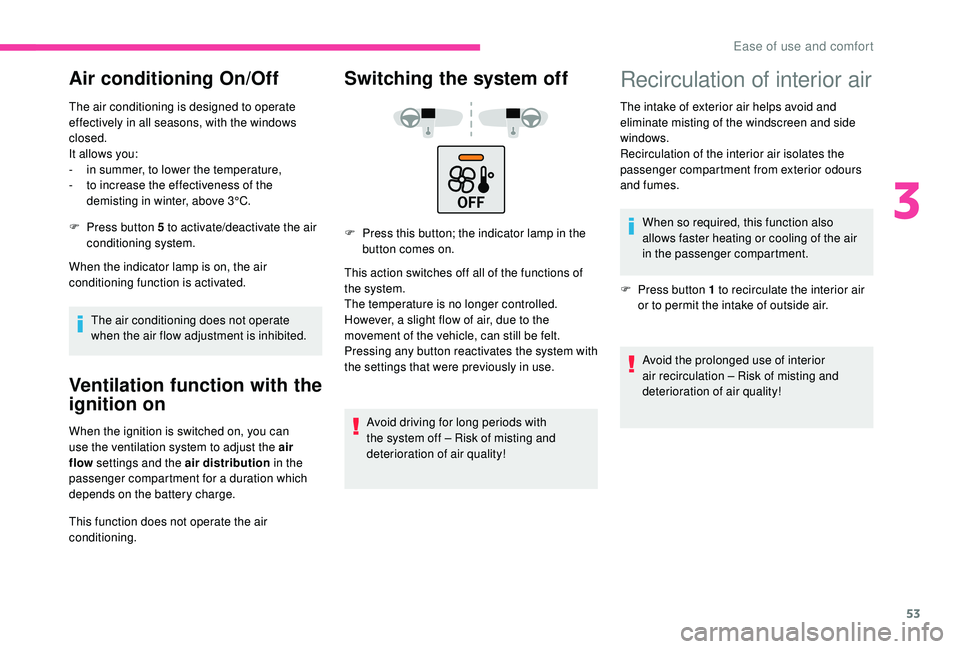
Switching the system off
F Press this button; the indicator lamp in the button comes on.
This action switches off all of the functions of
the system.
The temperature is no longer controlled.
However, a slight flow of air, due to the
movement of the vehicle, can still be felt.
Pressing any button reactivates the system with
the settings that were previously in use.
Avoid driving for long periods with
the system off – Risk of misting and
deterioration of air quality!
Recirculation of interior air
The intake of exterior air helps avoid and
eliminate misting of the windscreen and side
windows.
Recirculation of the interior air isolates the
passenger compartment from exterior odours
and fumes.When so required, this function also
allows faster heating or cooling of the air
in the passenger compartment.
F
P
ress button 1 to recirculate the interior air
or to permit the intake of outside air.
Avoid the prolonged use of interior
air recirculation – Risk of misting and
deterioration of air quality!
3
Ease of use and comfort
Page 56 of 256

54
Front demisting –
defrosting
On/Off
F Press this button to demist or defrost the windscreen and side windows as quickly as
possible. The indicator lamp in the button
comes on.
The system automatically manages the air
conditioning (depending on version), air
flow and air intake, and provides optimum
distribution towards the windscreen and side
windows.
F
T
o switch off demisting/defrosting, press this
button again. The indicator lamp goes off.
With Stop & Start, when demisting –
defrosting has been activated, STOP
mode is not available.
Rear screen demisting –
defrosting
On/Off
F Press this button to demist or defrost the rear screen and (depending on version)
the door mirrors. The indicator lamp in the
button comes on.
Demisting/defrosting switches off automatically
to prevent excessive electrical consumption.
F
I
t is possible to stop the demisting/
defrosting operation before it is switched off
automatically by pressing this button again.
The button indicator lamp goes off.
Switch off the demisting/defrosting of
the rear screen and door mirrors as
soon as appropriate, as lower current
consumption results in reduced fuel
consumption.
Rear screen demisting – defrosting can
only be operated when the engine is
running.
Courtesy lamps
1. Front courtesy lamp
2. Front map reading lamps
3. Rear courtesy lamp
4. Rear map reading lamps
Front and rear courtesy lamps
In this position, the courtesy lamp
comes on gradually:
-
w
hen the vehicle is unlocked,
-
w
hen the key is removed from the ignition,
Ease of use and comfort
Page 57 of 256
55
- when opening a door,
- w hen the remote control locking button is
activated, in order to locate your vehicle.
It switches off gradually:
-
w
hen the vehicle is locked,
-
w
hen the ignition is switched on,
-
3
0 seconds after the last door is closed. Permanently off.
Permanent lighting.
In "permanent lighting" mode, the lighting time
varies according to the circumstances:
-
w
hen the ignition is off, approximately ten
minutes,
-
i
n energy saving mode, approximately thirty
seconds,
-
w
ith the engine running, unlimited.
When the courtesy lamp is in the
"permanent lighting" position, the rear
courtesy lamp also comes on, except if it
is in the "permanently off " position.
To switch off the rear courtesy lamp, put it
in the "permanently off " position.Front and rear map reading
lamps
F With the ignition on, press the corresponding switch.
Take care to avoid leaving anything in
contact with the courtesy lamps.
Boot lamp
It comes on automatically when the boot is
opened.
Different lighting times are provided:
-
w
ith the ignition off, approximately ten
minutes,
-
i
n energy economy mode, approximately
thirty seconds,
-
w
ith the engine running, unlimited.
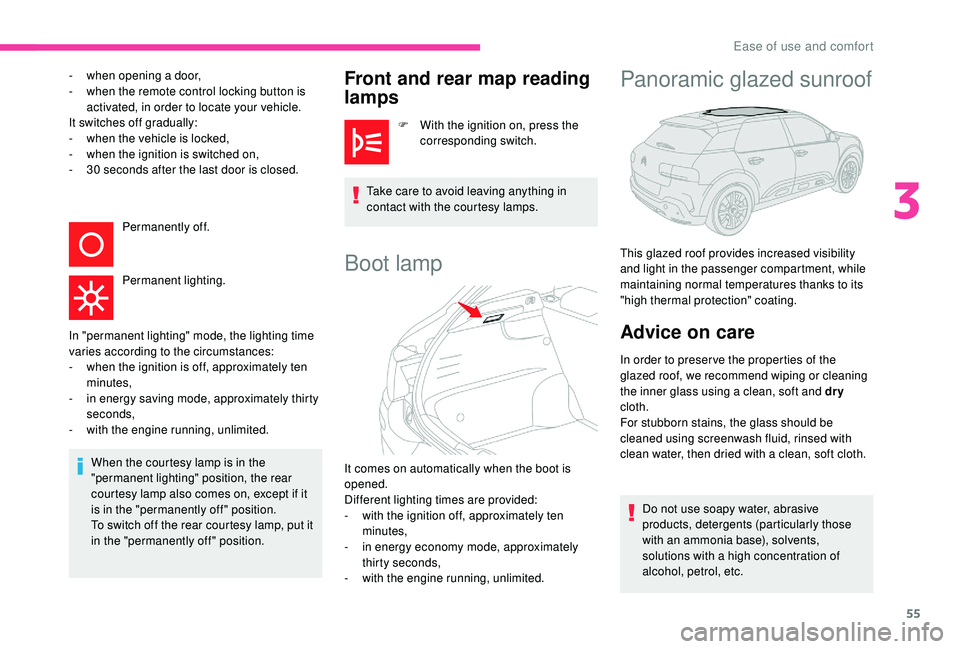
Panoramic glazed sunroof
This glazed roof provides increased visibility
and light in the passenger compartment, while
maintaining normal temperatures thanks to its
"high thermal protection" coating.
Advice on care
In order to preser ve the properties of the
glazed roof, we recommend wiping or cleaning
the inner glass using a clean, soft and dry
cloth.
For stubborn stains, the glass should be
cleaned using screenwash fluid, rinsed with
clean water, then dried with a clean, soft cloth.
Do not use soapy water, abrasive
products, detergents (particularly those
with an ammonia base), solvents,
solutions with a high concentration of
alcohol, petrol, etc.
3
Ease of use and comfort
Page 64 of 256

62
When the lighting is switched off automatically
(with AUTO model), the foglamp and the dipped
beam headlamps will remain on.
F
T
o switch it off, turn the ring rear wards.
Front and rear foglamps
Rotate and release the ring:
F o nce for wards to switch on the front
foglamps,
F
f
or wards a second time to switch on the rear
foglamps,
F
o
nce backwards to switch off the rear
foglamps,
F
b
ackwards a second time to switch off the
front foglamps.
When the lighting is switched off automatically
(with AUTO model), or when the dipped beam
headlamps are switched off manually, the
foglamps and sidelamps remain on.
F
T
urn the ring backwards to switch off the
foglamps, the sidelamps will then switch off. In good or rainy weather, both day and
night, using the front foglamps and the
rear foglamp is prohibited. In these
situations, the power of their beams may
dazzle other drivers. They should only be
used in fog or falling snow.
In these weather conditions, it is your
responsibility to switch on the foglamps
and dipped beam headlamps manually as
the sunshine sensor may detect sufficient
light.
Switch off the front and rear foglamps
when they are no longer necessary.
Switching off of the lighting when the
ignition is switched off
On switching off the ignition, all of the
lighting turns off immediately, except for
dipped beam if automatic guide-me-home
lighting is activated.
Switching on the lighting after
switching off the ignition
To reactivate the lighting control stalk,
rotate the ring to position "
0" – lighting off,
then to the desired position.
When the driver's door is opened, a
temporary audible signal warns you that
the vehicle's lighting is on.
The lighting, with the exception of the
sidelamps, will switch off automatically
after a maximum duration of thirty minutes
to prevent discharging of the battery.Direction indicators
F Left: lower the lighting control stalk beyond the point of resistance.
F
R
ight: raise the lighting control stalk beyond
the point of resistance.
Lighting and visibility
Page 66 of 256

64
Parking lamps
Vehicle side marking by illumination of the
sidelamps on the traffic side only.
F
D
epending on version, within one minute
of switching off the ignition, operate the
lighting control stalk up or down depending
on the traffic side (for example, when
parking on the right, move the lighting
control stalk downwards; the left-hand
sidelamps light up).
This is confirmed by an audible signal and
illumination of the corresponding direction
indicator lamp in the instrument panel.
To switch off the parking lamps, return the
lighting control stalk to the central position.
Guide-me-home lighting
Automatic
When the automatic illumination of headlamps
is activated, if the ambient light level is
low, the dipped beam headlamps come on
automatically when switching off the ignition.
Activation or deactivation, as well as the
duration for the guide-me-home lighting can be
set in the touch screen.
F
I
n the Driving/Vehicle menu,
select the " Vehicle settings "
tab, then " Headlamps " and
activate/deactivate " Guide-Me-
Home Lighting ".
Manual
The temporary illumination of the dipped beam
headlamps after the vehicle's ignition has been
switched off makes the driver's exit easier
when the light is poor. Switching on
F
W
ith the ignition off, "flash" the headlamps
using the lighting control stalk.
F
A
nother "headlamp flash" switches the
function off.
Switching off
The manual guide-me lighting goes off
automatically at the end of a given period of
time.
Headlamp beam height
adjustment
To avoid causing a nuisance to other road
users, the headlamp beams should be adjusted
for height according to the vehicle's load.
0. Driver only or driver + front passenger.
-. Driver + front passenger + rear
passengers.
Lighting and visibility
Page 69 of 256
67
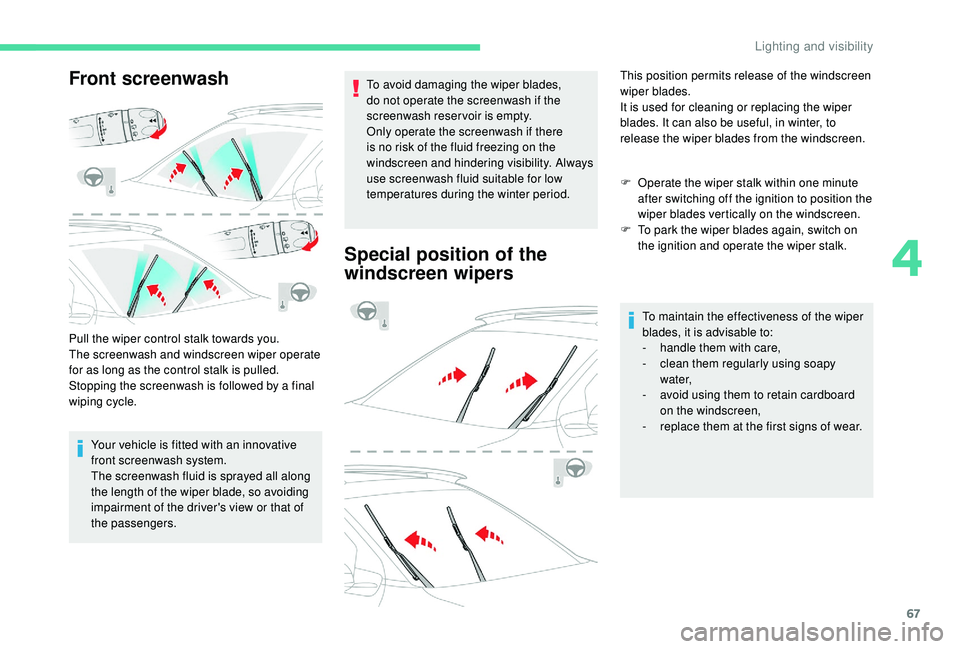
Front screenwash
Pull the wiper control stalk towards you.
The screenwash and windscreen wiper operate
for as long as the control stalk is pulled.
Stopping the screenwash is followed by a final
wiping cycle.Your vehicle is fitted with an innovative
front screenwash system.
The screenwash fluid is sprayed all along
the length of the wiper blade, so avoiding
impairment of the driver's view or that of
the passengers. To avoid damaging the wiper blades,
do not operate the screenwash if the
screenwash reservoir is empty.
Only operate the screenwash if there
is no risk of the fluid freezing on the
windscreen and hindering visibility. Always
use screenwash fluid suitable for low
temperatures during the winter period.
Special position of the
windscreen wipers
This position permits release of the windscreen
wiper blades.
It is used for cleaning or replacing the wiper
blades. It can also be useful, in winter, to
release the wiper blades from the windscreen.
F
O
perate the wiper stalk within one minute
after switching off the ignition to position the
wiper blades vertically on the windscreen.
F
T
o park the wiper blades again, switch on
the ignition and operate the wiper stalk.
To maintain the effectiveness of the wiper
blades, it is advisable to:
-
h
andle them with care,
-
c
lean them regularly using soapy
water,
-
a
void using them to retain cardboard
on the windscreen,
-
r
eplace them at the first signs of wear.
4
Lighting and visibility