light CITROEN C4 DAG 2013 User Guide
[x] Cancel search | Manufacturer: CITROEN, Model Year: 2013, Model line: C4 DAG, Model: CITROEN C4 DAG 2013Pages: 340, PDF Size: 28.95 MB
Page 30 of 340
1
MONITORING
28
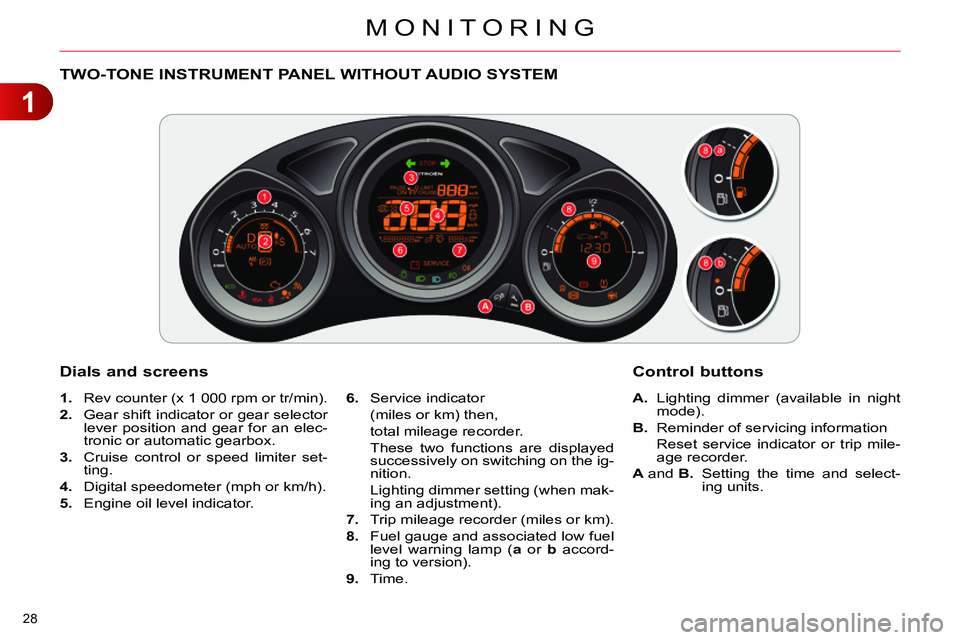
TWO-TONE INSTRUMENT PANEL WITHOUT AUDIO SYSTEM
Dials and screens
1.
Rev counter (x 1 000 rpm or tr/min).
2.
Gear shift indicator or gear selector
lever position and gear for an elec-
tronic or automatic gearbox.
3.
Cruise control or speed limiter set-
ting.
4.
Digital speedometer (mph or km/h).
5.
Engine oil level indicator.
6.
Service indicator
(miles or km) then,
total mileage recorder.
These two functions are displayed
successively on switching on the ig-
nition.
Lighting dimmer setting (when mak-
ing an adjustment).
7.
Trip mileage recorder (miles or km).
8.
Fuel gauge and associated low fuel
level warning lamp ( a
or b
accord-
ing to version).
9.
Time.
Control buttons
A.
Lighting dimmer (available in night
mode).
B.
Reminder of servicing information
Reset service indicator or trip mile-
age recorder.
A
and B.
Setting the time and select-
ing units.
Page 31 of 340
1
MONITORING
29
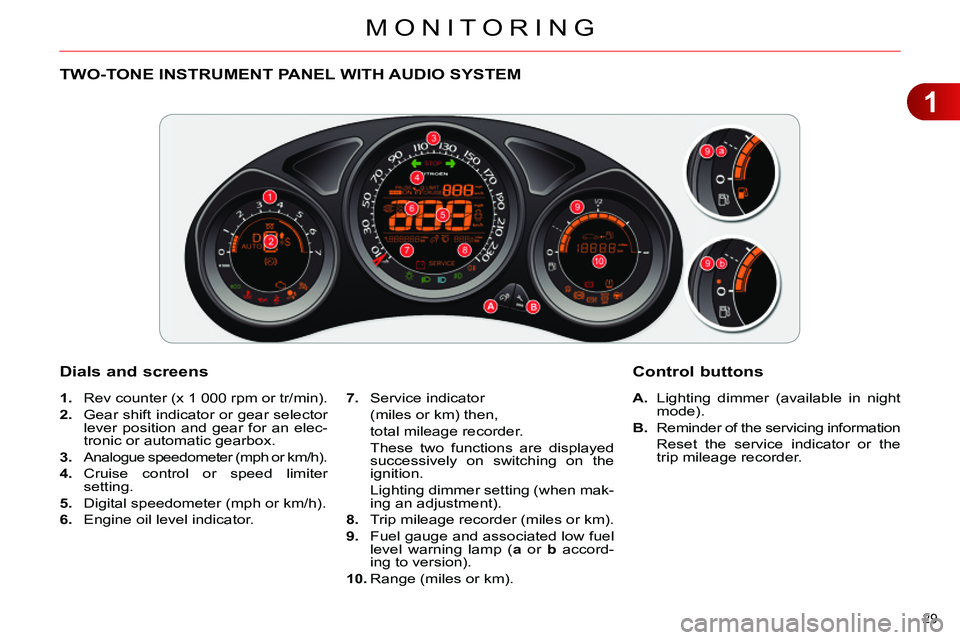
TWO-TONE INSTRUMENT PANEL WITH AUDIO SYSTEM
Dials and screens
A.
Lighting dimmer (available in night
mode).
B.
Reminder of the servicing information
Reset the service indicator or the
trip mileage recorder.
7.
Service indicator
(miles or km) then,
total mileage recorder.
These two functions are displayed
successively on switching on the
ignition.
Lighting dimmer setting (when mak-
ing an adjustment).
8.
Trip mileage recorder (miles or km).
9.
Fuel gauge and associated low fuel
level warning lamp ( a
or b
accord-
ing to version).
10.
Range (miles or km).
Control buttons
1.
Rev counter (x 1 000 rpm or tr/min).
2.
Gear shift indicator or gear selector
lever position and gear for an elec-
tronic or automatic gearbox.
3.
Analogue speedometer (mph or km/h).
4.
Cruise control or speed limiter
setting.
5.
Digital speedometer (mph or km/h).
6.
Engine oil level indicator.
Page 32 of 340
1
MONITORING
30
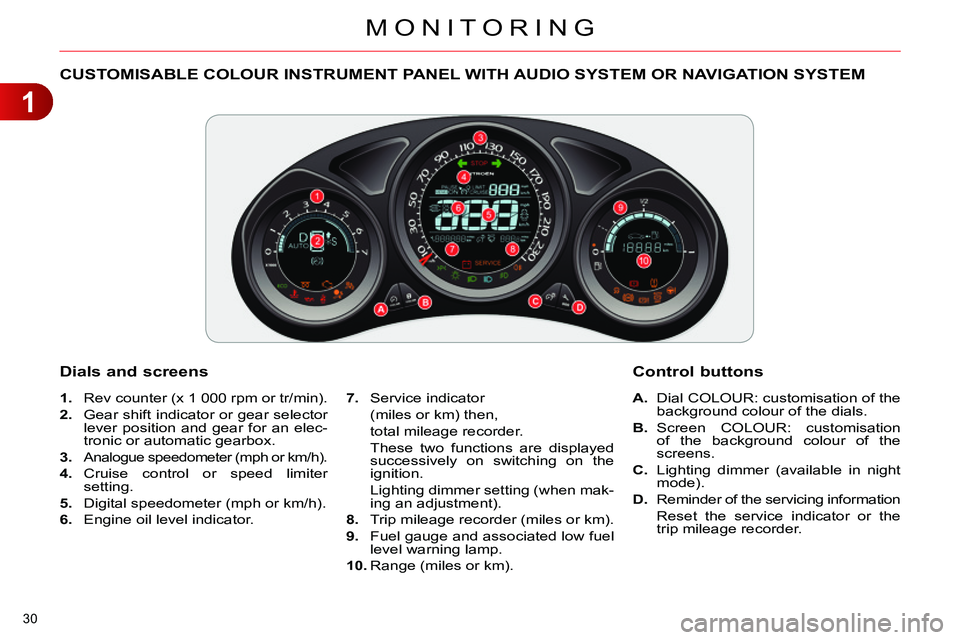
CUSTOMISABLE COLOUR INSTRUMENT PANEL WITH AUDIO SYSTEM OR NAVIGATION SYSTEM
1.
Rev counter (x 1 000 rpm or tr/min).
2.
Gear shift indicator or gear selector
lever position and gear for an elec-
tronic or automatic gearbox.
3.
Analogue speedometer (mph or km/h).
4.
Cruise control or speed limiter
setting.
5.
Digital speedometer (mph or km/h).
6.
Engine oil level indicator.
A.
Dial COLOUR: customisation of the
background colour of the dials.
B.
Screen COLOUR: customisation
of the background colour of the
screens.
C.
Lighting dimmer (available in night
mode).
D.
Reminder of the servicing information
Reset the service indicator or the
trip mileage recorder.
Dials and screens
7.
Service indicator
(miles or km) then,
total mileage recorder.
These two functions are displayed
successively on switching on the
ignition.
Lighting dimmer setting (when mak-
ing an adjustment).
8.
Trip mileage recorder (miles or km).
9.
Fuel gauge and associated low fuel
level warning lamp.
10.
Range (miles or km).
Control buttons
Page 41 of 340
1
MONITORING
39
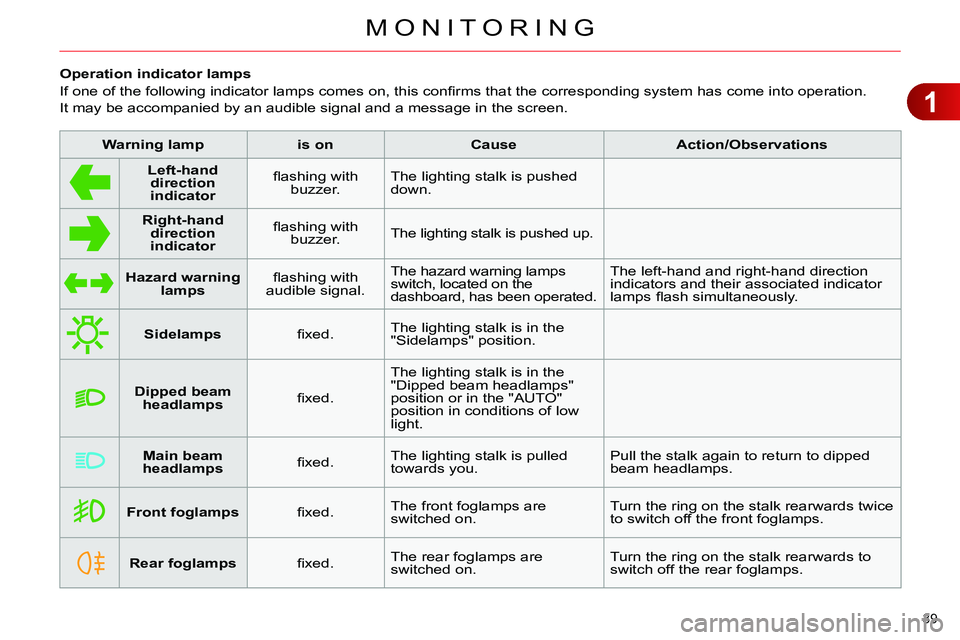
Operation indicator lamps
If one of the following indicator lamps comes on, this confi rms that the corresponding system has come into operation.
It may be accompanied by an audible signal and a message in the screen.
Warning lamp
is on
Cause
Action/Observations
Left-hand
direction
indicato
r
fl ashing with
buzzer. The lighting stalk is pushed
down.
Right-hand
direction
indicator
fl ashing with
buzzer. The lighting stalk is pushed up.
Hazard warning
lamps
fl ashing with
audible signal. The hazard warning lamps
switch, located on the
dashboard, has been operated. The left-hand and right-hand direction
indicators and their associated indicator
lamps fl ash simultaneously.
Sidelamps
fi xed. The lighting stalk is in the
"Sidelamps" position.
Dipped beam
headlamps
fi xed. The lighting stalk is in the
"Dipped beam headlamps"
position or in the "AUTO"
position in conditions of low
light.
Main beam
headlamps
fi xed. The lighting stalk is pulled
towards you. Pull the stalk again to return to dipped
beam headlamps.
Front foglamps
fi xed. The front foglamps are
switched on. Turn the ring on the stalk rearwards twice
to switch off the front foglamps.
Rear foglamps
fi xed. The rear foglamps are
switched on. Turn the ring on the stalk rearwards to
switch off the rear foglamps.
Page 43 of 340
1
MONITORING
41
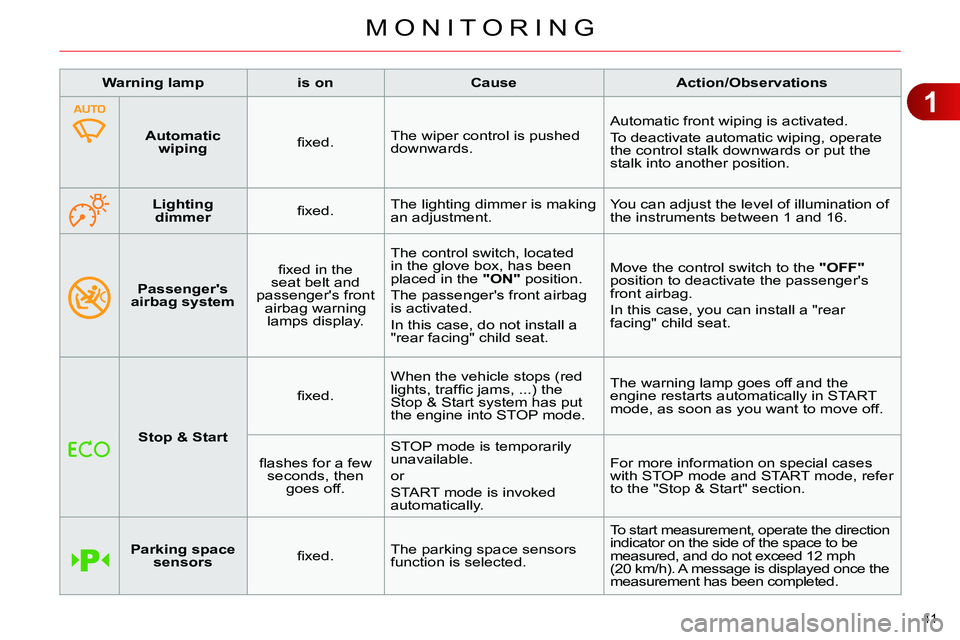
Passenger's
airbag system
fi xed in the
seat belt and
passenger's front
airbag warning
lamps display. The control switch, located
in the glove box, has been
placed in the "ON"
position.
The passenger's front airbag
is activated.
In this case, do not install a
"rear facing" child seat. Move the control switch to the "OFF"
position to deactivate the passenger's
front airbag.
In this case, you can install a "rear
facing" child seat.
Warning lamp
is on
Cause
Action/Observations
Stop & Start
fi xed. When the vehicle stops (red
lights, traffi c jams, ...) the
Stop & Start system has put
the engine into STOP mode. The warning lamp goes off and the
engine restarts automatically in START
mode, as soon as you want to move off.
fl ashes for a few
seconds, then
goes off. STOP mode is temporarily
unavailable.
or
START mode is invoked
automatically. For more information on special cases
with STOP mode and START mode, refer
to the "Stop & Start" section.
Parking space
sensors
fi xed. The parking space sensors
function is selected. To start measurement, operate the direction
indicator on the side of the space to be
measured, and do not exceed 12 mph
(20 km/h). A message is displayed once the
measurement has been completed.
Automatic
wiping
fi xed. The wiper control is pushed
downwards. Automatic front wiping is activated.
To deactivate automatic wiping, operate
the control stalk downwards or put the
stalk into another position.
Lighting
dimmer
fi xed. The lighting dimmer is making
an adjustment. You can adjust the level of illumination of
the instruments between 1 and 16.
Page 49 of 340
1
MONITORING
47
System allowing certain screens to be
switched off for night driving.
The instrument panel remains on with
the vehicle speed, electronic or auto-
matic gearbox gear selected, cruise
control or speed limiter information, if
in use, and the low fuel alerts as ap-
propriate.
If there is an alert or a change in a
function or to a setting, the black panel
mode is interrupted.
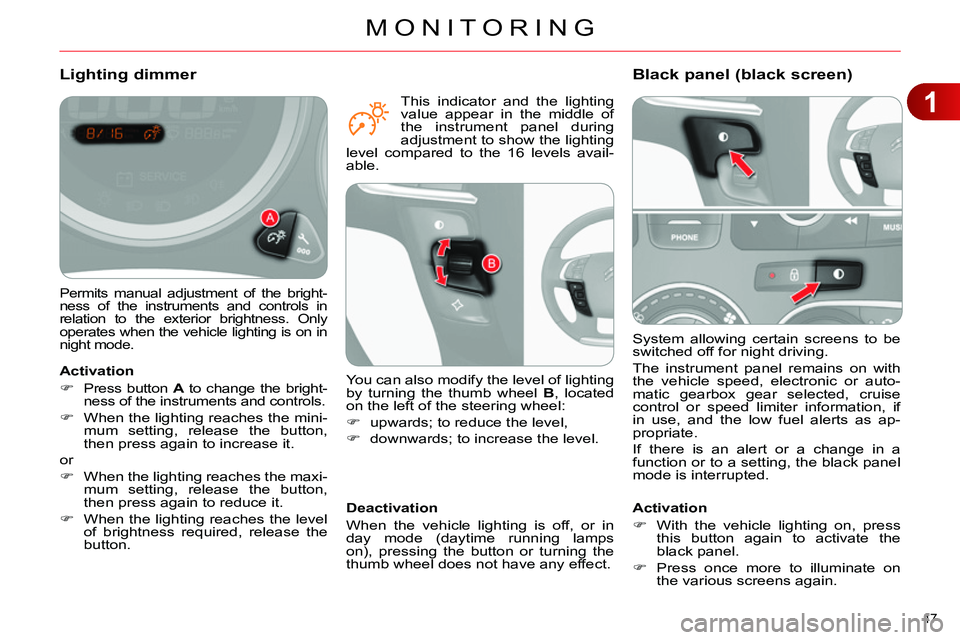
Black panel (black screen)
Activation
With the vehicle lighting on, press
this button again to activate the
black panel.
Press once more to illuminate on
the various screens again.
Permits manual adjustment of the bright-
ness of the instruments and controls in
relation to the exterior brightness. Only
operates when the vehicle lighting is on in
night mode.
Lighting dimmer
Activation
Press button A
to change the bright-
ness of the instruments and controls.
When the lighting reaches the mini-
mum setting, release the button,
then press again to increase it.
or
When the lighting reaches the maxi-
mum setting, release the button,
then press again to reduce it.
When the lighting reaches the level
of brightness required, release the
button.
Deactivation
When the vehicle lighting is off, or in
day mode (daytime running lamps
on), pressing the button or turning the
thumb wheel does not have any effect.
You can also modify the level of lighting
by turning the thumb wheel B
, located
on the left of the steering wheel:
upwards; to reduce the level,
downwards; to increase the level.
This indicator and the lighting
value appear in the middle of
the instrument panel during
adjustment to show the lighting
level compared to the 16 levels avail-
able.
Page 50 of 340
1
MONITORING
48
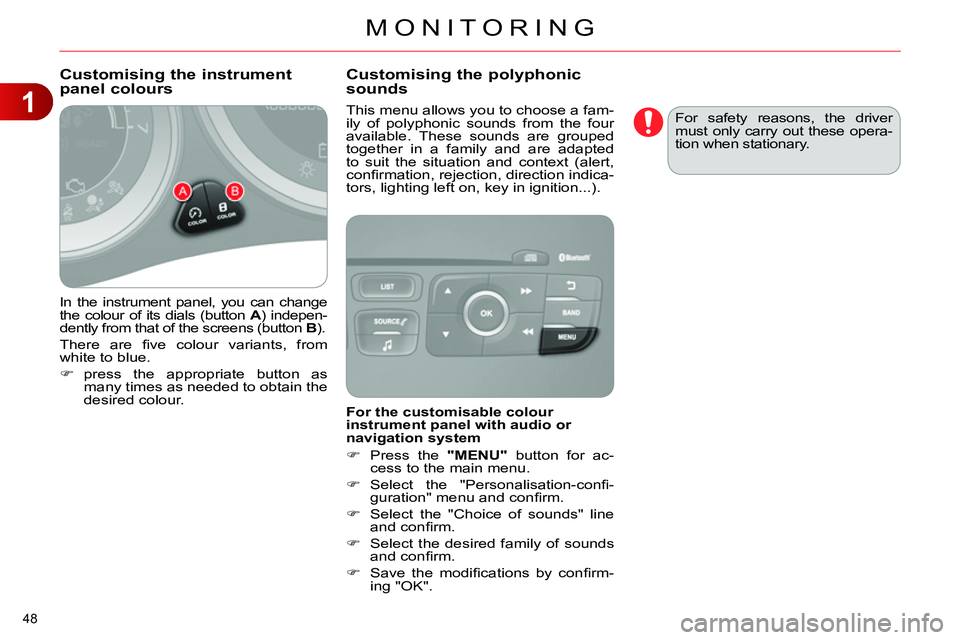
In the instrument panel, you can change
the colour of its dials (button A
) indepen-
dently from that of the screens (button B
).
There are fi ve colour variants, from
white to blue.
press the appropriate button as
many times as needed to obtain the
desired colour.
This menu allows you to choose a fam-
ily of polyphonic sounds from the four
available. These sounds are grouped
together in a family and are adapted
to suit the situation and context (alert,
confi rmation, rejection, direction indica-
tors, lighting left on, key in ignition...).
Customising the instrument
panel colours
Customising the polyphonic
sounds
For the customisable colour
instrument panel with audio or
navigation system
Press the "MENU"
button for ac-
cess to the main menu.
Select the "Personalisation-confi -
guration" menu and confi rm.
Select the "Choice of sounds" line
and confi rm.
Select the desired family of sounds
and confi rm.
Save the modifi cations by confi rm-
ing "OK". For safety reasons, the driver
must only carry out these opera-
tion when stationary.
Page 52 of 340
2
MULTIFUNCTION SCREENS
50
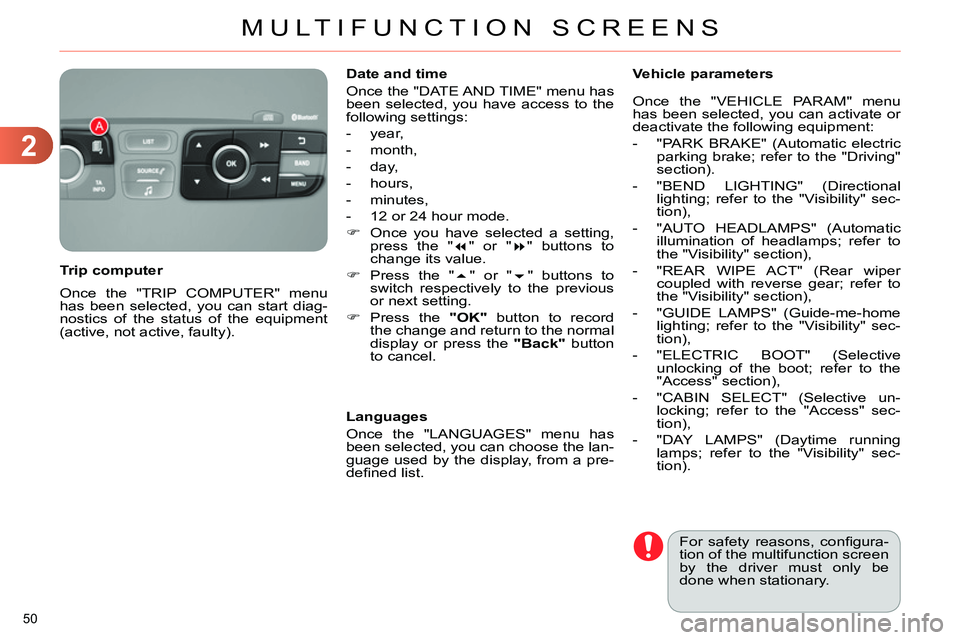
Once the "TRIP COMPUTER" menu
has been selected, you can start diag-
nostics of the status of the equipment
(active, not active, faulty).
Trip computer
Date and time
Once the "DATE AND TIME" menu has
been selected, you have access to the
following settings:
- year,
- month,
- day,
- hours,
- minutes,
- 12 or 24 hour mode.
Once you have selected a setting,
press the "
" or "
" buttons to
change its value.
Press the "
" or "
" buttons to
switch respectively to the previous
or next setting.
Press the "OK"
button to record
the change and return to the normal
display or press the "Back"
button
to cancel.
Languages
Once the "LANGUAGES" menu has
been selected, you can choose the lan-
guage used by the display, from a pre-
defi ned list.
For safety reasons, confi gura-
tion of the multifunction screen
by the driver must only be
done when stationary.
Vehicle parameters
Once the "VEHICLE PARAM" menu
has been selected, you can activate or
deactivate the following equipment:
- "PARK BRAKE" (Automatic electric
parking brake; refer to the "Driving"
section).
- "BEND LIGHTING" (Directional
lighting; refer to the "Visibility" sec-
tion),
- "AUTO HEADLAMPS" (Automatic
illumination of headlamps; refer to
the "Visibility" section),
- "REAR WIPE ACT" (Rear wiper
coupled with reverse gear; refer to
the "Visibility" section),
- "GUIDE LAMPS" (Guide-me-home
lighting; refer to the "Visibility" sec-
tion),
- "ELECTRIC BOOT" (Selective
unlocking of the boot; refer to the
"Access" section),
- "CABIN SELECT" (Selective un-
locking; refer to the "Access" sec-
tion),
- "DAY LAMPS" (Daytime running
lamps; refer to the "Visibility" sec-
tion).
Page 55 of 340
2
MULTIFUNCTION SCREENS
53
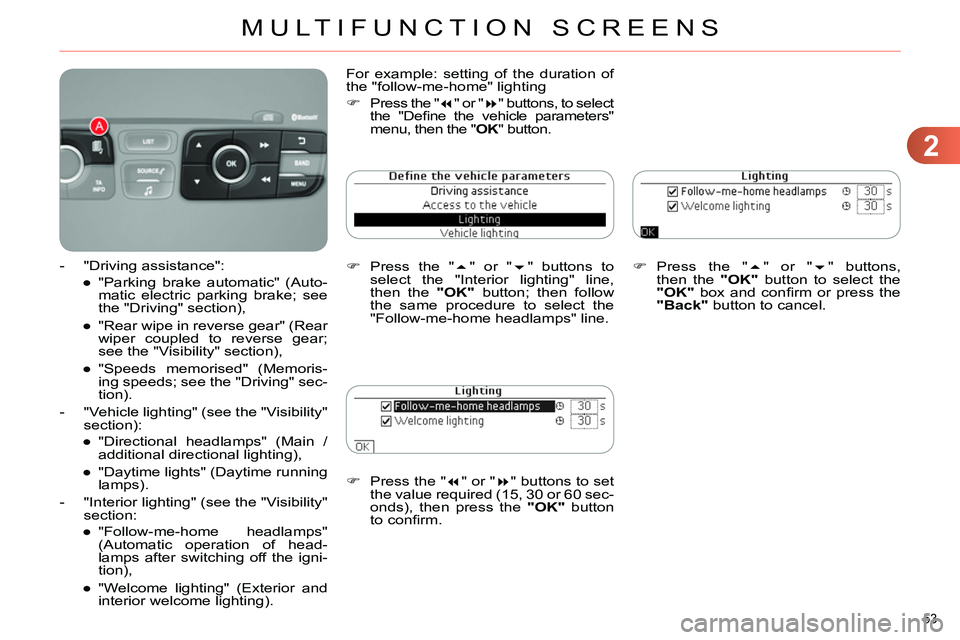
Press the "
" or "
" buttons to set
the value required (15, 30 or 60 sec-
onds), then press the "OK"
button
to confi rm.
Press the "
" or "
" buttons,
then the "OK"
button to select the
"OK"
box and confi rm or press the
"Back"
button to cancel.
For example: setting of the duration of
the "follow-me-home" lighting
Press the "
" or "
" buttons, to select
the "Defi ne the vehicle parameters"
menu, then the " OK
" button.
Press the "
" or "
" buttons to
select the "Interior lighting" line,
then the "OK"
button; then follow
the same procedure to select the
"Follow-me-home headlamps" line.
- "Driving assistance":
●
"Parking brake automatic" (Auto-
matic electric parking brake; see
the "Driving" section),
●
"Rear wipe in reverse gear" (Rear
wiper coupled to reverse gear;
see the "Visibility" section),
●
"Speeds memorised" (Memoris-
ing speeds; see the "Driving" sec-
tion).
- "Vehicle lighting" (see the "Visibility"
section):
●
"Directional headlamps" (Main /
additional directional lighting),
●
"Daytime lights" (Daytime running
lamps).
- "Interior lighting" (see the "Visibility"
section:
●
"Follow-me-home headlamps"
(Automatic operation of head-
lamps after switching off the igni-
tion),
●
"Welcome lighting" (Exterior and
interior welcome lighting).
Page 56 of 340
2
MULTIFUNCTION SCREENS
54
Choice of language
Once this menu has been selected, you
can choose the language used by the
display from a pre-defi ned list.
For safety reasons, confi gura-
tion of the multifunction screen
by the driver must only be done
when stationary.
Display confi guration
This menu gives access to the following
settings:
- "Choice of units",
- "Date and time adjustment",
- "Display parameters",
- "Brightness".
Choice of sounds
This menu allows you to choose a fam-
ily of polyphonic sounds from the four
available. These sounds are grouped
together in a family and are adapted
to suit the situation and context (alert,
confi rmation, rejection, direction indica-
tors, lighting left on, key in ignition...).
Adjusting the date and time
Press the "
" or "
" button to
display the "Display confi guration"
menu, then press "OK"
.
Press the "
" or "
" button to se-
lect the "Date and time adjustment"
button, then press "OK"
.
Press the "
" or "
" button to se-
lect the setting to modify. Confi rm
by pressing "OK"
, then modify the
setting and confi rm again to save
the modifi cation.
Adjust the settings one by one, con-
fi rming with the "OK"
button.
Press the "
" or "
" button, then
the "OK"
button to select the "OK"
box and confi rm or the "Back"
but-
ton to cancel.