light CITROEN C4 DAG 2013 Owner's Manual
[x] Cancel search | Manufacturer: CITROEN, Model Year: 2013, Model line: C4 DAG, Model: CITROEN C4 DAG 2013Pages: 340, PDF Size: 28.95 MB
Page 58 of 340
2
MULTIFUNCTION SCREENS
56
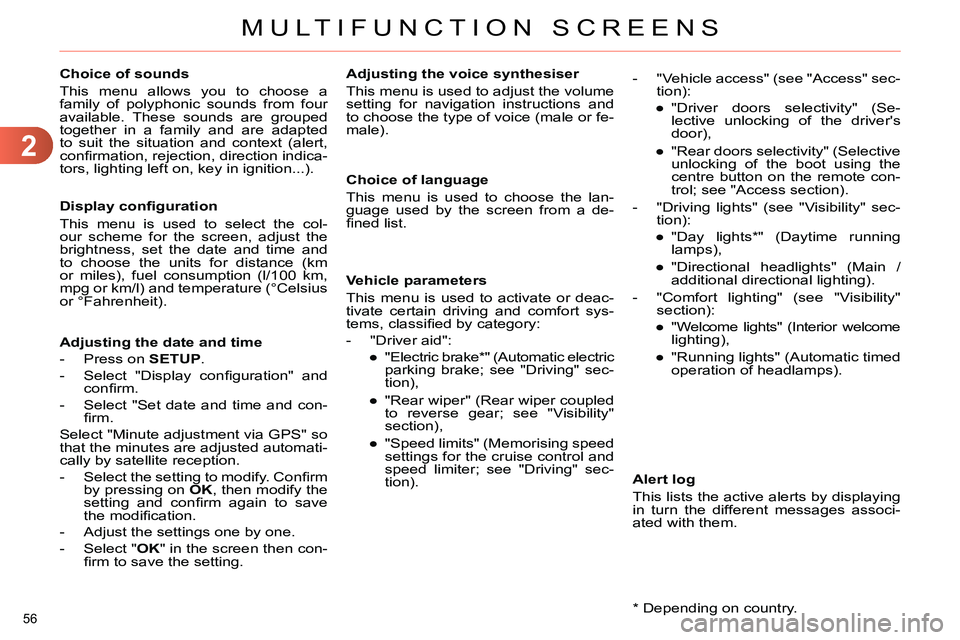
Choice of sounds
This menu allows you to choose a
family of polyphonic sounds from four
available. These sounds are grouped
together in a family and are adapted
to suit the situation and context (alert,
confi rmation, rejection, direction indica-
tors, lighting left on, key in ignition...).
Display confi guration
This menu is used to select the col-
our scheme for the screen, adjust the
brightness, set the date and time and
to choose the units for distance (km
or miles), fuel consumption (l/100 km,
mpg or km/l) and temperature (°Celsius
or °Fahrenheit).
Adjusting the voice synthesiser
This menu is used to adjust the volume
setting for navigation instructions and
to choose the type of voice (male or fe-
male).
Adjusting the date and time
- Press on SETUP
.
- Select "Display confi guration" and
confi rm.
- Select "Set date and time and con-
fi rm.
Select "Minute adjustment via GPS" so
that the minutes are adjusted automati-
cally by satellite reception.
- Select the setting to modify. Confi rm
by pressing on OK
, then modify the
setting and confi rm again to save
the modifi cation.
- Adjust the settings one by one.
- Select " OK
" in the screen then con-
fi rm to save the setting.
Choice of language
This menu is used to choose the lan-
guage used by the screen from a de-
fi ned list.
Vehicle parameters
This menu is used to activate or deac-
tivate certain driving and comfort sys-
tems, classifi ed by category:
- "Driver aid":
●
"Electric brake * " (Automatic electric
parking brake; see "Driving" sec-
tion),
●
"Rear wiper" (Rear wiper coupled
to reverse gear; see "Visibility"
section),
●
"Speed limits" (Memorising speed
settings for the cruise control and
speed limiter; see "Driving" sec-
tion).
Alert log
This lists the active alerts by displaying
in turn the different messages associ-
ated with them.
- "Vehicle access" (see "Access" sec-
tion):
●
"Driver doors selectivity" (Se-
lective unlocking of the driver's
door),
●
"Rear doors selectivity" (Selective
unlocking of the boot using the
centre button on the remote con-
trol; see "Access section).
- "Driving lights" (see "Visibility" sec-
tion):
●
"Day lights * " (Daytime running
lamps),
●
"Directional headlights" (Main /
additional directional lighting).
- "Comfort lighting" (see "Visibility"
section):
●
"Welcome lights" (Interior welcome
lighting),
●
"Running lights" (Automatic timed
operation of headlamps).
*
Depending on country.
Page 65 of 340
3
COMFORT
63
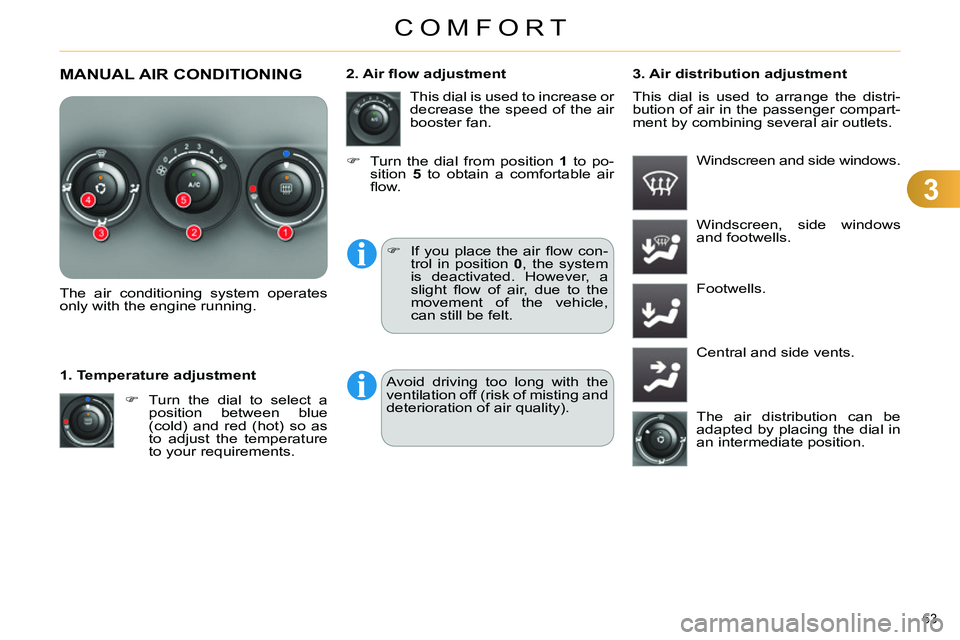
MANUAL AIR CONDITIONING
The air conditioning system operates
only with the engine running.
Turn the dial to select a
position between blue
(cold) and red (hot) so as
to adjust the temperature
to your requirements.
1. Temperature adjustment This dial is used to increase or
decrease the speed of the air
booster fan.
2. Air fl ow adjustment
3. Air distribution adjustment
Windscreen and side windows.
If you place the air fl ow con-
trol in position 0
, the system
is deactivated. However, a
slight fl ow of air, due to the
movement of the vehicle,
can still be felt.
Windscreen, side windows
and footwells.
Footwells.
Central and side vents.
The air distribution can be
adapted by placing the dial in
an intermediate position.
Turn the dial from position 1
to po-
sition 5
to obtain a comfortable air
fl ow. This dial is used to arrange the distri-
bution of air in the passenger compart-
ment by combining several air outlets.
Avoid driving too long with the
ventilation off (risk of misting and
deterioration of air quality).
Page 67 of 340
3
COMFORT
65
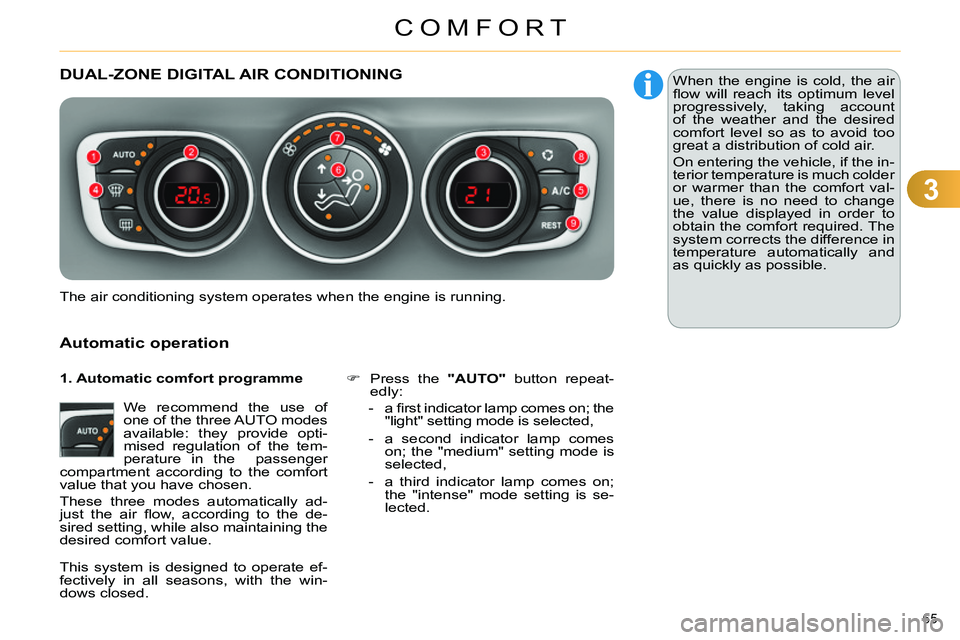
DUAL-ZONE DIGITAL AIR CONDITIONING
Automatic operation
We recommend the use of
one of the three AUTO modes
available: they provide opti-
mised regulation of the tem-
perature in the passenger
compartment according to the comfort
value that you have chosen.
These three modes automatically ad-
just the air fl ow, according to the de-
sired setting, while also maintaining the
desired comfort value.
Press the "AUTO"
button repeat-
edly:
- a fi rst indicator lamp comes on; the
"light" setting mode is selected,
- a second indicator lamp comes
on; the "medium" setting mode is
selected,
- a third indicator lamp comes on;
the "intense" mode setting is se-
lected.
The air conditioning system operates when the engine is running. When the engine is cold, the air
fl ow will reach its optimum level
progressively, taking account
of the weather and the desired
comfort level so as to avoid too
great a distribution of cold air.
On entering the vehicle, if the in-
terior temperature is much colder
or warmer than the comfort val-
ue, there is no need to change
the value displayed in order to
obtain the comfort required. The
system corrects the difference in
temperature automatically and
as quickly as possible.
1. Automatic comfort programme
This system is designed to operate ef-
fectively in all seasons, with the win-
dows closed.
Page 70 of 340
3
COMFORT
68
Switching the system off
Avoid prolonged operation in in-
terior air recirculation mode or
driving for long periods with the
system off (risk of misting and
deterioration of air quality).
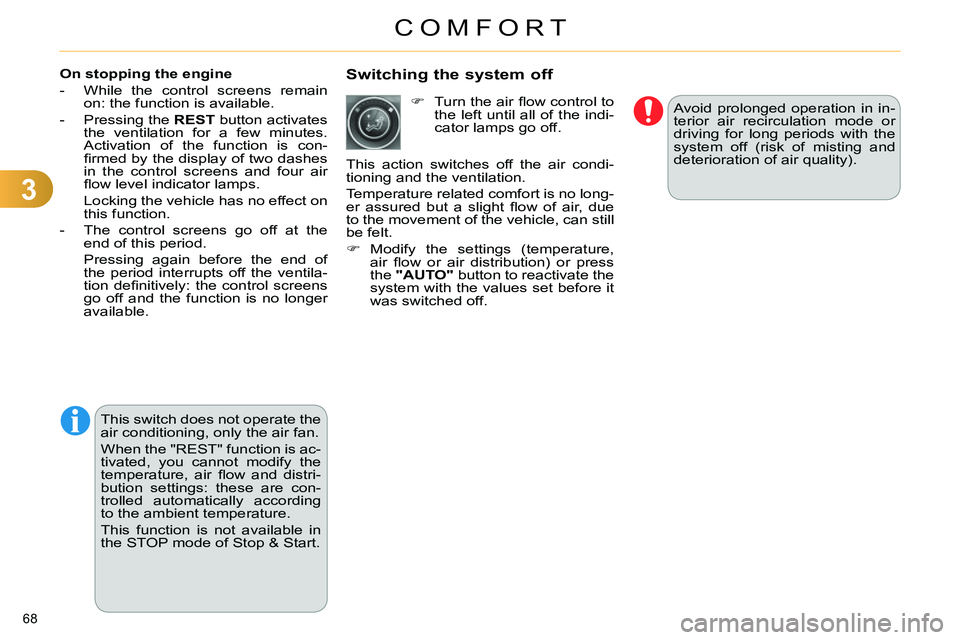
On stopping the engine
- While the control screens remain
on: the function is available.
- Pressing the REST
button activates
the ventilation for a few minutes.
Activation of the function is con-
fi rmed by the display of two dashes
in the control screens and four air
fl ow level indicator lamps.
Locking the vehicle has no effect on
this function.
- The control screens go off at the
end of this period.
Pressing again before the end of
the period interrupts off the ventila-
tion defi nitively: the control screens
go off and the function is no longer
available.
Turn the air fl ow control to
the left until all of the indi-
cator lamps go off.
This action switches off the air condi-
tioning and the ventilation.
Temperature related comfort is no long-
er assured but a slight fl ow of air, due
to the movement of the vehicle, can still
be felt.
Modify the settings (temperature,
air fl ow or air distribution) or press
the "AUTO"
button to reactivate the
system with the values set before it
was switched off.
This switch does not operate the
air conditioning, only the air fan.
When the "REST" function is ac-
tivated, you cannot modify the
temperature, air fl ow and distri-
bution settings: these are con-
trolled automatically according
to the ambient temperature.
This function is not available in
the STOP mode of Stop & Start.
Page 77 of 340
3
COMFORT
75
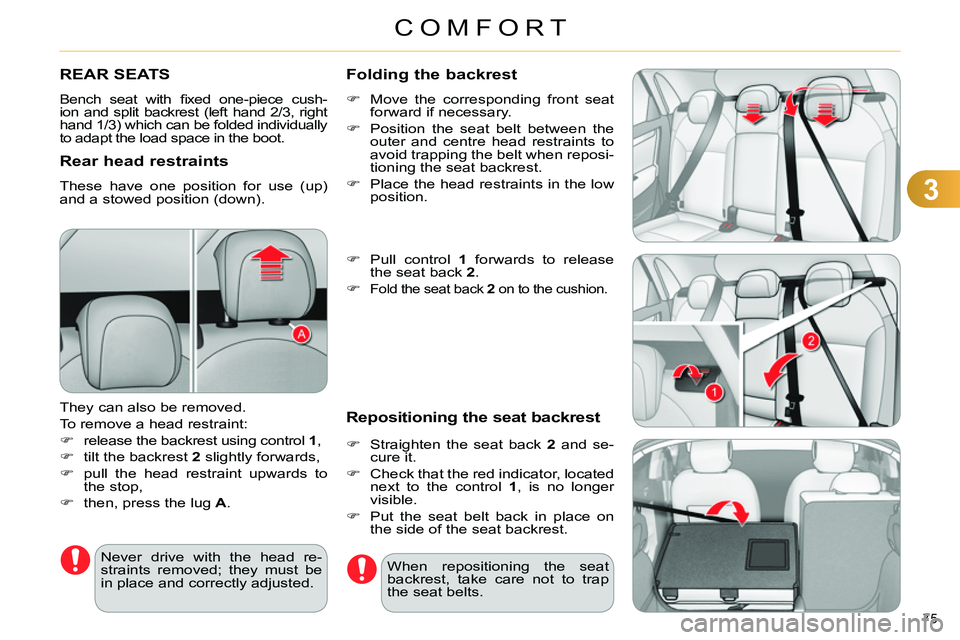
REAR SEATS
Bench seat with fi xed one-piece cush-
ion and split backrest (left hand 2/3, right
hand 1/3) which can be folded individually
to adapt the load space in the boot.
Rear head restraints
These have one position for use (up)
and a stowed position (down).
They can also be removed.
To remove a head restraint:
release the backrest using control 1
,
tilt the backrest 2
slightly forwards,
pull the head restraint upwards to
the stop,
then, press the lug A
.
Never drive with the head re-
straints removed; they must be
in place and correctly adjusted. When repositioning the seat
backrest, take care not to trap
the seat belts.
Folding the backrest
Move the corresponding front seat
forward if necessary.
Position the seat belt between the
outer and centre head restraints to
avoid trapping the belt when reposi-
tioning the seat backrest.
Place the head restraints in the low
position.
Pull control 1
forwards to release
the seat back 2
.
Fold the seat back 2
on to the cushion.
Repositioning the seat backrest
Straighten the seat back 2
and se-
cure it.
Check that the red indicator, located
next to the control 1
, is no longer
visible.
Put the seat belt back in place on
the side of the seat backrest.
Page 80 of 340
3
COMFORT
78
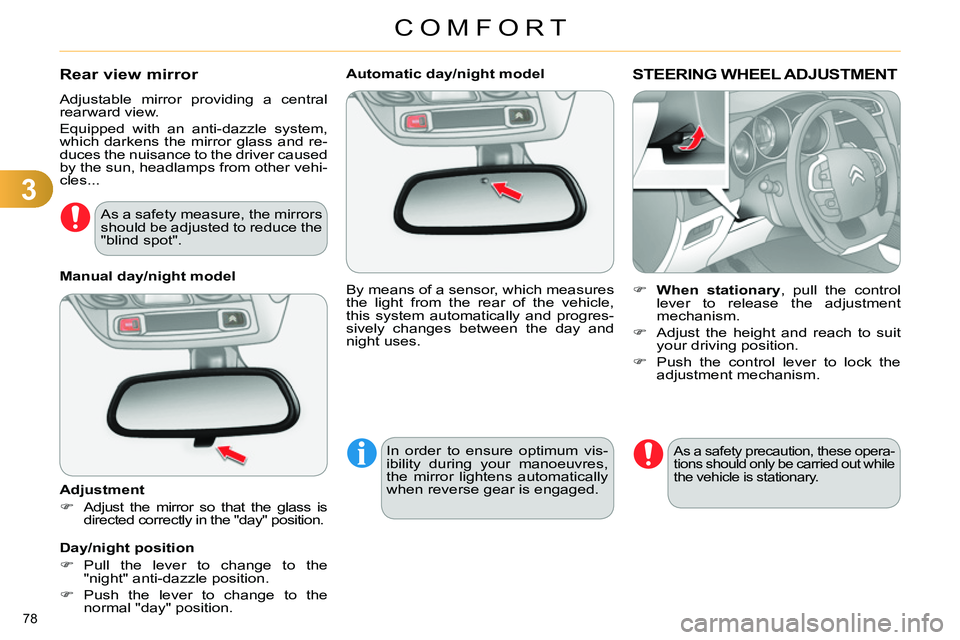
Automatic day/night model
By means of a sensor, which measures
the light from the rear of the vehicle,
this system automatically and progres-
sively changes between the day and
night uses.
In order to ensure optimum vis-
ibility during your manoeuvres,
the mirror lightens automatically
when reverse gear is engaged.
STEERING WHEEL ADJUSTMENT
When stationary
, pull the control
lever to release the adjustment
mechanism.
Adjust the height and reach to suit
your driving position.
Push the control lever to lock the
adjustment mechanism.
As a safety precaution, these opera-
tions should only be carried out while
the vehicle is stationary.
Rear view mirror
Adjustable mirror providing a central
rearward view.
Equipped with an anti-dazzle system,
which darkens the mirror glass and re-
duces the nuisance to the driver caused
by the sun, headlamps from other vehi-
cles...
Manual day/night model
Adjustment
Adjust the mirror so that the glass is
directed correctly in the "day" position.
Day/night position
Pull the lever to change to the
"night" anti-dazzle position.
Push the lever to change to the
normal "day" position.
As a safety measure, the mirrors
should be adjusted to reduce the
"blind spot".
Page 81 of 340
4
ACCESS
79
REMOTE CONTROL KEY
System which permits central unlocking
or locking of the vehicle using the door
lock or from a distance. It is also used
to locate and start the vehicle, as well
as providing protection against theft.
Press the open padlock
once to unlock the driver's
door only.
Selective unlocking using the
remote control
Turn the key towards the front in
the driver's door lock to unlock the
vehicle completely.
Complete unlocking using the
remote control
Press the open padlock
to unlock the vehicle com-
pletely.
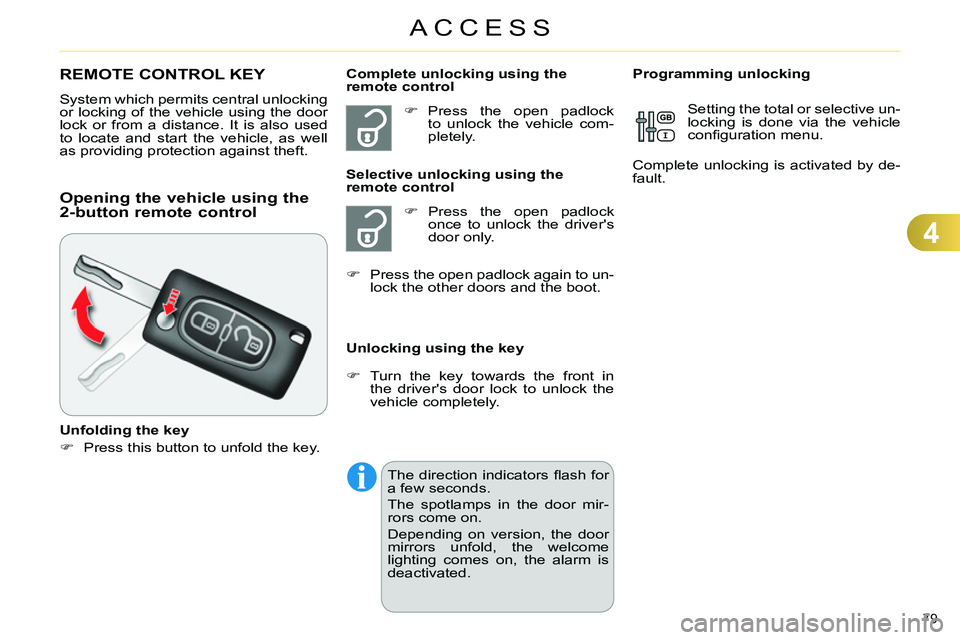
Opening the vehicle using the
2-button remote control
Unfolding the key
Press this button to unfold the key.
Unlocking using the key
Programming unlocking
Setting the total or selective un-
locking is done via the vehicle
confi guration menu.
Complete unlocking is activated by de-
fault.
Press the open padlock again to un-
lock the other doors and the boot.
The direction indicators fl ash for
a few seconds.
The spotlamps in the door mir-
rors come on.
Depending on version, the door
mirrors unfold, the welcome
lighting comes on, the alarm is
deactivated.
Page 82 of 340
4
ACCESS
80
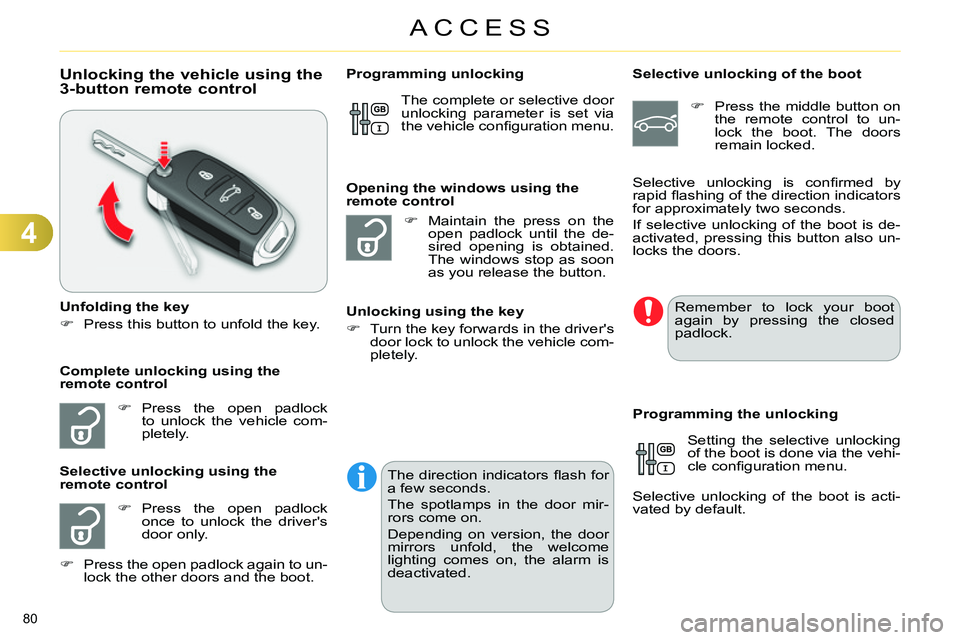
Unlocking the vehicle using the
3-button remote control
Unfolding the key
Press this button to unfold the key.
Press the open padlock
to unlock the vehicle com-
pletely.
Press the open padlock
once to unlock the driver's
door only.
Selective unlocking using the
remote control
Maintain the press on the
open padlock until the de-
sired opening is obtained.
The windows stop as soon
as you release the button.
Opening the windows using the
remote control
Unlocking using the key
Turn the key forwards in the driver's
door lock to unlock the vehicle com-
pletely.
Programming unlocking
Selective unlocking of the boot
Press the middle button on
the remote control to un-
lock the boot. The doors
remain locked.
Setting the selective unlocking
of the boot is done via the vehi-
cle confi guration menu.
Selective unlocking of the boot is acti-
vated by default.
Programming the unlocking
Complete unlocking using the
remote control Selective unlocking is confi rmed by
rapid fl ashing of the direction indicators
for approximately two seconds.
If selective unlocking of the boot is de-
activated, pressing this button also un-
locks the doors. The complete or selective door
unlocking parameter is set via
the vehicle confi guration menu.
Remember to lock your boot
again by pressing the closed
padlock.
Press the open padlock again to un-
lock the other doors and the boot.
The direction indicators fl ash for
a few seconds.
The spotlamps in the door mir-
rors come on.
Depending on version, the door
mirrors unfold, the welcome
lighting comes on, the alarm is
deactivated.
Page 83 of 340
4
ACCESS
81
Locking the vehicle
Press the closed padlock to
lock the vehicle.
Normal locking using the remote
control
Normal locking using the key
Turn the key towards the rear in the
driver's door lock to lock the vehicle.
Locating your vehicle
This function allows you to identify your
vehicle from a distance, particularly in
poor light. Your vehicle must be locked.
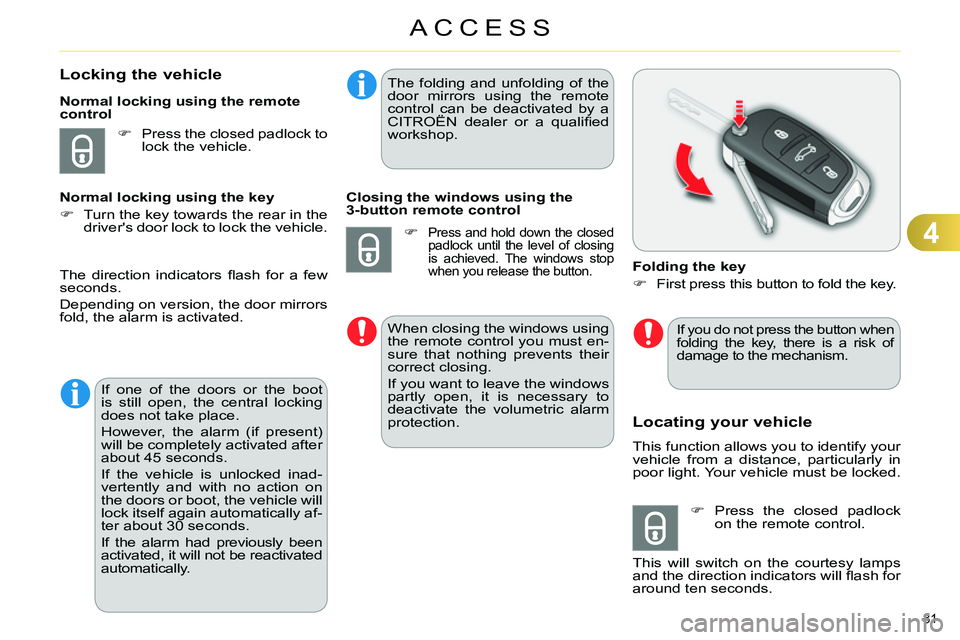
Folding the key
First press this button to fold the key.
Press the closed padlock
on the remote control.
This will switch on the courtesy lamps
and the direction indicators will fl ash for
around ten seconds.
The direction indicators fl ash for a few
seconds.
Depending on version, the door mirrors
fold, the alarm is activated.
If one of the doors or the boot
is still open, the central locking
does not take place.
However, the alarm (if present)
will be completely activated after
about 45 seconds.
If the vehicle is unlocked inad-
vertently and with no action on
the doors or boot, the vehicle will
lock itself again automatically af-
ter about 30 seconds.
If the alarm had previously been
activated, it will not be reactivated
automatically.
The folding and unfolding of the
door mirrors using the remote
control can be deactivated by a
CITROËN dealer or a qualifi ed
workshop.
Closing the windows using the
3-button remote control
Press and hold down the closed
padlock until the level of closing
is achieved. The windows stop
when you release the button.
When closing the windows using
the remote control you must en-
sure that nothing prevents their
correct closing.
If you want to leave the windows
partly open, it is necessary to
deactivate the volumetric alarm
protection.
If you do not press the button when
folding the key, there is a risk of
damage to the mechanism.
Page 96 of 340
4
ACCESS
94
PANORAMIC SUNROOF
Your vehicle is fi tted with a tinted glass
panoramic sunroof which increases
the light and visibility in the passenger
compartment. Its electric blind helps
control the temperature in the passen-
ger compartment.
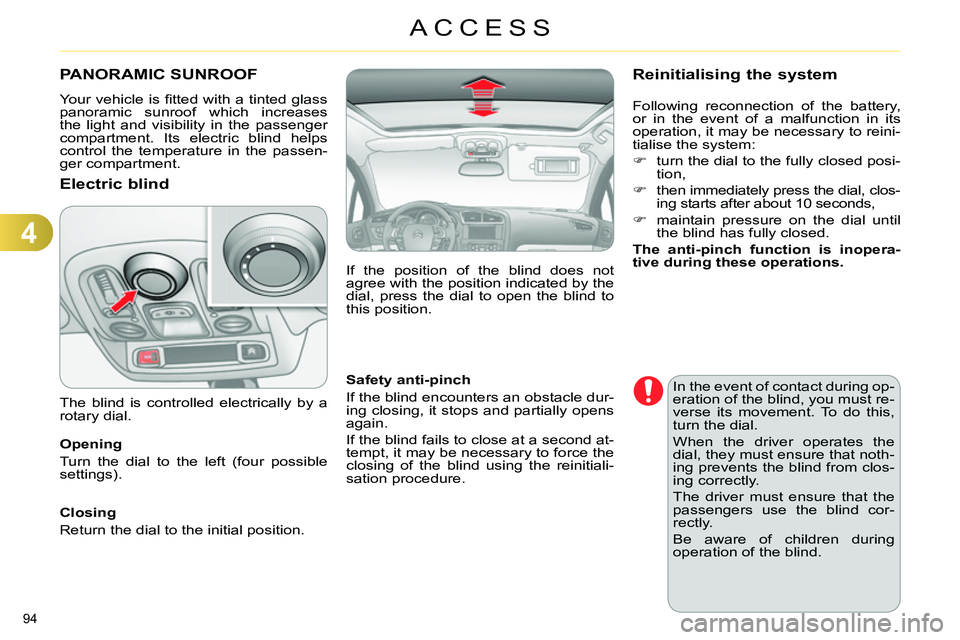
Electric blind
Opening
Turn the dial to the left (four possible
settings).
Closing
Return the dial to the initial position.
Safety anti-pinch
If the blind encounters an obstacle dur-
ing closing, it stops and partially opens
again.
If the blind fails to close at a second at-
tempt, it may be necessary to force the
closing of the blind using the reinitiali-
sation procedure.
The blind is controlled electrically by a
rotary dial.
In the event of contact during op-
eration of the blind, you must re-
verse its movement. To do this,
turn the dial.
When the driver operates the
dial, they must ensure that noth-
ing prevents the blind from clos-
ing correctly.
The driver must ensure that the
passengers use the blind cor-
rectly.
Be aware of children during
operation of the blind.
Reinitialising the system
Following reconnection of the battery,
or in the event of a malfunction in its
operation, it may be necessary to reini-
tialise the system:
turn the dial to the fully closed posi-
tion,
then immediately press the dial, clos-
ing starts after about 10 seconds,
maintain pressure on the dial until
the blind has fully closed.
The anti-pinch function is inopera-
tive during these operations.
If the position of the blind does not
agree with the position indicated by the
dial, press the dial to open the blind to
this position.