ignition Citroen C4 RHD 2014 2.G Owner's Guide
[x] Cancel search | Manufacturer: CITROEN, Model Year: 2014, Model line: C4 RHD, Model: Citroen C4 RHD 2014 2.GPages: 328
Page 58 of 328
2
MULTIFUNCTION SCREENS
56
Choice of sounds
This menu allows you to choose a
family of polyphonic sounds from four
available. These sounds are grouped
together in a family and are adapted
to suit the situation and context (alert,
confi rmation, rejection, direction indica-
tors, lighting left on, key in ignition...).
Display confi guration
This menu is used to select the col-
our scheme for the screen, adjust the
brightness, set the date and time and
to choose the units for distance (km
or miles), fuel consumption (l/100 km,
mpg or km/l) and temperature (°Celsius
or °Fahrenheit).
Adjusting the voice synthesiser
This menu is used to adjust the volume
setting for navigation instructions and
to choose the type of voice (male or fe-
male).
Adjusting the date and time
- Press on SETUP
.
- Select "Display confi guration" and
confi rm.
- Select "Set date and time" and con-
fi rm.
Select "Minute adjustment via GPS" so
that the minutes are adjusted automati-
cally by satellite reception.
- Select the setting to modify. Confi rm
by pressing on OK
, then modify the
setting and confi rm again to save
the modifi cation.
- Adjust the settings one by one.
- Select " OK
" in the screen then con-
fi rm to save the setting.
Choice of language
This menu is used to choose the lan-
guage used by the screen from a de-
fi ned list.
Vehicle parameters
This menu is used to activate or deac-
tivate certain driving and comfort sys-
tems, classifi ed by category:
- "Driver aid":
●
"Electric brake * " (Automatic electric
parking brake; see "Driving" sec-
tion),
●
"Rear wiper" (Rear wiper coupled
to reverse gear; see "Visibility"
section),
●
"Speed limits" (Memorising speed
settings for the cruise control and
speed limiter; see "Driving" sec-
tion).
Alert log
This lists the active alerts by displaying
in turn the different messages associ-
ated with them.
- "Vehicle access" (see "Access" sec-
tion):
●
"Driver doors selectivity" (Se-
lective unlocking of the driver's
door),
●
"Rear doors selectivity" (Selective
unlocking of the boot using the
centre button on the remote con-
trol; see "Access section).
- "Driving lights" (see "Visibility" sec-
tion):
●
"Day lights * " (Daytime running
lamps),
●
"Directional headlights" (Main /
additional directional lighting).
- "Comfort lighting" (see "Visibility"
section):
●
"Welcome lights" (Interior welcome
lighting),
●
"Running lights" (Automatic timed
operation of headlamps).
*
Depending on country.
Page 62 of 328

2
MULTIFUNCTION SCREENS
60
A few definitions…
This value may vary following a
change in the style of driving or
the relief, resulting in a signifi -
cant change in the current fuel
consumption.
If dashes are displayed continu-
ously while driving in place of the
digits, contact a CITROËN dealer
or a qualifi ed workshop. This function is only displayed
from 20 mph (30 km/h).
Range
(miles or km)
This indicates the distance
which can still be travelled
with the fuel remaining in the tank in
relation to the average fuel consump-
tion over the last few miles (kilometres)
travelled.
When the range falls below 20 miles
(30 km), dashes are displayed. After
fi lling with at least 5 litres of fuel, the
range is recalculated and is displayed
when it exceeds 60 miles (100 km).
Current fuel consumption
(mpg or l/100 km or km/l)
This is the average fuel con-
sumption during the last few
seconds.
Average fuel consumption
(mpg or l/100 km or km/l)
This is the average fuel con-
sumption since the last trip
computer zero reset.
Average speed
(mph or km/h)
This is the average speed calcu-
lated since the last trip computer
zero reset (ignition on).
Distance travelled
(miles or km)
This indicates the distance
travelled since the last trip
computer zero reset.
Stop & Start time counter
(minutes/seconds or hours/
minutes)
If your vehicle is fi tted with Stop & Start,
a time counter calculates the time spent
in STOP mode during a journey.
It resets to zero every time the ignition
is switched on with the key.
The fuel consumption of your
vehicle will be higher than
the offi cial fi gures obtained
by CITROËN during the fi rst
3 000 miles (5 000 km) of the
vehicle's life.
Page 69 of 328

3
COMFORT
67
9. "REST" function: ventilation with
the engine off
On switching on the engine
- The control screens come on: the
function is available.
- Pressing the REST
button activates
the ventilation for a few minutes.
Activation of the function is con-
fi rmed by the display of two dashes
in the control screens and four air
fl ow level indicator lamps.
- The function can be deactivated and
reactivated if the control screens
are on.
- The screens go off at the end of this
period. Even with the engine is off,
you can operate the ventila-
tion for a few minutes.
For example, while you are
away from the vehicle, the
passengers can still enjoy some air cir-
culation without having the engine run-
ning.
This function is available after switching
on the ignition, as well as after stopping
the engine.
The period that the function is available
depends on the state of charge of the
battery.
You can activate the "REST" func-
tion while the air conditioning control
screens are on.
7. Air fl ow adjustment
Turn this control to the left
to decrease the air fl ow or
to the right to increase the
air fl ow.
The air fl ow indicator lamps, between
the two fans, come on progressively in
relation to the value requested.
5. Air conditioning On / Off
Press this button to switch
off the air conditioning.
Switching the system off could result in
discomfort (humidity, condensation).
Press this button again to return to
automatic operation of the air con-
ditioning. The indicator lamp on the
"A/C"
button comes on.
Press one or more but-
tons to direct the air fl ow
towards:
6. Air distribution adjustment
- the windscreen and side windows
(demisting or defrosting),
- the outer and centre air vents,
- the footwells.
You can combine the three orientations
to obtain the desired air distribution.
8. Air intake / Air recirculation
Press this button for recir-
culation of the interior air.
The indicator lamp in the
button comes on.
Air recirculation enables the passenger
compartment to be isolated from exte-
rior odours and smoke.
As soon as possible, press this but-
ton again to permit the intake of out-
side air and prevent the formation of
condensation. The indicator lamp in
the button goes off.
Avoid prolonged operation in in-
terior air recirculation mode (risk
of misting and deterioration of air
quality).
Page 73 of 328
3
COMFORT
71
FRONT SEATS
Seat consisting of a seat cushion, a
seat backrest and a head restraint
which can all be adjusted to adapt your
position for ease of driving and comfort.
Driver's seat electric
adjustments
The electrical functions of the driver's seat are deactivated approximately
one minute after the ignition is switched off.
To reactivate them, switch on the ignition.
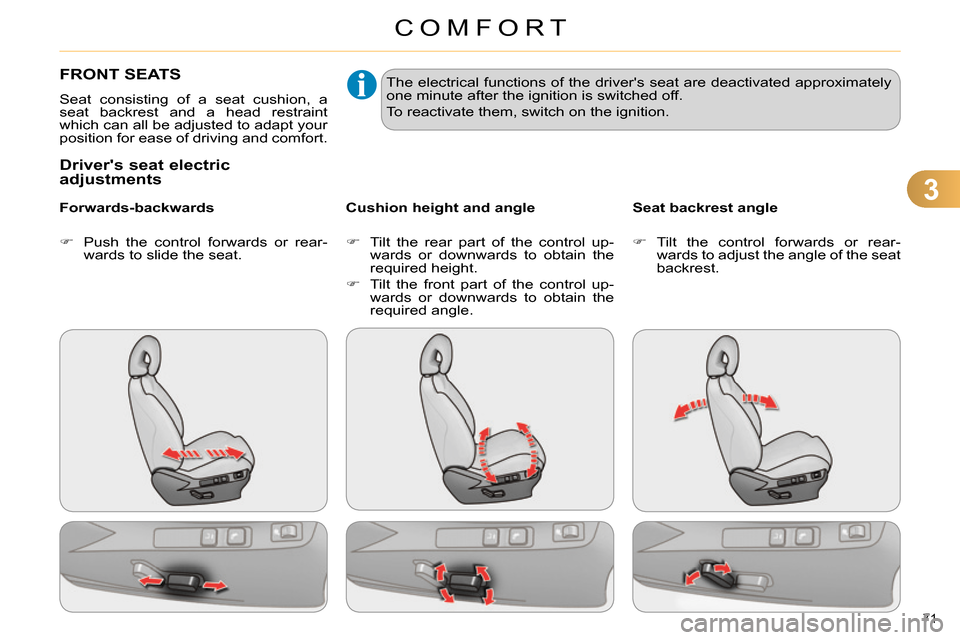
Push the control forwards or rear-
wards to slide the seat.
Forwards-backwards
Tilt the rear part of the control up-
wards or downwards to obtain the
required height.
Tilt the front part of the control up-
wards or downwards to obtain the
required angle.
Cushion height and angle
Tilt the control forwards or rear-
wards to adjust the angle of the seat
backrest.
Seat backrest angle
Page 77 of 328
3
COMFORT
75
MIRRORS
Door mirrors
Each fi tted with an adjustable mirror
glass permitting the lateral rearward vi-
sion necessary for overtaking or park-
ing. They can also be folded for parking
in confi ned spaces.
Demisting - Defrosting
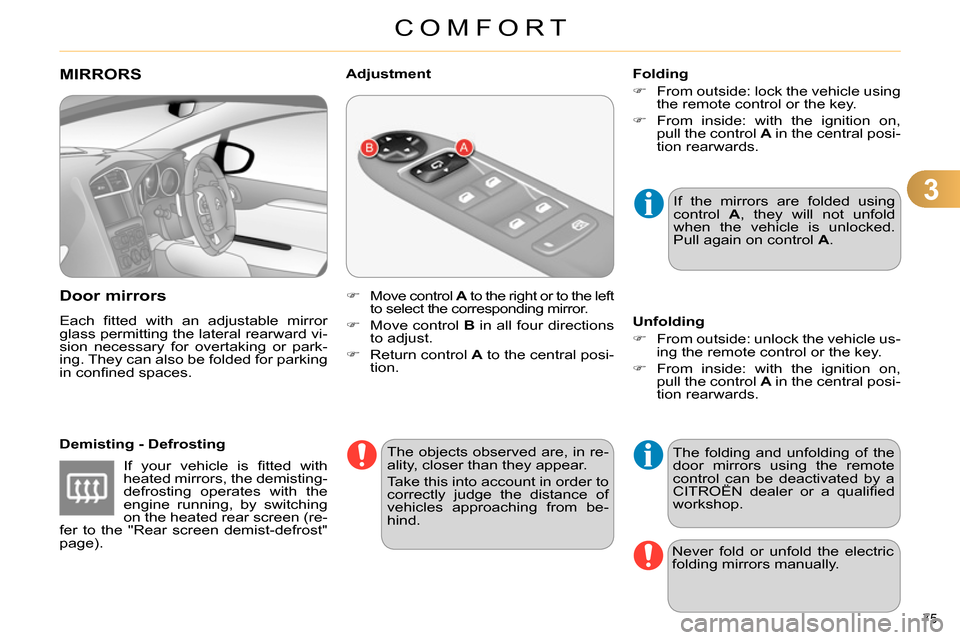
Move control A
to the right or to the left
to select the corresponding mirror.
Move control B
in all four directions
to adjust.
Return control A
to the central posi-
tion.
Adjustment
If the mirrors are folded using
control A
, they will not unfold
when the vehicle is unlocked.
Pull again on control A
.
The objects observed are, in re-
ality, closer than they appear.
Take this into account in order to
correctly judge the distance of
vehicles approaching from be-
hind.
Folding
From outside: lock the vehicle using
the remote control or the key.
From inside: with the ignition on,
pull the control A
in the central posi-
tion rearwards.
The folding and unfolding of the
door mirrors using the remote
control can be deactivated by a
CITROËN dealer or a qualifi ed
workshop.
Unfolding
From outside: unlock the vehicle us-
ing the remote control or the key.
From inside: with the ignition on,
pull the control A
in the central posi-
tion rearwards.
Never fold or unfold the electric
folding mirrors manually.
If your vehicle is fi tted with
heated mirrors, the demisting-
defrosting operates with the
engine running, by switching
on the heated rear screen (re-
fer to the "Rear screen demist-defrost"
page).
Page 82 of 328
4
ACCESS
80
Anti-theft protection
Electronic engine immobiliser
The key contains an electronic chip
which has a special code. When the
ignition is switched on, this code must
be recognised in order for starting to be
possible.
This electronic engine immobiliser locks
the engine management system a few
minutes after the ignition is switched off
and prevents starting of the engine by
anyone who does not have the key.
In the event of a fault, you
are informed by illumina-
tion of this warning lamp,
an audible signal and a message in the
screen.
In this case, your vehicle will not start;
contact a CITROËN dealer as soon as
possible.
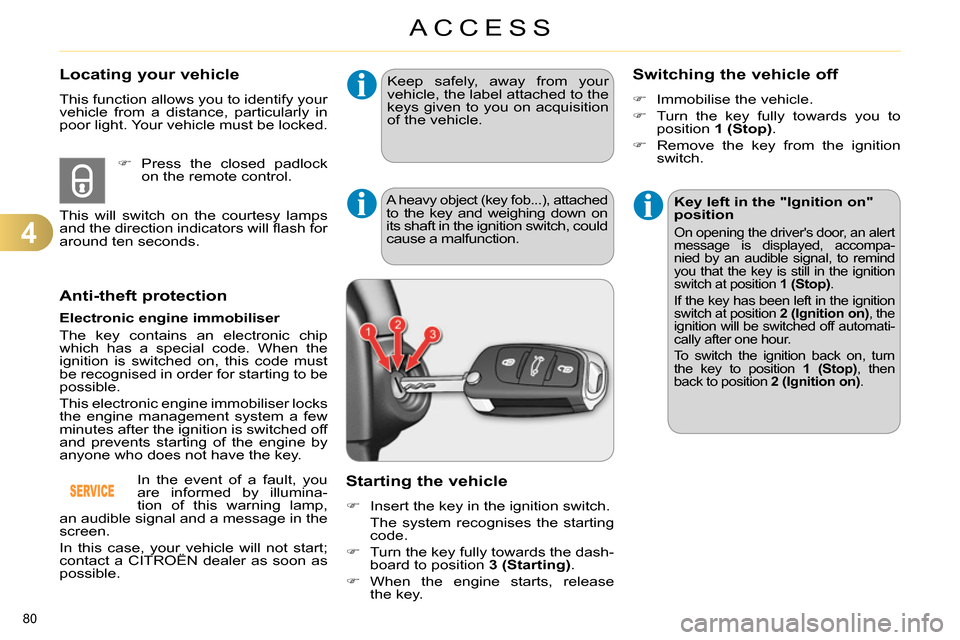
Starting the vehicle
Insert the key in the ignition switch.
The system recognises the starting
code.
Turn the key fully towards the dash-
board to position 3 (Starting)
.
When the engine starts, release
the key.
A heavy object (key fob...), attached to the key and weighing down on
its shaft in the ignition switch, could
cause a malfunction.
Switching the vehicle off
Immobilise the vehicle.
Turn the key fully towards you to
position 1 (Stop)
.
Remove the key from the ignition
switch.
Key left in the "Ignition on"
position
On opening the driver's door, an alert
message is displayed, accompa-
nied by an audible signal, to remind
you that the key is still in the ignition
switch at position 1 (Stop)
.
If the key has been left in the ignition
switch at position 2 (Ignition on)
, the
ignition will be switched off automati-
cally after one hour.
To switch the ignition back on, turn
the key to position 1 (Stop)
, then
back to position 2 (Ignition on)
.
Keep safely, away from your
vehicle, the label attached to the
keys given to you on acquisition
of the vehicle.
Locating your vehicle
This function allows you to identify your
vehicle from a distance, particularly in
poor light. Your vehicle must be locked.
Press the closed padlock
on the remote control.
This will switch on the courtesy lamps
and the direction indicators will fl ash for
around ten seconds.
Page 83 of 328
4
ACCESS
81
Fault with the remote control
In the event of a malfunction with the
remote control, you can no longer un-
lock, lock or locate your vehicle.
First of all, use the key in the lock to
unlock or lock your vehicle.
Then, reinitialise the remote control.
Reinitialisation
Switch off the ignition and remove
the ignition key.
Press the closed padlock immedi-
ately for a few seconds.
Turn the key to position 2 (Ignition
on)
.
Switch off the ignition and remove
the key from the ignition switch.
The remote control is fully operational
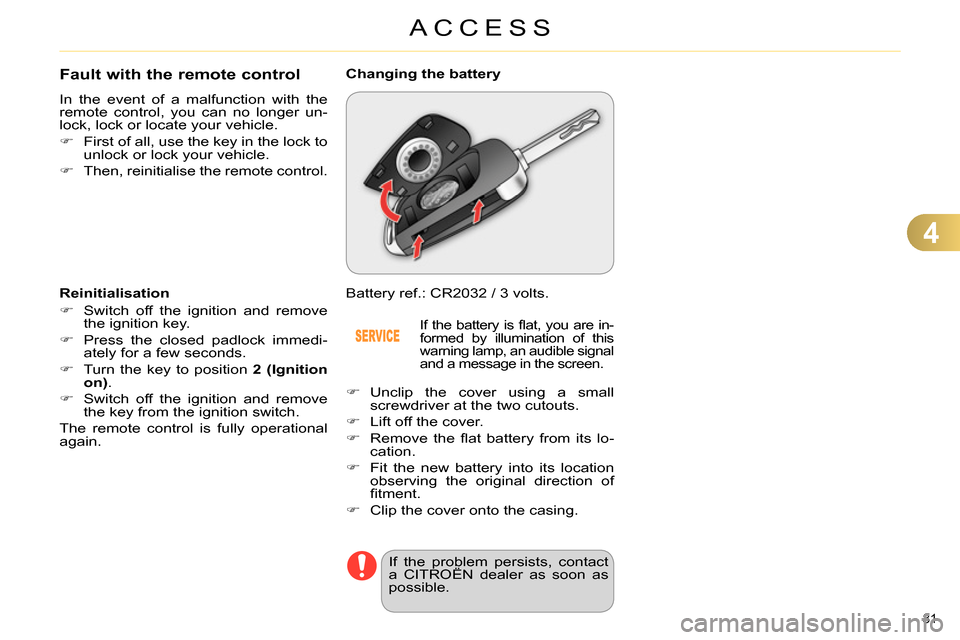
again. Battery ref.: CR2032 / 3 volts.
Changing the battery
If the battery is fl at, you are in-
formed by illumination of this
warning lamp, an audible signal
and a message in the screen.
Unclip the cover using a small
screwdriver at the two cutouts.
Lift off the cover.
Remove the fl at battery from its lo-
cation.
Fit the new battery into its location
observing the original direction of
fi tment.
Clip the cover onto the casing.
If the problem persists, contact
a CITROËN dealer as soon as
possible.
Page 84 of 328

4
ACCESS
82
Lost keys
Go to a CITROËN dealer with the vehicle's registration document, your
personal identifi cation documents and if possible the key code label.
The CITROËN dealer will be able to look up the key code and the transponder
code required to order a new key.
Do not throw the remote con-
trol batteries away, they contain
metals which are harmful to the
environment.
Take them to an approved col-
lection point.
Remote control
The high frequency remote control is a sensitive system; do not operate
it while it is in your pocket as there is a possibility that it may unlock the
vehicle, without you being aware of it.
Do not repeatedly press the buttons of your remote control out of range and
out of sight of your vehicle. You run the risk of stopping it from working and
the remote control would have to be reinitialised.
No remote control can operate when the key is in the ignition switch, even
when the ignition is switched off, except for reinitialisation.
Locking the vehicle
Driving with the doors locked may make access to the passenger compart-
ment by the emergency services more diffi cult in an emergency.
As a safety precaution, never leave children alone in the vehicle, except for
a very short period.
In all cases, it is essential to remove the key from the ignition switch when
leaving the vehicle.
Anti-theft protection
Do not make any modifi cations to the electronic engine immobiliser system;
this could cause malfunctions.
When purchasing a second-hand vehicle
Have the pairing of all of the keys in your possession checked by a
CITROËN dealer, to ensure that only your keys can be used to open and
start the vehicle.
Page 86 of 328

4
ACCESS
84
Emergency control
System allowing the doors to be locked
and unlocked manually in the event of
a malfunction of the central locking sys-
tem or battery failure.
Locking the driver's door
Insert the key in the door lock, then
turn it to the rear.
You can also apply the procedure de-
scribed for the passenger doors.
Unlocking the driver's door
Insert the key in the door lock, then
turn it to the front.
Locking the front and rear
passenger doors
Unlocking the front and rear
passenger doors
Pull the interior door opening control.
Open the doors.
On the rear doors, check that the
child lock is not on (see the corre-
sponding section).
Remove the black cap, located on
the edge of the door, using the key.
Insert the key in the socket without
forcing it, then without turning it,
move the latch sideways towards
the inside of the door.
Remove the key and refi t the cap.
Close the doors and check that the
vehicle has locked correctly from
the outside.
Activation / Deactivation
You can activate or deactivate this func-
tion permanently.
With the ignition on, press this but-
ton until an audible signal starts and
a corresponding message is dis-
played.
the state of the system stays in memory
when switching off the ignition.
Page 87 of 328
4
ACCESS
85
*
According to country.
ALARM *
System which protects and provides a
deterrent against theft and break-ins. It
provides the following types of monitoring.
- exterior perimeter
The system checks for opening of the
vehicle.
The alarm is triggered if anyone tries to
open a door, the boot, the bonnet...
- interior volumetric
The system checks for any variation in the
volume in the passenger compartment.
The alarm is triggered if anyone breaks a
window, enters the passenger compart-
ment or moves inside the vehicle.
- tilt
The system checks for any change in
the attitude of the vehicle.
The alarm is triggered if the vehicle is
lifted, moved or knocked.
Self-protection function
The system checks for the putting out
of service of its components.
The alarm is triggered if the battery, the
central control or the siren wiring are
put out of service or damaged.
For all work on the alarm sys-
tem, contact a CITROËN dealer
or a qualifi ed workshop.
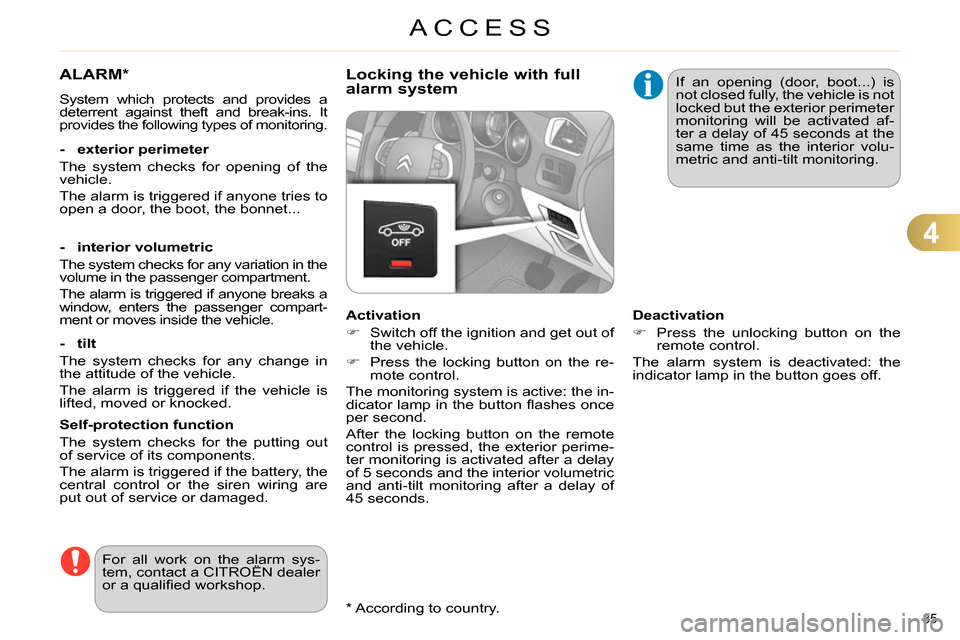
Locking the vehicle with full
alarm system
Activation
Switch off the ignition and get out of
the vehicle.
Press the locking button on the re-
mote control.
The monitoring system is active: the in-
dicator lamp in the button fl ashes once
per second.
After the locking button on the remote
control is pressed, the exterior perime-
ter monitoring is activated after a delay
of 5 seconds and the interior volumetric
and anti-tilt monitoring after a delay of
45 seconds. If an opening (door, boot...) is
not closed fully, the vehicle is not
locked but the exterior perimeter
monitoring will be activated af-
ter a delay of 45 seconds at the
same time as the interior volu-
metric and anti-tilt monitoring.
Deactivation
Press the unlocking button on the
remote control.
The alarm system is deactivated: the
indicator lamp in the button goes off.