reset Citroen C4 RHD 2016 2.G User Guide
[x] Cancel search | Manufacturer: CITROEN, Model Year: 2016, Model line: C4 RHD, Model: Citroen C4 RHD 2016 2.GPages: 472, PDF Size: 13.96 MB
Page 308 of 472
306
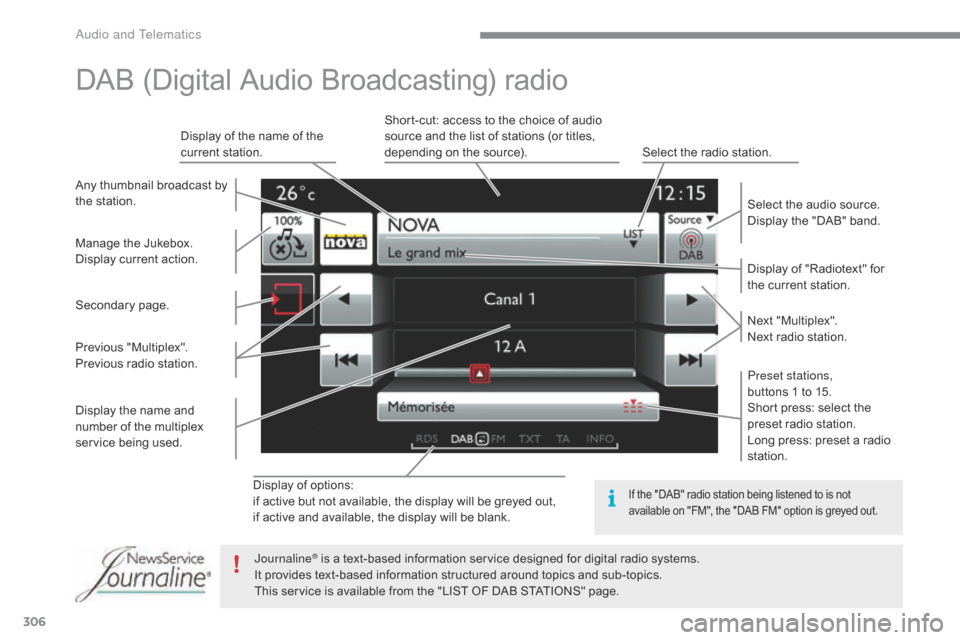
Display of options:
if a ctive b ut n ot a vailable, t he d isplay w ill b e g reyed o ut,
if
a
ctive
a
nd
a
vailable,
t
he
d
isplay
w
ill
b
e
b
lank. Display
o
f
"
Radiotext"
f
or
th
e
c
urrent
s
tation.
Manage
t
he
J
ukebox.
Display
c
urrent
a
ction.
Select
t
he
a
udio
s
ource.
Display
t
he
"
DAB"
b
and.
Display
o
f
t
he
n
ame
o
f
t
he
cu
rrent
s
tation.
Short-cut:
a
ccess
t
o
t
he
c
hoice
o
f
a
udio
so
urce
a
nd
t
he
l
ist
o
f
s
tations
(
or
t
itles,
de
pending
o
n
t
he
s
ource).
Select
t
he
r
adio
s
tation.
Any
t
humbnail
b
roadcast
b
y
th
e
s
tation.
Preset stations,
buttons
1 t
o
1
5.
Short
p
ress:
s
elect
t
he
pr
eset
r
adio
s
tation.
Long
p
ress:
p
reset
a r
adio
st
ation.
Next
"Mu
ltiplex".
Next
r
adio
s
tation.
Secondary
pa
ge.
Display
t
he
n
ame
a
nd
nu
mber
o
f
t
he
m
ultiplex
serv
ice
bei
ng
use
d.
Previous
"M
ultiplex".
Previous
r
adio
s
tation.
DAB (Digital Audio Broadcasting) radio
If the "DAB" radio station being listened to is not av
ailable o n " FM", t he " DAB F M" o ption i s g reyed o ut.
Journaline® is a text-based information service designed for digital radio systems.
It p
rovides t ext-based i nformation s tructured a round t opics a nd s ub-topics.
This
s
ervice
i
s
a
vailable
f
rom
t
he
"
LIST
O
F
D
AB
S
TATIONS"
p
age.
Audio and Telematics
Page 325 of 472
323
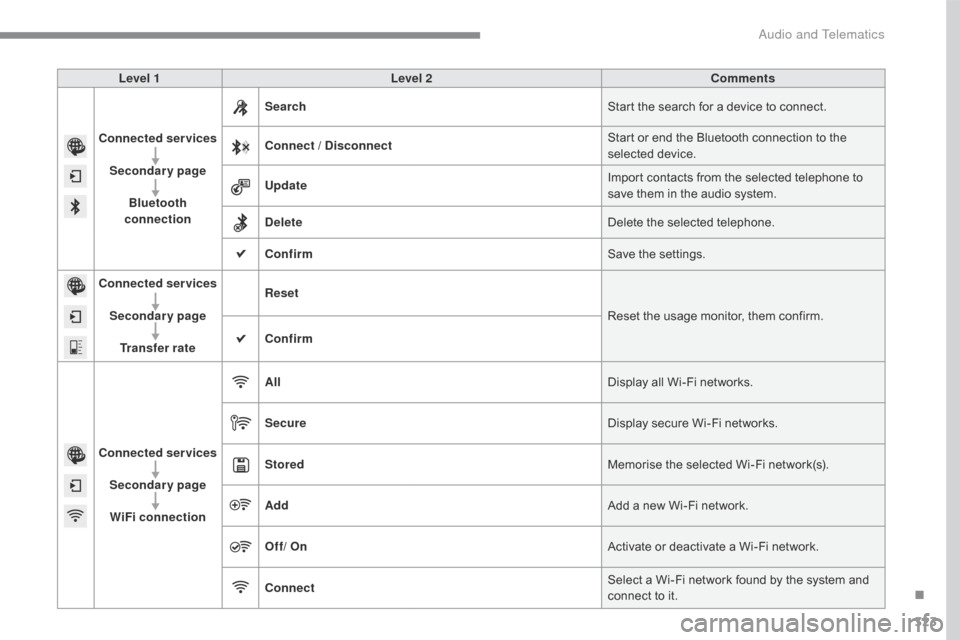
Level 1Level 2 Comments
Connected services Secondary page Bluetooth
connection Search
Start
t
he
s
earch
f
or
a d
evice
t
o
c
onnect.
Connect / Disconnect Start
o
r
e
nd
t
he
B
luetooth
c
onnection
t
o
t
he
se
lected
de
vice.
Update Import
c
ontacts
f
rom
t
he
s
elected
t
elephone
t
o
sa
ve
t
hem
i
n
t
he
a
udio
s
ystem.
Delete Delete
t
he
s
elected
t
elephone.
Confirm Save
t
he
s
ettings.
Connected services
Secondary pageTransfer rate Reset
Reset
t
he
u
sage
m
onitor,
t
hem
c
onfirm.
Confirm
Connected services Secondary pageWiFi connection All
Display
a
ll
W
i-Fi
n
etworks.
Secure Display
s
ecure
W
i-Fi
n
etworks.
Stored Memorise
t
he
s
elected
W
i-Fi
n
etwork(s).
Add Add
a n
ew
W
i-Fi
n
etwork.
Off/ On Activate
o
r
d
eactivate
a W
i-Fi
n
etwork.
Connect Select
a W
i-Fi
n
etwork
f
ound
b
y
t
he
s
ystem
a
nd
co
nnect
t
o
i
t.
.
Audio and Telematics
Page 352 of 472
350
First steps
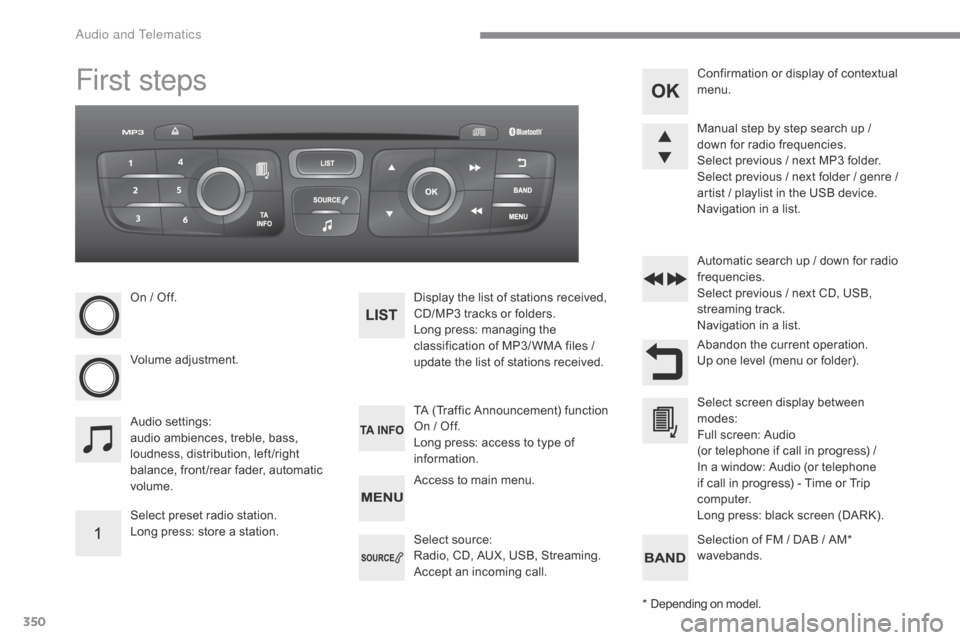
On / Off.
Vo lume
adju
stment.
Select
p
reset
r
adio
s
tation.
Long
p
ress:
s
tore
a s
tation. Display t
he l ist o f s tations r eceived, CD
/MP3 t racks o r f olders.
Long
p
ress:
m
anaging
t
he
cl
assification
o
f
M
P3/ WMA
f
iles
/ up
date
t
he
l
ist
o
f
s
tations
r
eceived.
Audio
set
tings:
audio
a
mbiences,
t
reble,
b
ass,
lo
udness,
d
istribution,
l
eft /right
ba
lance,
f
ront /rear
f
ader,
a
utomatic
vol
ume. TA
(
Traffic
A
nnouncement)
f
unction
On / O
ff.
Long
p
ress:
a
ccess
t
o
t
ype
o
f
in
formation.Automatic
s
earch
u
p
/ d
own
f
or
r
adio
fr
equencies.
Select p revious / n ext C D, U SB, st
reaming tr ack.
Navigation
i
n
a l
ist.
Access
t
o
m
ain
m
enu.Abandon
t
he
c
urrent
o
peration.
Up
o
ne
l
evel
(
menu
o
r
f
older).
Confirmation
o
r
d
isplay
o
f
c
ontextual
me
nu.
Manual
s
tep
b
y
s
tep
s
earch
u
p
/ do
wn
f
or
r
adio
f
requencies.
Select
p
revious
/ n
ext
M
P3
f
older.
Select
p
revious
/ n
ext
f
older
/ g
enre
/ ar
tist
/ p
laylist
i
n
t
he
U
SB
d
evice.
Navigation
i
n
a l
ist.
Select
so
urce:
Radio,
C
D,
A
UX,
U
SB,
S
treaming.
Accept
a
n
i
ncoming
c
all.Select
s
creen
d
isplay
b
etween
mo
des:
Full
s
creen:
A
udio
(
or
t
elephone
i
f
c
all
i
n
p
rogress)
/
I
n
a w
indow:
A
udio
(
or
t
elephone
if c
all
i
n
p
rogress)
- T
ime
o
r
T
rip
co
mputer.
Long
p
ress:
b
lack
s
creen
(
DARK).
*
De
pending
o
n
m
odel.
Selection
o
f
F
M
/ D
AB
/ A
M*
wa
vebands.
Audio and Telematics
Page 357 of 472
355
DAB (Digital Audio Broadcasting) radio
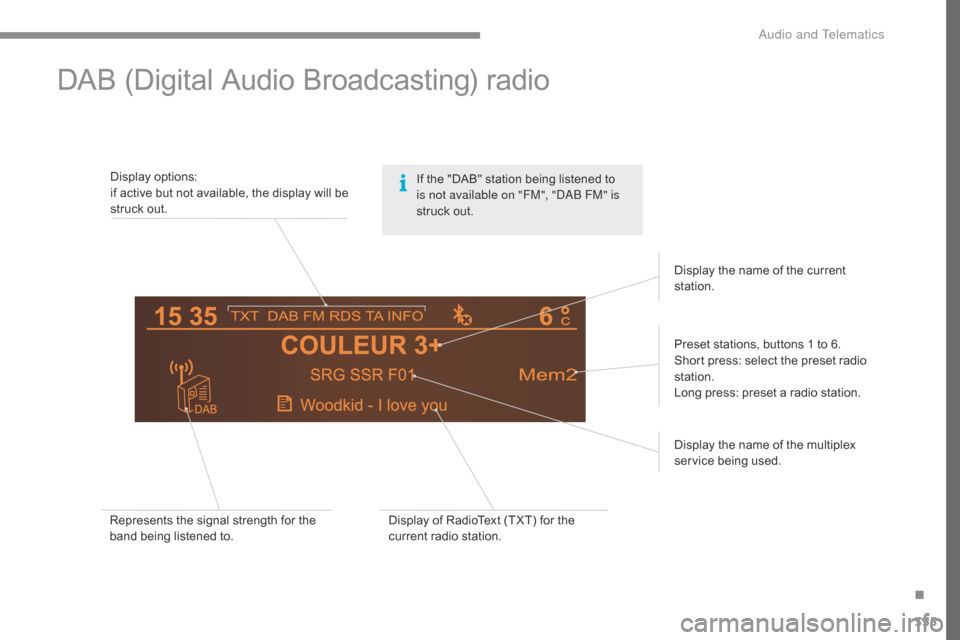
Display options:
i f a ctive b ut n ot a vailable, t he d isplay w ill b e st
ruck
o
ut.
Preset
s
tations,
b
uttons
1 t
o
6
.
Short
p
ress:
s
elect
t
he
p
reset
r
adio
st
ation.
Long
p
ress:
p
reset
a r
adio
s
tation.
Display
t
he
n
ame
o
f
t
he
m
ultiplex
serv
ice
bei
ng
use
d.
Represents
t
he
s
ignal
s
trength
f
or
t
he
ba
nd
b
eing
l
istened
t
o. Display
o
f
R
adioText
(
TXT)
f
or
t
he
cu
rrent
r
adio
s
tation.Display
t
he
n
ame
o
f
t
he
c
urrent
st
ation.
If t
he " DAB" s tation b eing l istened t o is n
ot available on "FM", "DAB FM" is
struck
o
ut.
.
Audio and Telematics
Page 434 of 472

26
ADD_C42_EVO_EN
Press on Radio Media to display the
primary page.
Press on Radio Media to display the
primary page. Select "
Save".
If necessary, select change of
source. Press on Radio Media
to display the
primary page.
Select change source.
"
AM Radio ". By automatic frequency search
Select "FM Radio ".
" AM Radio ".
Press on the secondary page. Or
Select a preset radio station
in the list.
Select " FM Radio ".
Select a radio station from
the list offered.
Select " Update list " to refresh the
list. Select " List" in the primary page.
Press on Radio Media to display the
primary page.
Radio
Changing a radio frequency
Selecting a station
THEN
Radio reception may be affected by
the use of electrical equipment not
approved by CITROËN, such as a USB
charger connected to the 12 V socket.
The exterior environment (hills,
buildings, tunnel, car park, below
ground...) may prevent reception,
even in RDS station tracking mode.
This phenomenon is normal in the
propagation of radio waves and is in no
way indicative of a fault with the audio
system.
Select "
Radio list " in the secondary
page. Or
Press 3 or 4 to move the cursor for an
automatic search down or up for a radio
frequency.
Or
To select a preset radio station.
Audio and Telematics
Page 435 of 472
27
ADD_C42_EVO_EN
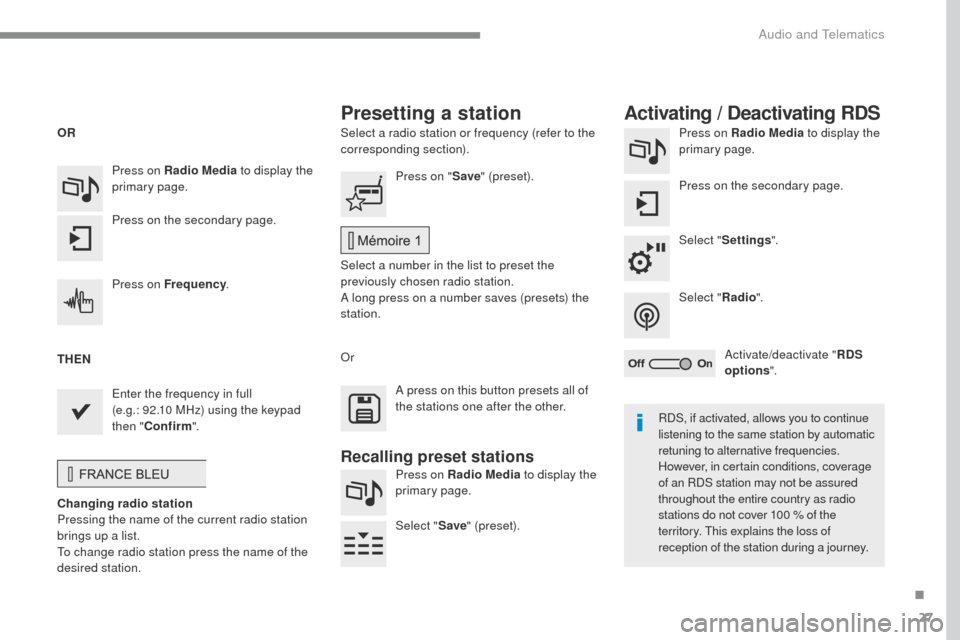
Select a radio station or frequency (refer to the
corresponding section).Press on Radio Media
to display the
primary page.
Press on the secondary page.
Select " Settings ".
Select " Radio".
Activate/deactivate " RDS
options ".
Press on Radio Media
to display the
primary page.
Press on the secondary page. Press on "
Save" (preset).
Select a number in the list to preset the
previously chosen radio station.
A long press on a number saves (presets) the
station.
Press on Frequency
.
Enter the frequency in full
(e.g.:
92.10
MHz) using the keypad
then " Confirm ".
Changing radio station
Pressing the name of the current radio station
brings up a list.
To change radio station press the name of the
desired station. Or
Press on Radio Media to display the
primary page.
Select " Save" (preset).
Presetting a station Activating / Deactivating RDS
OR
THEN
A press on this button presets all of
the stations one after the other.
Recalling preset stations
RDS, if activated, allows you to continue
listening to the same station by automatic
retuning to alternative frequencies.
However, in certain conditions, coverage
of an RDS station may not be assured
throughout the entire country as radio
stations do not cover 100 % of the
territory. This explains the loss of
reception of the station during a journey.
.
Audio and Telematics
Page 436 of 472
28
ADD_C42_EVO_EN
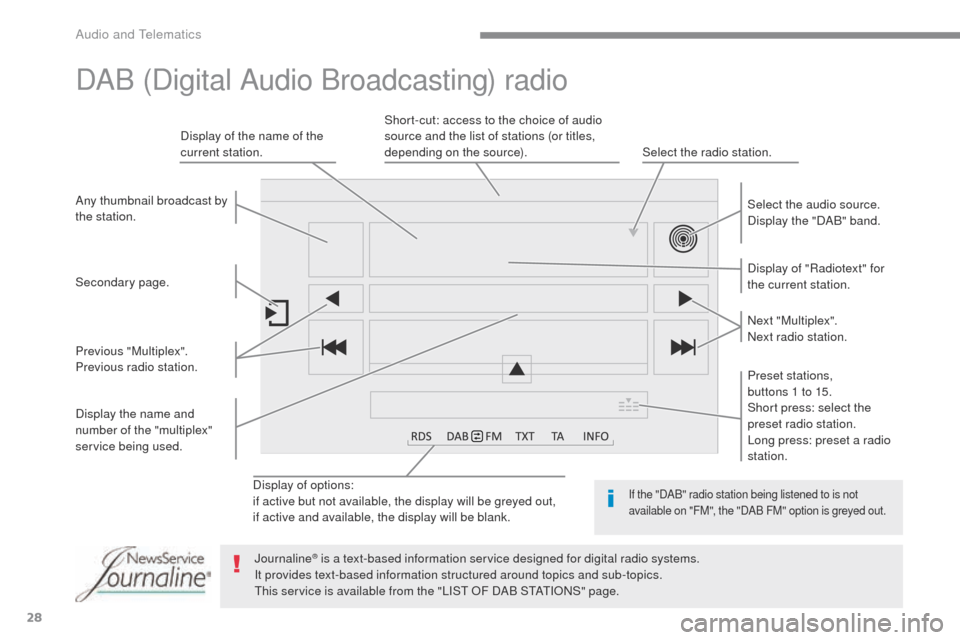
Display of options:
if active but not available, the display will be greyed out,
if active and available, the display will be blank.Display of "Radiotext" for
the current station. Select the audio source.
Display the "DAB" band.
Display of the name of the
current station.
Short-cut: access to the choice of audio
source and the list of stations (or titles,
depending on the source).
Select the radio station.
Any thumbnail broadcast by
the station.
Preset stations,
buttons 1 to 15.
Short press: select the
preset radio station.
Long press: preset a radio
station. Next "Multiplex".
Next radio station.
Secondary page.
Display the name and
number of the "multiplex"
service being used. Previous "Multiplex".
Previous radio station.
DAB (Digital Audio Broadcasting) radio
If the "DAB" radio station being listened to is not
available on "FM", the "DAB FM" option is greyed out.
Journaline® is a text-based information service designed for digital radio systems.
I
t provides text-based information structured around topics and sub-topics.
This service is available from the "LIST OF DAB STATIONS" page.
Audio and Telematics