wheel Citroen C5 2014.5 (RD/TD) / 2.G User Guide
[x] Cancel search | Manufacturer: CITROEN, Model Year: 2014.5, Model line: C5, Model: Citroen C5 2014.5 (RD/TD) / 2.GPages: 344, PDF Size: 12.9 MB
Page 17 of 344

15
Instrument panels - petrol and Diesel - manual and automatic gearbox
A. Fuel gauge
B. Indicator:
●
C
oolant temperature
●
C
ruise control/Speed limiter information
C.
Spe
edometer
D.
R
ev counter E. I
ndicator:
● E ngine oil temperature
●
G
ear lever position and gear engaged
(Automatic gearbox)
F.
C
ontrols:
●
L
ighting dimmer
●
R
eset the trip mileage recorder and
service indicator G. I
nstrument panel screen indicating:
● D epending on the page selected with the
left-hand thumb wheel on the steering
wheel:
-
D
igital speed repeater
-
T
rip computer
-
N
avigation (guidance) information
-
D
isplay of message alerts
-
E
ngine oil level check
-
S
ervice indicator
●
P
ermanently:
-
T
rip mileage recorder
-
T
otal mileage recorder
Panel grouping together the dials and vehicle operation indicator and warning lamps.
1
Monitoring
Page 18 of 344
16
"Choice of language" menu
This allows you to choose the display and voice
recognition language.
"Choice of units" menu
This allows you to choose metric or imperial
units.
The main menu allows you to programme
certain vehicle and instrument panel screen
functions:
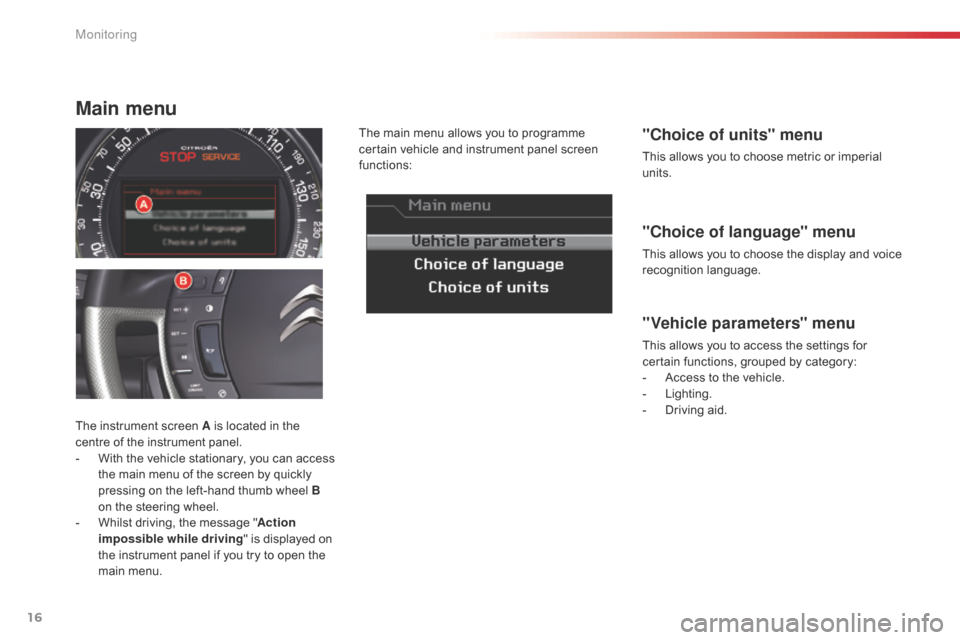
The instrument screen A is located in the
centre of the instrument panel.
-
W
ith the vehicle stationary, you can access
the main menu of the screen by quickly
pressing on the left-hand thumb wheel B
on the steering wheel.
-
W
hilst driving, the message " Action
impossible while driving " is displayed on
the instrument panel if you try to open the
main menu.
"Vehicle parameters" menu
This allows you to access the settings for
certain functions, grouped by category:
-
A
ccess to the vehicle.
-
L
ighting.
-
D
riving aid.
Main menu
Monitoring
Page 20 of 344
18
System which provides current information concerning your journey (range, consumption, etc.)
Information displays Trip zero reset
The trip computer is displayed in the instrument
panel screen.
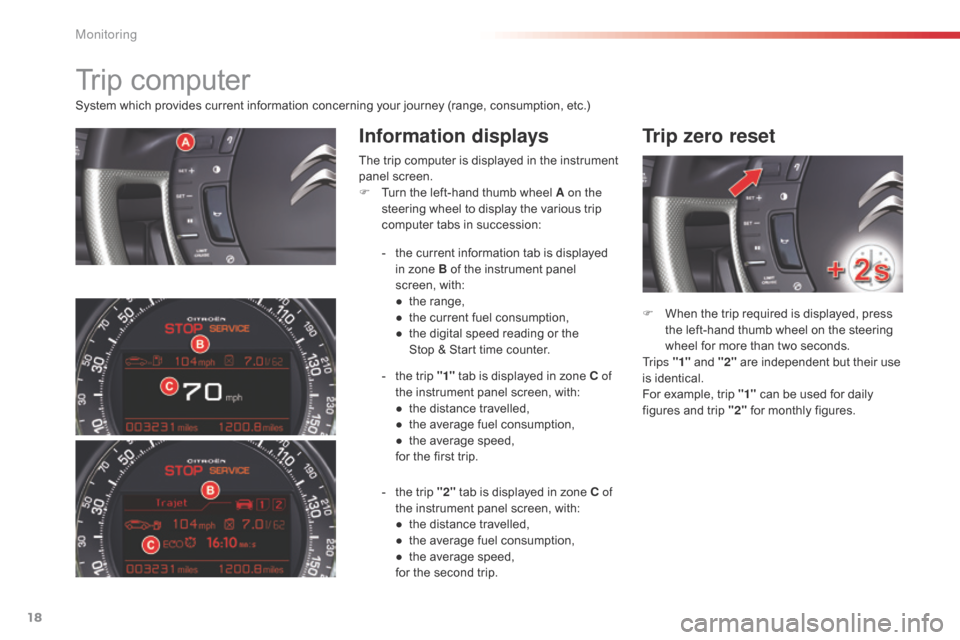
F
T
urn the left-hand thumb wheel A on the
steering wheel to display the various trip
computer tabs in succession:
F
W
hen the trip required is displayed, press
the left-hand thumb wheel on the steering
wheel for more than two seconds.
Tr i p s "1" and "2" are independent but their use
is identical.
For example, trip "1" can be used for daily
figures and trip "2" for monthly figures.
Trip computer
- the current information tab is displayed
in zone B of the instrument panel
screen, with:
●
t
he range,
●
t
he current fuel consumption,
●
t
he digital speed reading or the
Stop
& Start time counter.
-
t
he trip "1" tab is displayed in zone C of
the instrument panel screen, with:
●
t
he distance travelled,
●
t
he average fuel consumption,
●
t
he average speed,
for the first trip.
-
t
he trip "2" tab is displayed in zone C of
the instrument panel screen, with:
●
t
he distance travelled,
●
t
he average fuel consumption,
●
t
he average speed,
for the second trip.
Monitoring
Page 22 of 344
20
Return to the main
instrument panel screen
display
Successive rotations of the left-hand thumb
wheel on the steering wheel allow you to return
to the main instrument panel screen display
(vehicle speed), via the navigation information
screen, then the screen displaying only the
total mileage and the trip mileage (bottom of
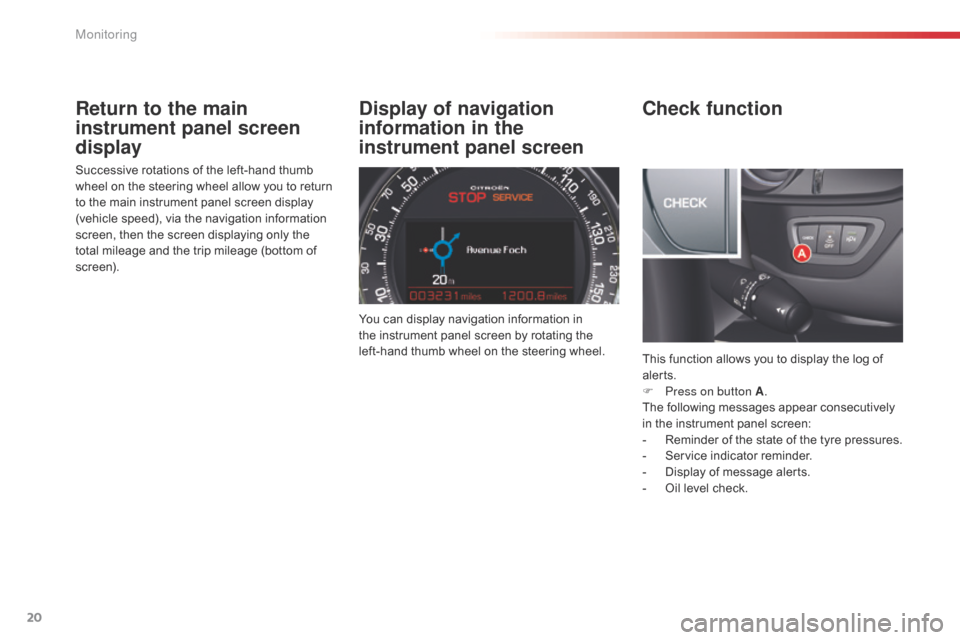
screen).You can display navigation information in
the
instrument panel screen by rotating the
left-hand thumb wheel on the steering wheel. This function allows you to display the log of
alerts.
F
P
ress on button A.
The following messages appear consecutively
in the instrument panel screen:
-
R
eminder of the state of the tyre pressures.
-
S
ervice indicator reminder.
-
D
isplay of message alerts.
-
O
il level check.
Check function
Display of navigation
information in the
instrument panel screen
Monitoring
Page 32 of 344

30
Warning/indicator lampis on Cause Action / Observations
Under-inflation fixed. The pressure in one or more wheels
is too low. Check the pressure of the tyres as soon as possible.
This check should preferably be carried out when the
tyres are cold.
+ flashing then fixed,
accompanied by the
Service warning lamp.The tyre pressure monitoring system
has a fault or no sensor is detected
on one of the wheels. Under-inflation detection is not assured.
Have the system checked by a CITROËN dealer or a
qualified workshop.
Monitoring
Page 36 of 344
34
Monochrome screen C
Displays in the screenControls
Displays according to context:
-
t ime
-
d
ate,
-
a
mbient temperature with air conditioning
(the value displayed flashes if there is a
risk of ice),
-
p
arking sensor information,
-
a
udio functions
-
a
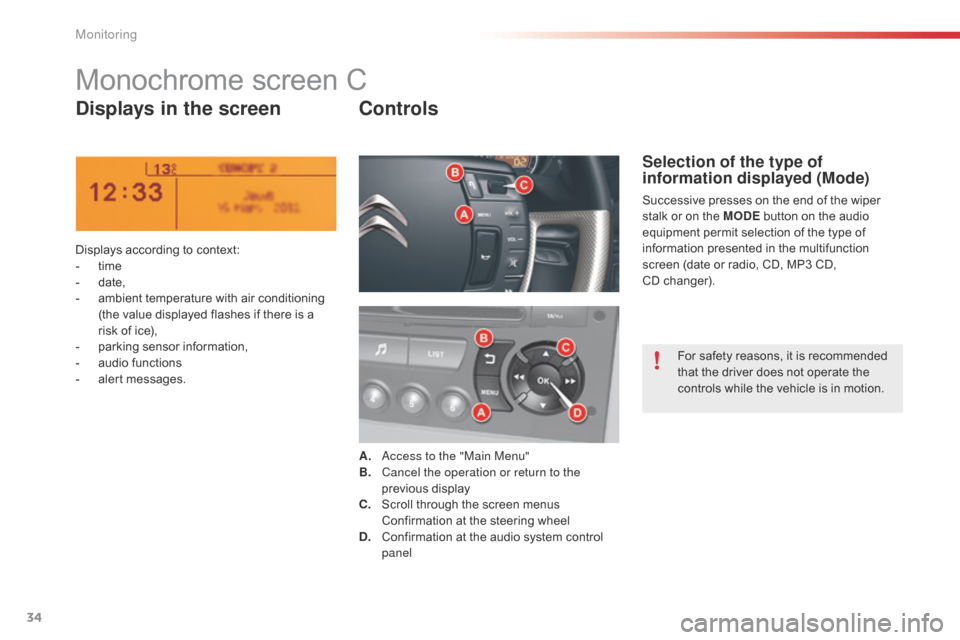
lert messages. A.
a
c
cess to the "Main Menu"
B.
C
ancel the operation or return to the
previous display
C.
S
croll through the screen menus
C
onfirmation at the steering wheel
D.
C
onfirmation at the audio system control
panel
Selection of the type of
information displayed (Mode)
Successive presses on the end of the wiper
stalk or on the MODE button on the audio
equipment permit selection of the type of
information presented in the multifunction
screen (date or radio, CD, MP3 CD,
CD
changer).For safety reasons, it is recommended
that the driver does not operate the
controls while the vehicle is in motion.
Monitoring
Page 38 of 344
36
With the Audio system switched on, once
this menu is selected, you can configure
your Bluetooth hands-free kit (pairing), view
the different telephone directories (calls log,
services...) and manage your calls (start a call,
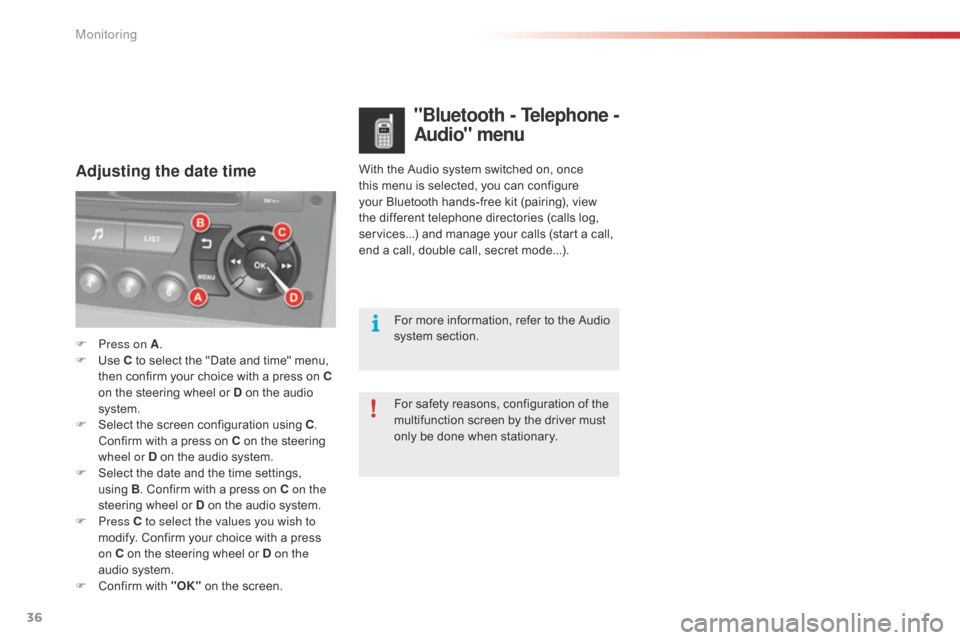
end a call, double call, secret mode...).Adjusting the date time
"Bluetooth - Telephone -
A udio" menu
For safety reasons, configuration of the
multifunction screen by the driver must
only be done when stationary. For more information, refer to the Audio
system section.
F
P
ress on A
.
F
U
se C to select the "Date and time" menu,
then confirm your choice with a press on
C
on the steering wheel or D on the audio
system.
F
S
elect the screen configuration using C .
Confirm with a press on C on the steering
wheel or D on the audio system.
F
S
elect the date and the time settings,
using B. Confirm with a press on C on the
steering wheel or D on the audio system.
F
Press C to select the values you wish to
modify. Confirm your choice with a press
on C on the steering wheel or D on the
audio system.
F
C
onfirm with "OK" on the screen.
Monitoring
Page 47 of 344

45
Deactivation
F Press the unlocking button on the remote control.
The alarm system is deactivated: the indicator
lamp in the button goes off.
Locking the vehicle
with exterior perimeter
monitoring only
Deactivate the interior volumetric and anti-tilt
monitoring to avoid unwanted triggering of the
alarm in certain cases such as:
-
l
eaving a pet in the vehicle,
-
l
eaving a window partially open,
-
w
ashing your vehicle,
-
c
hanging a wheel,
-
h
aving your vehicle towed,
-
t
ransport by sea.
Deactivation of the interior
volumetric and anti-tilt
monitoring
F Switch off the ignition.
F W ithin ten seconds, press the button until
the indicator lamp is on continuously.
F
G
et out of the vehicle.
F
P
ress the locking button on the remote
control immediately.
The exterior perimeter monitoring alone is
activated: the indicator lamp in the button
flashes once per second.
To be effective, this deactivation must be carried
out each time the ignition is switched off.
Reactivation of the interior
volumetric and anti-tilt monitoring
F Press the unlocking button on the remote control to deactivate the exterior perimeter
monitoring.
F
P
ress the locking button on the remote
control to activate all the monitoring
functions.
The indicator lamp in the button again flashes
once per second.
2
Access
Page 64 of 344

62
Steering wheel adjustment
F First, adjust the driver's seat to the most suitable position.
F
W
hen stationary , lower the lever A to
release the steering wheel adjustment.
F
A
djust for height and reach.
F
R
aise the lever to lock the steering wheel
adjustment.
After locking, if you press firmly on the steering
wheel, a slight click may be heard. The steering wheel can be adjusted for height and reach to adapt the driving position to the size of
the driver.
Adjustment
as a safety precaution, these
operations must only be carried out
while the vehicle is stationary.
Ease of use and comfort
Page 69 of 344
67
Ventilation
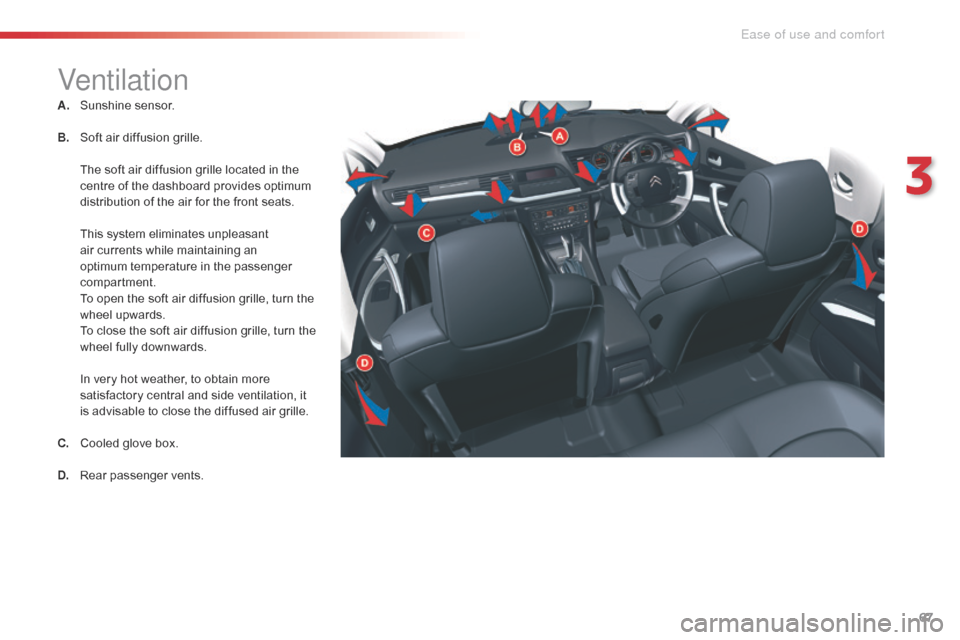
A. Sunshine sensor.
B.
S
oft air diffusion grille.
T
he soft air diffusion grille located in the
centre of the dashboard provides optimum
distribution of the air for the front seats.
T
his system eliminates unpleasant
air currents while maintaining an
optimum temperature in the passenger
compartment.
T
o open the soft air diffusion grille, turn the
wheel upwards.
T
o close the soft air diffusion grille, turn the
wheel fully downwards.
I
n very hot weather, to obtain more
satisfactory central and side ventilation, it
is advisable to close the diffused air grille.
C.
C
ooled glove box.
D.
R
ear passenger vents.
3
Ease of use and comfort