wheel Citroen C5 2014.5 (RD/TD) / 2.G Owner's Guide
[x] Cancel search | Manufacturer: CITROEN, Model Year: 2014.5, Model line: C5, Model: Citroen C5 2014.5 (RD/TD) / 2.GPages: 344, PDF Size: 12.9 MB
Page 127 of 344

125
The loss of pressure detected does not
always lead to visible deformation of the
tyre. Do not rely on just a visual check.The alert is maintained until the tyre or
tyres concerned is reinflated, repaired
or replaced.
The spare wheel (space-saver type or a
steel rim) does not have a sensor.
Under-inflation alert
The aler t is given by the fixed illumination
of this warning lamp, accompanied by
an audible signal, and depending on
equipment, the display of a message.
In the event of a problem on one of the tyres,
the symbol or the message appears, according
to equipment, to identify it.
F
R
educe speed, avoid sudden steering
movements or harsh brake applications.
F
S
top as soon as it is safe to do so. F
I
f you have a compressor (the one in the
temporary puncture repair kit for example),
check the four tyre pressures when cold.
I
f it is not possible to check the tyre
pressures at the time, drive carefully at
reduced speed.
or
F
I
n the event of a puncture, use the
temporary puncture repair kit or the spare
wheel (according to equipment).
Operating fault
The flashing and then fixed
illumination of the under-inflation
warning lamp accompanied by
the illumination of the service warning lamp
indicates a fault with the system.
In this case, monitoring of the tyre pressures is
not assured.
This alert is also displayed when one or more
wheels is not fitted with a sensor (for example,
a space-saver or steel spare wheel).
Go to a CITROËN dealer or a qualified
workshop
to have the system checked
or, following the repair of a puncture, to
have the original wheel, equipped with a
sensor, refitted.
Any tyre repair or replacement on a
wheel fitted with this system must be
carried out by a CITROËN dealer or a
qualified workshop.
If after changing a tyre, a wheel is not
detected by your vehicle (fitting snow
tyres for example), you must have the
system reinitialised by a CITROËN
dealer or a qualified workshop.
4
Driving
Page 128 of 344
126
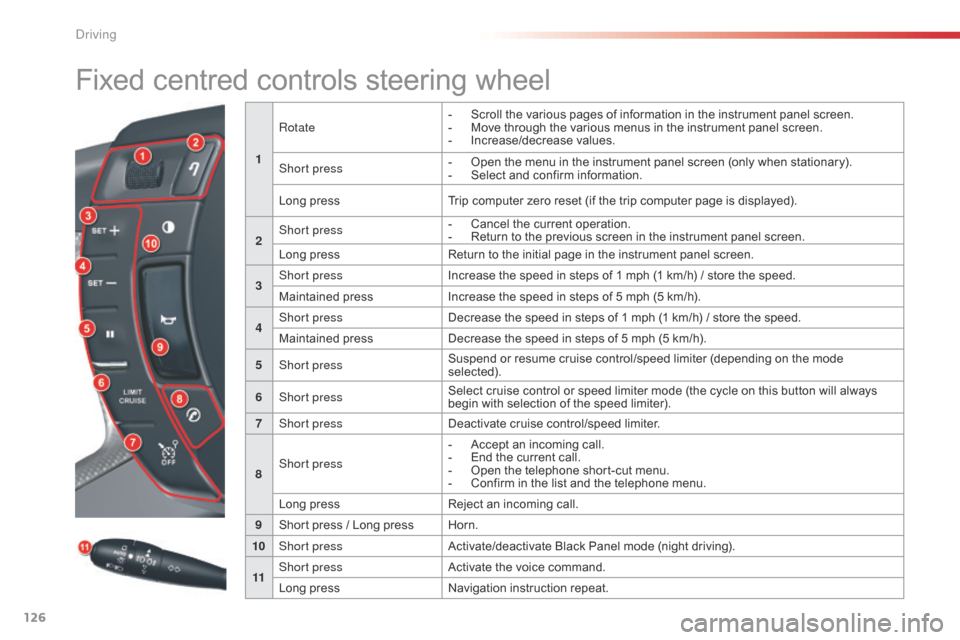
Fixed centred controls steering wheel
1Rotate
-
S
croll the various pages of information in the instrument panel screen.
-
M
ove through the various menus in the instrument panel screen.
-
In
crease/decrease values.
Short press -
O pen the menu in the instrument panel screen (only when stationary).
-
S elect and confirm information.
Long press Trip computer zero reset (if the trip computer page is displayed).
2 Short press
-
C
ancel the current operation.
-
R
eturn to the previous screen in the instrument panel screen.
Long press Return to the initial page in the instrument panel screen.
3 Short press
Increase the speed in steps of 1 mph (1 km/h) / store the speed.
Maintained press Increase the speed in steps of 5 mph (5 km/h).
4 Short press
Decrease the speed in steps of 1 mph (1 km/h) / store the speed.
Maintained press Decrease the speed in steps of 5 mph (5 km/h).
5 Short press Suspend or resume cruise control/speed limiter (depending on the mode
selected).
6 Short press Select cruise control or speed limiter mode (the cycle on this button will always
begin with selection of the speed limiter).
7 Short press Deactivate cruise control/speed limiter.
8 Short press -
A
ccept an incoming call.
-
E
nd the current call.
-
O
pen the telephone short-cut menu.
-
C
onfirm in the list and the telephone menu.
Long press Reject an incoming call.
9 Short press / Long press Horn.
10 Short press Activate/deactivate Black Panel mode (night driving).
11 Short press
Activate the voice command.
Long press Navigation instruction repeat.
Driving
Page 130 of 344

128
Speed limiter
Steering mounted controls
The speed limiter switches are located on the
left-hand side of the steering wheel.
Displays in the instrument panel
The speed limiter information is displayed in
zone A of the instrument panel.
System which prevents the vehicle from
exceeding the speed programmed by the
driver.
When the limit speed is reached, the
accelerator pedal no longer has any effect.
The speed limiter is switched on manually:
a
speed of at least 20 mph (approx. 30 km/h)
must be programmed.
The speed limiter can in no circumstances
replace keeping to speed limits or the need for
vigilance on the part of the driver.
Driving
Page 133 of 344
131
Cruise control
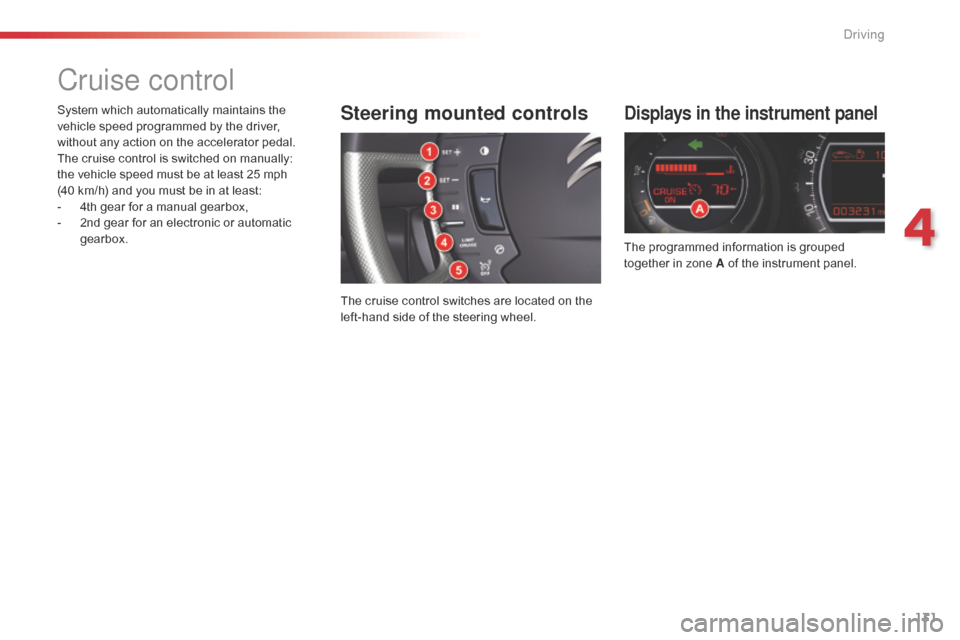
Displays in the instrument panel
The programmed information is grouped
together in zone A of the instrument panel.
Steering mounted controls
The cruise control switches are located on the
left-hand side of the steering wheel.
System which automatically maintains the
vehicle speed programmed by the driver,
without any action on the accelerator pedal.
The cruise control is switched on manually:
the
vehicle speed must be at least 25 mph
(40 km/h) and you must be in at least:
-
4
th gear for a manual gearbox,
-
2
nd gear for an electronic or automatic
gearbox.
4
driving
Page 143 of 344

141
Request not granted
The instrument panel screen temporarily displays a
message indicating that this position is not authorised.
The vehicle remains in the authorised position and the
instrument panel screen indicates this position to you.
Automatic variation of ground clearance
- If your speed exceeds 70 mph (approx.
110 km/h), on a good road sur face, ground
clearance is lowered. The vehicle returns
to its normal position if the road sur face
deteriorates or if your speed is lower than
55 mph (approx. 90 km/h).
-
A
t low or medium speed, if the road sur face
is poor, ground clearance is increased. The
vehicle returns to its normal position as
soon as conditions allow.
-
O
n switching off the ignition, the ground
clearance is reduced to the parking position.
Normal position
If the speed authorised for a particular position
is exceeded, the vehicle reverts automatically
to the normal position.
Low position
To facilitate loading or unloading the vehicle.
For workshop inspections.
Not to be used in normal driving (not possible
if speed > 6mph (10
km/h)).
High position
Changing a wheel (not possible if speed >
6 mph (10 km/h)).
Mid-high position
For increased ground clearance (not possible
if speed > 25 mph (40 km/h)).
For use on difficult roads when travelling at
reduced speed, as well as on car park ramps.
For your safety if you are operating
underneath the vehicle, you must
suppor t the vehicle with axle stands.
4
Driving
Page 150 of 344

148
Directional lighting
without cornering lightingwith cornering lighting
"Cornering lighting" function
Activation
This function is activated:
- w hen the direction indicator is activated,
-
f
rom a certain angle of rotation of the
steering wheel.
Deactivation
This function is deactivated:
- b elow a certain angle of rotation of the
steering wheel,
-
w
hen stationary or at very low speed,
-
w
hen reverse gear is engaged,
-
w
hen the directional headlamps are
switched off.
With dipped or main beams, this function
provides additional lighting for the inside of a
bend, when the vehicle speed is below 25 mph
(approx 40 km/h).
This lighting is most useful when travelling at
low and medium speed (urban driving, winding
road, intersections, parking manoeuvres...).
Visibility
Page 157 of 344
155
Horn
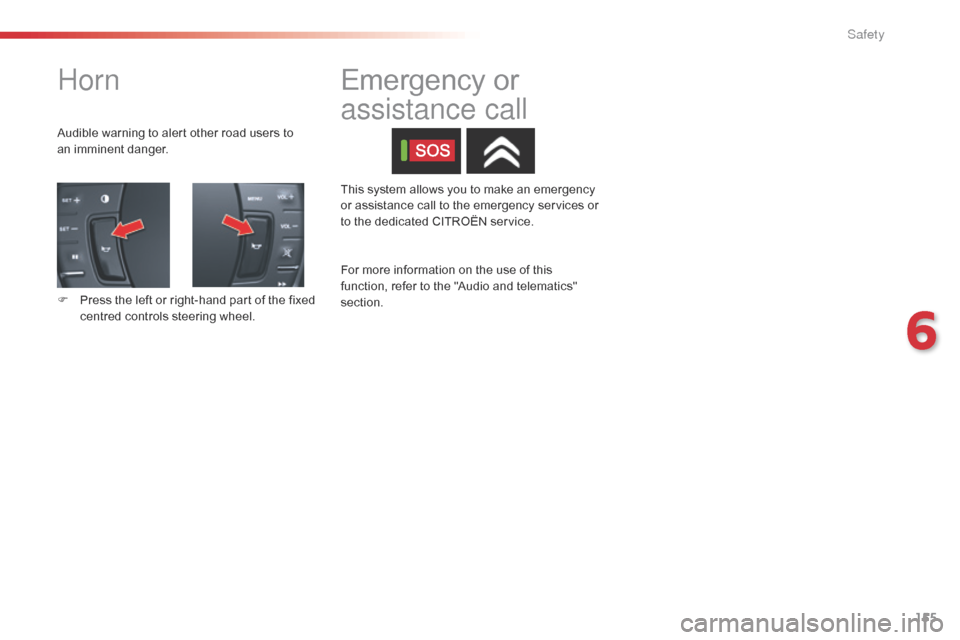
Audible warning to alert other road users to
an imminent danger.
F
P
ress the left or right-hand part of the fixed
centred controls steering wheel. This system allows you to make an emergency
or assistance call to the emergency services or
to the dedicated CITROËN service.
Emergency or
assistance call
For more information on the use of this
function, refer to the "Audio and telematics"
section.
6
Safety
Page 158 of 344

156
Braking assistance systems
Anti-lock braking system
and electronic brake force
distribution
Linked systems which improve the stability and
manoeuvrability of your vehicle when braking,
in particular on poor or slippery sur faces.
Activation
The anti-lock braking system comes into
operation automatically when there is a risk of
wheel lock.
Normal operation of the ABS may make itself
felt by slight vibration of the brake pedal.
Operating fault
If this warning lamp comes on,
accompanied by an audible signal
and a message in the instrument
panel screen, it indicates a fault with
the anti-lock braking system which could result
in loss of control of the vehicle when braking.
If this warning lamp comes on,
together with the STOP and ABS
warning lamps, accompanied by an
audible signal and a message in the
instrument panel screen, it indicates a fault with
the electronic brake force distribution which
could result in loss of control of the vehicle
when braking.
You MUST stop as soon as it is safe to do so.
In both cases, contact a CITROËN dealer or a
qualified workshop.
Emergency braking
assistance
System which, in an emergency, enables you
to obtain the optimum braking pressure more
quickly, thus reducing the stopping distance.
Activation
It is triggered by the speed at which the brake
pedal is pressed.
The effect of this is a reduction in the
resistance of the pedal and an increase in
braking efficiency.
Group of supplementary systems which help
you to obtain optimum braking in complete
safety in emergency situations:
-
a
nti-lock braking system (ABS),
-
e
lectronic brake force distribution (EBFD),
-
e
mergency braking assistance (EBA).
When replacing wheels (tyres and
rims), ensure that they conform to the
manufacturer's recommendations.When braking in an emergency, press
firmly without releasing the pressure.
When braking in an emergency,
press very firmly without releasing
the
pressure.
Safety
Page 159 of 344

157
Trajectory control systems
Anti-slip regulation (ASR) and dynamic stability control
(DSC)
Activation
This is indicated by flashing of this
warning lamp in the instrument panel.
Your vehicle has a system to improve traction
on snow: intelligent traction control
.
This system detects situations of low adhesion
that might make moving off and progress
difficult on deep fresh snow or compacted
snow.
In these situations the intelligent traction
control system regulates the amount of wheel
slip to optimise the traction and trajectory
control of your vehicle.
For vehicles with Hydractive III + suspension,
manual adjustment of ground clearance to
the intermediate position improves further the
ability to make progress in deep snow (see the
relevant paragraph).
The use of snow tyres is strongly
recommended on sur faces with low adhesion.
The anti-slip regulation (also known as traction
control) optimises traction to prevent skidding
of the wheels, by acting on the brakes of the
driving wheels and on the engine.
The electronic stability control acts on the
brake of one or more wheels and on the engine
to keep the vehicle on the trajectory required
by the driver, within the limits of the laws of
physics.
Intelligent traction control
system ("Snow motion")
These systems are activated automatically
each time the vehicle is started.
They come into operation in the event of a grip
or trajectory problem.
6
Safety
Page 160 of 344
158
Reactivation
Operating fault
Illumination of this warning lamp and
the lamp in the deactivation button,
accompanied by an audible signal
and a message, indicate a fault with
the system.
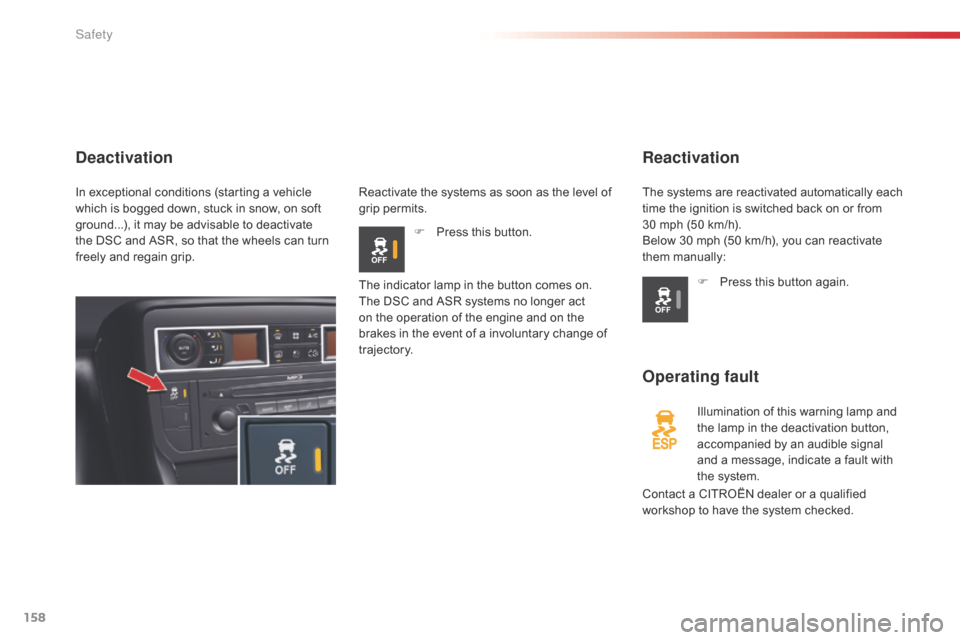
Deactivation
Reactivate the systems as soon as the level of
grip permits.F
P
ress this button.
Contact a CITROËN dealer or a qualified
workshop to have the system checked.
The indicator lamp in the button comes on.
The DSC and ASR systems no longer act
on the operation of the engine and on the
brakes in the event of a involuntary change of
trajectory.
F
P
ress this button again.
The systems are reactivated automatically each
time the ignition is switched back on or from
30
mph (50 km/h).
Below 30 mph (50 km/h), you can reactivate
them manually:
In exceptional conditions (starting a vehicle
which is bogged down, stuck in snow, on soft
ground...), it may be advisable to deactivate
the DSC and ASR, so that the wheels can turn
freely and regain grip.
Safety