ad blue CITROEN C5 AIRCROSS 2020 Handbook (in English)
[x] Cancel search | Manufacturer: CITROEN, Model Year: 2020, Model line: C5 AIRCROSS, Model: CITROEN C5 AIRCROSS 2020Pages: 292, PDF Size: 8.59 MB
Page 188 of 292
186
Load reduction mode
System which manages the use of certain
functions according to the level of charge
remaining in the battery.
When the vehicle is being driven, the load
reduction function temporarily deactivates
certain functions, such as air conditioning,
heated rear screen, etc.
The deactivated functions are reactivated
automatically as soon as conditions permit.
Snow chains
In wintry conditions, snow chains
improve traction as well as the
behaviour of the vehicle when
braking.
Snow chains must be fitted only to the
front wheels. They must never be fitted to
"space-saver" type spare wheels.
Take account of the legislation in force in
your country on the use of snow chains
and the maximum authorised speed.
Installation tips
F If you have to fit the chains during a journey,
stop the vehicle on a flat sur face on the side
of the road.
F
A
pply the parking brake and position any
wheel chocks under the wheels to prevent
movement of your vehicle.
F
F
it the chains following the instructions
provided by the manufacturer.
F
M
ove off gently and drive for a few
moments, without exceeding 31
mph
(50
km/h).
F
S
top your vehicle and check that the snow
chains are correctly tightened.
Energy economy mode
System which manages the duration of use of
certain functions to conser ve a sufficient level of
charge in the battery.
After switching off the engine and for a
maximum
cumulative period of around 40
minutes, you can
continue to use functions such as the audio and
telematics system, the wipers, the dipped beam
headlamps, the courtesy lamps, etc.
Switching to this mode
A message appears in the instrument panel
screen indicating that the vehicle has switched
to economy mode and the active functions are
put on standby.
If a
telephone call is being made at this
time, it will be maintained for around
10
minutes with the Bluetooth hands-free
system of your audio system.
Exiting the mode
These functions will be automatically
reactivated the next time the vehicle is used.
In order to restore the use of these functions
immediately, start the engine and let it run:
-
f
or less than 10 minutes, to use the
equipment for approximately 5
minutes,A flat battery prevents the engine from
starting.
For more information on the 12
V batter y
,
refer to the corresponding section.
-
f
or more than 10 minutes, to use the
equipment for approximately 30
minutes.
Let the engine run for the duration specified to
ensure that the battery charge is sufficient.
Do not repeatedly and continuously restart the
engine in order to charge the battery.
Practical information
Page 194 of 292

192
Versions equipped with Stop & Start are
fitted with a 12 V lead-acid battery of
specific technology and specification.
Its replacement should be carried out
only by a
CITROËN dealer or a qualified
workshop.
Cabin filter
Depending on the environment and
the use of the vehicle (e.g. dusty
atmosphere, city driving), change it
twice as often if necessar y .A clogged cabin filter may have an
adverse effect on the per formance of
the air conditioning system and generate
undesirable odours.
Air filter
Depending on the environment and
the use of the vehicle (e.g. dusty
atmosphere, city driving), change it
twice as often if necessar y
.
Oil filter
Change the oil filter each time the
engine oil is changed.
Particle filter (Diesel)
or The start of saturation of the particle
filter is signalled by the temporary
illumination of this warning lamp,
accompanied by a
message warning
of the risk of the filter clogging up.
As soon as the traffic conditions permit,
regenerate the filter by driving at a
speed of at
least 37
mph (60 km/h) until the warning lamp
goes off.
AdBlue (BlueHDi)
An alert is triggered once the reser ve level is
reached.
For more information on the AdBlue range
indicators , refer to the corresponding section.
To avoid the vehicle being immobilised as per
regulations, you must top up the AdBlue tank.
For more information on the Supply of
AdBlue , refer to the corresponding section.
Checks
Unless otherwise indicated, check these
components in accordance with the
manufacturer's service schedule and according
to your engine.
Other wise, have them checked by a
CITROËN
dealer or a
qualified workshop.
Only use products recommended by
CITROËN or products of equivalent quality
and specification.
In order to optimise the operation of
components as important as those in the
braking system, CITROËN selects and
offers very specific products.
12 V battery
The battery does not require any maintenance.
However, check regularly that the terminals
are correctly tightened (versions without quick
release terminals) and that the connections
are clean.
For more information on the precautions to
take before any work on the 12 V batter y,
refer to the corresponding section.
Practical information
Page 196 of 292

194
Headlamps and lamps
The headlamps have polycarbonate
lenses with a protective coating.
Do not clean them with a
dry or abrasive
cloth, nor with detergent or solvent
products.
Use a
sponge and soapy water.
The use of a
high pressure jet wash for
cleaning the headlamps, lamps and their
surrounds may damage the lacquer and
seals.
Observe the recommendations on
pressure and distance for jet washing.
First clean persistent stains with a
sponge
and warm soapy water.
Leather
Leather is a natural product. Appropriate
regular care and cleaning is essential for its
durability.
Refer to your vehicle's Maintenance and
Warranty guide for information on all the
special precautions to observe.
AdBlue® (BlueHDi)
To respect the environment and ensure
compliance with the Euro 6 standard, without
adversely affecting the per formance or fuel
consumption of Diesel engines, CITROËN
has taken the decision to equip its vehicles
with a
system that associates SCR (Selective
Catalytic Reduction) with a
Diesel particle filter
(DPF) for the treatment of exhaust gases.
SCR system
Using a liquid called AdBlue® that contains
urea, a catalytic converter turns up to 85% of
the nitrogen oxides (NOx) into nitrogen and
water, which are harmless to health and the
environment.
The AdBlue
® is contained in
a
special tank holding about
17
litres.
Its capacity allows a
driving range of
approximately 5,600
miles (9,000 km), highly
dependent on your driving style.
An alert system is triggered automatically once
the reser ve level is reached: you can then drive
for a
further 1,500
miles (2,400 km) before the
tank is empty.
Driving with under-inflated tyres increases
fuel consumption. Non-compliant tyre
pressure causes premature wear on tyres
and has an adverse effect on the vehicle's
road holding – risk of an accident!
Driving with worn or damaged tyres reduces
the braking and road holding per formance of
the vehicle. It is recommended to regularly
check the condition of the tyres (tread and
sidewalls) and wheel rims as well as the
presence of the valves.
Using different size wheels and tyres from
those specified can affect the lifetime of
tyres, wheel rotation, ground clearance, the
speedometer reading and have an adverse
effect on road holding.
Fitting different tyres on the front and rear axles
can cause the ESC to mistime.
Advice on care and maintenance
Recommendations on the care and
maintenance of your vehicle are given in the
Maintenance and Warranty Guide.
Practical information
Page 197 of 292
195
For more information on the Warning
and indicator lamps and the associated
alerts, or the Indicators , refer to the
corresponding sections.
Once the AdBlue
® tank is empty, a system
required by regulations prevents starting
of the engine.
If the SCR system is faulty, the level of
emissions from your vehicle will no longer
meet the Euro 6
standard: your vehicle
becomes polluting.
In the event of a
confirmed fault with the
SCR system, you must go to a
CITROËN
dealer or a
qualified workshop as soon
as possible: after travelling a
distance
of 685
miles (1,100 km), a system will be
triggered automatically to prevent engine
starting.
In either case, a range indicator gives you
the distance you can travel before the
vehicle is immobilised.
Freezing of the AdBlue
®
AdBlue® freezes at temperatures below
around -11°C.
The SCR system includes a
heater for the
AdBlue
® tank, allowing you to continue
driving in very cold conditions.
Supply of AdBlue®
It is recommended that the AdBlue® be topped
up as soon as the first alert is issued indicating
that the reser ve level has been reached.
In order to ensure that the SCR system
operates correctly:
-
U
se only AdBlue
® fluid that meets the
ISO
22241
standard.
-
N
ever transfer AdBlue
® to another
container: it would lose its purity.
-
N
ever dilute AdBlue
® with water.
You can obtain AdBlue
® from a CITROËN
d
ealer or a
qualified workshop.
You can also visit a
ser vice station equipped
with AdBlue
® pumps specially designed for
passenger vehicles.
Recommendations on
storage
If the fluid has frozen, it can be used once it has
completely thawed out at room temperature.
Never keep bottles or containers of
AdBlue
® in your vehicle.
Precautions for use
AdBlue® is a urea-based solution. This liquid
is
non-flammable, colourless and odourless
(when kept in a
cool place).
In the event of contact with the skin, wash the
affected area with soap and water. In the event
of contact with the eyes, wash (irrigate) the
eyes with large amounts of water or with an eye
wash solution for at least 15
minutes. If you feel
a
persistent burning sensation or irritation, get
medical attention.
If swallowed, immediately wash out the mouth
with clean water and then drink plenty of water.
In certain conditions (at high temperature,
for example), the risk of release of ammonia
cannot be excluded: do not inhale the vapour.
Ammonia has an irritant effect on mucous
membranes (eyes, nose and throat).
AdBlue
® freezes below about -11°C and
deteriorates above 25°C. It should be stored in
a
cool place and protected from direct sunlight.
Under these conditions, the fluid can be kept
for at least a
year.
7
Practical information
Page 198 of 292
196
Access to the AdBlue® tank
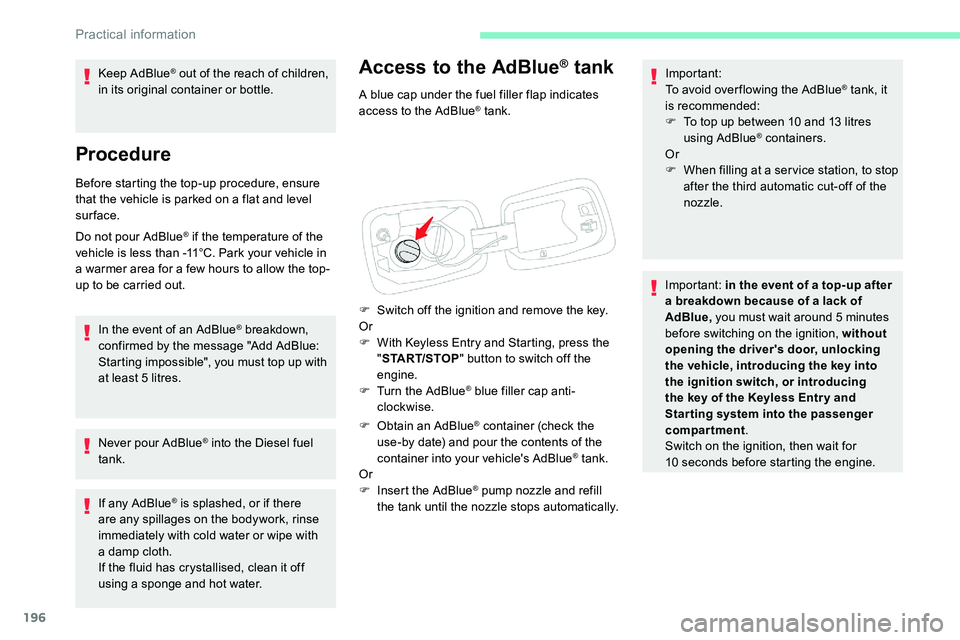
A blue cap under the fuel filler flap indicates
access to the AdBlue® tank.
F
S
witch off the ignition and remove the key.
Or
F
W
ith Keyless Entry and Starting, press the
" START/STOP " button to switch off the
engine.
F
T
urn the AdBlue
® blue filler cap anti-
clockwise.
F
O
btain an AdBlue
® container (check the
use-by date) and pour the contents of the
container into your vehicle's AdBlue
® tank.
Or
F
I
nsert the AdBlue
® pump nozzle and refill
the tank until the nozzle stops automatically. Important:
To avoid over flowing the AdBlue
® tank, it
is recommended:
F
T
o top up between 10
and 13
litres
using AdBlue
® containers.
Or
F
W
hen filling at a ser vice station, to stop
after the third automatic cut-off of the
nozzle.
Important: in the event of a
top-up after
a
breakdown because of a lack of
AdBlue, you must wait around 5
minutes
before switching on the ignition, without
opening the driver's door, unlocking
the vehicle, introducing the key into
the ignition switch, or introducing
the key of the Keyless Entr y and
Star ting system into the passenger
compartment .
Switch on the ignition, then wait for
10
seconds before starting the engine.
Keep AdBlue
® out of the reach of children,
in its original container or bottle.
Procedure
Before starting the top-up procedure, ensure
that the vehicle is parked on a flat and level
sur face.
Do not pour AdBlue
® if the temperature of the
vehicle is less than -11°C. Park your vehicle in
a
warmer area for a
few hours to allow the top-
up to be carried out.
In the event of an AdBlue
® breakdown,
confirmed by the message "Add AdBlue:
Starting impossible", you must top up with
at least 5
litres.
Never pour AdBlue
® into the Diesel fuel
tank.
If any AdBlue
® is splashed, or if there
are any spillages on the bodywork, rinse
immediately with cold water or wipe with
a
damp cloth.
If the fluid has crystallised, clean it off
using a
sponge and hot water.
Practical information
Page 199 of 292

197
Warning triangle
As a safety precaution, before leaving your
v ehicle to set up and install the triangle, switch
on the hazard warning lamps and put on your
high visibility vest.
Storage compartment
There is a compartment in the interior trim of
t he tailgate to store a triangle.
F
O
pen the tailgate.
F
R
elease the cover by turning the screw
a
quarter turn anti-clockwise.
Assembling and placing the
triangle
For versions supplied with a triangle as original
e quipment, refer to the illustration above.
For other versions, refer to the assembly
instructions provided with the triangle.
F
P
ut the triangle in place behind the vehicle,
as required by local legislation.
Running out of fuel (Diesel)
On vehicles fitted with Diesel engines, the fuel
system must be primed if you run out of fuel.
If the engine does not start first time, do not
keep trying, but start the procedure again from
the beginning. For more information on Misfuel
prevention (Diesel)
, refer to the
corresponding section.
BlueHDi 130 engines
F Fill the fuel tank with at least 5 litres of
Diesel.
F
S
witch on the ignition (without starting the
engine).
F
W
ait around 1 minute and switch off the
ignition.
F
O
perate the starter to start the engine.
If the engine does not start, repeat the
procedure.
BlueHDi 180 engines
F Fill the fuel tank with at least 5 litres of
Diesel.
F
S
witch on the ignition (without starting the
engine).
F
W
ait around 6 seconds and switch off the
ignition.
F
R
epeat the last two operations 10 times.
F
O
perate the starter to start the engine.
8
In the event of a breakdown
Page 226 of 292

224
Engines and towed loads – Diesel
EnginesBlueHDi 130 S&S2.0 HDi 180
(Euro 5) BlueHDi 180
S&S
Gearboxes BVM6
(Manual 6-speed) E AT 8
(Automatic 8-speed) E AT 8
(Automatic 8-speed) E AT 8
(Automatic 8-speed)
Codes DV5RC STTd ML6C DV5RC STTd ATN8 DW10FC – AMN8 DW10FC STTa AMN8
Model codes
J... YHZ
YHZ EHZEHZ
Cubic capacity (cm
3) 1,49 91,49 9 1,9 971,9 97
Max. power: EC standard (kW) 969613 0 13 0
Fuel DieselDieselDieselDiesel
Braked trailer (within the GTW limit) (kg)
on a
10% or 12% gradient 1,4 5 0
1, 25 0 1,6 5 01,6 5 0
Unbraked trailer (kg) 750750750750
Maximum authorised nose weight (kg) 585066 66
Technical data
Page 227 of 292
1
CITROËN Connect Radio
Multimedia audio system –
Applications – Bluetooth®
telephone
Contents
First steps
1
S
teering mounted controls
2
M
enus
3
A
pplications
5
R
adio
5
D
AB (Digital Audio Broadcasting) radio
7
M
edia
8
T
elephone
1
0
Settings
1
4
Frequently asked questions
1
6
The various functions and settings
described differ according to the version
and configuration of the vehicle. For safety reasons and because they
require continued attention on the part of
the driver, the following operations must
be carried out with the vehicle stationary
and the ignition on:
-
Us
ing a
smartphone.
-
P
airing a Bluetooth mobile phone to
the hands-free Bluetooth system of the
audio system.
-
Sm
artphone connection operations for
CarPlay
®, MirrorLinkTM or Android Auto
(certain applications interrupt their
display when the vehicle starts to move
again).
-
T
he configuration of profiles.
The system is protected in such a
way that
it will only operate in the vehicle.
The display of the message Energy
Economy Mode signals that a
change to
standby is imminent.
The link below gives access to the OSS
(Open Source Software) code for the
system.
https://www.groupe-psa.com/fr/oss/
https://www.groupe-psa.com/en/oss/
First steps
With the engine running, a press
mutes the sound.
With the ignition off, a press turns
the system on.
Increase or decrease the volume using
the wheel or the "plus" or "minus" buttons
(depending on the equipment).
Use the buttons on either side of or below the
touch screen for access to the menus, then
press the virtual buttons in the touch screen.
Depending on the model, use the "Source" or
"Menu" buttons on the left of the touch screen
for access to the menus, then press the virtual
buttons in the touch screen.
At all times it is possible to display the rolling
menus by pressing the screen briefly with three
fingers.
All of the touch areas of the screen are white.
For pages with multiple tabs at the bottom of
the screen, it is possible to switch between
pages either by tapping the tab for the desired
page, or by using a
finger, sliding the pages to
the left or to the right.
Press in the grey zone to go back up a
level or
to confirm.
.
CITROËN Connect Radio
Page 228 of 292
2
The touch screen is of the "capacitive"
type.
To clean the screen, use a soft, non-
abrasive cloth (e.g. spectacles cloth) with
no additional product.
Do not use sharp objects on the screen.
Do not touch the screen with wet hands.
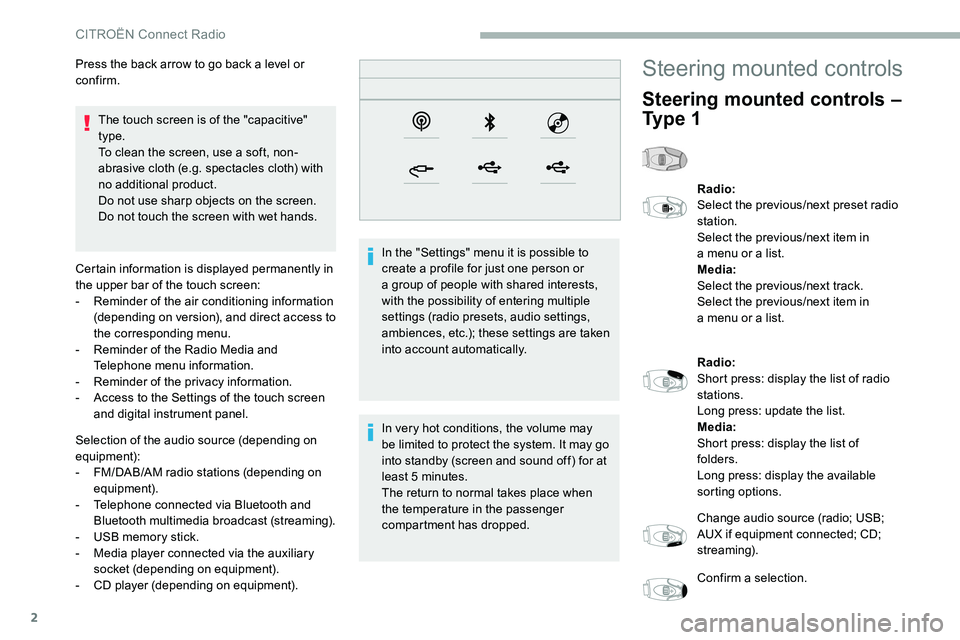
Certain information is displayed permanently in
the upper bar of the touch screen:
-
R
eminder of the air conditioning information
(depending on version), and direct access to
the corresponding menu.
-
R
eminder of the Radio Media and
Telephone menu information.
-
R
eminder of the privacy information.
-
A
ccess to the Settings of the touch screen
and digital instrument panel.
Selection of the audio source (depending on
equipment):
-
F
M/DAB/AM radio stations (depending on
equipment).
-
T
elephone connected via Bluetooth and
Bluetooth multimedia broadcast (streaming).
-
U
SB memory stick.
-
M
edia player connected via the auxiliary
socket (depending on equipment).
-
C
D player (depending on equipment). In the "Settings" menu it is possible to
create a
profile for just one person or
a
group of people with shared interests,
with the possibility of entering multiple
settings (radio presets, audio settings,
ambiences, etc.); these settings are taken
into account automatically.
In very hot conditions, the volume may
be limited to protect the system. It may go
into standby (screen and sound off) for at
least 5
minutes.
The return to normal takes place when
the temperature in the passenger
compartment has dropped.
Press the back arrow to go back a
level or
confirm.
Steering mounted controls
Steering mounted controls –
Ty p e 1
Radio:
Select the previous/next preset radio
station.
Select the previous/next item in
a
menu or a list.
Media:
Select the previous/next track.
Select the previous/next item in
a
menu or a list.
Radio:
Short press: display the list of radio
stations.
Long press: update the list.
Media:
Short press: display the list of
folders.
Long press: display the available
sorting options.
Change audio source (radio; USB;
AUX if equipment connected; CD;
streaming).
Confirm a
selection.
CITROËN Connect Radio
Page 230 of 292
4
21,518,5
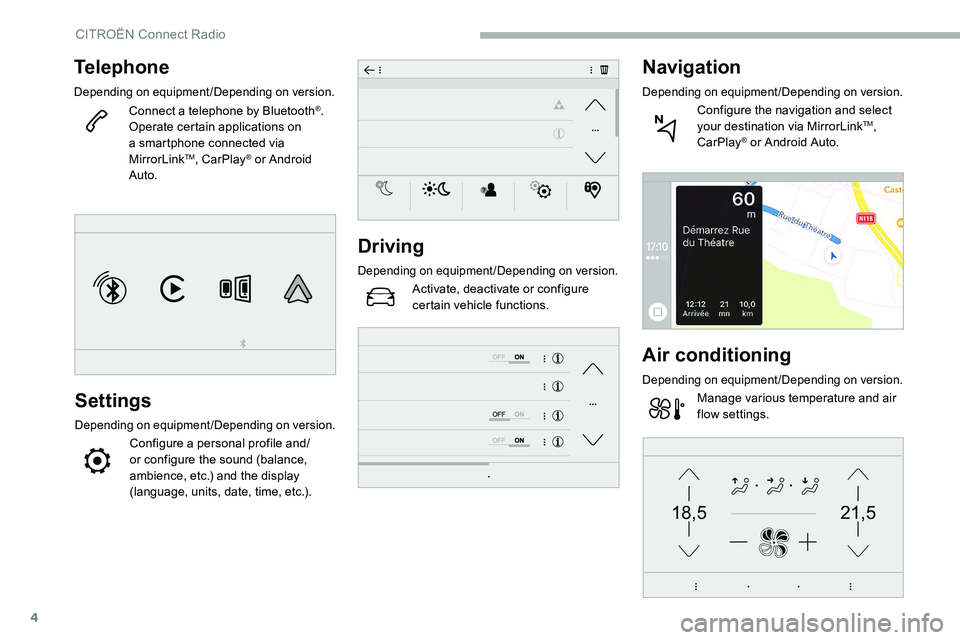
Telephone
Depending on equipment/Depending on version.
Connect a telephone by Bluetooth®.
Operate certain applications on
a
smartphone connected via
MirrorLink
TM, CarPlay® or Android
Auto.
Settings
Depending on equipment/Depending on version.
Configure a personal profile and/
o r configure the sound (balance,
ambience, etc.) and the display
(language, units, date, time, etc.).
Driving
Depending on equipment/Depending on version.
Activate, deactivate or configure
certain vehicle functions.
Navigation
Depending on equipment/Depending on version.
Configure the navigation and select
your destination via MirrorLinkTM,
CarPlay® or Android Auto.
Air conditioning
Depending on equipment/Depending on version.
Manage various temperature and air
flow settings.
CITROËN Connect Radio