ad blue CITROEN C5 AIRCROSS 2020 Handbook (in English)
[x] Cancel search | Manufacturer: CITROEN, Model Year: 2020, Model line: C5 AIRCROSS, Model: CITROEN C5 AIRCROSS 2020Pages: 292, PDF Size: 8.59 MB
Page 31 of 292
29
Malfunction of the SCR
emissions control system
Malfunction detection
If a malfunction is detected,
t hese warning lamps come on,
accompanied by an audible signal
and the display of an "Emissions
fault" message.
The alert is triggered while driving as soon
as the fault is detected for the first time, then
when switching on the ignition for subsequent
journeys, while the fault persists. If it is a
temporary fault, the alert
disappears during the next journey,
after self-diagnostic checks of the SCR
emissions control system.
Malfunction confirmed during the
permitted driving phase (between
685
miles and 0 miles (1,100 km and 0 km))
If the warning lamp is still on after 31 miles
( 50 km) of driving, the fault in the SCR system
is confirmed. Have the system checked by a
CITROËN
dealer or a qualified workshop as soon as
possible.
Starting prevented
Every time the ignition is switched on, the
message "Emissions fault: Starting prevented"
is displayed.
To be able to restart the engine, call
on a
CITROËN dealer or a qualified
workshop.
The AdBlue warning lamp flashes,
accompanied by the display of a
message
("Emissions fault: Starting prevented in x
miles") indicating the remaining range in miles
or kilometres.
While driving, the message is displayed every
30
seconds. The alert is repeated when
switching on the ignition.
You can continue driving for up to 685 miles
(1,100 km) before the engine star ting
prevention system is triggered.
Manual test in the
instrument panel
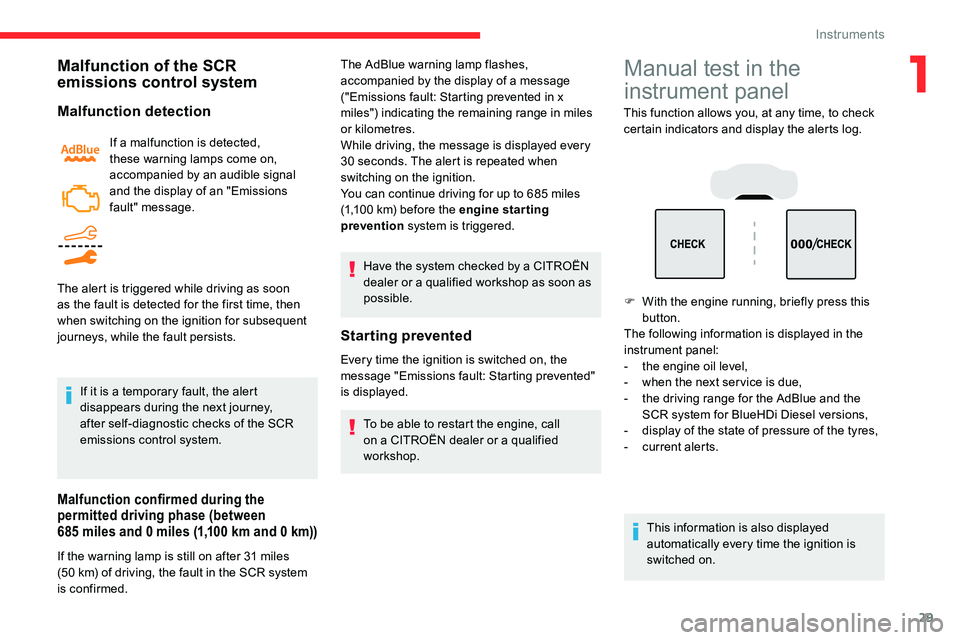
This function allows you, at any time, to check
certain indicators and display the alerts log.
F
W
ith the engine running, briefly press this
button.
The following information is displayed in the
instrument panel:
-
t
he engine oil level,
-
w
hen the next ser vice is due,
-
t
he driving range for the AdBlue and the
SCR system for BlueHDi Diesel versions,
-
d
isplay of the state of pressure of the tyres,
-
c
urrent alerts.
This information is also displayed
automatically every time the ignition is
switched on.
1
Instruments
Page 34 of 292
32
Average fuel consumption
(mpg or l/100 km or km/l)
C alculated since the last trip
computer reset.
Average speed
(mph or km/h)
Calculated since the last trip
computer reset.
Distance travelled
(miles or km)
Calculated since the last trip
computer reset.
Stop & Start time counter
(minutes/seconds or hours/minutes)
If your vehicle is fitted with Stop & Start, a time
counter calculates the time spent in STOP
mode during a
journey.
It resets to zero every time the ignition is
switched on.
Current fuel consumption
(mpg or l/100 km or km/l)
C alculated during the last few
seconds.
This value may vary following a
change in
the style of driving or the terrain, resulting
in a
significant change in the current fuel
consumption.
When the range falls below 19
miles (30
km),
dashes are displayed.
After filling with at least 5
litres of fuel, the
range is recalculated and is displayed if it
exceeds 62
miles (100
km).
If dashes instead of figures continue
to be displayed when driving, contact
a CITROËN dealer or a qualified workshop.
Touch screen
This system gives access to:
- t he permanent display of the time and
the exterior temperature (a blue symbol
appears when there is a
risk of ice).
-
t
he heating/air conditioning controls.
-
t
he menus for adjusting settings for vehicle
functions and systems.
-
t
he audio system and telephone controls
and the display of associated information.
-
t
he display of visual manoeuvring aid
functions (visual parking sensor information,
Park Assist, etc.).
-
I
nternet ser vices and the display of
associated information.
and, depending on equipment, it gives access
to:
-
t
he mode and intensity adjustment for the
massage function of the front seats.
-
t
he navigation system controls and the
display of associated information.
This function is only displayed from 19
mph
(30
km/h).
A few definitions…
Range
(miles or km)
The distance which can
still be travelled with the
fuel remaining in the tank
(depending on the average
fuel consumption over the
last few miles (kilometres)
travelled).
Instruments
Page 36 of 292
34
CITROËN Connect Nav side banners
Left-hand side
- E xterior temperature (a blue warning lamp
appears when there is a
risk of ice).
-
A
ccess to the Settings of the touch screen
and digital instrument panel (date/time,
languages, units, etc.).
-
R
eminder of the air conditioning information,
and direct access to the corresponding
menu.
Right-hand side
-
Time.
-
Notifications.
-
R
eminder of the air conditioning information,
and direct access to the corresponding
menu.
Date and time adjustment
With CITROËN Connect
Radio
F Select the Settings menu in
the upper banner of the touch
screen.
F
Sel
ect " Configuration ".
F
Sel
ect "Date and time ".
F
Sel
ect " Date " or "Time ".
F
C
hoose the display formats.
F
C
hange the date and/or time using the
numeric keypad.
F
C
onfirm with " OK".
With CITROËN Connect Nav
Setting of the time and date is only available if
synchronisation with the GPS is deactivated.
F
Sel
ect the Settings menu in the
touch screen banner.
F
P
ress the " OPTIONS " button to go to the
secondary page. F
Sel
ect "
Setting the time- date".
F
Sel
ect the "
Date" or "Time " tab.
F
S
et the date and/or time using the numeric
keypad.
F
C
onfirm with "
OK".
Additional settings
You can choose:
-
T he time zone.
-
T
he display format of the date and time
(12 h / 24 h).
-
T
he summer time management function
(+1
h o ur).
-
T
he synchronisation with GPS (UTC).
The system does not automatically
manage the change between winter and
summer time (depending on the country
of s a l e).
CITROËN Connect Radio upper
banner
- Time and exterior temperature (a blue warning lamp appears when there is a risk
of i c e).
-
R
eminder of the air conditioning information,
and direct access to the corresponding
menu.
-
R
eminder of the Radio Media and
Telephone menus information.
-
Notifications.
-
A
ccess to the Settings of the touch screen
and digital instrument panel (date/time,
languages, units, etc.).
Instruments
Page 65 of 292
63
Servicing the ventilation and air
conditioning system
F
E
nsure that the cabin filter is in good
condition and have the filter elements
replaced regularly.
We recommend the use of a
combined
cabin filter. Thanks to its special active
additive, it contributes to the purification of
the air breathed by the occupants and the
cleanliness of the passenger compartment
(reduction of allergic symptoms, bad
odours and greasy deposits).
F
T
o ensure correct operation of the air
conditioning system, have it checked
according to the recommendations in
the Maintenance and Warranty Guide.
Stop & Star t
The heating and air conditioning systems
only work when the engine is running.
Temporarily deactivate the Stop &
Start system to maintain a
comfortable
temperature in the passenger
compartment.
For more information on Stop & Star t ,
refer to the corresponding section.Manual air conditioning
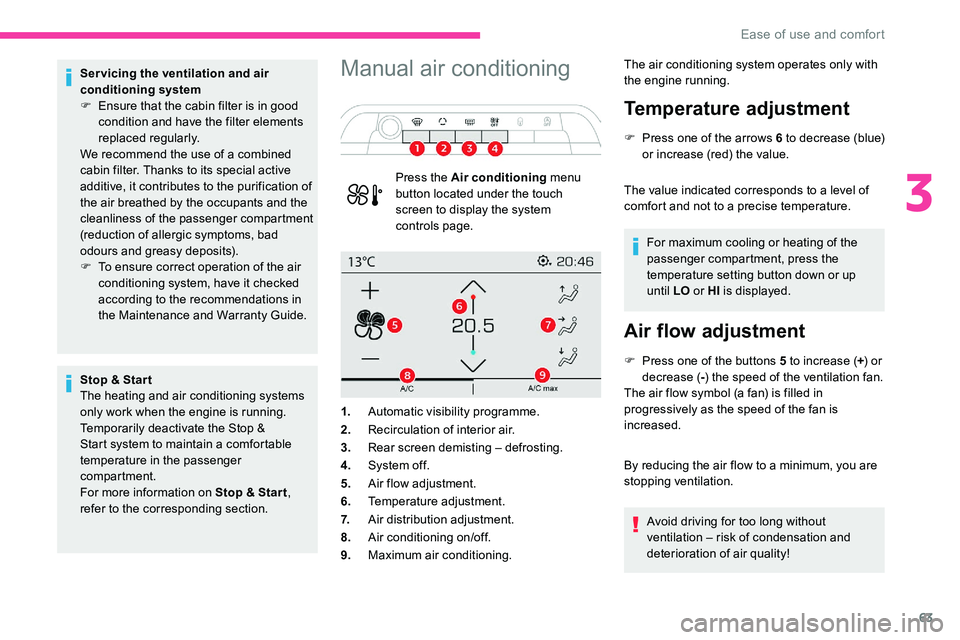
Press the Air conditioning menu
button located under the touch
screen to display the system
controls page. The air conditioning system operates only with
the engine running.
Temperature adjustment
F Press one of the arrows 6
t o decrease (blue)
or increase (red) the value.
The value indicated corresponds to a
level of
comfort and not to a
precise temperature.
For maximum cooling or heating of the
passenger compartment, press the
temperature setting button down or up
until LO or HI is displayed.
Air flow adjustment
F Press one of the buttons 5 to increase (+) or
decrease ( -) the speed of the ventilation fan.
The air flow symbol (a fan) is filled in
progressively as the speed of the fan is
increased.
By reducing the air flow to a
minimum, you are
stopping ventilation.
Avoid driving for too long without
ventilation – risk of condensation and
deterioration of air quality!
1.
Automatic visibility programme.
2. Recirculation of interior air.
3. Rear screen demisting – defrosting.
4. System of f.
5. Air flow adjustment.
6. Temperature adjustment.
7. Air distribution adjustment.
8. Air conditioning on/off.
9. Maximum air conditioning.
3
Ease of use and comfort
Page 67 of 292

65
11.Access to the secondary page.
12 . Passenger compartment pre-conditioning
(depending on version).
13. Selection of adjustment for the automatic
comfort programme (Soft/Normal/Fast).
14 . Mono-zone/Dual-zone.
15. "AQS" (Air Quality System) function
(depending on version).
The air conditioning system operates with
the engine running, but the ventilation and its
controls are available with the ignition on.
Operation of the air conditioning and regulation
of temperature, air flow and air distribution
in the passenger compartment are regulated
automatically.
Temperature adjustment
The driver and front passenger can each set
the temperature independently of one another.
F
P
ress one of the buttons 6 to decrease
(blue) or increase (red) the value.
1.
Automatic visibility programme.
2. Recirculation of interior air.
3. Rear screen demisting – defrosting.
4. System of f.
5. Air flow adjustment.
6. Temperature adjustment.
7. Air distribution adjustment.
8. Air conditioning on/off.
9. Maximum air conditioning.
10. Activation of automatic comfort
programme. The value indicated corresponds to a
level of
comfort and not to a
precise temperature.
It is recommended that you avoid a
difference
of more than 3
in the settings for left and right. For maximum cooling or heating of the
passenger compartment, press the
temperature setting button down or up
until LO or HI
is displayed.
Automatic comfort
programme
F Press button 10 "AUTO " to activate
automatic mode of the air conditioning
system.
When the indicator lamp in the button is on, the
air conditioning system operates automatically:
the system manages the temperature, air
flow and air distribution in the passenger
compartment in an optimum way according to
the comfort level you have selected.
It is possible to adjust the intensity of the
automatic comfort programme by choosing one
of the settings offered in the secondary page,
accessible from button 11 "OPTIONS ".
To change the current setting, shown by
illumination of the corresponding indicator
lamp, press button 13
repeatedly until the
desired mode is displayed:
" Soft ": provides soft and quiet operation by
limiting air flow.
3
Ease of use and comfort
Page 131 of 292

129
Stop as soon as it is safe to do so, away
from the traffic, and call a CITROËN
dealer or a
qualified workshop.
When the ignition is switched off, the
gearbox goes into mode P automatically.
Driving mode
1. ECO.
Press this button to activate/deactivate
"ECO " mode (confirmed by the
illumination/extinction of the indicator
lamp).
2.
S P O R T.
Press this button to activate/deactivate
" SPORT " mode (confirmed by the
illumination/extinction of the indicator lamp).
When the message disappears, the selected
mode is activated.
Each mode is independent and they cannot
be activated simultaneously. Activation of
one mode deactivates the other.
" SPORT " mode (depending on version)
With the engine running, when SPORT mode is
activated, the gearbox delays changing up for
a
more dynamic driving style.
Activating SPORT mode is not recommended
in the following situations:
-
A
SR/DSC deactivated,
-
l
ow fuel level reached,
-
l
ow AdBlue level reached.
In mode D , pressing this button activates the
SPORT programme.
" S " appears in the instrument panel.
Pressing this button again deactivates the
function.
Pressing this button has no effect when
towing a
connected trailer.
" ECO " mode
This allows fuel consumption to be reduced.
With the EAT8
gearbox, "free-wheeling" mode
may activate to save fuel. Take your foot fully
off the accelerator pedal to anticipate slowing
down.
SPORT or ECO mode is automatically
deactivated when the ignition is switched
of f.Hill start assist
System which keeps your vehicle immobilised
temporarily (approximately 2 seconds) when
starting on a
gradient, the time it takes to
move your foot from the brake pedal to the
accelerator pedal.
It is only active when:
-
t
he vehicle is completely stationary, with
your foot on the brake pedal,
-
c
ertain slope conditions are met,
-
t
he driver's door is closed.Do not leave the vehicle while it is being
held in the hill start assist phase.
If you need to leave the vehicle with the
engine running, apply the parking brake
manually. Then check that the parking
brake warning lamp is on fixed on the
instrument panel.
The hill start assist function cannot be
deactivated. However, use of the parking
brake to immobilise the vehicle interrupts
its operation.
6
Driving
Page 133 of 292

131
Driving on flooded roads
Before entering into a flooded area, it is
strongly recommended that you deactivate
the Stop & Start system.
For more information on Driving
recommendations , particularly on
flooded roads, refer to the corresponding
section.
Deactivation/Reactivation
The function is activated by default when the
ignition is switched on.
To deactivate/reactivate the function: F
P
ress the button.
A message in the instrument panel confirms
the change of state.
When the function is deactivated, the orange
indicator lamp is lit; if the engine was in
standby, it restarts immediately.
Associated indicator lamps
Function activated.
Function deactivated or malfunction.
Operation
Opening the bonnet
Before doing anything under the bonnet,
deactivate the Stop & Start system to
avoid any risk of injury caused by the
engine restarting automatically.
Main conditions for operation
-
T
he driver's door must be closed.
-
T
he driver's seat belt must be fastened.
-
T
he state of charge of the battery must be
sufficient.
-
T
he temperature of the engine must be
within its nominal operating range.
-
T
he outside temperature must be between
0°C and 35°C.
Putting the engine into standby
(STOP mode)
The engine automatically goes into standby
as soon as the driver indicates the intention of
stopping.
-
W
ith a manual gearbox : at a
speed below
2
mph (3 km/h), with the gear lever in
neutral and the clutch pedal released.
-
W
ith an automatic gearbox :
•
W
ith the gear selector in mode D or M ,
at a
speed below 12 mph (20 km/h) for
BlueHDi 180
S&S versions, or below
2
mph (3 km/h) for PureTech 130/175 S&S
and BlueHDi 130
S&S versions, with the
brake pedal depressed.
•
W
ith the gear selector in mode N , at
a
speed of 0 mph (0 km/h).
•
W
ith the gear selector in mode P and
the brake pedal released, at a
speed of
0
mph (0 km/h).
Time counter
A time counter adds up the time spent in
standby during the journey. It is reset to zero
every time the ignition is switched on.
6
Driving
Page 171 of 292
169
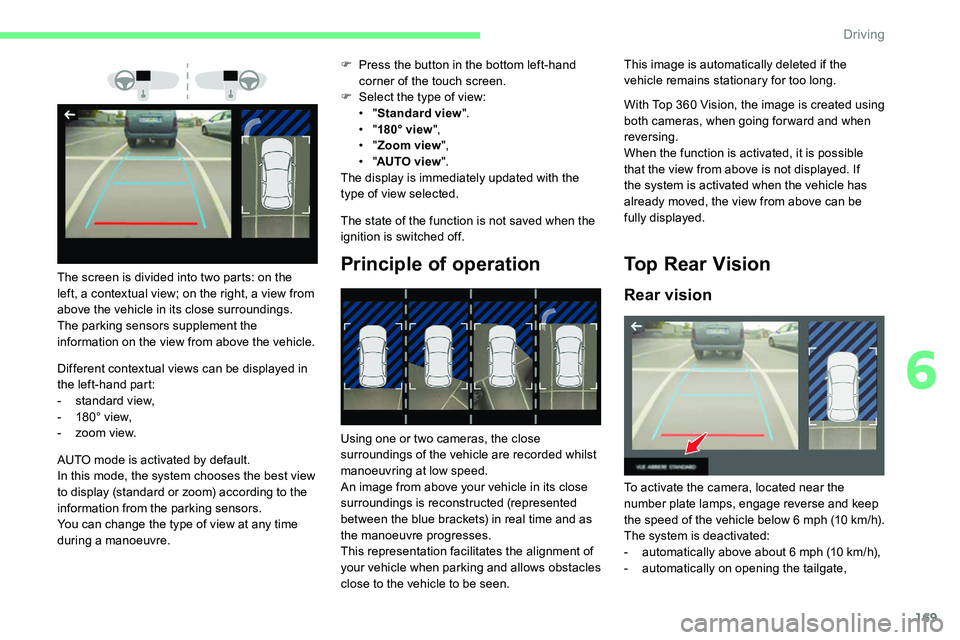
Different contextual views can be displayed in
the left-hand part:
-
s
tandard view,
-
1
80° view,
-
z
oom view. F
P
ress the button in the bottom left-hand
corner of the touch screen.
F
Sel
ect the type of view:
• "
Standard view ".
• "
180° view ",
• "
Zoom view ",
• "
AUTO view ".
The display is immediately updated with the
type of view selected.
The state of the function is not saved when the
ignition is switched off.
Principle of operationThe screen is divided into two parts: on the
left, a contextual view; on the right, a view from
above the vehicle in its close surroundings.
The parking sensors supplement the
information on the view from above the vehicle.
AUTO mode is activated by default.
In this mode, the system chooses the best view
to display (standard or zoom) according to the
information from the parking sensors.
You can change the type of view at any time
during a
manoeuvre. Using one or two cameras, the close
surroundings of the vehicle are recorded whilst
manoeuvring at low speed.
An image from above your vehicle in its close
surroundings is reconstructed (represented
between the blue brackets) in real time and as
the manoeuvre progresses.
This representation facilitates the alignment of
your vehicle when parking and allows obstacles
close to the vehicle to be seen. With Top 360
Vision, the image is created using
both cameras, when going for ward and when
reversing.
When the function is activated, it is possible
that the view from above is not displayed. If
the system is activated when the vehicle has
already moved, the view from above can be
fully displayed.Top Rear Vision
Rear vision
This image is automatically deleted if the
vehicle remains stationary for too long.
To activate the camera, located near the
number plate lamps, engage reverse and keep
the speed of the vehicle below 6
m
ph (10
k
m/h).
The system is deactivated:
-
a
utomatically above about 6 mph (10 km/h),
-
a
utomatically on opening the tailgate,
6
Driving
Page 172 of 292
170
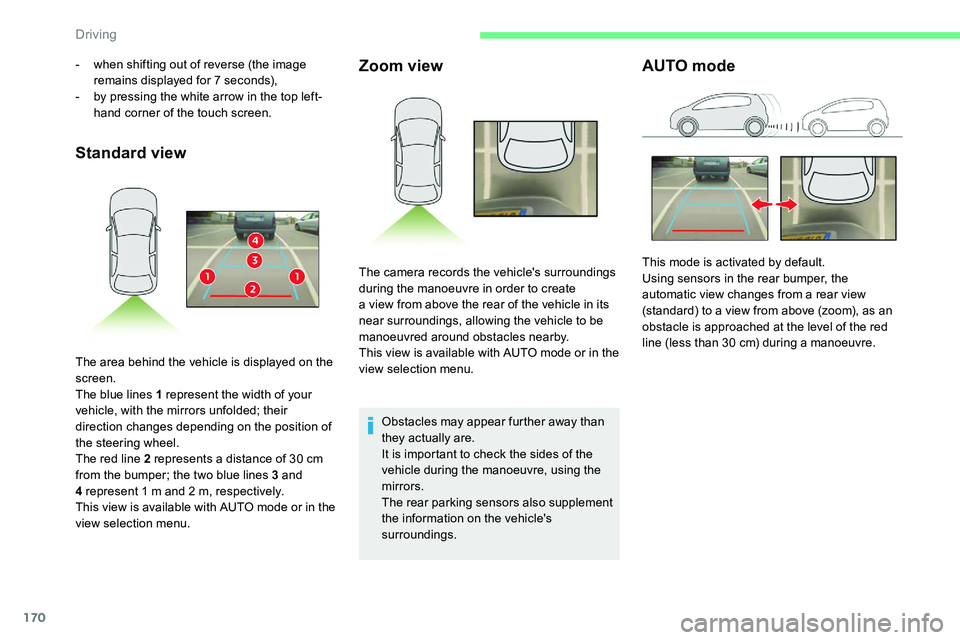
Standard viewZoom view
Obstacles may appear further away than
they actually are.
It is important to check the sides of the
vehicle during the manoeuvre, using the
mirrors.
The rear parking sensors also supplement
the information on the vehicle's
surroundings.
AUTO mode- when shifting out of reverse (the image
remains displayed for 7 seconds),
-
b
y pressing the white arrow in the top left-
hand corner of the touch screen.
The area behind the vehicle is displayed on the
screen.
The blue lines 1
represent the width of your
vehicle, with the mirrors unfolded; their
direction changes depending on the position of
the steering wheel.
The red line 2
represents a distance of 30 cm
from the bumper; the two blue lines 3
and
4
represent 1 m and 2 m, respectively.
This view is available with AUTO mode or in the
view selection menu. The camera records the vehicle's surroundings
during the manoeuvre in order to create
a
view from above the rear of the vehicle in its
near surroundings, allowing the vehicle to be
manoeuvred around obstacles nearby.
This view is available with AUTO mode or in the
view selection menu. This mode is activated by default.
Using sensors in the rear bumper, the
automatic view changes from a
rear view
(standard) to a
view from above (zoom), as an
obstacle is approached at the level of the red
line (less than 30
cm) during a manoeuvre.
Driving
Page 174 of 292
172
F Select "Panoramic visual aid ".
AUTO mode is displayed by default, with front
vision, if the gearbox is in neutral or with a
gear
engaged, or with rear vision, if reverse is
engaged.
The system is deactivated:
-
a
utomatically above about 19 mph (30 km/h)
(the image disappears temporarily from
12
mph (20 km/h)),
-
b
y pressing the white arrow in the top left-
hand corner of the touch screen.
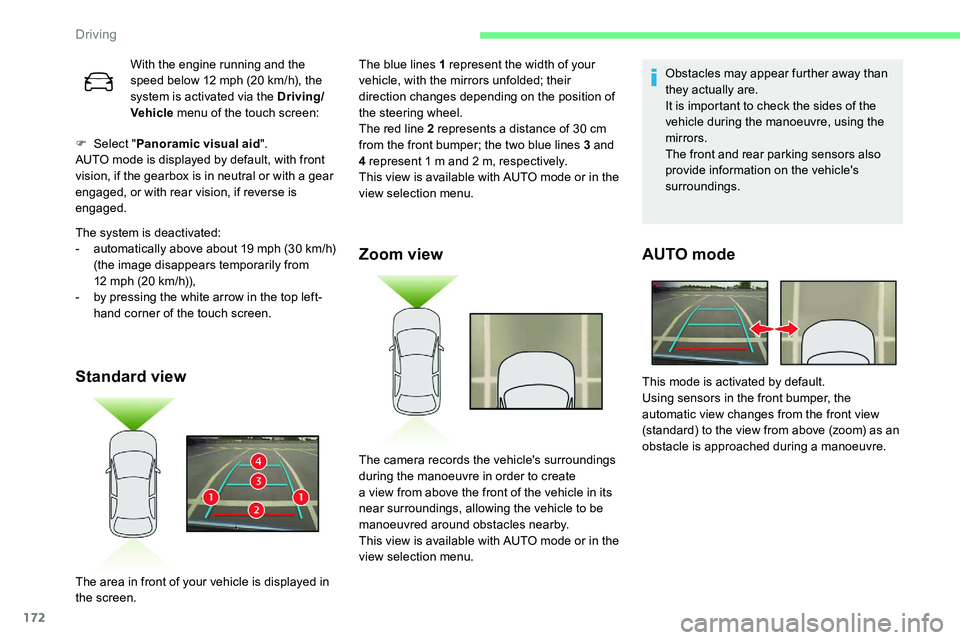
Standard view Zoom view
Obstacles may appear further away than
they actually are.
It is important to check the sides of the
vehicle during the manoeuvre, using the
mirrors.
The front and rear parking sensors also
provide information on the vehicle's
surroundings.
AUTO mode
With the engine running and the
speed below 12
mph (20 km/h), the
system is activated via the Driving/
Vehicle menu of the touch screen: The blue lines 1
represent the width of your
vehicle, with the mirrors unfolded; their
direction changes depending on the position of
the steering wheel.
The red line 2
represents a distance of 30 cm
from the front bumper; the two blue lines 3
and
4
represent 1 m and 2 m, respectively.
This view is available with AUTO mode or in the
view selection menu.
The area in front of your vehicle is displayed in
the screen. The camera records the vehicle's surroundings
during the manoeuvre in order to create
a
view from above the front of the vehicle in its
near surroundings, allowing the vehicle to be
manoeuvred around obstacles nearby.
This view is available with AUTO mode or in the
view selection menu. This mode is activated by default.
Using sensors in the front bumper, the
automatic view changes from the front view
(standard) to the view from above (zoom) as an
obstacle is approached during a
manoeuvre.
Driving