check CITROEN DISPATCH SPACETOURER DAG 2020 Handbook (in English)
[x] Cancel search | Manufacturer: CITROEN, Model Year: 2020, Model line: DISPATCH SPACETOURER DAG, Model: CITROEN DISPATCH SPACETOURER DAG 2020Pages: 324, PDF Size: 10.89 MB
Page 156 of 324

154
Engine restarting (START mode)
The engine automatically restarts as soon as
the driver indicates the intention of moving off
again.
With a manual gearbox: with the clutch pedal
fully depressed.
With an automatic gearbox :
-
W
ith the selector in position D or M : with the
brake pedal released.
-
W
ith the selector in position N and the brake
pedal released: with the selector at D or M .
-
W
ith the selector in position P and the brake
pedal depressed: with the selector at R , N,
D or M .
-
R
everse gear engaged.
With an electronic gearbox :
-
W
ith the selector in position A or M : with the
brake pedal released.
-
W
ith the selector in position N and the brake
pedal released: with the selector at A or M .
-
R
everse gear engaged.
Special cases
The engine restarts automatically if all the
operating conditions are met again and in the
following cases.
-
W
ith a manual gearbox : vehicle speed
exceeds 16
mph (25 km/h) or 2 mph
(3
km/h) (depending on engine).
-
W
ith an automatic gearbox : vehicle speed
exceeds 2.5
mph (3 km/h). In these cases, this indicator lamp
flashes for a few seconds, then goes
of f.
Malfunctions
Depending on the vehicle’s equipment:
F
H
ave the vehicle checked by a CITROËN
dealer or a qualified workshop.
The vehicle stalls in STOP mode
All of the instrument panel warning lamps come
on if this fault occurs.
Depending on version, a warning message may
also be displayed, asking you to place the gear
selector in position N and to press the brake
pedal.
F
Switch off the ignition then start the engine again with the key or the " START/STOP"
button. The Stop & Start system requires a
12
V battery of specific technology and
specification.
All work concerning the battery must be
carried out only by a CITROËN dealer or a
qualified workshop.
In the event of a fault with the system,
this warning lamp flashes in the
instrument panel.
The warning lamp in this button
flashes and a message appears,
accompanied by an audible signal.
Tyre under-inflation
detection
This system automatically checks the
pressures of the tyres while driving.
It compares the information given by the wheel
speed sensors with reference values, which
must be reinitialised ever y time the tyre
pressures are adjusted or a wheel changed .
The system triggers an alert as soon as it
detects a drop in the inflation pressure of one
or more tyres.
Driving
Page 157 of 324

155
The inflation pressures specified for the
vehicle can be found on the tyre pressure
label.
For more information on the
Identification markings, refer to the
corresponding section.
Checking tyre pressures
This check should be done when the tyres
are "cold" (vehicle stopped for 1 hour or
after a journey of less than 6
miles (10 km)
at moderate speeds).
Other wise, add 0.3
bar to the pressures
shown on the label. Snow chains
The system does not have to be
reinitialised after fitting or removing snow
chains.
Spare wheel
The steel spare wheel does not have an
under-inflation detection sensor.
Under-inflation alert
Under-inflation detection does not replace
the need for vigilance on the part of the
driver.
This system does not avoid the need
to regularly check the tyre pressures
(including the spare wheel) as well as
before a long journey.
Driving with under-inflated tyres,
particularly in adverse conditions (heavy
load, high speed, long journey):
-
w
orsens road-holding,
-
l
engthens braking distances,
-
c
auses premature wear of the tyres,
-
i
ncreases fuel consumption. This is signalled by the fixed
illumination of this warning lamp,
accompanied by an audible signal
and, depending on equipment, the
display of a message.
F
R
educe speed immediately, avoid excessive
steering movements and avoid sudden
braking.
F
S
top the vehicle as soon as it is safe to do
so.
The loss of pressure detected does not
always cause visible bulging of the tyre.
Do not rely on just a visual check. F
I f it is not possible to make this check
immediately, drive carefully at reduced
speed.
F
I
n the event of a puncture, use the
temporary puncture repair kit or the spare
wheel (depending on equipment).
The alert is kept active until the system is
reinitialised.
Reinitialisation
Reinitialise the system after adjusting one or
more tyre pressures and after changing one or
more wheels.
Before reinitialising the system, make
sure that the pressures of the four tyres
are correct for the conditions of use of the
vehicle and conform to the values written
on the tyre pressure label.
Check the pressures of the four tyres
before performing the reinitialisation.
The system does not advise if a pressure
is incorrect at the time of reinitialisation.
F
U
sing a compressor, such as the one in the
temporary puncture repair kit, check the
pressures of the four tyres when cold.
6
Driving
Page 158 of 324

156
Without audio system
F Press this button for about 3 seconds then release it, an audible signal confirms the
reinitialisation.
With audio system or touch
screen
The reinitialisation is carried out via
the vehicle configuration menu.
Malfunction
In this case, under-inflation monitoring of the
tyres is no longer assured.
Have the system checked by a CITROËN
dealer or a qualified workshop. The illumination of these warning lamps
indicates a fault with the system.
Driving and manoeuvring
aids - General
recommendations
Driving and manoeuvring aids cannot, in
any circumstances, replace the need for
vigilance on the part of the driver.
The driver must comply with the Highway
Code, must remain in control of the
vehicle in all circumstances and must be
able to retake control of it at all times. The
driver must adapt the speed to climactic
conditions, traffic and the state of the
road.
It is the driver's responsibility to constantly
check the traffic, to assess the relative
distances and speeds of other vehicles
and to anticipate their movements before
indicating and changing lane.
The systems cannot exceed the limits of
the laws of physics.
Driving aids
You should hold the steering wheel with
both hands, always use the interior and
exterior rear view mirrors, always keep the
feet close to the pedals and take a break
every two hours. Manoeuvring aids
The driver must always check the
surroundings of the vehicle before and
during the whole manoeuvre, in particular
using the mirrors.
Radar
The operation of the radar as well as the
associated functions may be impaired
through the accumulation of dirt (mud,
frost, etc.), in certain difficult weather
conditions (very heavy rain, snow) or if the
bumper is damaged.
If the front bumper is to be repainted,
contact a CITROËN dealer or a qualified
workshop
; certain types of paint could
inter fere with the operation of the radar.
Driving
Page 166 of 324

164
Temporarily exceeding the
programmed speed
F To temporarily exceed the programmed speed threshold, fully depress the
accelerator pedal.
The speed limiter is deactivated temporarily
and the displayed programmed speed flashes.
If it is exceeded for a prolonged period of time,
an audible warning is triggered.
Simply release the accelerator pedal to return
to below the programmed speed. When the limit speed is exceeded but this is not
due to action by the driver (in case of a steep
slope, for example), an audible signal triggers
immediately.
Once the speed of the vehicle returns to
the programmed setting, the speed limiter
functions again: the display of the programmed
speed setting becomes fixed again.
Switching off
F Turn the thumbwheel 1 to the " 0" position:
the display of information on the speed
limiter disappears.
Malfunction
To modify the limit speed setting from the
speed suggested by the vehicle Speed Limit
recognition and recommendation:
F
t
he speed suggested is displayed in the
instrument panel,
F
m
ake a first press on button 5 ; a message
is displayed to confirm the memorisation
request,
F
p
ress button 5 again to save the suggested
speed.
The speed displays immediately in the
instrument panel as the new speed setting.
The display of dashes (flashing then fixed)
indicates a fault with the speed limiter.
Have it checked by a CITROËN dealer or a
qualified workshop.
The selection screen closes after a few
moments.
This setting becomes the new limit speed.
Cruise control - particular
recommendations
For the safety of everyone, only use the
cruise control where the driving conditions
allow running at a constant speed and
keeping an adequate safety distance.
Remain vigilant
when the cruise control
is activated. If you hold one of the speed
setting modification buttons, a very rapid
change in the speed of your vehicle may
o c c u r.
When descending a steep hill , the cruise
control system cannot prevent the vehicle
from exceeding the set speed. Brake if
necessary to control the speed of your
vehicle.
On steep climbs or when towing, the set
speed may not be reached or maintained.
Driving
Page 169 of 324

167
To modify the cruise speed setting from the
speed suggested by the vehicle Speed Limit
recognition and recommendation:
F
t
he speed suggested is displayed in the
instrument panel,
F
m
ake an initial press on button 5 ; a
message is displayed to confirm the
memorisation request.
F
p
ress button 5 again to save the suggested
speed.
The speed displays immediately in the
instrument panel as the new speed setting.
Temporarily exceeding the
programmed speed
If needed (e.g. for overtaking), it is
possible to exceed the programmed
speed by pressing the accelerator
pedal.
The cruise control is temporarily overridden
and the programmed speed setting flashes.
To return to the programmed speed, simply
release the accelerator pedal.
Once the vehicle has returned to the
programmed speed, the cruise control takes
over again: the display of the programmed
speed setting becomes fixed again. When descending a steep hill, the cruise
control system cannot prevent the vehicle
from exceeding the programmed speed.
You may have to brake to control the
speed of your vehicle. In this case, the
cruise control is automatically paused.
To activate the system again, with the
speed of the vehicle above 25 mph
(40
km/h), press button 4
.
Switching off
F Turn the thumbwheel 1 to the " 0” position:
the cruise control information disappears
from the screen.
Malfunction
The display of dashes (flashing then fixed)
indicates a fault with the cruise control system.
Have it checked by a CITROËN dealer or a
qualified workshop.
Adaptive Cruise Control
Refer to the General recommendations
on the use of driving and manoeuvring
aids and to Cruise control - par ticular
recommendations .
This system automatically maintains
the speed of your vehicle at a value
which you set (speed setting), while
keeping a safe distance from the
vehicle in front (target vehicle), and
which has been set beforehand by
the driver. The system automatically
manages the acceleration and
deceleration of the vehicle using just
engine braking (as if the driver had
pressed the "-" button).
To do so, it has a radar located in the front
b u m p e r.
6
Driving
Page 173 of 324

171
When the driver must suspend the cruise
control system:
-
W
hen following a narrow vehicle.
-
V
ehicles not running in the middle of the
lane.
-
V
ehicles entering a corner.
-
V
ehicles changing lane at the last moment.
Reactivate cruise control when conditions
permit. Cases where the driver is urged to take
back control immediately:
-
W
hen a vehicle cuts in sharply between
your vehicle and the one in front.
-
E
xcessively sharp deceleration of the
vehicle in front of you.
The adaptive cruise control operates by
day and night, in fog or moderate rainfall.
The system does not act on the braking
system, but works only with engine
braking.
The regulation range is limited: there will
no longer be any adjustment of speed if
the difference between the programmed
speed setting and the speed of the vehicle
in front becomes too great.
If the difference between the programmed
speed setting and the speed of the
vehicle in front is too great, the speed
cannot be adjusted: the cruise control is
automatically deactivated.Malfunction
In the event of a malfunction of the adaptive
cruise control system, you are warned by an
audible signal and the display of the message
"Driving aid functions fault".
Have the system checked by a CITROËN
dealer or a qualified workshop.
Active Safety Brake
with Distance Alert and
Intelligent emergency
braking assistance
Refer to the General recommendations on
the use of driving and manoeuvring aids .
This system allows:
-
t
he driver to be warned that their vehicle is
at risk of collision with the vehicle in front,
-
a c
ollision to be prevented, or its severity to
be limited, by reducing the vehicle’s speed.
This system is comprised of three functions:
-
D
istance Alert,
-
I
ntelligent emergency braking assistance,
6
Driving
Page 174 of 324
172
- Active Safety Brake (automatic emergency b r ak ing).
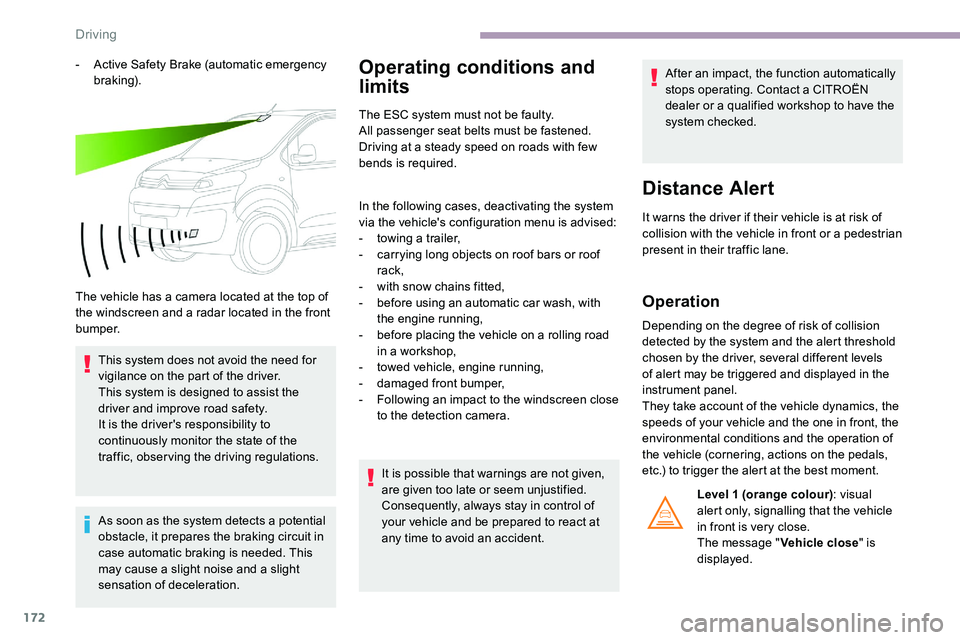
The vehicle has a camera located at the top of
the windscreen and a radar located in the front
b u m p e r. This system does not avoid the need for
vigilance on the part of the driver.
This system is designed to assist the
driver and improve road safety.
It is the driver's responsibility to
continuously monitor the state of the
traffic, observing the driving regulations.
As soon as the system detects a potential
obstacle, it prepares the braking circuit in
case automatic braking is needed. This
may cause a slight noise and a slight
sensation of deceleration.Operating conditions and
limits
The ESC system must not be faulty.
All passenger seat belts must be fastened.
Driving at a steady speed on roads with few
bends is required.
In the following cases, deactivating the system
via the vehicle's configuration menu is advised:
-
t
owing a trailer,
-
c
arrying long objects on roof bars or roof
rack,
-
w
ith snow chains fitted,
-
b
efore using an automatic car wash, with
the engine running,
-
b
efore placing the vehicle on a rolling road
in a workshop,
-
t
owed vehicle, engine running,
-
d
amaged front bumper,
-
F
ollowing an impact to the windscreen close
to the detection camera.
It is possible that warnings are not given,
are given too late or seem unjustified.
Consequently, always stay in control of
your vehicle and be prepared to react at
any time to avoid an accident. After an impact, the function automatically
stops operating. Contact a CITROËN
dealer or a qualified workshop to have the
system checked.
Distance Alert
It warns the driver if their vehicle is at risk of
collision with the vehicle in front or a pedestrian
present in their traffic lane.
Operation
Depending on the degree of risk of collision
detected by the system and the alert threshold
chosen by the driver, several different levels
of alert may be triggered and displayed in the
instrument panel.
They take account of the vehicle dynamics, the
speeds of your vehicle and the one in front, the
environmental conditions and the operation of
the vehicle (cornering, actions on the pedals,
etc.) to trigger the alert at the best moment.
Level
1 (orange colour) : visual
alert only, signalling that the vehicle
in front is very close.
The message " Vehicle close" is
displayed.
Driving
Page 176 of 324
174
The driver can maintain control of the
vehicle at any time by sharply turning
the steering wheel and/or pressing the
accelerator pedal.
Operation of the function may be felt by
slight vibration in the brake pedal.
If the vehicle comes to a complete stop,
the automatic braking is maintained for 1
to 2 seconds.
Deactivation/Activation
By default, the system is automatically
activated at every engine start.This system can be deactivated
or activated via the vehicle
configuration menu.
Deactivation of the system is
signalled by the illumination of this
indicator lamp, accompanied by the
display of a message.
Malfunction
In the event of a fault with the system,
you are alerted by the continuous
illumination of this warning lamp,
accompanied by the display of a
message and an audible signal.
If these warning lamps come
on after the engine has been
switched off and restarted, contact
a CITROËN dealer or a qualified
workshop to have the system
checked.
Lane departure warning
system
Refer to the General recommendations on
the use of driving and manoeuvring aids .
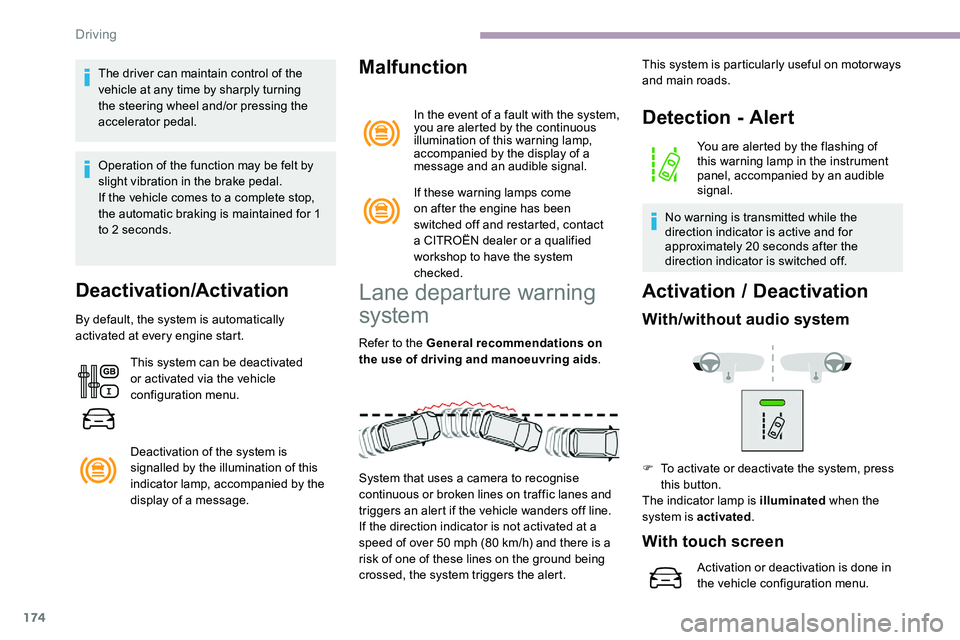
System that uses a camera to recognise
continuous or broken lines on traffic lanes and
triggers an alert if the vehicle wanders off line.
If the direction indicator is not activated at a
speed of over 50 mph (80
km/h) and there is a
risk of one of these lines on the ground being
crossed, the system triggers the alert.
Detection - Alert
You are alerted by the flashing of
this warning lamp in the instrument
panel, accompanied by an audible
signal.
No warning is transmitted while the
direction indicator is active and for
approximately 20 seconds after the
direction indicator is switched off.
Activation / D eactivation
With/without audio system
This system is particularly useful on motor ways
and main roads.
F
T
o activate or deactivate the system, press
this button.
The indicator lamp is illuminated when the
system is activated .
With touch screen
Activation or deactivation is done in
the vehicle configuration menu.
Driving
Page 182 of 324

180
Malfunction
Reversing camera with
display in the interior
mirror
Refer to the General recommendations on
the use of driving and manoeuvring aids.
The visual reversing assistance camera is
activated automatically when reverse gear is
engaged. If a malfunction occurs, when
shifting to reverse, this warning lamp
comes on in the instrument panel,
accompanied by the display of a
message and an audible signal (short
b e e p).
Contact a CITROËN dealer or a qualified
workshop to have the system checked. The function may be supplemented by parking
sensors.
The image is displayed in the interior mirror. They are represented as lines marked
"on the ground" and do not indicate the
position of the vehicle in relation to tall
obstacles (e.g. other vehicles).
Some distortion of the image is normal.
It is normal to have a part of the number
plate showing at the bottom of the screen.
Opening the tailgate or rear door
(depending on equipment) can interfere
with the display.
If a side-hinged door is open, allow for the
space it occupies.
The blue lines ( 1) represent the width of the
vehicle including the mirrors.
The red line ( 2) represents a distance of 30
cm
from the rear bumper and the thin blue lines
1
m (A) and 2
m (B) respectively. Check the cleanliness of the camera lens
regularly.
Clean the reversing camera regularly
using a soft, dry cloth.
Top Rear Vision
Refer to the General recommendations on
the use of driving and manoeuvring aids
.
Driving
Page 185 of 324
183
180° view
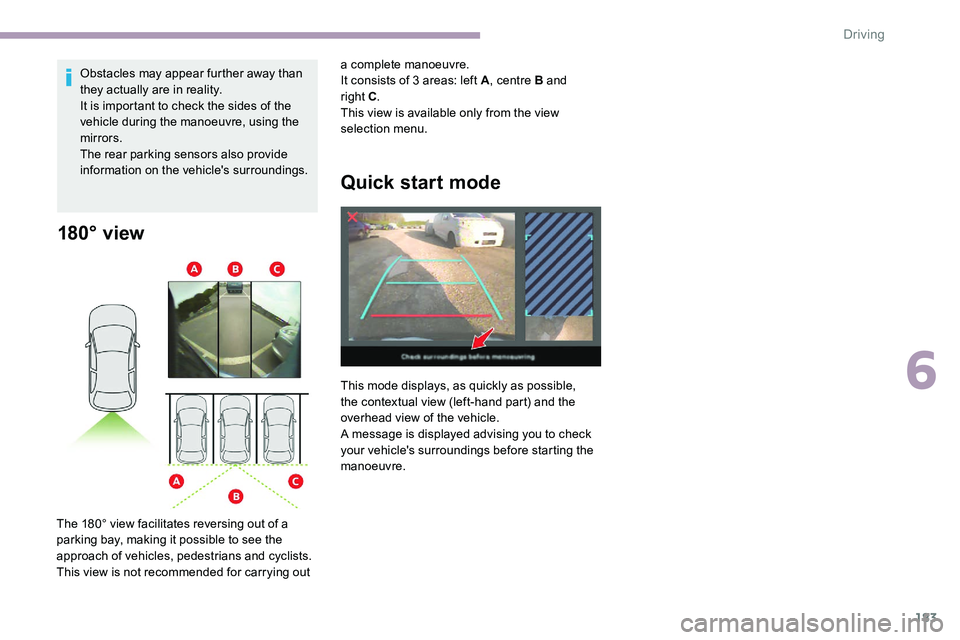
The 180° view facilitates reversing out of a
parking bay, making it possible to see the
approach of vehicles, pedestrians and cyclists.
This view is not recommended for carrying out Obstacles may appear further away than
they actually are in reality.
It is important to check the sides of the
vehicle during the manoeuvre, using the
mirrors.
The rear parking sensors also provide
information on the vehicle's surroundings.
Quick start mode
This mode displays, as quickly as possible,
the contextual view (left-hand part) and the
overhead view of the vehicle.
A message is displayed advising you to check
your vehicle's surroundings before starting the
manoeuvre. a complete manoeuvre.
It consists of 3 areas: left A
, centre B and
right C
.
This view is available only from the view
selection menu.
6
Driving