phone CITROEN DS3 CABRIO DAG 2017 Handbook (in English)
[x] Cancel search | Manufacturer: CITROEN, Model Year: 2017, Model line: DS3 CABRIO DAG, Model: CITROEN DS3 CABRIO DAG 2017Pages: 444, PDF Size: 14.09 MB
Page 47 of 444

45
DS3_en_Chap01_controle-de-marche_ed02-2015
Monochrome screen C
This displays the following information:
- t ime,
-
d
ate,
-
am
bient
t
emperature
(
this
f
lashes
i
f
t
here
i
s
a r
isk
o
f
i
ce),
-
st
atus of doors and boot,
-
au
dio
s
ources
(
radio,
C
D,
U
SB
p
ort
/ au
xiliary
s
ocket
e
tc.),
-
tr
ip computer,
-
in
formation
o
r
a
lert
m
essages,
-
se
ttings
m
enus
f
or
t
he
s
creen
a
nd
v
ehicle
sys
tems.
Displays in the screen
From your Audio system control panel, you can:
F pr ess the "MEnU " b utton t o g ain a ccess t o th
e main menu ,
F
pr
ess the " 5" or " 6" buttons to scroll
through
t
he
i
tems
i
n
t
he
s
creen,
F
pr
ess the "MODE"
b
utton
t
o
c
hange
t
he
pe
rmanent
a
pplication
(
trip
c
omputer,
au
dio
so
urce...),
F
pr
ess the " 7" or " 8"
b
uttons
t
o
c
hange
a se
tting
v
alue,
F
pr
ess the "OK" button to confirm,
or
F
pr
ess the "Back" button to abandon the
operation
i
n
p
rogress.
Controls
F Press the "MEnU " b utton t o g ain a ccess to t
he main menu :
-
au
dio functions,
-
th
e trip computer,
-
per
sonalisation-configuration,
-
te
lephone
(
hands-free
k
it).
F
Pr
ess the " 5" or " 6" buttons to select the
menu
r
equired,
t
hen
c
onfirm
b
y
p
ressing
th
e "OK"
b
utton.
Main menu
Monitoring
Page 50 of 444

DS3_en_Chap01_controle-de-marche_ed02-2015
Display configuration
Once this menu has been selected, you can
gain access t o t he f ollowing s ettings:
-
br
ightness-video
se
tting,
-
da
te
a
nd
t
ime
s
etting,
-
se
lection
o
f
u
nits.
Once the fuel consumption units have
been
c
hanged
t
o
m
pg,
t
he
i
nformation
in t
he
s
creen
r
elating
t
o
s
peed
a
nd
di
stance
a
lso
c
hanges
t
o
m
ph
a
nd
mile
s
res
pectively. As
a s
afety
m
easure,
c
onfiguration
b
y
th
e driver of the multifunction screen
should
o
nly
b
e
d
one
w
hen
s
tationary.
Choice of language
Once this menu has been selected, you can
change the l anguage u sed b y t he s creen b y ch
oosing
o
ne
f
rom
a d
efined
l
ist.With Audio system on, once this menu is
selected y
ou c an c onfigure y our B luetooth ha
nds-free s ystem ( pairing), v iew t he v arious te
lephone
d
irectories
(
list
o
f
c
alls,
s
ervices...)
an
d
m
anage
y
our
c
alls
(
call,
h
ang
u
p,
s
econd
ca
ll,
s
ecret
m
ode...).
For more information on the "Telephone"
function,
r
efer
t
o
t
he
"
Audio
s
ystem"
s
ection.
"Telephone" Menu
Setting the date and time
F Select the "Set date and time" function
using
t
he
"5 " o
r "6 "
b
utton.
F
P
ress "OK"
t
o
c
onfirm
t
he
s
election.
F
Ad
just
t
he
s
ettings
o
ne
b
y
o
ne
u
sing
th
e
"7 " o
r "8" button then confirm
with
"O
K".
F
Then
select the "OK"
b
ox
i
n
t
he
s
creen
an
d
c
onfirm.
Page 51 of 444

49
DS3_en_Chap01_controle-de-marche_ed02-2015
Touch screen tablet
This system gives access to:
- me nus f or a djusting s ettings f or v ehicle fu
nctions and systems,
-
au
dio
a
nd
d
isplay
c
onfiguration
m
enus,
-
au
dio system and telephone controls and
the
d
isplay
o
f
a
ssociated
i
nformation.
-
th
e
d
isplay
o
f
a
lert
m
essages,
-
th
e
d
isplay
o
f
a
mbient
t
emperature
(
a
b
lue
sn
ow
f
lake
a
ppears
i
f
t
here
i
s
a r
isk
o
f
i
ce),
-
th
e
t
rip
c
omputer.
And,
d
epending
o
n
e
quipment,
i
t
a
llows:
-
th
e
d
isplay
o
f
t
he
v
isual
p
arking
s
ensors
in
formation,
-
ac
cess
t
o
t
he
c
ontrols
f
or
t
he
n
avigation
sy
stem and Internet services, and the
display
o
f
a
ssociated
i
nformation. After a few moments with no action on
the
s
econdary
p
age,
t
he
p
rimary
p
age
is d
isplayed
a
utomatically.
As a safety measure, some functions
can
o
nly
b
e
v
iewed
w
hen
s
tationary.
Th
eir display is interrupted as soon as
the
v
ehicle
m
oves
o
ff.general operation
Recommendations
It is necessary to press firmly, particularly for
"flick" gestures ( scrolling t hrough l ists, m oving th
e
ma
p...).
A
l
ight
w
ipe
i
s
n
ot
e
nough.
The
s
creen
d
oes
n
ot
r
ecognise
p
ressing
w
ith
mo
re
t
han
o
ne
f
inger.
This
t
echnology
a
llows
u
se
a
t
a
ll
t
emperatures
an
d
w
hen
w
earing
g
loves.
Do
n
ot
u
se
p
ointed
o
bjects
o
n
t
he
t
ouch
s
creen
ta
blet.
Do not touch the touch screen tablet with wet
hands.
Uses a soft clean cloth to clean the touch
screen
ta
blet.
Principles
Press the " MEnU" b utton for access to the
different menus, then press the virtual buttons
in
t
he
t
ouch
s
creen
t
ablet.
Each
m
enu
i
s
d
isplayed
ov
er
o
ne
o
r
t
wo
p
ages
(p
rimary
p
age
a
nd
s
econdary
p
age).
Use the " O
P
TIO
nS" b
utton
t
o
g
o
t
o
t
he
se
condary
page
.
Use this button for access to
additional information and to the
settings
f
or
c
ertain
f
unctions.
Use
t
his
b
utton
t
o
c
onfirm.
Use this button to return to the
primary
p
age
o
r
t
o
q
uit.
Monitoring
Page 52 of 444

DS3_en_Chap01_controle-de-marche_ed02-2015
Menus
navigation
N avigation i s a vailable d epending o n th
e
c
ounty
o
f
s
ale
a
nd/or
t
rim
l
evel.
Refer to the "Audio and telematics"
section.
Radio Media
Refer to the "Audio and telematics"
section.
Settings
Allows
c
onfiguration
o
f
t
he
d
isplay
an
d
t
he
s
ystem.
Refer
t
o
t
he
c
orresponding
s
ection.
Connected Services
These services are available
depending
o
n
t
he
c
ounty
o
f
s
ale
a
nd/
or
t
rim
l
evel.
Refer to the "Audio and telematics"
section. Telephone
Refer to the "Audio and telematics"
section.
Driving
Allows access to the trip computer and,
depending
o
n
v
ersion,
t
he
a
djustment
of s
ettings
f
or
c
ertain
f
unctions.
Refer
t
o
t
he
c
orresponding
s
ection.1.
Vo
lume
/ m
ute.
Refer
t
o
t
he
"
Audio
a
nd
t
elematics"
s
ection.
Press this button, then select the
desired
me
nu.
Page 96 of 444
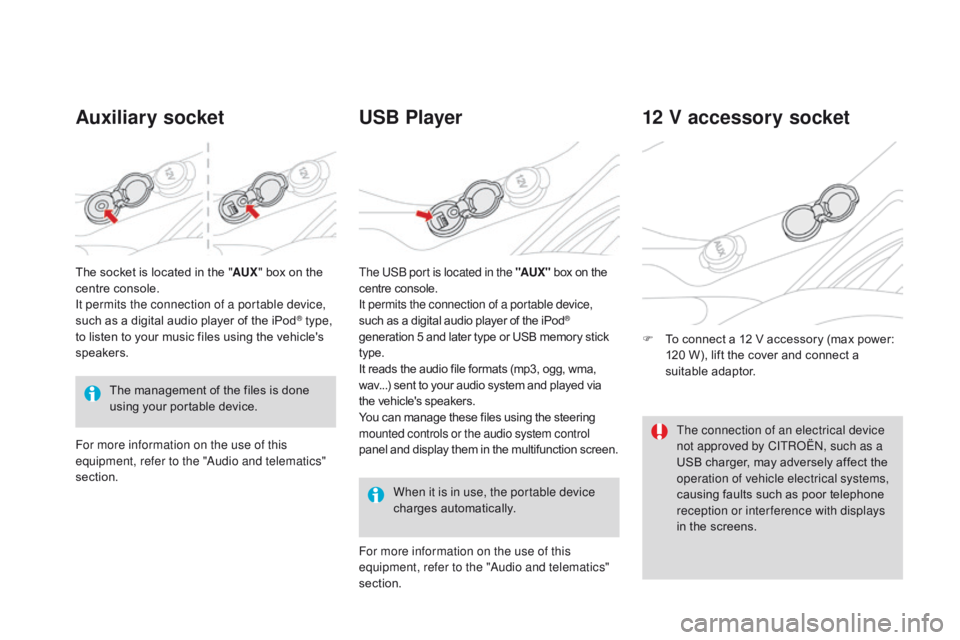
DS3_en_Chap03_confort_ed02-2015
Auxiliary socketUSB Player
When it is in use, the portable device
charges au
tomatically.
12 V accessory socket
F To connect a 1 2 V a ccessory ( max p ower: 12
0 W ), l ift t he c over a nd c onnect a su
itable
ad
aptor.
The
m
anagement
o
f
t
he
f
iles
i
s
d
one
us
ing
y
our
p
ortable
d
evice.
The
s
ocket
i
s
l
ocated
i
n
t
he
"
AU
X
"
b
ox
o
n
t
he
ce
ntre
c
onsole.
It permits the connection of a portable device,
such
a
s
a d
igital
a
udio
p
layer
o
f
t
he
i
Pod
® type,
to l
isten t
o y
our m
usic f
iles u
sing t
he v
ehicle's sp
eakers.
For more information on the use of this
equipment, refer to the "Audio and telematics"
section. For more information on the use of this
equipment, refer to the "Audio and telematics"
section. The USB port is located in the "AUX "
b
ox
o
n
t
he
ce
ntre
c
onsole.
It permits the connection of a portable device,
such a s a d igital a udio p layer o f t he i Pod®
generation 5 a
nd l
ater t
ype o
r U
SB m
emory s tick ty
pe.
It
r
eads
t
he
a
udio
f
ile
f
ormats
(
mp3,
o
gg,
w
ma,
wa
v...)
s
ent
t
o
y
our
a
udio
s
ystem
a
nd
p
layed
v
ia
th
e
v
ehicle's
s
peakers.
You
c
an
m
anage
t
hese
f
iles
u
sing
t
he
s
teering
mo
unted controls or the audio system control
panel
a
nd
d
isplay
t
hem
i
n
t
he
m
ultifunction
s
creen. The connection of an electrical device
not approved by CITROËN, such as a
USB
c
harger,
m
ay
a
dversely
a
ffect
t
he
op
eration of vehicle electrical systems,
causing
f
aults
s
uch
a
s
p
oor
t
elephone
re
ception or inter ference with displays
in
t
he
s
creens.
Page 233 of 444

231
DS3_en_Chap08_info-pratiques_ed02-2015
Load reduction modeSystem which manages the use of certain functions a ccording t o t he l evel o f c harge re
maining
i
n
t
he
b
attery.
When
t
he
v
ehicle
i
s
b
eing
d
riven,
t
he
l
oad
re
duction function temporarily deactivates
certain
f
unctions,
s
uch
a
s
t
he
a
ir
c
onditioning,
th
e
h
eated
r
ear
s
creen...
The deactivated functions are reactivated
automatically
a
s
s
oon
a
s
c
onditions
p
ermit.Energy economy modeSystem which manages the period of use of certain functions to conserve a sufficient level of ch
arge i n t he b attery.
After
t
he
e
ngine
h
as
s
topped,
y
ou
c
an
s
till
u
se
f
unctions
s
uch
a
s
t
he
a
udio
e
quipment,
w
indscreen
wi
pers,
d
ipped
b
eam
h
eadlamps,
c
ourtesy
l
amps,
e
tc.
f
or
a m
aximum
c
ombined
p
eriod
o
f
th
irty minutes. This
p
eriod
m
ay
b
e
g
reatly
r
educed
i
f
th
e
b
attery
i
s
n
ot
f
ully
c
harged.
A
f
lat
b
attery
p
revents
t
he
e
ngine
f
rom
st
arting.
If
t
he
t
elephone
i
s
b
eing
u
sed
a
t
t
he
sa
me time, it will be interrupted after
10
mi
nutes.
Switching to economy mode
Once this period has elapsed, a message appears i n t he s creen i ndicating t hat t he ve
hicle has switched to economy mode and the
active
f
unctions
a
re
p
ut
o
n
s
tandby.
Exiting economy mode
These functions are reactivated automatically
the next t ime t he v ehicle i s d riven.
F
In o
rder to resume the use of these
functions
i
mmediately,
s
tart
t
he
e
ngine
a
nd
le
t
i
t
r
un
f
or
a f
ew
m
inutes.
The time available to you will then be double
the
p
eriod
f
or
w
hich
t
he
e
ngine
i
s
l
eft
r
unning.
Ho
wever, this period will always be between
five
a
nd
t
hirty
m
inutes.
Practical information
Page 242 of 444

DS3_en_Chap08_info-pratiques_ed02-2015
"Multimedia":
hands-free system, semi-integral satellite navigation s ystem, p ortable n avigation sy
stems,
m
apping
u
pdates,
d
riving
a
ssistant
sy
stem,
D
VD
p
layer,
r
eversing
c
amera,
2
30V
so
cket,
t
elephone/smartphone
c
arrier,
r
ear
mu
ltimedia
car
rier... By
v
isiting
a C
ITROËN dealer,
y
ou
c
an
a
lso
ob
tain c leaning a nd m aintenance p roducts (i
nterior a nd e xterior) - i ncluding e cological pr
oducts
f
rom
t
he
"
TECHNATURE"
r
ange,
pr
oducts
f
or
t
opping
u
p
(
screenwash
f
luid...),
to
uch-up
p
ens
a
nd
p
aint
a
erosols
f
or
t
he
e
xact
co
lour
o
f
y
our
v
ehicle,
r
efills
(
cartridge
f
or
t
he
te
mporary
p
uncture
r
epair
k
it...),
.
..
Installation of radio
communication transmitters
Before installing any after-market radio communication transmitter, you can
contact a CITROËN dealer for the
specification of transmitters which can
be
f
itted
(
frequency,
m
aximum
p
ower,
ae
rial position, specific installation
requirements),
i
n
l
ine
w
ith
t
he
V
ehicle
El
ectromagnetic
Co
mpatibility
Di
rective (2004/104/EC). The
f
itting
o
f
e
lectrical
e
quipment
or a
ccessories which are not
recommended by CITROËN may result
in a f ailure o f y our v ehicle's e lectronic sy
stem
a
nd
e
xcessive
e
lectrical
co
nsumption.
Contact a CITROËN dealer
for
i
nformation
o
n
t
he
r
ange
o
f
re
commended equipment and
accessories.
Depending
o
n
t
he
l
egislation
i
n
f
orce
i
n
th
e country, certain safety equipment
may b e c ompulsory: h igh v isibility sa
fety v ests, w arning t riangles, br
eathalyzers, spare bulbs, spare
fuses,
f
ire
e
xtinguisher,
f
irst
a
id
k
it,
mu
d
f
laps
a
t
t
he
r
ear
o
f
t
he
v
ehicle.
Page 275 of 444

273
DS3_en_Chap11c_SMEGplus_ed02-2015
7-inch touch screen tablet
gPS satellite navigation - Multimedia audio - Bluetooth® telephone
Contents
First steps 27 4
Steering
m
ounted
c
ontrols
27
6
Menus
2
77
Navigation
27
8
Navigation
- G
uidance
28
6
Traffic
290
R
adio Media
29
2
Radio
2
98
DAB
(
Digital
A
udio
B
roadcasting)
r
adio
30
0
Media
3
02
Settings
30
6
Connected services
31
4
Internet browser
31
5
MirrorLink
TM 318
Car
Play® 322
Te
lephone
3
26
Frequently
a
sked
q
uestions
33
4
The system is protected in such a way that it will only operate in
your
v
ehicle. As a safety measure, the driver should only carry out operations
which
r
equire
p
rolonged
a
ttention
w
hile
t
he
v
ehicle
i
s
s
tationary.
The
d
isplay
o
f
t
he
e
nergy
e
conomy
m
ode
m
essage
s
ignals
th
at
t
he
s
ystem
i
s
a
bout
t
o
g
o
i
nto
s
tandby.
R
efer
t
o
t
he
e
nergy
econ
omy
mod
e
sec
tion.
Audio and Telematics
Page 277 of 444

275
DS3_en_Chap11c_SMEGplus_ed02-2015
Selecting the audio source (depending on version):
-
"F
M"
/ "
DAB"
/ "
AM"*
s
tations.
-
"U
SB"
m
emory
s
tick.
-
Sm
artphone
v
ia
M
irrorLink
TM or CarPlay®.
- Te
lephone connected by Bluetooth* and
Bluetooth
a
udio
s
treaming*.
-
Me
dia
p
layer
c
onnected
t
o
t
he
a
uxiliary
so
cket
(
jack,
c
able
n
ot
s
upplied).
-
Ju
kebox*,
a
fter
f
irst
c
opying
a
udio
f
iles
t
o
th
e
i
nternal
m
emory
o
f
t
he
s
ystem.
*
D
epending
o
n
e
quipment.
Short-cuts:
u
sing
t
he
t
ouch
b
uttons
i
n
t
he
u
pper
ba
nd of the touch screen tablet, it is possible
to
g
o
d
irectly
t
o
t
he
s
election
o
f
a
udio
s
ource,
th
e
l
ist
o
f
s
tations
(
or
t
itles,
d
epending
o
n
t
he
s o
u r c e).
The screen is of the "resistive" type, it
is necessary to press firmly, particularly
for
"
flick"
g
estures
(
scrolling
t
hrough
a li
st,
m
oving
t
he
m
ap...).
A s
imple
w
ipe
wi
ll
n
ot
b
e
e
nough.
p
ressing
w
ith
m
ore
th
an
o
ne
f
inger
i
s
n
ot
r
ecognised.
The
s
creen
c
an
b
e
u
sed
w
hen
w
earing
gl
oves.
T
his
t
echnology
a
llows
u
se
a
t
al
l
te
mperatures.
Following
pr
olonged
opera
tion
in ve
ry
hi
gh
t
emperatures,
t
he
v
olume
m
ay
b
e
li
mited
t
o
p
rotect
t
he
s
ystem.
T
he
r
eturn
t
o
no
rmal
t
akes
p
lace
w
hen
t
he
t
emperature
in t
he
p
assenger
c
ompartment
d
rops.
To clean the screen, use a soft
non-abrasive
c
loth
(
spectacles
c
loth)
wi
thout
a
ny
a
dditional
p
roduct.
Do
n
ot
u
se
p
ointed
o
bjects
o
n
t
he
scre
en.
Do not touch the screen with wet
hands.
Volume
a
djustment
(
each
s
ource
i
s
ind
ependent,
in
cluding
tr
affic
an
nouncements
(T
A)
a
nd
n
avigation
i
nstructions).
Press Menu
to display the menu
carousel.
Increase v olume.
Reduce
v
olume.
Mute
t
he
s
ound
b
y
p
ressing
s
imultaneously
o
n
th
e
v
olume
i
ncrease
a
nd
r
educe
b
uttons.
Unmute
t
he
s
ound
b
y
p
ressing
o
ne
o
f
t
he
t
wo
vo
lume
but
tons.
Audio and Telematics
Page 278 of 444

DS3_en_Chap11c_SMEGplus_ed02-2015
Steering mounted controls
Radio: select the previous/next preset st ation.
Media:
s
elect
a g
enre
/ a
rtist
/ f
older
fr
om
t
he
l
ist.
Select
t
he
p
revious/next
e
ntry
i
n
a me
nu.
Decrease
v
olume.
Radio:
a
utomatic
s
earch
f
or
a h
igher
fre
quency.
Media:
S
elect
n
ext
t
rack.
Media,
p
ress
a
nd
h
old:
f
ast
f
or ward.
Jump
i
n
t
he
l
ist. Mute:
c
ut
t
he
s
ound
b
y
p
ressing
the
volume increase and decrease
buttons
sim
ultaneously.
Restore
t
he
s
ound
b
y
p
ressing
o
ne
o
f
th
e
t
wo
v
olume
b
uttons.
Radio: a
utomatic s earch f or a l ower fre
quency.
Media:
s
elect
p
revious
t
rack.
Media,
p
ress
a
nd
h
old:
f
ast
b
ack.
Jump
i
n
t
he
l
ist.
Change
t
he
a
udio
s
ource.
Confirm
a s
election.
Call/end
c
all
o
n
t
he
t
elephone.
Press
f
or
m
ore
t
han
2 s
econds:
ac
cess
t
o
t
he
t
elephone
m
enu.Increase
v
olume.