battery CITROEN DS3 CROSSBACK 2020 User Guide
[x] Cancel search | Manufacturer: CITROEN, Model Year: 2020, Model line: DS3 CROSSBACK, Model: CITROEN DS3 CROSSBACK 2020Pages: 244, PDF Size: 7.7 MB
Page 32 of 244
30
Access02
Manual
► Press this button to lock/unlock the vehicle
(doors and boot) from inside the vehicle.
The indicator lamp comes on to confirm central
locking of the vehicle.
The central locking does not take place if
one of the doors is open.
To unfold the exterior handles, press the
button once when the vehicle is locked or
twice when it is unlocked.
When locking / deadlocking from the
outside
When the vehicle is locked or deadlocked from
the outside, the indicator lamp flashes and the
button is inoperative.
► After normal locking, pull one of the interior
door controls to unlock the vehicle.
► After deadlocking, it is necessary to use
the remote control, the “Keyless Entry and
Starting” system or the integral key to unlock
the vehicle.
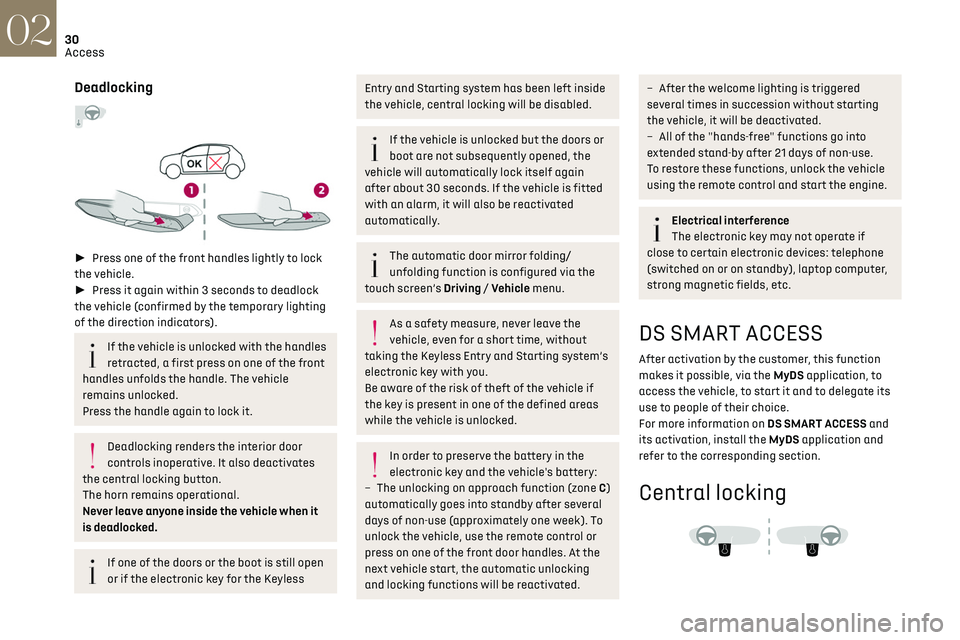
Deadlocking
► Press one of the front handles lightly to lock
the vehicle.
► Press it again within 3 seconds to deadlock
the vehicle (confirmed by the temporary lighting
of the direction indicators).
If the vehicle is unlocked with the handles
retracted, a first press on one of the front
handles unfolds the handle. The vehicle
remains unlocked.
Press the handle again to lock it.
Deadlocking renders the interior door
controls inoperative. It also deactivates
the central locking button.
The horn remains operational.
Never leave anyone inside the vehicle when it
is deadlocked.
If one of the doors or the boot is still open
or if the electronic key for the Keyless
Entry and Starting s ystem has been left inside
the vehicle, central locking will be disabled.
If the vehicle is unlocked but the doors or
boot are not subsequently opened, the
vehicle will automatically lock itself again
after about 30 seconds. If the vehicle is fitted
with an alarm, it will also be reactivated
automatically.
The automatic door mirror folding/
unfolding function is configured via the
touch screen’s Driving / Vehicle menu.
As a safety measure, never leave the
vehicle, even for a short time, without
taking the Keyless Entry and Starting system’s
electronic key with you.
Be aware of the risk of theft of the vehicle if
the key is present in one of the defined areas
while the vehicle is unlocked.
In order to preserve the battery in the
electronic key and the vehicle's battery:
–
The unlocking on approach function (z
one C)
automatically goes into standby after several
days of non-use (approximately one week). To
unlock the vehicle, use the remote control or
press on one of the front door handles. At the
next vehicle start, the automatic unlocking
and locking functions will be reactivated.
– After the welcome lighting is triggered
several times in succession without starting
the vehicle, it will be deactivated.
–
All o
f the "hands-free" functions go into
extended stand-by after 21 days of non-use.
To restore these functions, unlock the vehicle
using the remote control and start the engine.
Electrical interference
The electronic key may not operate if
close to certain electronic devices: telephone
(switched on or on standby), laptop computer,
strong magnetic fields, etc.
DS SMART ACCESS
After activation by the customer, this function
makes it possible, via the MyDS application, to
access the vehicle, to start it and to delegate its
use to people of their choice.
For more information on DS SMART ACCESS and
its activation, install the MyDS application and
refer to the corresponding section.
Central locking
Page 34 of 244
32
Access02
► Unclip the cover by inserting a small
screwdriver in the slot and raise the cover.
► Remove the discharged battery from its
housing.
► Insert the new battery, observing the polarity,
and clip the cover onto the housing.
► Reinitialise the remote control.
For more information on Reinitialising the remote
control, refer to the corresponding section.
Do not throw remote control batteries
away, as they contain metals that are
harmful to the environment. Take them to an
approved disposal point.
Reinitialising the remote
control
Following replacement of the battery or in the
event of a fault, it may be necessary to reinitialise
the remote control.
Complete unlocking/locking of
the vehicle with the key
Use this procedure in the following situations:
– R emote control battery discharged.
–
R
emote control malfunction.
–
V
ehicle battery discharged.
–
V
ehicle in an area subject to strong
electromagnetic interference.
In the first case, change the remote control
battery.
In the second case, reinitialise the remote control.
Refer to the corresponding sections.
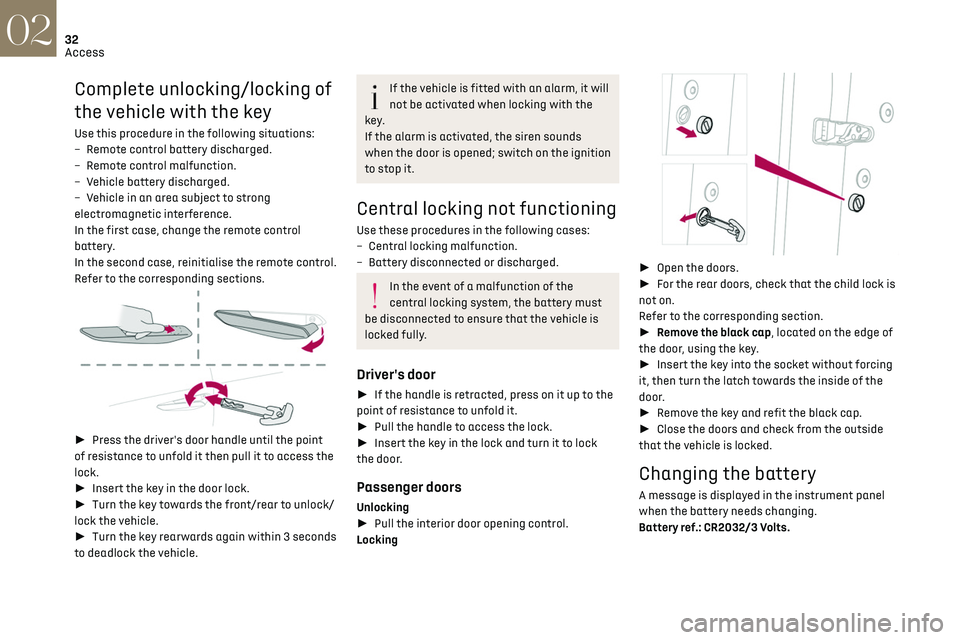
► Press the driver's door handle until the point
of resistance to unfold it then pull it to access the
lock.
► Insert the key in the door lock.
► Turn the key towards the front/rear to unlock/
lock the vehicle.
► Turn the key rearwards again within 3 seconds
to deadlock the vehicle.
If the vehicle is fitted with an alarm, it will
not be activated when locking with the
key.
If the alarm is activated, the siren sounds
when the door is opened; switch on the ignition
to stop it.
Central locking not functioning
Use these procedures in the following cases:
– Cen tral locking malfunction.
–
Ba
ttery disconnected or discharged.
In the event of a malfunction of the
central locking system, the battery must
be disconnected to ensure that the vehicle is
locked fully.
Driver's door
► If the handle is retracted, press on it up to the
point of resistance to unfold it.
► Pull the handle to access the lock.
► Insert the key in the lock and turn it to lock
the door.
Passenger doors
Unlocking
► Pull the interior door opening control.
Locking
► Open the doors.
► For the rear doors, check that the child lock is
not on.
Refer to the corresponding section.
► Remove the black cap, located on the edge of
the door, using the key.
► Insert the key into the socket without forcing
it, then turn the latch towards the inside of the
door.
► Remove the key and refit the black cap.
► Close the doors and check from the outside
that the vehicle is locked.
Changing the battery
A message is displayed in the instrument panel
when the battery needs changing.
Battery ref.: CR2032/3 Volts.
Page 35 of 244
33
Access02
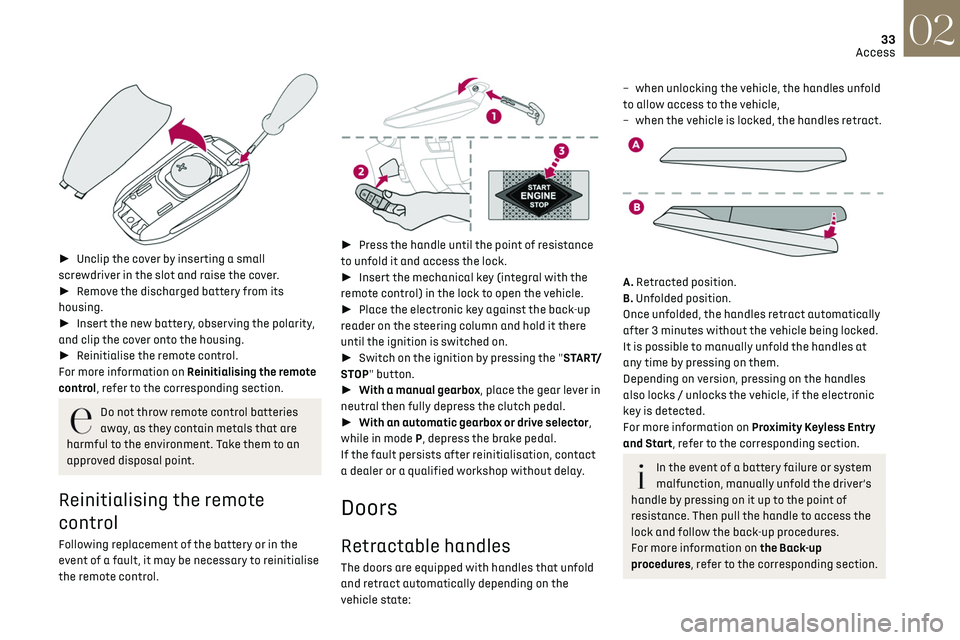
► Unclip the cover by inserting a small
screwdriver in the slot and raise the cover.
► Remove the discharged battery from its
housing.
► Insert the new battery, observing the polarity,
and clip the cover onto the housing.
► Reinitialise the remote control.
For more information on Reinitialising the remote
control, refer to the corresponding section.
Do not throw remote control batteries
away, as they contain metals that are
harmful to the environment. Take them to an
approved disposal point.
Reinitialising the remote
control
Following replacement of the battery or in the
event of a fault, it may be necessary to reinitialise
the remote control.
► Press the handle until the point of resistance
to unfold it and access the lock.
► Insert the mechanical key (integral with the
remote control) in the lock to open the vehicle.
► Place the electronic key against the back-up
reader on the steering column and hold it there
until the ignition is switched on.
► Switch on the ignition by pressing the "START/
STOP" button.
► With a manual gearbox, place the gear lever in
neutral then fully depress the clutch pedal.
► With an automatic gearbox or drive selector,
while in mode P, depress the brake pedal.
If the fault persists after reinitialisation, contact
a dealer or a qualified workshop without delay.
Doors
Retractable handles
The doors are equipped with handles that unfold
and retract automatically depending on the
vehicle state:
– when unlocking the v ehicle, the handles unfold
to allow access to the vehicle,
–
when the v
ehicle is locked, the handles retract.
A. Retracted position.
B. Unfolded position.
Once unfolded, the handles retract automatically
after 3 minutes without the vehicle being locked.
It is possible to manually unfold the handles at
any time by pressing on them.
Depending on version, pressing on the handles
also locks / unlocks the vehicle, if the electronic
key is detected.
For more information on Proximity Keyless Entry
and Start, refer to the corresponding section.
In the event of a battery failure or system
malfunction, manually unfold the driver’s
handle by pressing on it up to the point of
resistance. Then pull the handle to access the
lock and follow the back-up procedures.
For more information on the Back-up
procedures, refer to the corresponding section.
Page 36 of 244
34
Access02
System which protects and provides a deterrent
against theft and break-ins.
Exterior perimeter monitoring
The system checks for opening of the vehicle.
The alarm is triggered if anyone tries to open a
door, the boot or the bonnet, for example.
Interior volumetric monitoring
The system checks for any variation in volume in
the passenger compartment.
The alarm is triggered if anyone breaks a window,
enters the passenger compartment or moves
inside the vehicle.
Self-protection function
The system checks for the putting out of service
of its components.
The alarm is triggered if the battery, the central
control or the siren wiring is put out of service or
damaged.For all work on the alarm system, contact
a dealer or a qualified workshop.
Locking the vehicle with full
alarm system
Activation
► Switch off the ignition and exit the vehicle.
► Lock or deadlock the vehicle using the remote
control or by pressing on one of the front door
handles.
Too frequent presses on the handle up to
the point of resistance may damage its
mechanism.
In case of frost, press the handle to
release it.
From inside the vehicle, it is possible to unfold the
handles:
–
b
y opening a door,
–
b
y pressing the central locking button once
when the vehicle is locked or twice when
unlocked.
When driving, the handles automatically retract
once the vehicle speed exceeds 2 mph (3 km/h).
Opening
From outside
► Unlock your vehicle to unfold the door handles.
► Pull the handle.
When selective unlocking is activated,
only the driver door's handle will unfold
and only the driver's door can be opened.
From inside
► Pull the interior door opening lever; the exterior
door handles unfold automatically.
Opening one of the doors from inside unlocks the
rest of the vehicle.
With selective unlocking activated:
– O pening the driver's door unlocks the
driver's door only (if the vehicle has not already
been completely unlocked).
–
O
pening one of the passenger doors unlocks
the rest of the vehicle.
–
O
pening a door from inside causes the
unfolding of all the exterior handles.
Boot
Opening
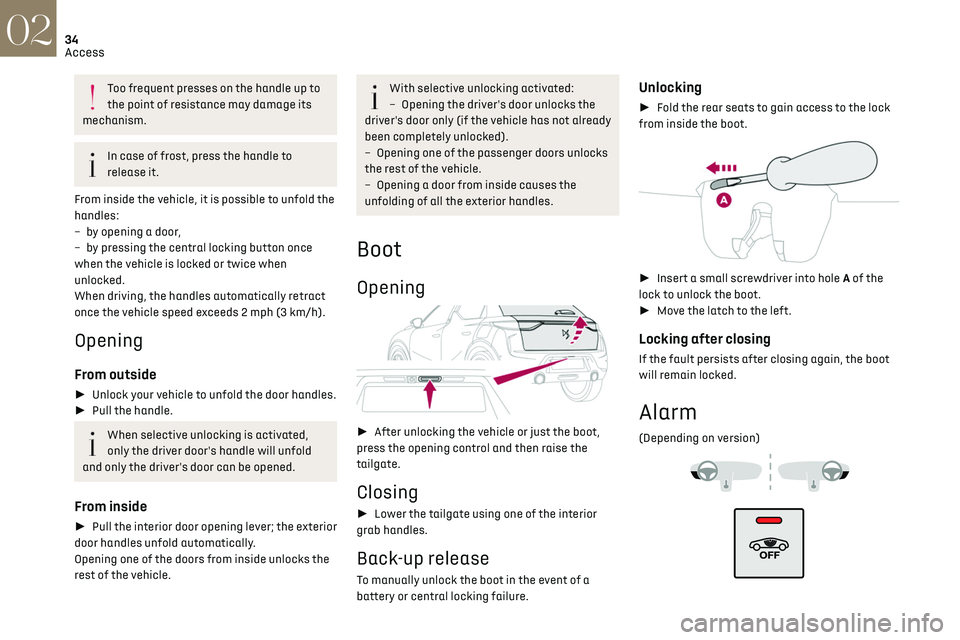
► After unlocking the vehicle or just the boot,
press the opening control and then raise the
tailgate.
Closing
► Lower the tailgate using one of the interior
grab handles.
Back-up release
To manually unlock the boot in the event of a
battery or central locking failure.
Unlocking
► Fold the rear seats to gain access to the lock
from inside the boot.
► Insert a small screwdriver into hole A of the
lock to unlock the boot.
► Move the latch to the left.
Locking after closing
If the fault persists after closing again, the boot
will remain locked.
Alarm
(Depending on version)
Page 37 of 244
35
Access02
System which protects and provides a deterrent
against theft and break-ins.
Exterior perimeter monitoring
The system checks for opening of the vehicle.
The alarm is triggered if anyone tries to open a
door, the boot or the bonnet, for example.
Interior volumetric monitoring
The system checks for any variation in volume in
the passenger compartment.
The alarm is triggered if anyone breaks a window,
enters the passenger compartment or moves
inside the vehicle.
Self-protection function
The system checks for the putting out of service
of its components.
The alarm is triggered if the battery, the central
control or the siren wiring is put out of service or
damaged.
For all work on the alarm system, contact
a dealer or a qualified workshop.
Locking the vehicle with full
alarm system
Activation
► Switch off the ignition and exit the vehicle.
► Lock or deadlock the vehicle using the remote
control or by pressing on one of the front door
handles.
When the monitoring system is active, the red
indicator lamp in the button flashes once per
second and the direction indicators come on for
about 2 seconds.
The exterior perimeter monitoring is activated
after 5 seconds and the interior volumetric
monitoring after 45 seconds.
The alarm does not activate when locking
automatically from a distance.
If an opening (door, boot or bonnet) is not
properly closed, the vehicle is not locked,
but the exterior perimeter monitoring will be
activated after 45 seconds, at the same time
as the interior volumetric monitoring.
Deactivation
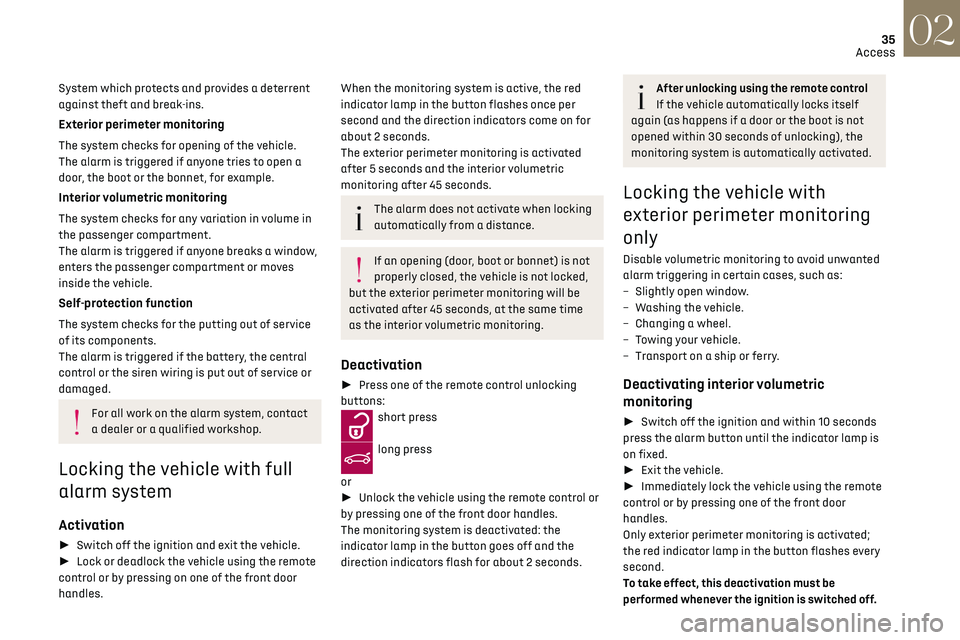
► Press one of the remote control unlocking
buttons:
short press
long press
or
► Unlock the vehicle using the remote control or
by pressing one of the front door handles.
The monitoring system is deactivated: the
indicator lamp in the button goes off and the
direction indicators flash for about 2 seconds.
After unlocking using the remote control
If the vehicle automatically locks itself
again (as happens if a door or the boot is not
opened within 30 seconds of unlocking), the
monitoring system is automatically activated.
Locking the vehicle with
exterior perimeter monitoring
only
Disable volumetric monitoring to avoid unwanted
alarm triggering in certain cases, such as:
–
Sligh
tly open window.
–
W
ashing the vehicle.
–
C
hanging a wheel.
–
T
owing your vehicle.
–
Transport on a ship or ferry
.
Deactivating interior volumetric
monitoring
► Switch off the ignition and within 10 seconds
press the alarm button until the indicator lamp is
on fixed.
► Exit the vehicle.
► Immediately lock the vehicle using the remote
control or by pressing one of the front door
handles.
Only exterior perimeter monitoring is activated;
the red indicator lamp in the button flashes every
second.
To take effect, this deactivation must be
performed whenever the ignition is switched off.
Page 39 of 244
37
Access02
Operating the switch again stops the movement
of the window.
Window controls remain operational for
approximately 45 seconds after switching
off the ignition or after locking the vehicle.
After that time, the controls are disabled.
To reactivate them, switch on the ignition or
unlock the vehicle.
Anti-pinch
If the window meets an obstacle while rising, it
stops and immediately partially lowers again.
Deactivation of the rear
controls for the rear electric
windows
For children's safety, press switch 5 to
deactivate the rear electric windows
controls.
The indicator lamp for the button comes on,
accompanied by a message confirming activation.
With the ignition on, it remains lit, as long as the
child lock remains activated.
Use of the rear electric windows from the driver's
controls remains possible.
For versions fitted with an electric child
lock, this control also deactivates the
interior rear door controls.
For more information on the Child lock, refer to
the corresponding section.
Reinitialising the electric
windows
After reconnecting the battery, or in the event
of abnormal window movement, the anti-pinch
function must be reinitialised.
The anti-pinch function is disabled during the
following sequence of operations.
For each window:
► Lower the window fully, then raise it; it will
rise in steps of a few centimetres each time the
control is pressed. Repeat the operation until the
window is fully closed.
► Continue to pull the control upwards for at
least one second after the window reaches the
closed position.
If an electric window meets an obstacle
during operation, the movement of the
window must be reversed. To do this, press the
relevant switch.
When the driver operates the passengers’
electric window switches, it is important to
ensure that nothing can prevent the window
from closing properly.
It is important to ensure that passengers use
the electric windows correctly.
Pay particular attention to children when
operating windows.
Be aware of passengers and/or other persons
present when closing windows using the key or
the "Keyless Entry and Starting" system.
Page 50 of 244
48Ease of use and comfort03
Remote-controlled heating
and air conditioning
(Electric)
This function allows you to programme the
vehicle to adjust the passenger compartment
temperature to a pre-defined, non-modifiable
temperature (approx. 21°C) before you enter the
vehicle, on the days and times of your choice.
Programming
(With DS CONNECT NAV)
In the Climate > OPTIONS menu:
Select Temperature conditioning.
► Press + to programme.
► Select the time of entry into the vehicle and
the desired days. Press OK.
► Press ON to activate this programming.
Pre-conditioning begins approximately 45 minutes
before the programmed time, and is maintained
for 10 minutes afterwards.
You can define multiple programmings.
Each one is saved in the system.
To optimise battery life, we recommend
programming with the vehicle plugged in.
This feature can be programmed using a
smartphone, via the MyDS application.
With DS CONNECT RADIO, the programming can
only be carried out using a smartphone, via the
application. For more information on Remotely operable
features, refer to the corresponding section.
Operating conditions
– The function is only activ
ated when the ignition
is off and the vehicle locked.
–
The function is no
t activated if the battery
charge level is below 50%.
–
If rec
urrent programming is activated (e.g.
from Monday to Friday) and two pre-conditioning
sequences are performed without the vehicle
being used, the programming will be deactivated.
Interior fittings
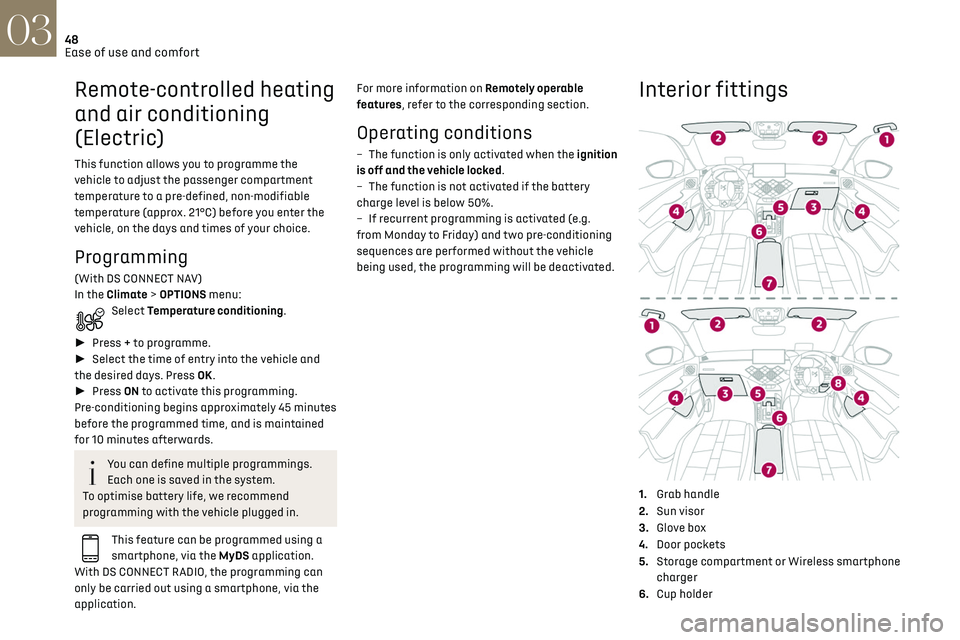
1. Grab handle
2. Sun visor
3. Glove box
4. Door pockets
5. Storage compartment or Wireless smartphone
charger
6. Cup holder
7.Central armrest with USB port and 12 V
accessory socket (depending on version)
8. Storage compartment below the steering
wheel
Sun visor
► With the ignition on, raise the concealing flap;
the mirror is illuminated automatically.
This sun visor is also equipped with a ticket
holder.
Glove box
► To open the glove box, raise the handle.
Page 52 of 244
50Ease of use and comfort03
The connection of an unapproved
electrical device, such as a USB charger,
may adversely affect the operation of vehicle
electrical systems, causing faults such as poor
radio reception or interference with displays in
the screens.
FOCAL ELECTRA® Premium Hi-Fi
system
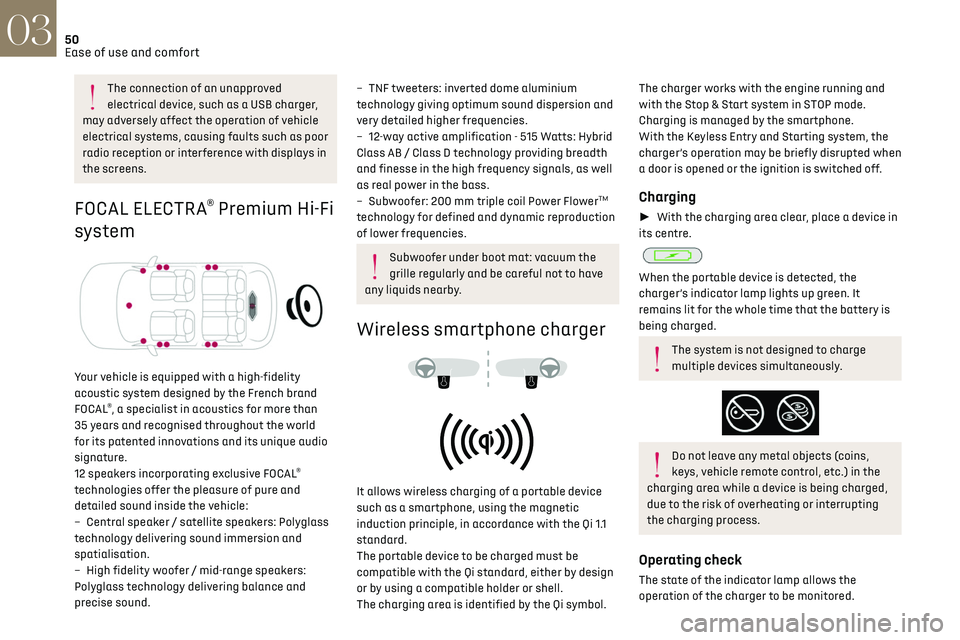
Your vehicle is equipped with a high-fidelity
acoustic system designed by the French brand
FOCAL
®, a specialist in acoustics for more than
35 years and recognised throughout the world
for its patented innovations and its unique audio
signature.
12 speakers incorporating exclusive FOCAL
®
technologies offer the pleasure of pure and
detailed sound inside the vehicle:
–
Cen
tral speaker / satellite speakers: Polyglass
technology delivering sound immersion and
spatialisation.
–
High fidelity w
oofer / mid-range speakers:
Polyglass technology delivering balance and
precise sound.
– TNF tweeters: inverted dome aluminium
technology giving optimum sound dispersion and
very detailed higher frequencies.
–
12-w
ay active amplification - 515 Watts: Hybrid
Class AB / Class D technology providing breadth
and finesse in the high frequency signals, as well
as real power in the bass.
–
Sub
woofer: 200 mm triple coil Power Flower
TM
technology for defined and dynamic reproduction
of lower frequencies.
Subwoofer under boot mat: vacuum the
grille regularly and be careful not to have
any liquids nearby.
Wireless smartphone charger
It allows wireless charging of a portable device
such as a smartphone, using the magnetic
induction principle, in accordance with the Qi 1.1
standard.
The portable device to be charged must be
compatible with the Qi standard, either by design
or by using a compatible holder or shell.
The charging area is identified by the Qi symbol.
The charger works with the engine running and
with the Stop & Start system in STOP mode.
Charging is managed by the smartphone.
With the Keyless Entry and Starting system, the
charger’s operation may be briefly disrupted when
a door is opened or the ignition is switched off.
Charging
► With the charging area clear, place a device in
its centre.
When the portable device is detected, the
charger’s indicator lamp lights up green. It
remains lit for the whole time that the battery is
being charged.
The system is not designed to charge
multiple devices simultaneously.
Do not leave any metal objects (coins,
keys, vehicle remote control, etc.) in the
charging area while a device is being charged,
due to the risk of overheating or interrupting
the charging process.
Operating check
The state of the indicator lamp allows the
operation of the charger to be monitored.
Page 53 of 244

51Ease of use and comfort03
State of the
indicator lampMeaning
Off Engine switched off.
No compatible devices
detected.
Charging finished.
Fixed green Compatible device detected.
Charging.
Flashing orange Foreign object detected in the charging zone.
Device not well centred in
the charging zone.
Fixed orange Fault with the device's battery meter.
Device battery
temperature too high.
Charger malfunction.
If the indicator lamp is lit orange:
– remo ve the device, then place it back in the
centre of the charging zone.
or
–
remo
ve the device and try again in a quarter of
an hour.
If the problem persists, have the system checked
by a dealer or a qualified workshop.
Mats
Fitting
When fitting the mat for the first time, on the
driver's side use only the fasteners supplied in the
enclosed sachet.
The other mats are simply laid over the carpet.
Removing/refitting
► To remove it on the driver's side, move the seat
backwards and unclip the fasteners.
► To refit it, position the mat and secure it by
pressing.
► Check that the mat is secured correctly.
To avoid any risk of jamming the pedals:
–
O nly use mats which are suitable for
the fasteners already present in the vehicle;
these fasteners must be used.
–
Ne
ver fit one mat on top of another.
The use of mats not approved by the
Manufacturer may interfere with access to the
pedals and hinder the operation of the cruise
control/speed limiter.
The approved mats have two fasteners located
underneath the seat.
Courtesy lamps
1. Front courtesy lamp
2.Front map reading lamps
Front courtesy lamps
In this position, the courtesy lamp comes
on gradually:
–
on unlocking the v
ehicle,
–
on remo
ving the key from the ignition,
–
on opening a door
,
–
on activ
ating the remote control locking button,
in order to locate your vehicle.
It switches off gradually:
–
when the v
ehicle is locked,
–
when the ignition is s
witched on,
–
30 sec
onds after the last door is closed.
Permanently off.
Page 56 of 244

54Lighting and visibility04
Exterior lighting control
stalk
Main lighting
Automatic illumination of headlamps/
daytime running lamps.
Sidelamps only.
Dipped or main beam headlamps.
"Highway function"
On versions fitted with "Full LED"
technology headlamps, the range of the dipped
beam headlamps is automatically increased
once the speed of the vehicle is above 68 mph
(110 km/h).
Headlamp dipping
► Pull the stalk to switch between dipped and
main beam headlamps.
In “AUTO” and sidelamps modes, the driver can
switch on the main beam headlamps temporarily
(“headlamp flash”) by pulling the stalk.
Displays
Illumination of the corresponding indicator lamp
in the instrument panel confirms that the lighting
selected is on.
A fault with a lamp is signalled by the
permanent illumination of this warning
lamp, accompanied by the display of a message
and an audible signal.
Rear foglamp
It only works if the dipped or main beam
headlamps are on.
► Rotate the ring forwards to switch it on and
backwards to switch it off.
When the lamps are switched off automatically
("AUTO" position), the foglamp and the dipped
beam headlamps will remain on.
Switching on the foglamps is prohibited in
clear weather or in rain, both day and
night. In these situations, the power of their
beams may dazzle other drivers. They must
only be used in fog or falling snow (rules may
vary depending on country).
Do not forget to switch off the foglamps when
they are no longer necessary.
Switching off of the lamps when the
ignition is switched off
When the ignition is switched off, all of the
lamps turn off immediately, except for dipped
beam headlamps if automatic guide-me-home
lighting is activated.
Switching on the lamps after switching
off the ignition
To reactivate the lighting control, rotate the
ring to the "AUTO" position, then to the desired
position.
If the driver's door is opened, a temporary
audible signal warns the driver that the lamps
are on.
They will go off automatically after a period
of time that depends on the state of charge of
the battery (entering energy economy mode).
In some weather conditions (e.g. low
temperature or humidity), the presence of
misting on the internal surface of the glass of
the headlamps and rear lamps is normal; it
disappears after the lamps have been on for a
few minutes.
Never look too closely at the luminous
beam of “Full LED” headlamps: risk of
serious eye injury.
Travelling abroad
Vehicles equipped with halogen
headlamps:
If planning to use your vehicle in a country
that drives on the other side of the road, the
headlamp dipped beams must be adjusted to
avoid dazzling oncoming drivers. Contact a
dealer or a qualified workshop.
Daytime running lamps/
sidelamps
The front and rear lamps light up automatically
when the engine starts.