change CITROEN JUMPY 2015 Service Manual
[x] Cancel search | Manufacturer: CITROEN, Model Year: 2015, Model line: JUMPY, Model: CITROEN JUMPY 2015Pages: 252, PDF Size: 12.15 MB
Page 208 of 252

9.54
12 SCREEN MENU MAP
1
1
2
1
1
2
2
2
2
2
2
2
3
3
2
2
2
1
Random on all media
Repetition
Audio settings
Activate / Deactivate AUX
input
"MUSIC" MENU
Change Media
Read mode
Normal
Random
All passengers
Le-Ri balance
Fr-Re balance
Auto. Volume
Update radio list
Bass
Treble
Loudness
Distribution
Driver
1
2
2
1
1
3
3
3
3
3
3
2 Equalizer
"RADIO" MENU
Change Waveband
Guidance options
TA
RDS
Audio settings
None
Classical
Jazz
Rock
Techno
Vocal
2
2
2
2
USB/iPod
AUX
CD
BT Streaming
2 AM / FM
3Activated / Deactivated
3Activated / Deactivated
Page 213 of 252
9.59
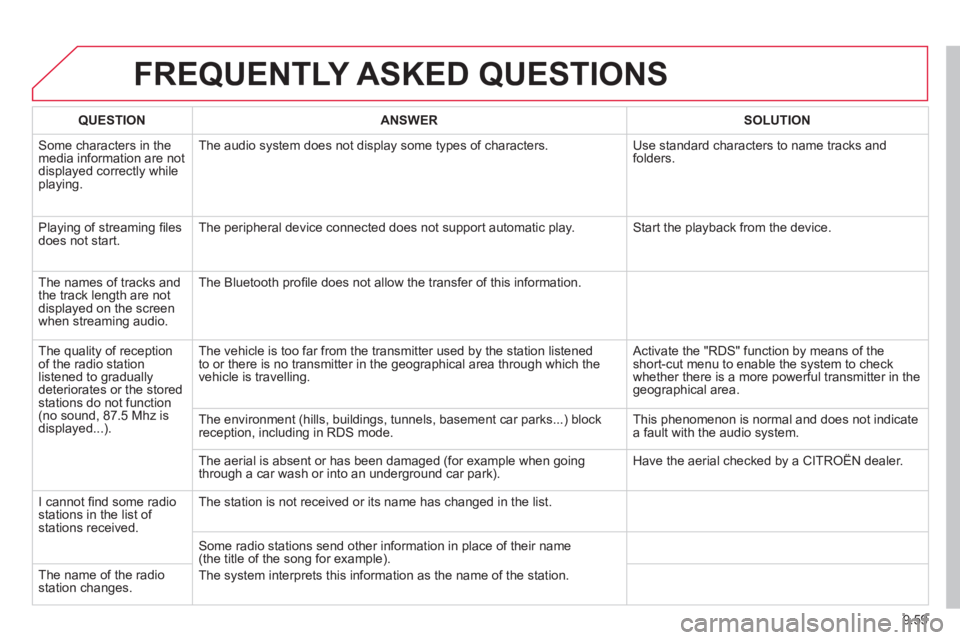
FREQUENTLY ASKED QUESTIONS
QUESTIONANSWERSOLUTION
Some characters in the media information are not displayed correctly while playing.
The audio system does not display some types of characters. Use standard characters to name tracks and folders.
Playing of streaming fi les does not start. The peripheral device connected does not support automatic play. Start the playback from the device.
The names of tracks and the track length are not displayed on the screen when streaming audio.
The Bluetooth profi le does not allow the transfer of this information.
The quality of reception of the radio station listened to gradually deteriorates or the stored stations do not function (no sound, 87.5 Mhz is displayed...).
The vehicle is too far from the transmitter used by the station listened\
to or there is no transmitter in the geographical area through which the\
vehicle is travelling.
Activate the "RDS" function by means of the short-cut menu to enable the system to check whether there is a more powerful transmitter in the geographical area.
The environment (hills, buildings, tunnels, basement car parks...) blo\
ck reception, including in RDS mode. This phenomenon is normal and does not indicate a fault with the audio system.
The aerial is absent or has been damaged (for example when going through a car wash or into an underground car park). Have the aerial checked by a CITROËN dealer.
I cannot fi nd some radio stations in the list of stations received.
The station is not received or its name has changed in the list.
Some radio stations send other information in place of their name (the title of the song for example).
The system interprets this information as the name of the station. The name of the radio station changes.
Page 218 of 252

9.64
01 FIRST STEPS
Eject CD.
Select source:
radio, audio CD / MP3 CD, USB, Jack connection, Streaming, AUX.
Select the screen display mode:
Date, audio functions, trip computer, telephone.
Automatic frequency search down/up.
Select previous/next CD, MP3 or USB track.
Audio settings: front/rear fader, left/right balance, bass/treble, loudness, audio ambiences.
Display the list of local stations.
Long press: CD tracks or MP3 folders (CD / USB).
TA (Traffi c Announcements) on/off.
Long press: PTY * (radio Programme TYpe) mode.
Display main menu. The DARK button changes the screen display for improved driving comfort at night.
1 st press: upper bar only illuminated.
2 nd press: black screen.
3 rd press: return to standard display.
On/off, volume setting.
Buttons 1 to 6:
Select a pre-set radio station.
Long press: pre-set a station.
Select next frequency down/up.
Select previous/next MP3 folder.
Select previous/next folder / genre / artist / playlist (USB).
Confi rm.
Select wavebands FM1, FM2, FMast and AM. Abandon the current operation.
* Available according to version.
Page 219 of 252

9.65
02 STEERING MOUNTED CONTROLS
Radio: select the previous/next pre-set station.
USB: select genre / artist / folder from the classifi cation list.
Select the previous/next item in a menu.
Change audio source.
Confi rm a selection.
Call/end call on the telephone.
Press for more than 2 seconds: telephone main menu.
Radio: automatic search for a lower frequency.
CD / MP3 / USB: selection of the previous track.
CD / USB: continuous press: fast reverse.
Move in the list.
Radio: automatic search for a higher frequency.
CD / MP3 / USB: selection of the next track.
CD / USB: continuous press: fast forwards play.
Move in the list.
Volume increase.
Volume decrease.
Mute: press the volume increase and decrease buttons simultaneously.
The sound is restored by pressing one of the two volume buttons.
Page 221 of 252

9.67
04 AUDIO
Press the SOURCE button several times in succession and select the radio.
Press the BAND AST button to select a waveband: FM1, FM2, FMast, AM.
Briefl y press one of the buttons to carry out an automatic search of the radio stations.
Press one of the buttons to carry out a manual search up / down for radio frequencies.
Press the LIST REFRESH button to display the list of stations received locally (30 stations maximum).
To update this list, press for more than two seconds.
The external environment (hills, buildings, tunnels, basement car parks, ...) may block reception, including in RDS mode. This is a normal effect of the way in which radio waves are transmitted and does not indicate any failu\
re of the audio system.
RDS RADIO
SELECTING A STATION
Press the MENU button.
Select AUDIO FUNCTIONS then press OK.
Select the FM WAVEBAND PREFERENCES function then press OK.
Select ACTIVATE RDS then press OK. RDS appears on the screen.
In radio mode, press OK directly to activate / deactivate RDS mode.
The RDS, if displayed, enables you to continue listening to the same sta\
tion by automatic retuning to alternative frequencies. However, in certain conditions, coverage of an RDS station may not be assured throughout the country as radio stations do not cover 100 % of the territory. Under conditions of very weak reception, the system may change to a regional station.
Page 231 of 252

9.77
08
13
TRIP COMPUTER
Each press of the button, located at the end of the wiper stalk, displays the different trip computer information in succession, depending on the screen.
- the "vehicle" tab with:
● the range, the current fuel consumption and the distance remaining to the destination,
- the "1" tab (trip 1) with:
● the average speed, the average consumption and the distance travelled calculated over trip "1" ,
- the "2" tab (trip 2) with the same information for a second trip.
A FEW DEFINITIONS
Range: displays the distance which can travelled with the remaining fuel detected in the tank, basd on the average consumption over the last few \
miles (kilometres).
This displayed value may vary signifi cantly following a change in the vehicle speed or the relief of the route.
When the range falls below 20 miles (30 km), dashes are displayed. After fi lling with at least 10 litres of fuel, the range is recalculated and is displayed when it exceeds 60 miles (100 km).
If, whilst driving, dashes are displayed continuously in place of the di\
gits, contact a CITROËN dealer. If, whilst driving, dashes are displayed continuously in place of the di\
gits, contact a CITROËN dealer. If, whilst driving, dashes are displayed continuously in place of the di\
gits,
Current fuel consumption: only calculated and displayed above 20 mph (30 km/h).
Average fuel consumption: this is the average fuel consumption since the last trip computer zero reset.
Distance travelled: calculated since the last trip computer zero reset.
Distance remaining to the destination: calculated with reference to the fi nal destination, entered by the user. If guidance is activated, the navigation system calculates it as a current value.
Average speed: this is the average speed calculated since the last trip computer zero reset (ignition on). Zero reset
When the required trip is displayed, press the control for more than two seconds.
VEHICLE DIAGNOSTICS