phone Citroen JUMPY 2016 2.G User Guide
[x] Cancel search | Manufacturer: CITROEN, Model Year: 2016, Model line: JUMPY, Model: Citroen JUMPY 2016 2.GPages: 595, PDF Size: 12.47 MB
Page 348 of 595
346
Jumpy_en_Chap10b_NAC-1_ed01-2016
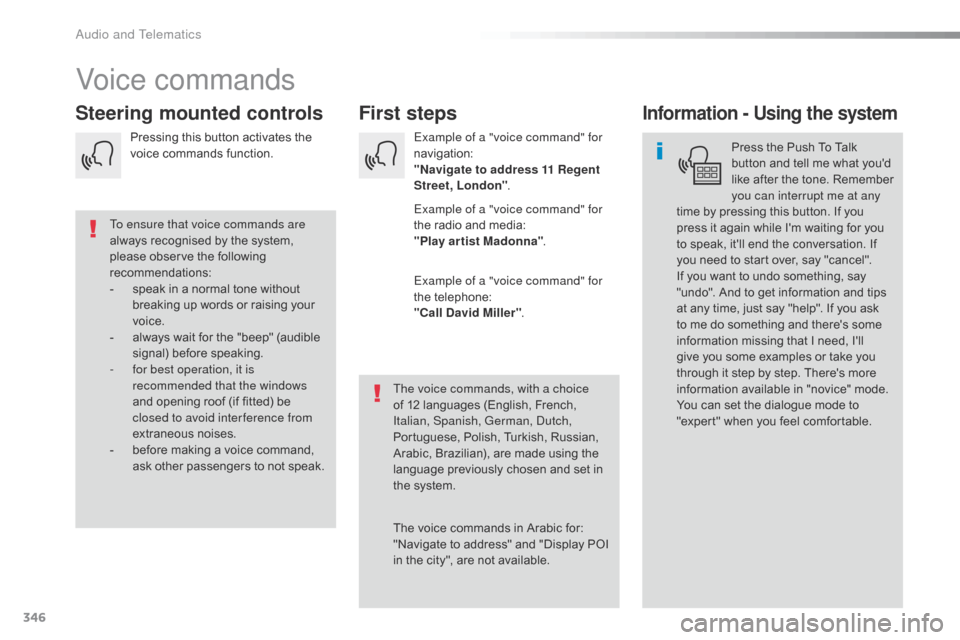
Voice commands
First steps
Steering mounted controlsInformation - Using the system
Press the Push To Talk
button and tell me what you'd
like after the tone. Remember
you can interrupt me at any
time by pressing this button. If you
press it again while I'm waiting for you
to speak, it'll end the conversation. If
you need to start over, say "cancel".
If you want to undo something, say
"undo". And to get information and tips
at any time, just say "help". If you ask
to me do something and there's some
information missing that I need, I'll
give you some examples or take you
through it step by step. There's more
information available in "novice" mode.
You can set the dialogue mode to
"expert" when you feel comfortable.
To ensure that voice commands are
always recognised by the system,
please observe the following
recommendations:
-
s
peak in a normal tone without
breaking up words or raising your
voice.
-
a
lways wait for the "beep" (audible
signal) before speaking.
-
f
or best operation, it is
recommended that the windows
and opening roof (if fitted) be
closed to avoid inter ference from
extraneous noises.
-
b
efore making a voice command,
ask other passengers to not speak. The voice commands, with a choice
of 12 languages (English, French,
Italian, Spanish, German, Dutch,
Portuguese, Polish, Turkish, Russian,
Arabic, Brazilian), are made using the
language previously chosen and set in
the system.
The voice commands in Arabic for:
"Navigate to address" and "Display POI
in the city", are not available.Example of a "voice command" for
navigation:
"Navigate to address 11 Regent
Street, London
".
Example of a "voice command" for
the radio and media:
"Play ar tist Madonna" .
Example of a "voice command" for
the telephone:
"Call David Miller" .
Pressing this button activates the
voice commands function.
Audio and Telematics
Page 349 of 595
347
Jumpy_en_Chap10b_NAC-1_ed01-2016
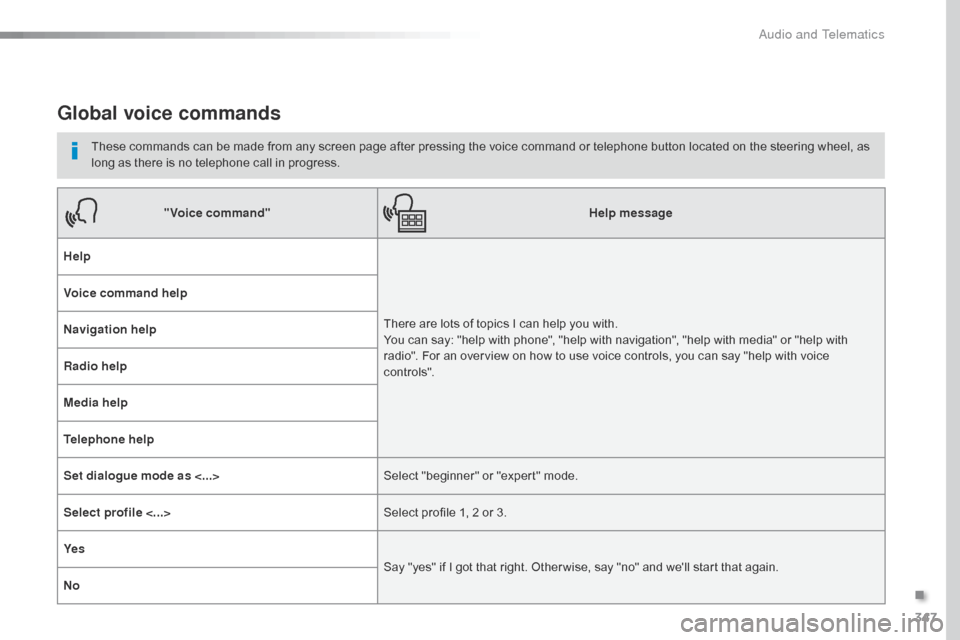
Global voice commands
These commands can be made from any screen page after pressing the voice command or telephone button located on the steering wheel, as
long as there is no telephone call in progress."Voice command" Help message
Help
There are lots of topics I can help you with.
You can say: "help with phone", "help with navigation", "help with media" or "help with
radio". For an overview on how to use voice controls, you can say "help with voice
c ont ro ls".
Voice command help
Navigation help
Radio help
Media help
Telephone help
Set dialogue mode as <...>
Select "beginner" or "expert" mode.
Select profile <...> Select profile 1, 2 or 3.
Ye s Say "yes" if I got that right. Other wise, say "no" and we'll start that again.
No
.
Audio and Telematics
Page 350 of 595
348
Jumpy_en_Chap10b_NAC-1_ed01-2016
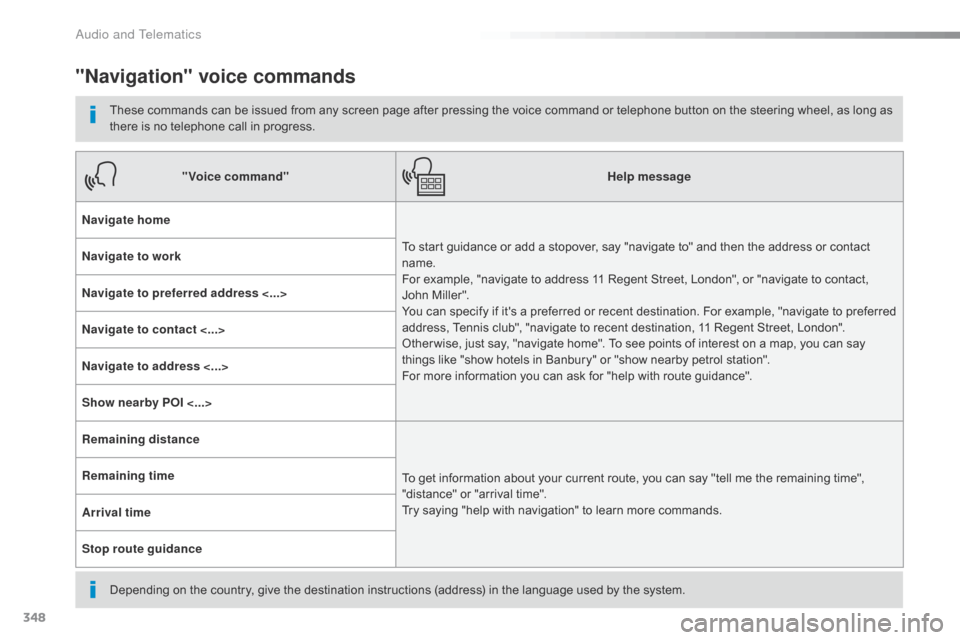
"Navigation" voice commands
These commands can be issued from any screen page after pressing the voice command or telephone button on the steering wheel, as long as
there is no telephone call in progress.
Depending on the country, give the destination instructions (address) in the language used by the system."Voice command"
Help message
Navigate home To start guidance or add a stopover, say "navigate to" and then the address or contact
name.
For example, "navigate to address 11 Regent Street, London", or "navigate to contact,
John Miller".
You can specify if it's a preferred or recent destination. For example, "navigate to preferred
address, Tennis club", "navigate to recent destination, 11 Regent Street, London".
Other wise, just say, "navigate home". To see points of interest on a map, you can say
things like "show hotels in Banbury" or "show nearby petrol station".
For more information you can ask for "help with route guidance".
Navigate to work
Navigate to preferred address <...>
Navigate to contact <...>
Navigate to address <...>
Show nearby POI <...>
Remaining distance
To get information about your current route, you can say "tell me the remaining time",
"distance" or "arrival time".
Try saying "help with navigation" to learn more commands.
Remaining time
Arrival time
Stop route guidance
Audio and Telematics
Page 351 of 595
349
Jumpy_en_Chap10b_NAC-1_ed01-2016
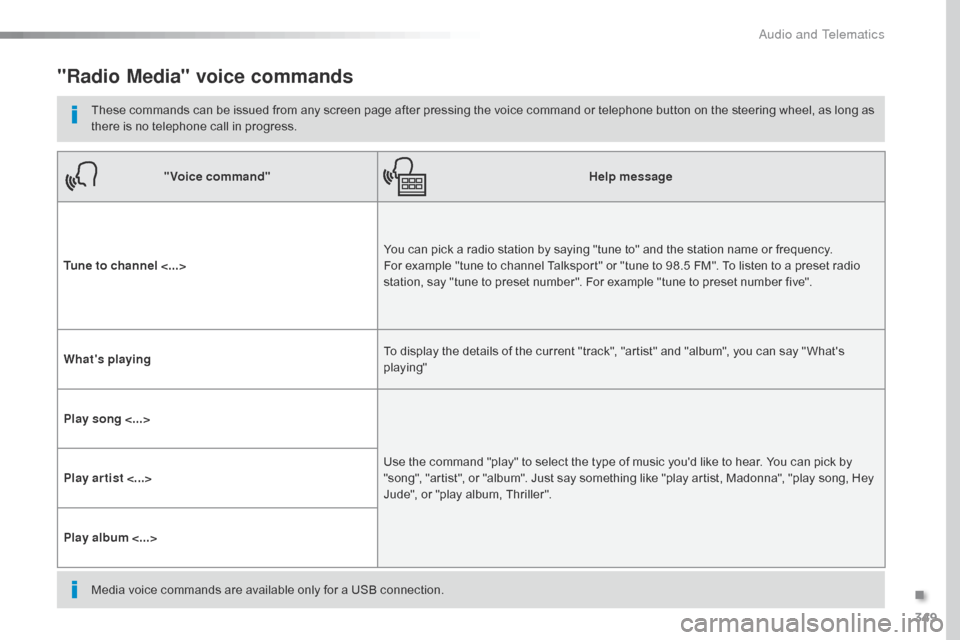
"Radio Media" voice commands
These commands can be issued from any screen page after pressing the voice command or telephone button on the steering wheel, as long as
there is no telephone call in progress."Voice command" Help message
Tune to channel <...> You can pick a radio station by saying "tune to" and the station name or frequency.
For example "tune to channel Talksport" or "tune to 98.5 FM". To listen to a preset radio
station, say "tune to preset number". For example "tune to preset number five".
What's playing To display the details of the current "track", "artist" and "album", you can say " What's
playing"
Play song <...> Use the command "play" to select the type of music you'd like to hear. You can pick by
"song", "artist", or "album". Just say something like "play artist, Madonna", "play song, Hey
Jude", or "play album, Thriller".
Play ar tist <...>
Play album <...>
Media voice commands are available only for a USB connection.
.
Audio and Telematics
Page 352 of 595
350
Jumpy_en_Chap10b_NAC-1_ed01-2016
"Voice command"Help message
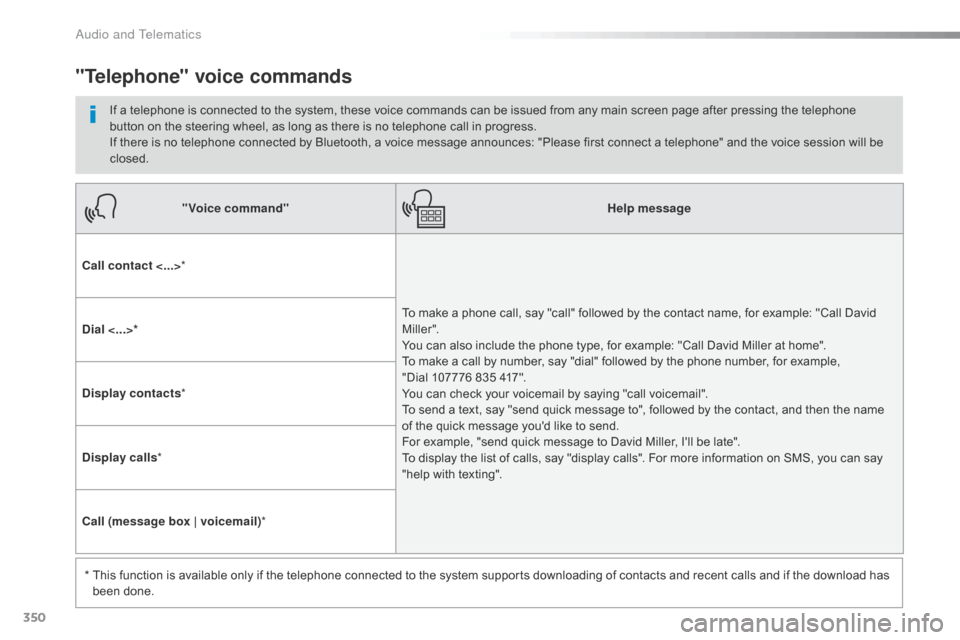
Call contact <...> *
To make a phone call, say "call" followed by the contact name, for example: "Call David
M iller ".
You can also include the phone type, for example: "Call David Miller at home".
To make a call by number, say "dial" followed by the phone number, for example,
"Dial 107776 835 417".
You can check your voicemail by saying "call voicemail".
To send a text, say "send quick message to", followed by the contact, and then the name
of the quick message you'd like to send.
For example, "send quick message to David Miller, I'll be late".
To display the list of calls, say "display calls". For more information on SMS, you can say
"help with texting".
Dial <...>*
Display contacts
*
Display calls *
Call (message box | voicemail) *
*
T
his function is available only if the telephone connected to the system supports downloading of contacts and recent calls and if the download has
been done.
"Telephone" voice commands
If a telephone is connected to the system, these voice commands can be issued from any main screen page after pressing the telephone
button on the steering wheel, as long as there is no telephone call in progress.
If there is no telephone connected by Bluetooth, a voice message announces: "Please first connect a telephone" and the voice session will be
closed.
Audio and Telematics
Page 353 of 595
351
Jumpy_en_Chap10b_NAC-1_ed01-2016
"Voice command"Help message
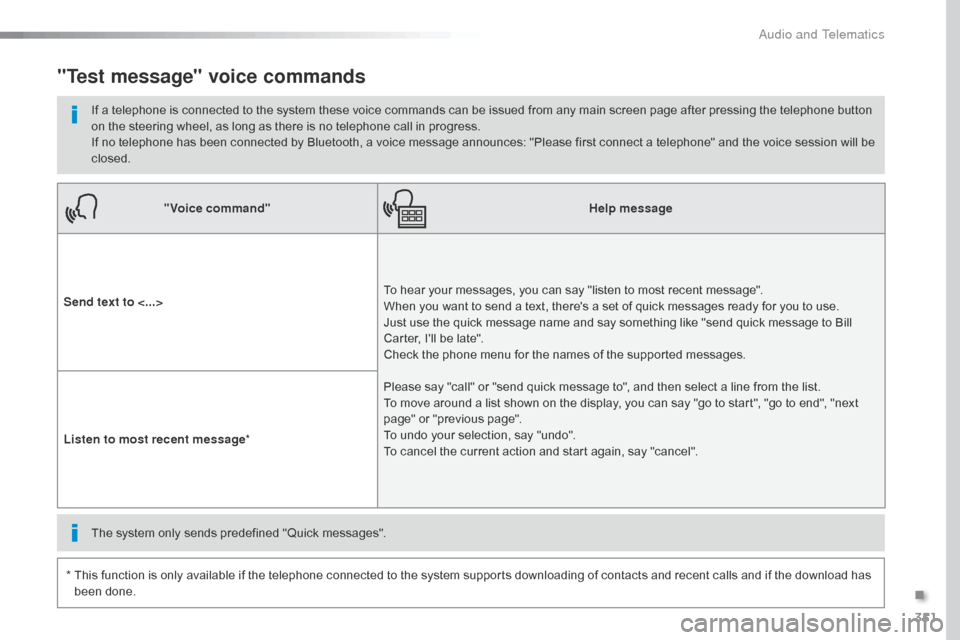
Send text to <...> To hear your messages, you can say "listen to most recent message".
When you want to send a text, there's a set of quick messages ready for you to use.
Just use the quick message name and say something like "send quick message to Bill
Carter, I'll be late".
Check the phone menu for the names of the supported messages.
Please say "call" or "send quick message to", and then select a line from the list.
To move around a list shown on the display, you can say "go to start", "go to end", "next
page" or "previous page".
To undo your selection, say "undo".
To cancel the current action and start again, say "cancel".
Listen to most recent message
*
"Test message" voice commands
If a telephone is connected to the system these voice commands can be issued from any main screen page after pressing the telephone button
on the steering wheel, as long as there is no telephone call in progress.
If no telephone has been connected by Bluetooth, a voice message announces: "Please first connect a telephone" and the voice session will be
closed.
*
T
his function is only available if the telephone connected to the system supports downloading of contacts and recent calls and if the download has
been done. The system only sends predefined "Quick messages".
.
Audio and Telematics
Page 371 of 595
369
Jumpy_en_Chap10b_NAC-1_ed01-2016
As a safety measure and because it
requires sustained attention by the
driver, using a smartphone when
driving is prohibited.
All operations must be done with the
vehicle stationary.
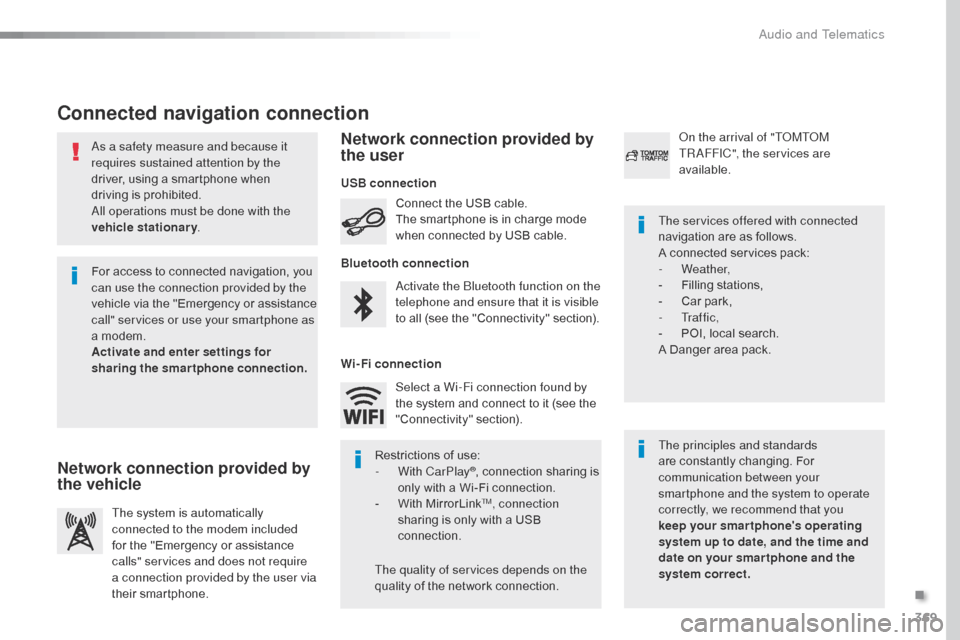
Connected navigation connection
The principles and standards
are constantly changing. For
communication between your
smartphone and the system to operate
correctly, we recommend that you
keep your smar tphone's operating
system up to date, and the time and
date on your smar tphone and the
system correct. The services offered with connected
navigation are as follows.
A connected services pack:
-
Weather,
-
F
illing stations,
-
C
ar park,
-
Tr a f f i c ,
-
P
OI, local search.
A Danger area pack.
Activate the Bluetooth function on the
telephone and ensure that it is visible
to all (see the "Connectivity" section). Connect the USB cable.
The smartphone is in charge mode
when connected by USB cable.
The system is automatically
connected to the modem included
for the "Emergency or assistance
calls" services and does not require
a connection provided by the user via
their smartphone. On the arrival of "TOMTOM
TR AFFIC", the services are
available.
For access to connected navigation, you
can use the connection provided by the
vehicle via the "Emergency or assistance
call" services or use your smartphone as
a modem.
Activate and enter settings for
sharing the smartphone connection. Restrictions of use:
-
W
ith CarPlay
®, connection sharing is
only with a Wi-Fi connection.
-
W
ith MirrorLink
TM, connection
sharing is only with a USB
connection.
The quality of services depends on the
quality of the network connection. Select a Wi-Fi connection found by
the system and connect to it (see the
"Connectivity" section).
USB connection
Network connection provided by
the vehicle Network connection provided by
the user
Bluetooth connection
Wi-Fi connection
.
Audio and Telematics
Page 381 of 595

379
1
1
1
1
6
7
8
2
3
4
5
Jumpy_en_Chap10b_NAC-1_ed01-2016
Level 2Level 3 Comments
Connectivity
Secondary page Bluetooth
connection All
Display all telephones, connected or
disconnected.
Connected Display all connected telephones.
Search Start a search for a device to connect.
Connectivity
Secondary page Wi- Fi network connection Secured
Display secured Wi-Fi networks.
Not secured Display non-secured Wi-Fi networks.
Stored Display remembered Wi-Fi networks.
Connectivity
Secondary page
Manage connection Display the state of the subscription to connected
services, the state of the network connection and
the connection mode.
Connectivity
Secondary page Share Wi- Fi connection Activation
Activate or deactivating the sharing of the Wi-Fi
connection.
Settings Select a Wi-Fi network found by the system and
connect to it.
Save settings.
Functionalities available according to equipment.
.
Audio and Telematics
Page 382 of 595

380
1
Jumpy_en_Chap10b_NAC-1_ed01-2016
Bluetooth® connection
Procedure from the systemConnection sharing
Press on "Telephone " to display the
secondary page.
Press on " Bluetooth connection ".
Select " Search".
The list of detected telephones is
displayed.
If the pairing procedure fails, it is recommended
that you deactivate and then reactivate the
"Bluetooth" function in your telephone.
The " Mobile internet data " profile
must be activated for connected
navigation (where the vehicle does not
have "Emergency and assistance call"
services), having first activated sharing
of this connection on your smartphone.
The system offers to connect the
telephone
with 3 profiles:
-
"
Telephone " (hands-free kit, telephone
only),
-
"
Streaming " (wireless play of audio files
on the telephone),
-
"
Mobile internet data ".
Select the name of the chosen
telephone in the list. Press on "Confirm".
Select one or more profiles.
Press on the "
OPTIONS" button to
go to the secondary page.
As a safety measure and because it
requires sustained attention by the
driver, the pairing of a Bluetooth mobile
telephone with the Bluetooth hands-
free system of your audio system must
be done with the vehicle stationary
and the ignition on.
Procedure from the telephone
Select the name of the system in the
list of devices detected.
In the system, accept the connection request
from the telephone. Activate the Bluetooth function on the
telephone and ensure that it is "visible
to all" (telephone configuration).
To complete the pairing, whichever
procedure used (from the telephone or
from the system), ensure that the code
is the same in the system and in the
telephone.
Depending on the type of telephone,
you may be asked to accept or not the
transfer of your contacts and messages.
Audio and Telematics
Page 383 of 595

381
11
1
7
8
Jumpy_en_Chap10b_NAC-1_ed01-2016
Wi-Fi connectionSharing the Wi-Fi connectionManaging connections
To protect from any piracy and provide
maximum security for your systems,
it is recommended that you use a
security code or complex password.
The Wi-Fi connection and the sharing
of the Wi-Fi connection are exclusive. Press "
Confirm ".
Press " Confirm " to start the
connection. Press " Connectivity " to display the
primary page.
Network connection by the smartphone Wi-Fi. Creation of a local Wi-Fi network by the
system.
Press Connectivity to display the
primary page. Press Connectivity
to display the
primary page.
Press the " OPTIONS" button to go to
the secondary page. Press the "
OPTIONS" button to go to
the secondary page. Press the "
OPTIONS" button to go to
the secondary page.
Select " Wi-Fi network connection ".Select "Share Wi-Fi connection ".Select "
Manage connection ".
And / Or
Select the "
Secured", "Not secured "
or " Stored " tab. Select the "
Activation" tab to
activate or deactivate sharing of the
Wi-Fi connection.
Select the " Settings" to change the
name of the system network and the
password. With this function you can view the access
to connected services, the availability of
connected services and modify the connection
mode.
Using the virtual keypad, enter the
" Key " for the Wi-Fi network and the
" Password ".
Select a network.
.
Audio and Telematics