Level Citroen SPACETOURER 2016 1.G Owner's Manual
[x] Cancel search | Manufacturer: CITROEN, Model Year: 2016, Model line: SPACETOURER, Model: Citroen SPACETOURER 2016 1.GPages: 604, PDF Size: 13.25 MB
Page 446 of 604
444
Spacetourer-VP_en_Chap10c_RCC-1_ed01-2016
Media
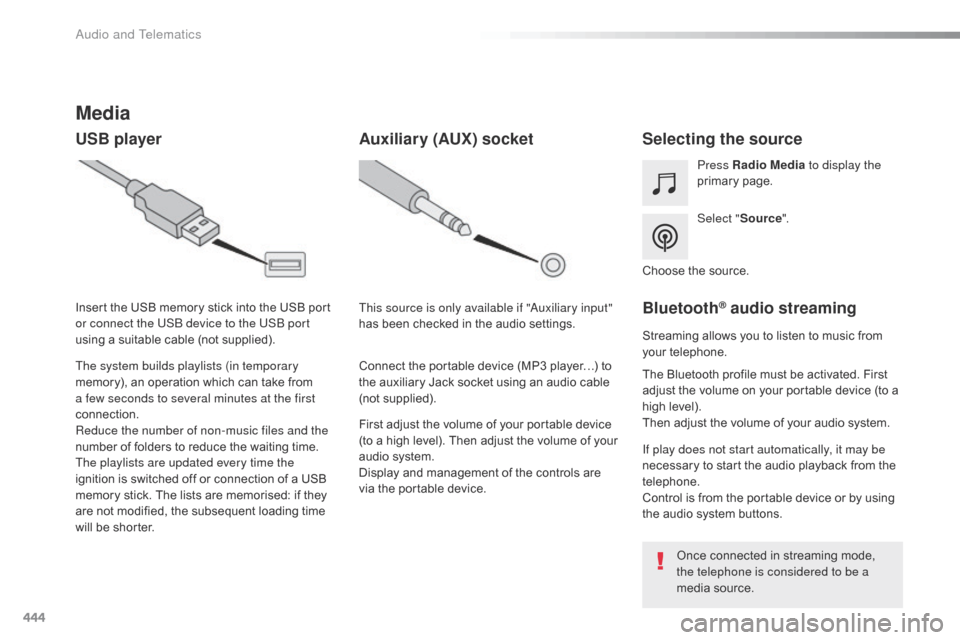
USB playerSelecting the source
Select "Source".
Press Radio Media
to display the
primary page.
The system builds playlists (in temporary
memory), an operation which can take from
a few seconds to several minutes at the first
connection.
Reduce the number of non-music files and the
number of folders to reduce the waiting time.
The playlists are updated every time the
ignition is switched off or connection of a USB
memory stick. The lists are memorised: if they
are not modified, the subsequent loading time
will be shorter. Insert the USB memory stick into the USB port
or connect the USB device to the USB port
using a suitable cable (not supplied).
Auxiliary (AUX) socket
First adjust the volume of your portable device
(to a high level). Then adjust the volume of your
audio system.
Display and management of the controls are
via the portable device. This source is only available if "Auxiliary input"
has been checked in the audio settings.
Connect the portable device (MP3 player…) to
the auxiliary Jack socket using an audio cable
(not supplied). Choose the source.
Bluetooth® audio streaming
Streaming allows you to listen to music from
your telephone.
The Bluetooth profile must be activated. First
adjust the volume on your portable device (to a
high level).
Then adjust the volume of your audio system.
If play does not start automatically, it may be
necessary to start the audio playback from the
telephone.
Control is from the portable device or by using
the audio system buttons.
Once connected in streaming mode,
the telephone is considered to be a
media source.
Audio and Telematics
Page 447 of 604
445
Spacetourer-VP_en_Chap10c_RCC-1_ed01-2016
Connecting Apple® players
Connect the Apple® player to the USB port
using a suitable cable (not supplied).
Play starts automatically.
Control is via the audio system.
The classifications available are those
of the portable device connected
(artists / albums / genres / playlists /
audiobooks / podcasts).
The default classification used is by
artist. To modify the classification used,
return to the first level of the menu
then select the desired classification
(playlists for example) and confirm
to go down through the menu to the
desired track.
The version of software in the audio system
may not be compatible with the generation of
your Apple
® player. The audio equipment will only play audio
files with ".wma, .aac, .flac, .ogg and .mp3"
file extensions and with a bit rate of between
32
Kbps and 320 Kbps.
It also supports VBR (Variable Bit Rate) mode.
No other type of file (.mp4, ...) can be played.
".wma" files must be of the standard wma 9 type.
The sampling rates supported are 32, 44 and
48 KHz.
It is advisable to restrict file names to
20 characters, without using of special
characters (e.g.: " " ? ; ù) to avoid any playing
and displaying problems.
Information and advice
Use only USB memory sticks formatted FAT 32
(file allocation table). The system supports USB mass
storage devices, BlackBerry
® devices
or Apple® players via USB ports. The
adaptor cable is not supplied.
Control of the peripheral device is with
the audio system controls.
Other peripherals, not recognised on
connection, must be connected to the
auxiliary socket using a Jack cable (not
supplied) or via Bluetooth streaming,
depending on compatibility.
It is recommended that the USB cable
for the portable device is used.
.
Audio and Telematics
Page 448 of 604
446
12:13
23 °C531 kHz
12:13
23 °C531 kHz
4
1
1
8
14
5
39
12
6
210
7
11
13
Spacetourer-VP_en_Chap10c_RCC-1_ed01-2016
Level 1
Telephone
Level 2 Level 3
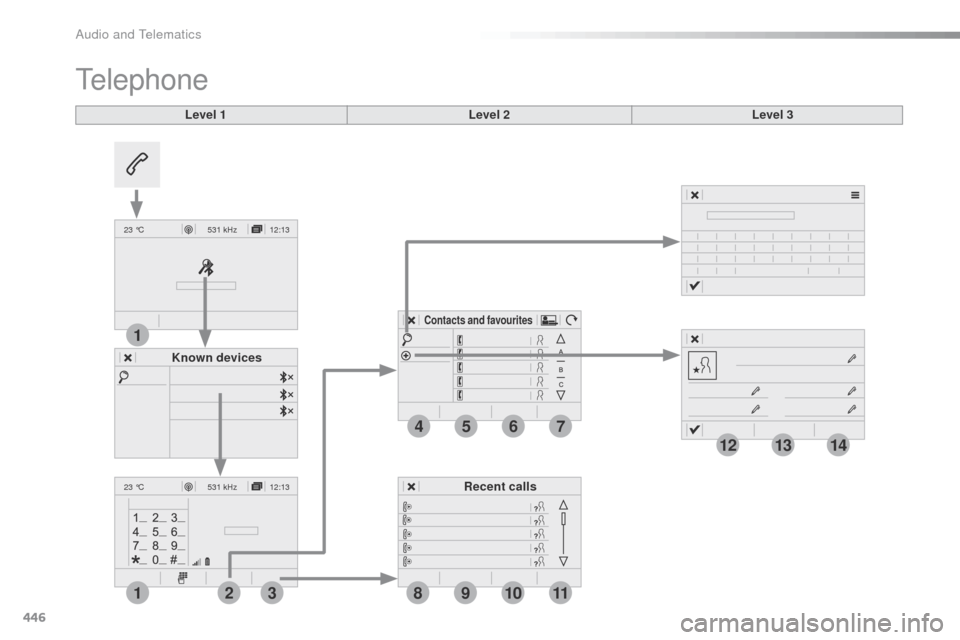
Known devices Recent calls
Contacts and favourites
Audio and Telematics
Page 449 of 604
447
14
12
13
3
2
5
6
7
4
8
9
10
11
Spacetourer-VP_en_Chap10c_RCC-1_ed01-2016
Level 1Level 2 Level 3 Comments
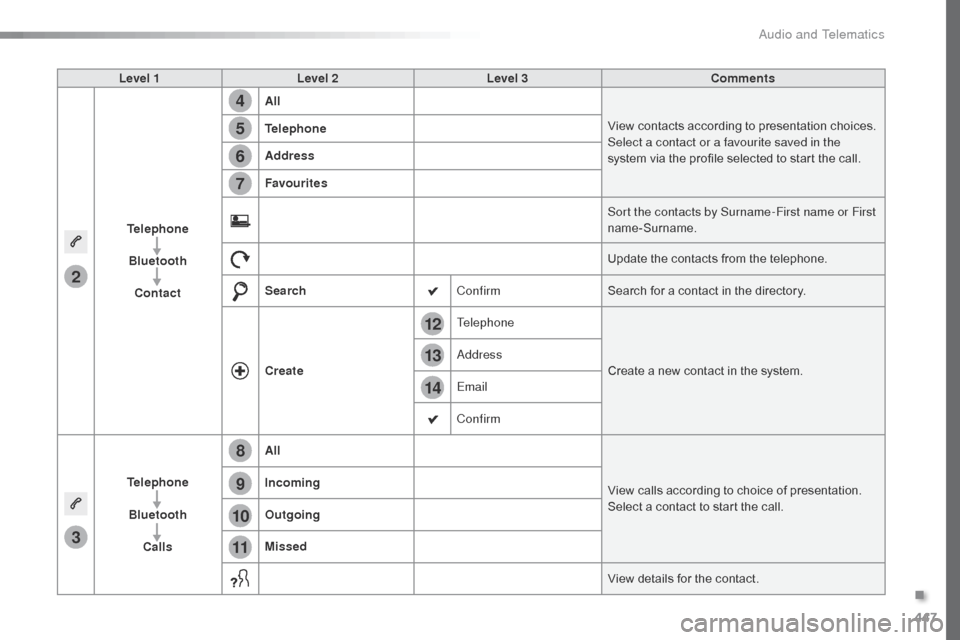
Telephone Bluetooth Contact All
View contacts according to presentation choices.
Select a contact or a favourite saved in the
system via the profile selected to start the call.
Telephone
Address
Favourites
Sort the contacts by Surname-First name or First
name-Surname.
Update the contacts from the telephone.
Search ConfirmSearch for a contact in the directory.
Create Telephone
Create a new contact in the system.
Address
Email
Confirm
Telephone Bluetooth Calls All
View calls according to choice of presentation.
Select a contact to start the call.
Incoming
Outgoing
Missed
View details for the contact.
.
Audio and Telematics
Page 450 of 604
448
19
202122
1
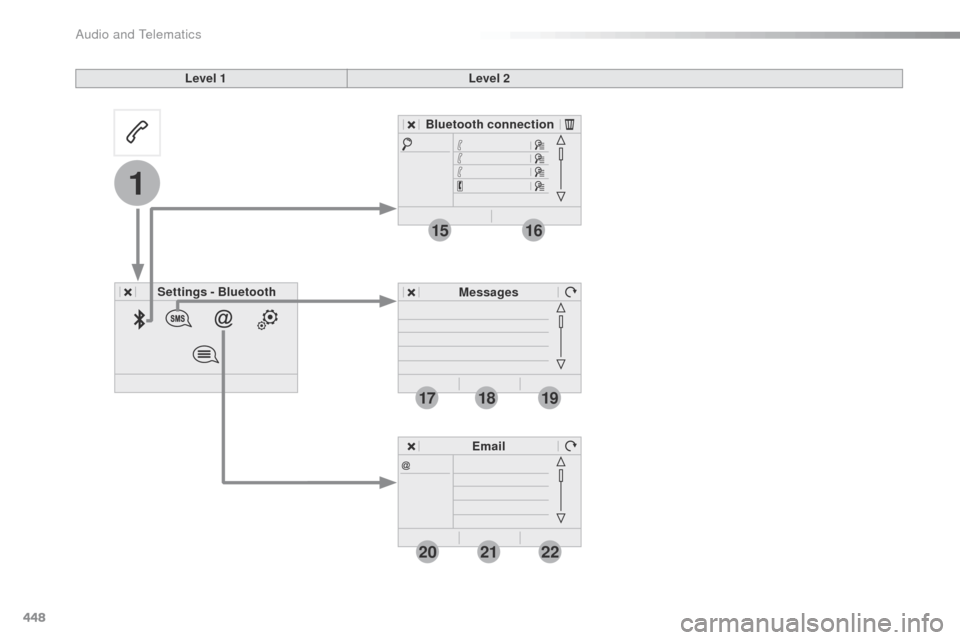
1516
1718
Spacetourer-VP_en_Chap10c_RCC-1_ed01-2016
Level 1Level 2
Settings - Bluetooth Bluetooth connection
MessagesEmail
Audio and Telematics
Page 451 of 604
449
1
1
1
19
20
21
22
15
16
17
18
Spacetourer-VP_en_Chap10c_RCC-1_ed01-2016
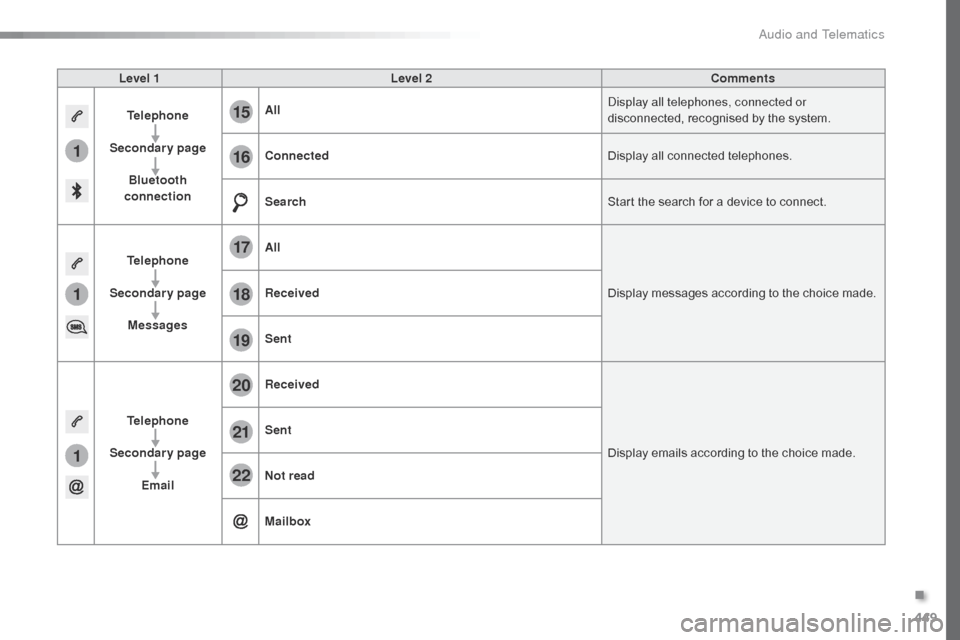
Level 1Level 2 Comments
Telephone
Secondary page Bluetooth
connection All
Display all telephones, connected or
disconnected, recognised by the system.
Connected Display all connected telephones.
Search Start the search for a device to connect.
Telephone
Secondary page Messages All
Display messages according to the choice made.
Received
Sent
Telephone
Secondary page Email Received
Display emails according to the choice made.
Sent
Not read
Mailbox
.
Audio and Telematics
Page 452 of 604
450
23
27
24
28
25
29
26
30
1
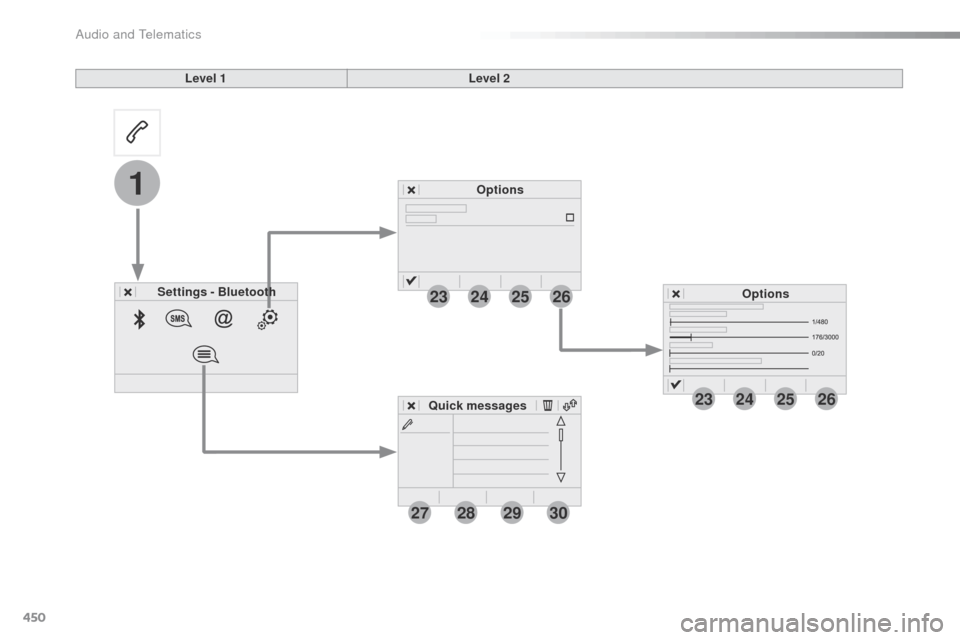
23242526
Spacetourer-VP_en_Chap10c_RCC-1_ed01-2016
Level 1Level 2
Settings - Bluetooth Options
Options
Quick messages
Audio and Telematics
Page 453 of 604
451
1
1
27
28
29
30
23
24
25
26
Spacetourer-VP_en_Chap10c_RCC-1_ed01-2016
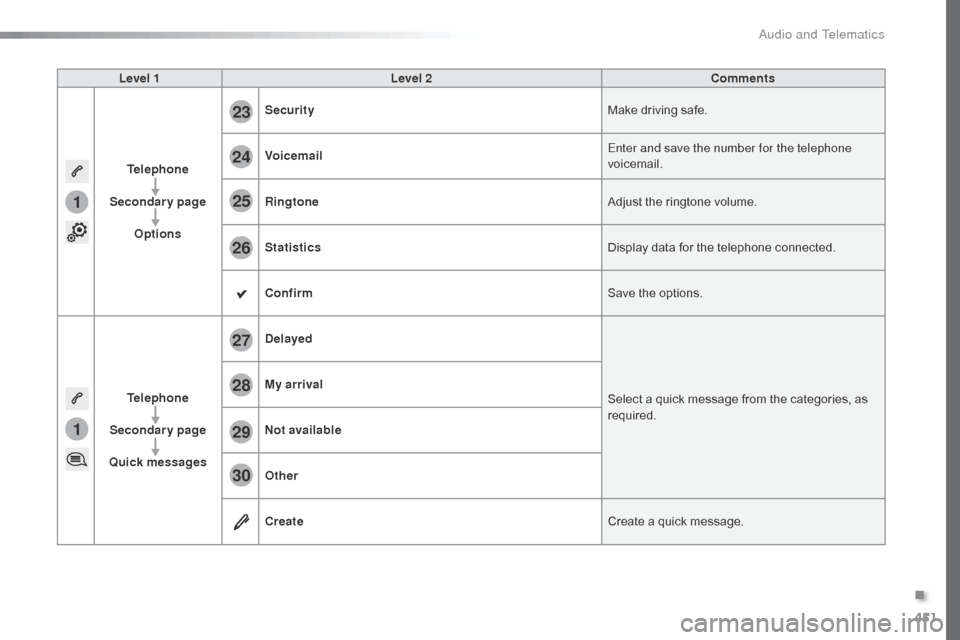
Level 1Level 2 Comments
Telephone
Secondary page Options Security
Make driving safe.
Voicemail Enter and save the number for the telephone
voicemail.
Ringtone Adjust the ringtone volume.
Statistics Display data for the telephone connected.
Confirm Save the options.
Telephone
Secondary page
Quick messages Delayed
Select a quick message from the categories, as
required.
My arrival
Not available
Other
Create
Create a quick message.
.
Audio and Telematics
Page 460 of 604
458
12:13
23 °C
3
3
4
4
5
5
6
6
7
7
34567
12
Spacetourer-VP_en_Chap10c_RCC-1_ed01-2016
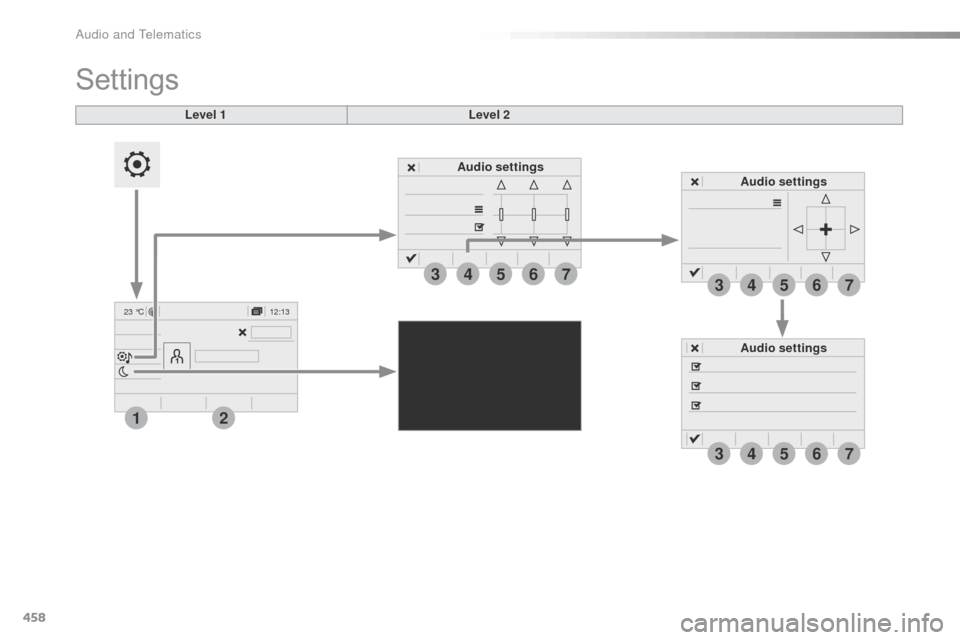
Audio settings Audio settings
Level 1
Settings
Level 2
Audio settings
Audio and Telematics
Page 461 of 604
459
5
6
7
3
4
2
Spacetourer-VP_en_Chap10c_RCC-1_ed01-2016
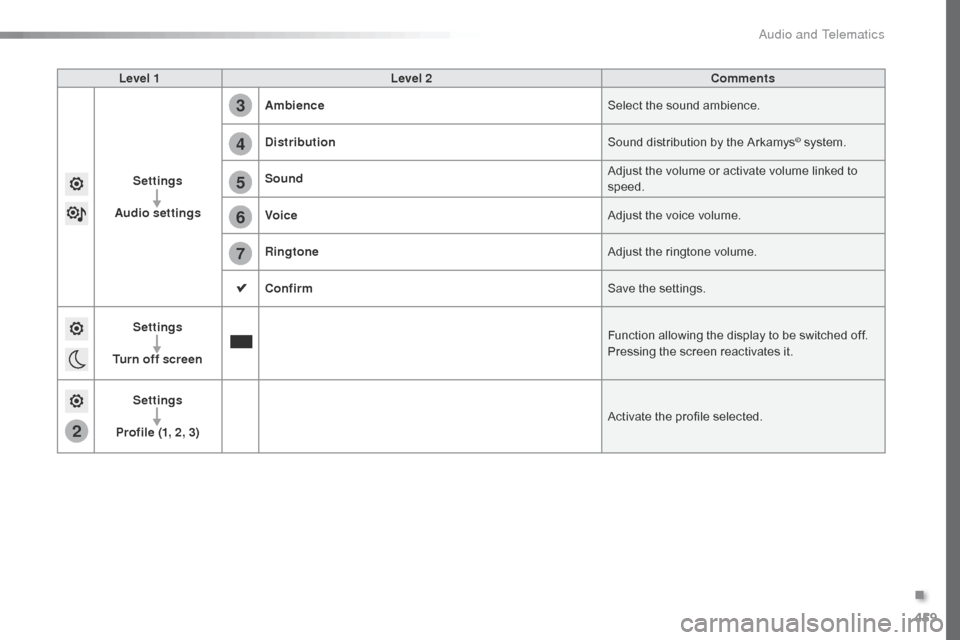
Level 1Level 2 Comments
Settings
Audio settings Ambience
Select the sound ambience.
Distribution Sound distribution by the Arkamys
© system.
Sound Adjust the volume or activate volume linked to
speed.
Voice Adjust the voice volume.
Ringtone Adjust the ringtone volume.
Confirm Save the settings.
Settings
Turn off screen Function allowing the display to be switched off.
Pressing the screen reactivates it.
Settings
Profile (1, 2, 3) Activate the profile selected.
.
Audio and Telematics