Level Citroen SPACETOURER 2016 1.G Owner's Manual
[x] Cancel search | Manufacturer: CITROEN, Model Year: 2016, Model line: SPACETOURER, Model: Citroen SPACETOURER 2016 1.GPages: 604, PDF Size: 13.25 MB
Page 462 of 604
460
1
89
89
111012
13141516
Spacetourer-VP_en_Chap10c_RCC-1_ed01-2016
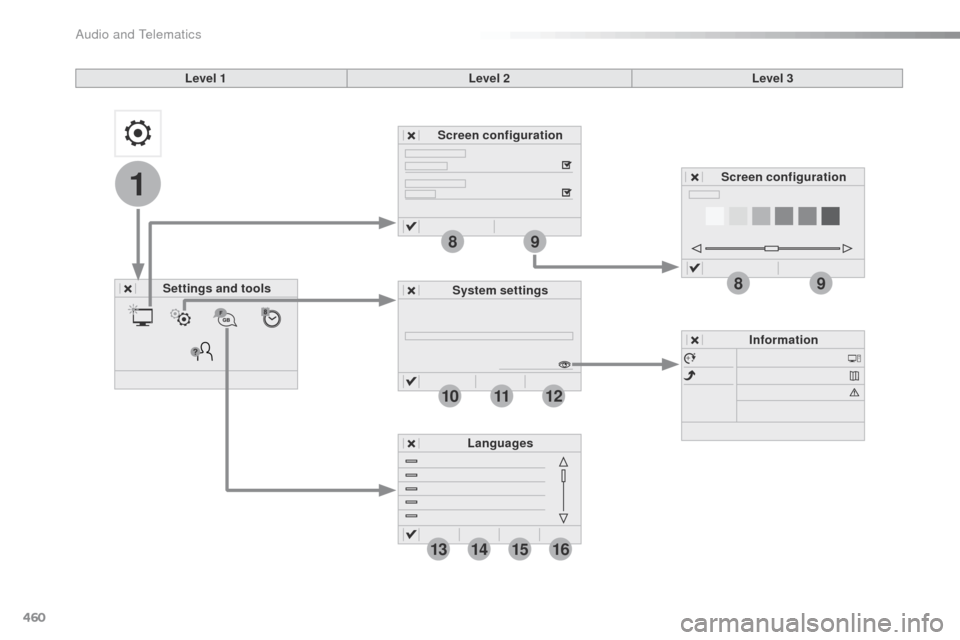
Level 1Level 2Level 3
Settings and tools Screen configuration
System settings Information
Languages Screen configuration
Audio and Telematics
Page 463 of 604
461
1
8
9
1
1
13
14
15
16
11
10
12
Spacetourer-VP_en_Chap10c_RCC-1_ed01-2016
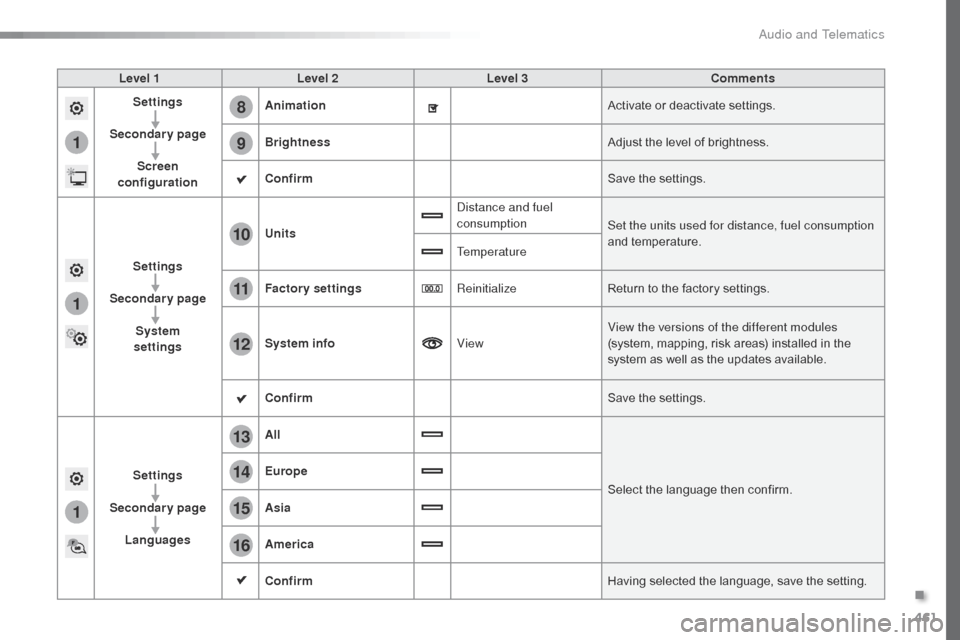
Level 1Level 2 Level 3 Comments
Settings
Secondary page Screen
configuration Animation
Activate or deactivate settings.
Brightness Adjust the level of brightness.
Confirm Save the settings.
Settings
Secondary page System
settings Units
Distance and fuel
consumption
Set the units used for distance, fuel consumption
and temperature.
Temperature
Factory settings ReinitializeReturn to the factory settings.
System info ViewView the versions of the different modules
(system, mapping, risk areas) installed in the
system as well as the updates available.
Confirm Save the settings.
Settings
Secondary page Languages All
Select the language then confirm.
Europe
Asia
America
Confirm
Having selected the language, save the setting.
.
Audio and Telematics
Page 464 of 604
462
1
1718
19202122
Spacetourer-VP_en_Chap10c_RCC-1_ed01-2016
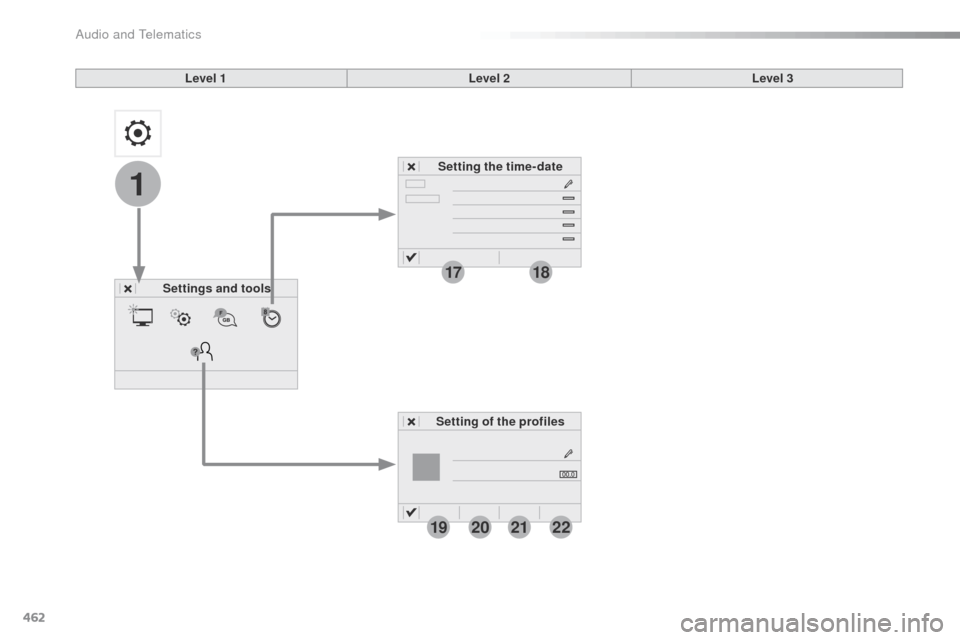
Level 1Level 2
Settings and tools Setting the time- date
Setting of the profiles Level 3
Audio and Telematics
Page 465 of 604
463
1
1
17
18
20
19
21
22
Spacetourer-VP_en_Chap10c_RCC-1_ed01-2016
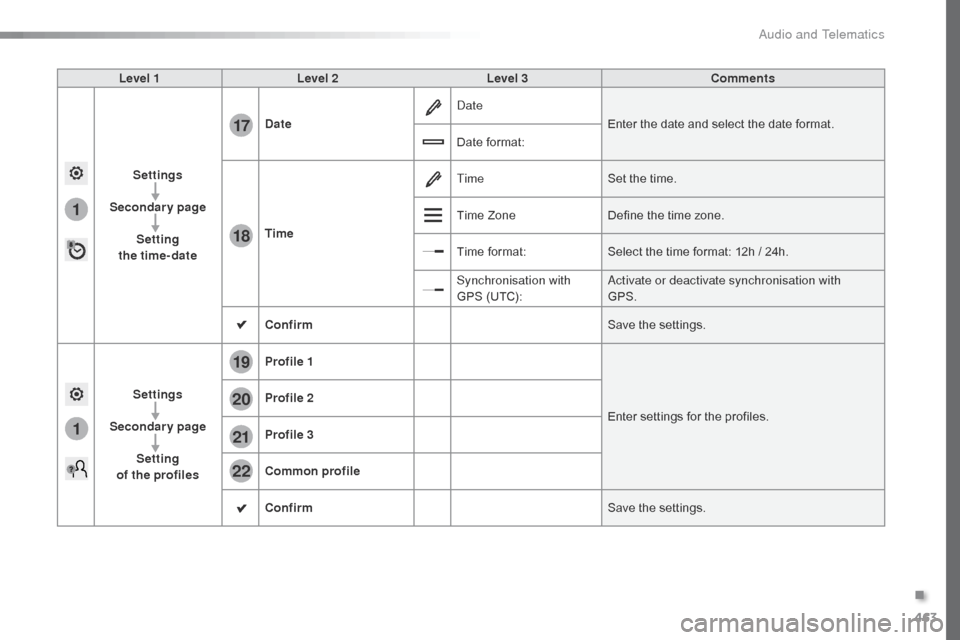
Level 1Level 2 Level 3 Comments
Settings
Secondary page Setting
the time-date Date
Date
Enter the date and select the date format.
Date format:
Time Time
Set the time.
Time Zone Define the time zone.
Time format: Select the time format: 12h / 24h.
Synchronisation with
GPS (UTC): Activate or deactivate synchronisation with
GPS.
Confirm Save the settings.
Settings
Secondary page Setting
of the profiles Profile 1
Enter settings for the profiles.
Profile 2
Profile 3
Common profile
Confirm
Save the settings.
.
Audio and Telematics
Page 472 of 604
470
Spacetourer-VP_en_Chap10c_RCC-1_ed01-2016
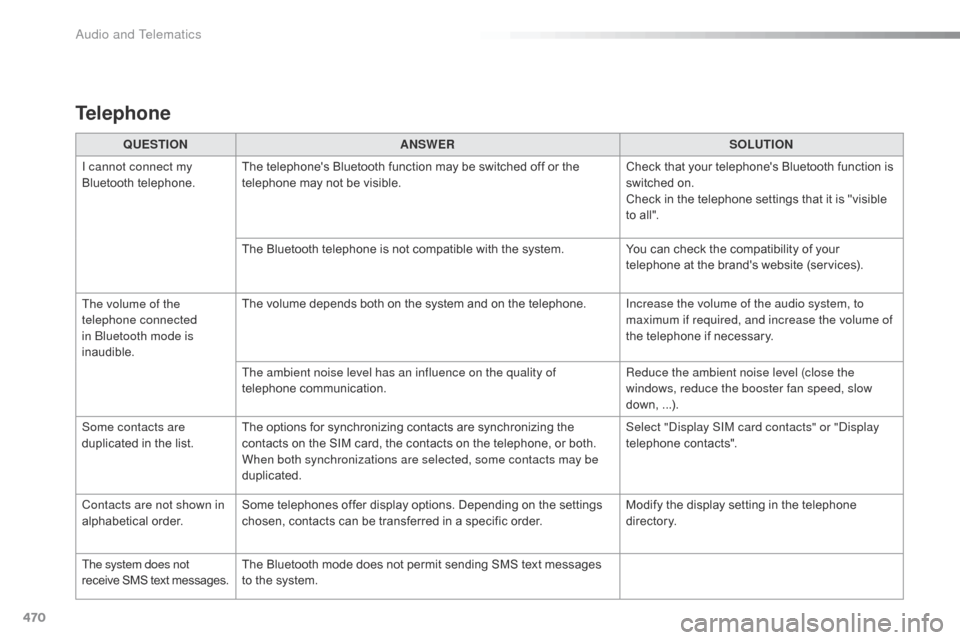
QUESTIONANSWER SOLUTION
I cannot connect my
Bluetooth telephone. The telephone's Bluetooth function may be switched off or the
telephone may not be visible. Check that your telephone's Bluetooth function is
switched on.
Check in the telephone settings that it is "visible
to all".
The Bluetooth telephone is not compatible with the system. You can check the compatibility of your
telephone at the brand's website (services).
The volume of the
telephone connected
in Bluetooth mode is
inaudible. The volume depends both on the system and on the telephone.
Increase the volume of the audio system, to
maximum if required, and increase the volume of
the telephone if necessary.
The ambient noise level has an influence on the quality of
telephone communication. Reduce the ambient noise level (close the
windows, reduce the booster fan speed, slow
down, ...).
Some contacts are
duplicated in the list. The options for synchronizing contacts are synchronizing the
contacts on the SIM card, the contacts on the telephone, or both.
When both synchronizations are selected, some contacts may be
duplicated. Select "Display SIM card contacts" or "Display
telephone contacts".
Contacts are not shown in
alphabetical order. Some telephones offer display options. Depending on the settings
chosen, contacts can be transferred in a specific order. Modify the display setting in the telephone
di r e c to r y.
The system does not
receive SMS text messages. The Bluetooth mode does not permit sending SMS text messages
to the system.
Telephone
Audio and Telematics
Page 476 of 604
474
First steps
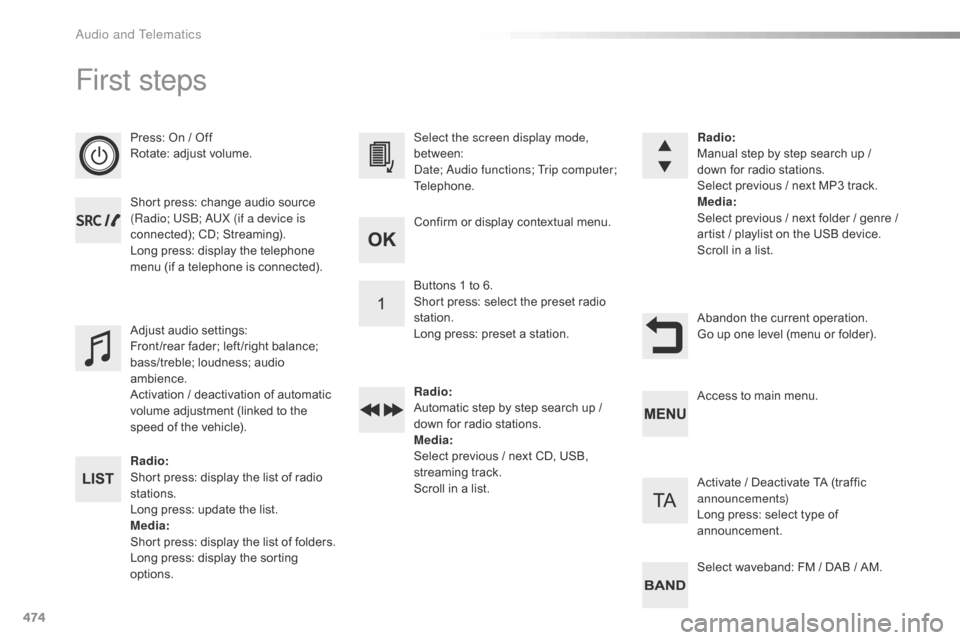
Press: On / Off
Rotate: adjust volume.
Short press: change audio source
(Radio; USB; AUX (if a device is
connected); CD; Streaming).
Long press: display the telephone
menu (if a telephone is connected).
Radio:
Short press: display the list of radio
stations.
Long press: update the list.
Media :
Short press: display the list of folders.
Long press: display the sorting
options. Select the screen display mode,
between:
Date; Audio functions; Trip computer;
Telephone.
Adjust audio settings:
Front /rear fader; left /right balance;
bass/treble; loudness; audio
ambience.
Activation / deactivation of automatic
volume adjustment (linked to the
speed of the vehicle). Radio
:
Manual step by step search up /
down for radio stations.
Select previous / next MP3 track.
Media :
Select previous / next folder / genre /
artist
/ playlist on the USB device.
Scroll in a list.
Abandon the current operation.
Go up one level (menu or folder).
Confirm or display contextual menu.
Buttons 1 to 6.
Short press: select the preset radio
station.
Long press: preset a station.
Radio
:
Automatic step by step search up /
down for radio stations.
Media :
Select previous / next CD, USB,
streaming track.
Scroll in a list. Access to main menu.
Activate / Deactivate TA (traffic
announcements)
Long press: select type of
announcement.
Select waveband: FM / DAB / AM.
Audio and Telematics
Page 486 of 604
484
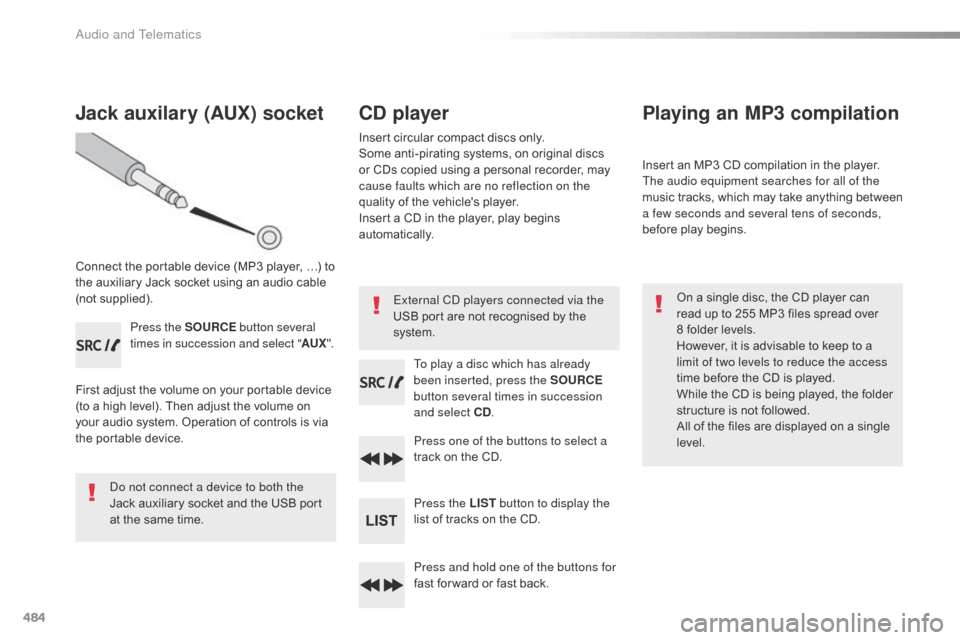
Jack auxilary (AUX) socket
Connect the portable device (MP3 player, …) to
the auxiliary Jack socket using an audio cable
(not supplied).Press the SOURCE button several
times in succession and select " AUX".
First adjust the volume on your portable device
(to a high level). Then adjust the volume on
your audio system. Operation of controls is via
the portable device.
Do not connect a device to both the
Jack auxiliary socket and the USB port
at the same time.
CD player
Insert circular compact discs only.
Some anti-pirating systems, on original discs
or CDs copied using a personal recorder, may
cause faults which are no reflection on the
quality of the vehicle's player.
Insert a CD in the player, play begins
automatically.
To play a disc which has already
been inserted, press the SOURCE
button several times in succession
and select CD .
Press one of the buttons to select a
track on the CD.
Press the LIST button to display the
list of tracks on the CD.
Press and hold one of the buttons for
fast for ward or fast back.
Playing an MP3 compilation
Insert an MP3 CD compilation in the player.
The audio equipment searches for all of the
music tracks, which may take anything between
a few seconds and several tens of seconds,
before play begins.
On a single disc, the CD player can
read up to 255 MP3 files spread over
8 folder levels.
However, it is advisable to keep to a
limit of two levels to reduce the access
time before the CD is played.
While the CD is being played, the folder
structure is not followed.
All of the files are displayed on a single
level.
External CD players connected via the
USB port are not recognised by the
system.
Audio and Telematics
Page 488 of 604
486
The CD player can play files with .mp3, .wma,
.wav and .aac file extensions, with a bit rate of
of 32 to 320 Kbps.
It also supports TAG mode (ID3 tag, WMA
TAG) .
Other file types (mp4, ...) may be played.
Files of the ".wma" type should be to the wma
9 standard.
The sampling rates supported are 11, 22, 44
and 48 KHz.
File names should have less than
20
characters, avoiding special characters
(e.g.: " ? ; ù) so as to avoid any reading or
display problems. In order to be able to play a recorded CDR or
CDRW, the ISO 9660 level 1.2 or Joliet file
format is recommended when recording.
If the disc is recorded in another format, it may
not be played correctly.
It is recommended that the same recording
format is always used for an individual disc,
with as low a speed as possible (4x maximum)
for optimum sound quality.
In the particular case of a multi-session CD, the
Joliet format is recommended.
Information and advice
Use only USB memory sticks formatted FAT32
(File Allocation Table).
It is recommended that you use
genuine Apple
® USB cables for correct
operation.
Audio and Telematics
Page 496 of 604
494
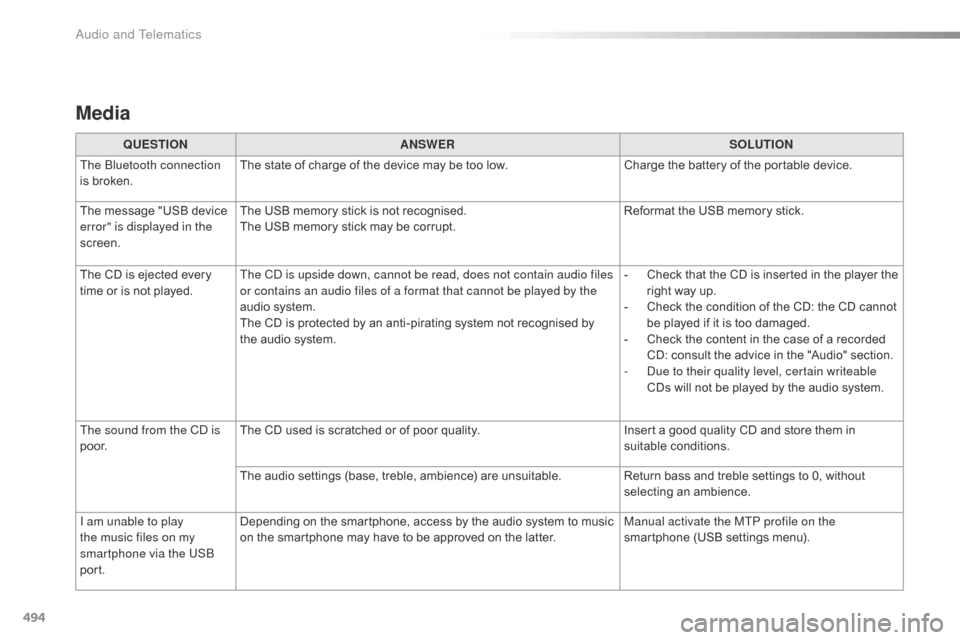
Media
QUESTIONANSWER SOLUTION
The Bluetooth connection
is broken. The state of charge of the device may be too low.
Charge the battery of the portable device.
The message "USB device
error" is displayed in the
screen. The USB memory stick is not recognised.
The USB memory stick may be corrupt.
Reformat the USB memory stick.
The CD is ejected every
time or is not played. The CD is upside down, cannot be read, does not contain audio files
or contains an audio files of a format that cannot be played by the
audio system.
The CD is protected by an anti-pirating system not recognised by
the audio system. -
C
heck that the CD is inserted in the player the
right way up.
-
C
heck the condition of the CD: the CD cannot
be played if it is too damaged.
-
C
heck the content in the case of a recorded
CD: consult the advice in the "Audio" section.
-
D
ue to their quality level, certain writeable
CDs will not be played by the audio system.
The sound from the CD is
p o o r. The CD used is scratched or of poor quality.
Insert a good quality CD and store them in
suitable conditions.
The audio settings (base, treble, ambience) are unsuitable. Return bass and treble settings to 0, without
selecting an ambience.
I am unable to play
the music files on my
smartphone via the USB
port. Depending on the smartphone, access by the audio system to music
on the smartphone may have to be approved on the latter.
Manual activate the MTP profile on the
smartphone (USB settings menu).
Audio and Telematics
Page 498 of 604
496
Spacetourer-VP_en_Chap11_index-alpha_ed01-2016
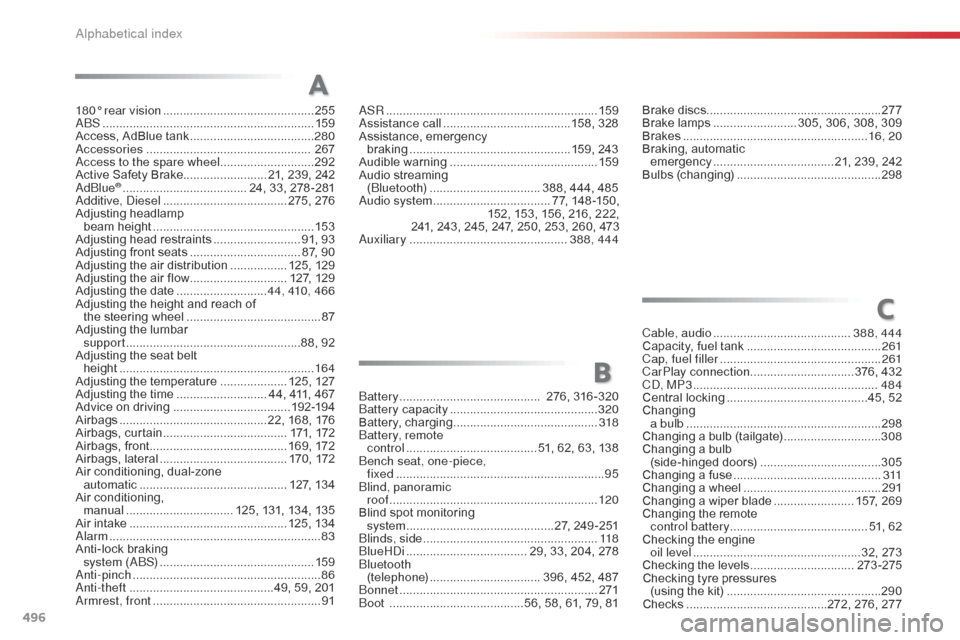
180° rear vision .............................................255
ABS ........ ....................................................... 159
Access, AdBlue tank
..................................... 28
0
Accessories
..............................
................... 267
Access to the spare wheel
............................2
92
Active Safety Brake......................... 21, 239, 242
AdBlue
® ............................... ...... 24, 33, 278 -281
Additive, Diesel ............................... ...... 275, 276
Adjusting headlamp
beam height
................................................ 15
3
Adjusting head restraints
.......................... 9
1, 93
Adjusting front seats
................................. 87
, 90
Adjusting the air distribution
.................12
5, 129
Adjusting the air flow
............................. 12
7, 129
Adjusting the date
........................... 4
4, 410, 466
Adjusting the height and reach of the steering wheel
...............................
......... 87
Adjusting the lumbar support
....................................................8
8, 92
Adjusting the seat belt height
...............
........................................... 16 4
Adjusting the temperature
....................12
5, 127
Adjusting the time
........................... 4
4, 411, 467
Advice on driving
..............................
.....192-19 4
Airbags
...............
.............................22, 168, 176
Airbags, curtain
..................................... 17
1, 172
Airbags, front......................................... 169, 172
Airbags, lateral
...................................... 17
0, 172
Air conditioning, dual-zone automatic
............................................ 1
27, 134
Air conditioning, manual
...............
................. 125, 131, 134, 135
Air intake
...............
................................ 125, 134
Alarm
............................................................... 83
A
nti-lock braking
system (ABS)
.............................................. 15
9
Anti-pinch
........................................................ 86
A
nti-theft
..............................
.............49, 59, 201
Armrest, front
.................................................. 91AS
R
...............................................................
15
9
Assistance call
...............................
.......158, 328
Assistance, emergency
braking
...............
.................................159, 243
Audible warning
............................................ 15
9
Audio streaming (Bluetooth) .............................. ... 388, 444, 485
Audio system
............................... .... 77, 148 -150,
152, 153, 156, 216, 222,
241, 243, 245, 247, 250, 253, 260, 473
Auxiliary
............................................... 3
88, 444
A
C
B
Brake discs ....................................................2 77
Brake lamps ......................... 3 05, 306, 308, 309
Brakes
....................................................... 16
, 20
Braking, automatic emergency
.................................... 2
1, 239, 242
Bulbs (changing)
...............................
............298
Cable, audio
......................................... 3
88, 444
Capacity, fuel tank
..............................
..........261
Cap, fuel filler
................................................ 2
61
CarPlay connection ...............................376, 432
CD, MP3
....................................................... 48
4
Central locking
..........................................4
5, 52
Changing
a bulb
...............
........................................... 298
Changing a bulb (tailgate)
.............................3
08
Changing a bulb (side-hinged doors)
.................................... 3
05
Changing a fuse
............................................ 3
11
Changing a wheel
...............................
..........291
Changing a wiper blade
........................ 1
57, 269
Changing the remote control battery ......................................... 51, 62
Checking the engine oil level
...............
...................................32, 273
Checking the levels
...............................2
73-275
Checking tyre pressures (using the kit)
..............................
................290
Checks
...............
...........................272, 276, 277
Battery
...............................
........... 276, 316 -320
Battery capacity
...............................
............. 320
Battery, charging
...............................
............ 318
Battery, remote control
....................................... 5
1, 62, 63, 138
Bench seat, one-piece, fixed
.............................................................
. 95
Blind, panoramic roof
.............................................................. 12
0
Blind spot monitoring system
................
............................27, 249 -251
Blinds, side
.................................................... 11
8
BlueHDi
...............................
..... 29, 33, 204, 278
Bluetooth (telephone)
................................. 3
96, 452, 487
Bonnet
...............
............................................ 271
Boot
........................................5
6, 58, 61, 79, 81
Alphabetical index