Citroen SPACETOURER 2016 1.G Owners Manual
SPACETOURER 2016 1.G
Citroen
Citroen
https://www.carmanualsonline.info/img/9/4460/w960_4460-0.png
Citroen SPACETOURER 2016 1.G Owners Manual
Page 395 of 604
393
1
1
1
19
20
21
22
15
16
17
18
Spacetourer-VP_en_Chap10b_NAC-1_ed01-2016
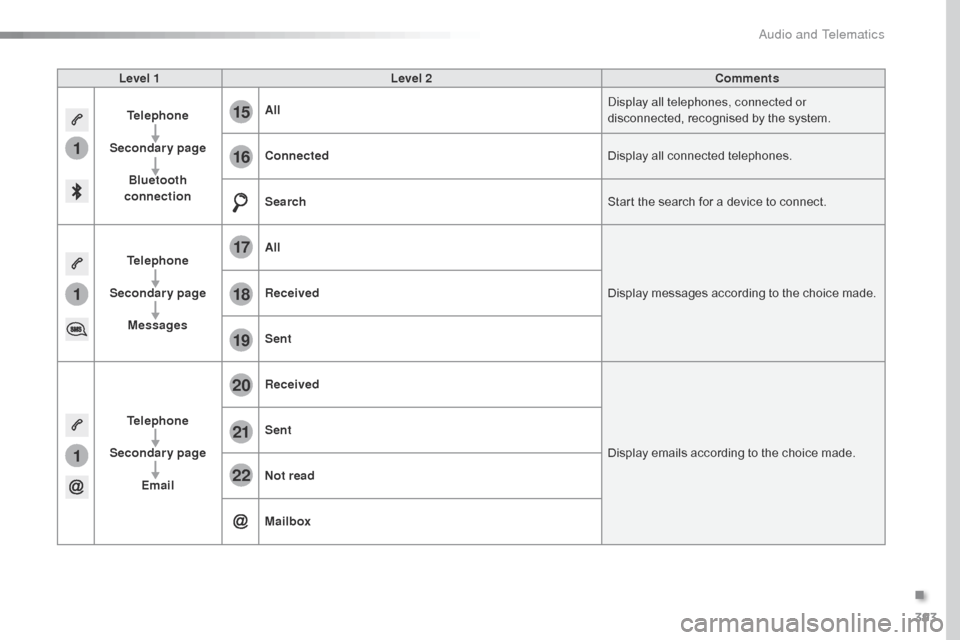
Level 1Level 2 Comments
Telephone
Secondary page Bluetooth
connection All
Display all telephones, connected or
disconnected, recognised by the system.
Connected Display all connected telephones.
Search Start the search for a device to connect.
Telephone
Secondary page Messages All
Display messages according to the choice made.
Received
Sent
Telephone
Secondary page Email Received
Display emails according to the choice made.
Sent
Not read
Mailbox
.
Audio and Telematics
Page 396 of 604
394
23
27
24
28
25
29
26
30
1
23242526
Spacetourer-VP_en_Chap10b_NAC-1_ed01-2016
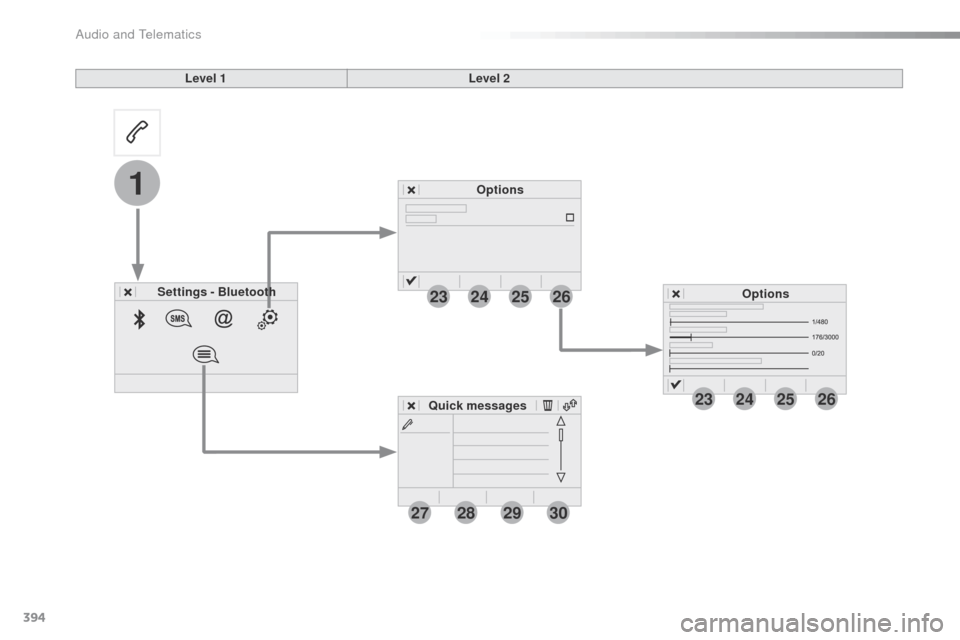
Level 1Level 2
Settings - Bluetooth Options
Options
Quick messages
Audio and Telematics
Page 397 of 604
395
1
1
27
28
29
30
23
24
25
26
Spacetourer-VP_en_Chap10b_NAC-1_ed01-2016
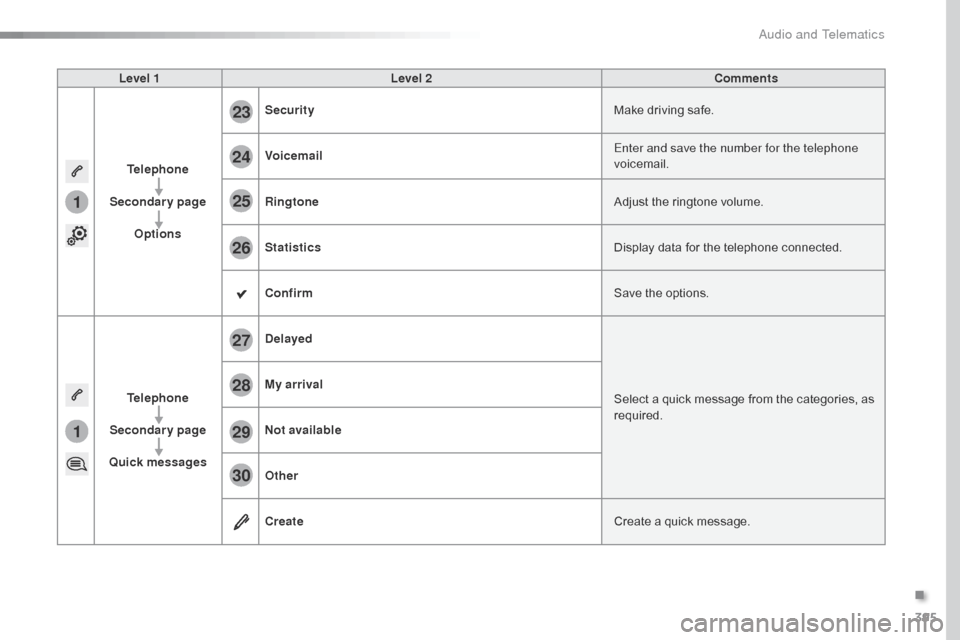
Level 1Level 2 Comments
Telephone
Secondary page Options Security
Make driving safe.
Voicemail Enter and save the number for the telephone
voicemail.
Ringtone Adjust the ringtone volume.
Statistics Display data for the telephone connected.
Confirm Save the options.
Telephone
Secondary page
Quick messages Delayed
Select a quick message from the categories, as
required.
My arrival
Not available
Other
Create
Create a quick message.
.
Audio and Telematics
Page 404 of 604
402
12:13
23 °C
12
3
3
4
4
5
5
6
6
7
7
34567
Spacetourer-VP_en_Chap10b_NAC-1_ed01-2016
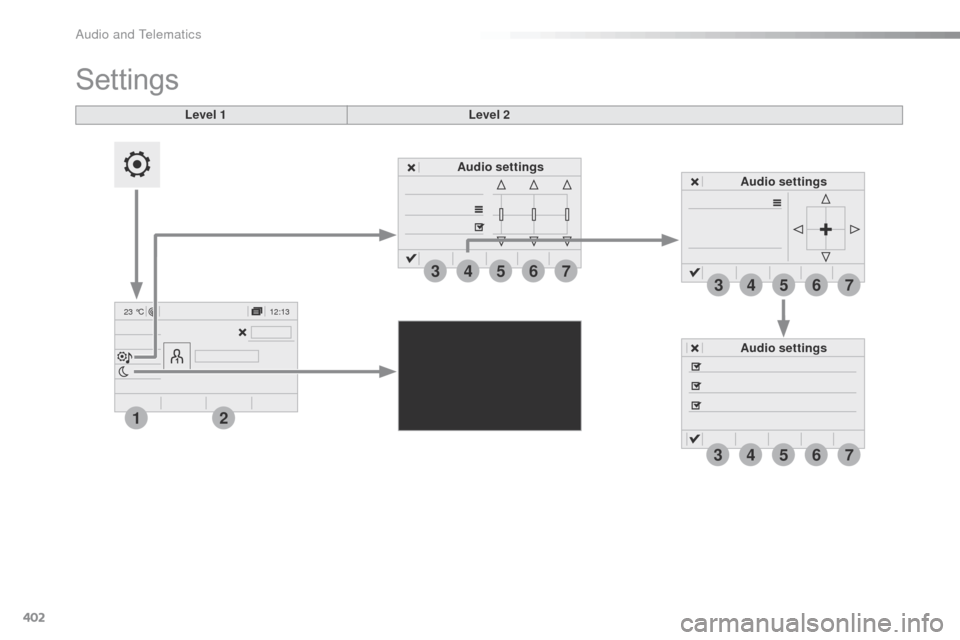
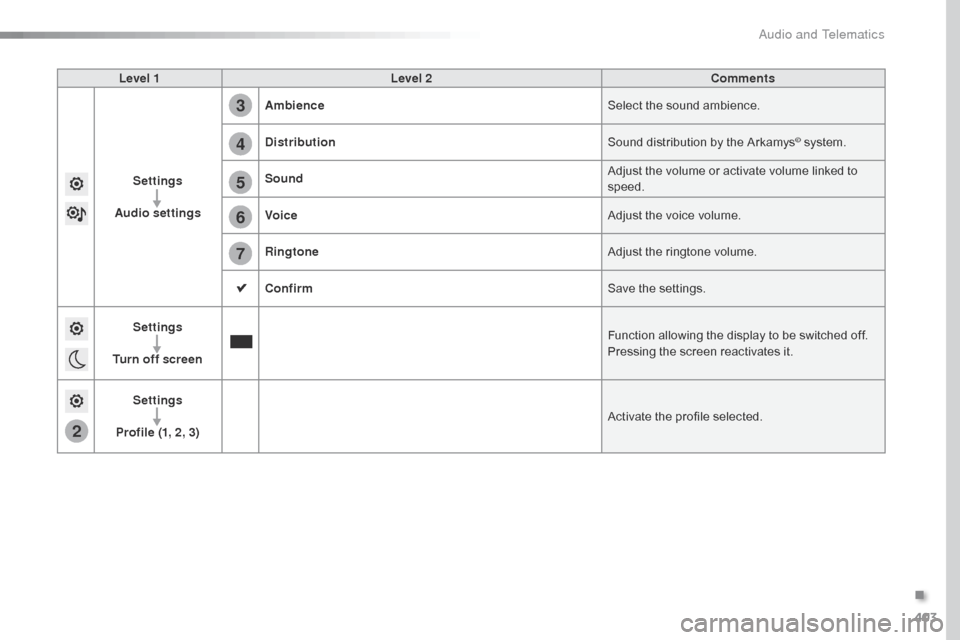
Audio settings Audio settings
Level 1
Settings
Level 2
Audio settings
Audio and Telematics
Page 405 of 604
403
2
5
6
7
3
4
Spacetourer-VP_en_Chap10b_NAC-1_ed01-2016
Level 1Level 2 Comments
Settings
Audio settings Ambience
Select the sound ambience.
Distribution Sound distribution by the Arkamys
© system.
Sound Adjust the volume or activate volume linked to
speed.
Voice Adjust the voice volume.
Ringtone Adjust the ringtone volume.
Confirm Save the settings.
Settings
Turn off screen Function allowing the display to be switched off.
Pressing the screen reactivates it.
Settings
Profile (1, 2, 3) Activate the profile selected.
.
Audio and Telematics
Page 406 of 604
404
1
89
89
111012
13141516
Spacetourer-VP_en_Chap10b_NAC-1_ed01-2016
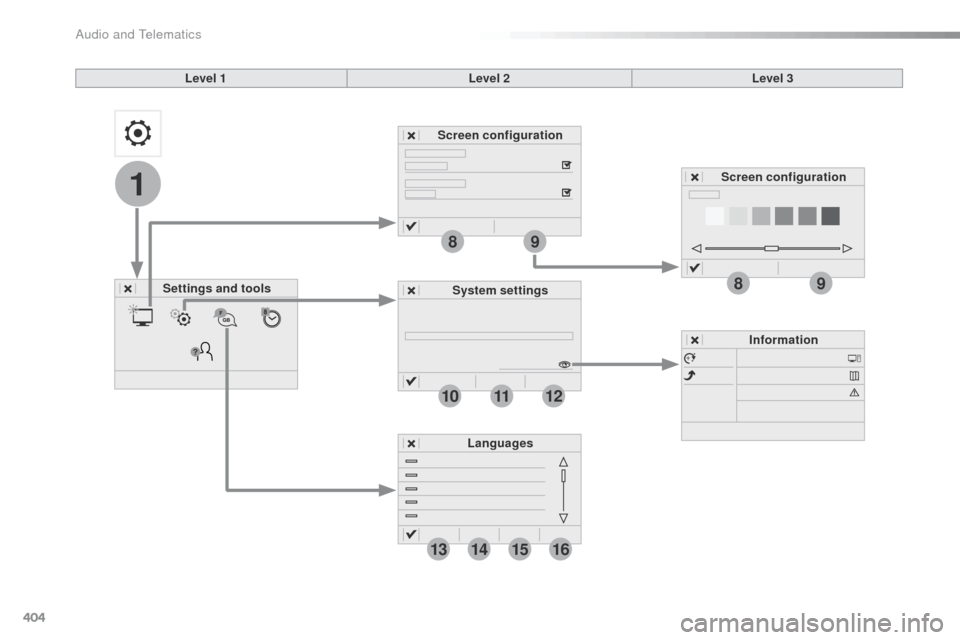
Level 1Level 2Level 3
Settings and tools Screen configuration
System settings Information
Languages Screen configuration
Audio and Telematics
Page 407 of 604
405
1
8
9
1
1
13
14
15
16
11
10
12
Spacetourer-VP_en_Chap10b_NAC-1_ed01-2016
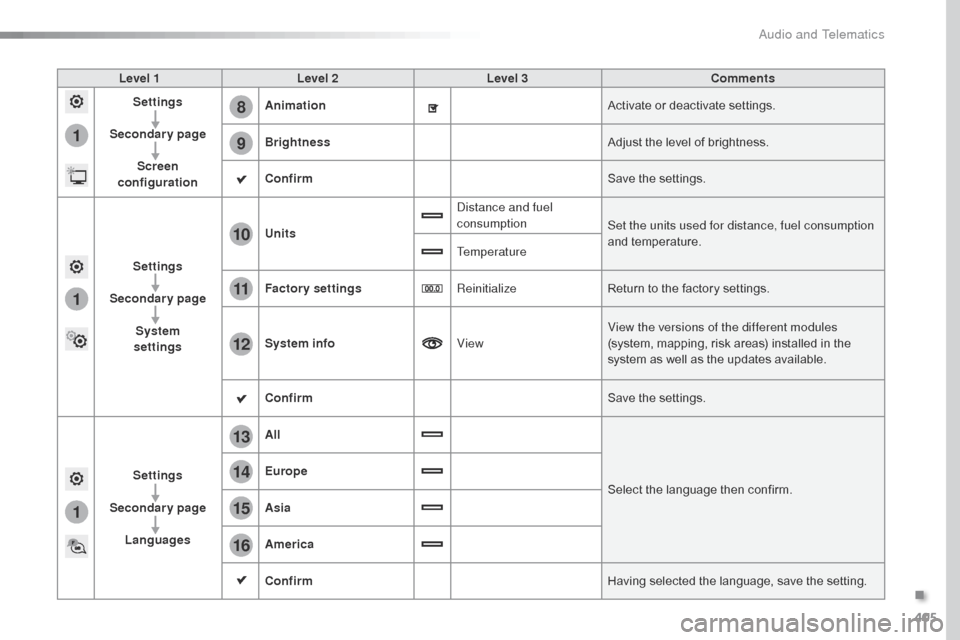
Level 1Level 2 Level 3 Comments
Settings
Secondary page Screen
configuration Animation
Activate or deactivate settings.
Brightness Adjust the level of brightness.
Confirm Save the settings.
Settings
Secondary page System
settings Units
Distance and fuel
consumption
Set the units used for distance, fuel consumption
and temperature.
Temperature
Factory settings ReinitializeReturn to the factory settings.
System info ViewView the versions of the different modules
(system, mapping, risk areas) installed in the
system as well as the updates available.
Confirm Save the settings.
Settings
Secondary page Languages All
Select the language then confirm.
Europe
Asia
America
Confirm
Having selected the language, save the setting.
.
Audio and Telematics
Page 408 of 604
406
1
1718
19202122
Spacetourer-VP_en_Chap10b_NAC-1_ed01-2016
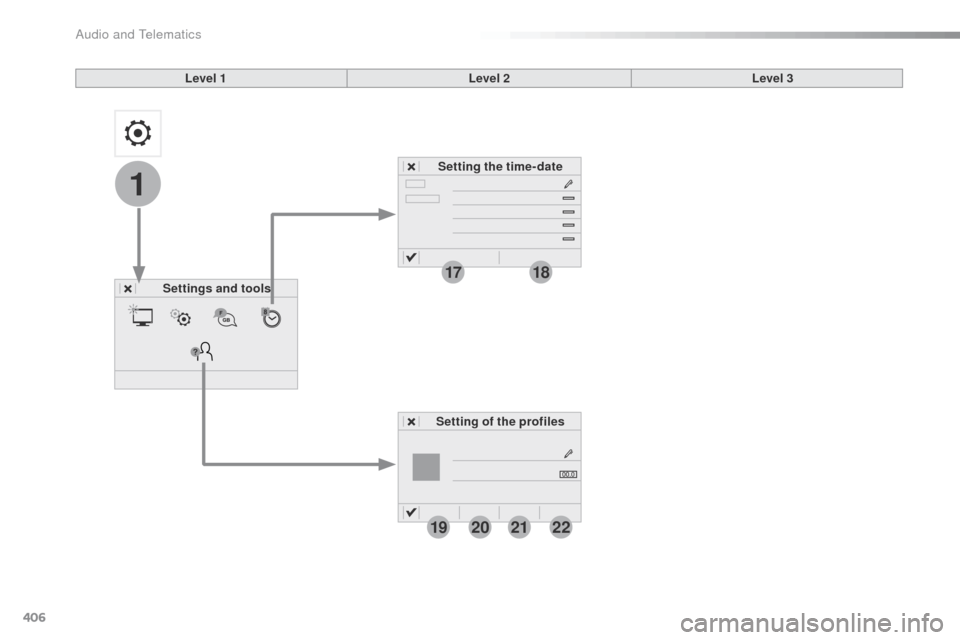
Level 1Level 2
Settings and tools Setting the time- date
Setting of the profiles Level 3
Audio and Telematics
Page 409 of 604
407
1
17
18
1
20
19
21
22
Spacetourer-VP_en_Chap10b_NAC-1_ed01-2016
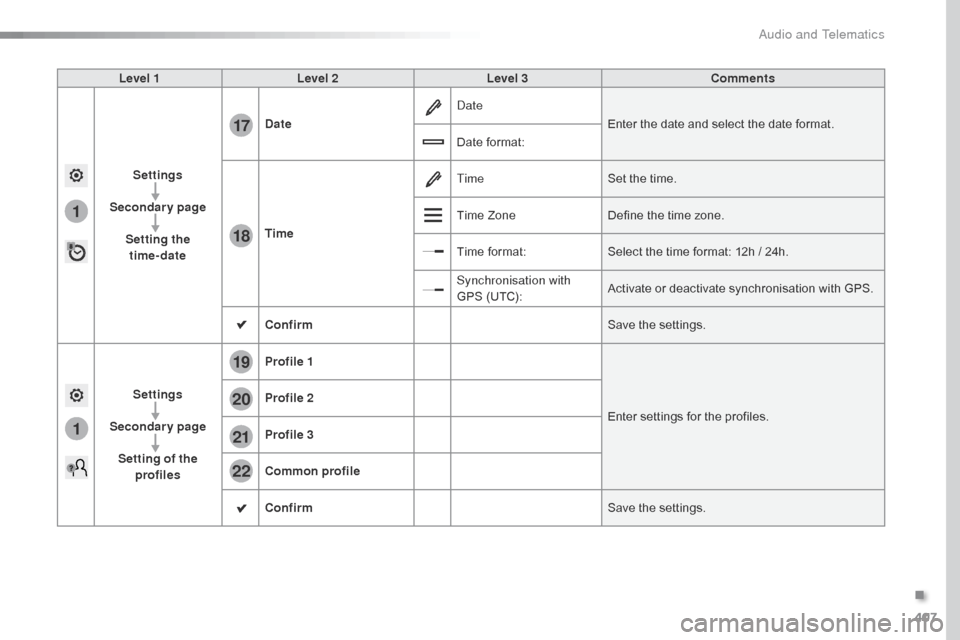
Level 1Level 2 Level 3 Comments
Settings
Secondary page Setting the time-date Date
Date
Enter the date and select the date format.
Date format:
Time Time
Set the time.
Time Zone Define the time zone.
Time format: Select the time format: 12h / 24h.
Synchronisation with
GPS (UTC): Activate or deactivate synchronisation with GPS.
Confirm Save the settings.
Settings
Secondary page Setting of the profiles Profile 1
Enter settings for the profiles.
Profile 2
Profile 3
Common profile
Confirm
Save the settings.
.
Audio and Telematics
Page 418 of 604
416
Spacetourer-VP_en_Chap10b_NAC-1_ed01-2016
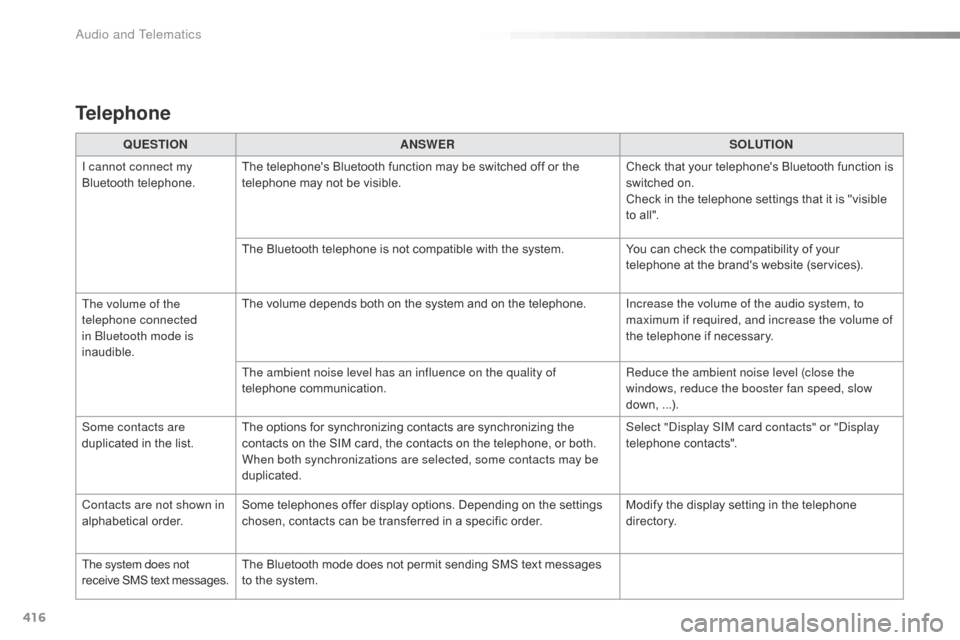
QUESTIONANSWER SOLUTION
I cannot connect my
Bluetooth telephone. The telephone's Bluetooth function may be switched off or the
telephone may not be visible. Check that your telephone's Bluetooth function is
switched on.
Check in the telephone settings that it is "visible
to all".
The Bluetooth telephone is not compatible with the system. You can check the compatibility of your
telephone at the brand's website (services).
The volume of the
telephone connected
in Bluetooth mode is
inaudible. The volume depends both on the system and on the telephone.
Increase the volume of the audio system, to
maximum if required, and increase the volume of
the telephone if necessary.
The ambient noise level has an influence on the quality of
telephone communication. Reduce the ambient noise level (close the
windows, reduce the booster fan speed, slow
down, ...).
Some contacts are
duplicated in the list. The options for synchronizing contacts are synchronizing the
contacts on the SIM card, the contacts on the telephone, or both.
When both synchronizations are selected, some contacts may be
duplicated. Select "Display SIM card contacts" or "Display
telephone contacts".
Contacts are not shown in
alphabetical order. Some telephones offer display options. Depending on the settings
chosen, contacts can be transferred in a specific order. Modify the display setting in the telephone
di r e c to r y.
The system does not
receive SMS text messages. The Bluetooth mode does not permit sending SMS text messages
to the system.
Telephone
Audio and Telematics