lock DAEWOO LACETTI 2004 Service Repair Manual
[x] Cancel search | Manufacturer: DAEWOO, Model Year: 2004, Model line: LACETTI, Model: DAEWOO LACETTI 2004Pages: 2643, PDF Size: 80.54 MB
Page 2252 of 2643

9B – 26ILIGHTING SYSTEMS
DAEWOO V–121 BL4
Backup Lamps Inoperative
StepActionValue(s)YesNo
11. Block the wheels.
2. Apply the parking brake to prevent the vehicle
from moving.
3. Turn the ignition on.
4. Put the transaxle in reverse (R).
5. Remove one of the backup lamps from its
socket.
6. Test the lamp socket positive terminal with a
voltmeter.
Does the battery voltage available at the backup
lamp socket positive terminal equal the specified
value?11–14 vGo to Step 3Go to Step 2
2Repair the open circuit between fuse F20 and the
backup lamps.
Is the repair complete?–System OK–
3Connect an ohmmeter between ground and the neg-
ative terminal at the bulb socket.
Is the resistance equal to the specified value?0 WGo to Step 4Go to Step 5
4Replace the faulty backup lamps.
Is the repair complete?–System OK–
51. Reinstall the backup lamps.
2. Disconnect the electrical connector at the re-
verse switch. (On automatic transaxle (A/T)
vehicles, disconnect the neutral safety/backup
switch.)
3. Turn the ignition on.
4. Put the transaxle in R.
5. Use a voltmeter to check for the reverse switch
terminal 1. (On A/T vehicles, test terminal 7 of
the neutral safety/backup switch).
Does the battery voltage available at terminal 1 (or
terminal 7, if equipped with A/T) equal the specified
value?11–14 vGo to Step 7Go to Step 6
6Repair the open circuit between the backup lamps
and the, reverse switch (or the neutral safety/backup
switch if equipped with A/T).
Is the repair complete?–System OK–
71. Put the transaxle in R.
2. Use an ohmmeter to check the continuity be-
tween reverse switch terminal 1 and terminal 2
(terminals 7 and 8 on the neutral safety/backup
switch, if equipped with A/T).
Does the continuity between terminals 1 and 2 (ter-
minals 7 and 8, if equipped with A/T) equal the speci-
fied value?0 WGo to Step 9Go to Step 8
Page 2272 of 2643

9B – 46ILITHING SYSTEMS
DAEWOO V–121 BL4
GENERAL DESCRIPTION
AND SYSTEM OPERATION
HEADLAMPS–ON REMINDER CHIME
When the headlamp switch is in the headlamps–on or
parking lamps–on position, voltage is applied to the chime
module. When the ignition is in ON, ACC or START, volt-
age is applied through the fuse block to the module. These
two voltages are sensed, and the chime module is not
sounded.
When the ignition is not in ON, ACC or START, the module
loses voltage. The chime module senses change. If the
voltage is still available, it is applied to sound the chime.
The chime can be turned off by turning the headlamp
switch off. The module no longer senses voltage from the
headlamp switch, so the chime module does not sound.
HEADLAMPS
The headlamps are controlled by the multifunction lever
located on the left side of the steering column. They will
come on with the ignition switch in any position. Turning
the headlamp switch to the first position turns on the park-
ing lamps, the license plate lamps and the instrument pan-
el illumination. Turning the switch to the second position
turns on all of the previous lamps and the headlamps.
Turning the switch to the OFF position turns off all the
lamps.
Headlamp high beams and low beams are also controlled
by this lever. When the headlamps are on, pushing the le-
ver away from the driver until the switch clicks changes the
lamp from low beam to high beam. An indicator lamp on
the instrument cluster assembly will come on when the
high beam headlamps are on. To return the headlamps to
low beam, pull the lever toward the driver.
The headlamps must be aimed for proper illumination of
the road. Headlamp aim should be checked whenever a
new headlamp assembly is installed, or whenever service
repairs to the front end area may have disturbed the head-
lamp assembly or its mountings.
DAYTIME RUNNING LAMPS
The Daytime Running Lamps (DRL) will come on when:
S The ignition is ON.
S The light is OFF.
S The parking brake is released.
When the exterior lights are on, the DRL will turn off. To
turn the DRL off when idling, apply the parking brake.
PARKING AND TURN SIGNAL LAMPS
The parking lamps can be turned on by turning the lighting
switch to the first position. The parking lamps can be
turned off by turning the switch to the OFF position.When the turn signals are activated, the front and rear turn
signal lamps flash to signal a turn. The turn signals work
only when the ignition is ON.
The turn signals are controlled by the light switch on the
left side of the steering column. Moving the lever all the
way up or down (past the detent) will turn on the front and
rear turn signals. When the turn is completed, the lever will
return to horizontal and the turn signals will stop flashing.
For changing lanes, or for shallow turns in which the steer-
ing wheel does not turn far enough to cancel the signal,
move the signal lever only to the first detent and hold it
there. When the lever is released, it will return to horizontal
and the turn signals will cancel.
FOG LAMPS
The fog lamp switch is on the instrument panel to the right
of the steering column. To use the fog lamps, first turn on
the headlamps or the parking lamps. Then push the fog
lamp switch. The indicator light in the switch will illuminate
to indicate that the fog lamps are on. Push the switch again
to turn off the fog lamps. The indicator light will then go off.
The fog lamps should not be used as a substitute for the
headlamps.
The fog lamps must be aimed for proper illumination of the
road. Fog lamp aim should be checked when a new bulb
is installed or if service or repairs in the front end area may
have disturbed the fog lamp mountings.
REAR COMBINATION LAMPS
The taillamps, stoplamps, turn signal lamps and backup
lamp are one assembly.
Turning on either the headlamps or the parking lamps will
also turn on the taillamps. When the brake pedal is
pushed, the taillamps will glow brighter to serve as sto-
plamps.
The center high–mounted stoplamp is located in the rear
window and will come on when the brake pedal is pressed.
LICENSE PLATE LAMP
The license plate lamps will come on when the headlamps
or the parking lamps are on. The license plate lamps are
mounted above the license plate.
INTERIOR COURTESY LAMP
The courtesy lamp is located on the headliner just behind
the front seats. The lamp switch has three positions. If the
switch is left in the center position, the lamp will go on
whenever a door is opened and go off when it is closed.
In the ON position, the lamp will stay on until it is turned off.
In the OFF position, the lamp will not come on, even when
a door is opened.
LUGGAGE COMPARTMENT LAMP
The luggage compartment lamp is located under the deck
lid sill plate on the notchback. The lamp is located on the
left–side wheelhouse trim panel on the hatchback. It will
come on whenever the luggage compartment is opened.
Page 2274 of 2643

SECTION : 9C
HORN(S)
CAUTION : Disconnect the negative battery cable before removing or installing any electrical unit or when a tool
or equipment could easily come in contact with exposed electrical terminals. Disconnecting this cable will help
prevent personal injury and damage to the vehicle. The ignition must also be in LOCK unless otherwise noted.
TABLE OF CONTENTS
SPECIFICATIONS9C–1 . . . . . . . . . . . . . . . . . . . . . . . . . .
Fastener Tightening Specifications 9C–1. . . . . . . . . . .
SCHEMATIC AND ROUTING DIAGRAMS9C–2 . . . . .
Horn Wiring System 9C–2. . . . . . . . . . . . . . . . . . . . . . . .
MAINTENANCE AND REPAIR9C–3 . . . . . . . . . . . . . . . ON–VEHICLE SERVICE 9C–3. . . . . . . . . . . . . . . . . . . . .
Horn(s) 9C–3. . . . . . . . . . . . . . . . . . . . . . . . . . . . . . . . . . .
GENERAL DESCRIPTION AND SYSTEM
OPERATION9C–4 . . . . . . . . . . . . . . . . . . . . . . . . . . . . . .
Horn(s) 9C–4. . . . . . . . . . . . . . . . . . . . . . . . . . . . . . . . . . .
SPECIFICATIONS
FASTENER TIGHTENING SPECIFICATIONS
ApplicationNSmLb–FtLb–In
Horn Bolt2015–
Page 2278 of 2643

SECTION : 9D
WIPERS/WASHER SYSTEMS
CAUTION : Disconnect the negative battery cable before removing or installing any electrical unit or when a tool
or equipment could easily come in contact with exposed electrical terminals. Disconnecting this cable will help
prevent personal injury and damage to the vehicle. The ignition must also be in LOCK unless otherwise noted.
TABLE OF CONTENTS
SPECIFICATIONS9D–1 . . . . . . . . . . . . . . . . . . . . . . . . . .
Fastener Tightening Specifications 9D–1. . . . . . . . . . .
SCHEMATIC AND ROUTING DIAGRAMS9D–2 . . . . .
Wipers and Washer System 9D–2. . . . . . . . . . . . . . . . .
Wipers and Washer System 9D–3. . . . . . . . . . . . . . . . .
Wipers and Washer System (HatchBack) 9D–4. . . . .
Wipers and Washer System (HatchBack) 9D–5. . . . .
DIAGNOSIS9D–6 . . . . . . . . . . . . . . . . . . . . . . . . . . . . . . . .
Windshield Wipers 9D–6. . . . . . . . . . . . . . . . . . . . . . . . .
Windshield Washer System 9D–10. . . . . . . . . . . . . . . .
Rear Window Wiper (Hatchback) 9D–11. . . . . . . . . . .
Rear Window Washer System (Hatchback) 9D–13. . .
MAINTENANCE AND REPAIR9D–14 . . . . . . . . . . . . . .
ON–VEHICLE SERVICE 9D–14. . . . . . . . . . . . . . . . . . . .
Windshield Wiper Arm 9D–14. . . . . . . . . . . . . . . . . . . . . Windshield Wiper Motor 9D–14. . . . . . . . . . . . . . . . . . .
Windshield Wiper Blade 9D–15. . . . . . . . . . . . . . . . . . .
Windshield Wiper Blade Insert 9D–16. . . . . . . . . . . . . .
Windshield Washer Reservoir 9D–16. . . . . . . . . . . . . .
Windshield Washer Pump(s) 9D–17. . . . . . . . . . . . . . .
Windshield Washer Nozzles 9D–18. . . . . . . . . . . . . . . .
Windshield Washer Hoses 9D–18. . . . . . . . . . . . . . . . .
Rear Window Wiper Arm (HATCHBACK) 9D–19. . . .
Rear Window Wiper Motor (HATCHBACK) 9D–20. . .
Rear Window Washer Nozzle (HATCHBACK) 9D–20
GENERAL DESCRIPTION AND SYSTEM
OPERATION9D–22 . . . . . . . . . . . . . . . . . . . . . . . . . . . . .
Windshield Wiper System 9D–22. . . . . . . . . . . . . . . . . .
Windshield Washer System 9D–22. . . . . . . . . . . . . . . .
Rear Window Wiper/Washer System 9D–22. . . . . . . .
SPECIFICATIONS
FASTENER TIGHTENING SPECIFICATIONS
ApplicationNSmLb–FtLb–In
Front Wheel Well Splash Shield Bolts1.5–13
Washer Fluid Reservoir Bolts8–71
Wiper Arm Linkage Nut5–44
Wiper Arm Nut2216–
Wiper Motor Bolts8–71
Rear Wiper Arm Nut11–97
Page 2300 of 2643

SECTION : 9E
INSTRUMENTATION/DRIVER INFORMATION
CAUTION : Disconnect the negative battery cable before removing or installing any electrical unit or when a tool
or equipment could easily come in contact with exposed electrical terminals. Disconnecting this cable will help
prevent personal injury and damage to the vehicle. The ignition must also be in LOCK unless otherwise noted.
TABLE OF CONTENTS
SPECIFICATIONS9E–2 . . . . . . . . . . . . . . . . . . . . . . . . . .
Fastener Tightening Specifications 9E–2. . . . . . . . . . .
Instrument Cluster Indicator Lamps
Specifications 9E–2. . . . . . . . . . . . . . . . . . . . . . . . . . .
SCHEMATIC AND ROUTING DIAGRAMS9E–3 . . . . .
Instrument Cluster Circuit (1 of 2) 9E–3. . . . . . . . . . . .
Instrument Cluster Circuit (2 of 2) 9E–4. . . . . . . . . . . .
Cigar Lighter And Extra Power Jack Circuit 9E–5. . . .
DIAGNOSIS9E–6 . . . . . . . . . . . . . . . . . . . . . . . . . . . . . . . .
Cigar Lighter 9E–6. . . . . . . . . . . . . . . . . . . . . . . . . . . . . .
Digital Clock 9E–7. . . . . . . . . . . . . . . . . . . . . . . . . . . . . .
Instrument Panel Illumination 9E–9. . . . . . . . . . . . . . . .
Speedometer 9E–10. . . . . . . . . . . . . . . . . . . . . . . . . . . .
Fuel Gauge 9E–10. . . . . . . . . . . . . . . . . . . . . . . . . . . . . .
Temperature Gauge 9E–11. . . . . . . . . . . . . . . . . . . . . . .
Instrument Cluster Indicator Lamps 9E–12. . . . . . . . .
Chime Module 9E–13. . . . . . . . . . . . . . . . . . . . . . . . . . . .
Chime Module 9E–14. . . . . . . . . . . . . . . . . . . . . . . . . . . .
MAINTENANCE AND REPAIR9E–18 . . . . . . . . . . . . . .
ON–VEHICLE SERVICE 9E–18. . . . . . . . . . . . . . . . . . . .
Center Molding 9E–18. . . . . . . . . . . . . . . . . . . . . . . . . . .
Instrument Cluster Trim Panel 9E–18. . . . . . . . . . . . . .
Garnish Molding 9E–19. . . . . . . . . . . . . . . . . . . . . . . . . .
Ashtray 9E–19. . . . . . . . . . . . . . . . . . . . . . . . . . . . . . . . . . Cigar Lighter 9E–20. . . . . . . . . . . . . . . . . . . . . . . . . . . . .
Glove Box 9E–20. . . . . . . . . . . . . . . . . . . . . . . . . . . . . . .
Notchback Deposit Box 9E–21. . . . . . . . . . . . . . . . . . . .
Notchback Digital Clock 9E–21. . . . . . . . . . . . . . . . . . .
Hatchback Digital Clock 9E–22. . . . . . . . . . . . . . . . . . .
Instrument Cluster 9E–23. . . . . . . . . . . . . . . . . . . . . . . .
Instrument Cluster Dimmer/Headlamp
Leveling Switch 9E–23. . . . . . . . . . . . . . . . . . . . . . . . .
Instrument Cluster Indicator Lamps 9E–24. . . . . . . . .
Instrument Panel 9E–24. . . . . . . . . . . . . . . . . . . . . . . . .
Chime Module 9E–28. . . . . . . . . . . . . . . . . . . . . . . . . . . .
GENERAL DESCRIPTION AND SYSTEM
OPERATION9E–30 . . . . . . . . . . . . . . . . . . . . . . . . . . . . .
Cigar Lighter 9E–30. . . . . . . . . . . . . . . . . . . . . . . . . . . . .
Ashtray 9E–30. . . . . . . . . . . . . . . . . . . . . . . . . . . . . . . . . .
Instrument Panel Vents 9E–30. . . . . . . . . . . . . . . . . . . .
Glove Box 9E–30. . . . . . . . . . . . . . . . . . . . . . . . . . . . . . .
Digital Clock 9E–30. . . . . . . . . . . . . . . . . . . . . . . . . . . . .
Instrument Cluster 9E–30. . . . . . . . . . . . . . . . . . . . . . . .
Speedometer/Odometer/Trip Odometer 9E–30. . . . . .
Fuel Gauge 9E–30. . . . . . . . . . . . . . . . . . . . . . . . . . . . . .
Temperature Gauge 9E–30. . . . . . . . . . . . . . . . . . . . . . .
Instrument Cluster Indicator Lamps 9E–30. . . . . . . . .
Chime Module 9E–30. . . . . . . . . . . . . . . . . . . . . . . . . . . .
Page 2301 of 2643

9E – 2IINSTRUMENTATION/DRIVER INFORMATION
DAEWOO V–121 BL4
SPECIFICATIONS
FASTENER TIGHTENING SPECIFICATIONS
ApplicationNSmLb–FtLb–In
Air Deflector Screws2–18
Chime Module Screws4–35
Clock Screws2–18
Cupholder Screws2.5–22
Deposit Box Screws2.5–22
Driver Knee Bolster Bolts10–89
Floor Console Brace Bolts4–35
Floor Console Brace Nuts4–35
HVAC Controls Screws4–35
Instrument Cluster Screws4–35
Instrument Cluster Trim Panel Screws4–35
Instrument Panel End Bolts2015–
Instrument Panel End Screws4–35
Instrument Panel Nuts Above the Steering Column2015–
Instrument Panel Bolts Behind the HVAC Controls4–35
Steering Column Bracket Nut2216–
Steering Column Lower Trim Cover Screws2.5–22
Steering Column U–Clamp Nuts2216–
Steering Column Upper Trim Cover Screws3–27
INSTRUMENT CLUSTER INDICATOR LAMPS
SPECIFICATIONS
Indicator LampColorBulb
ABS WarningAmber14 v 1.4 W
Airbag WarningRed14 v 1.4 W
Battery Charge IndicatorRed14 v 1.4 W
Check EngineAmber14 v 1.4 W
Door Open WarningRed14 v 1.4 W
Engine OverheatRed14 v 1.4 W
Fasten Seat Belt WarningRed14 v 1.4 W
High Beam IndicatorBlue14 v 1.4 W
Low Fuel Level WarningAmber14 v 4 W
Oil Pressure WarningRed14 v 1.4 W
Parking Brake Indicator and Brake Fluid WarningRed14 v 1.4 W
Service Engine Soon WarningAmber14 v 1.4 W
Transaxle Power Mode IndicatorAmber14 v 1.4 W
Turn Signal IndicatorsGreen14 v 1.4 W
Page 2306 of 2643

INSTRUMENTATION/DRIVER INFORMATION 9E – 7
DAEWOO V–121 BL4
DIGITAL CLOCK
Digital Clock Inoperative
StepActionValue(s)YesNo
1Check fuses F17, Ef28 and F22.
Is either fuse F17, Ef28 and F22 blown?–Go to Step 2Go to Step 3
21. Check for a short circuit and repair it, if neces-
sary.
2. Replace the blown fuses.
Is the repair complete?–System OK–
31. Turn the ignition ON.
2. Use a voltmeter to check battery voltage avail-
able at fuses F17, Ef28 and F22.
Does the voltmeter indicate the value specified?11–14 vGo to Step 5Go to Step 4
4Repair the open power supply circuit for the fuse.
Is the repair complete?–System OK–
5Use a voltmeter to check the battery voltage avail-
able at the clock connector terminal 6.
Does the voltmeter indicate the value specified?11–14 vGo to Step 7Go to Step 6
6Repair the open circuit between the clock connector
terminal 2 and the fuse F22.
Is the repair complete?–System OK–
7Turn the ignition ON.
Is battery voltage available at the clock connector
terminal 5?–Go to Step 9Go to Step 8
Page 2307 of 2643

9E – 8IINSTRUMENTATION/DRIVER INFORMATION
DAEWOO V–121 BL4
StepNo Yes Value(s) Action
8Repair the open circuit between terminal 5 of the
clock connector and fuse F17.
Is the repair complete?–System OK–
9Check continuity between terminal 3 of the clock
connector and ground.
Does the multimeter indicate the value specified?0 WGo to Step 10Go to Step 11
10Replace the clock.
Is the repair complete?–System OK–
11Repair the open ground circuit between terminal 3
the clock connector and ground G202.
Is the repair complete?–System OK–
Page 2320 of 2643
INSTRUMENTATION/DRIVER INFORMATION 9E – 21
DAEWOO V–121 BL4
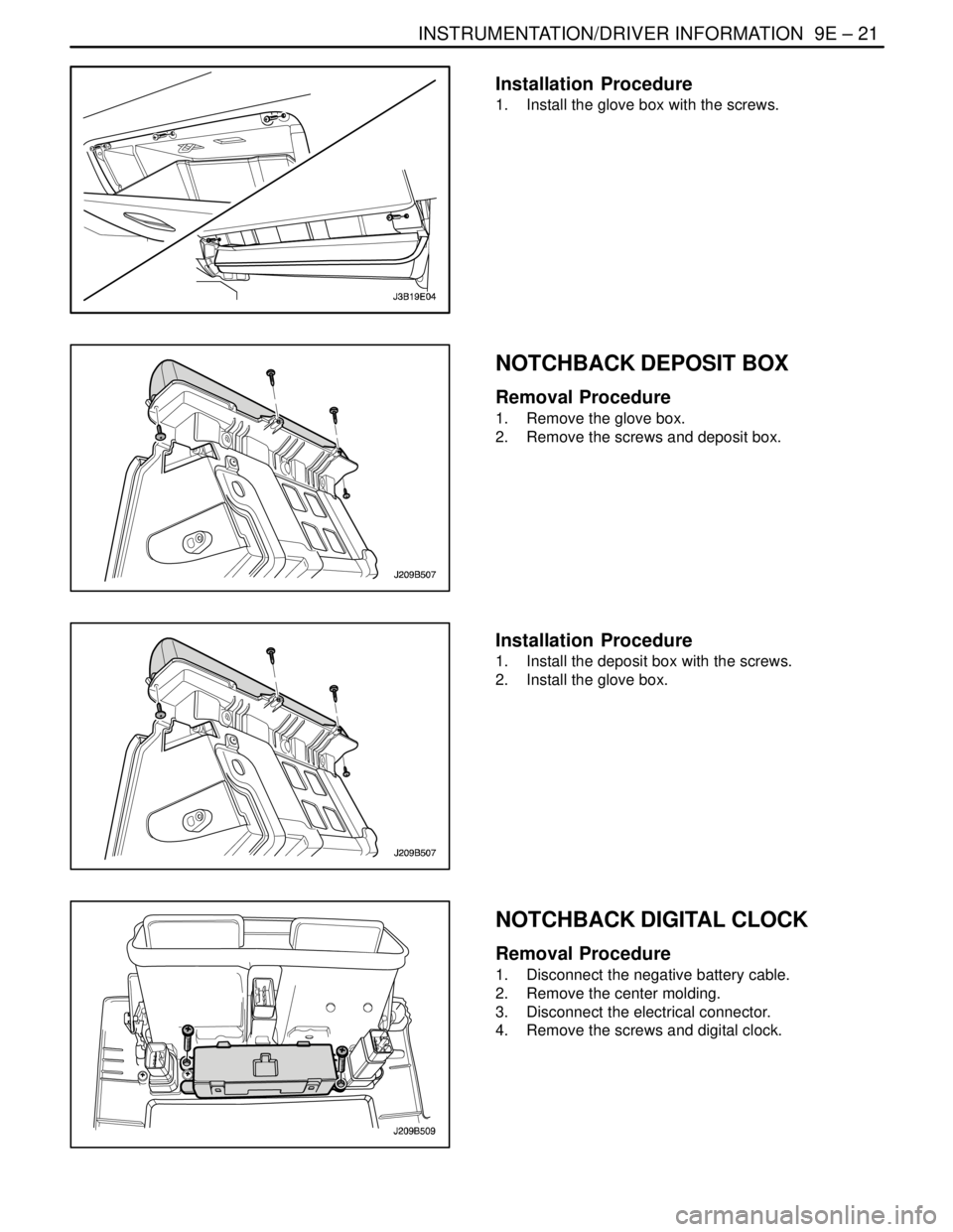
Installation Procedure
1. Install the glove box with the screws.
NOTCHBACK DEPOSIT BOX
Removal Procedure
1. Remove the glove box.
2. Remove the screws and deposit box.
Installation Procedure
1. Install the deposit box with the screws.
2. Install the glove box.
NOTCHBACK DIGITAL CLOCK
Removal Procedure
1. Disconnect the negative battery cable.
2. Remove the center molding.
3. Disconnect the electrical connector.
4. Remove the screws and digital clock.
Page 2321 of 2643
9E – 22IINSTRUMENTATION/DRIVER INFORMATION
DAEWOO V–121 BL4
Installation Procedure
1. Install the digital clock with the screws.
2. Connect the electrical connector.
3. Install the center molding.
4. Connect the negative battery cable.
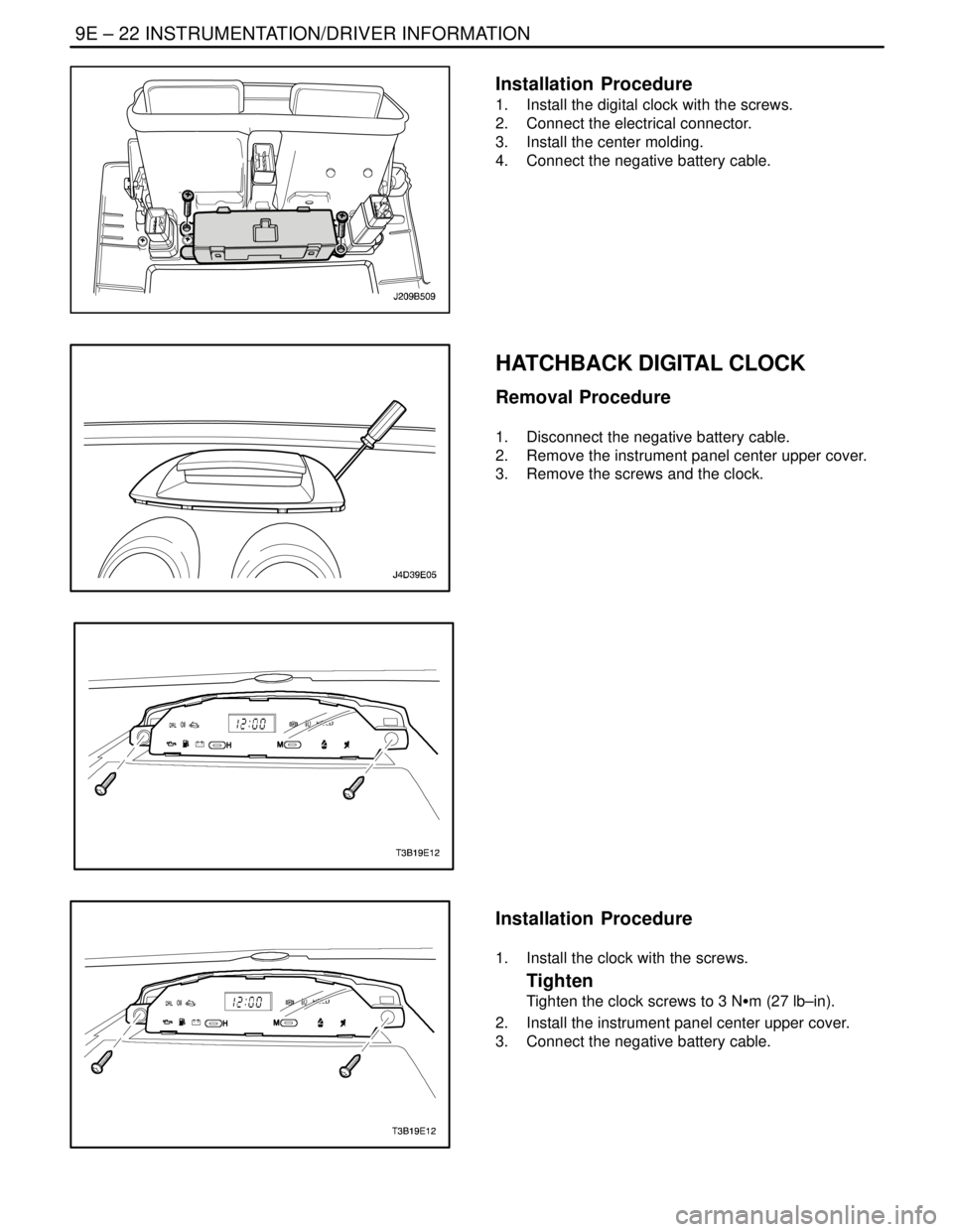
HATCHBACK DIGITAL CLOCK
Removal Procedure
1. Disconnect the negative battery cable.
2. Remove the instrument panel center upper cover.
3. Remove the screws and the clock.
Installation Procedure
1. Install the clock with the screws.
Tighten
Tighten the clock screws to 3 NSm (27 lb–in).
2. Install the instrument panel center upper cover.
3. Connect the negative battery cable.