air condition DATSUN 210 1979 Service Manual
[x] Cancel search | Manufacturer: DATSUN, Model Year: 1979, Model line: 210, Model: DATSUN 210 1979Pages: 548, PDF Size: 28.66 MB
Page 517 of 548
I
I
3
Set
temperature
lever
to
max
imum
cold
position
Air
Conditioning
4
Sefblower
to
maximum
speed
S
Check
sight
glass
after
the
lapse
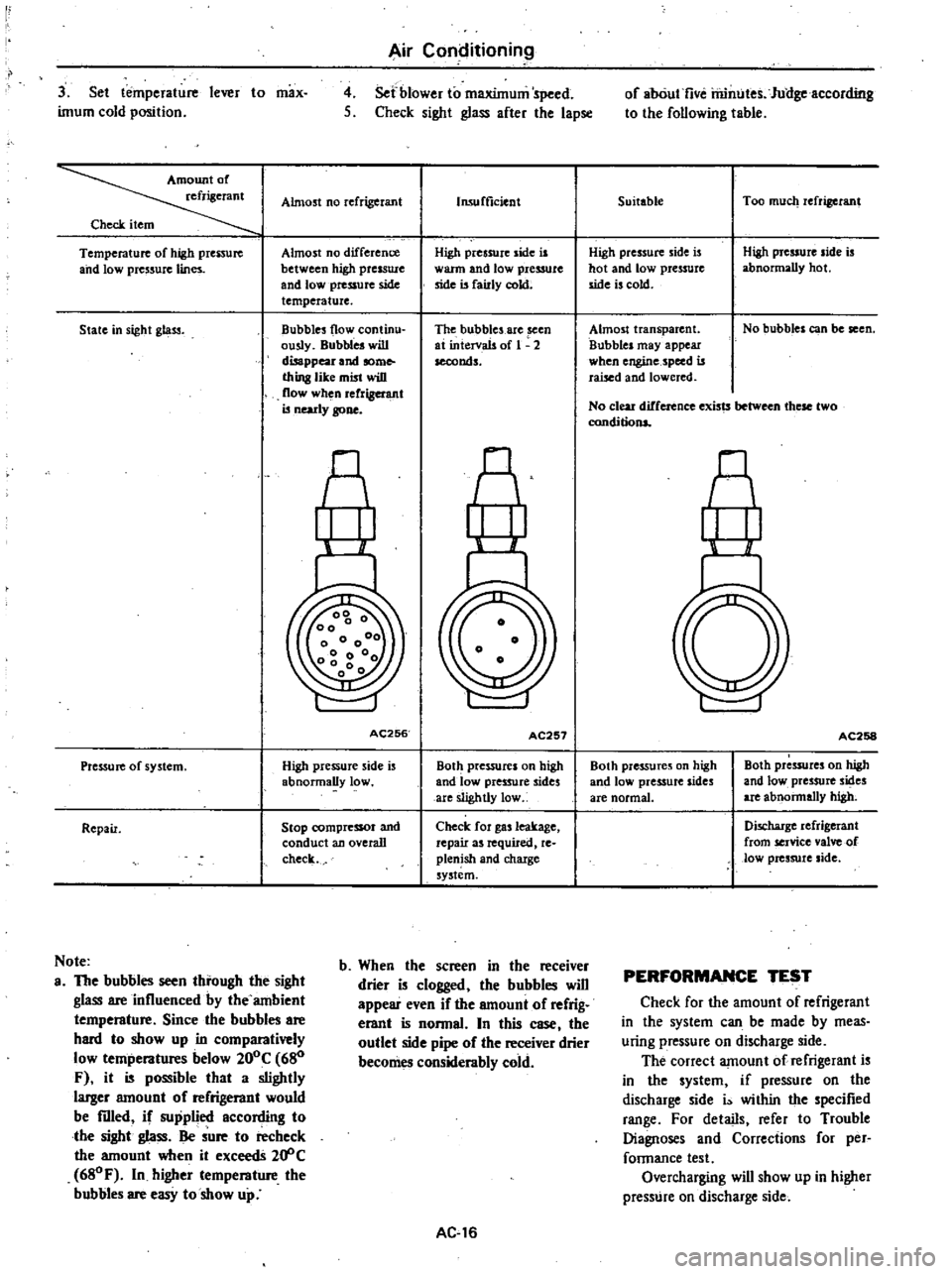
Almost
no
refrigerant
Check
item
Temperature
of
high
prenure
and
low
pressure
lines
Almost
no
difference
between
high
presswc
and
lowpressufC
side
temperature
State
in
sight
gl
ltS3
Bubbles
flow
continu
ously
Bubbles
will
disappear
and
some
thing
like
mist
wiD
flow
when
rerrigel
l
llt
is
nearly
gone
AC256
Pressure
of
system
High
pressure
side
is
abnormally
low
Repair
Stop
compressor
and
conduct
an
overall
check
Note
a
The
bubbles
seen
tbrough
the
sight
glass
are
influenced
by
the
ambient
tempemture
Since
the
bubbles
are
bard
to
show
up
in
comparatively
low
tempemtures
below
200C
680
F
it
is
possible
that
a
slightly
larger
amouot
of
refrigemot
would
be
filled
if
supplied
according
to
tbe
sight
glass
Be
sure
to
recheck
the
amount
when
it
exceedS
20
C
680F
In
higher
tempemture
tbe
bubbles
are
easy
to
show
up
Insufficient
High
pressure
side
is
warm
and
low
pressure
side
is
fairly
cokt
The
bubbles
are
seen
at
intervals
of
1
2
seconds
AC257
Both
pressures
on
high
and
low
pressure
sides
are
slightly
low
Check
for
gas
leakage
repair
as
required
re
plenish
and
chaxge
system
b
Wben
the
screen
in
tbe
receiver
drier
is
clogged
tbe
bubbles
wiD
appear
even
if
the
amount
of
refrig
erant
is
nonnaL
In
this
case
tbe
outlet
side
pipe
of
tbe
receiver
drier
becomes
considembly
cold
AC
16
of
abOut
five
rilintJtes
Jullgeaccording
to
the
following
table
Suitable
Too
much
refrigerant
High
pressure
side
is
hot
and
low
pressure
side
is
cold
High
pressure
side
is
abnormally
hot
Almost
transparent
Bubbles
may
appear
when
engine
speed
is
raised
and
lowered
No
bubbles
can
be
seen
No
clear
difference
exists
these
two
conditions
nl
AC258
Both
pre55ures
on
high
and
low
pressure
sides
are
normal
Both
pressures
on
high
and
low
pressure
sides
are
abnonnally
high
Discharge
refrigerant
from
service
valve
of
low
pressure
side
PERFORMANCE
TEST
Check
for
the
amount
of
refrigerant
in
the
system
can
be
made
by
meas
uring
pressure
on
discharge
side
The
correct
amount
of
refrigerant
is
in
the
system
if
pressure
on
the
discharge
side
i
within
the
specified
range
For
details
refer
to
Trouble
Diagnoses
and
Corrections
for
per
fannance
test
Overcharging
will
show
up
in
higher
presstJre
on
discharge
side
Page 518 of 548
COMPRESSOR
OIL
LEVEL
CHECK
The
oil
used
to
lubricate
compres
sor
circulates
into
system
from
the
oil
sump
while
compressor
is
operating
Therefore
to
correctly
measure
com
pressor
oil
the
amount
of
oil
flowing
to
system
must
be
considered
If
a
considerable
amount
of
leakage
of
refrigerant
gas
happens
the
leakage
of
compressor
oil
is
also
considered
There
will
be
no
compressor
oil
leak
age
from
a
completely
sealed
system
When
system
operates
under
satisfying
condition
the
compressor
oil
level
check
is
unnecessary
When
checking
the
level
of
com
pressor
oil
or
when
replacing
any
component
part
of
the
system
use
the
following
service
procedure
This
facio
litates
to
return
oil
to
compressor
1
Operate
compressor
at
engine
idling
speed
I
OOO
rpm
or
below
with
controls
set
for
maximum
cooling
and
high
blower
speed
for
10
to
15
minutes
in
order
to
return
com
pressor
oil
to
compressor
2
Stop
the
engine
and
discharge
refrigerant
of
system
and
then
remove
compressor
from
the
car
3
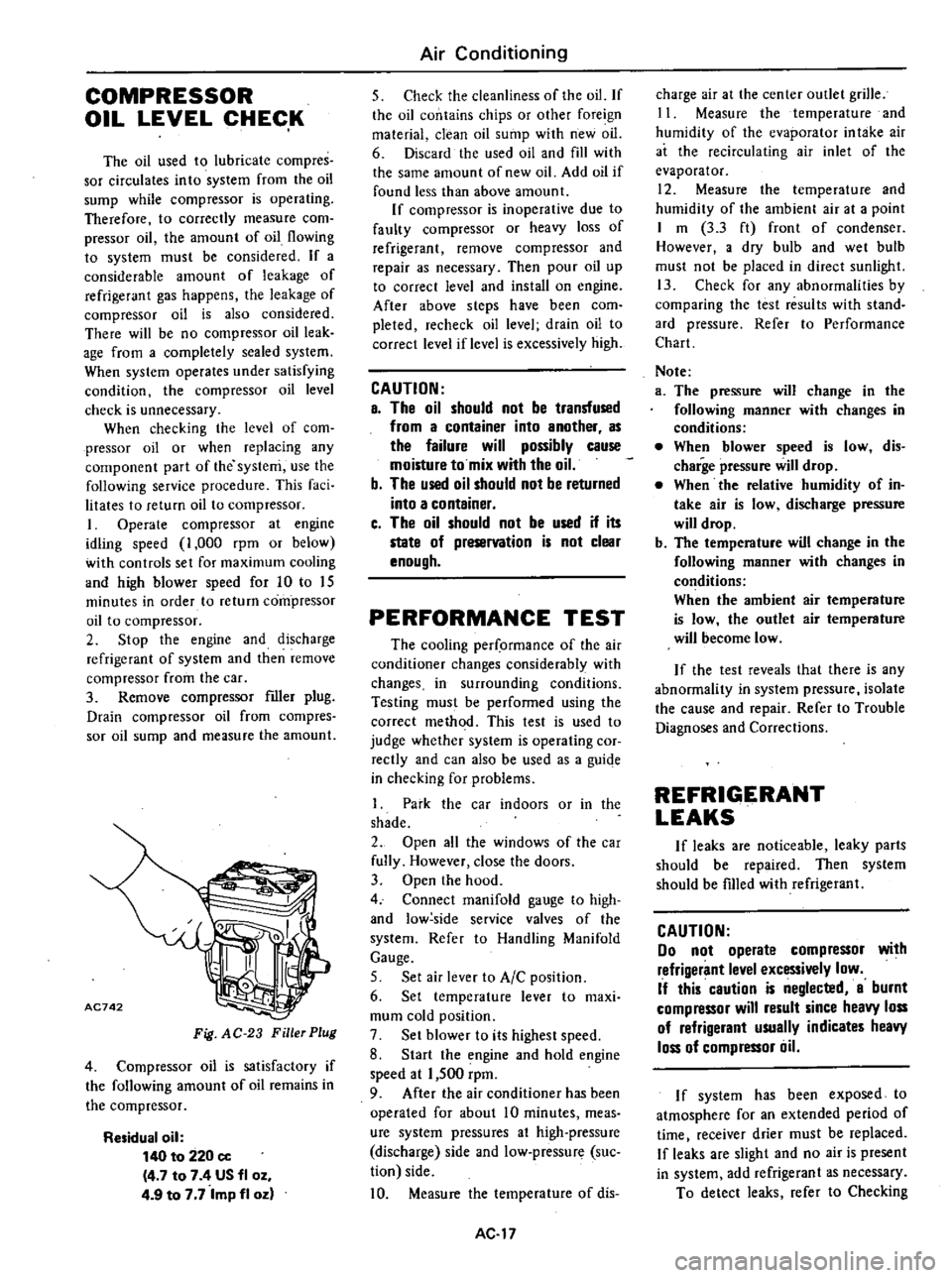
Remove
compressor
filler
plug
Drain
compressor
oil
from
compres
sor
oil
sump
and
measure
the
amount
AC742
Fig
AC
23
Filler
Plug
4
Compressor
oil
is
satisfactory
if
the
following
amount
of
oil
remains
in
the
compressor
Residual
oil
140
to
220
cc
4
7
to
7
4
US
fl
oz
4
9
to
7
7
Imp
fl
oz
Air
Conditioning
5
Check
the
cleanliness
of
the
oil
If
the
oil
contains
chips
or
other
foreign
material
clean
oil
sump
with
new
oil
6
Discard
the
used
oil
and
fill
with
the
same
amount
of
new
oil
Add
oil
if
found
less
than
above
amount
If
compressor
is
inoperative
due
to
faulty
compressor
or
heavy
loss
of
refrigerant
remove
compressor
and
repair
as
necessary
Then
pour
oil
up
to
correct
level
and
install
on
engine
After
above
steps
have
been
com
pleted
recheck
oil
level
drain
oil
to
correct
level
if
level
is
excessively
high
CAUTION
a
The
oil
should
not
be
transfused
from
a
container
into
another
as
the
failure
will
possibly
cause
moisture
to
mix
with
the
oil
b
The
used
oil
should
not
be
returned
into
a
container
c
The
oil
should
not
be
used
if
its
state
of
preservation
is
not
clear
enough
PERFORMANCE
TEST
The
cooling
per
ormance
of
the
air
conditioner
changes
considerably
with
changes
in
surrounding
conditions
Testing
must
be
performed
using
the
correct
method
This
test
is
used
to
judge
whether
system
is
operating
cor
rectly
and
can
also
be
used
as
a
guiqe
in
checking
for
problems
1
Park
the
car
indoors
or
in
the
shade
2
Open
all
the
windows
of
the
car
fully
However
close
the
doors
3
Open
the
hood
4
Connect
manifold
gauge
to
high
and
low
side
service
valves
of
the
system
Refer
to
Handling
Manifold
Gauge
5
Set
air
lever
to
AIC
position
6
Set
temperature
lever
to
maxi
mum
cold
position
7
Set
blower
to
its
highest
speed
8
Start
the
engine
and
hold
engine
speed
at
1
500
rpm
9
After
the
air
conditioner
has
been
operated
for
about
10
minutes
meas
ure
system
pressures
at
high
pressure
discharge
side
and
low
pressure
suc
tion
side
10
Measure
the
temperature
of
dis
AC
17
charge
air
at
the
center
outlet
grille
11
Measure
the
temperature
and
humidity
of
the
evaporator
in
take
air
at
the
recirculating
air
inlet
of
the
evaporator
12
Measure
the
temperature
and
humidity
of
the
ambient
air
at
a
point
I
m
3
3
ft
front
of
condenser
However
a
dry
bulb
and
wet
bulb
must
not
be
placed
in
direct
sunlight
13
Check
for
any
abnormalities
by
comparing
the
test
results
with
stand
ard
pressure
Refer
to
Performance
Chart
Note
a
The
pressure
will
change
in
the
following
manner
with
changes
in
conditions
When
blower
speed
is
low
dis
charge
pressure
will
drop
When
the
relative
humidity
of
in
take
air
is
low
discharge
pressure
will
drop
b
The
temperature
will
change
in
the
following
manner
with
changes
in
conditions
When
the
ambient
air
temperature
is
low
the
outlet
air
temperature
will
become
low
If
the
test
reveals
that
there
is
any
abnormality
in
system
pressure
isolate
the
cause
and
repair
Refer
to
Trouble
Diagnoses
and
Corrections
REFRIGERANT
LEAKS
If
leaks
are
noticeable
leaky
parts
should
be
repaired
Then
system
should
be
fIlled
with
refrigerant
CAUTION
00
not
operate
compressor
with
refrigerant
level
excessively
low
If
this
caution
is
neglected
a
burnt
compressor
will
result
since
heavy
loss
of
refrigerant
usually
indicates
heavy
loss
of
compressor
liil
I
f
system
has
been
exposed
to
atmosphere
for
an
extended
period
of
time
I
receiver
drier
must
be
replaced
If
leaks
are
slight
and
no
air
is
present
in
system
add
refrigerant
as
necessary
To
detect
leaks
refer
to
Checking
Page 519 of 548
for
Leaks
Here
is
how
leaks
are
stopped
I
Check
torque
on
the
connection
fitting
and
if
too
loose
tighten
to
the
proper
lorque
Check
for
gas
leakage
with
a
leak
detector
Air
Conditioning
2
If
leakage
continues
ven
after
the
fitting
has
been
retightened
dis
charge
refrigerant
from
system
disc
on
net
the
fittings
and
check
its
seating
face
for
damage
Always
replace
even
if
damage
is
slight
J
Check
compressor
6il
and
add
oil
if
required
4
Charge
refrigerant
and
recheck
for
gas
leaks
If
no
leaks
are
found
evacuate
and
charge
system
SERVICE
PROCEDURES
FAST
IDLE
ACTUATOR
ADJUSTMENT
OF
IDLE
SPEED
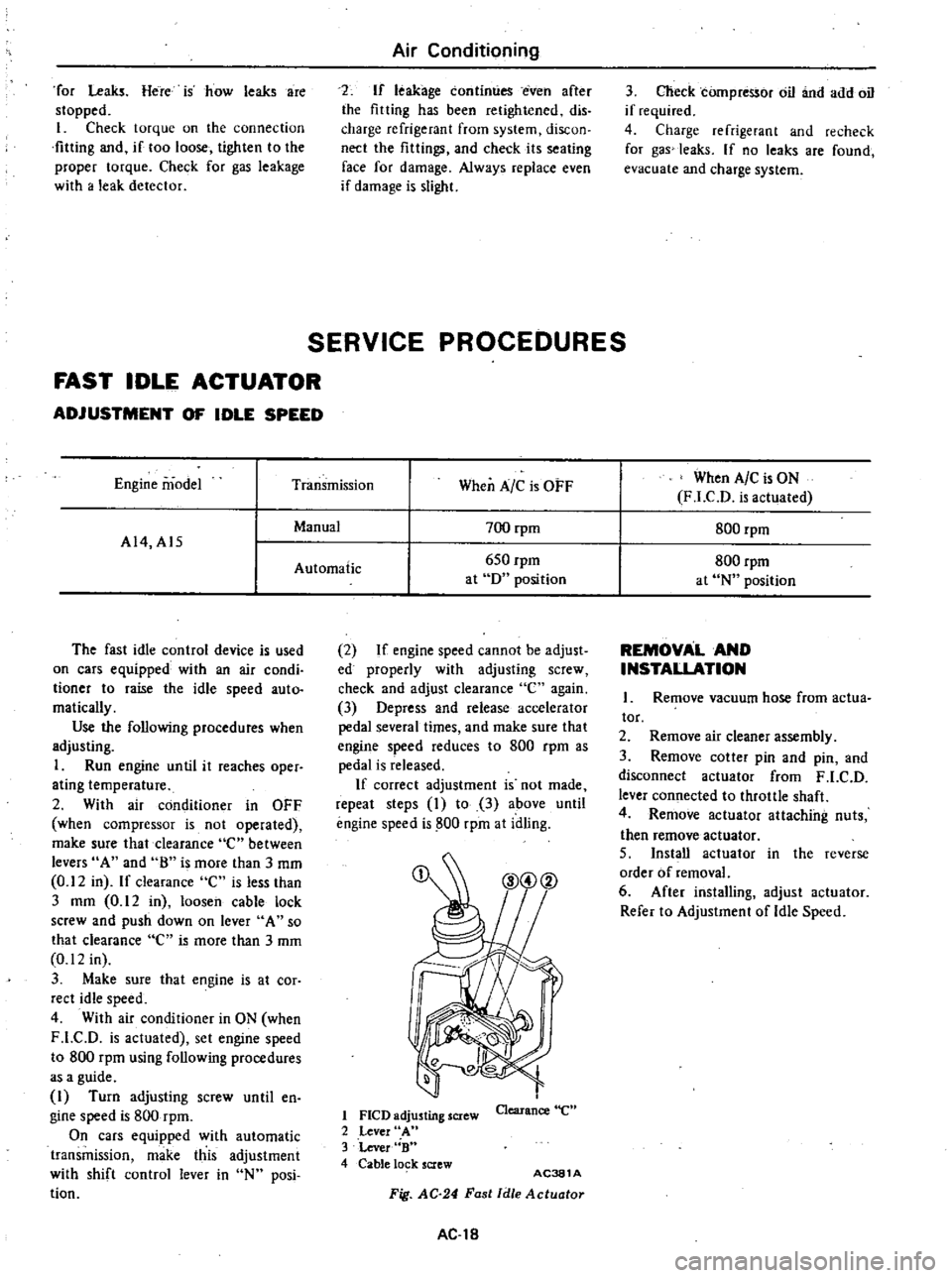
Engine
model
Transmission
When
A
C
is
OFF
When
A
C
is
ON
F
LCD
is
actuated
Manual
700
rpm
800
rpm
A14
A15
Automatic
650
rpm
800
rpm
at
D
position
at
N
position
The
fast
idle
control
device
is
used
on
cars
equipped
with
an
air
condi
tioner
to
raise
the
idle
speed
auto
matically
Use
the
following
procedures
when
adjusting
1
Run
engine
until
it
reaches
oper
ating
temperature
2
With
air
conditioner
in
OFF
when
compressor
is
not
operated
make
sure
that
clearance
e
between
levers
A
and
8
is
more
than
J
mm
0
12
in
If
clearance
C
is
less
than
J
mm
0
12
in
loosen
cable
lock
screw
and
push
down
on
lever
A
so
that
clearance
C
is
more
than
J
mm
0
12
in
3
Make
sure
that
engine
is
at
cor
rect
idle
speed
4
With
air
conditioner
in
ON
when
F
LC
D
is
actuated
set
engine
speed
to
800
rpm
using
following
procedures
as
a
guide
I
Turn
adjusting
screw
until
en
gine
speed
is
800
rpm
On
cars
equipped
with
automatic
transmission
make
this
adjustment
with
shift
control
lever
in
N
posi
tion
2
If
engine
speed
cannot
be
adjust
ed
properly
with
adjusting
screw
check
and
adjust
clearance
e
again
3
Depress
and
release
accelerator
pedal
several
times
and
make
sure
that
engine
speed
reduces
to
800
rpm
as
pedal
is
released
If
correct
adjustment
is
not
made
repeat
steps
I
to
3
above
until
engine
speed
is
800
rpm
at
idling
1
FlCD
adjusting
screw
2
Lever
A
3
Lever
B
4
Cable
lo
k
screw
Clearance
e
AC381
A
Fig
AC
24
Fast
Idle
Actuotor
AC
18
REMOVAL
AND
INSTALLATION
Remove
vacuum
hose
from
actua
tor
2
Remove
air
cleaner
assembly
3
Remove
cotter
pin
and
pin
and
disconnect
actuator
from
F
LC
D
lever
connected
to
throttle
shaft
4
Remove
actuator
attaching
nuts
then
remove
actuator
5
Install
actuator
in
the
reverse
order
of
removal
6
After
installing
adjust
actuator
Refer
to
Adjustment
of
Idle
Speed
Page 520 of 548

Air
Conditioning
IDLER
PULLEY
AND
COMPRESSOR
DRIVE
BELT
ADJ
USTMENT
OF
BELT
TENSION
Idler
pulley
Alternator
Crankshaft
pulley
Unit
mm
in
Idler
pulley
Fig
AC
25
Belt
Tension
Specified
compressor
belt
tension
is
8
to
12
mm
0
31
to
0
47
in
when
thumb
pressure
of
10
kg
22
Ib
is
applied
midway
between
idler
pulley
and
compressor
pulley
1
Loosen
idler
pulley
lock
nut
and
then
adjust
pulley
by
turning
adjusting
bolt
2
After
adjustment
tighten
idler
pulley
lock
nut
bolt
3
Remove
idler
pulley
4
Install
pulley
in
the
reverse
order
of
removal
5
Adjust
compressor
belt
tension
REMOVAL
AND
INSTALLATION
1
Jack
up
front
of
car
and
remove
under
cover
2
Remove
idler
pulley
lock
nut
and
loosen
belt
tension
adjusting
Fig
AC26
AC382A
Idler
Pulley
TIghtening
torque
@
3
7
to
5
1
kg
m
27
to
37
ft
lb
AC383A
Fig
AC
27
Compressor
and
Bracket
AC
19
REMOVAL
I
Operate
compressor
if
possible
at
engine
idling
speed
with
air
condi
tioner
controls
set
for
maximum
cool
ing
and
high
blower
speed
for20
to
30
minutes
with
all
windows
open
to
return
oil
into
compressor
2
Disconnect
battery
ground
cables
and
compressor
lead
wire
at
con
nector
3
Discharge
refrigerant
from
cool
ing
system
Refer
to
Discharging
Sys
tem
4
Jack
up
front
of
car
and
remove
under
cover
5
Loosen
idler
pulley
lock
nut
and
loosen
tension
adjusting
bolt
fully
Remove
compressor
drive
belt
See
Fig
AC
26
6
Remove
high
and
low
flexible
hoses
from
compressor
WARNING
Gradually
loosen
discharge
side
hose
fitting
and
remove
it
after
remaining
pressure
has
been
re
leased
CAUTION
Be
sure
to
immediately
put
plug
in
flexible
hose
and
compressor
open
ings
7
Remove
bolts
securing
lower
part
of
compressor
8
Remove
bolts
securing
upper
part
of
compressor
Hold
compressor
with
one
hand
when
removing
bolts
and
then
remove
compressor
With
compressor
clutch
up
lift
compressor
out
with
both
hands
CAUTION
00
not
attempt
to
leave
the
com
pressor
on
its
side
or
upside
down
for
more
than
10
minutes
as
the
compressor
oil
will
enter
the
low
pressure
chambers
If
under
that
condition
compressor
should
be
oper
ated
suddenly
internal
damage
would
result
To
expel
oil
from
chambers
hand
crank
compressor
several
times
in
its
installed
condition
Page 522 of 548
REFRIGERANT
LINES
Air
Conditioning
@
I
J
L
S
r
Z
S
t
@
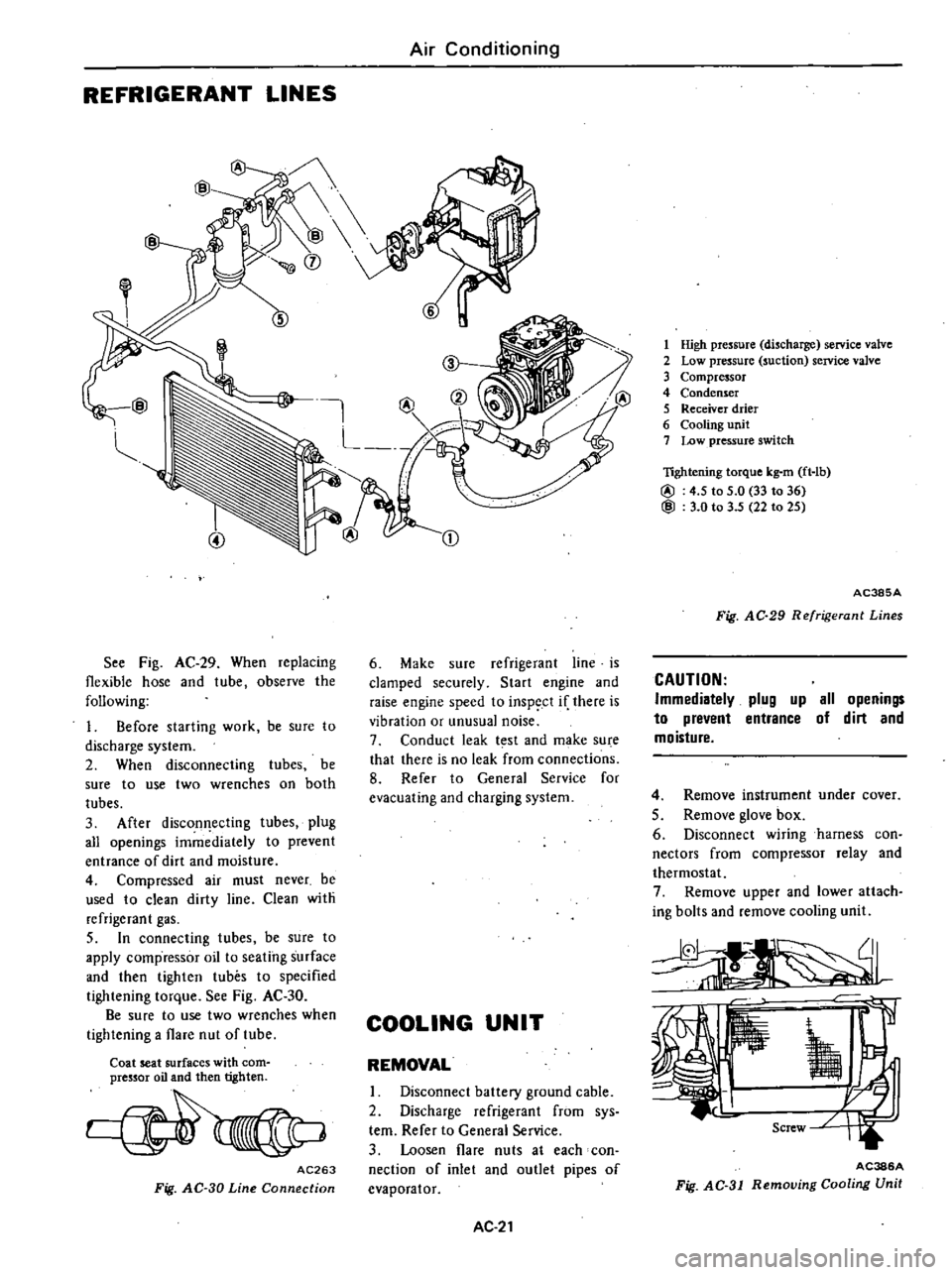
See
Fig
AC
29
When
replacing
flexible
hose
and
tube
observe
the
following
1
Before
starting
work
be
sure
to
discharge
system
2
When
disconnecting
tubes
be
sure
to
use
two
wrenches
on
both
tubes
3
After
discon
ecting
tubes
plug
all
openings
immediately
to
prevent
entrance
of
dirt
and
moisture
4
Compressed
air
must
never
be
used
to
clean
dirty
line
Clean
with
refrigerant
gas
5
In
connecting
tubes
be
sure
to
apply
compressor
oil
to
seating
surface
and
then
tighten
tubes
to
specified
tightening
torque
See
Fig
AC
30
Be
sure
to
use
two
wrenches
when
tightening
a
flare
nut
of
tube
Coat
seat
surfaces
with
com
pressor
oil
and
then
tighten
AC263
Fig
AC
30
Line
Connection
CD
6
Make
sure
refrigerant
line
is
clamped
securely
Start
engine
and
raise
engine
speed
to
inspect
if
there
is
vibration
or
unusual
noise
7
Conduct
leak
t
st
and
make
su
e
that
there
is
no
leak
from
connections
8
Refer
to
General
Service
for
evacuating
and
charging
system
COOLING
UNIT
REMOVAL
I
Disconnect
battery
ground
cable
2
Discharge
refrigerant
from
sys
tern
Refer
to
General
Service
3
Loosen
flare
nuts
at
each
con
nection
of
inlet
and
outlet
pipes
of
evaporator
AC
21
1
High
pressure
discharge
service
valve
2
Low
pressure
suction
service
valve
3
Compressor
4
Condenser
5
Receiver
drier
6
Cooling
unit
7
Low
pressure
switch
lightening
torque
kg
m
ft
lb
@
4
5
to
5
0
33
to
36
@
3
0
to
3
5
22
to
25
AC385A
Fig
AC
29
Refrigerant
Lines
CAUTION
Immediatelv
plug
up
all
openings
to
prevent
entrance
of
dirt
and
moisture
4
Remove
instrument
under
cover
5
Remove
glove
box
6
Disconnect
wiring
harness
con
nectors
from
compressor
relay
and
thermostat
7
Remove
upper
and
lower
attach
ing
bolts
and
remove
cooling
unit
AC386A
Fig
AC
31
Removing
Cooling
Unit
Page 523 of 548
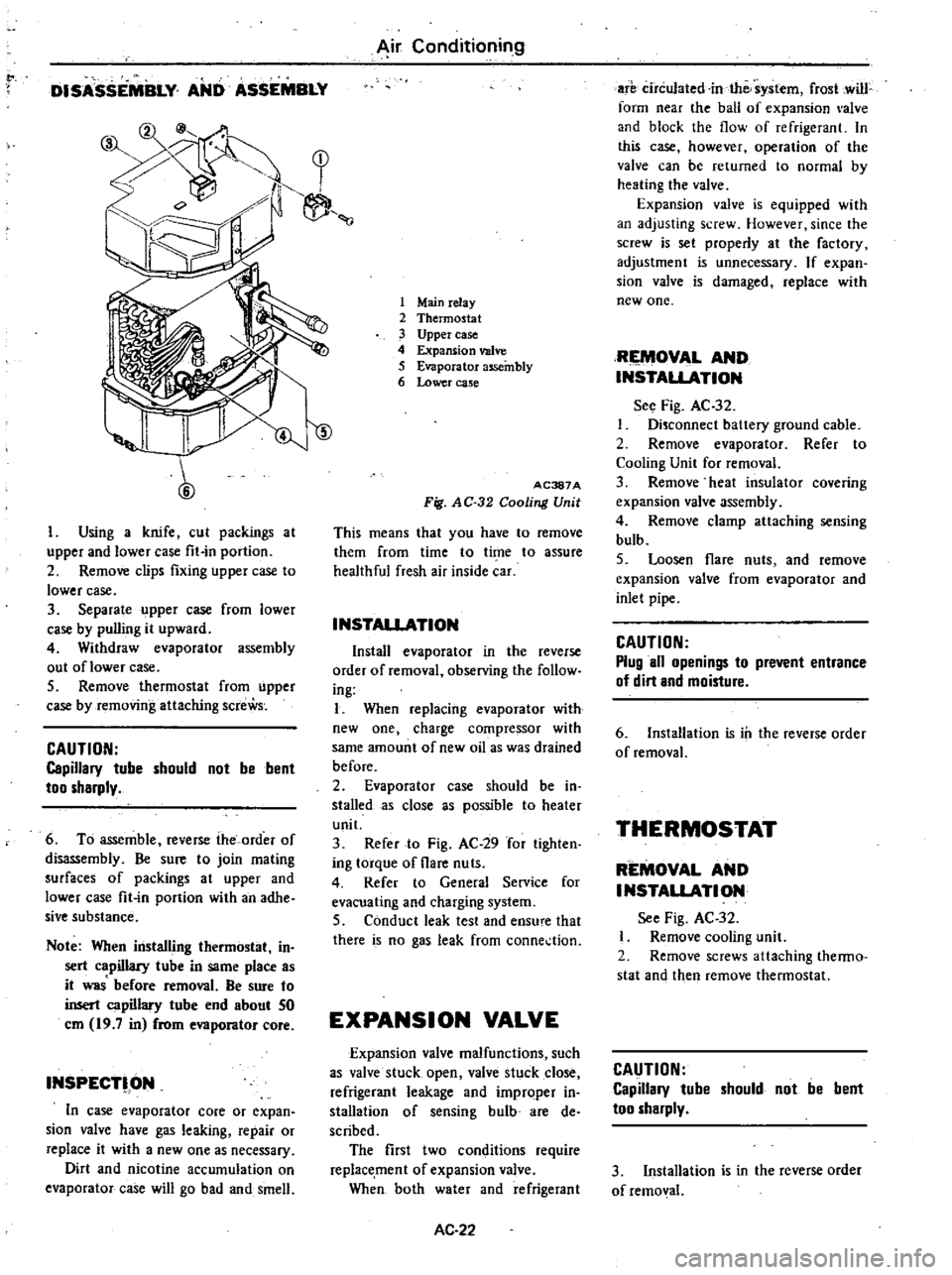
to
DISASSEMBLY
AND
ASSEMBLY
y
1
7
1
r
II
l
1
Using
a
knife
cut
packings
at
upper
and
lower
case
fit
in
portion
2
Remove
clips
fixing
upper
case
to
lower
case
3
Separate
upper
case
from
lower
case
by
pulling
it
upward
4
Withdraw
evaporator
assembly
out
oflower
case
5
Remove
thermostat
from
upper
case
by
removing
attaching
screWs
CAUTION
Capillary
tube
should
not
be
bent
too
sharply
6
To
assemble
reverse
the
order
of
disassembly
Be
sure
to
join
mating
surfaces
of
packings
at
upper
and
lower
case
fit
in
portion
with
an
adhe
sive
substance
Note
When
installing
thermostat
in
sert
capillary
tube
in
same
place
as
it
was
before
removal
Be
sure
to
insert
capillary
tube
end
about
50
em
19
7
in
from
evaporator
core
INSPECT
ON
In
case
evaporator
core
or
expan
sion
valve
have
gas
leaking
repair
or
replace
it
with
a
new
one
as
necessary
Dirt
and
nicotine
accumulation
on
evaporator
case
will
go
b
d
and
smell
Air
Conditioning
1
Mainrelay
2
Thermostat
3
Upper
case
4
Expansion
valve
5
Evaporator
assembly
6
Lower
case
ID
AC387A
Fig
AC
32
Cooling
Unit
This
means
that
you
have
to
remove
them
from
time
to
time
to
assure
healthful
fresh
air
inside
car
INSTAllATION
Install
evaporator
in
the
reverse
order
of
removal
observing
the
follow
ing
I
When
replacing
evaporator
with
new
one
charge
compressor
with
same
amount
of
new
oil
as
was
drained
before
2
Evaporator
case
should
be
in
stalled
as
close
s
possible
to
heater
unit
3
Refer
to
Fig
AC
29
for
tighten
ing
torque
of
flare
nuts
4
Refer
to
General
Service
for
evacuating
and
charging
system
5
Conduct
leak
test
and
ensu
e
that
there
is
no
gas
leak
from
conne
tion
EXPANSION
VALVE
Expansion
valve
malfunctions
such
as
valve
stuck
open
valve
stuck
close
refrigerant
leakage
and
improper
in
stall
tion
of
sensing
bulb
are
de
scribed
The
first
two
conditions
require
replacement
of
expansion
valve
When
both
water
and
refrigerant
AC
22
are
circulated
in
the
system
frost
cwill
form
near
the
ball
of
expansion
alve
and
block
the
flow
of
refrigerant
In
this
case
however
operation
of
the
valve
can
be
returned
to
normal
by
heating
the
valve
Expansion
valve
is
equipped
with
an
adjusting
screw
However
since
the
screw
is
set
properly
at
the
factory
adjustment
is
unnecessary
If
expan
sion
valve
is
damaged
replace
with
new
one
RIEMOV
L
AND
INSTALlATION
See
Fig
AC
32
Disconnect
baltery
ground
cable
2
Remove
ev
porator
Refer
to
Cooling
Unit
for
removal
3
Remove
heat
insulator
covering
expansion
valve
assembly
4
Remove
clamp
attaching
sensing
bulb
5
Loosen
flare
nuts
and
remove
expansion
valve
from
evaporator
and
inlet
pipe
CAUTION
Plug
all
openings
to
prevent
entrance
of
dirt
and
moisture
6
Installation
is
ill
the
reverse
order
of
removal
THERMOSTAT
REMOVAL
AND
INSTALlATION
See
Fig
AC
32
Remove
cooling
unit
2
Remove
screws
attaching
thenno
stat
and
then
remove
thermostat
CAUTION
Capillary
tube
should
not
be
bent
too
sharply
3
Installation
is
in
the
reverse
order
of
removal
Page 524 of 548
Note
When
installing
thermostat
in
sert
capillary
tube
in
same
place
as
it
was
before
removal
Be
sure
to
insert
capillary
tube
end
about
SO
em
19
7
in
from
evaporator
core
INSPECTION
1
Test
continuity
between
two
switch
terminals
with
test
lamp
or
ohmmerter
Continuity
should
exist
2
With
capillary
tube
end
dipped
into
ice
salt
water
maintained
to
I
oc
300
F
test
continuity
between
two
switch
terminals
Continuity
should
not
exist
3
If
switch
is
found
damaged
re
place
MAIN
RELAY
REMOVAL
AND
INSTALLATION
I
Disconnect
battery
ground
cable
2
Remove
glove
box
3
Disconnect
connector
from
main
relay
4
Remove
screw
retaining
main
relay
to
cooling
unit
then
remove
main
relay
5
Installation
is
in
the
reverse
order
of
removal
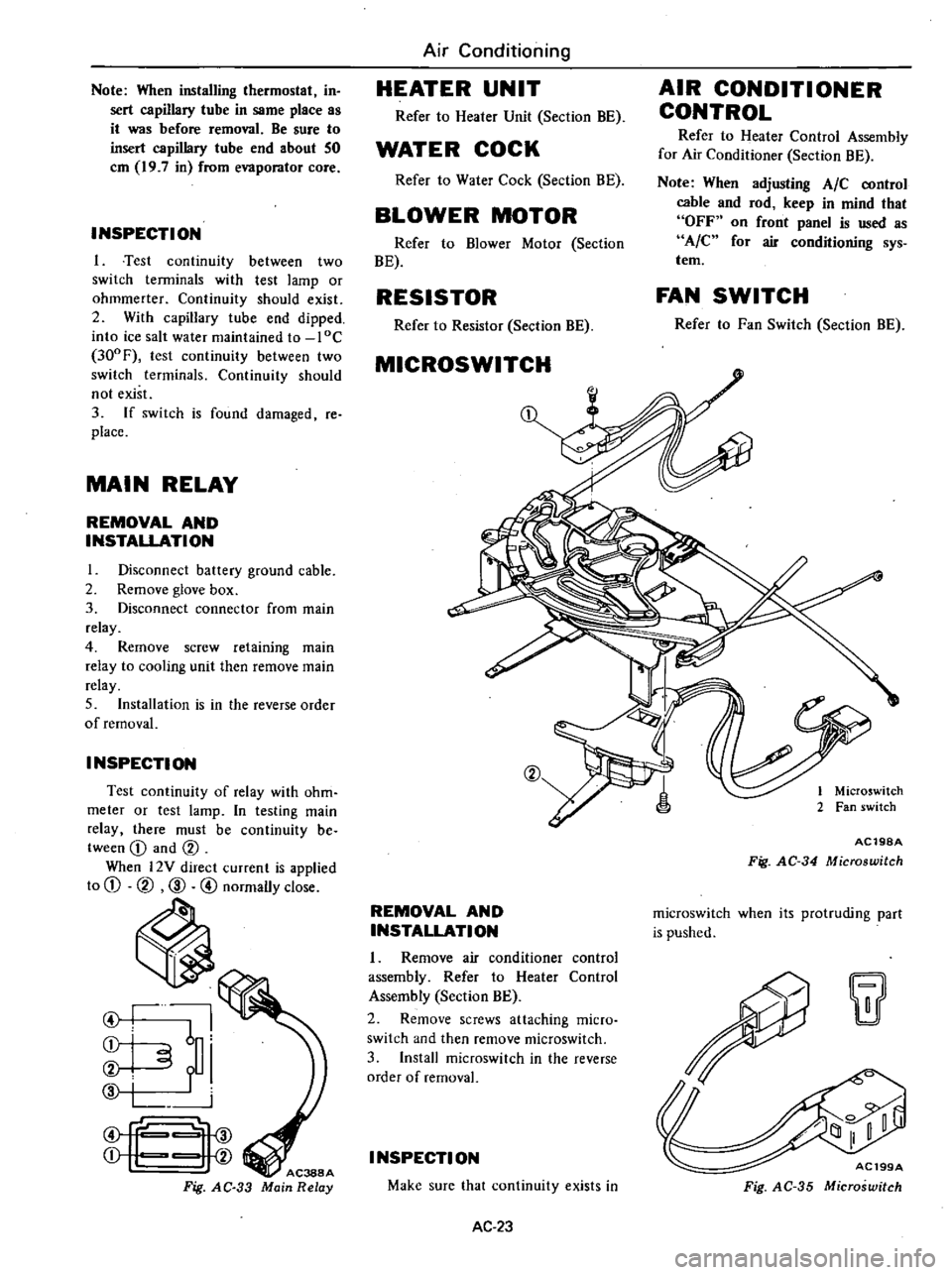
INSPECTION
Test
continuity
of
relay
with
ohm
meter
or
test
lamp
In
testing
main
relay
there
must
be
continuity
be
tween
CD
and
CV
When
l2Y
direct
current
is
applied
to
CD
CV
CID
@
normally
close
ti
I
I
6
i
i
f
i
f
Fig
AC
33
Air
Conditioning
HEATER
UNIT
Refer
to
Heater
Unit
Section
BE
WATER
COCK
Refer
to
Water
Cock
Section
BE
BLOWER
MOTOR
Refer
to
Blower
Motor
Section
BE
RESISTOR
Refer
to
Resistor
Section
BE
MICROSWITCH
CV
REMOVAL
AND
INSTALLATION
1
Remove
air
conditioner
control
assembly
Refer
to
Heater
Control
Assembly
Section
BE
2
Remove
screws
attaching
micro
switch
and
then
remove
rnicroswitch
3
Install
rnicroswitch
in
the
reverse
order
of
removal
I
NSPECTI
ON
Make
sure
that
continuity
exists
in
AC
23
AIR
CONDITIONER
CONTROL
Refer
to
Heater
Control
Assembly
for
Air
Conditioner
Section
BE
Note
When
adjusting
AIC
control
cable
and
rod
keep
in
mind
that
OFF
on
front
panel
is
used
as
A
C
for
air
conditioning
sys
tem
FAN
SWITCH
Refer
to
Fan
Switch
Section
BE
1
Microswitch
2
Fan
switch
AC19SA
Fig
AC
34
Microswitch
rnicroswitch
when
its
protruding
part
is
pushed
w
AC199A
Fig
AC
35
Microswitch
Page 525 of 548
LOW
PRESSURE
SWITCH
REMOVAL
AND
INSTALLATION
I
Disconnect
battery
ground
cable
2
Discharge
refrigerant
from
sys
tem
Refer
to
General
Service
3
Disconnect
connector
to
low
pressure
switch
4
Remove
low
pressure
switch
by
turning
the
switch
5
Installation
is
in
the
reverse
order
of
removal
INSPECTION
Using
a
circuit
tester
make
sure
that
low
pressure
switch
exhibits
con
tinuity
when
gas
pressure
of
refriger
ant
in
system
is
normal
and
that
low
pressure
switch
does
not
exhibit
con
tinuity
when
gas
pressure
drops
below
2
2
kg
cm2
31
p
i
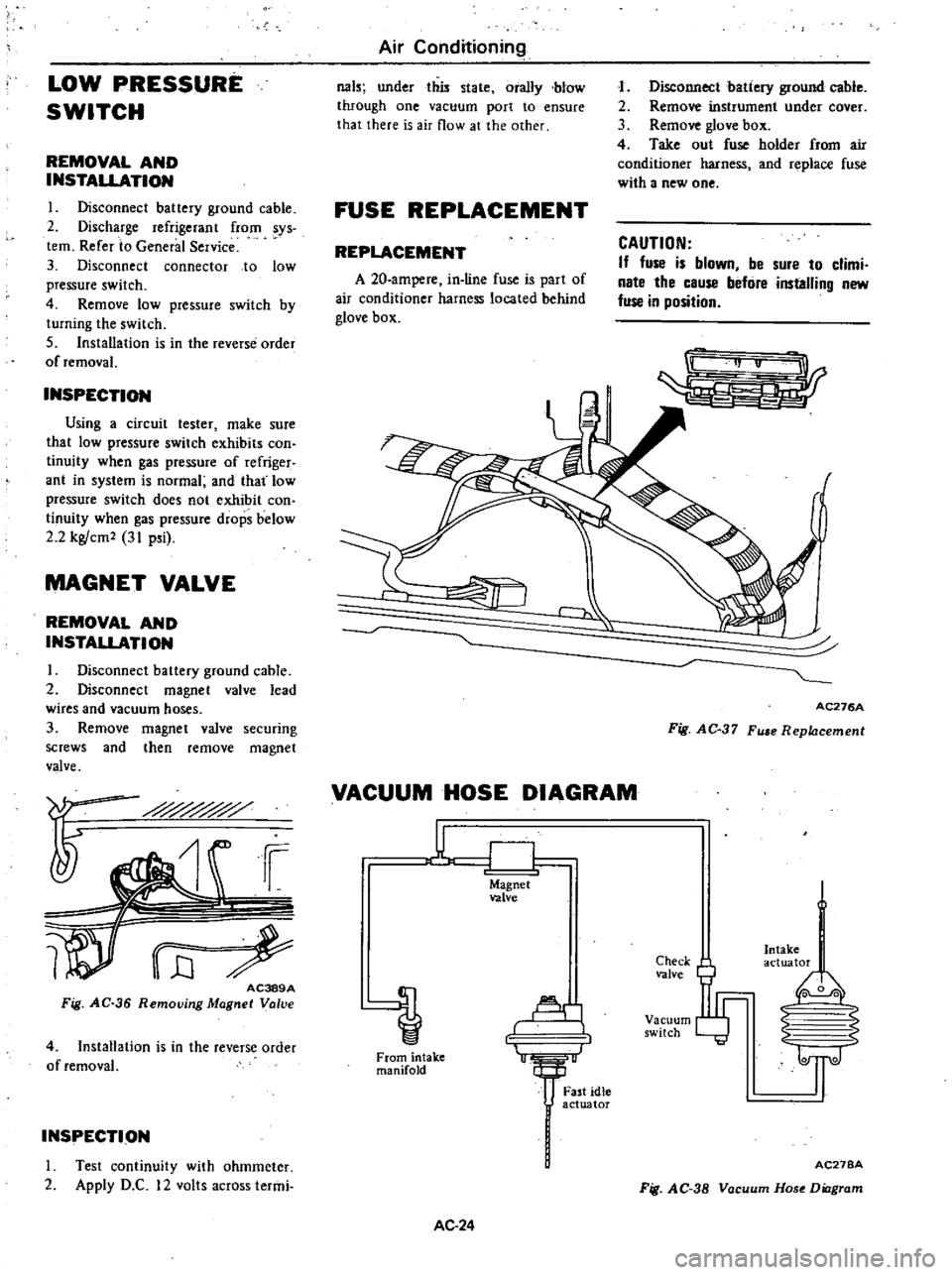
MAGNET
VALVE
REMOVAL
AND
INSTALLATION
I
Disconnect
battery
ground
cable
2
Disconnect
magnet
valve
lead
wires
and
vacuum
hoses
3
Remove
magnet
valve
securing
screws
and
then
remove
magnet
valve
i
i
WrE
AC389A
Fig
AC
36
Removjng
Magnet
Valve
4
Installation
is
in
the
reverse
order
of
removal
INSPECTION
I
rest
continuity
with
ohmmeter
2
Apply
D
C
12
volts
across
termi
Air
Conditioning
031
under
this
state
orally
blow
through
one
vacuum
port
to
ensure
that
there
is
air
flow
at
the
other
FUSE
REPLACEMENT
REPLACEMENT
A
20
ampere
in
line
fuse
is
part
of
air
conditioner
harness
located
behind
glove
box
J
Disconnect
batiery
ground
cable
2
Remove
instrument
under
cover
3
Remove
glove
box
4
Take
out
fuse
holder
from
air
conditioner
harness
and
replace
fuse
with
a
new
one
CAUTION
If
fuse
is
blown
be
sure
to
climi
nate
the
cause
befure
installing
new
fuse
in
position
r
AC276A
Fig
AC
37
Fu
e
Replacement
VACUUM
HOSE
DIAGRAM
u
CJ
Magnet
valve
Al
1
From
intake
manifold
AC
24
Fast
idle
actuator
Check
valve
Vacuum
switch
Intake
actuator
I
0
0
2
S
1l
AC27BA
Fig
AC
38
Vacuum
Hose
Diagram
Page 526 of 548
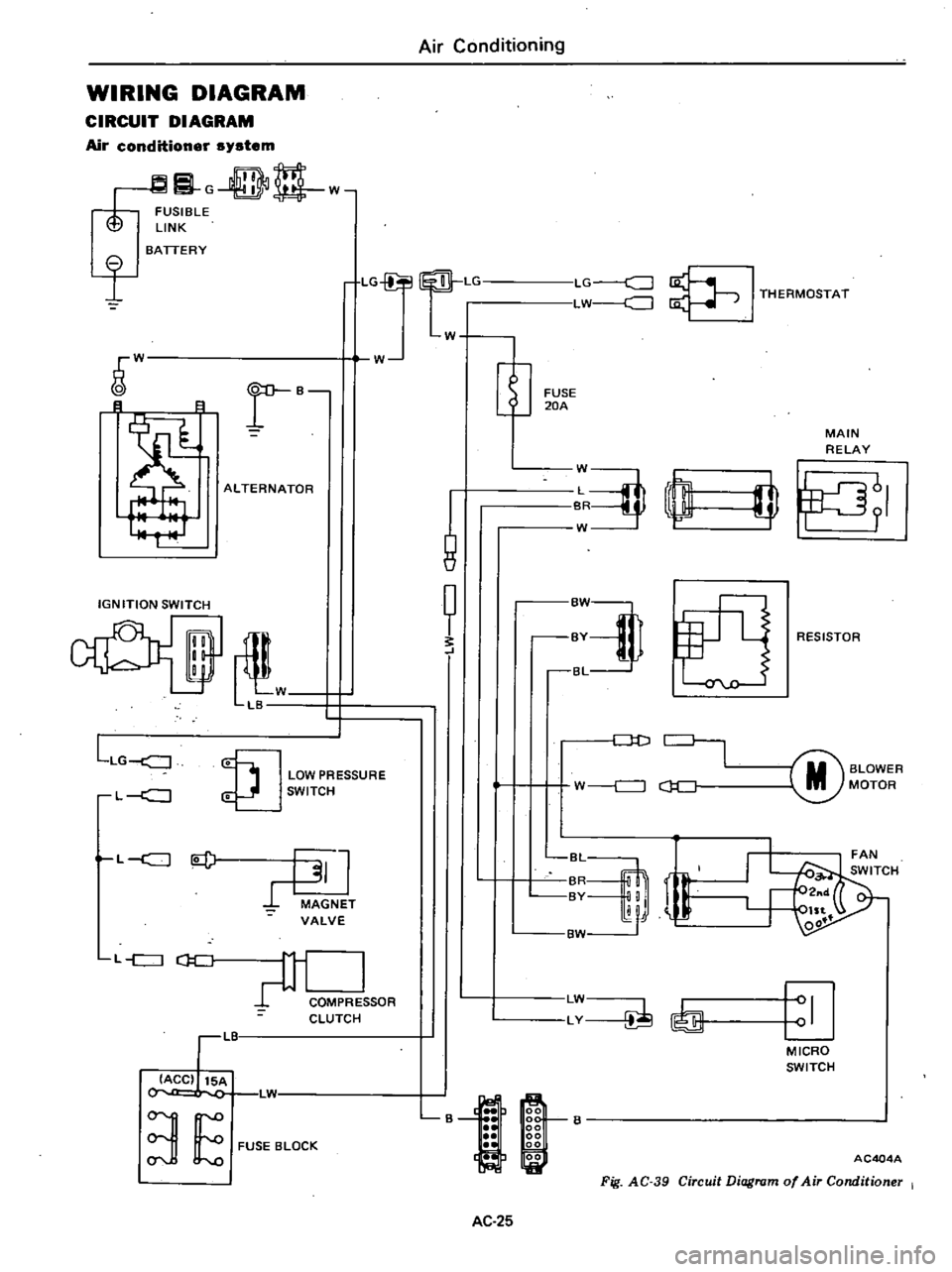
WIRING
DIAGRAM
CIRCUIT
DIAGRAM
Air
conditioner
system
G
DD
w
FUSIBLE
LINK
I
BATTERY
LG
Lr
LG
c
J
LW
J
I
THERMOSTAT
W
W
r
B
B
8
ALTERNATOR
IGNITION
SWITCH
il
W
LB
LLG
J
LOW
PRESSURE
SWITCH
L
c
J
L
c
J
l
J
MAGNET
VALVE
L
c
J
CJ
C
COMPRE
SOR
CLUTCH
LIT
IACC
15A
L1
3
E
FUSE
BLOCK
Air
Conditioning
W
1
8
t
FUSE
20A
MAIN
RELAY
J
rn
W
I
fJ
RESISTOR
Dt
J
M
BLOWER
MOTOR
W
c
J
c
J
C
r
BvM
LW
LY
I
MICRO
SWITCH
B
AC404A
Fig
AC
39
Circuit
Diagram
of
Air
Conditioner
I
AC
25
Page 528 of 548
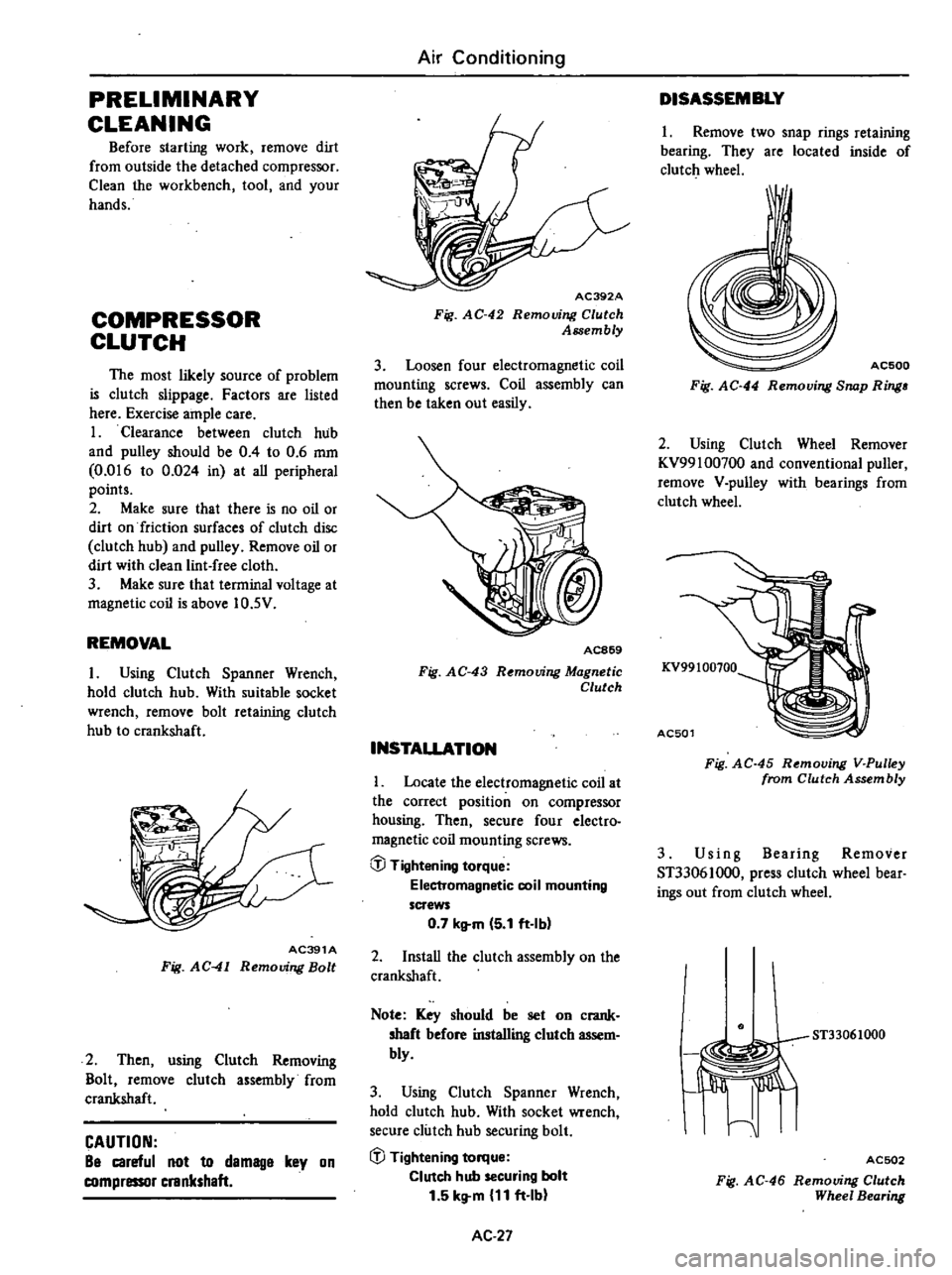
PRELIMINARY
CLEANING
Before
starting
work
remove
dirt
from
outside
the
detached
compressor
Clean
the
workbench
tool
and
your
hands
COMPRESSOR
CLUTCH
The
most
likely
source
of
problem
is
clutch
slippage
Factors
are
listed
here
Exercise
ample
care
1
Clearance
between
clutch
hub
and
pulley
should
be
0
4
to
0
6
mm
0
016
to
0
024
in
at
aU
peripheral
points
2
Make
sure
that
there
is
no
oil
or
dirt
on
friction
surfaces
of
clutch
disc
clutch
hub
and
pulley
Remove
oil
or
dirt
with
clean
lint
free
cloth
3
Make
sure
that
terminal
voltage
at
magnetic
coil
is
above
10
5V
REMOVAL
I
Using
Clutch
Spanner
Wrench
hold
clutch
hub
With
suitable
socket
wrench
remove
bolt
retaining
clutch
hub
to
crankshaft
AC391A
Fig
AC
41
Removing
Bolt
2
Then
using
Clutch
Removing
Bolt
remove
clutch
assembly
from
crankshaft
CAUTION
Be
careful
not
to
demage
key
on
compressor
crankshaft
Air
Conditioning
AC392A
Fig
AC
42
Removing
Clutch
Assembly
3
Loosen
four
electromagnetic
coil
mounting
screws
Coil
assembly
can
then
be
taken
out
easily
AC869
Fig
AC
43
R
mouing
Magnetic
Clutch
INSTALLATION
Locate
the
electromagnetic
coil
at
the
correct
position
on
compressor
housing
Then
secure
four
electro
magnetic
coil
mounting
screws
@
Tightening
torque
Electromagnetic
coil
mounting
screws
0
7
kltm
5
1
ft
Ibl
2
InstaU
the
clutch
assembly
on
the
crankshaft
Note
Key
should
be
set
on
crank
shaft
before
installing
clutch
assem
bly
3
Using
Clutch
Spanner
Wrench
hold
clutch
hub
With
socket
wrench
secure
clutch
hub
securing
bolt
iJJ
Tightening
torque
Clutch
hub
securing
bolt
1
5
kg
m
11
ft
Ib
AC
27
DISASSEMBLY
1
Remove
two
snap
rings
retaining
bearing
They
are
located
inside
of
clutch
wheel
I
AC500
Fig
AC
44
Removing
Snap
Ring
2
Using
Clutch
Wheel
Remover
KV99100700
and
conventional
puller
remove
V
pulley
with
bearings
from
clutch
wheel
KV99100100
AC501
Fig
AC
45
Removing
V
Pulley
from
Clutch
Assembly
3
Us
i
n
g
Bearing
Remover
ST33061000
press
clutch
wheel
bear
ings
out
from
clutch
wheel
ST33061000
I
Jiffi
I
ACSD2
Fig
AC
46
Removing
Clutch
Wheel
Bearing