Release DATSUN 210 1979 User Guide
[x] Cancel search | Manufacturer: DATSUN, Model Year: 1979, Model line: 210, Model: DATSUN 210 1979Pages: 548, PDF Size: 28.66 MB
Page 203 of 548
DATSUN
210
Model
8310
Series
SECTIONCL
CLUTCH
CONTENTS
ADJUSTMENT
CLUTCH
PEDAL
HEIGHT
CLUTCH
PEDAL
FREE
TRAVEL
BLEEDING
CLUTCH
SYSTEM
CLUTCH
CONTROL
CLUTCH
PEDAL
CLUTCH
MASTER
CYLINDER
OPERATING
CYLINDER
CLUTCH
LINE
CLUTCH
UNIT
CLUTCH
DISC
AND
COVER
CL
2
CL
2
CL
2
CL
2
CL
3
CL
3
CL
4
CL
5
CL
6
CL
7
CL
7
RELEASE
BEARING
PILOT
BUSHING
SERVICE
DATA
AND
SPECIFICATIONS
GENERAL
SPECIFICATIONS
INSPEctiON
AND
ADJUSTMENT
TIGHTENING
TORQUE
TROUBLE
DIAGNOSES
AND
I
ECTIONS
SPECIAL
SERVICE
TOOLS
CL
8
CL
9
CL
10
CL
10
CL10
CL
11
CL
12
CL
14
Page 204 of 548
CLUTCH
PEDAL
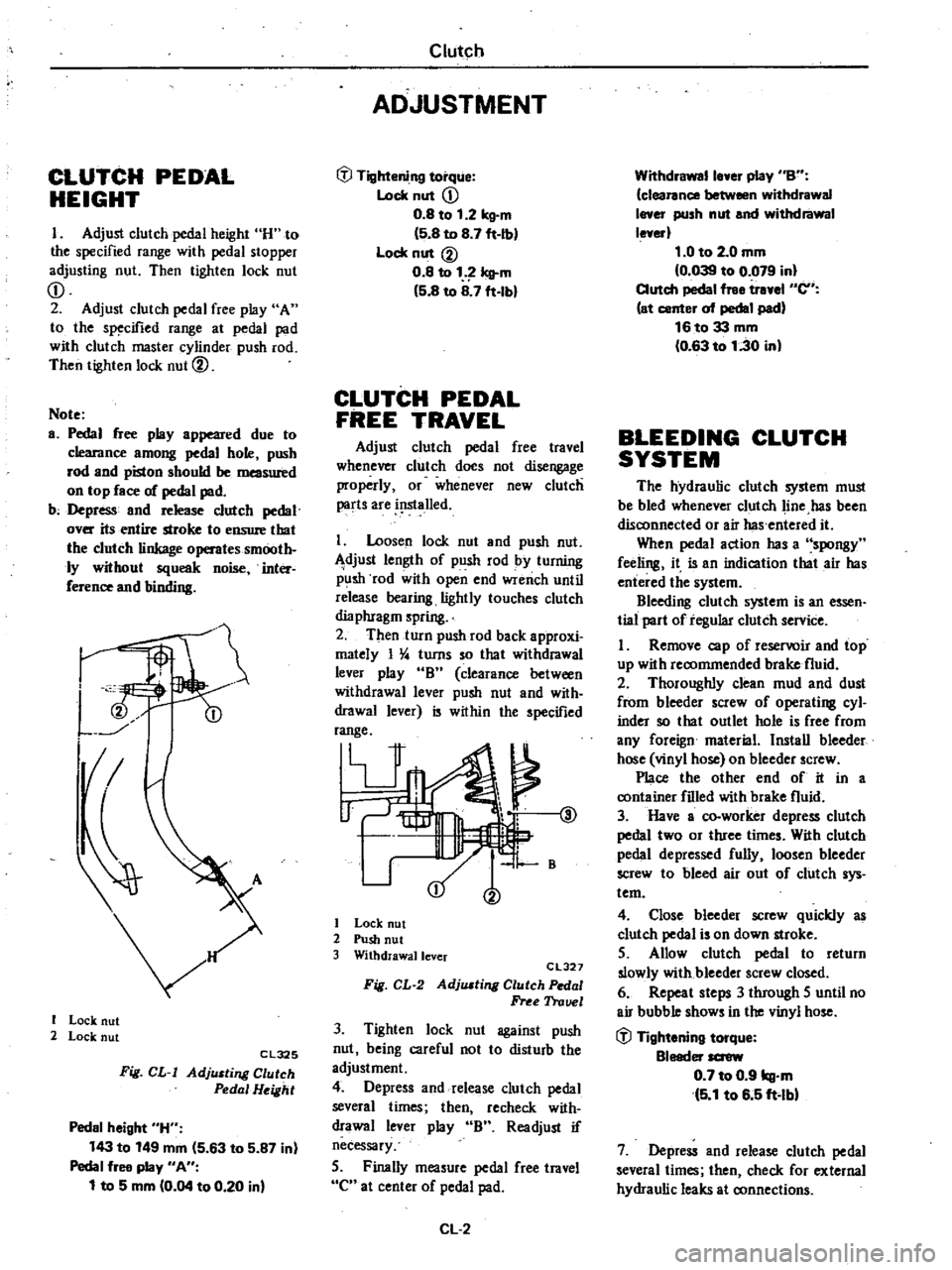
HEIGHT
I
Adjust
clutch
pedal
height
H
to
the
specified
range
with
pedal
stopper
adjusting
nut
Then
tighten
lock
nut
CD
2
Adjust
clutch
pedal
free
play
A
to
the
specified
range
at
pedal
pad
with
clutch
master
cylinder
push
rod
Then
tighten
lock
nut
@
Note
a
Pedal
free
play
appeared
due
to
clearance
among
pedal
hole
push
rod
and
piston
should
be
measured
on
top
face
of
pedal
pad
b
Depress
and
release
clutch
pedal
over
its
entire
stroke
to
ensure
that
the
clutch
linkage
operates
smooth
ly
without
squeak
noise
inter
ference
and
binding
I
I
Lock
nut
2
Lock
nut
Cl325
Fig
CL
I
AdjlUting
Clutch
Pedal
Height
Pedal
height
H
143
to
149
mm
5
63
to
5
87
in
Pedal
free
play
An
1
to
5
mm
0
04
to
0
20
in
Clutch
ADJUSTMENT
tfl
Tightening
torque
Lock
nut
CD
0
8
to
1
2
kg
m
5
8
to
8
7
ft
Ib
Lock
nut
@
0
8
to
1
Icll
m
5
8
to
8
7
ft
lbl
CLUTCH
PEDAL
FREE
TRAVEL
Adjust
clutch
pedal
free
travel
whenever
clutch
does
not
disengage
properly
or
whenever
new
clutch
parts
are
i
lslalled
I
Loosen
lock
nut
and
push
nut
djust
length
of
push
rod
by
turning
p
lsh
rod
with
open
end
wrench
until
release
bearing
lightly
touches
clutch
dia
phragm
spring
2
Then
turn
push
rod
back
approxi
mately
I
4
turns
so
that
withdrawal
lever
play
B
clearance
between
withdrawal
lever
push
nut
and
with
drawal
lever
is
within
the
specified
range
V
@
1
B
I
Lock
nut
2
Push
nut
3
Withdrawallcver
CL327
Fig
CL
2
AdjlUting
Clutch
Pedal
Free
Trauel
3
Tighten
lock
nut
against
push
nut
being
careful
not
to
disturb
the
adjustment
4
Depress
and
release
clutch
pedal
several
times
then
recheck
with
drawal
lever
play
B
Readjust
if
necessary
5
Finally
measure
pedal
free
travel
C
at
center
of
pedal
pad
CL
2
Withdrawalle
er
play
nBn
clearance
between
withdrawal
I
er
push
nut
and
withdrawal
le
erl
1
0
to
2
0
mm
0
039
to
0
079
in
Clutch
pedal
free
tr
el
en
at
center
of
pedal
pad
16to33
mm
0
63
to
1
30
in
BLEEDING
CLUTCH
SYSTEM
The
hydraulic
clutch
system
must
be
bled
whenever
clutch
line
has
been
disconnected
or
air
has
entered
it
When
pedal
action
has
a
spongy
feeling
it
is
an
indication
that
air
has
entered
the
system
Bleeding
clutch
system
is
an
essen
tial
part
of
regular
clutch
service
I
Remove
cap
of
reservoir
and
top
up
with
recommended
brake
fluid
2
Thoroughly
clean
mud
and
dust
from
bleeder
screw
of
operating
cyl
inder
so
that
outlet
hole
is
free
from
any
foreign
material
Install
bleeder
hose
vinyl
hose
on
bleeder
screw
Place
the
other
end
of
it
in
a
container
filled
with
brake
fluid
3
Have
a
co
worker
depress
clutch
pedal
two
or
three
times
With
clutch
pedal
depressed
fully
loosen
bleeder
screw
to
bleed
air
out
of
clutch
sys
tem
4
Close
bleeder
screw
quickly
as
clutch
pedal
is
on
down
stroke
5
Allow
clutch
pedal
to
return
slowly
with
bleeder
screw
closed
6
Repeat
steps
3
through
5
until
no
air
bubble
shows
in
the
vinyl
hose
tfl
Tightening
torque
Bleeder
screw
0
7
to
0
9
kg
m
5
1
to
6
5
ft
lbl
7
Depress
and
release
clutch
pedal
several
times
then
check
for
external
hydraulic
leaks
at
connections
Page 205 of 548
Note
a
Brake
fluid
conlaining
air
is
white
and
has
visible
air
bubbles
b
Brake
fluid
containing
no
air
runs
out
of
bleeder
screw
in
a
1lO6d
stream
without
air
bubbles
c
Pay
close
attention
to
clutch
fluid
level
in
reservoir
during
bleeding
operation
Clutch
d
Pour
brake
fluid
into
reServoir
up
to
the
specified
level
CLUTCH
CONTROL
Clutch
ma5ter
cylinder
2
Clutch
disc
assembly
3
Clutch
cover
assembly
4
Release
bearing
and
sleeve
assembly
5
Return
spring
6
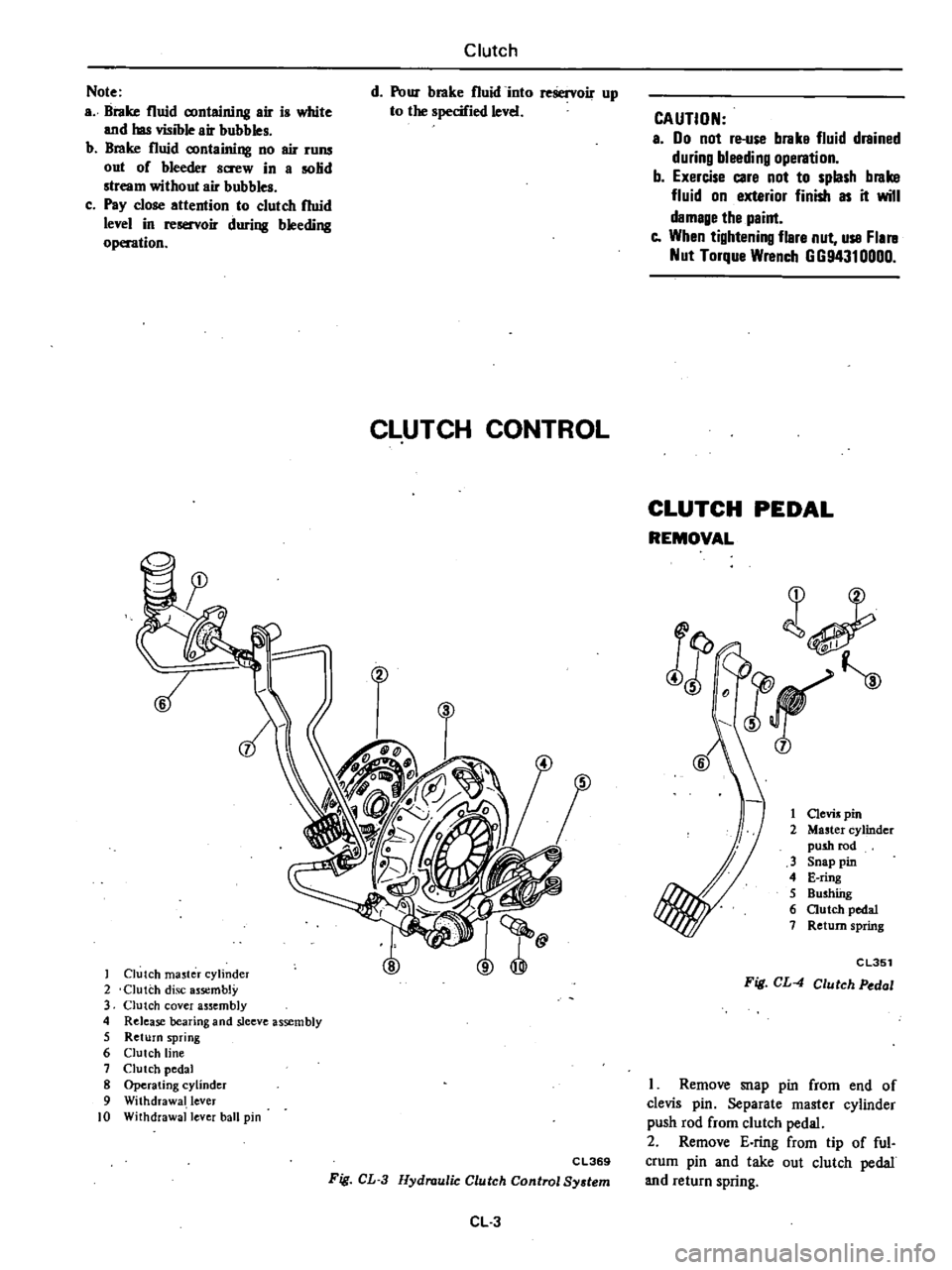
Clutch
line
7
Clutch
pedal
8
Operating
cylinder
9
Withdrawal
lever
10
Withdrawal
lever
ball
pin
CAUTION
a
00
not
re
use
brake
fluid
drained
during
bleeding
operation
b
Exercise
care
not
to
splash
brake
fluid
on
exterior
finish
as
it
will
damage
the
paint
e
When
tightening
flare
nut
use
Flal
ll
Nut
Torque
Wrench
GG94310000
CLUTCH
PEDAL
REMOVAL
l
JF
j
1
Clevis
pin
2
Master
cylinder
push
rod
3
Snap
pin
4
E
ring
5
Bushfug
6
autch
pedal
7
Return
spring
j
CL351
Fig
CL
4
Clutch
Pedal
C
L369
Fig
CL
3
Hydraulic
Clutch
Control
System
CL
3
I
Remove
snap
pin
from
end
of
clevis
pin
Separate
master
cylinder
push
rod
from
clutch
pedal
2
Remove
E
ring
from
tip
of
ful
crum
pin
and
take
out
clutch
pedal
and
return
spring
Page 209 of 548
CLUTCH
DISC
AND
COVER
REMOVAL
1
Remove
transmission
from
en
gine
Refer
to
Removal
Section
MT
2
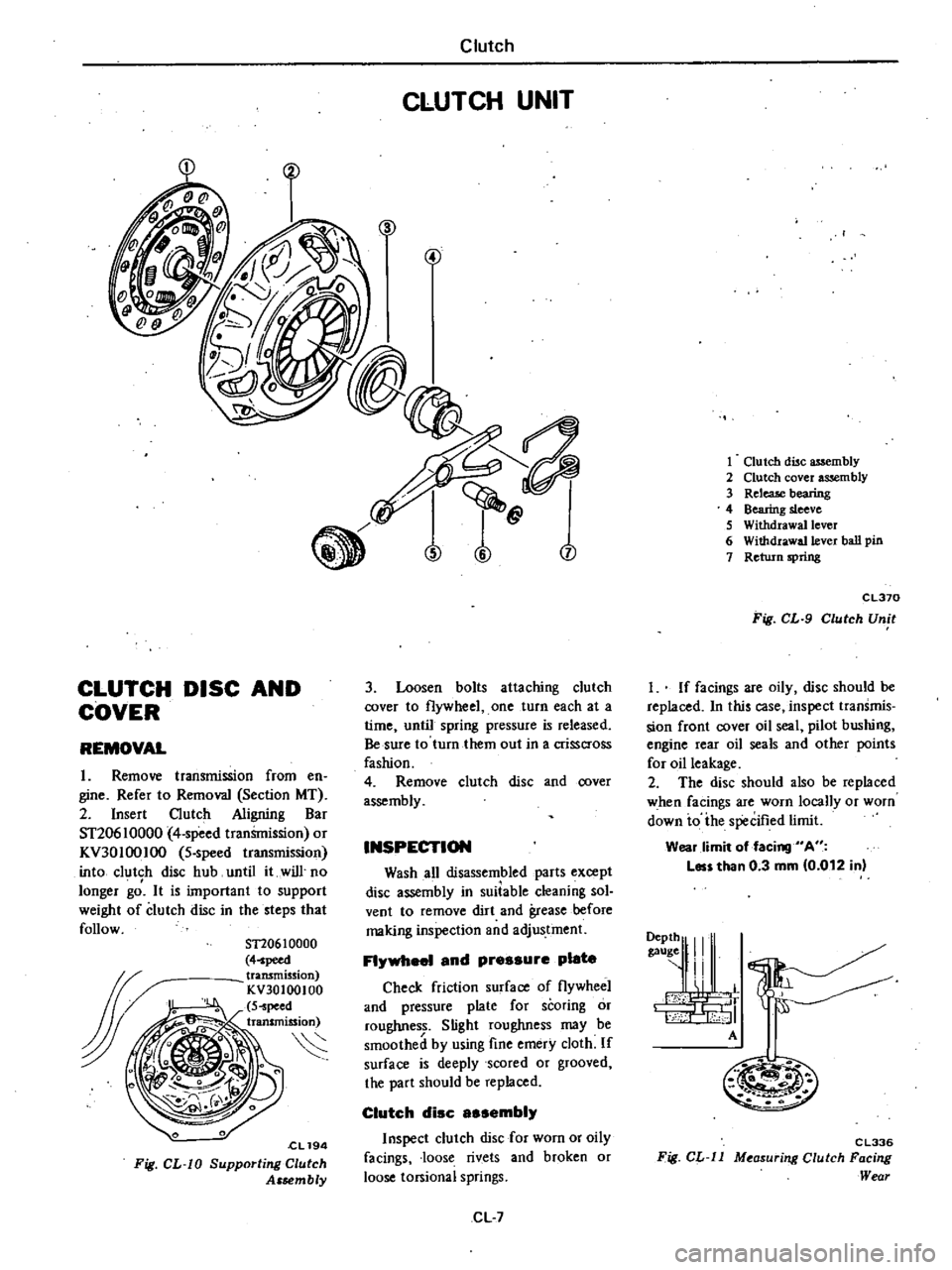
Insert
Clutch
Aligning
Bar
ST20610000
4
speed
tranSmission
or
KV30100IOO
5
speed
transmission
into
clutch
disc
hub
until
it
will
no
longer
gd
It
is
important
to
support
weight
of
clutch
disc
in
the
steps
that
follow
ST20610000
4
peed
transmission
KV30100100
S
peed
transmission
S
cL194
Fig
CL
W
Supporting
Clutch
Assembly
Clutch
CLUTCH
UNIT
n
j
3
Loosen
bolts
attaching
clutch
cover
to
flywheel
one
turn
each
at
a
time
until
spring
pressure
is
released
Be
sure
to
turn
them
out
in
a
crisscross
fashion
4
Remove
clutch
disc
and
cover
assembly
INSPECTION
Wash
all
disassembled
parts
except
disc
assembly
in
suiiable
cleaning
sol
vent
to
remove
dirt
and
grease
before
making
inspection
and
adjustment
FI
1
and
pressure
plate
Check
friction
surface
of
flywheel
and
pressure
plate
for
scoring
or
roughness
Slight
roughness
may
be
smoothed
by
using
fine
emery
cloth
If
surface
is
deeply
scored
or
grooved
the
part
should
be
replaced
Clutch
disc
sembi
Inspect
clutch
disc
for
worn
or
oily
facings
loose
rivets
and
broken
or
loose
torsional
springs
CL
7
1
Clutch
disc
assembly
2
Clutch
cover
assembly
3
ReleaJe
bearing
4
Bearing
sleeve
S
Withdrawal
lever
6
Withdrawa11ever
ball
pin
7
Return
spring
CL370
Fig
CL
9
Clutch
Unit
I
If
facings
are
oily
disc
should
be
replaced
In
this
case
inspect
transmis
sion
front
cover
oil
seal
pilot
bushing
engine
rear
oil
seals
and
other
points
for
oil
leakage
2
The
disc
should
also
be
replaced
when
facings
are
worn
locally
or
worn
down
io
ihe
specified
limit
Wear
limit
of
facing
A
Les
than
0
3
mm
0
012
in
9111
I
A
M
m
C
L336
Fig
CL
ll
M
asur
ng
Clutch
Facing
Wear
Page 210 of 548
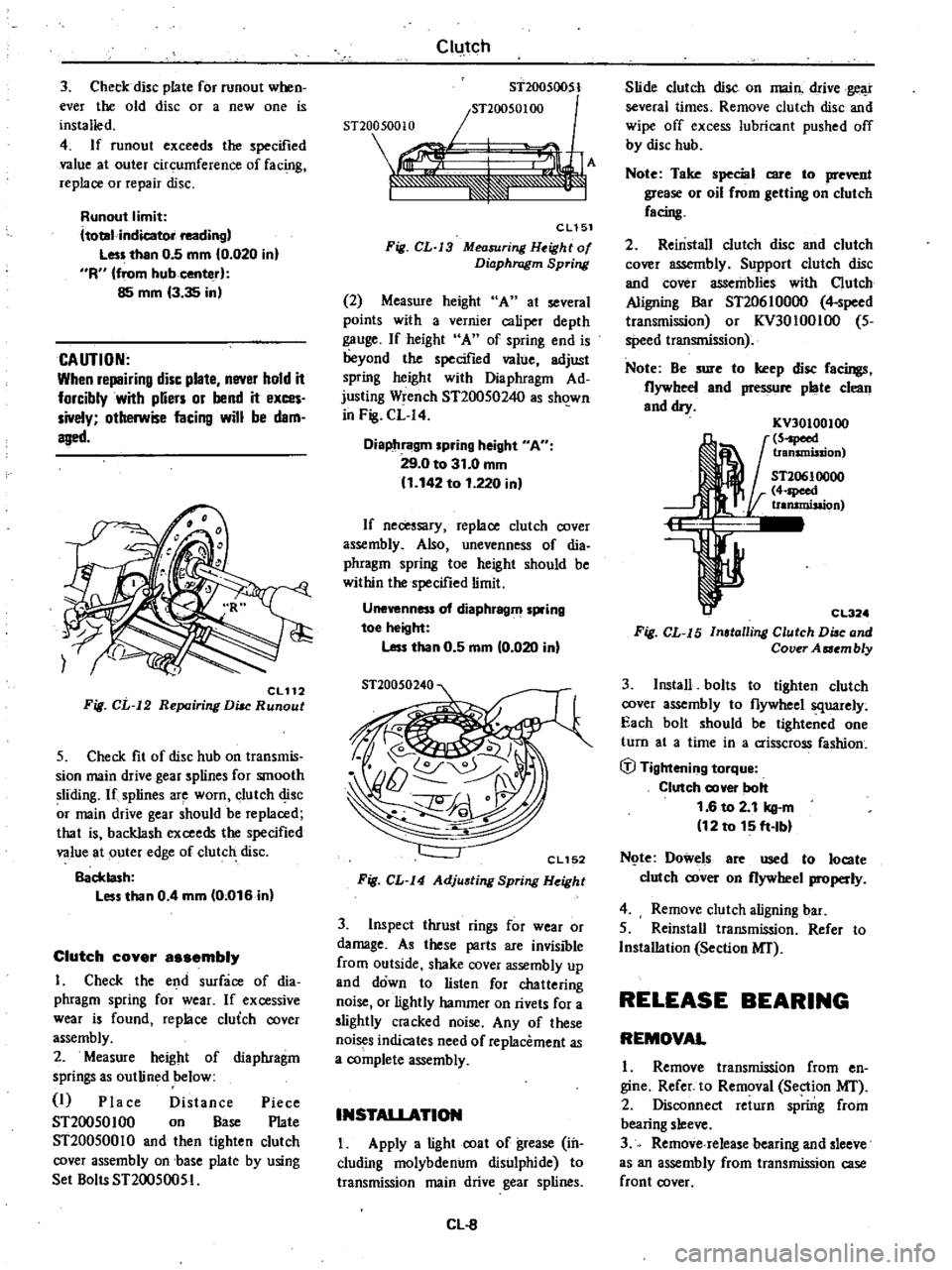
3
Check
disc
plate
for
runout
when
ever
the
old
disc
or
a
new
one
is
installed
4
If
runout
exceeds
the
specified
value
at
outer
circumference
of
fac
g
replace
or
repair
disc
Runout
limit
ltotal
indicator
reading
Less
than
0
5
mm
0
020
in
R
from
hub
center
85
mm
3
35
in
CAUTION
When
repairing
disc
plate
never
hold
it
forcibly
with
pUers
or
bend
it
exces
sively
otherwise
facing
will
be
dam
aged
CL112
Fig
CL
12
Repairing
DiM
Runout
5
Check
fit
of
disc
hub
on
transmis
sion
main
drive
gear
splines
for
smooth
sliding
If
splines
are
worn
clutch
disc
r
main
drive
gear
should
be
replaced
that
is
backlash
exceeds
the
specified
value
at
outer
edge
of
clutch
disc
Backlash
Less
than
0
4
mm
0
016
in
Clutch
cover
a
embly
I
Check
the
end
surface
of
dia
phragm
spring
for
wear
If
excessive
wear
is
found
replace
cluich
cover
assembly
2
Measure
height
of
diaphragm
springs
as
outlined
below
I
Place
Distance
Piece
ST20050100
on
Base
Plate
ST20050010
and
then
tighten
clutch
cover
assembly
on
base
plate
by
using
Set
Bolts
ST20050051
Clutch
ST200S0051
snOO50100
snoo
500
10
re1
F
A
J
eLlSl
Fig
CL
J3
Measuring
H
ight
of
Diaphragm
Spring
2
Measure
height
A
at
several
points
with
a
vernier
caliper
depth
gauge
If
height
A
of
spring
end
is
beyond
the
specified
value
adjust
spring
height
with
Diaphragm
Ad
justing
Wrench
ST20050240
as
sh
1wn
in
Fig
CL
I4
Diaphragm
spring
height
A
29
0
to
31
0
mm
1
142
to
1
220
in
If
necessary
replace
clutch
cover
assembly
Also
unevenness
of
dia
phragm
spring
toe
height
should
be
within
the
specified
limit
Unevenness
of
diaphragm
spring
toe
height
Less
than
0
5
mm
0
020
in
CL152
Fig
CL
I4
Adjusting
Spring
Height
3
Inspect
thrust
rings
for
wear
or
damage
As
these
parts
are
invisible
from
outside
shake
cover
assembly
up
and
down
to
listen
for
chattering
noise
or
lightly
hammer
on
rivets
for
a
slightly
cracked
noise
Any
of
these
noi
s
indicates
need
of
replacement
as
a
complete
assembly
INSTALlATION
I
Apply
a
light
coat
of
grease
in
cluding
molybdenum
disulphide
to
transmission
main
drive
gear
splines
Cl
8
Slide
clutch
disc
on
main
drive
gear
several
times
Remove
clutch
disc
and
wipe
off
excess
lubricant
pushed
off
by
disc
hub
Note
Take
special
care
to
prevent
grease
or
oil
rrom
getting
on
clutch
racing
2
Reinstall
clutch
disc
and
clutch
cover
assembly
Support
clutch
disc
and
cover
assemblies
with
Clutch
Aligning
Bar
ST20610000
4
speed
transmission
or
KV30100IOO
5
speed
transmission
Note
Be
sure
to
keep
disc
racings
flywheel
and
pressure
plate
clean
and
dry
KV30100100
5
peed
transmission
ST20610000
4
speed
trammisaion
CL32
Fig
CL
I5
Installing
Clutch
Diac
and
Cover
Aaembly
3
Install
bolts
to
tighten
clutch
cover
assembly
to
flywheel
squarely
Each
bolt
should
be
tightened
one
turn
at
a
time
in
a
crisscross
fashion
ifJ
Tightening
torque
Clutch
cover
bolt
1
6
to
2
1
kg
m
12
to
15
ft
Ibl
N
te
Dowels
are
used
to
locate
clutch
cover
on
flywheel
properly
4
Remove
clutch
aligning
bar
5
Reinstall
transmission
Refer
to
Installation
Section
MI
RELEASE
BEARING
REMOVAL
1
Remove
transmission
from
en
gine
Refer
to
Removal
Section
MI
2
Disconnect
return
spring
from
bearing
sleeve
3
Remove
release
bearing
and
sleeve
as
an
assembly
from
transmission
case
front
cover
Page 211 of 548

4
Take
clutch
release
bearing
out
from
bearing
sleeve
using
a
universal
puller
and
a
suitable
adapter
Fig
CL
16
Di8auembling
Release
Bearing
INSPECTION
Check
for
abnormal
wear
on
COD
tact
surface
of
withdrawal
lever
ball
pin
and
bearing
sleeve
Hold
bearing
inner
race
and
rotate
outer
race
while
applying
pressure
to
it
If
the
bearing
rotation
is
rough
or
noisy
replace
bearing
INSTALLATION
1
Assemble
release
bearing
on
sleeve
using
a
press
Note
Do
not
depress
outer
race
i
L
Cl117
Fig
CL
17
nstalling
Release
Bearing
2
Before
or
during
assembly
lubri
cate
the
following
points
with
a
light
coat
of
multi
purpose
grease
eve
nner
1groove
of
release
bearing
Pack
this
reces5
4
CL093
Fig
CL
IB
Lubricating
Rece
of
Bearing
Sleeve
Clutch
2
Contact
surfaces
of
withdrawal
lever
lever
ball
pin
and
bearing
sleeve
3
Bearing
sleeve
sliding
surface
of
transmission
case
front
cover
C1195
Fig
CL
19
Lubricating
Points
of
Withdrawal
Lever
Bearing
Sleeve
and
Front
Cover
4
Transmission
main
drive
gear
splines
Use
grease
including
molybde
num
disulphide
Note
A
small
amounl
of
grease
should
be
coated
to
the
above
points
If
too
much
lubricant
is
applied
it
will
n
out
on
the
friction
plates
when
hot
resulting
in
damaged
clutch
disc
facings
3
After
lubricating
install
with
drawallever
release
bearing
and
sleeve
assembly
in
position
Connect
them
with
return
spring
1
Return
spring
2
Release
bearing
3
Withdrawal1cver
CL196
Fig
CL
20
Installing
Release
Mechanism
4
Reinstall
transmission
Refer
to
Installation
Section
MT
PILOT
BUSHING
REMOVAL
1
Remove
transmission
from
en
gine
Refer
to
Removal
Section
MT
2
Remove
clutch
disc
and
cover
assembly
Refer
to
Clutch
Disc
and
Cover
for
removal
CL
9
3
Remove
pilot
bushing
in
shaft
by
Pilot
Bushing
KVI0102800
KV10t02800
crank
Puller
Fig
CL
21
Removing
Pilot
Bushing
INSPECTION
Check
pilot
bushing
for
fit
in
bore
of
crankshaft
Check
inner
surface
of
pilot
bush
ing
for
wear
roughness
or
bell
mouthed
condition
If
pilot
bushing
is
worn
or
damaged
replace
When
bush
ing
is
damaged
be
sure
to
check
transmission
main
drive
gear
at
the
same
time
INSTALLATION
1
Before
installing
a
new
bushing
thoroughly
clean
bushing
hole
2
Install
pilot
bushing
so
its
height
A
above
flange
end
is
the
specified
value
Bushing
need
not
be
oiled
Pilot
bushing
inserting
distance
A
2
8
mm
0
110
in
Note
When
inserting
pilot
bushing
be
careful
not
to
damage
edge
of
pilot
bushing
A
EM719
Fig
CL
22
Installing
Pilot
Bushing
3
Install
clutch
disc
and
clutch
cover
assembly
Refer
to
Clutch
Disc
and
Cover
for
installation
4
Install
transmission
Refer
to
In
stallation
Section
MT
Page 215 of 548

Condition
Clutch
chatters
Noisy
clutch
Clutch
grabs
Clutch
Probable
cause
and
testing
Corr
ctive
action
Clutch
chattering
is
usually
noticeable
when
car
is
just
rolled
off
with
clutch
parlially
engaged
Weak
or
broken
clutch
disc
torsion
spring
Oil
or
grease
on
clutch
facing
Clutch
facing
out
of
proper
contact
or
clutch
disc
runout
Loose
rivets
Warped
pressure
plate
or
clutch
cover
surface
Unevenness
of
diaphragm
spring
toe
height
Loose
engine
mounting
or
deteriorated
rubber
A
noise
is
heard
after
clutch
is
disengaged
Damaged
release
bearing
A
noise
is
heard
when
clutch
is
disengaged
Insufficient
grease
on
the
sliding
surface
of
bearing
sleeve
Clutch
cover
and
bearing
are
not
in
stalled
correctly
Replace
Replace
Replace
Replace
Repair
or
replace
Adjust
or
replace
Retighten
or
replace
I
Replace
Apply
grease
Adjust
A
noise
is
heard
when
car
is
suddenly
rolled
off
with
clutch
partially
engaged
Damaged
pilot
bushing
I
Replace
When
grabbing
of
clutch
occurs
car
will
not
roll
off
smoothly
from
a
standing
start
or
clutch
will
be
engaged
before
clutch
pedal
is
fully
depressed
Oil
or
grease
on
clutch
facing
Clutch
facing
worn
or
loose
rivets
Wear
or
rust
on
splines
in
drive
shaft
and
clutch
disc
Warped
flywheel
or
pressure
plate
Loose
mountings
for
engine
or
power
train
units
CL13
Replace
Replace
Clean
or
replace
Repair
or
replace
Retighten
Page 221 of 548
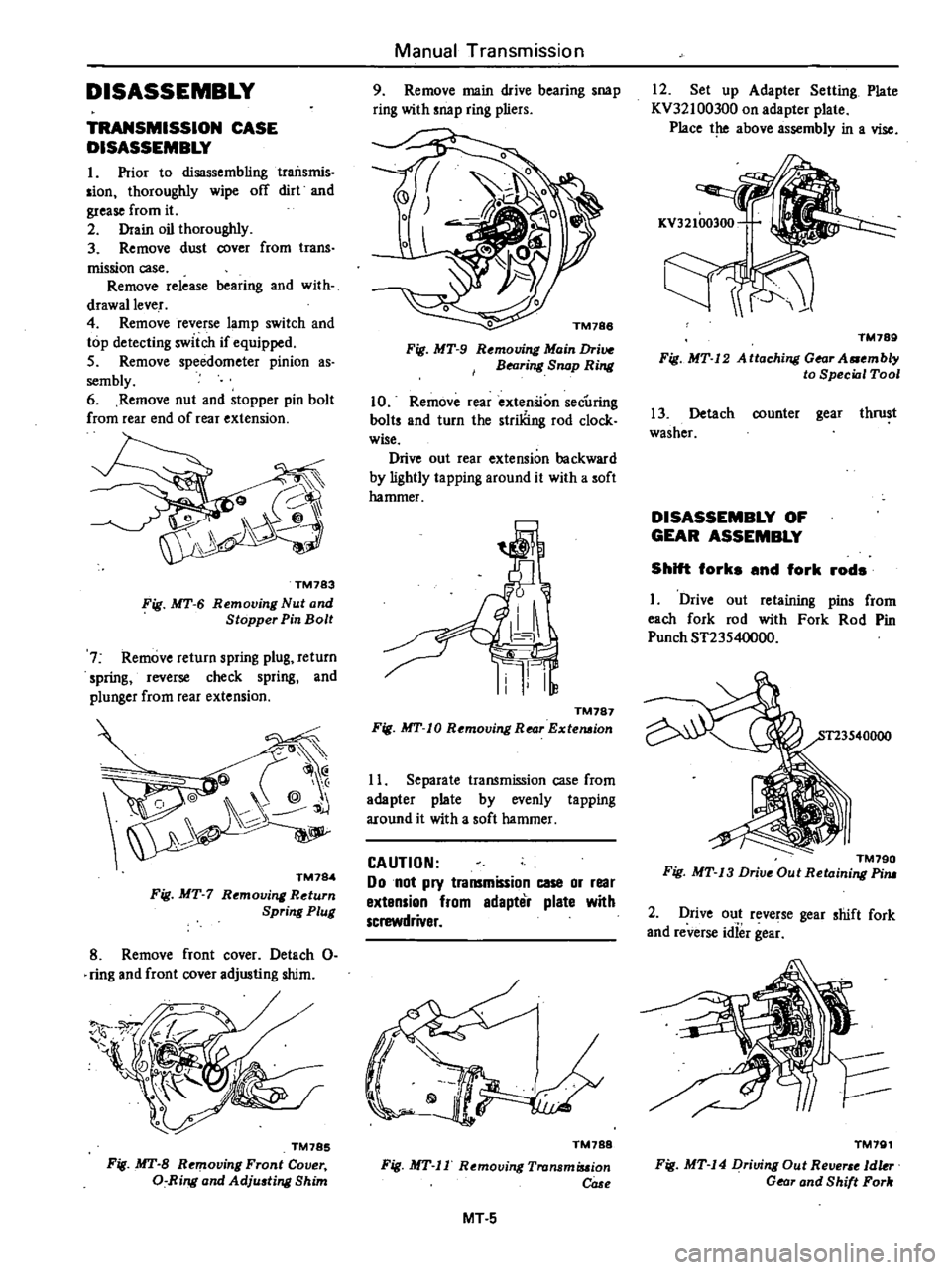
DISASSEMBLY
TRANSMISSION
CASE
DISASSEMBLY
I
Prior
to
disassembling
traiIsmis
sian
thoroughly
wipe
off
dirt
and
grease
from
it
2
Drain
oil
thoroughly
3
Remove
dust
cover
from
trans
mission
case
Remove
release
bearing
and
with
drawallever
4
Remove
reverse
lamp
switch
and
top
detecting
switch
if
equipped
5
Remove
speedometer
pinion
as
sembly
6
Remove
nut
and
stopper
pin
bolt
from
rear
end
of
rear
extension
TM783
Fig
MT
6
Removing
Nut
and
Stopper
Pin
Bolt
7
Remove
return
spring
plug
return
spring
reverse
check
spring
and
plunger
from
rear
extension
@
@
j
TM784
Fig
MT
7
Rt
moving
Return
Spring
Plug
8
Remove
front
cover
Detach
0
ring
and
front
cover
adjusting
shim
TM785
Fig
MT
B
Removing
Front
Cover
a
Ring
and
Adju
ting
Shim
Manual
Transmission
9
Remove
main
drive
bearing
snap
ring
with
snap
ring
pliers
o
TM188
Fig
MT
9
Rt
mouing
Main
Drive
BNring
Snap
Ring
10
Remove
rear
extenSion
secUring
baits
and
turn
the
striliing
rod
clock
wise
Drive
out
rear
extension
backward
by
lightly
ta
pping
around
it
with
a
soft
hammer
TM787
Fig
MT
10
Removing
Rear
Extemion
11
Separate
transmission
case
from
adapter
plate
by
evenly
tapping
around
it
with
a
soft
hammer
CAUTION
Do
not
pry
transmission
case
or
rear
extension
from
edapter
plate
with
screwdriver
TM788
Fig
MT
II
Removing
Tronsmiuion
COSf
MT
5
12
Set
up
Adapter
Setting
Plate
KV32100300
on
adapter
plate
Place
the
above
assembly
in
a
vise
TM789
Fig
MT
12
A
ttaching
Gear
A
mbly
to
Special
Tool
13
Detach
counter
gear
thrust
washer
DISASSEMBLY
OF
GEAR
ASSEMBLY
Shift
forks
and
fork
rods
I
Drive
out
retaining
pins
from
each
fork
rod
with
Fork
Rod
Pin
Punch
ST23540000
TM790
Fig
MT
13
Drive
Out
Retaining
Pim
2
Drive
out
reverse
gear
shift
fork
and
reverse
idief
gea
TM791
Fig
MT
14
Driving
Out
Re
1dkr
Gear
and
Shift
Fork
Page 231 of 548
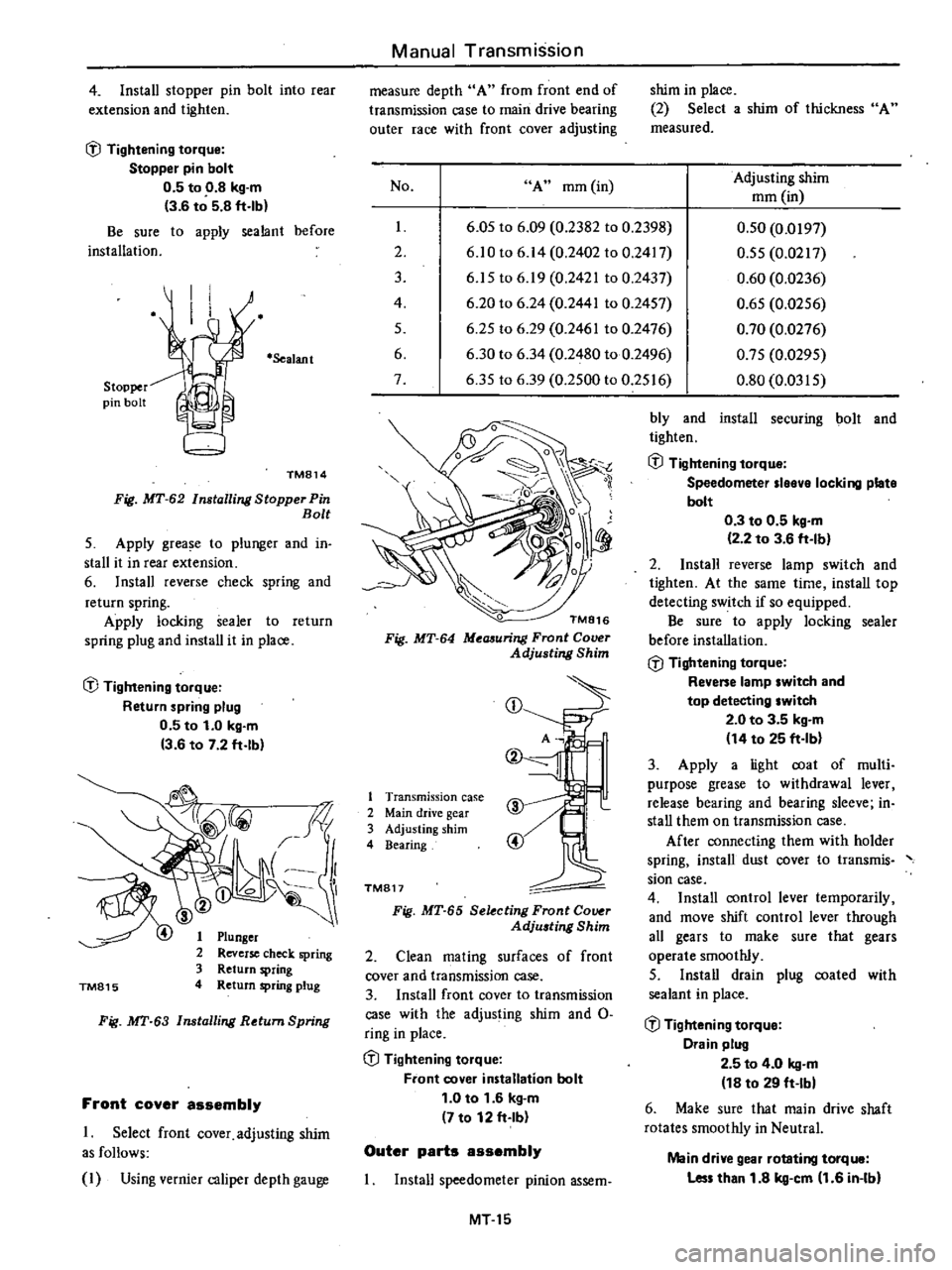
4
Install
stopper
pin
bolt
into
rear
extension
and
tighten
l
J
Tightening
torque
Stopper
pin
bolt
0
5
to
0
8
kg
m
3
6
to
5
8
ft
lb
Be
sure
to
apply
sealant
before
installation
Stopper
pin
bolt
Sealant
TM814
Fig
MT
62
Installing
Stopper
Pin
Bolt
5
Apply
grease
to
plunger
and
in
stall
it
in
rear
extension
6
Install
reverse
check
spring
and
return
spring
Apply
locking
sealer
to
return
spring
plug
and
install
it
in
place
l
J
Tightening
torque
Return
spring
plug
0
5
to
1
0
kg
m
3
6
to
7
2
ft
lb
TM815
Plunger
Reverse
check
spring
Return
spring
Return
spring
plug
Fig
MT
63
Installing
Return
Spring
Front
cover
assembly
1
Select
front
cover
adjusting
shim
as
follows
I
Using
vernier
caliper
depth
gauge
Manual
Transmission
measure
depth
A
from
front
end
of
transmission
case
to
main
drive
bearing
outer
race
with
front
cover
adjusting
No
A
mm
in
I
2
3
4
5
6
7
shim
in
place
2
Select
a
shim
of
thickness
A
measured
Adjusting
shim
mm
in
6
05
to
6
09
0
2382
to
0
2398
6
10
to
6
14
0
2402
to
0
2417
6
15
to
6
19
0
2421
to
0
2437
6
20
to
6
24
0
2441
to
0
2457
6
25
to
6
29
0
2461
to
0
2476
6
30
to
6
34
0
2480
to
0
2496
6
35
to
6
39
0
2500
to
0
2516
0
50
0
0197
0
55
0
0217
0
60
0
0236
0
65
0
0256
0
70
0
0276
0
75
0
0295
0
80
0
0315
TM816
Fig
MT
64
Meaauring
Front
Cover
Adjusting
Shim
CD
1
Transmission
case
2
Main
drive
gear
3
Adjusting
shim
4
Bearing
TM817
Fig
MT
65
Selecting
Front
Co
r
Adju
ting
Shim
2
Clean
mating
surfaces
of
front
cover
and
transmission
case
3
Install
front
cover
to
transmission
case
with
the
adjusting
shim
and
0
ring
in
place
l
J
Tightening
torque
Front
cover
installation
bolt
1
0
to
1
6
kg
m
7
to
12
ft
Ib
Outer
parts
assembly
Install
speedometer
pinion
assem
MT15
bly
and
install
securing
bolt
and
tighten
l
J
Tightening
torque
Speedometer
Ieeve
locking
plate
bolt
0
3
to
0
5
kg
m
2
2
to
3
6
ft
Ib
2
Install
reverse
lamp
switch
and
tighten
At
the
same
time
install
top
detecting
switch
if
so
equipped
Be
sure
to
apply
locking
sealer
before
installation
l
J
Tightening
torque
Revene
lamp
switch
and
top
detecting
switch
2
0
to
3
5
kg
m
14
to
25
ft
Ib
3
Apply
a
light
coat
of
multi
purpose
grease
to
withdrawal
lever
release
bearing
and
bearing
sleeve
in
stall
them
on
transmission
case
After
connecting
them
with
holder
spring
install
dust
cover
to
transmis
sian
case
4
Install
control
lever
temporarily
and
move
shift
control
lever
through
all
gears
to
make
sure
that
gears
operate
smoothly
5
Install
drain
plug
coated
with
sealant
in
place
l
J
Tightening
torque
Drain
plug
2
5
to
4
0
kg
m
18
to
29
ft
Ibl
6
Make
sure
that
main
drive
shaft
rotates
smoothly
in
Neutral
Main
drive
gear
rotating
torque
Les
than
1
8
kg
cm
1
6
in
Ibl
Page 235 of 548
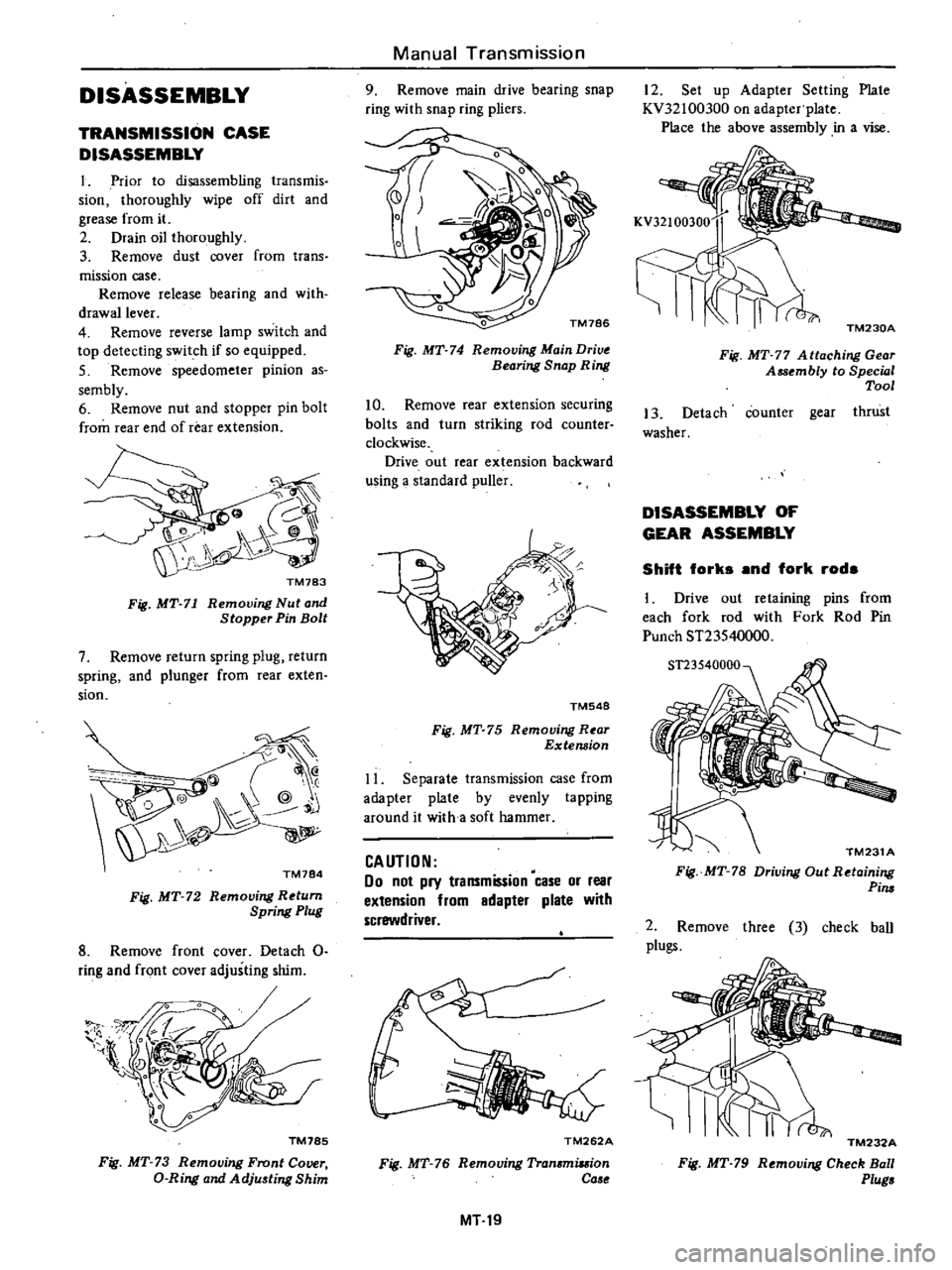
DISASSEMBLY
TRANSMISSION
CASE
DISASSEMBLY
1
Prior
to
disassembling
transmis
sion
thoroughly
wipe
off
dirt
and
grease
from
it
2
Drain
oil
thoroughly
3
Remove
dust
cover
from
trans
mission
case
Remove
release
bearing
and
with
drawallever
4
Remove
reverse
lamp
switch
and
top
detecting
switch
if
so
equipped
5
Remove
speedometer
pinion
as
sembly
6
Remove
nut
and
stopper
pin
bolt
from
rear
end
of
rear
extension
Fig
MT
71
Removing
Nut
and
Stopper
Pin
Bolt
7
Remove
return
spring
plug
return
spring
and
plunger
from
rear
exten
sion
@
@
Q
@
j
TM784
Fig
MT
72
Removing
Return
Spring
Plug
8
Remove
front
cover
Detach
0
ring
and
front
cover
adjusting
shim
1l
l
TM785
Fig
MT
73
Removing
Front
Cover
D
Ring
and
Adju
ting
Shim
Manual
Transmission
9
Remove
main
drive
bearing
snap
ring
with
snap
ring
pliers
Fig
MT
74
Removing
Main
Drive
Bearing
Snap
Ring
10
Remove
rear
extension
securing
bolts
and
turn
striking
rod
counter
clockwise
Drive
out
rear
extension
backward
using
a
standard
puller
TM548
Fig
MT
75
Removing
R
ar
Extension
11
Separate
transmission
case
from
adapter
plate
by
evenly
tapping
around
it
with
a
soft
hammer
CAUTION
00
not
pry
transmission
case
or
rear
extension
from
adapter
plate
with
screwdriver
TM262A
Fig
MT
76
Removing
Tran
miuion
Ca
e
MT19
12
Set
up
Adapter
Setting
Plate
KV32100300
on
adapter
plate
Place
the
above
assembly
in
a
vise
TM230A
Fig
MT
77
A
ttaching
Gear
Assembly
to
Special
Tool
13
Detach
counter
gear
thrust
washer
DISASSEMBLY
OF
GEAR
ASSEMBLY
Shift
forks
and
fork
rods
1
Drive
out
retaining
pins
from
each
fork
rod
with
Fork
Rod
Pin
Punch
ST23540000
TM231
A
Fig
MT
78
Driving
Out
Retaining
Pim
2
Remove
three
3
check
ball
plugs
TM232A
Fig
MT
79
Removing
Check
Ball
Plug