clutch DATSUN 210 1979 Manual PDF
[x] Cancel search | Manufacturer: DATSUN, Model Year: 1979, Model line: 210, Model: DATSUN 210 1979Pages: 548, PDF Size: 28.66 MB
Page 508 of 548
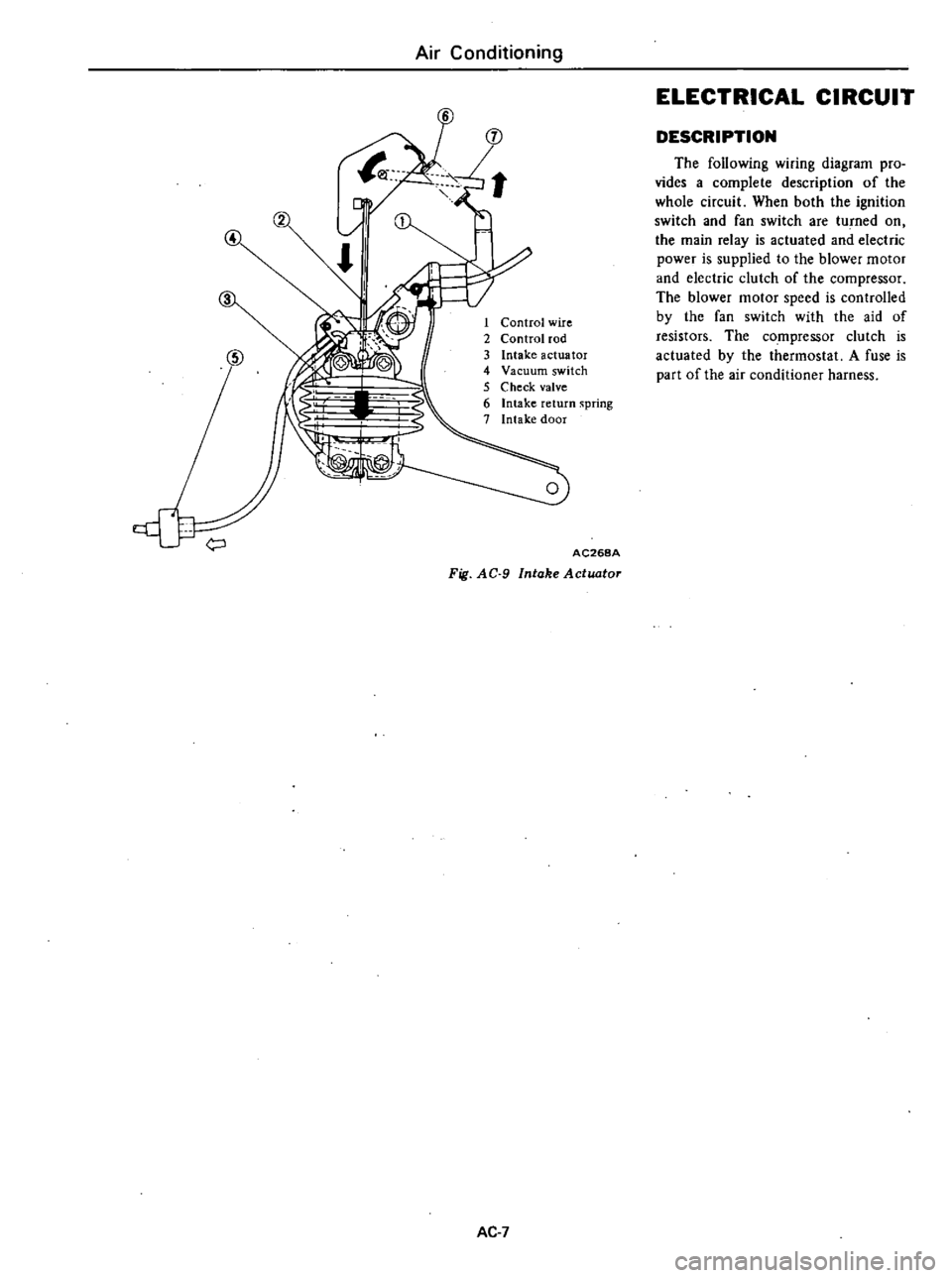
Air
Conditioning
4
1
Control
wire
2
Control
rod
3
Intake
actuator
4
Vacuum
switch
5
Check
valve
6
Intake
return
spring
7
Intake
door
AC268A
Fig
AC
9
Intake
Actuator
AC
7
ELECTRICAL
CIRCUIT
DESCRIPTION
The
following
wiring
diagram
pro
vides
a
complete
description
of
the
whole
circuit
When
both
the
ignition
switch
and
fan
switch
are
tu
ned
on
the
main
relay
is
actuated
and
electric
power
is
supplied
to
the
blower
motor
and
electric
clutch
of
the
compressor
The
blower
motor
speed
is
controlled
by
the
fan
switch
with
the
aid
of
resistors
The
compressor
clutch
is
actuated
by
the
thermostat
A
fuse
is
part
of
the
air
conditioner
harness
Page 509 of 548

Air
Conditioning
Ale
position
Main
relay
Blower
motor
Fan
switch
Fusible
r
link
o
c
Fuse
This
fuse
is
built
into
air
con
harnes
s
I
L
RW
B
5
d
2nd
I
I
olst
Resistor
1
Battery
Ignition
Fuse
1
switch
Micro
switch
Low
pressure
switch
0
Thermost
T
I
CompreSsor
clutch
roo
h
Magnet
valve
AC269A
VENT
8
L
HEAT
DEF
and
REC
HEAT
position
Main
relay
Blower
motor
Fusible
1
link
0
O
C
Fuse
This
fuse
is
built
into
air
coil
harness
RW
o
Fan
switch
Ignition
switch
r
o
Fuse
5
d
2nd
olsl
I
Resistor
0
1
Micro
switch
j
Battery
Low
pressure
switch
0
J
The
most
T
tr
r
I
Compressor
clutch
Magnet
valve
AC270A
Fig
AC
IO
Electrical
Circuit
Ac
a
Page 520 of 548

Air
Conditioning
IDLER
PULLEY
AND
COMPRESSOR
DRIVE
BELT
ADJ
USTMENT
OF
BELT
TENSION
Idler
pulley
Alternator
Crankshaft
pulley
Unit
mm
in
Idler
pulley
Fig
AC
25
Belt
Tension
Specified
compressor
belt
tension
is
8
to
12
mm
0
31
to
0
47
in
when
thumb
pressure
of
10
kg
22
Ib
is
applied
midway
between
idler
pulley
and
compressor
pulley
1
Loosen
idler
pulley
lock
nut
and
then
adjust
pulley
by
turning
adjusting
bolt
2
After
adjustment
tighten
idler
pulley
lock
nut
bolt
3
Remove
idler
pulley
4
Install
pulley
in
the
reverse
order
of
removal
5
Adjust
compressor
belt
tension
REMOVAL
AND
INSTALLATION
1
Jack
up
front
of
car
and
remove
under
cover
2
Remove
idler
pulley
lock
nut
and
loosen
belt
tension
adjusting
Fig
AC26
AC382A
Idler
Pulley
TIghtening
torque
@
3
7
to
5
1
kg
m
27
to
37
ft
lb
AC383A
Fig
AC
27
Compressor
and
Bracket
AC
19
REMOVAL
I
Operate
compressor
if
possible
at
engine
idling
speed
with
air
condi
tioner
controls
set
for
maximum
cool
ing
and
high
blower
speed
for20
to
30
minutes
with
all
windows
open
to
return
oil
into
compressor
2
Disconnect
battery
ground
cables
and
compressor
lead
wire
at
con
nector
3
Discharge
refrigerant
from
cool
ing
system
Refer
to
Discharging
Sys
tem
4
Jack
up
front
of
car
and
remove
under
cover
5
Loosen
idler
pulley
lock
nut
and
loosen
tension
adjusting
bolt
fully
Remove
compressor
drive
belt
See
Fig
AC
26
6
Remove
high
and
low
flexible
hoses
from
compressor
WARNING
Gradually
loosen
discharge
side
hose
fitting
and
remove
it
after
remaining
pressure
has
been
re
leased
CAUTION
Be
sure
to
immediately
put
plug
in
flexible
hose
and
compressor
open
ings
7
Remove
bolts
securing
lower
part
of
compressor
8
Remove
bolts
securing
upper
part
of
compressor
Hold
compressor
with
one
hand
when
removing
bolts
and
then
remove
compressor
With
compressor
clutch
up
lift
compressor
out
with
both
hands
CAUTION
00
not
attempt
to
leave
the
com
pressor
on
its
side
or
upside
down
for
more
than
10
minutes
as
the
compressor
oil
will
enter
the
low
pressure
chambers
If
under
that
condition
compressor
should
be
oper
ated
suddenly
internal
damage
would
result
To
expel
oil
from
chambers
hand
crank
compressor
several
times
in
its
installed
condition
Page 526 of 548
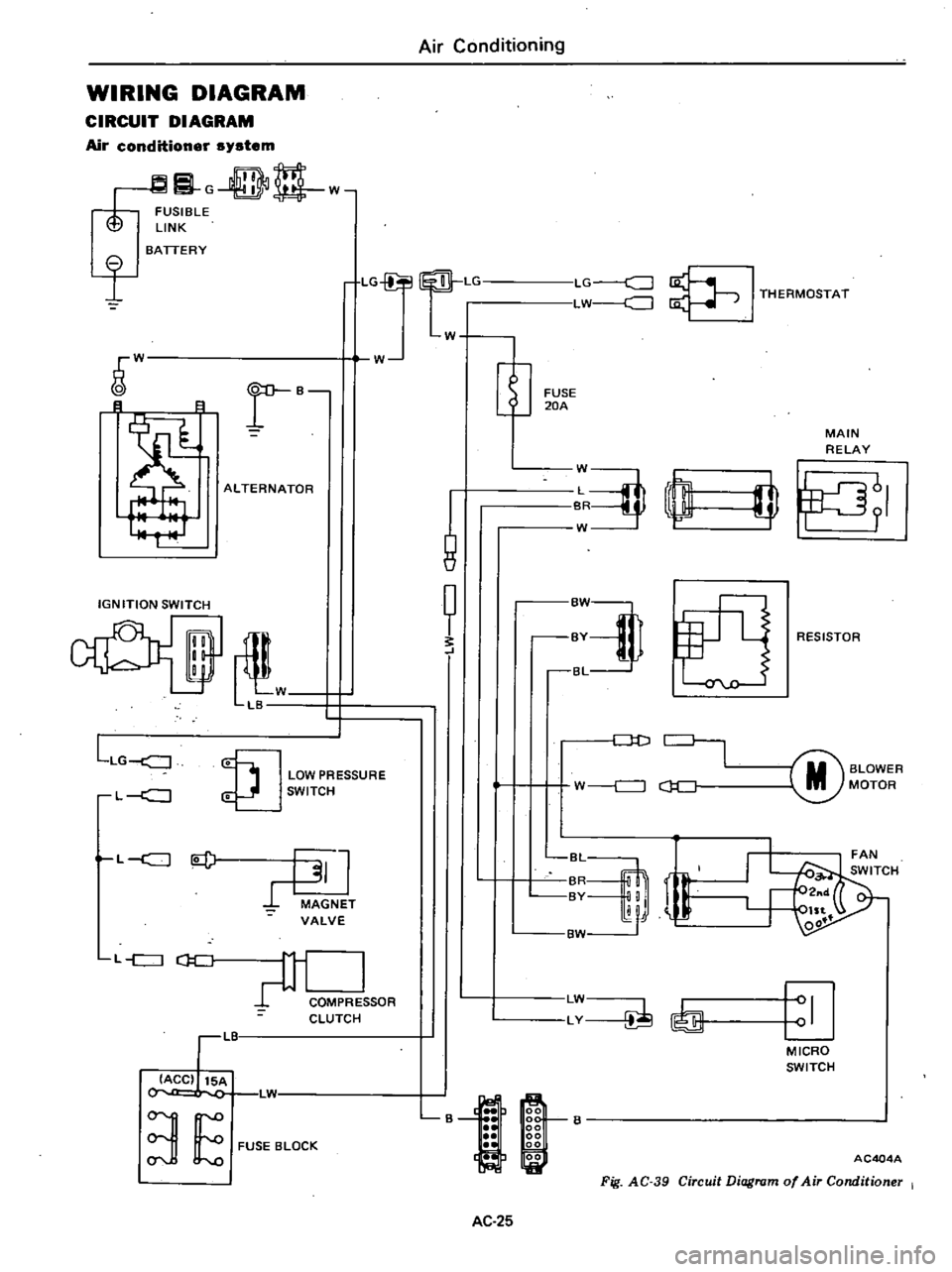
WIRING
DIAGRAM
CIRCUIT
DIAGRAM
Air
conditioner
system
G
DD
w
FUSIBLE
LINK
I
BATTERY
LG
Lr
LG
c
J
LW
J
I
THERMOSTAT
W
W
r
B
B
8
ALTERNATOR
IGNITION
SWITCH
il
W
LB
LLG
J
LOW
PRESSURE
SWITCH
L
c
J
L
c
J
l
J
MAGNET
VALVE
L
c
J
CJ
C
COMPRE
SOR
CLUTCH
LIT
IACC
15A
L1
3
E
FUSE
BLOCK
Air
Conditioning
W
1
8
t
FUSE
20A
MAIN
RELAY
J
rn
W
I
fJ
RESISTOR
Dt
J
M
BLOWER
MOTOR
W
c
J
c
J
C
r
BvM
LW
LY
I
MICRO
SWITCH
B
AC404A
Fig
AC
39
Circuit
Diagram
of
Air
Conditioner
I
AC
25
Page 527 of 548
0
@
o
s
xl
m
u
U
0
0
xJ
l
1
I
9
0
I
K
s
0
0
en
o
o
l
me
0
r
U
0
I
@
0
0
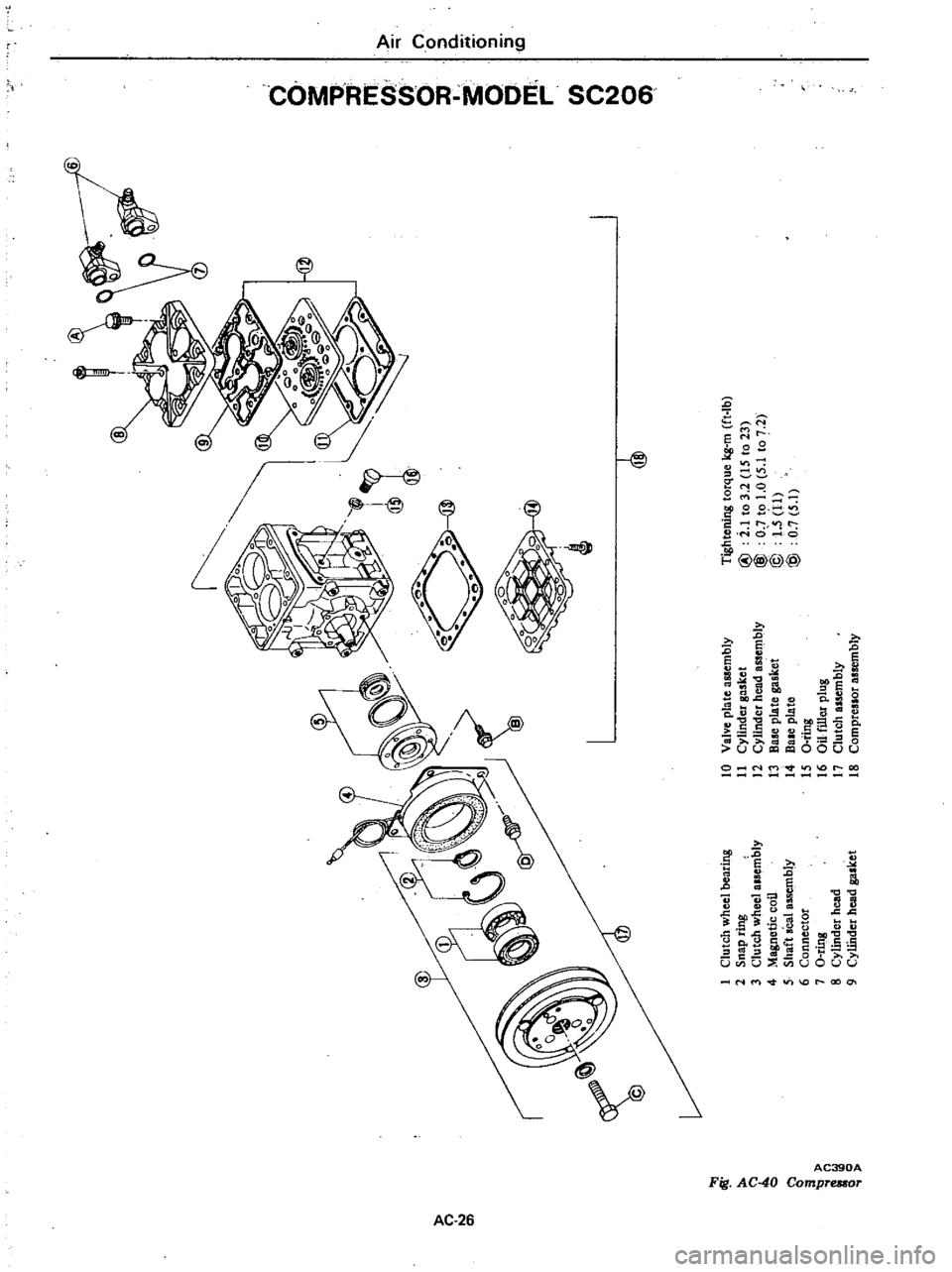
Tightening
torque
kg
m
ft
Ib
I
Clutch
wheel
bearing
10
Valve
pla
te
assembly
2
Snap
ring
11
Cylinder
gasket
@
i
1
to
3
2
IS
to
23
C
l
3
Clutch
wheel
alsembly
12
Cylinder
head
assembly
@
O
to
1
0
5
1
to
7
2
0
4
Magnetic
coil
13
B
plate
gasket
@
1
5
11
5
Shaft
seal
assembly
14
Bale
plate
@
0
7
5
1
6
Connector
IS
a
ting
7
O
ring
16
au
filler
plug
i
8
Cylindet
head
17
Clutch
assembly
o
Q
9
CyUhder
head
gasket
18
Compreslor
assembly
Page 528 of 548
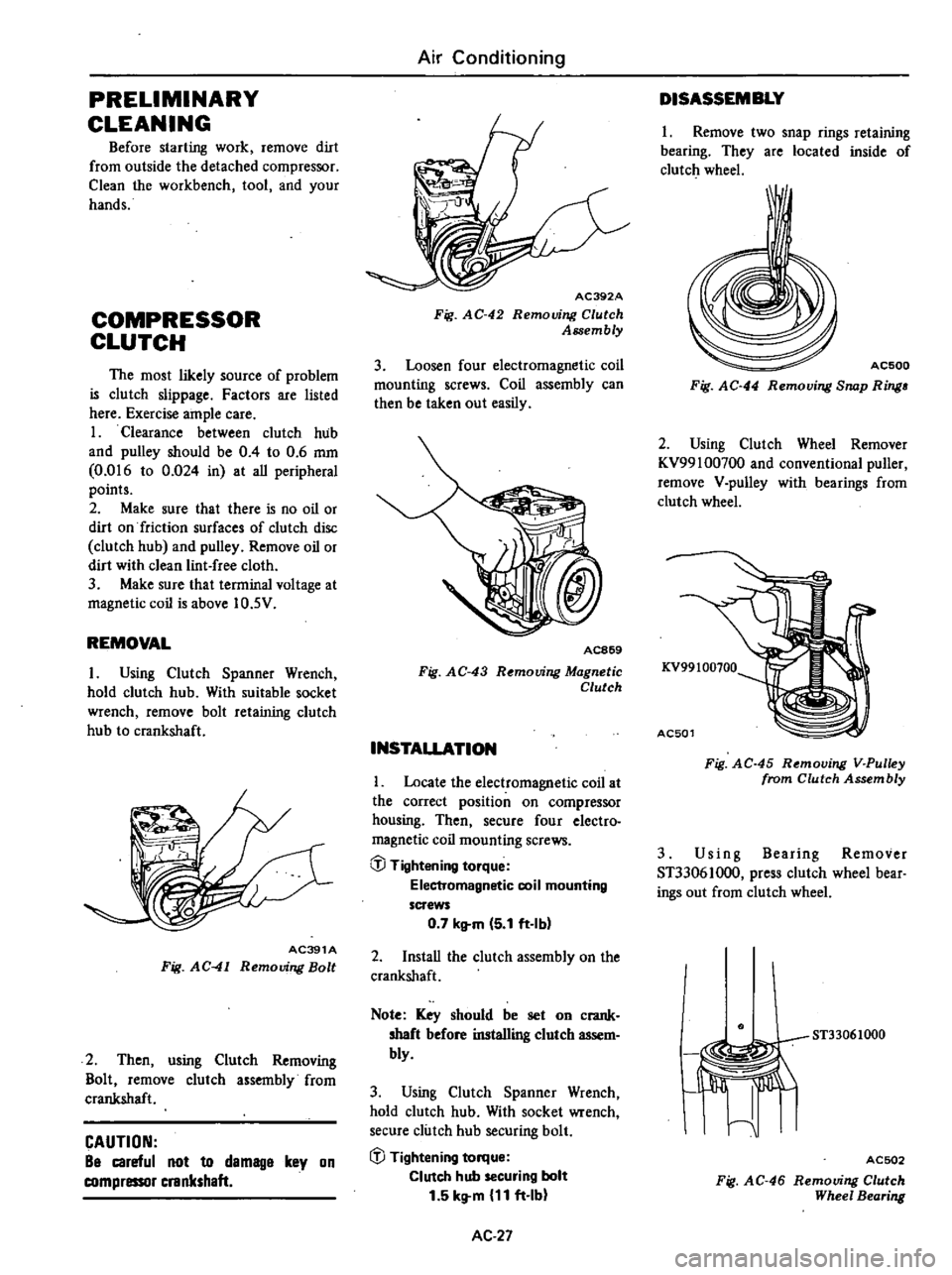
PRELIMINARY
CLEANING
Before
starting
work
remove
dirt
from
outside
the
detached
compressor
Clean
the
workbench
tool
and
your
hands
COMPRESSOR
CLUTCH
The
most
likely
source
of
problem
is
clutch
slippage
Factors
are
listed
here
Exercise
ample
care
1
Clearance
between
clutch
hub
and
pulley
should
be
0
4
to
0
6
mm
0
016
to
0
024
in
at
aU
peripheral
points
2
Make
sure
that
there
is
no
oil
or
dirt
on
friction
surfaces
of
clutch
disc
clutch
hub
and
pulley
Remove
oil
or
dirt
with
clean
lint
free
cloth
3
Make
sure
that
terminal
voltage
at
magnetic
coil
is
above
10
5V
REMOVAL
I
Using
Clutch
Spanner
Wrench
hold
clutch
hub
With
suitable
socket
wrench
remove
bolt
retaining
clutch
hub
to
crankshaft
AC391A
Fig
AC
41
Removing
Bolt
2
Then
using
Clutch
Removing
Bolt
remove
clutch
assembly
from
crankshaft
CAUTION
Be
careful
not
to
demage
key
on
compressor
crankshaft
Air
Conditioning
AC392A
Fig
AC
42
Removing
Clutch
Assembly
3
Loosen
four
electromagnetic
coil
mounting
screws
Coil
assembly
can
then
be
taken
out
easily
AC869
Fig
AC
43
R
mouing
Magnetic
Clutch
INSTALLATION
Locate
the
electromagnetic
coil
at
the
correct
position
on
compressor
housing
Then
secure
four
electro
magnetic
coil
mounting
screws
@
Tightening
torque
Electromagnetic
coil
mounting
screws
0
7
kltm
5
1
ft
Ibl
2
InstaU
the
clutch
assembly
on
the
crankshaft
Note
Key
should
be
set
on
crank
shaft
before
installing
clutch
assem
bly
3
Using
Clutch
Spanner
Wrench
hold
clutch
hub
With
socket
wrench
secure
clutch
hub
securing
bolt
iJJ
Tightening
torque
Clutch
hub
securing
bolt
1
5
kg
m
11
ft
Ib
AC
27
DISASSEMBLY
1
Remove
two
snap
rings
retaining
bearing
They
are
located
inside
of
clutch
wheel
I
AC500
Fig
AC
44
Removing
Snap
Ring
2
Using
Clutch
Wheel
Remover
KV99100700
and
conventional
puller
remove
V
pulley
with
bearings
from
clutch
wheel
KV99100100
AC501
Fig
AC
45
Removing
V
Pulley
from
Clutch
Assembly
3
Us
i
n
g
Bearing
Remover
ST33061000
press
clutch
wheel
bear
ings
out
from
clutch
wheel
ST33061000
I
Jiffi
I
ACSD2
Fig
AC
46
Removing
Clutch
Wheel
Bearing
Page 529 of 548
rt
ASSEMBLY
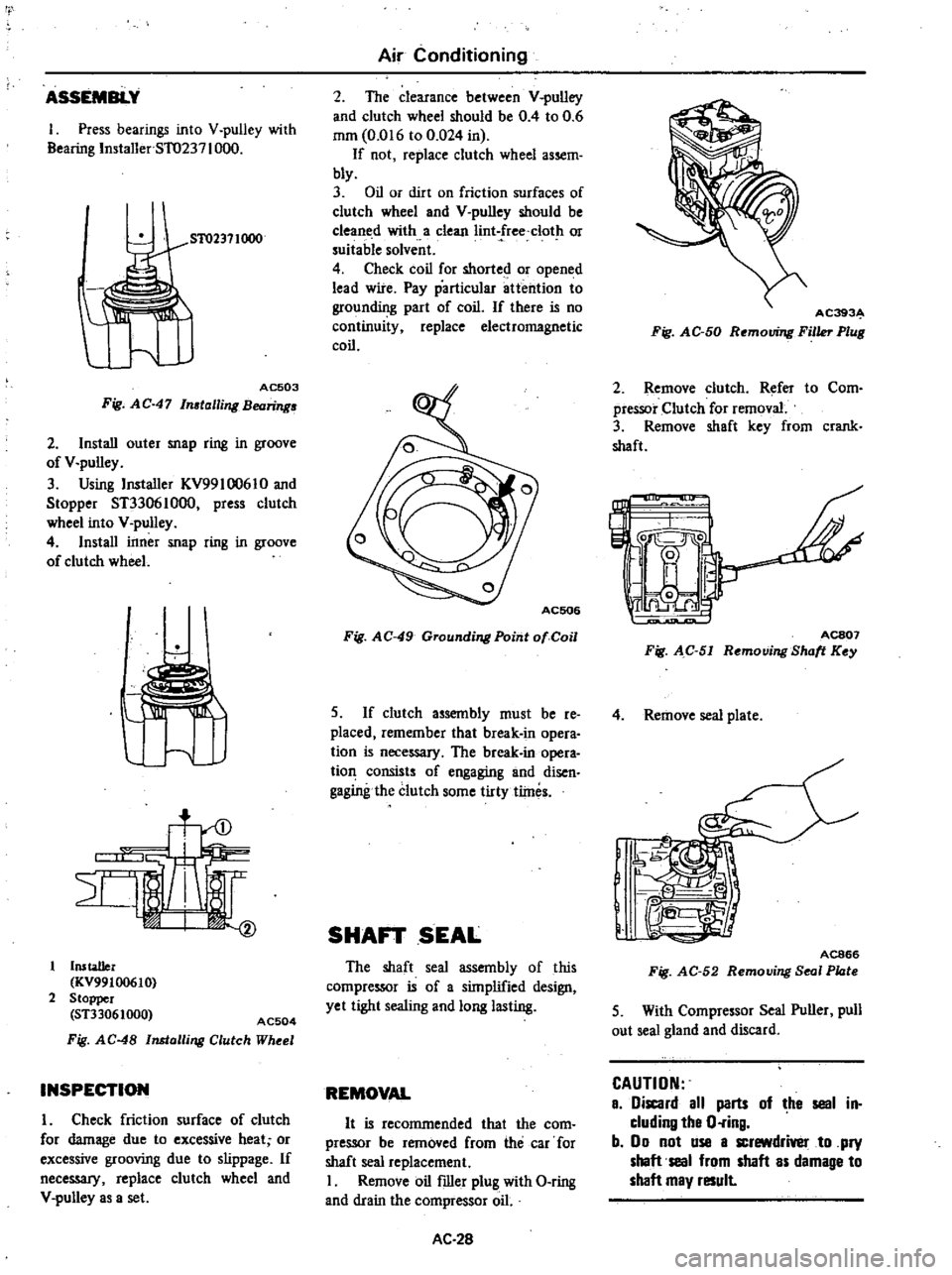
1
Press
bearings
into
V
pulley
with
Bearing
Installer
5T0237
1000
51
02371000
AC503
Fig
AC
47
In
talling
Bearing
2
Install
outer
snap
ring
in
groove
of
V
pulley
3
Using
Installer
KV99l
0061
0
and
Stopper
ST33061000
press
clutch
wheel
into
V
pulley
4
Install
inner
snap
ring
in
groove
of
clutch
wheel
u
Installer
KV99100610
2
Stopper
ST33061000
AC504
Fig
AC
48
Installing
Clutch
Wheel
INSPECTION
I
Check
friction
surface
of
clutch
for
damage
due
to
excessive
heat
or
excessive
grooving
due
to
slippage
If
neceSS3I
replace
clutch
wheel
and
V
pulley
as
a
set
Air
Conditioning
2
The
clearance
between
V
pulley
and
clutch
wheel
should
be
0
4
to
0
6
mm
0
016
to
0
024
in
If
not
replace
clutch
wheel
assem
bly
3
Oil
or
dirt
on
friction
surfaces
of
clutch
wheel
and
V
pulley
should
be
cleaned
with
a
clean
Iint
free
clot
or
suitable
solvent
4
Check
coil
for
shorted
or
opened
lead
wire
Pay
particular
attention
to
grounding
part
of
coil
If
there
is
no
continuity
replace
electromagnetic
coil
Fig
AC
49
Grounding
Point
01
Coil
S
If
clutch
assembly
must
be
re
placed
remember
that
break
in
opera
tion
is
neceSS3I
The
break
in
opera
tion
consists
of
engaging
and
disen
gagingthe
clutch
some
tirty
tlines
SHAFT
SEAL
The
shaft
seal
assembly
of
this
compressor
is
of
a
simplified
design
yet
tight
sealing
and
long
lasting
REMOVAL
It
is
recommended
that
the
com
pressor
be
removed
from
the
car
for
shaft
seal
replacement
I
Remove
oil
filler
plug
with
O
ring
and
drain
the
compressor
oil
AC
28
AC393
Fig
AC
50
Removing
Filler
Plug
2
Remove
clutch
Refer
to
Com
pressor
Clutch
for
removal
3
Remove
shaft
key
from
crank
shaft
L
IJ
C
I
0
ACS07
Fig
AC
51
Removing
Shott
Key
4
Remove
seal
plate
J
e
I
@
IR
n
1
j
AC866
Fig
AC
52
Removing
Seal
Plote
5
With
Compressor
Seal
Puller
pull
out
seal
gland
and
discard
CAUTION
a
iscard
all
parts
of
he
seal
in
cluding
tha
O
ring
b
00
not
use
a
screwdrivel
to
pry
shaft
seal
from
shaft
as
damage
to
shaft
may
result
Page 530 of 548
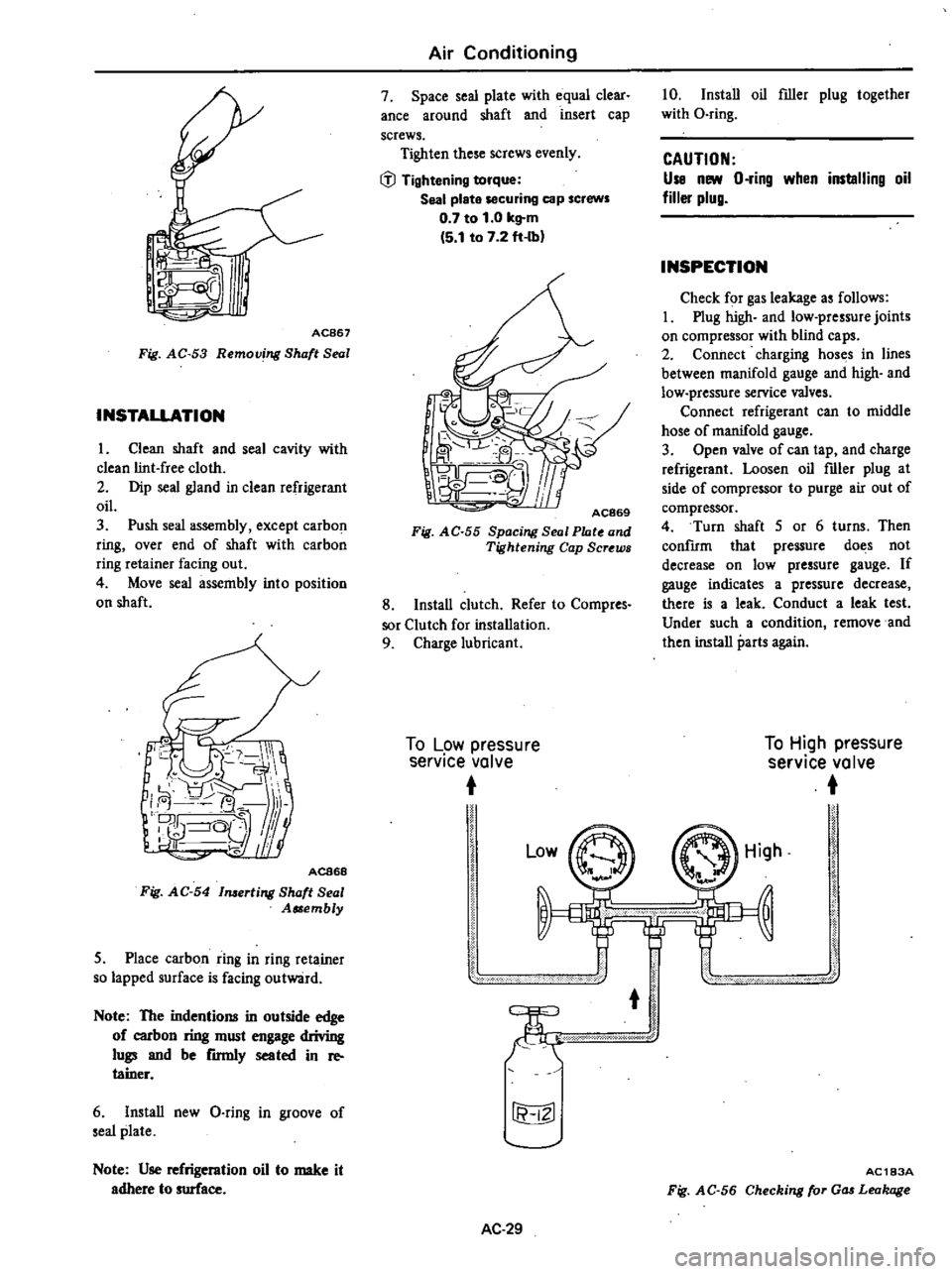
AC867
Fig
AC
53
Removing
Shaft
Seal
INSTALLATION
1
Clean
shaft
and
seal
cavity
with
clean
lint
free
cloth
2
Dip
seal
gland
in
clean
refrigerant
oil
3
Push
seal
assembly
except
carbon
ring
over
end
of
shaft
with
carbon
ring
retainer
facing
out
4
Move
seal
assembly
into
position
on
shaft
ACB68
Fig
AC
54
1merting
Shaft
Seal
Assembly
5
Place
carbon
ring
in
ring
reta
iner
so
lapped
surface
is
facing
outward
Note
The
indentions
in
outside
edge
of
carbon
ring
must
engage
driving
lugs
and
be
rmnly
seated
in
re
tainer
6
Install
new
Q
ring
in
groove
of
seal
plate
Note
Use
refrigeration
oil
to
make
it
adhere
to
surface
Air
Conditioning
7
Space
seal
plate
with
equal
clear
ance
around
shaft
and
insert
cap
screws
Tighten
these
screws
evenly
IiJ
Tightening
torque
Seal
plate
securing
cap
screws
0
7
to
1
0
kg
m
5
1
to
7
2
ft
Ibl
AC869
Fig
AC
55
Spacing
Seal
Plate
and
Tightening
Cap
Screws
8
Install
clutch
Refer
to
Compres
sor
Clutch
for
installation
9
Charge
lubricant
To
Low
pressure
service
valve
10
Install
oil
filler
plug
together
with
O
ring
CAUTION
Use
new
O
ring
when
installing
oil
filler
plug
INSPECTION
Check
for
gas
leakage
as
follows
I
Plug
high
and
low
pressure
joints
on
compressor
with
blind
caps
2
Connect
charging
hoses
in
lines
between
manifold
gauge
and
high
and
low
pressure
service
valves
Connect
refrigerant
can
to
middle
hose
of
manifold
gauge
3
Open
valve
of
can
tap
and
charge
refrigerant
Loosen
oil
filler
plug
at
side
of
compressor
to
purge
air
out
of
compressor
4
Turn
shaft
5
or
6
turns
Then
confIrm
that
pressure
does
not
decrease
on
low
pressure
gauge
If
gauge
indicates
a
pressure
decrease
there
is
a
leak
Conduct
a
leak
test
Under
such
a
condition
remove
and
then
install
parts
again
To
High
pressure
service
valve
Low
r
fi
IZl
AC
29
High
AC183A
Fig
AC
56
Checking
for
Gas
Leakage
Page 533 of 548
Com
pressor
OFF
I
I
Blower
makes
noise
Repair
or
re
place
blower
Bearings
of
com
pressor
clutch
or
idler
pulley
make
noise
Replace
C
l
W
Noisy
Compressor
itself
makes
noise
Repair
or
replace
com
pressor
Belt
is
loose
Adjust
belt
Suction
pressure
is
low
Strainer
in
pipe
Line
Is
restricted
Replace
strainer
Pipe
at
receiver
drier
outlet
has
low
temperature
Receiver
drier
is
restricted
Replace
receiver
drier
I
Fin
and
tube
of
evaporator
or
laminated
evapo
rator
have
some
dents
Replace
or
repair
evaporator
Expansion
valve
is
close
excessively
or
gas
leakage
from
thermo
bulb
Replace
expansion
valve
Compressor
ON
J
I
When
engine
rpm
is
changed
there
are
reso
nant
sounds
Retighten
com
pre
ssor
bracket
bolts
Piping
is
reso
nating
Add
clamp
Insufficient
cooling
Bubbles
in
sight
glaS
Check
refrigeration
line
for
gas
leaks
and
repair
leaks
if
any
Charge
re
frigerant
to
correct
level
In
case
of
too
many
leaks
stop
com
pressor
discharge
the
system
evaCUate
and
recharge
the
system
As
necessary
replace
receiver
drier
Air
in
system
may
cause
bubbles
in
sight
glass
System
pressure
and
temperature
of
discharge
air
llre
abnormal
Refer
to
Performance
Test
Diagnoses
for
detail
Suction
pres
sure
is
high
Expansion
valve
is
open
excessively
Replace
ex
pansion
valve
Discharge
pressure
is
high
Overcharge
of
refrigerant
Discharge
some
of
refrig
erani
to
correct
level
Air
is
mixed
in
Discharge
system
and
replace
drier
Evacuate
and
recharge
system
Condenser
s
fin
is
dented
or
clogged
with
dust
Clean
exterior
surface
with
water
No
bubbles
in
sight
glass
With
manifold
gauge
check
system
pres
sures
Measure
tem
perature
of
discharge
air
Refer
to
Perform
ance
Test
Blower
does
not
rotate
Refei
to
Blower
Motor
Diagnoses
Temperature
of
discharge
air
is
abnormal
but
system
pres5ure
is
normal
Suction
pressure
iJ
high
while
dis
charge
pressure
is
low
Valve
or
gasket
of
compressor
is
damaged
Repair
or
replace
compreuor
Check
air
flow
system
Refer
to
Air
Conditioner
Operation
Chart
Compressor
does
not
run
Refer
to
Com
pressor
Diagnoses
Check
grommets
on
car
s
dash
panel
for
air
leaks
check
other
seal
of
car
Page 535 of 548
J
COnlp
reSSOI
clutch
is
not
J
engaged
c
00
ha
voltage
decreased
to
es
thall
lO
5V
Lead
wire
or
com
pressor
clutch
is
dead
I
Ground
terminal
of
coil
is
poor
a
t
connection
Repair
connection
Refer
to
CompreSior
Clutch
Diagnoses
J
J
r
In
c
e
Clutch
is
not
en
gaged
yet
replace
compressor
dutch
lr1
vetChatgO
of
Ief
ge1ant
I
I
e
refrigotant
gas
10
n
o
t
cnt
j
that
sight
gla
ss
of
receiver
drier
has
onlY
a
few
bubble
Engine5peed
l
OOrpm
i
l
r
Check
for
dis
charge
pressure
OK
if
dbcnarge
pres
ure
is
reduced
Discharge
pres
sure
is
not
reduced
l
Compressor
clutch
is
engaged
but
compre
sor
doe
not
IUn
Cbeck
and
re
adjust
gap
of
clutch
Clea
Il
oil
OJ
dust
on
contact
sur
face
of
clutch
if
slipping
con
ti
n
ues
rCPlaO
J
compressor
clutch
Check
belt
teMion
and
adjust
it
lfbelt
bwor
l
out
or
damaged
ie
pl
ce
iI
Air
in
refrigeration
System
J
Discharge
system
ftom
service
valve
on
discharge
side
Evacuate
a
nd
rech
arge
the
Lystem
J
When
torque
is
stm
grellt
repair
or
rtV1ace
compressor
j
T
son
rod
l
mp
teSSOI
j
Internal
problem
in
cornpre
sor
cyl
inder
Check
y
tem
Repau
or
replace
nece
tY
J
r
Compte
r
oille
ing
J
Air
blOW
on
spot
whcre
oil
leak
e
vidence
is
round
Then
check
for
refrigerant
leakS
us
n
leak
detectof
Refrigerant
leaking
Repau
01
replace
compttUOr
I
NO
teftig
lea
ing
Wipe
clean
oil
wi
h
Jag
L
Noisy
onlY
when
clutch
is
engaged
Check
for
oo
c
comprenor
mount
ing
Dolts
Retighten
bolts
Compressor
drive
belt
islOosc
Adjust
belt
ttM1on
If
cotTlpre
sor
is
noisY
yet
repair
or
replace
compres
sor
Noisy
when
clutch
is
not
engaged
Remove
cQm1JressOt
belL
Turn
pulley
of
compressot
clutch
by
hand
and
check
for
noise
If
noisC
is
MaId
repair
com
preM
or
clutCh
01
o
B
0
a
Ut
Ut
o
a
a
i
o
Ut
A
o
l
Cl
o
l
l
tC