service DODGE CHALLENGER 2015 3.G User Guide
[x] Cancel search | Manufacturer: DODGE, Model Year: 2015, Model line: CHALLENGER, Model: DODGE CHALLENGER 2015 3.GPages: 603, PDF Size: 14.97 MB
Page 111 of 603
WARNING!
•If anyone in the vehicle could be in danger (e.g.,
fire or smoke is visible, dangerous road conditions
or location), do not wait for voice contact from a
9-1-1 operator. All occupants should exit the vehicle
immediately and move to a safe location.
•The 9-1-1 Call system is embedded into the vehi-
cle’s electrical system. Do not add aftermarket
electrical equipment to the vehicle’s electrical sys-
tem. This may prevent your vehicle from sending a
signal to initiate an emergency call. To avoid inter-
ference that can cause the 9-1-1 Call system to fail,
never add aftermarket equipment (e.g., two-way
mobile radio, CB radio, data recorder, etc.) to your
vehicle’s electrical system or modify the antennas
on your vehicle. IF YOUR VEHICLE LOSES BAT-
TERY POWER FOR ANY REASON (INCLUDING
(Continued)
WARNING!(Continued)
DURING OR AFTER AN ACCIDENT), THE
UCONNECT FEATURES, APPS AND SERVICES,
AMONG OTHERS, WILL NOT OPERATE.
•Modifications to any part of the 9-1-1 Call system
could cause the air bag system to fail when you
need it. You could be injured if the air bag system
is not there to help protect you.
9-1-1 Call System Limitations
Vehicles sold in Canada and MexicoDO NOThave 9-1-1
Call system capabilities.
9-1-1 or other emergency line operators in Canada and
Mexico may not answer or respond to 9-1-1 system calls.
3
UNDERSTANDING THE FEATURES OF YOUR VEHICLE 109
Page 112 of 603
If the 9-1-1 Call system detects a malfunction, any of the
following may occur at the time the malfunction is
detected, and at the beginning of each ignition cycle:
•The Rearview Mirror light located between the Assist
and 9-1-1 buttons will continuously be illuminated
red.
•The Phone Screen will display the following message
“Vehicle phone requires service. Please contact your
dealer.”
•An In-Vehicle Audio message will state “Vehicle phone
requires service. Please contact your dealer.”
WARNING!
•Ignoring the Rearview Mirror light could mean you
will not have 9-1-1 Call services. If the Rearview
Mirror light is illuminated, have an authorized
dealer service the 9-1-1 Call system immediately.
•The Occupant Restraint Control module turns on
the Air Bag Warning Light on the instrument panel
if a malfunction in any part of the system is
detected. If the Air Bag Warning Light is illumi-
nated, the air bag system may not be working
properly and the 9-1-1 system may not be able to
send a signal to a 9-1-1 operator. If the Air Bag
Warning Light is illuminated, have an authorized
dealer service the ORC system immediately.
11 0 U N D E R S TA N D I N G T H E F E AT U R E S O F Y O U R V E H I C L E
Page 122 of 603
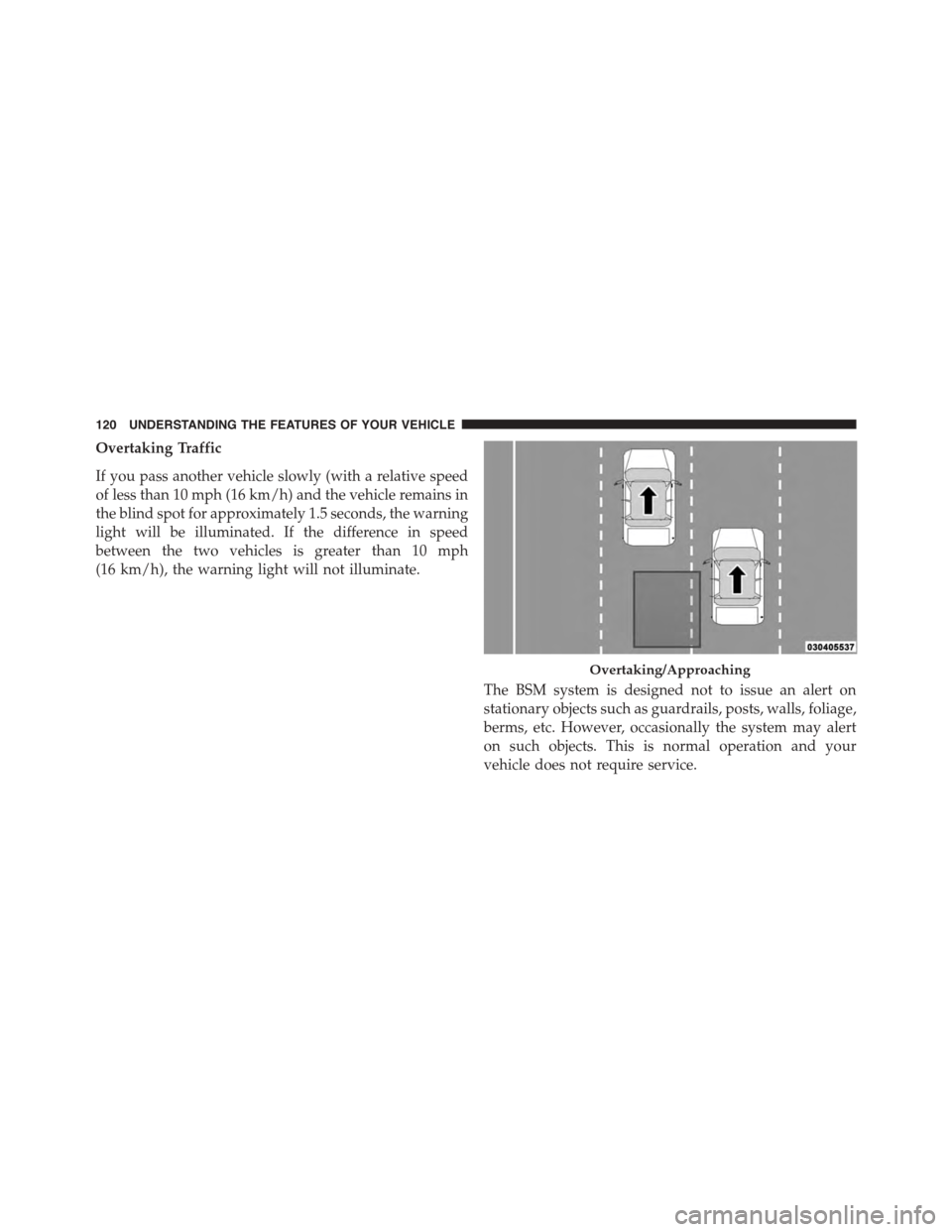
Overtaking Traffic
If you pass another vehicle slowly (with a relative speed
of less than 10 mph (16 km/h) and the vehicle remains in
the blind spot for approximately 1.5 seconds, the warning
light will be illuminated. If the difference in speed
between the two vehicles is greater than 10 mph
(16 km/h), the warning light will not illuminate.
The BSM system is designed not to issue an alert on
stationary objects such as guardrails, posts, walls, foliage,
berms, etc. However, occasionally the system may alert
on such objects. This is normal operation and your
vehicle does not require service.
Overtaking/Approaching
120 UNDERSTANDING THE FEATURES OF YOUR VEHICLE
Page 127 of 603
Blind Spot Alert Off
When the BSM system is turned off there will be no
visual or audible alerts from either the BSM or RCP
systems.
NOTE:The BSM system will store the current operating
mode when the vehicle is shut off. Each time the vehicle
is started the previously stored mode will be recalled and
used.
General Information
This vehicle has systems that operate on radio frequency
that comply with Part 15 of the Federal Communications
Commission (FCC) rules and with Industry Canada
Standards RSS- GEN/210/220/310.
Operation is subject to the following two conditions:
1. The device may not cause harmful interference.
2. The device must accept any interference received,
including interference that may cause undesired op-
eration of the device.
Changes or modifications to any of these systems by
other than an authorized service facility could void
authorization to use this equipment.
SEATS
Seats are a part of the Occupant Restraint System of the
vehicle.
3
UNDERSTANDING THE FEATURES OF YOUR VEHICLE 125
Page 136 of 603
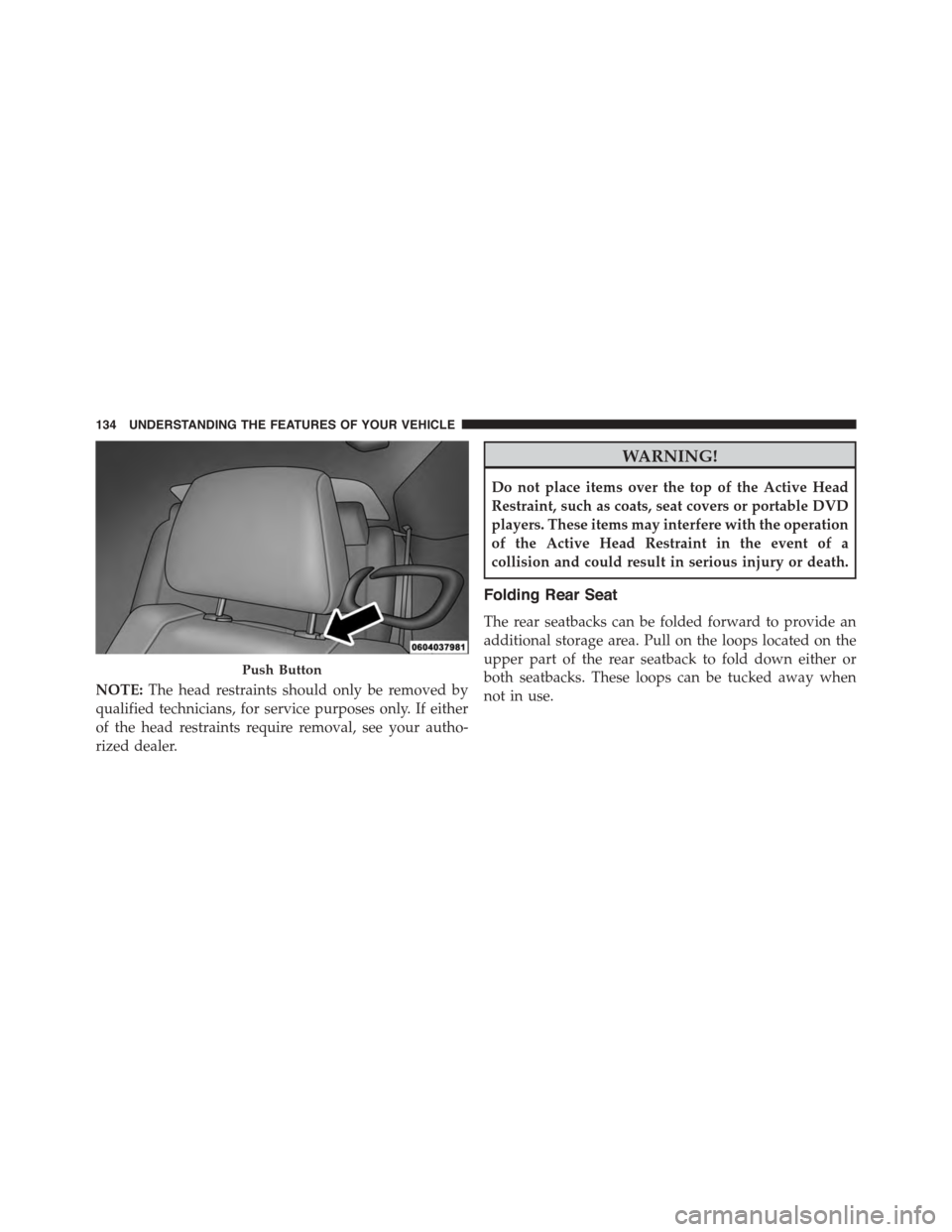
NOTE:The head restraints should only be removed by
qualified technicians, for service purposes only. If either
of the head restraints require removal, see your autho-
rized dealer.
WARNING!
Do not place items over the top of the Active Head
Restraint, such as coats, seat covers or portable DVD
players. These items may interfere with the operation
of the Active Head Restraint in the event of a
collision and could result in serious injury or death.
Folding Rear Seat
The rear seatbacks can be folded forward to provide an
additional storage area. Pull on the loops located on the
upper part of the rear seatback to fold down either or
both seatbacks. These loops can be tucked away when
not in use.
Push Button
134 UNDERSTANDING THE FEATURES OF YOUR VEHICLE
Page 176 of 603
•Do not remove any screws from the sensor. Doing so
could cause an ACC system malfunction or failure and
require a sensor realignment.
•If the sensor or front end of the vehicle is damaged due
to a collision, see your authorized dealer for service.
•Do not attach or install any accessories near the sensor,
including transparent material or aftermarket grilles.
Doing so could cause an ACC system failure or
malfunction.
When the condition that deactivated the system is no
longer present, the system will return to the “Adaptive
Cruise Control Off” state and will resume function by
simply reactivating it.
NOTE:
•If the “ACC/FCW Unavailable Wipe Front Radar
Sensor” message occurs frequently (e.g. more than
once on every trip) without any snow, rain, mud, or
other obstruction, have the radar sensor realigned at
your authorized dealer.
•Installing a snow plow, front-end protector, an after-
market grille or modifying the grille is not recom-
mended. Doing so may block the sensor and inhibit
ACC/FCW operation.
Service ACC/FCW Warning
If the system turns off, and the DID displays “ACC/FCW
Unavailable Service Required”or “Cruise/FCW Unavail-
able Service Required”, there may be an internal system
fault or a temporary malfunction that limits ACC func-
tionality. Although the vehicle is still drivable under
normal conditions, ACC will be temporarily unavailable.
174 UNDERSTANDING THE FEATURES OF YOUR VEHICLE
Page 181 of 603
General Information
This vehicle has systems that operate on radio frequency
that comply with Part 15 of the Federal Communications
Commission (FCC) rules and with Industry Canada
Standards RSS- GEN/210/220/310.
Operation is subject to the following two conditions:
1. The device may not cause harmful interference.
2. The device must accept any interference received,
including interference that may cause undesired op-
eration of the device.
Changes or modifications to any of these systems by
other than an authorized service facility could void
authorization to use this equipment.
Normal (Fixed Speed) Electronic Speed Control
Mode
In addition to Adaptive Cruise Control mode, a Normal
(Fixed Speed) Electronic Speed Control mode is available
for cruising at fixed speeds. The Normal (Fixed Speed)
Electronic Speed Control mode is designed to maintain a
set cruising speed without requiring the driver to operate
the accelerator. Electronic Speed Control can only be
operated if the vehicle speed is above 20 mph (32 km/h).
To change between the different control modes, press the
ADAPTIVE CRUISE CONTROL (ACC) ON/OFF button
which turns the ACC and the NORMAL (Fixed Speed)
ELECTRONIC SPEED CONTROL OFF. Pressing of the
NORMAL (Fixed Speed) ELECTRONIC SPEED CON-
TROL ON/OFF button will result in turning ON (chang-
ing to) the Normal (Fixed Speed) Electronic Speed Con-
trol mode.
3
UNDERSTANDING THE FEATURES OF YOUR VEHICLE 179
Page 188 of 603
Service FCW Warning
If the system turns off, and the DID displays:
•ACC/FCW Unavailable Service Required
•Cruise/FCW Unavailable Service Required
This indicates there is an internal system fault. Although
the vehicle is still drivable under normal conditions, have
the system checked by an authorized dealer.
PARKSENSE® REAR PARK ASSIST — IF
EQUIPPED
The ParkSense® Rear Park Assist system provides visual
and audible indications of the distance between the rear
fascia and a detected obstacle when backing up, e.g.
during a parking maneuver. Refer to “ParkSense® Sys-
tem Usage Precautions” in this section for limitations of
this system and recommendations.
ParkSense® will retain the last system state (enabled or
disabled) from the last ignition cycle when the ignition is
changed to the ON/RUN position.
ParkSense® can be active only when the shift lever is in
REVERSE. If ParkSense® is enabled at this shift lever
position, the system will remain active until the vehicle
speed is increased to approximately 7 mph (11 km/h) or
above. The system will become active again if the vehicle
speed is decreased to speeds less than approximately
6 mph (9 km/h).
ParkSense® Sensors
The four ParkSense® sensors, located in the rear fascia/
bumper, monitor the area behind the vehicle that is
within the sensors’ field of view. The sensors can detect
obstacles from approximately 12 in (30 cm) up to 79 in
(200 cm) from the rear fascia/bumper in the horizontal
direction, depending on the location, type and orienta-
tion of the obstacle.
186 UNDERSTANDING THE FEATURES OF YOUR VEHICLE
Page 194 of 603
Enabling And Disabling ParkSense®
ParkSense® can be enabled and disabled with the
ParkSense® switch, located on the switch panel below
the Uconnect® display.
When the ParkSense® system is disabled, the
Drivers Information Display (DID) will display
the “PARKSENSE OFF” message for approxi-
mately five seconds. Refer to “Drivers Informa-
tion Display (DID)” in “Understanding Your Instrument
Panel” for further information. When the shift lever is
moved to REVERSE and the system is disabled, the DID
will display the “PARKSENSE OFF” message for as long
as the vehicle is in REVERSE.
The ParkSense® switch LED will be ON when
ParkSense® is disabled or defective. The ParkSense®
switch LED will be OFF when the system is enabled. If
the ParkSense switch is pressed and the system is dis-
abled or requires service, the ParkSense switch LED will
blink momentarily and then the LED will be ON.
Service The ParkSense® Rear Park Assist
System
During vehicle start up, when the ParkSense® Rear Park
Assist System has detected a faulted condition, the
instrument cluster will actuate a single chime, once per
ignition cycle and it will display the “PARKSENSE
UNAVAILABLE WIPE REAR SENSORS” or
“PARKSENSE UNAVAILABLE SERVICE REQUIRED”
message for five seconds. Refer to “Driver Information
Display (DID)” in “Understanding Your Instrument
Panel” for further information.
When the shift lever is moved to REVERSE and the
system has detected a faulted condition, the Driver
Information Display (DID) will display the
“PARKSENSE UNAVAILABLE WIPE REAR SENSORS”
192 UNDERSTANDING THE FEATURES OF YOUR VEHICLE
Page 195 of 603
or “PARKSENSE UNAVAILABLE SERVICE REQUIRED”
message for as long as the vehicle is in REVERSE. Under
this condition, ParkSense® will not operate.
If “PARKSENSE UNAVAILABLE WIPE REAR SEN-
SORS” appears in the Driver Information Display (DID),
make sure the outer surface and the inside of the rear
fascia/bumper is clean and clear of snow, ice, mud, dirt
or other obstruction, and then cycle the ignition. If the
message continues to appear see an authorized dealer.
If “PARKSENSE UNAVAILABLE SERVICE REQUIRED”
appears in the DID, see an authorized dealer.
Cleaning The ParkSense® System
Clean the ParkSense® sensors with water, car wash soap
and a soft cloth. Do not use rough or hard cloths. Do not
scratch or poke the sensors. Otherwise, you could dam-
age the sensors.
ParkSense® System Usage Precautions
NOTE:
•Ensure that the rear bumper is free of snow, ice, mud,
dirt and debris to keep the ParkSense® system oper-
ating properly.
•Jackhammers, large trucks, and other vibrations could
affect the performance of ParkSense® or render the
system temporarily unavailable.
•When you turn ParkSense® off in DRIVE, the instru-
ment cluster will display#PARKSENSE OFF#for five
seconds. Furthermore, once you turn ParkSense® off,
it remains off until you turn it on again, even if you
cycle the ignition key.
3
UNDERSTANDING THE FEATURES OF YOUR VEHICLE 193