manual DODGE CHARGER 2014 7.G User Guide
[x] Cancel search | Manufacturer: DODGE, Model Year: 2014, Model line: CHARGER, Model: DODGE CHARGER 2014 7.GPages: 148, PDF Size: 3.77 MB
Page 1 of 148
> 2014 CHARGER // USER GUIDE
Includes SRT
14D481-926-AA
CHARGER Fourth Edition
User Guide
DOWNLOAD A FREE ELECTRONIC COPY OF THE
OWNER’S MANUAL OR WARRANTY BOOKLET
by visiting the Owners tab at:
www.dodge.com (U.S.)
www.dodge.ca (Canada)
1596112_14d_Dodge_Charger_UG_020714.indd 12/7/14 2:36 PM
Page 2 of 148
> IMPORTANT
The driver’s primary responsibility is the safe operation of the vehicle. Driving while
distracted can result in loss of vehicle control, resulting in a collision and personal injury.
Chrysler Group LLC strongly recommends that the driver use extreme caution when using any
device or feature that may take their attention off the road. Use of any electrical devices such
as cell phones, computers, portable radios, vehicle navigation or other devices by the driver while
the vehicle is moving is dangerous and could lead to a serious collision. Texting while driving is
also dangerous and should never be done while the vehicle is moving. If you find yourself unable
to devote your full attention to vehicle operation, pull off the road to a safe location and stop your
vehicle. Some States or Provinces prohibit the use of cellular telephones or texting while driving.
It is always the driver’s responsibility to comply with all local laws.
If you are the first registered retail owner of your vehicle, you
may obtain a complimentary printed copy of the Owner’s
Manual, Navigation/Uconnect
® Manuals or Warranty Booklet
by calling 1-800-423-6343 (U.S.) or 1-800-387-1143 (Canada)
or by contacting your dealer.
This User Guide is intended to familiarize you with the important features of your vehicle.
The DVD enclosed contains your Owner’s Manual, Navigation/Uconnect® Manuals, Warranty
Booklets, Tire Warranty and Roadside Assistance (new vehicles purchased in the U.S.) or
Roadside Assistance (new vehicles purchased in Canada) in electronic format. We hope you
find it useful. Replacement DVD kits may be purchased by visiting www.techauthority.com.
Copyright 2014 Chrysler Group LLC.
DODGE.COM
WARNING!
Driving after drinking can lead to an accident. Your perceptions are less sharp, your reflexes are
slower, and your judgment is impaired when you have been drinking. Never drink and then drive.
DRIVING AND ALCOHOL
Drunken driving is one of the most frequent causes of accidents. Your driving ability can be
seriously impaired with blood alcohol levels far below the legal minimum. If you are drinking, don’t
drive. Ride with a designated non-drinking driver, call a cab, a friend, or use public transportation. This guide has been prepared to help you get quickly acquainted with your new Dodge and to
provide a convenient reference source for common questions. However, it is not a substitute for
your Owner’s Manual.
For complete operational instructions, maintenance procedures and important safety messages,
please consult your Owner’s Manual, Navigation/Uconnect
® Manuals and other Warning Labels in
your vehicle.
Not all features shown in this guide may apply to your vehicle. For additional information on
accessories to help personalize your vehicle, visit www.mopar.com (U.S.), www.mopar.ca (Canada)
or your local Dodge dealer.
1596112_14d_Dodge_Charger_UG_020714.indd 22/7/14 2:36 PM
Page 4 of 148
WELCOME FROM CHRYSLER GROUP LLC
Congratulations on selecting your new Chrysler Group LLC vehicle. Be assured that it
represents precision workmanship, distinctive styling, and high quality - all essentials that
are traditional to our vehicles.
Your new Chrysler Group LLC vehicle has characteristics to enhance the driver's control
under some driving conditions. These are to assist the driver and are never a substitute for
attentive driving. They can never take the driver's place. Always drive carefully.
Your new vehicle has many features for the comfort and convenience of you and your
passengers. Some of these should not be used when driving because they take your eyes
from the road or your attention from driving. Never text while driving or take your eyes more
than momentarily off the road.
This guide illustrates and describes the operation of features and equipment that are either
standard or optional on this vehicle. This guide may also include a description of features
and equipment that are no longer available or were not ordered on this vehicle. Please
disregard any features and equipment described in this guide that are not available on this
vehicle. Chrysler Group LLC reserves the right to make changes in design and specifica-
tions and/or make additions to or improvements to its products without imposing any
obligation upon itself to install them on products previously manufactured.
This User Guide has been prepared to help you quickly become acquainted with the
important features of your vehicle. It contains most things you will need to operate and
maintain the vehicle, including emergency information.
The DVD includes a computer application containing detailed owner's information which
can be viewed on a personal computer or MAC computer. The multimedia DVD also includes
videos which can be played on any standard DVD player (including the Uconnect® Touch-
screen Radios). Additional DVD operational information is located on the back of the DVD
sleeve.
For complete owner information, refer to your Owner's Manual on the DVD in the owner’s
kit provided at the time of new vehicle purchase.For your convenience, the information
contained on the DVD may also be printed and saved for future reference.
Chrysler Group LLC is committed to protecting our environment and natural resources. By
converting from paper to electronic delivery for the majority of the user information for your
vehicle, together we greatly reduce the demand for tree-based products and lessen the
stress on our environment.
INTRODUCTION/WELCOME
2
Page 5 of 148
VEHICLES SOLD IN CANADA
With respect to any vehicles sold in Canada, the name Chrysler Group LLC shall be deemed
to be deleted and the name Chrysler Canada Inc. used in substitution.
WARNING!
• Pedals that cannot move freely can cause loss of vehicle control and increase therisk of serious personal injury.
• Always make sure that objects cannot fall into the driver foot well while the vehicle is
moving. Objects can become trapped under the brake pedal and accelerator pedal
causing a loss of vehicle control.
• Failure to properly follow floor mat installation or mounting can cause interference
with the brake pedal and accelerator pedal operation causing loss of control of the
vehicle.
• Never leave children alone in a vehicle, or with access to an unlocked vehicle.
Allowing children to be in a vehicle unattended is dangerous for a number of reasons.
A child or others could be seriously or fatally injured. Children should be warned not
to touch the parking brake, brake pedal or the shift lever/gear selector.
• Never use the ‘PARK’ position as a substitute for the parking brake. Always apply the parking brake fully when parked to guard against vehicle movement and possible
injury or damage.
• Refer to your Owner's Manual on the DVD for further details.
USE OF AFTERMARKET PRODUCTS (ELECTRONICS)
The use of aftermarket devices including cell phones, MP3 players, GPS systems, or
chargers may affect the performance of on-board wireless features including Keyless
Enter-N-Go™ and Remote Start range. If you are experiencing difficulties with any of your
wireless features, try disconnecting your aftermarket devices to see if the situation im-
proves. If your symptoms persist, please see an authorized dealer.
CHRYSLER, DODGE, JEEP, RAM TRUCK, SRT, ATF+4, MOPAR and Uconnect are registered
trademarks of Chrysler Group LLC.
COPYRIGHT ©2014 CHRYSLER GROUP LLC
INTRODUCTION/WELCOME
3
Page 10 of 148
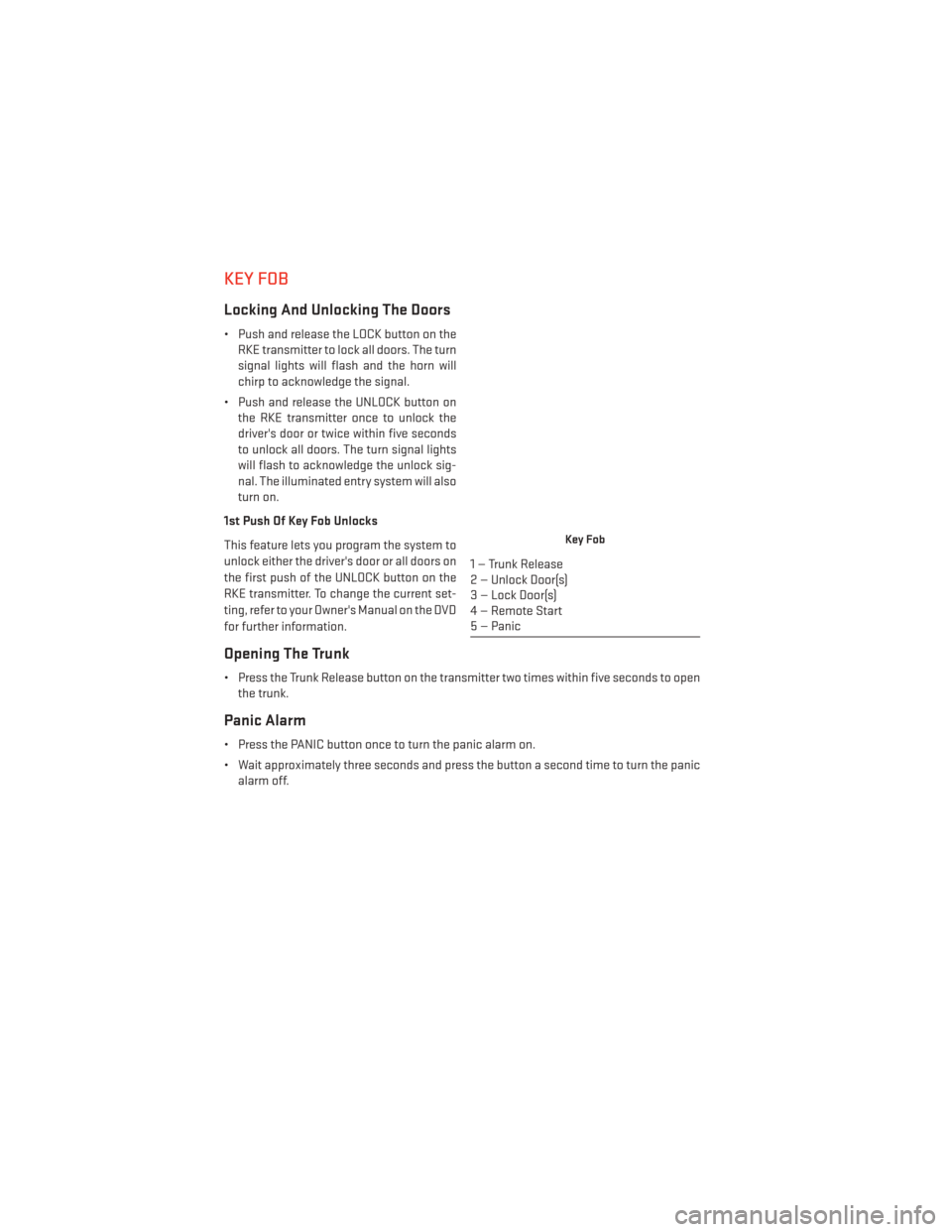
KEY FOB
Locking And Unlocking The Doors
• Push and release the LOCK button on theRKE transmitter to lock all doors. The turn
signal lights will flash and the horn will
chirp to acknowledge the signal.
• Push and release the UNLOCK button on the RKE transmitter once to unlock the
driver's door or twice within five seconds
to unlock all doors. The turn signal lights
will flash to acknowledge the unlock sig-
nal. The illuminated entry system will also
turn on.
1st Push Of Key Fob Unlocks
This feature lets you program the system to
unlock either the driver's door or all doors on
the first push of the UNLOCK button on the
RKE transmitter. To change the current set-
ting, refer to your Owner's Manual on the DVD
for further information.
Opening The Trunk
• Press the Trunk Release button on the transmitter two times within five seconds to open the trunk.
Panic Alarm
• Press the PANIC button once to turn the panic alarm on.
• Wait approximately three seconds and press the button a second time to turn the panicalarm off.
Key Fob
1 — Trunk Release
2 — Unlock Door(s)
3 — Lock Door(s)
4 — Remote Start
5 — Panic
GETTING STARTED
8
Page 13 of 148
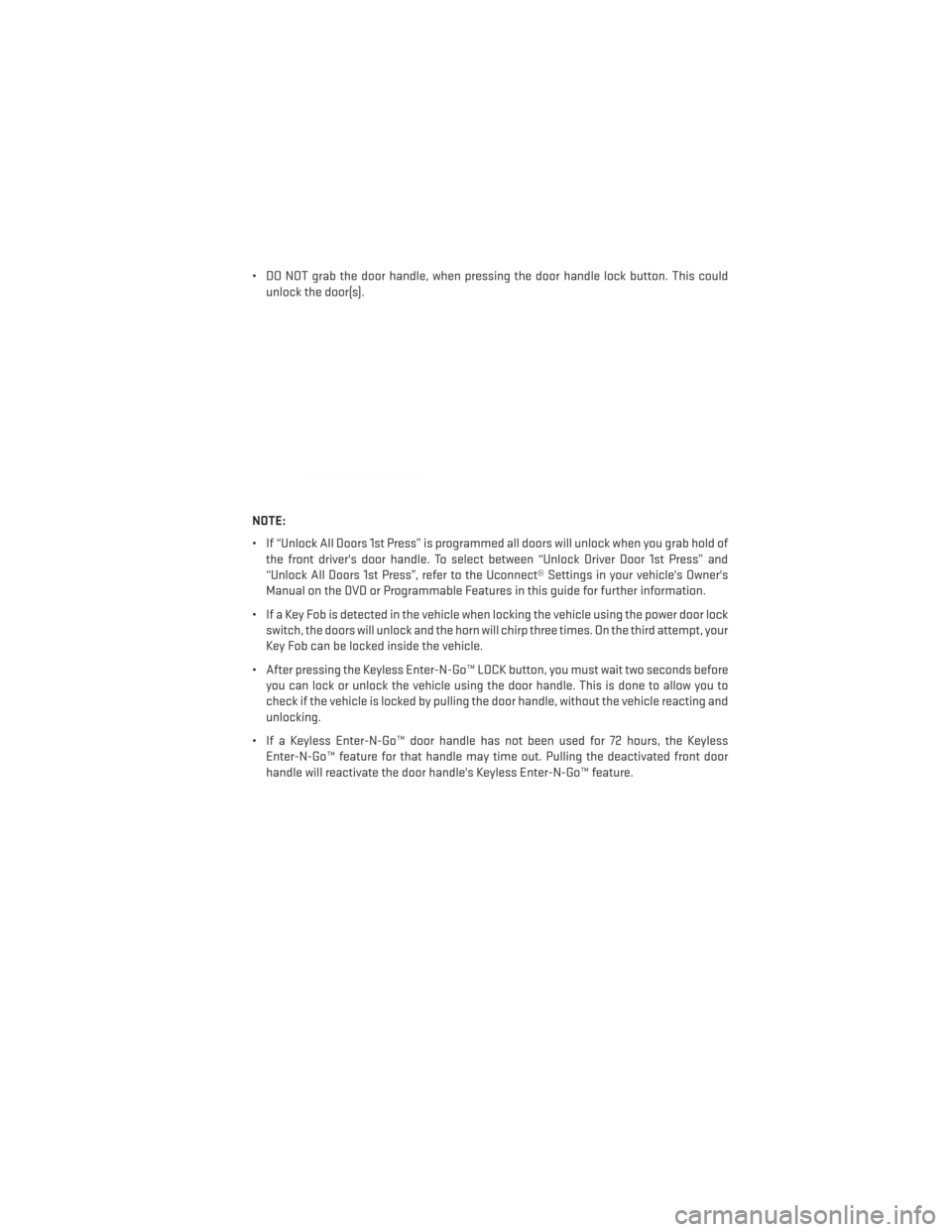
• DO NOT grab the door handle, when pressing the door handle lock button. This couldunlock the door(s).
NOTE:
• If “Unlock All Doors 1st Press” is programmed all doors will unlock when you grab hold of the front driver's door handle. To select between “Unlock Driver Door 1st Press” and
“Unlock All Doors 1st Press”, refer to the Uconnect® Settings in your vehicle's Owner's
Manual on the DVD or Programmable Features in this guide for further information.
• If a Key Fob is detected in the vehicle when locking the vehicle using the power door lock switch, the doors will unlock and the horn will chirp three times. On the third attempt, your
Key Fob can be locked inside the vehicle.
• After pressing the Keyless Enter-N-Go™ LOCK button, you must wait two seconds before you can lock or unlock the vehicle using the door handle. This is done to allow you to
check if the vehicle is locked by pulling the door handle, without the vehicle reacting and
unlocking.
• If a Keyless Enter-N-Go™ door handle has not been used for 72 hours, the Keyless Enter-N-Go™ feature for that handle may time out. Pulling the deactivated front door
handle will reactivate the door handle's Keyless Enter-N-Go™ feature.
GETTING STARTED
11
Page 14 of 148
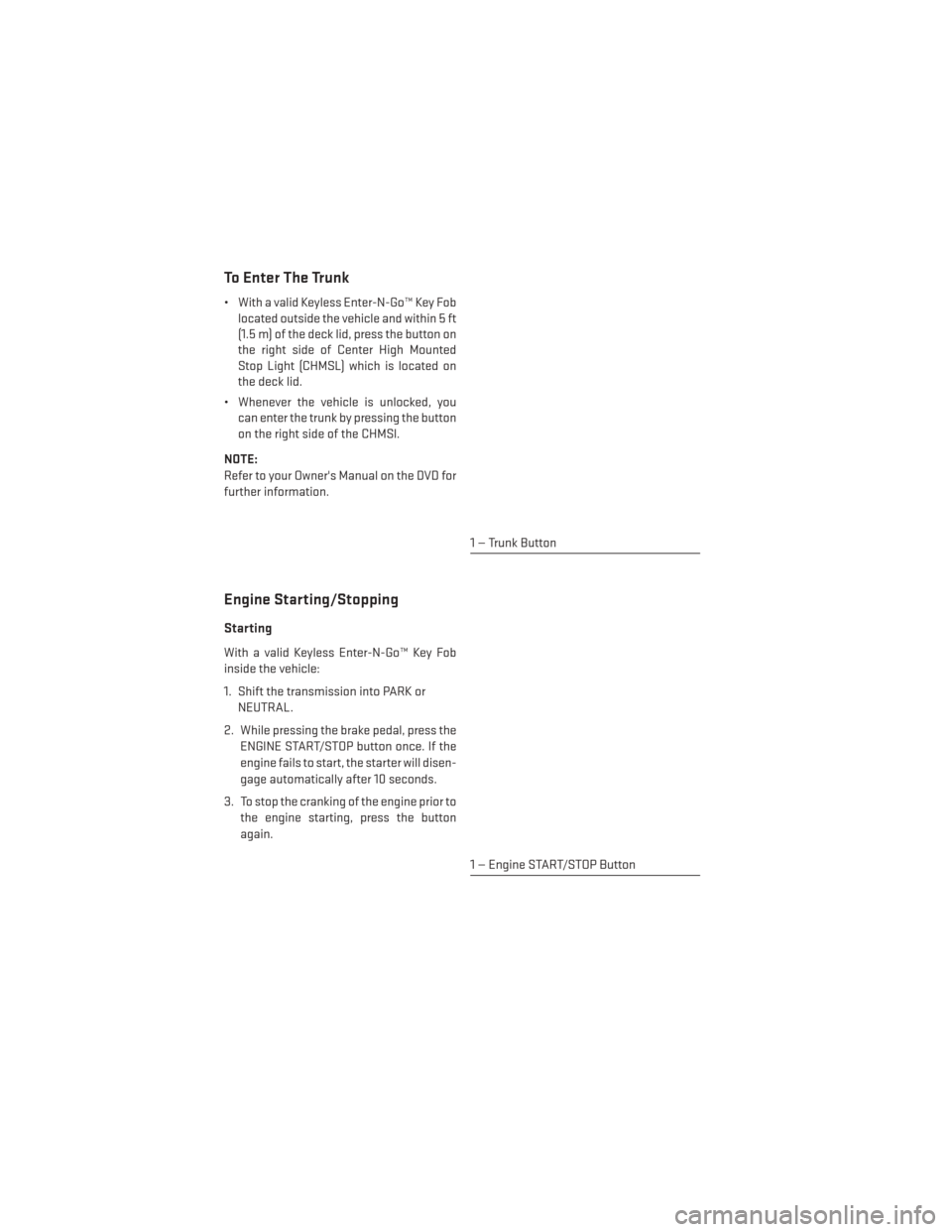
To Enter The Trunk
• With a valid Keyless Enter-N-Go™ Key Foblocated outside the vehicle and within 5 ft
(1.5 m) of the deck lid, press the button on
the right side of Center High Mounted
Stop Light (CHMSL) which is located on
the deck lid.
• Whenever the vehicle is unlocked, you can enter the trunk by pressing the button
on the right side of the CHMSl.
NOTE:
Refer to your Owner's Manual on the DVD for
further information.
Engine Starting/Stopping
Starting
With a valid Keyless Enter-N-Go™ Key Fob
inside the vehicle:
1. Shift the transmission into PARK or NEUTRAL.
2. While pressing the brake pedal, press the ENGINE START/STOP button once. If the
engine fails to start, the starter will disen-
gage automatically after 10 seconds.
3. To stop the cranking of the engine prior to the engine starting, press the button
again.
1 — Trunk Button
1 — Engine START/STOP Button
GETTING STARTED
12
Page 16 of 148
TRUNK LOCK AND RELEASE
• The trunk lid can be released from inside the vehicle by pressing the TRUNK RELEASEbutton located on the instrument panel to the left of the steering wheel.
NOTE:
The transmission must be in PARK before the button will operate.
• The trunk lid can be released from outside the vehicle by pressing the TRUNK button on the Remote Keyless Entry (RKE) transmitter twice within five seconds.
• With the ignition in the ON/RUN position, the Trunk Open symbol will display in the instrument cluster indicating that the trunk is open. The odometer display will reappear
once the trunk is closed.
• With the ignition in the OFF position or the key removed from the ignition switch, the Trunk Open symbol will display until the trunk is closed.
• Refer to your Owner's Manual on the DVD for further information on trunk operation with the Passive Entry feature.
Trunk Emergency Release
• As a security measure, a Trunk Internal Emergency Release lever is built into the trunklatching mechanism. In the event of an individual being locked inside the trunk, the trunk
can be simply opened by pulling on the glow-in-the-dark handle attached to the trunk
latching mechanism.
WARNING!
Do not allow children to have access to the trunk, either by climbing into the trunk from
outside, or through the inside of the vehicle. Always close the trunk lid when your vehicle
is unattended. Once in the trunk, young children may not be able to escape, even if they
entered through the rear seat. If trapped in the trunk, children can die from suffocation or
heat stroke.
VEHICLE SECURITY ALARM
To Arm:
• Press the Keyless Enter-N-Go™ START/STOP button until the Electronic Vehicle Informa-tion Center (EVIC) indicates that the vehicle ignition is “OFF”. Press the power door lock
switch while the door is open, press the Key Fob LOCK button, or with one of the Key Fobs
located outside the vehicle and within 5 ft (1.5 m) of the driver's and passenger front door
handles, press the Keyless Enter-N-Go™ LOCK button located on the door handle.
NOTE:
After pressing the Keyless Enter-N-Go™ LOCK button, you must wait two seconds before
you can lock or unlock the vehicle via the door handle.
GETTING STARTED
14
Page 18 of 148
SUPPLEMENTAL RESTRAINT SYSTEM (SRS) — AIR BAGS
• This vehicle has Advanced Front Air Bags for both the driver and front passenger as asupplement to the seat belt restraint systems. The driver's Advanced Front Air Bag is
mounted in the center of the steering wheel. The passenger's Advanced Front Air Bag is
mounted in the instrument panel, above the glove compartment. The words AIRBAG are
embossed on the air bag covers. In addition, the vehicle is equipped with a Supplemental
Driver Side Knee Air Bag mounted in the instrument panel below the steering column.
• The Advanced Front Air Bags have a multistage inflator design. This allows the air bag to have different rates of inflation based on several factors, including the severity and type
of collision.
• This vehicle may be equipped with driver and/or front passenger seat track position sensors that may adjust the inflation rate of the Advanced Front Air Bags based upon
seat position.
• This vehicle may be equipped with a driver and/or front passenger seat belt buckle switch that detects whether the driver or front passenger seat belt is fastened. The seat belt
buckle switch may adjust the inflation rate of the Advanced Front Air Bags.
• This vehicle may be equipped with Supplemental Side Air Bag Inflatable Curtains (SABIC) to protect the driver, front, and rear passengers sitting next to a window. The SABIC air
bags are located above the side windows and their covers are labeled: AIRBAG.
• If the Air Bag Warning Light
is not on during starting, stays on, or turns on while
driving, have the vehicle serviced by an authorized service center immediately.
• Refer to the Owner's Manual on the DVD for further details regarding the Supplemental Restraint System (SRS).
NOTE:
The Air Bag System is designed to be maintenance free.
GETTING STARTED
16
Page 24 of 148
NOTE:
Before programming your RKE transmitters you must select the feature through the
Uconnect® system. Refer to “Uconnect® Settings ” in “Understanding Your Instrument
Panel” in the Owner's Manual on the DVD for further details.
• To program a Key Fob to the memory position:1. Cycle the vehicles ignition to the OFF position.
2. Select the desired memory profile 1 or 2.
3. Press and release the S (SET) button on the memory switch, then within five secondspress and release the 1 or 2 button accordingly.
4. Press and release the LOCK button on the RKE transmitter within 10 seconds.
• To recall the saved positions, press 1 or 2 on the memory switch or press UNLOCK on the programmed RKE transmitter.
Easy Entry/Exit Feature
• The memory seat has an Easy Entry/Exit feature. This feature provides automatic driver seat positioning to enhance driver mobility when entering and exiting the vehicle.
NOTE:
The Easy Entry/Exit feature is not enabled when the vehicle is delivered from the factory. To
enable (or later disable) this feature you must select “Easy Exit Seats” in “Engine Off
Options” through the programmable features in the Uconnect® system. • Refer to “Uconnect® Customer Programmable Features” in “Electronics” of this UserGuide.
• For further details refer to “Uconnect® Settings” in “Understanding Your Instrument Panel” in the Owner's Manual on the DVD.
Manual Seat Adjustments
Forward/Rearward
• Lift up on the adjusting bar located at thefront of the seat near the floor and release
it when the seat is at the desired position.
Then, using body pressure, move forward
and backward on the seat to be sure that
the seat adjusters have latched.
Recliner
• Lean forward in the seat and lift the re-cliner lever, then lean back to the desired
position and release the lever.
• Lift the lever to return the seatback to an upright position.
GETTING STARTED
22