fuel DODGE CHARGER 2015 7.G User Guide
[x] Cancel search | Manufacturer: DODGE, Model Year: 2015, Model line: CHARGER, Model: DODGE CHARGER 2015 7.GPages: 236, PDF Size: 35.67 MB
Page 3 of 236
INTRODUCTION/WELCOME
WELCOME FROM FCA US LLC.......3
CONTROLS AT A GLANCE
DRIVER COCKPIT...............6INSTRUMENT CLUSTER...........8
GETTING STARTED
KEY FOB . . . . . . . . . . . . . . . . . . . 10REMOTE START . . . . . . . . . . . . . . . 13KEYLESS ENTER-N-GO™.........14TRUNK LOCK AND RELEASE.......17VEHICLE SECURITY ALARM........18SEAT BELT SYSTEMS............19SUPPLEMENTAL RESTRAINT SYSTEM(SRS) — AIR BAGS.............20CHILD RESTRAINTS............23HEAD RESTRAINTS.............27FRONT SEATS................28REAR SEATS.................31HEATED/VENTILATED SEATS........32HEATED STEERING WHEEL........34ADJUSTABLE PEDALS...........35TILT/TELESCOPING STEERINGCOLUMN...................36
OPERATING YOUR VEHICLE
ENGINE BREAK-INRECOMMENDATIONS............38TURN SIGNAL/WIPER/WASHER/HIGHBEAM LEVER.................40HEADLIGHT SWITCH............42ELECTRONIC SPEED CONTROL......43ADAPTIVE CRUISE CONTROL (ACC)....45LANESENSE.................51PA R K V I E W®REAR BACK-UP CAMERA . . 52BLIND SPOT MONITORING.........52EIGHT-SPEED AUTOMATICTRANSMISSION...............53AUTOSTICK/STEERING WHEEL MOUNTEDPA D D L E S H I F T E R S..............54SPORT MODE — WITHOUT PERFORMANCECONTROL....................55MANUAL CLIMATE CONTROLS.......56AUTOMATIC TEMPERATURE CONTROLS(ATC) . . . . . . . . . . . . . . . . . . . . . . 58POWER SUNROOF..............60WIND BUFFETING..............61
ELECTRONICS
YOUR VEHICLE'S SOUND SYSTEM....62IDENTIFYING YOUR RADIO.........64Uconnect®ACCESS.............65Uconnect®5.0 . . . . . . . . . . . . . . . . 81Uconnect®8.4A...............91Uconnect®8.4AN.............118
Uconnect®PHONE.............132STEERING WHEEL AUDIO CONTROLS..142DRIVER INFORMATION DISPLAY (DID)..142PROGRAMMABLE FEATURES.......147UNIVERSAL GARAGE DOOR OPENER . . 148POWER OUTLET..............151
UTILITY
TRAILER TOWING WEIGHTS(MAXIMUM TRAILER WEIGHTRATINGS)..................152RECREATIONAL TOWING(BEHIND MOTORHOME, ETC.)......152
SRT
AUTOSTICK.................153DRIVE MODES................155SRT PERFORMANCE FEATURES.....155SUMMER/THREE-SEASON TIRES....158
WHAT TO DO IN EMERGENCIES
ROADSIDE ASSISTANCE..........159INSTRUMENT CLUSTER WARNINGLIGHTS...................159INSTRUMENT CLUSTER INDICATORLIGHTS...................163IF YOUR ENGINE OVERHEATS......165JACKING AND TIRE CHANGING.....166TIRE SERVICE KIT.............172BATTERY LOCATION............178JUMP-STARTING..............178MANUAL PARK RELEASE —8SPEEDTRANSMISSION.........180TOWING A DISABLED VEHICLE.....182FREEING A STUCK VEHICLE.......183EVENT DATA RECORDER (EDR).....184
MAINTAINING YOUR VEHICLE
OPENING THE HOOD...........185ENGINE COMPARTMENT.........186FLUID CAPACITIES — NON-SRT.....194FLUID CAPACITIES — SRT........194FLUIDS, LUBRICANTS AND GENUINEPA RT S — N O N - S RT............195FLUIDS, LUBRICANTS AND GENUINEPA RT S — S RT . . . . . . . . . . . . . . . 1 9 6MAINTENANCE PROCEDURES......198MAINTENANCE SCHEDULE —NON-SRT...................198MAINTENANCE SCHEDULE — SRT . . . 203FUSES....................208TIRE PRESSURES.............213SPARE TIRES — IF EQUIPPED......214FUEL DOOR RELEASE..........215WHEEL AND WHEEL TRIM CARE....217REPLACEMENT BULBS..........217
TABLE OF CONTENTS
Page 11 of 236
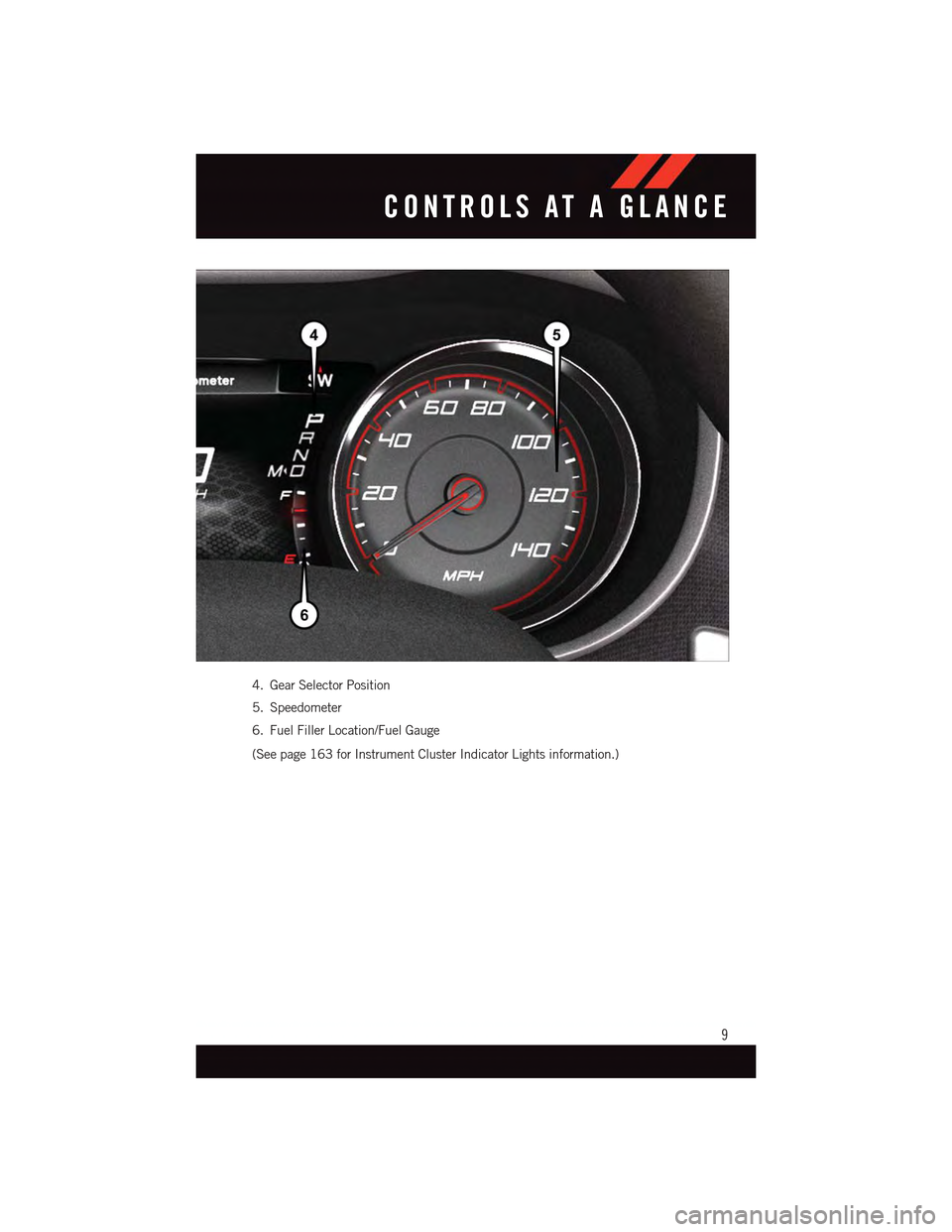
4. Gear Selector Position
5. Speedometer
6. Fuel Filler Location/Fuel Gauge
(See page 163 for Instrument Cluster Indicator Lights information.)
CONTROLS AT A GLANCE
9
Page 41 of 236
•Drivewiththeenginespeedlessthan3,500RPM.
•Maintainvehiclespeedbelow55mph(88km/h)andobservelocalspeedlimits.
100 to 300 miles (161 to 483 km):
•Depresstheacceleratorpedalslowlyandnotmorethanhalfwaytoavoidrapid
acceleration in lower gears (1st to 3rd gears).
•Avoidaggressivebraking.
•Drivewiththeenginespeedlessthan5,000RPM.
•Maintainvehiclespeedbelow70mph(112km/h)andobservelocalspeedlimits.
300 to 500 miles (483 to 805 km):
•Exercisethefullenginerpmrange,shiftingmanually(paddlesorgearshift)athigher
rpms when possible.
•Donotperformsustainedoperationwiththeacceleratorpedalatwideopenthrottle.
•Maintainvehiclespeedbelow85mph(136km/h)andobservelocalspeedlimits.
For the first 1500 mi (2414 km):
•Donotparticipateintrackevents,sportdrivingschools,orsimilaractivitiesduringthe
first 1500 mi (2414 km).
NOTE:
Check engine oil with every refueling and add if necessary. Oil and fuel consumption may
be higher through the first oil change interval.
SRT Engine Break-In
SRT Engine Break-In Recommendations: The following tips will be helpful in obtaining
optimum performance and maximum durability for your new SRT Vehicle.
Despite modern technology and World Class manufacturing methods, the moving parts of
the vehicle must still wear in with each other. This wearing in occurs mainly during the first
500 miles (805 km) and continues through the first oil change interval.
It is recommended for the operator to observe the following driving behaviors during the
new vehicle break-in period:
0to100miles(0to161km):
•Donotallowtheenginetooperateatidleforanextendedperiodoftime.
•Depresstheacceleratorpedalslowlyandnotmorethanhalfwaytoavoidrapid
acceleration.
•Avoidaggressivebraking.
•Drivewiththeenginespeedlessthan3,500RPM.
•Maintainvehiclespeedbelow55mph(88km/h)andobservelocalspeedlimits.
OPERATING YOUR VEHICLE
39
Page 42 of 236
100 to 300 miles (161 to 483 km):
•Depresstheacceleratorpedalslowlyandnotmorethanhalfwaytoavoidrapid
acceleration in lower gears (1st to 3rd gears).
•Avoidaggressivebraking.
•Drivewiththeenginespeedlessthan5,000RPM.
•Maintainvehiclespeedbelow70mph(112km/h)andobservelocalspeedlimits.
300 to 500 miles (483 to 805 km):
•Exercisethefullenginerpmrange,shiftingmanually(paddlesorgearshift)athigher
rpms when possible.
•Donotperformsustainedoperationwiththeacceleratorpedalatwideopenthrottle.
•Maintainvehiclespeedbelow85mph(136km/h)andobservelocalspeedlimits.
For the first 1500 mi (2414 km):
•Donotparticipateintrackevents,sportdrivingschools,orsimilaractivitiesduringthe
first 1500 mi (2414 km).
NOTE:
Check engine oil with every refueling and add if necessary. Oil and fuel consumption may
be higher through the first oil change interval.
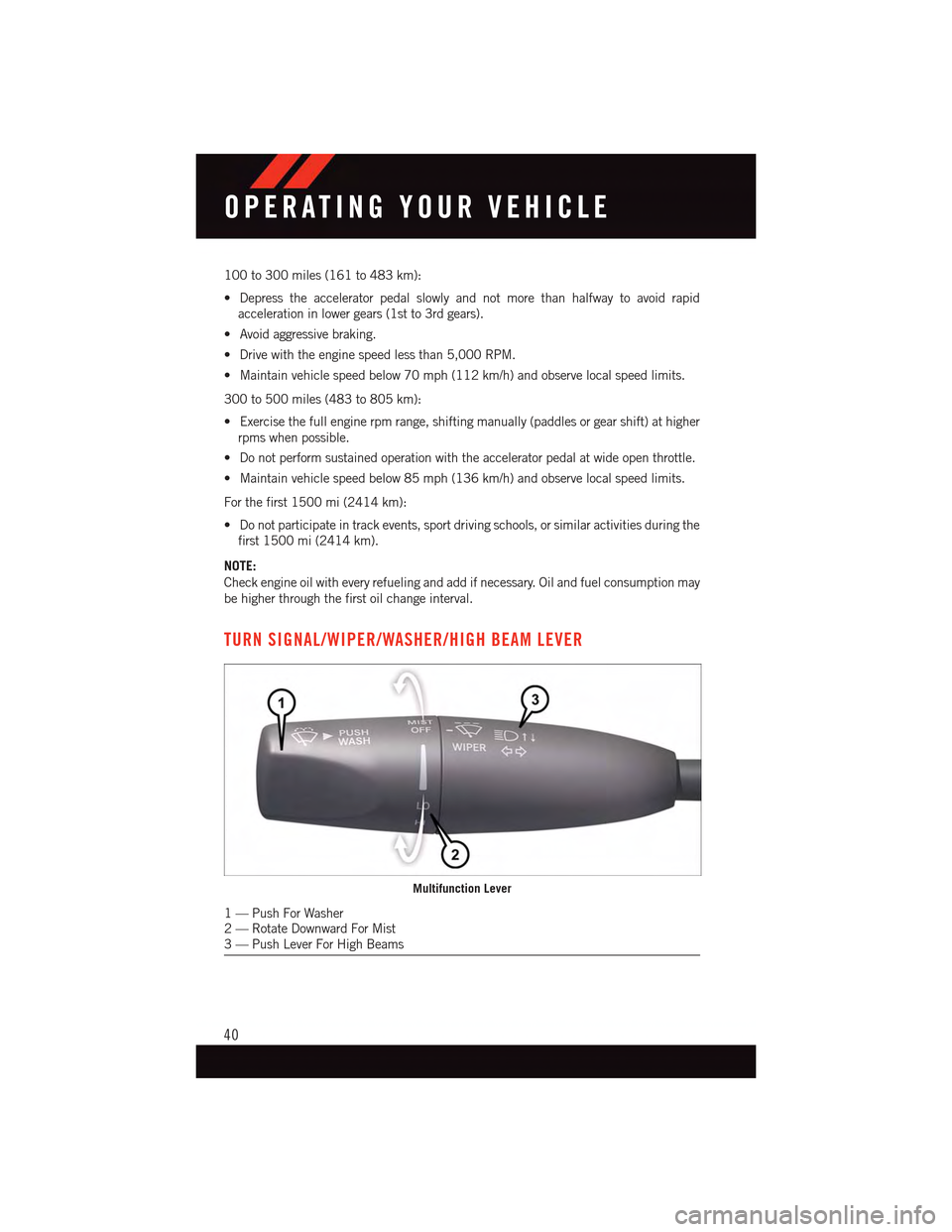
TURN SIGNAL/WIPER/WASHER/HIGH BEAM LEVER
Multifunction Lever
1—PushForWasher2—RotateDownwardForMist3—PushLeverForHighBeams
OPERATING YOUR VEHICLE
40
Page 118 of 236
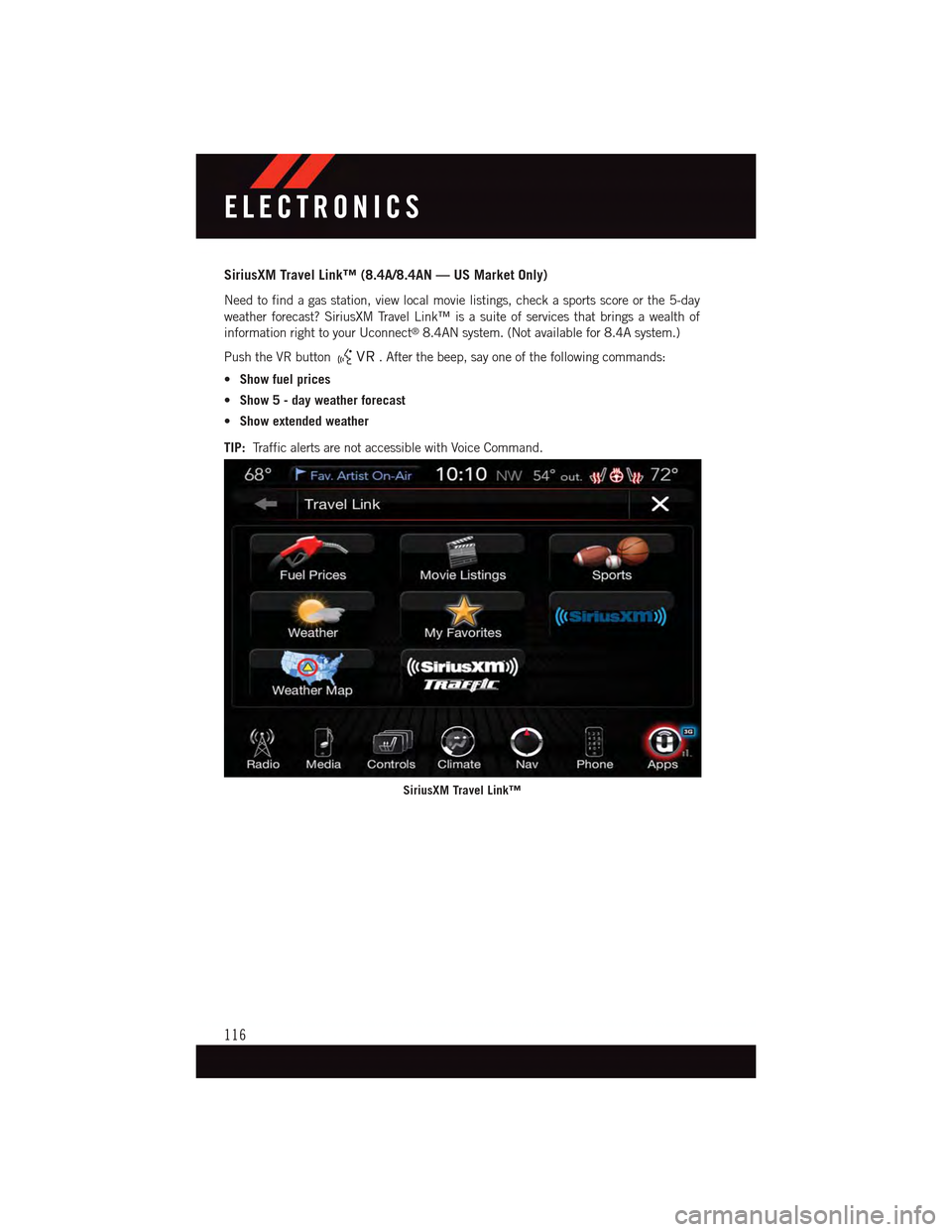
SiriusXM Travel Link™ (8.4A/8.4AN — US Market Only)
Need to find a gas station, view local movie listings, check a sports score or the 5-day
weather forecast? SiriusXM Travel Link™ is a suite of services that brings a wealth of
information right to your Uconnect®8.4AN system. (Not available for 8.4A system.)
Push the VR button.Afterthebeep,sayoneofthefollowingcommands:
•Show fuel prices
•Show 5 - day weather forecast
•Show extended weather
TIP:Tr a f f i c a l e r t s a r e n o t a c c e s s i b l e w i t h V o i c e C o m m a n d .
SiriusXM Travel Link™
ELECTRONICS
116
Page 132 of 236
Taking A Detour
To t a k e a d e t o u r y o u m u s t b e n a v i g a t i n g a r o u t e .
•Pressthe“Detour”buttononthetouchscreen.
NOTE:
•Iftherouteyouarecurrentlytakingistheonlyreasonableoption,thedevicemightnot
calculate a detour.
•Formoreinformation,seeyourUconnect®Supplement Manual.
SiriusXM TRAFFIC (US Market Only)
Don't Drive Through Traffic. Drive Around It.
Avoid congestion before you reach it. By enhancing your vehicle's navigation system with
the ability to see detailed traffic information, you can pinpoint traffic incidents, determine
average traffic speed and estimate travel time along your route. Since the service is
integrated with a vehicle's navigation system, SiriusXM Traffic can help drivers pick the
fastest route based on traffic conditions.
•Detailedinformationontrafficspeed,accidents,construction,androadclosings.
•Trafficinformationfrommultiplesources,includingpoliceandemergencyservices,
cameras and road sensors.
•Coast-to-coastdeliveryoftrafficinformation.
•Viewconditionsforpointsalongyourrouteandbeyond.Availableinover130markets.
SiriusXM TRAVEL LINK (US Market Only)
In addition to delivering over 130 channels of the best sports, entertainment, talk, and
commercial-free music, SiriusXM offers premium data services that work in conjunction
with compatible navigation systems. SiriusXM Travel Link brings a wealth of useful
information into your vehicle and right to your fingertips.
•Fuel Prices—Checklocalgasanddieselpricesinyourareaandroutetothestationof
your choice.
•Movie Listings—Checklocalmovietheatresandlistingsinyourareaandroutetothe
theater of your choice.
•Sports Scores—In-gameandfinalscoresaswellasweeklyschedules.
•Weather—Checkvarietyoflocalandnationalweatherinformationfromradarmapsto
current and 5-day forecast.
ELECTRONICS
130
Page 133 of 236
SiriusXM Travel Link feature is completely integrated into your vehicle. A few minutes
after you start your vehicle, Travel Link information arrives and updates in the background.
Yo u c a n a c c e s s t h e i n f o r m a t i o n w h e n e v e r y o u l i k e , w i t h n o w a i t i n g .
To a c c e s s S i r i u s X M Tr a v e l L i n k , p r e s s “ A p p s ” b u t t o n o n t h e t o u c h s c r e e n , t h e n p r e s s t h e
“SiriusXM Travel Link” button on the touchscreen.
NOTE:
SiriusXM Travel Link requires a subscription, sold separately after the five (5) year trial
subscription included with your vehicle purchase.
SiriusXM Travel Link is only available in the United States.
Fuel PricesCheck local gas and diesel prices in your area and route to the station ofyour choice.
Movie ListingsCheck local movie theatres and listings in your area and route to thetheater of your choice.
Sports ScoresIn-game and final scores as well as weekly schedules.
WeatherCheck variety of local and national weather information from radar mapsto current and 5-day forecast.
ELECTRONICS
131
Page 144 of 236
STEERING WHEEL AUDIO CONTROLS
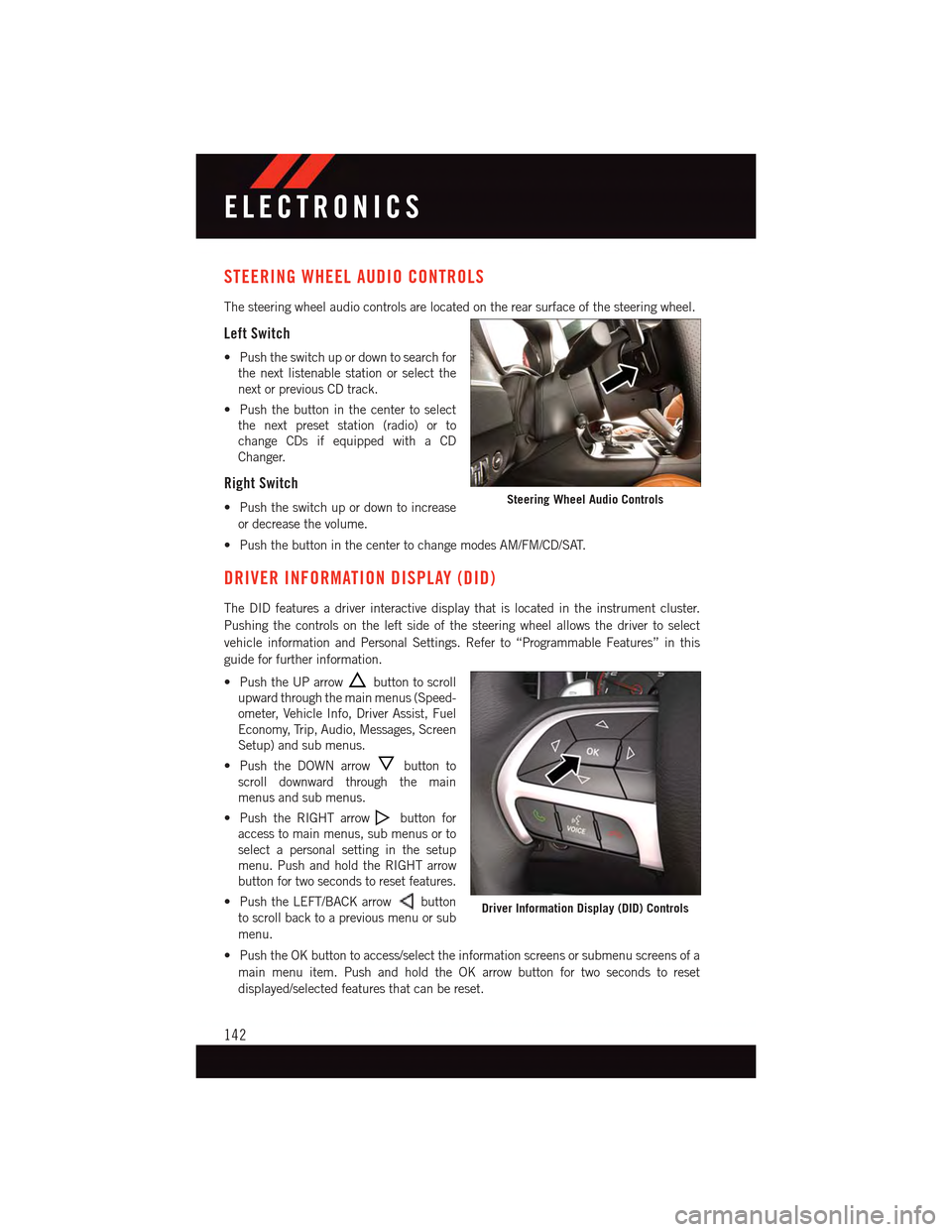
The steering wheel audio controls are located on the rear surface of the steering wheel.
Left Switch
•Pushtheswitchupordowntosearchfor
the next listenable station or select the
next or previous CD track.
•Pushthebuttoninthecentertoselect
the next preset station (radio) or to
change CDs if equipped with a CD
Changer.
Right Switch
•Pushtheswitchupordowntoincrease
or decrease the volume.
•PushthebuttoninthecentertochangemodesAM/FM/CD/SAT.
DRIVER INFORMATION DISPLAY (DID)
The DID features a driver interactive display that is located in the instrument cluster.
Pushing the controls on the left side of the steering wheel allows the driver to select
vehicle information and Personal Settings. Refer to “Programmable Features” in this
guide for further information.
•PushtheUParrowbutton to scroll
upward through the main menus (Speed-
ometer, Vehicle Info, Driver Assist, Fuel
Economy, Trip, Audio, Messages, Screen
Setup) and sub menus.
•PushtheDOWNarrowbutton to
scroll downward through the main
menus and sub menus.
•PushtheRIGHTarrowbutton for
access to main menus, sub menus or to
select a personal setting in the setup
menu. Push and hold the RIGHT arrow
button for two seconds to reset features.
•PushtheLEFT/BACKarrowbutton
to scroll back to a previous menu or sub
menu.
•PushtheOKbuttontoaccess/selecttheinformationscreensorsubmenuscreensofa
main menu item. Push and hold the OK arrow button for two seconds to reset
displayed/selected features that can be reset.
Steering Wheel Audio Controls
Driver Information Display (DID) Controls
ELECTRONICS
142
Page 149 of 236
PROGRAMMABLE FEATURES
Driver Information Display (DID)
The DID can be used to view or change the following settings. Push the UPor DOWN
button to scroll through the main menus, then push the RIGHTbutton to scroll
through the submenus of each menu item. Push theBACKbutton to scroll back to a
previous menu or sub menu.
•Speedometer•Audio
•VehicleInfo•Messages
•DriverAssist—IfEquipped•ScreenSetup
•FuelEconomy•SpeedWarning—IfEquipped
•Trip•Diagnostic—IfEquipped
Uconnect® Customer Programmable Features
The Uconnect®system allows you to access Customer Programmable feature settings
such as Display, Units, Voice, Clock, Safety & Driving Assistance, Lights, Doors & Locks,
Auto-On Comfort, Engine Off Options, Audio, Phone/Bluetooth®,SiriusXMSetup,Restore
Settings, Clear Personal Data, System Information, and Compass Settings (5.0 Radio
Only) through buttons on the touchscreen.
NOTE:
If equipped with the Super Track Pak option please refer to the “Drive Mode Supplement”
within your Owners Information Kit for further descriptions of these modes.
•Pressthe“Controls”buttonlocatednearthebottomofthetouchscreen,thenpressthe
“Settings” button on the touchscreen to access the Settings screen. When making a
selection, scroll up or down until the preferred setting is highlighted, then press and
release the preferred setting until a check-mark appears next to the setting, showing
that setting has been selected. The following feature settings are available:
•Display•EngineOffOptions
•Units•Audio
•Voice•Phone/Bluetooth®
•Clock•SiriusXMSetup
•Safety&DrivingAssistance•RestoreSettings
•Lights•ClearPersonalData
•Doors&Locks•SystemInformation
•Auto-OnComfort•Compass(5.0RadioOnly)
Refer to “Uconnect Settings/Customer Programmable Features” found within “Under-
standing Your Instrument Panel” located in your Owner's Manual on the DVD for further
information.
ELECTRONICS
147
Page 159 of 236
Timers
When the Timers Page is selected you will be able to select from following “Tickets”:
Current
•Pressingthe“Current”buttondisplaysa“realtime”summaryofperformancetimers.
Last
•Pressingthe“Last”buttondisplaysthelastrecordedrunofperformancetimers.
Best
•Pressingthe“Best”buttondisplaysthebestrecordedrunofperformancetimers,
except for braking data.
Save
•Pressingthe“Save”buttonwillletyousavethelastrun.Anysavedrunover10,will
overwrite the last saved run for Uconnect®System storage.
Gauges 1
When selected, this screen displays the following values:
•CoolantTemperature
•OilPressure
•OilTemperature
•BatteryVoltage(6.2LOnly)
•TransOilTemp(6.2LOnly)
Gauges 2
When selected, this screen displays the following values for the 6.2L:
•BoostPressure
•AirFuelRatio
•Inter-Cooler(I/C)CoolantTemperature
•IntakeAirTemperature
When selected, this screen displays the following values for the 6.4L:
•BatteryVoltage
•IntakeAirTemperature
•TransmissionTemperature
G-Force
When selected, this screen displays the following values:
•LateralG-ForceLeftandRight
•LongitudinalG-ForceForeandAft
•PeakG-ForcesForeAft,LeftandRight
•VehicleSpeed
•SteeringWheelAngle
SRT
157