torque DODGE CHARGER 2020 User Guide
[x] Cancel search | Manufacturer: DODGE, Model Year: 2020, Model line: CHARGER, Model: DODGE CHARGER 2020Pages: 412, PDF Size: 18.96 MB
Page 235 of 412
IN CASE OF EMERGENCY233
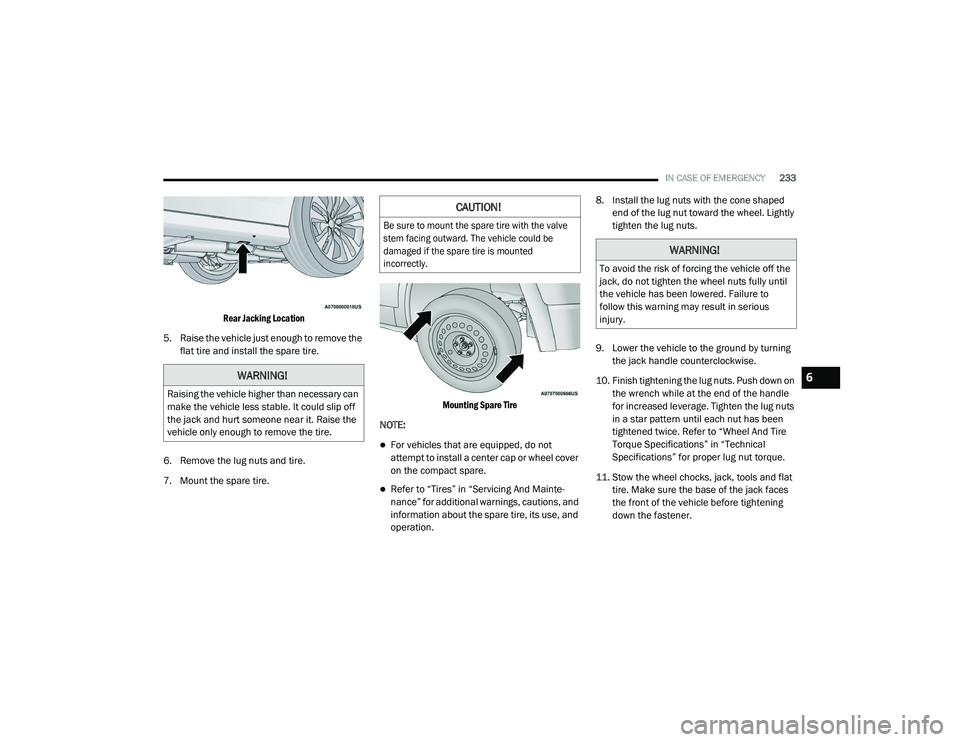
Rear Jacking Location
5. Raise the vehicle just enough to remove the flat tire and install the spare tire.
6. Remove the lug nuts and tire.
7. Mount the spare tire.
Mounting Spare Tire
NOTE:
For vehicles that are equipped, do not
attempt to install a center cap or wheel cover
on the compact spare.
Refer to “Tires” in “Servicing And Mainte -
nance” for additional warnings, cautions, and
information about the spare tire, its use, and
operation. 8. Install the lug nuts with the cone shaped
end of the lug nut toward the wheel. Lightly
tighten the lug nuts.
9. Lower the vehicle to the ground by turning the jack handle counterclockwise.
10. Finish tightening the lug nuts. Push down on the wrench while at the end of the handle
for increased leverage. Tighten the lug nuts
in a star pattern until each nut has been
tightened twice. Refer to “Wheel And Tire
Torque Specifications” in “Technical
Specifications” for proper lug nut torque.
11. Stow the wheel chocks, jack, tools and flat tire. Make sure the base of the jack faces
the front of the vehicle before tightening
down the fastener.
WARNING!
Raising the vehicle higher than necessary can
make the vehicle less stable. It could slip off
the jack and hurt someone near it. Raise the
vehicle only enough to remove the tire.
CAUTION!
Be sure to mount the spare tire with the valve
stem facing outward. The vehicle could be
damaged if the spare tire is mounted
incorrectly.
WARNING!
To avoid the risk of forcing the vehicle off the
jack, do not tighten the wheel nuts fully until
the vehicle has been lowered. Failure to
follow this warning may result in serious
injury.
6
20_LD_OM_EN_USC_t.book Page 233
Page 236 of 412
234IN CASE OF EMERGENCY
ROAD TIRE INSTALLATION
1. Mount the road tire on the axle.
2. Install the remaining lug nuts with the cone
shaped end of the nut toward the wheel.
Lightly tighten the lug nuts. 3. Lower the vehicle to the ground by turning
the jack handle counterclockwise.
4. Refer to “Wheel And Tire Torque Specifi -
cations” in “Technical Specifications” for
proper lug nut torque.
5. After 25 miles (40 km), check the lug nut torque with a torque wrench to ensure that
all lug nuts are properly seated against the
wheel.TIRE SERVICE KIT — IF EQUIPPED
Small punctures up to 1/4 inch (6 mm) in the
tire tread can be sealed with Tire Service Kit.
Foreign objects (e.g., screws or nails) should not
be removed from the tire. Tire Service Kit can be
used in outside temperatures down to
approximately -4°F (-20°C). This kit will provide a temporary tire seal,
allowing you to drive your vehicle up to
100 miles (160 km) with a maximum speed of
50 mph (80 km/h).
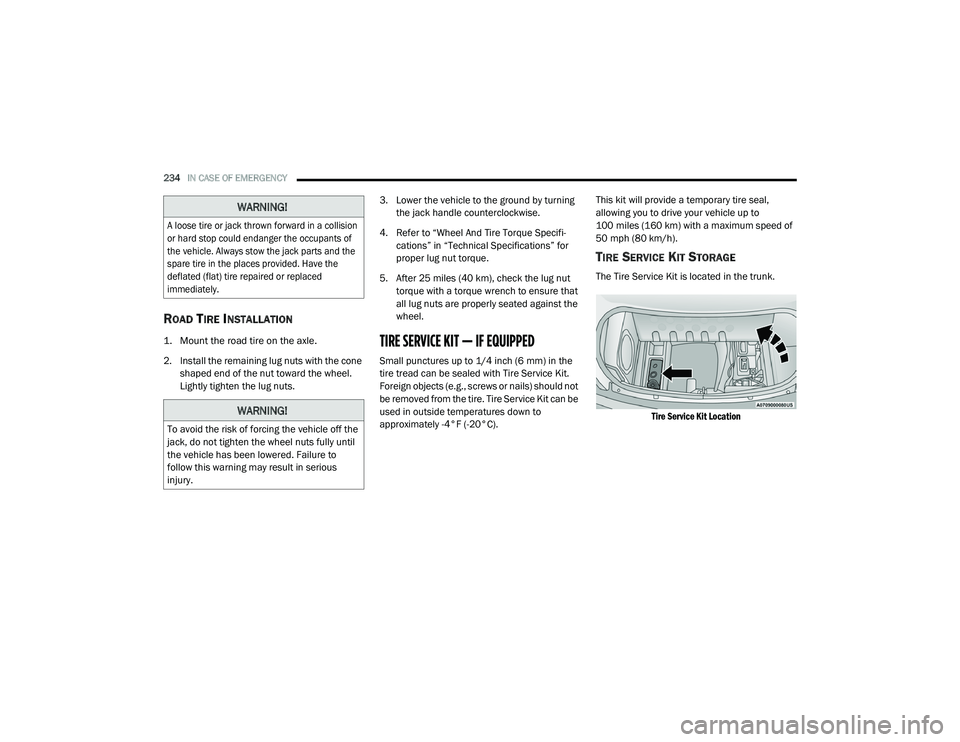
TIRE SERVICE KIT STORAGE
The Tire Service Kit is located in the trunk.
Tire Service Kit Location
WARNING!
A loose tire or jack thrown forward in a collision
or hard stop could endanger the occupants of
the vehicle. Always stow the jack parts and the
spare tire in the places provided. Have the
deflated (flat) tire repaired or replaced
immediately.
WARNING!
To avoid the risk of forcing the vehicle off the
jack, do not tighten the wheel nuts fully until
the vehicle has been lowered. Failure to
follow this warning may result in serious
injury.
20_LD_OM_EN_USC_t.book Page 234
Page 287 of 412
SERVICING AND MAINTENANCE285
AUTOMATIC TRANSMISSION
Selection Of Lubricant
It is important to use the proper transmission
fluid to ensure optimum transmission
performance and life. Use only the
manufacturer's specified transmission fluid.
Refer to “Fluids And Lubricants” in “Technical
Specifications” for fluid specifications. It is
important to maintain the transmission fluid at
the correct level using the recommended fluid. NOTE:
No chemical flushes should be used in any
transmission; only the approved lubricant
should be used.
Special Additives
The manufacturer strongly recommends
against using any special additives in the
transmission. Automatic Transmission Fluid
(ATF) is an engineered product and its
performance may be impaired by supplemental
additives. Therefore, do not add any fluid
additives to the transmission. Avoid using
transmission sealers as they may adversely
affect seals.
Fluid Level Check
The fluid level is preset at the factory and does
not require adjustment under normal operating
conditions. Routine fluid level checks are not
required; therefore the transmission has no
dipstick. An authorized dealer can check your
transmission fluid level using special service
tools. If you notice fluid leakage or transmission
malfunction, visit an authorized dealer
immediately to have the transmission fluid level
checked. Operating the vehicle with an
improper fluid level can cause severe
transmission damage.
Overfilling the brake fluid reservoir can
result in spilling brake fluid on hot engine
parts, causing the brake fluid to catch fire.
Brake fluid can also damage painted and
vinyl surfaces, care should be taken to
avoid its contact with these surfaces.
Do not allow petroleum based fluid to
contaminate the brake fluid. Brake seal
components could be damaged, causing
partial or complete brake failure. This could
result in a collision.
WARNING!
(Continued)
CAUTION!
Using a transmission fluid other than the
manufacturer’s recommended fluid may
cause deterioration in transmission shift
quality and/or torque converter shudder.
Refer to “Fluids And Lubricants” in “Technical
Specifications” for fluid specifications.
CAUTION!
Do not use chemical flushes in your
transmission as the chemicals can damage
your transmission components. Such damage
is not covered by the New Vehicle Limited
Warranty.
7
20_LD_OM_EN_USC_t.book Page 285
Page 310 of 412
308
TECHNICAL SPECIFICATIONS
IDENTIFICATION DATA
VEHICLE IDENTIFICATION NUMBER
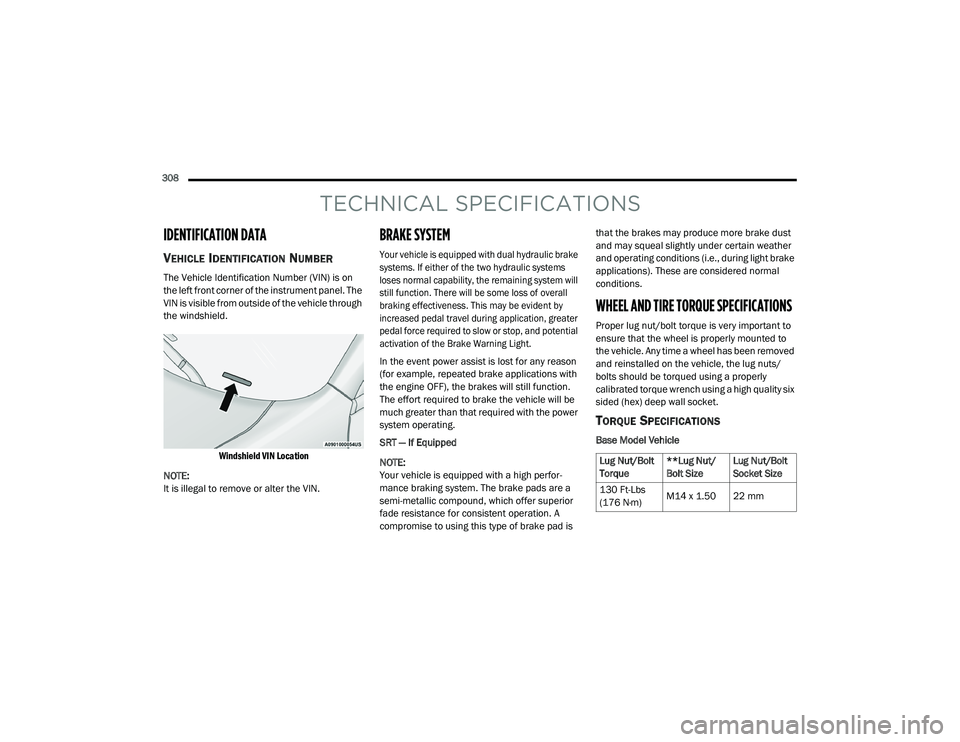
The Vehicle Identification Number (VIN) is on
the left front corner of the instrument panel. The
VIN is visible from outside of the vehicle through
the windshield.
Windshield VIN Location
NOTE:
It is illegal to remove or alter the VIN.
BRAKE SYSTEM
Your vehicle is equipped with dual hydraulic brake
systems. If either of the two hydraulic systems
loses normal capability, the remaining system will
still function. There will be some loss of overall
braking effectiveness. This may be evident by
increased pedal travel during application, greater
pedal force required to slow or stop, and potential
activation of the Brake Warning Light.
In the event power assist is lost for any reason
(for example, repeated brake applications with
the engine OFF), the brakes will still function.
The effort required to brake the vehicle will be
much greater than that required with the power
system operating.
SRT — If Equipped
NOTE:
Your vehicle is equipped with a high perfor -
mance braking system. The brake pads are a
semi-metallic compound, which offer superior
fade resistance for consistent operation. A
compromise to using this type of brake pad is that the brakes may produce more brake dust
and may squeal slightly under certain weather
and operating conditions (i.e., during light brake
applications). These are considered normal
conditions.
WHEEL AND TIRE TORQUE SPECIFICATIONS
Proper lug nut/bolt torque is very important to
ensure that the wheel is properly mounted to
the vehicle. Any time a wheel has been removed
and reinstalled on the vehicle, the lug nuts/
bolts should be torqued using a properly
calibrated torque wrench using a high quality six
sided (hex) deep wall socket.
TORQUE SPECIFICATIONS
Base Model Vehicle
Lug Nut/Bolt
Torque
**Lug Nut/
Bolt SizeLug Nut/Bolt
Socket Size
130 Ft-Lbs
(176 N·m) M14 x 1.50 22 mm
20_LD_OM_EN_USC_t.book Page 308
Page 311 of 412
TECHNICAL SPECIFICATIONS309
SRT Model Vehicle
**Use only authorized dealer recommended lug
nuts/bolts and clean or remove any dirt or oil before
tightening.
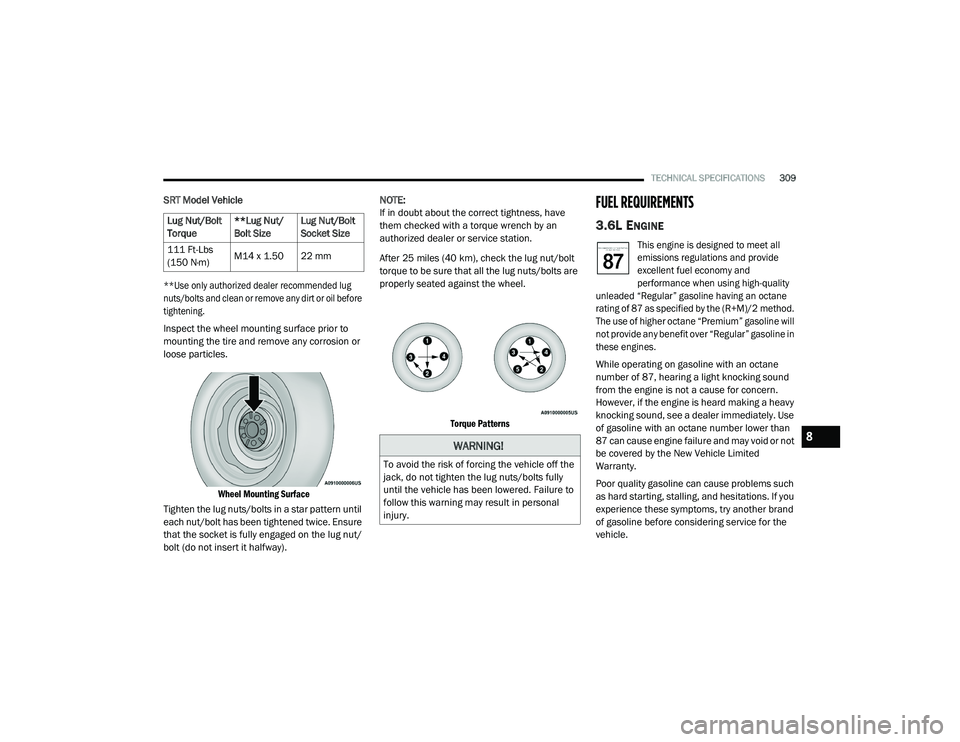
Inspect the wheel mounting surface prior to
mounting the tire and remove any corrosion or
loose particles.
Wheel Mounting Surface
Tighten the lug nuts/bolts in a star pattern until
each nut/bolt has been tightened twice. Ensure
that the socket is fully engaged on the lug nut/
bolt (do not insert it halfway). NOTE:
If in doubt about the correct tightness, have
them checked with a torque wrench by an
authorized dealer or service station.
After 25 miles (40 km), check the lug nut/bolt
torque to be sure that all the lug nuts/bolts are
properly seated against the wheel.
Torque Patterns
FUEL REQUIREMENTS
3.6L ENGINE
This engine is designed to meet all
emissions regulations and provide
excellent fuel economy and
performance when using high-quality
unleaded “Regular” gasoline having an octane
rating of 87 as specified by the (R+M)/2 method.
The use of higher octane “Premium” gasoline will
not provide any benefit over “Regular” gasoline in
these engines.
While operating on gasoline with an octane
number of 87, hearing a light knocking sound
from the engine is not a cause for concern.
However, if the engine is heard making a heavy
knocking sound, see a dealer immediately. Use
of gasoline with an octane number lower than
87 can cause engine failure and may void or not
be covered by the New Vehicle Limited
Warranty.
Poor quality gasoline can cause problems such
as hard starting, stalling, and hesitations. If you
experience these symptoms, try another brand
of gasoline before considering service for the
vehicle.
Lug Nut/Bolt
Torque
**Lug Nut/
Bolt SizeLug Nut/Bolt
Socket Size
111 Ft-Lbs
(150 N·m) M14 x 1.50 22 mm
WARNING!
To avoid the risk of forcing the vehicle off the
jack, do not tighten the lug nuts/bolts fully
until the vehicle has been lowered. Failure to
follow this warning may result in personal
injury.
8
20_LD_OM_EN_USC_t.book Page 309
Page 342 of 412
340MULTIMEDIA
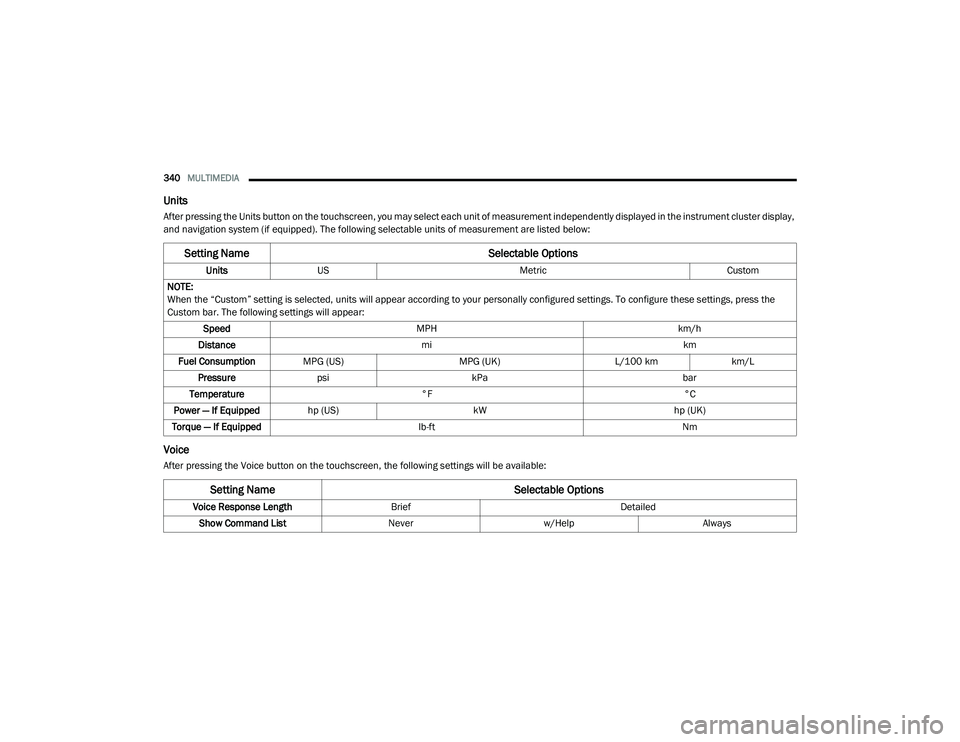
Units
After pressing the Units button on the touchscreen, you may select each unit of measurement independently displayed in the instrument cluster display,
and navigation system (if equipped). The following selectable units of measurement are listed below:
Voice
After pressing the Voice button on the touchscreen, the following settings will be available:
Setting Name Selectable Options
UnitsUS Metric Custom
NOTE:
When the “Custom” setting is selected, units will appear according to your personally configured settings. To configure these settings, press the
Custom bar. The following settings will appear: Speed MPH km/h
Distance mi km
Fuel Consumption MPG (US) MPG (UK)L/100 kmkm/L
Pressure psi kPa bar
Temperature °F °C
Power — If Equipped hp (US) kW hp (UK)
Torque — If Equipped lb-ft Nm
Setting Name Selectable Options
Voice Response LengthBrief Detailed
Show Command List Neverw/Help Always
20_LD_OM_EN_USC_t.book Page 340
Page 405 of 412
403
Time Delay Headlight
..................................................... 47Tire And Loading Information Placard........... 290Tire Markings................................................. 286Tire Safety Information.................................. 286Tire Service Kit........................... 234, 235, 237Tires..........................157, 293, 298, 299, 303Aging (Life Of Tires)................................... 296Air Pressure............................................... 293Chains............................................. 301, 302Changing................................ 229, 234, 286Compact Spare......................................... 299Flat Changing............................................ 234General Information............... 293, 298, 299High Speed................................................ 295Inflation Pressure...................................... 294Jacking............................................ 230, 286Life Of Tires............................................... 296Load Capacity.................................. 290, 291Pressure Monitoring System (TPMS).. 99, 120Quality Grading.......................................... 303Radial........................................................ 295Replacement................................... 234, 297
Rotation........................................... 302, 303Safety.............................................. 286, 293Sizes......................................................... 287Snow Tires................................................ 298Spare Tires....................230, 298, 299, 300Spinning................................................... 296Trailer Towing........................................... 207Tread Wear Indicators.............................. 296Wheel Mounting....................................... 234Wheel Nut Torque..................................... 308To Open Hood.................................................. 68Tongue Weight/Trailer Weight...................... 206Towing.......................................................... 203Behind A Motorhome................................ 210Disabled Vehicle....................................... 248Guide........................................................ 205Recreational............................................. 210Weight...................................................... 205Towing Behind A Motorhome........................ 210Traction......................................................... 210Traction Control............................................ 113
Trailer Towing................................................ 203Cooling System Tips.................................. 209Hitches..................................................... 205Minimum Requirements........................... 206Tips........................................................... 209Trailer And Tongue Weight........................ 206Wiring....................................................... 208Trailer Towing Guide..................................... 205Trailer Weight................................................ 205Transfer CaseFluid........................................315, 317, 318Transmission................................................. 167Automatic........................................ 167, 285Fluid.............................. 315, 317, 318, 320Maintenance............................................ 285Shifting..................................................... 165Transporting Pets.......................................... 155Tread Wear Indicators................................... 296Trunk Lid (Deck Lid).........................................68Trunk Release Remote Control........................68Turn Signals........................................... 48, 103
11
20_LD_OM_EN_USC_t.book Page 403